Update [0.3.2.0] Colour Presets, Spinning Models and Competition Winners!

It's been a pretty eventful week! Vecter was included in the Opera GX Browser, we have a winner for our ColourCode competition, I've finished uploading the whole OST to YouTube it's been a good time! Let's dive in.
Note: If you're only interested in the game changes, skip to the end of the article for the change-log section.
Opera GX Featuring

It's been a pretty eventful week since the last update! Vecter got featured in the Opera GX Corner under their Free Games section among GTA 5, Quake and Cities Skylines. It feels like being an impersonator among titans but I'm really grateful for this inclusion. This had the awesome effect of taking vecter from 100-ish downloads per day to thousands! The peak so far has been the 22nd of may with 7580 downloads in just one day!
I very much thank Opera GX and their inclusion of Vecter in their Web Browser for gamers, very cool! But warn-a-brother next time! I had to panic change the game to reduce the load on the server. The back-end was holding up fine but the hosting price started going parabolic and I needed to do something before it hit its £100/month hard limit. If it hit that happened, all online functionality would have immediately stopped to prevent making me poor.
Poliwagpi4554 is our Colour-Code competition winner!
For those of you who don't know, this week we've been holding a competition on Vecter's Discord server over who has the best colour scheme, and the winner is Poliwagpi4554!

Congratulations again to them for winning! The code is: 420B4878009F043290090010003B80001545C00100002B26003368007065007569006600736800695F00000F0E003731A805B5023134510E5108092F0E514351490E17510E00F7FE232323 but don't bother remembering it and I'll explain why in a minute.
For winning, Poliwagpi4554 has received the following prizes:
- The last Video Clip for the Vector OST on YouTube is made using their colour-code and full credit goes to them for the visual
- They receive a shout-out in all of the social media posts related to this release to highlight their contribution to the game
- Their colour-code is added as one of the presets in the game with full credit to them
- They can ask me one question, whatever they desire, and I will answer truthfully.
The question they went with was the following: What inspired you to make Vecter and how do you actually feel about it's popularity now?
And, as promised, I answered truthfully which hurt a bit due to past events but a promise is a promise. The answer is a big wall of text so I won't include the whole thing here. If you would like to see it, join the discord server and unlock it following the instructions in the #welcome channel. After that Go to this link here or scroll a little bit up in the Announcements channel
Congratulations again to Poliwagpi4554 for winning! Follow them on twitter or instagram!
Vecter Original Soundtrack is now live on YouTube!
[previewyoutube][/previewyoutube]
Like the sound track? No! Love the soundtrack? Well why not give it a listen outside the game as well! Here it is now fully uploaded to YouTube with nice visuals to go along with it! Link here to the YouTube Playlist containing all of it.
Everything new about colours
And finally! Getting into the actual changes, the colour picker menu has received some serious modifications. Three quality of life improvements that should make your life a LOT easier:
1. Object previews! No longer guessing what something looks like if it's not on screen, the menu will show you a preview of almost each object so you know exactly what you're modifying and what it looks like
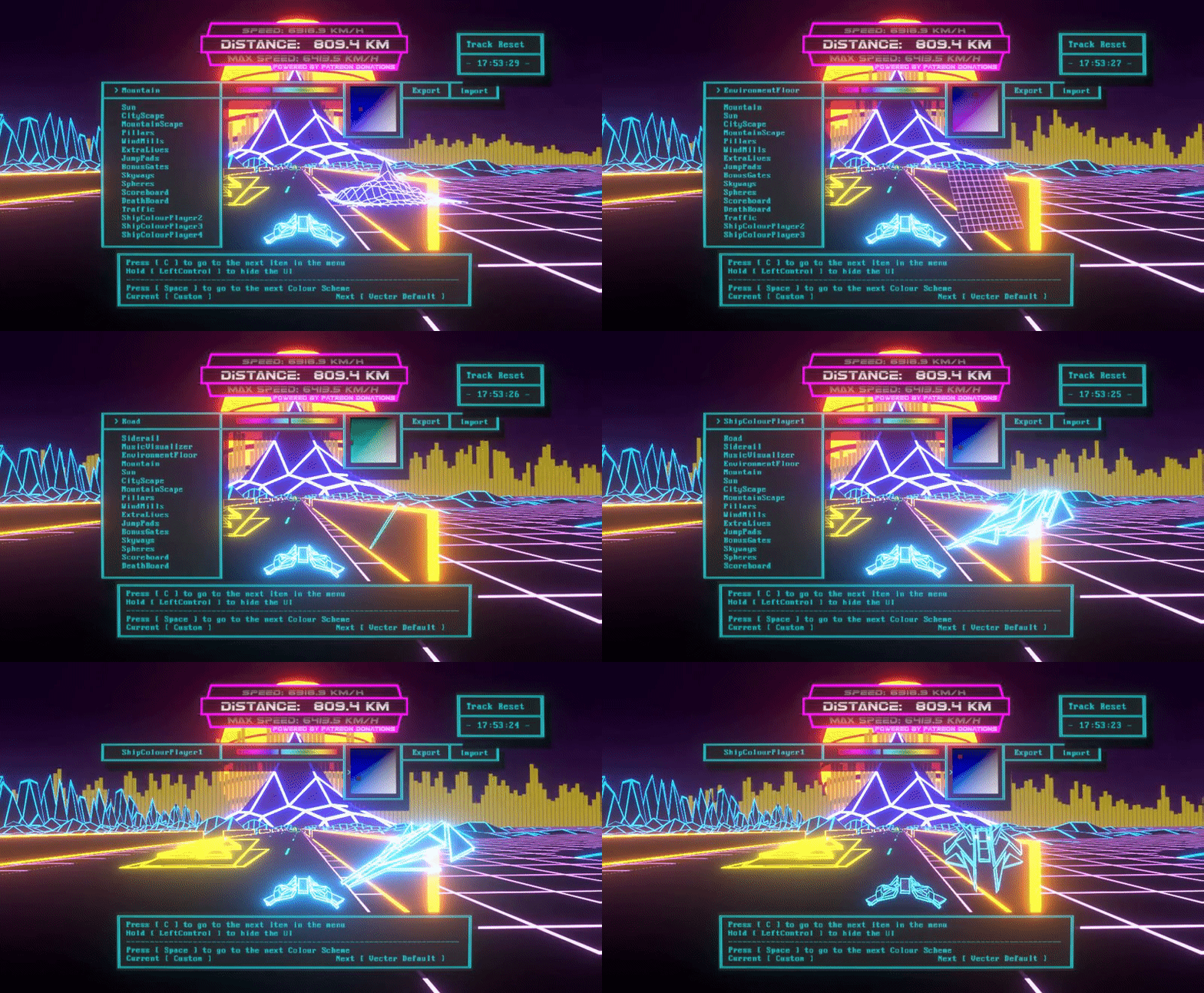
2. You can now select preset colour schemes in game. Just press the shoot button while in the colour menu to cycle through them. Currently there are only two: The Vecter Defaul scheme and Poliwagpi4554's winning scheme. More will be added over time but for now I wanted to keep options simple and limited.
Changing to a preset scheme does not affect your custom one and you can cycle back to it at any time. You cannot modify the presets, but you can export a preset, then import it over your custom scheme and modify that.

3. Holding down the Boost button will hid the UI so you can see what your changes look like behind the menus as well.

Change Log
What's new:
- Added preset colours in the colour-picker. You cannot edit the preset colours, but you can still create a custom one by selecting the "Custom" option. You can also start from a preset if you like by selecting the preset, pressing the export button and then immediately pressing the import button. This will overwrite your custom scheme with that preset one.
- Colour picker now also has a preview object for almost each item in the list that you are modifying, with the exception of the scoreboard which is already on the screen when you are editing.
- There is now a button in the colour-picker menu that, if you hold it pressed, it will hide the menu so you can see exactly what your modifications look like
- Added three more seeds that have a pre-set youtube video. Good luck finding them ;)
- Game now picks up new songs added to the music folder automatically, no need to restart the game.
- The log has been changed to write out your GPU, CPU, RAM and Windows version when the game starts.
- There is now a button in the pause menu with a double function:
- If no YouTube video is playing, it will say "Play YouTube" and will show you a box with instructions on how to load a YouTube video
- If a YouTube video is playing, it will say Stop YouTube and if you press it it will immediately stop playing that video and return back to the normal soundtrack. The box at the bottom in this scenario will tell you the URL of the YouTube video that you are playing.
What's changed:
- The bonus points text colour is now linked to the scoreboard frame colour
- For new players only: Top Dog and Hardcore are now locked and you unlock them as a reward for getting over 50,000 points in Training mode. Full disclosure, this is a measure implemented to drive down server costs by not uploading and downloading shadow playbacks for new players that are only learning to play the game for the first time and die often in the first few seconds of a run.
- Options menu can now be accessed from the pause menu.
- The ship will always be in 3rd person in the main menu now, but once you start a run it will put you in your last selected camera mode
- All the settings in the options menu related to music now affect youtube videos as well (pause menu music, restart song, stop song on ship crash)
- YouTube video now scales with FOV to make for a better viewing experience.
- The colour picker menu now says "Enter" instead of "Return" for the enter key
What's Fixed
- The shadow uploader has been completely fixed and is now working exactly as intended.
- The 5 million upgrade now unlocks as expected
- Game no longer freezes for a few seconds when you die
- Camera FOV returns to normal when the game is paused, in order to make the pause menu a reasonable size.
- CRT option in options menu works again as intended
- YouTube video now loops again when it finishes playing
- Player 1 achievement works again.
- Fixed a bug where the UI would display outside of the ship's cockpit in first person mode
- Fixed a bug where the road would turn completely black while jumping in the city environment
- Normal sound track will not play for a split second between runs if you're listening to a YouTube video
- "Pause menu music: Off" no longer makes the music cycle endlessly
- When crashing, the score board should never disappear anymore
- Music volume adjustment bars are now visible again