Solution for unable to open the game or low frame rate
When checking the comment areas of various platforms, we found that some players have problems with the game not opening, black screen, or low frame rate of mid-to-high-end graphics cards.
We are continuing to track the problem and will continue to work hard to optimize it. At present, it has been found that the low frame rate may be caused by the wrong use of the graphics card.
[h3]Special Notice:[/h3]
Based on our testing, third-party input methods may potentially conflict with the game. Before playing the game, please switch the input method application to the default input method provided by your system. We are working to resolve the conflict and will notify everyone as soon as we have any updates.
[h3]Special Notice:[/h3]
If the game is installed on HDD, it may be slow to load when you open the game for the first time due to the HHD read speed problem, so you need to wait patiently. We are already trying to optimize, thank you for your understanding.
Players who encounter problems can try the following methods. If the problem still cannot be solved, you are welcome to give feedback on our Discord server or in the Steam community.
[h3]Changing graphics card settings to use your dedicated GPU on a Windows computer[/h3]
The following is a good guide for how to get this done:
[h3]NVIDIA Graphics Cards[/h3]
1. For NVIDIA cards, click on Adjust Image Settings with Preview, select Use my preference emphasizing: Performance and click Apply.

2. Click on Manage 3D Settings and open the drop down menu for Global Settings. Select the High-performance NVIDIA processor as your preferred graphics processor and click Apply.
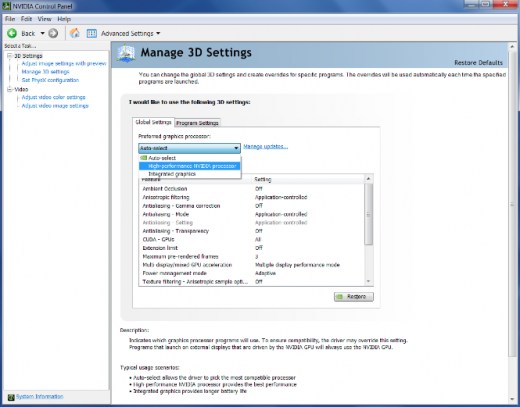
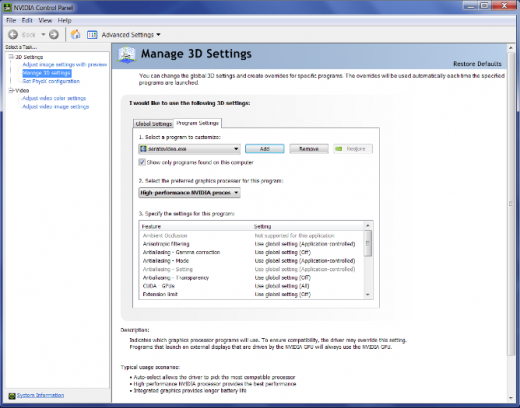
3. Open the drop down menu for Program Settings and click Add. Search for the Serato Video application
(The location for earlier versions is C:/Program Files(x86) / Common Files / Serato / Serato Video / Serato Video)
(The location for newer versions is C:/Program Files(x86) / Common Files / Serato / Serato DJ / Serato Video)
And double click to select it. Open the drop down menu and select the High-performance NVIDIA processor as the preferred graphics processor for this program and click Apply. Do the same for your host Serato software also - Scratch Live, Serato DJ or ITCH.)
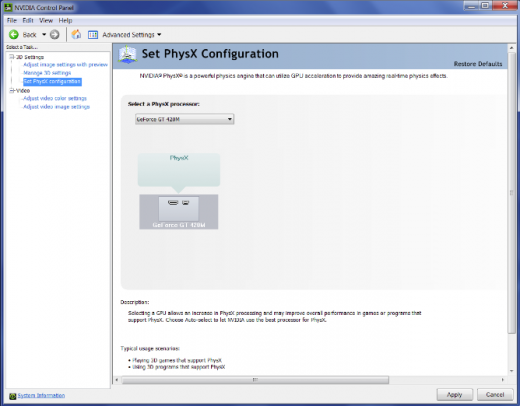
4. Click on Set PhysX configuration, open the drop down menu and select your NVIDIA card (the name is dependent on your exact card) as the PhysX processor. Click Apply and you are done.
Re-start your computer and open your Serato software and Serato Video to test. If you can't open Serato Video and still get the message that you are using an Intel graphics card, you may need to go towww.nvidia.com and download the latest drivers.
[h3]ATI/AMD Radeon Cards[/h3]
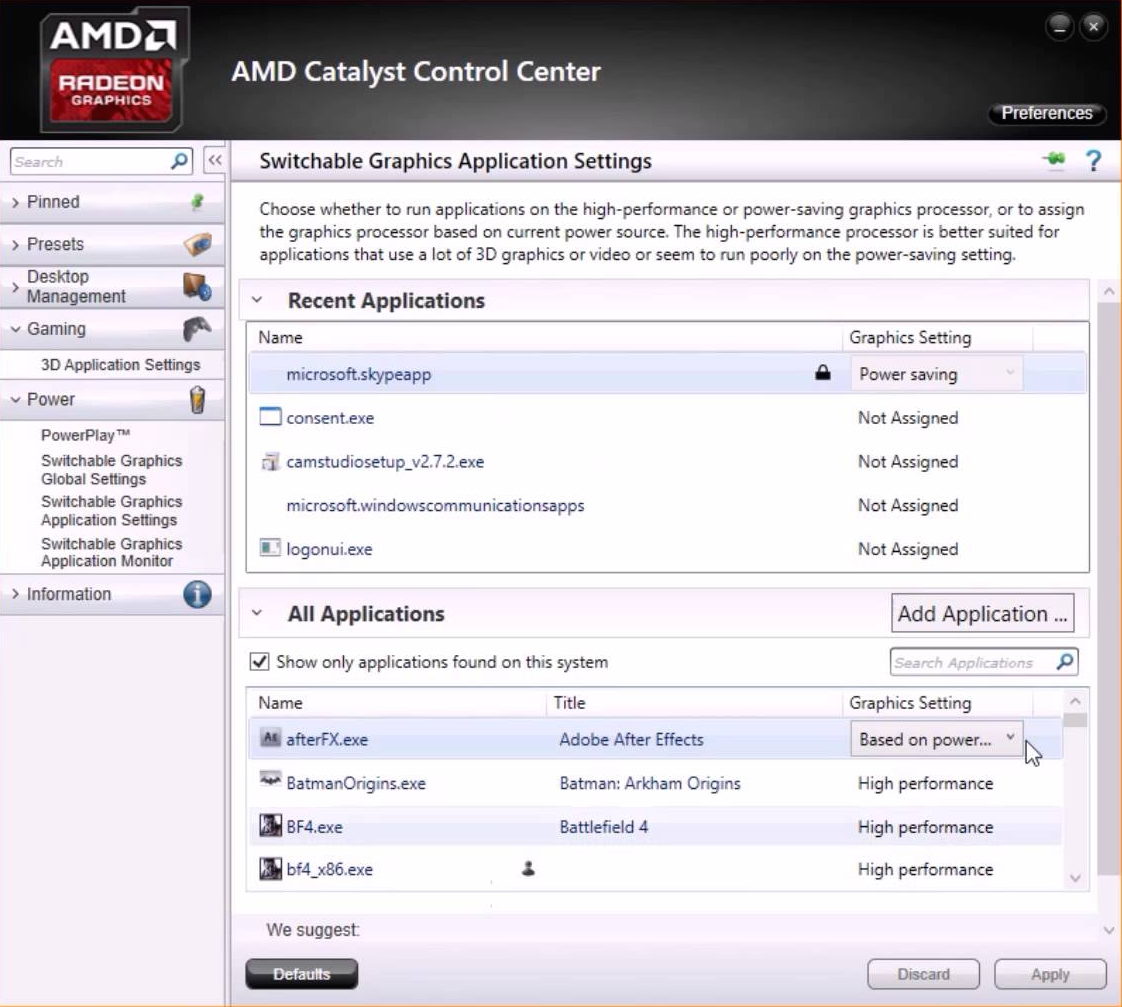
NOTE: There is a huge variation in versions of the ATI/AMD Radeon Catalyst Control Center for adjusting the settings for these cards so the following should be seen more as indicative than actual. Even if your Control Center looks different to these images, the principles are the same and you should be able to find similar options to those described here.
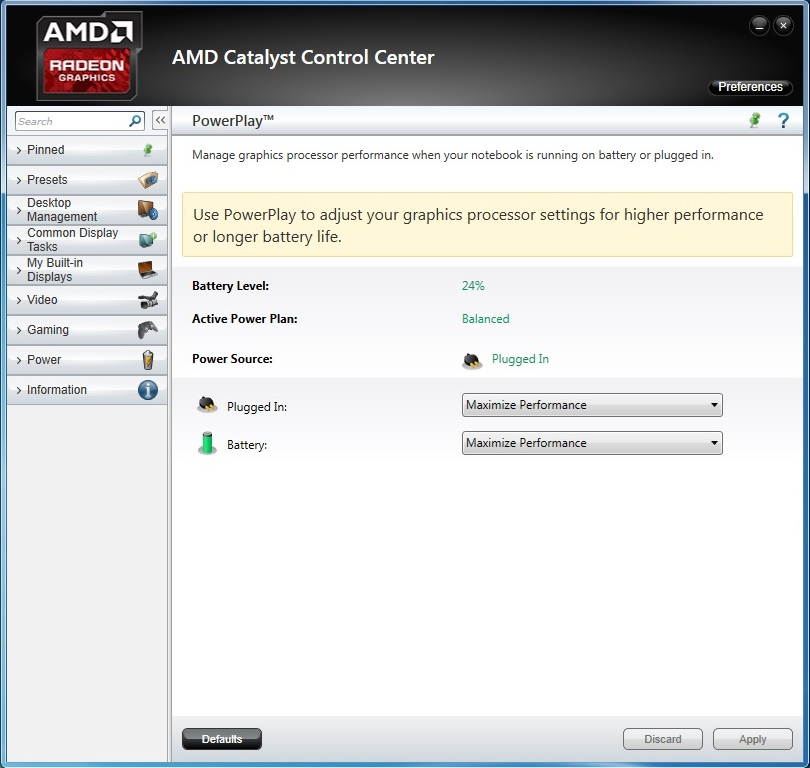
1. For ATI/AMD Radeon cards, go to Graphics > PowerPlay - Set Plugged In and Battery to Maximum Performance. Click Apply.
2. If applicable to your graphics card, go to Graphics > 3D and move the slider across to Performance so it is set for Optimal Performance. Click Apply. NOTE: This function might not be available on all ATI models.
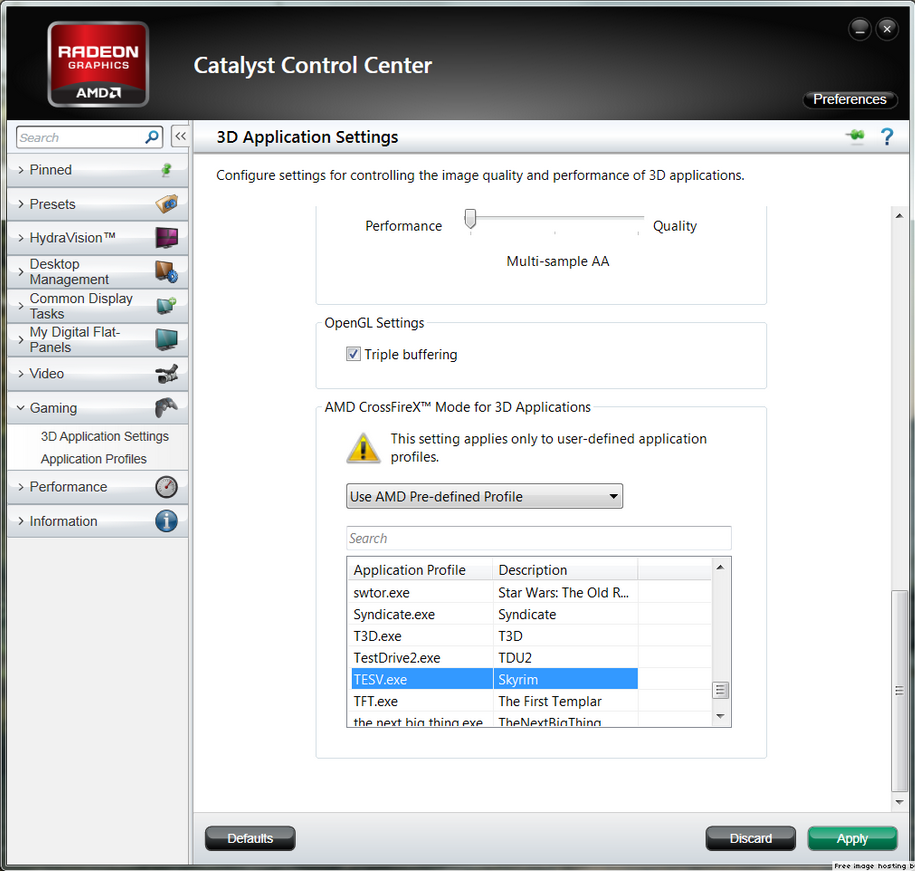
3. If your Catalyst Control Center has the Switchable Graphics tab go there and browse to locate seratovideo.exe and set it for High Performance. Click Apply. Do the same for your host Serato software also - Scratch Live, Serato DJ or ITCH.
(The Serato Video location for earlier versions is C:/Program Files(x86) / Common Files / Serato / Serato Video / Serato Video.)
(The Serato Video location for newer versions is C:/Program Files(x86) / Common Files / Serato / Serato DJ / Serato Video.)
Thanks again to all players who played "KAKU: Ancient Seal", and wish you all a pleasant gaming experience. We will continue to collect feedback and comments from various platforms, and reply to your questions as soon as possible.
The above content is from:
https://support.serato.com/hc/en-us/articles/202305784-Changing-graphics-card-settings-to-use-your-dedicated-GPU-on-a-Windows-computer
https://store.steampowered.com/app/1179580/KAKU_Ancient_Seal/
[h3]Follow us on social media to stay up to date with all the announcements![/h3]
We are continuing to track the problem and will continue to work hard to optimize it. At present, it has been found that the low frame rate may be caused by the wrong use of the graphics card.
[h3]Special Notice:[/h3]
Based on our testing, third-party input methods may potentially conflict with the game. Before playing the game, please switch the input method application to the default input method provided by your system. We are working to resolve the conflict and will notify everyone as soon as we have any updates.
[h3]Special Notice:[/h3]
If the game is installed on HDD, it may be slow to load when you open the game for the first time due to the HHD read speed problem, so you need to wait patiently. We are already trying to optimize, thank you for your understanding.
Players who encounter problems can try the following methods. If the problem still cannot be solved, you are welcome to give feedback on our Discord server or in the Steam community.
[h3]Changing graphics card settings to use your dedicated GPU on a Windows computer[/h3]
The following is a good guide for how to get this done:
[h3]NVIDIA Graphics Cards[/h3]
1. For NVIDIA cards, click on Adjust Image Settings with Preview, select Use my preference emphasizing: Performance and click Apply.
2. Click on Manage 3D Settings and open the drop down menu for Global Settings. Select the High-performance NVIDIA processor as your preferred graphics processor and click Apply.
3. Open the drop down menu for Program Settings and click Add. Search for the Serato Video application
(The location for earlier versions is C:/Program Files(x86) / Common Files / Serato / Serato Video / Serato Video)
(The location for newer versions is C:/Program Files(x86) / Common Files / Serato / Serato DJ / Serato Video)
And double click to select it. Open the drop down menu and select the High-performance NVIDIA processor as the preferred graphics processor for this program and click Apply. Do the same for your host Serato software also - Scratch Live, Serato DJ or ITCH.)
4. Click on Set PhysX configuration, open the drop down menu and select your NVIDIA card (the name is dependent on your exact card) as the PhysX processor. Click Apply and you are done.
Re-start your computer and open your Serato software and Serato Video to test. If you can't open Serato Video and still get the message that you are using an Intel graphics card, you may need to go towww.nvidia.com and download the latest drivers.
[h3]ATI/AMD Radeon Cards[/h3]
NOTE: There is a huge variation in versions of the ATI/AMD Radeon Catalyst Control Center for adjusting the settings for these cards so the following should be seen more as indicative than actual. Even if your Control Center looks different to these images, the principles are the same and you should be able to find similar options to those described here.
1. For ATI/AMD Radeon cards, go to Graphics > PowerPlay - Set Plugged In and Battery to Maximum Performance. Click Apply.
2. If applicable to your graphics card, go to Graphics > 3D and move the slider across to Performance so it is set for Optimal Performance. Click Apply. NOTE: This function might not be available on all ATI models.
3. If your Catalyst Control Center has the Switchable Graphics tab go there and browse to locate seratovideo.exe and set it for High Performance. Click Apply. Do the same for your host Serato software also - Scratch Live, Serato DJ or ITCH.
(The Serato Video location for earlier versions is C:/Program Files(x86) / Common Files / Serato / Serato Video / Serato Video.)
(The Serato Video location for newer versions is C:/Program Files(x86) / Common Files / Serato / Serato DJ / Serato Video.)
Thanks again to all players who played "KAKU: Ancient Seal", and wish you all a pleasant gaming experience. We will continue to collect feedback and comments from various platforms, and reply to your questions as soon as possible.
The above content is from:
https://support.serato.com/hc/en-us/articles/202305784-Changing-graphics-card-settings-to-use-your-dedicated-GPU-on-a-Windows-computer
https://store.steampowered.com/app/1179580/KAKU_Ancient_Seal/
[h3]Follow us on social media to stay up to date with all the announcements![/h3]


