Twitch Drops Are Back With Brand New Items To Earn!
Hey Valley Villagers!
With our fifth major content update quickly approaching, what better way to prepare and give your Valley an upgrade than with Twitch Drops? While we'll have more to share about the fifth content update in the coming days, we’re excited to announce that our second Twitch Drops campaign kicks off this week on Friday, May 19, complete with four brand new items!
With this round of Twitch Drops, everyone will have the chance to expand their in-game collection of RGB-inspired items with the Gamer Desk, Gamer Headphones, Gamer Backpack, and Gamer Desktop. Check out the items below and get ready to make your Valley glow:

This time, we’ve changed the Drops redemption experience a little bit. For this campaign, these new items will be offered as part of two bundles, each containing two items that will be unlocked together after achieving the redemption requirement. In other words, rather than unlocking each item individually, the bundles will be available one after the other for two days at a time. Take a look below to see when you’ll be able to earn each set of items:
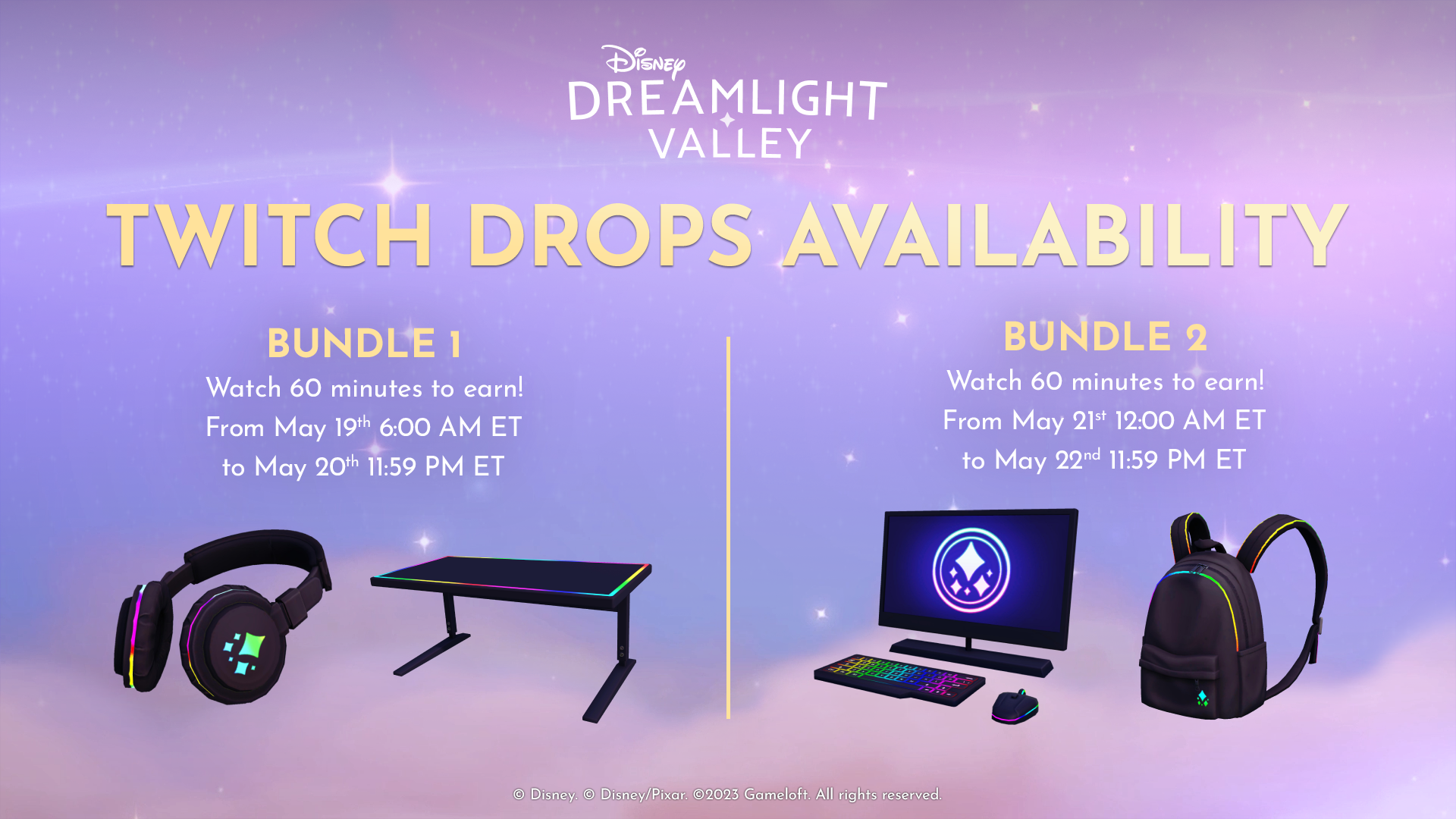
Simply tune into one of our pre-selected content creators while they stream Disney Dreamlight Valley on Twitch during each of those two periods to earn the relevant bundle.
We’ve also heard your feedback and are excited to introduce some new content creator faces to the Twitch Drops roster – check them out below. We hope you’ll bring as much joy and energy to their streams as we‘ve felt watching them!
Want to get involved in future Twitch Drops? We’re always looking for new content creators to collaborate with, so don’t hesitate to tag us in your wonderful content on social media for consideration and to catch our attention!
[h2]STEPS TO CLAIM[/h2]
1. Via the Twitch Drops tab on the Disney Dreamlight Valley website (Found under the Community Tab), Log in with your Twitch Account.
2. On the following page, connect your Disney Dreamlight Valley account. You will be required to sign in by choosing the platform associated with your account.
3. If during the process you have linked wrong accounts, you will be able to unlink your accounts and log in with a different account.
4. Watch a participating stream (see list below!) and start accumulating viewing minutes.
5. Claim your in-game rewards on Twitch! Go to your Twitch Drops inventory and claim your rewards before they expire.
6. Claim your in-game rewards via the in-game Player Mailbox. Launch Disney Dreamlight Valley and visit your Mailbox (beside your home) to redeem your rewards.
[h2]FREQUENTLY ASKED QUESTIONS[/h2]
Q: How do I claim my Twitch Drops items?
First, you’ll need to connect your Twitch Account and Disney Dreamlight Valley game account. To do so, visit our landing page here: http://disneydreamlightvalley.com/twitch-drops.
Afterwards, watch a participating content creator while they stream Disney Dreamlight Valley on Twitch. You’ll be notified once you’ve earned a reward, which can be found in your Twitch Drops inventory. Click the CLAIM button beside that item in your Twitch inventory.
Q: How long do I have to claim the Twitch Drops items?
You will have from May 19th to May 22nd to earn all four items that are a part of this Twitch Drop Campaign. After you have earned each, these items will be available for claim via your Twitch Drops inventory.
Q: What content creators can I watch that are eligible for Twitch Drops?
Q: When can I earn each of the new Twitch Drop bundles?
Each of the Twitch Drop bundles will be available to earn for a total of 2 days each, with the overall Twitch Drops Campaign running for 4 full days.
The availability period of each bundle is as follows:
Bundle 1 (Gamer Desk + Gamer Headphones)
Friday, May 19 @ 6:00 AM ET to Saturday, May 20 @ 11:59 PM ET
Bundle 2 (Gamer Backpack + Gamer Desktop)
Sunday, May 21 @ 12:00 AM ET to Monday, May 22 @ 11:59 PM ET
Q: How long do I have to watch a content creator to claim a Twitch Drop?
Each bundle of two items can be claimed by watching an eligible streamer for 60 minutes during that bundle’s availability period. A total time watched of 120 minutes will be needed to earn both bundles.
Q: Do I have to watch the same content creator for each Twitch Drop?
No! You can watch any number of eligible content creators. Any time spent viewing multiple streams will accumulate collectively towards items.
Q: Do I need a Twitch account to participate? How can I create a Twitch Account?
Yes. You can create an account for free here: https://help.twitch.tv/s/article/creating-an-account-with-twitch
Q: Where will I find my items in-game?
Once you have claimed your items in your Twitch Inventory, you can claim your items in-game via the Mailbox beside your player home.
Q: I did not receive my item(s) in-game. What should I do?
If you did not receive your items, make sure to navigate to your Twitch Drops inventory to make sure you have clicked ‘CLAIM’ beside your reward. If you have still not received your items via your player mailbox, please contact our Customer Care team via https://gameloft.helpshift.com/hc/en/66-disney-dreamlight-valley/contact-us/
With our fifth major content update quickly approaching, what better way to prepare and give your Valley an upgrade than with Twitch Drops? While we'll have more to share about the fifth content update in the coming days, we’re excited to announce that our second Twitch Drops campaign kicks off this week on Friday, May 19, complete with four brand new items!
With this round of Twitch Drops, everyone will have the chance to expand their in-game collection of RGB-inspired items with the Gamer Desk, Gamer Headphones, Gamer Backpack, and Gamer Desktop. Check out the items below and get ready to make your Valley glow:
This time, we’ve changed the Drops redemption experience a little bit. For this campaign, these new items will be offered as part of two bundles, each containing two items that will be unlocked together after achieving the redemption requirement. In other words, rather than unlocking each item individually, the bundles will be available one after the other for two days at a time. Take a look below to see when you’ll be able to earn each set of items:
Simply tune into one of our pre-selected content creators while they stream Disney Dreamlight Valley on Twitch during each of those two periods to earn the relevant bundle.
We’ve also heard your feedback and are excited to introduce some new content creator faces to the Twitch Drops roster – check them out below. We hope you’ll bring as much joy and energy to their streams as we‘ve felt watching them!
Want to get involved in future Twitch Drops? We’re always looking for new content creators to collaborate with, so don’t hesitate to tag us in your wonderful content on social media for consideration and to catch our attention!
[h2]STEPS TO CLAIM[/h2]
1. Via the Twitch Drops tab on the Disney Dreamlight Valley website (Found under the Community Tab), Log in with your Twitch Account.
2. On the following page, connect your Disney Dreamlight Valley account. You will be required to sign in by choosing the platform associated with your account.
3. If during the process you have linked wrong accounts, you will be able to unlink your accounts and log in with a different account.
4. Watch a participating stream (see list below!) and start accumulating viewing minutes.
5. Claim your in-game rewards on Twitch! Go to your Twitch Drops inventory and claim your rewards before they expire.
6. Claim your in-game rewards via the in-game Player Mailbox. Launch Disney Dreamlight Valley and visit your Mailbox (beside your home) to redeem your rewards.
[h2]FREQUENTLY ASKED QUESTIONS[/h2]
Q: How do I claim my Twitch Drops items?
First, you’ll need to connect your Twitch Account and Disney Dreamlight Valley game account. To do so, visit our landing page here: http://disneydreamlightvalley.com/twitch-drops.
Afterwards, watch a participating content creator while they stream Disney Dreamlight Valley on Twitch. You’ll be notified once you’ve earned a reward, which can be found in your Twitch Drops inventory. Click the CLAIM button beside that item in your Twitch inventory.
Q: How long do I have to claim the Twitch Drops items?
You will have from May 19th to May 22nd to earn all four items that are a part of this Twitch Drop Campaign. After you have earned each, these items will be available for claim via your Twitch Drops inventory.
Q: What content creators can I watch that are eligible for Twitch Drops?
- Dani Dawnstar - https://www.twitch.tv/danidawnstar
- Dr Gluon - https://www.twitch.tv/drgluon
- Eeowna - https://www.twitch.tv/eeowna
- Ezeekat - https://www.twitch.tv/Ezeekat
- Gab Smolders - https://www.twitch.tv/gabsmolders/
- GemZape - https://www.twitch.tv/gemzape
- Gnu - https://www.twitch.tv/gnu_live
- IronSeagull - https://www.twitch.tv/iron_seagull/
- Lady_Brittany - https://www.twitch.tv/lady_brittany
- Laelindria - https://www.twitch.tv/laelindria
- Lauwiny - https://www.twitch.tv/lauwiny
- Leshkee - https://www.twitch.tv/leshkee
- LilSimsie - https://www.twitch.tv/Lilsimsie
- Miyacore - https://www.twitch.tv/miyacore
- MizunoSakura - https://www.twitch.tv/mizunosakura
- Negaoryx - https://www.twitch.tv/negaoryx
- NintendoFanGirl - https://www.twitch.tv/ninfangirl
- Rinka - https://www.twitch.tv/rinka
- Risshella - https://www.twitch.tv/risshella
- Sheebi - https://www.twitch.tv/sheebi
- SincerelySunshineCat - https://www.twitch.tv/sincerelysunshinecat
- SpringSims - https://www.twitch.tv/springsims
- StumptGamers - https://www.twitch.tv/stumptgamers
- Terrestrial - https://www.twitch.tv/terrestrial
- UK Simmer - https://www.twitch.tv/uksimmer
- Ultia - https://www.twitch.tv/ultia
- UniquelyGeeky - https://www.twitch.tv/uniquelygeeky
- VintageSpookySpoon - https://www.twitch.tv/vintagespookyspoon
- Vixella - https://www.twitch.tv/vixella
Q: When can I earn each of the new Twitch Drop bundles?
Each of the Twitch Drop bundles will be available to earn for a total of 2 days each, with the overall Twitch Drops Campaign running for 4 full days.
The availability period of each bundle is as follows:
Bundle 1 (Gamer Desk + Gamer Headphones)
Friday, May 19 @ 6:00 AM ET to Saturday, May 20 @ 11:59 PM ET
Bundle 2 (Gamer Backpack + Gamer Desktop)
Sunday, May 21 @ 12:00 AM ET to Monday, May 22 @ 11:59 PM ET
Q: How long do I have to watch a content creator to claim a Twitch Drop?
Each bundle of two items can be claimed by watching an eligible streamer for 60 minutes during that bundle’s availability period. A total time watched of 120 minutes will be needed to earn both bundles.
Q: Do I have to watch the same content creator for each Twitch Drop?
No! You can watch any number of eligible content creators. Any time spent viewing multiple streams will accumulate collectively towards items.
Q: Do I need a Twitch account to participate? How can I create a Twitch Account?
Yes. You can create an account for free here: https://help.twitch.tv/s/article/creating-an-account-with-twitch
Q: Where will I find my items in-game?
Once you have claimed your items in your Twitch Inventory, you can claim your items in-game via the Mailbox beside your player home.
Q: I did not receive my item(s) in-game. What should I do?
If you did not receive your items, make sure to navigate to your Twitch Drops inventory to make sure you have clicked ‘CLAIM’ beside your reward. If you have still not received your items via your player mailbox, please contact our Customer Care team via https://gameloft.helpshift.com/hc/en/66-disney-dreamlight-valley/contact-us/