1. Adaptory
  2. News

Adaptory News

Adaptory Demo 0.11.1 released

This is a small patch that fixes a few unusual bugs from Alpha 9, and also should make the lower levels of the generated world a little bit more challenging! 😉

[h2]Internal[/h2]

  • Building pages in the in-game database now list the specific effects they may have on your explorer (for example, the bed's impact on explorer happiness)


[h2]Balance[/h2]

  • Increased magma default temperature in world generation from 1200 C to 2000 C
  • Added a wider variety of materials to world generation, increasing the difficulty to get down to the lowest levels


[h2]Fixes[/h2]

  • Fixed a bug where continuous music would eventually stop playing music altogether
  • Fixed a bug where a transmitter could have 2499.994 kg of transmitite but could not be filled up further

Alpha 9 now live

Alpha 9 is now live! This is a major release that has updated every single screen with brand new user interfaces that look and feel better. You can download a copy on itch.io or play the demo on Steam today.


If you find any bugs, issues, balance problems or suggestions, please let us know on Discord or by email. A huge thank you to the community testers who have helped test this release, and found some really unusual bugs! ❤️

[h2]A refreshed main screen[/h2]

The main game screen has had a complete overhaul:


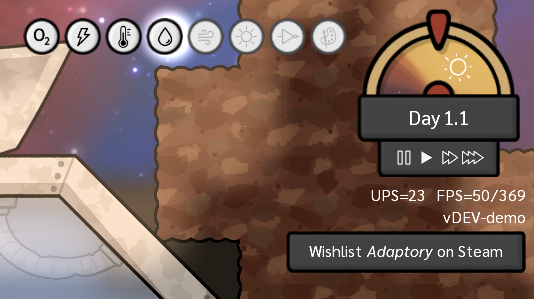
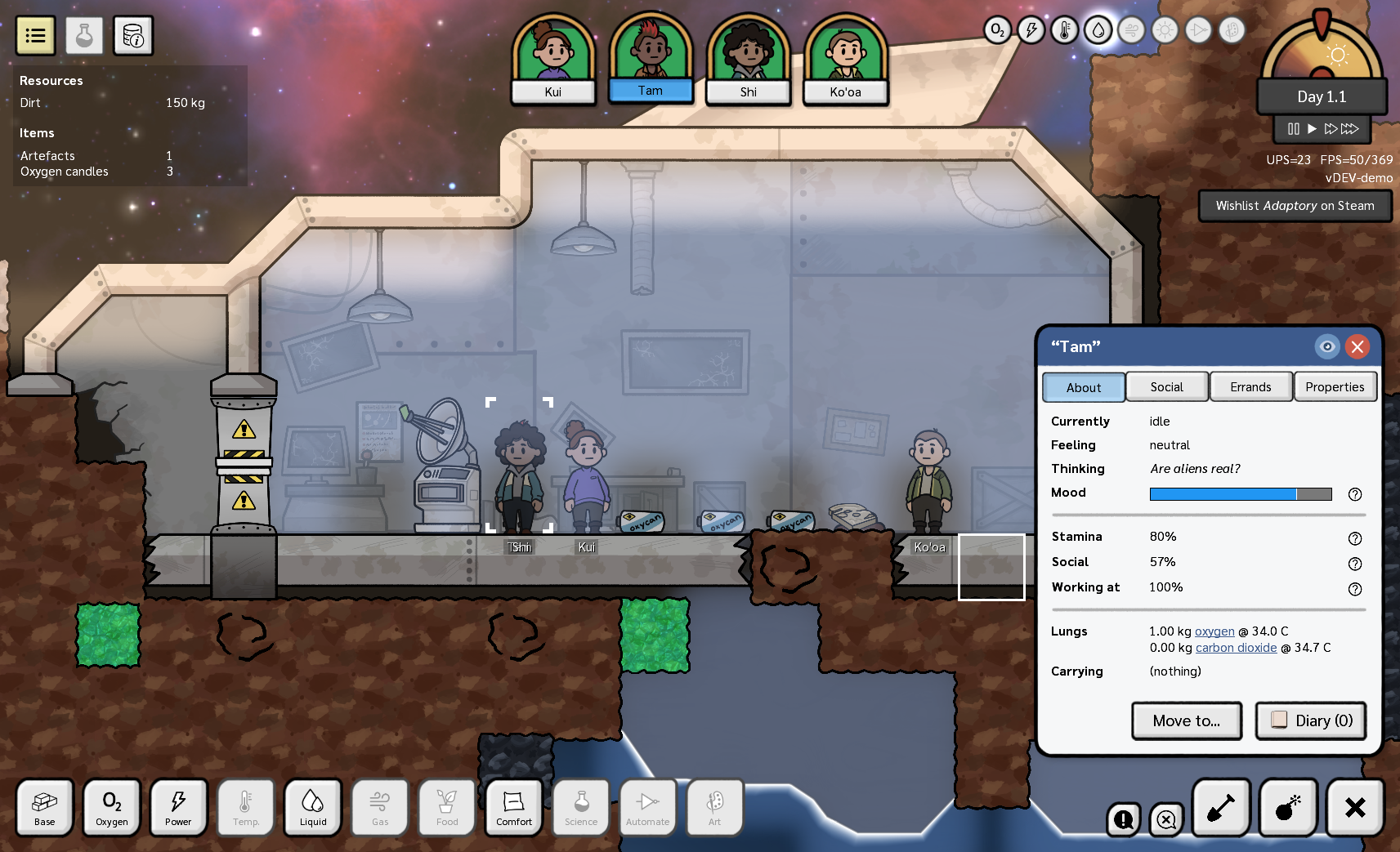
There’s a brand new world time clock in the top right, with speed buttons clearly listed. It also shows you the progress of the day/night cycle.


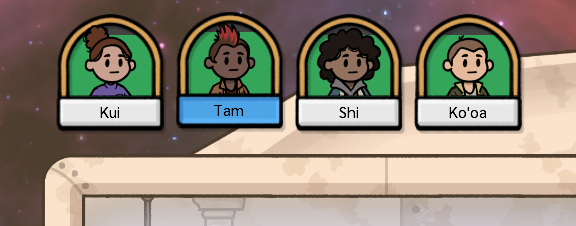
The explorer selection bar now displays their mood as a background colour and progress bar, so you can quickly see if someone is having a bad day.


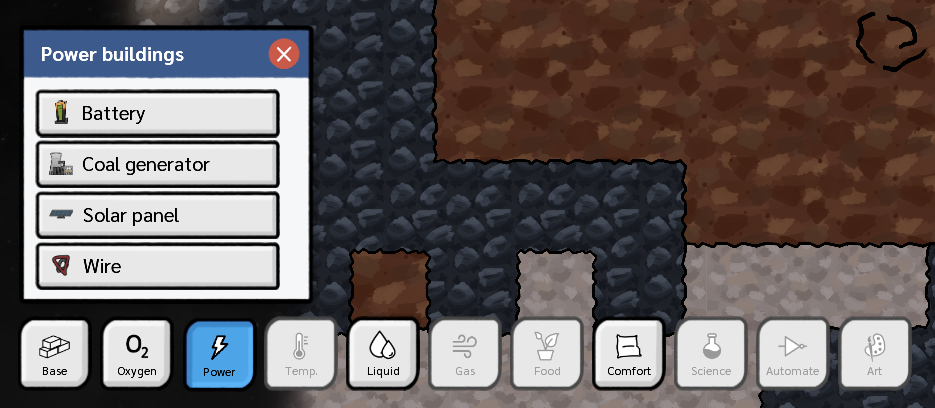
Building blueprints are now in different building categories, with separate dropdowns for each category (oxygen, power, liquid, gas etc.). Some of these categories will only become available in Early Access. These menus also give us room to add many more building types in future updates.


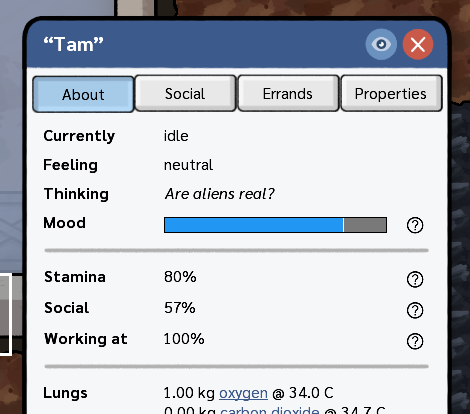
Selected objects now have different information panels to show different categories of information. For example, if you’re clicking on an explorer, you’re probably more interested to know how they’re feeling, and less who their best friend is, or what material they’re made out of – but it’s still important to know these details sometimes.

[h2]User interface design[/h2]

We’ve worked hard on a brand new user interface design that feels closer to the hand-drawn lineart style of the game. Buttons and dialogs are now rounded, shadows are cleaner, dropdowns are animated and have a scrollbar, text is crisper, rendering is faster, and there’s been lots and lots of other tweaks and polish.

User interface scaling is no longer experimental; whether you’re running the game at 80% or 200% zoom, the user interface should work great. Pressing keyboard shortcuts such as enter and escape now work more consistently across all user interfaces.

[h2]In-game database[/h2]

As we add more content and systems to the game, it’s important to be able to see what everything does. While Adaptory will have a wiki eventually, I think it’s better to have this detailed information available in-game – and in Alpha 9, we’ve added a fully interactive in-game database!

For now, the in-game database shows all of the possible buildings and materials

[h2]And a lot more[/h2]

We’ve added a lot of quality of life and user interface tweaks in this release, so the game should feel much more fluid and user-friendly. Please let us know what you think and if you like the changes!

Full patch notes below.

---

Release notes for Adaptory 0.11 (Alpha 9)


[h2]New features[/h2]

  • A brand new user interface design which will take us into Early Access!
  • A brand new in-game database showing detailed properties for all materials and buildings in the game
  • The top explorer selection bar now also displays their mood as a background colour
  • Added new world clock to the top right, which also has game speed buttons
  • The build panel is now categorised, with separate dropdowns for each building category (oxygen, power, liquid, gas etc.). Some of these will only become available in Early Access
  • Updated transmitter with new art
  • Most windows can now be moved by clicking and dragging the header, and closed with enter or escape
  • Updated selected object panels:

    • Panels now have tabs with different categories of information
    • Added tooltips to describe the impact of each explorer trait, if any
    • You can now cancel an individual building errand by selecting the errand and clicking the new "cancel build" button


[h2]Internal[/h2]

  • Improved performance of all user interfaces and components
  • Tweaked text rendering to be slightly crisper
  • Fixed small transparent images sometimes having very subtle rendering errors from filtering
  • Dropdowns with too many values to fit at once will now display with a scrollbar
  • Animated opening and closing dropdowns
  • Added inner drop shadow rendering to scrollable areas
  • When changing the UI scale, a confirmation dialog now pops up giving you the opportunity to revert the scale back
  • Updated some tutorial text to be clearer and simpler
  • Added a tutorial step to help the player unpause the game if it was accidentally paused at start
  • Improved game startup speed by only generating bitmap fonts on demand
  • Changed order of layer overlays, to align with the building category order
  • Tweaked right click to close more selected objects and actions, including the move explorer command and any selected overlay
  • When dragging an action, right click will now cancel that draggable action
  • Renamed artifact item type to artefact
  • Explorer thought bubbles are now rendered above solid elements, so you can always see what they're thinking
  • Keyboard input changes:

    • Pressing tilde ~ within the console while the console has focus now closes the console, rather than typing the character
    • Pressing enter in the Save Game dialog is now the same as pressing the Save button
    • Changed the power overlay keyboard shortcut from F4 to F2
    • The numpad enter key now works the same as normal enter
    • Pressing space on a button no longer "clicks" the button, as game pause/unpause should be higher priority. Enter and numpad enter are still keyboard shortcuts to click the button
    • Pressing escape when an overlay layer is open will now close the overlay, rather than opening the escape menu


[h2]Balance[/h2]

  • Reduced supply goal slider resolution from 1kg to 10kg
  • When opening an explorer's diary, new entries are no longer automatically marked as read
  • The day/night cycle now has an actual night period where sunlight is zero (1/4 of a day)
  • Oxygen candle holder buildings are now called oxycan holders
  • When a non-solid tile moves (e.g. sand falling), all dig errands attached to that tile are now moved as well
  • Increased event budget cost of solar flare event from 1.0 to 3.0
  • The salt element is no longer a fixed solid, but loose like sand


[h2]Accessibility[/h2]

  • Added "background star movement" option to options panel, which stops the movement of the main menu's background stars


[h2]Fixes[/h2]

  • Fixed a number of font scaling bugs when the UI scale was not 100%
  • Fixed a bug where text tooltips would sometimes not be replaced with rich tooltips
  • Fixed a bug where if the options dialog was open, escape would instead close the escape menu
  • Fixed not being able to subscribe to email updates from the main menu
  • Fixed being able to change an explorer's name to a blank string
  • Fixed a rare bug where you could not click on the Close button in Save/Load dialogs that listed a lot of save games
  • Fixed a memory leak that could occur when a scrollable user interface was left open for a long time
  • Fixed the sound at the start of the game sometimes being played more than once
  • Fixed a rare bug where the game would sometimes start paused
  • Fixed a rare crash from trying to delete a missing particle effect
  • Fixed a bug where a highlighted tutorial area would remain highlighted after clicking "hide all tutorials"
  • Fixed being able to unpause the game with space while in the escape menu or other modal dialogs
  • Fixed being able to change the layer overlays while in modal dialogs
  • Fixed a significant texture memory leak – thanks rhys! 😊
  • Fixed the game slowing down if a large number of sounds all tried to play at the same time
  • Fixed a bug where mass stored in a build errand would be deleted if the errand was cancelled
  • Fixed a bug where the camera would sometimes not center on the crashed ship at the start of a new game
  • Fixed a crash if an explorer stood on top of a pile of vacuum
  • Fixed a bug where suffocating explorers would not die until their body became visible (e.g. if they were stuck in sand)
  • Fixed a bug where digging a solid element would sometimes not visually update

Adaptory is part of the 2024 Women's Day Steam Sale!

We are thrilled to share that Adaptory is part of the 2024 Women's Day Sale on Steam!

Over the next week, please check out some of these games being made by diverse studios across the world. We're feeling very lucky to be a part of this event, alongside some really incredible and inspiring studios.

2024 Women's Day Sale

Now is also the perfect time to play the free Adaptory demo. We're working hard on the Adaptory user interface at the moment, based on your feedback from Steam Next Fest, so please do continue sharing your feedback and ideas!

https://store.steampowered.com/app/2201620/Adaptory/
Adaptory Demo 0.10.14 released

This is a small patch that should hopefully fix a number of rare concurrent and UI crashes. Thank you to everyone in Discord who helped test this release!

[h2]Internal[/h2]

  • Improved performance of string layout for most user interfaces
  • FPS counter now shows both slowest and average frames per second


[h2]Fixes[/h2]

  • Fixed a very unusual crash when selecting a building type in the build panel
  • Changed user interface rendering from multithreaded to singlethreaded, to fix a bunch of rare and difficult-to-fix crashes

Next Fest: What's next?

Steam Next Fest has been an absolute blast! Adaptory has had tens of thousands of new views, downloads, plays, wishlists, and feedback. Thank you all, so much, for all of your downloads, plays, and feedback over the last week! 😊 What's next?

From all of your feedback, we’ve identified four main themes that Adaptory needs to focus on:

1. A more refined identity: Adaptory is an ambitious mix of ideas, and while I have been focusing on making sure the simulations are solid and that experienced base-building players feel at home, it would be helpful to focus on what makes Adaptory unique: the randomly generated world events, limited team size, quest/task systems, conversations, and other features not yet announced.

2. More content: The key systems of the game are working well, but there needs to be more content. More systems, more buildings, more art and conversations, a bigger and more interesting world to explore. The content schedule is already mapped out, it just needs to be put into the game!

3. Performance on lower-end machines: The game plays well but struggles on lower-end machines, especially laptops and integrated graphics. I think there’s still 1-2 orders of magnitude of performance tucked away, now that the game architecture has settled. Adaptory is not designed to be a casual game, but I want it to be playable on as many devices as possible – my goal is 30+ fps on a 2016 Macbook Pro.

4. Polished user interfaces: It would be nice to have a lot more polish and quality of life improvements to the UI. A lot of information is hidden away and could be exposed in better ways, with more tutorials and help getting started, and made more accessible to a wider range of screens. It can also be prettier!

Originally, the plan was to release the game in Early Access later this year, and then spend at least two years working on adding in a lot of these systems and content. However, I think if we push the EA release date back and focus on preloading this work before the release, the launch will have more of an impact, and we’ll build a bigger community.

Therefore, as a team, we’ve decided...

We’re pushing back the Early Access date to 2025 (final date still to be announced). This will give us more time to add extra content, systems, and polish to really make the game shine at launch.

The Adaptory demo will remain on Steam, free to play. The demo will continue to be updated over the next year – particularly with UI, QOL, and performance improvements, so we can test things out and iron out bugs – but most new content will be exclusive to the Early Access release. EA is going to be huge!!

I’m also planning to run at least one closed beta test for Adaptory next year. This will be a focused, exclusive event where you’ll be able to play the new content before anyone else, and provide feedback before the game launches. If you’d like to be notified when the closed beta is open to signups, please join the Discord and/or the mailing list.

Select streamers and content creators will also be invited to a special preview build next year – so if you’d like to be part of that, please get in touch.

And of course, if you haven’t already, please wishlist Adaptory on Steam so that you can stay in the loop!

https://store.steampowered.com/app/2201620/Adaptory/