1. Cities: Skylines
  2. News

Cities: Skylines News

Dev Diary - Race Day #3 - Free Update

[p]Welcome back, mayors! In this third Developer Diary, we wanted to showcase all the free content coming in the update alongside the launch of Race Day Expansion. [/p][p][/p][p]And just to clarify, you are not required to own the Expansion to enjoy these features; it will be available for everyone![/p][p][/p][h3]Roadside Fences[/h3][p]Fences can now be added to roads! Just like trees, you can select the fence you want and apply it to the roadside. This will work for any fence type on just about any road type.[/p][p][/p][p][/p][p][/p][p]Left-clicking on a road with the Fence selected will add it to the side nearest to the cursor or selection. Right-clicking will remove the fence.[/p][p][/p][p]If the Fence placement tool is set to Upgrade, right-clicking will flip the direction the fence is facing. This now works for all fences, not just ones on roads.[/p][p][/p][h3]Billboards[/h3][p]Two new large placeable billboard props are also included in the free content. These are self-illuminating, so you can advertise 24/7! Find these in the Props tab of Parks and Plazas.[/p][p][/p][p][/p][h3]Employment Info View[/h3][p]Employment is now visible in the Info Views. Take a look at your city to see if your commercial, industrial, and office zones are in need of workers to fill jobs. You can also check your residential areas to see where unemployed workers live.[/p][p][/p][p][/p][p][/p][p]Thanks for reading! That’s all for our update showcase. We hope to see what the community can build with this new content in Race Day or the free content we’ve added![/p][p][/p][p]Tantalus[/p][p]
[/p]

Cities: Skylines is Free to Play!

[p][/p][p][/p][p]Cities: Skylines is Free to Play![/p][p][/p][p]For a limited time, Cities: Skylines is free to play for the whole weekend! Whether you’ve been watching from the sidelines or meant to revisit your grandest metropolis, this is the perfect moment to step into the mayor’s office.[/p][p][/p][p]Design road networks with flair, shape districts with personality, and watch your citizens go about their daily routines. Every decision matters. A single intersection can smooth traffic across the map or bring the whole city to a standstill.[/p][p][/p][p]With eleven years of community creativity behind it, Cities: Skylines offers a city-building sandbox shaped by players who turned simple grids into living worlds. Now it’s your turn to lay the first road and see where it leads.[/p][p]
[dynamiclink][/dynamiclink][/p]

Dev Diary - Race Day #2: Parades and other Races

[h2]Welcome back, mayors![/h2][p]
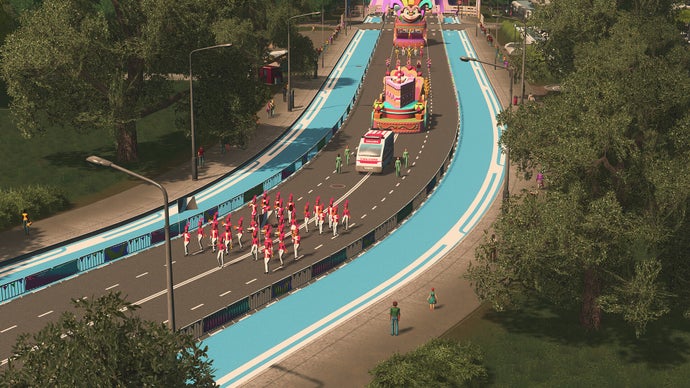
Time for the second Race Day Dev Diary from Tantalus! Today, we pull our motor race cars into the pit lane and cover the other types of events that can be held using the new Race Day Expansion. Parades, Running Races, and Bicycle races can all be held using the new Event Parks and Event Roads. [/p][p][/p][p][dynamiclink][/dynamiclink] [/p][h3]Creating an event route [/h3][p][/p][p]To establish a route for your events to be held on, first, we should identify a start and finish point within the city. The Start-line Park will be the main building and starting point for parades, running races, and cycling races. Once you are satisfied with the start, a Finish-line Park can then be built where the event route will end. [/p][p][/p][p]Event Road and One-way Event Roads can then be built between the parks, or you may upgrade the path between them to Event Roads. [/p][p]Event Routes can be built through established areas of cities.[/p][p][/p][h3]Start-line Park [/h3][p]The Start-line Park will look and function as a regular park when there are no events, Setting Up, In Progress, or Packing Up. Citizens can also walk through its perimeter as a pathway or shortcut. [/p][p]The Start-line Park is your public space that can be transformed to host 3 main event types: Parades, Running Races, and Cycling Races.[/p][h3]Races and Parades Info View [/h3][p][/p][p]Event Routes will affect the traffic of your city when there is an active event. Event Roads will be closed during events, so it’s important to mitigate the effects on your city when planning an Event Route through it. [/p][p][/p][p][/p][p]It’s a good idea to check the new Races and Parades Info View to see if any buildings have “no event access”, meaning that services cannot reach them when an event is in any of the active phases.[/p][p]
[/p][p]Races and Parades Info View shows which buildings will not have service access during an event. [/p][p][/p][p]Buildings that cannot be accessed by services during active events will be displayed in the Info View as black in colour, with the event access icon above them. To resolve this, it is possible to build an alternative access, or utilize the new Alley road-type as a lower impact way to allow service vehicles to access buildings while an event is active. [/p][p][/p][h3]Event Route Tips [/h3][p][/p][p]Because active events will disrupt normal traffic, it can be a good idea to allow alternate routes or build Event Routes that do not divide districts completely. [/p][p]When scheduling an event, frequent disruptions to traffic can be avoided by hosting fewer annual events on each route. The length of the route will also increase the duration of disruptions. [/p][p]It is encouraged that Event Routes are built through areas with existing tourism or attractiveness, to draw more spectators and tourists to increase ticket sales. [/p][p]There are several stages to each event with varying impact to the city’s normal traffic routes. [/p]
  • [p]Setting Up [/p]
[p]During this phase, Event Roads are closed and vehicles are discouraged from using Event Roads to reach their destination. Road blocks are placed across the intersections to Event Roads. Citizens and tourists will begin to congregate along the Event Route and at the Start line Park and Finish-line Parks to spectate the event.[/p]
  • [p]In Progress [/p]
[p]The Event is Active and there is no access to the Event Road for normal traffic. Services will also not be able to reach any buildings along the Event Route that do not have alternative access. [/p]
  • [p]Packing Up [/p]
[p]The event has now concluded and the participants and/or competitors leave the event. Services will still not be able to reach buildings that have their access blocked by the adjacent event route being used. Traffic will be allowed to resume as normal after packing up has completed. [/p]
  • [p]Inactive [/p]
[p]There are no events in any of the three phases above. Barriers are removed, and traffic is normal across Event Roads. [/p]
  • [p]Parades [/p]
[p]Parades can bring celebration to your prized city, drawing local spectators and tourists along the event route to enjoy the fanfare. There are 5 possible tiers of Parade, increasing in grandeur and variety of entertainment, but also expenses will increase on this scale.[/p][p]Your citizens will line up along the sides of the parade route and watch the parade as it goes along, so make sure that you get to a good spot fast![/p][p][/p][p][/p]
  • [p]Running Races [/p]
[p]Running Races and Fun Runs can also be held from the Start-line Park. This type of event will have your city's athletes or fun runners run the distance between your Start and Finish lines.[/p][p][/p][p][/p]
  • [p]Cycling Races [/p]
[p]Competitive or novelty Cycling Races can showcase a faster race between your citizens. How fast will your citizens pedal?[/p][p][/p][p][/p]
  • [p]Motor races on Event Roads[/p]
[p]Motor races can also be held on Event Roads! A Race HQ is still required, but part of the track can be built or upgraded to Event Roads, meaning that when a Race is not active, normal traffic can use the roads. Be careful when planning a circuit through your city to ensure that buildings along the route have alternative access for services. Also, keep in mind that the more laps your race event has, the longer traffic will be disrupted![/p][p]
[/p][p]Thanks for reading! In the next update, we will showcase the free content that will be released alongside the new Race Day Expansion. We have a new Fence Tool, Billboards, and an all-new Info View to share. See you then! [/p][p][/p][p]Tantalus[/p][p]
[/p]

Dev Diary - Race Day #1 - Races

[p]Hello from Tantalus Media! [/p][p][/p][p]We’ve been making the console ports of Cities: Skylines that were first released on Xbox One and PlayStation 4 back in 2017. Since then, we made the Remastered Editions for Xbox Series and PlayStation 5 in 2023, and have been the main developers on the PC version since 2024. And we’re now proud to bring you an entire new DLC worth of content! 

[dynamiclink][/dynamiclink] [/p][h3]Creating a motor race track [/h3][p]Race Day centers around creating routes for different events to be held through your city. Motor Races can be held on permanent dedicated Race Roads, excluded from the traffic of your existing cities, or hosted in part on an Event Road, temporarily closing sections of roads and ignoring the speed limit. [/p][p][/p][p]To host Motor Races within your city, first, we will need to establish where the route will start from and then where it will go. To begin, a Race HQ building can be built from the Parks and Plazas menu - once the Grand City milestone has been reached. [/p][p][/p][p][/p][p]The Race HQ can be found in a new tab in the Parks menu.[/p][p][/p][p]The Race HQ is the central control and coordination facility for a motor racing circuit. It contains a starting grid section of racetrack and pit lane with 3 pit garage buildings available. [/p][p]Make sure there is plenty of space for the Race HQ, as it is quite large and comes with two road segments, one for the race track and one for the pit lane.[/p][p]
[/p][p]Place the Race HQ to unlock Pit Garages and Stands.[/p][p][/p][p]Once the Race HQ is built, it will remain “under construction” in the building info as seen below. Now that there is a start and finish to your race track, we can build the track itself! [/p][p][/p][p][/p][p]The newly unlocked road types will be available under the Roads menu. Motor Race Roads come in three visual styles: Motor Racetrack, Motor Racetrack with Single Curb, and Motor Racetrack with Double Curb. Two-way Event Roads and One-way Event Roads can also be used to build the route. You can also build bridges and tunnels with your new roads, so you can get really creative with the layout.[/p][p][/p][p]There’s only two things to remember when planning your track, the route must be a loop that connects back to the Race HQ, so that they can start driving multiple laps. The second is that you should keep in mind where the track is placed, as races can be noisy for its neighbors![/p][p]
[/p][p][/p][p][/p][p]Using the Pit Lane and Pit Lane Entry/Exit roads, connect the pit lane to the Race Road. The Pit lane can also be extended in length using the Pit Lane road type - this will be useful for make space for more Pit Buildings, so that more race teams can compete in each race.[/p][p]
[/p][p]Create any shape of track that your heart desires![/p][p]
[/p][p]Pit Buildings will increase race team capacity of the track, meaning more drivers can compete, up to 32 drivers per race. [/p][p][/p][p]As you are building your racetracks, your future spectators may want viewpoints along the track. Stands can be built attached to the sides of the tracks, and they will in turn attract more spectators. We have included three sizes, each with different capacities.[/p][p]
[/p][p]The Small Stand on the left, the Main Stand in the middle, and the Grand Stand on the right. [/p][p][/p][h3]Races and Parades Info View [/h3][p]We have added a new Info View so that you can easily see your completed Event Routes and their direction. The new Info View for Races and Parades can be selected to view valid Event Routes. This view will display valid Event Routes and also displays the direction arrows for race tracks. [/p][p]
[/p][p]Speaking of directions, if you want to change the race direction, you can always use the Change Direction button from the Race HQ if you feel like a change![/p][p]
[/p][p][/p][h3]Attractiveness [/h3][p][/p][p]The Races and Parades Info View also features a tab to display attractiveness. This is useful for planning and improving the attractiveness of Event Routes. The stands included in the Race Day DLC content can increase attractiveness, but don’t forget about other buildings and services that could be used to increase the attractiveness and draw in spectators![/p][p][/p][p][/p][h3]Scheduling an event [/h3][p][/p][p]With a Race HQ, track and stands all completed, we are ready to Schedule an Event! [/p][p][/p][p]Select the Race HQ building to open the Event Route Info. This panel displays info about the Race HQ’s route Layout, Expenses, Spectators and Attractiveness. From this panel, events can also be scheduled, viewed and edited. Select Schedule Event or the Schedule tab to get started.[/p][p][/p][p][/p][p]The Race HQ Info tab displays an overview of the building, its scheduled events, and its track details.[/p][p][/p][p]From the Schedule tab, add a new event to set the details. The type of race will determine which class of race cars is competing: Hyper Car, Formula, or Circuit Cruisers. Different Tiers will affect the cost, but add more competitors to the event. Laps will affect how long the event will last, and the ticket price can also be set. Set a date and schedule the event to add it to the event queue! [/p][p][/p][p]Information on results, progress, and future events can all be viewed at a glance from the Info tab of the Race HQ world info panel.[/p][p][/p][h3]Tips [/h3][p]The space inside a motor racetrack can also be utilised for shopping malls, parking, parks, or anything else that you can come up with. Building public transport routes or extending existing routes to service the Race HQ will make it easier for your citizens to attend racing events! [/p][p][/p][p]Be careful if using Event Roads to route the motor race through your city. Depending on the number of laps, the event could affect traffic or other services. Build alternate routes, overpasses, or tunnels so that normal traffic can keep flowing![/p][p]
[/p][h3]Floodlights [/h3][p][/p][p]There are two new props that can be used to light your city. The aim was to provide something that could suit race tracks as well as other city areas that need some extra light at night. You can find these in the Props tab of the Races and Parades Menu. [/p][p][/p][p][/p][p]Thanks for reading! In the next update, we will cover the other types of events that can be hosted using the Race Day DLC content. We will explain Start and Finish-line parks, the events that can be hosted, and how to ensure your city’s traffic can keep flowing while events are in progress. [/p][p][/p][p]Tantalus[/p][p]
[/p]

The original Cities: Skylines is getting a new Race Day expansion next week, as Paradox parade the fact the series is turning 11

Welp. The Cities: Skylines series turns 11 years old today, so publishers Paradox have announced a bunch of stuff designed to celebrate that occasion. Look, look, they've said, here's a brand new expansion for the original Cities: Skylines and it'll launch next week. Oh and, they've also said, recently under-new-management sequel Cities: Skylines 2 is getting a couple of creator packs.


Read more