1. Gems of War
  2. News

Gems of War News

4.4 Patch Notes


Team Suggestion + Sharing

Whether it’s the helpful player who enjoys sharing their teams, the curious player who wants to try another player’s team, or a new player just getting into team building; we have implemented a new system to support you all, Team Suggestion + Sharing.
  • In the Troop Menu (whether accessed from World Map or from the Pre-Battle screen), players will see the Rename Team button has been changed to Manage Team. Tapping on it will open a popup menu with the following options:
    • Rename Team
    • Suggest a Team
    • Copy to Global Chat
    • Copy to Guild Chat
    • Paste Team


Suggest-a-Team
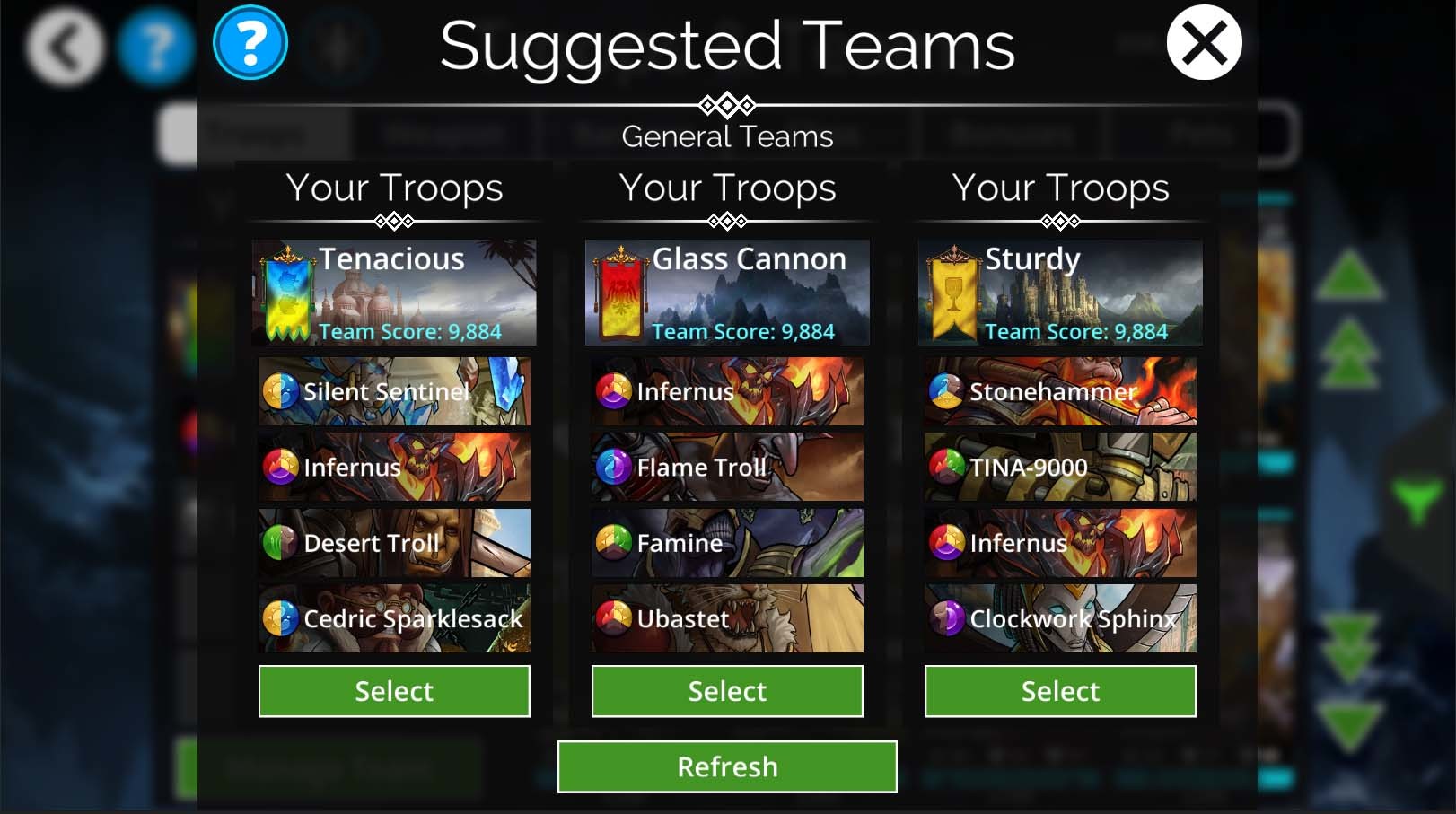
  • The game will look at player’s troops and suggest 3 potential teams for the player to choose from to suit their playstyle.
  • Team suggestions will include 4 Troops and a Banner whose color supports the team.
  • If players don’t see a team that appeals to them, they will be able to refresh the suggestions and get 3 more suggestions. (There is no cost to refreshing team suggestions).
  • Team suggestions are based on multiple different team patterns, and the team’s name will reflect what style they are (e.g. Balanced, Glass Cannon, Disruptive, Deceptive).
  • Troops have been given Roles (more on that below), which reflect how the troop plays, e.g. Mana Generator, Assassin, Support, Defender. These roles are taken into consideration so each team will be able to work together.
  • Suggest-a-Team will work with any Event that may have a restriction for troops (such as Raid Boss, Invasion or Class Trial).
  • Players can use suggest-a-team for teams that are partially filled (for example, you may want to build a team around a certain troop), or it may be used on a full team to suggest an entirely new 4 troops.
  • Once selected, the player can paste the suggested team into the team slot and make any further modifications they would like.
  • Suggest-a-Team does not often suggest Hero Weapons at this time. Because Hero builds are so diverse, if you would like a Hero in your team, we suggest placing him there via the weapon, and THEN using Suggest-a-Team.
  • While teams suggested this way will never be as good as teams finely-crafted by human players, they make a good starting point, if you’re a bit stuck on what troops to add.
Copy to Global/ Guild Chat
  • From the Manage Team popup menu, players can copy their existing teams into either Global Chat or their Guild Chat to share with other players.
  • Hero Classes can be copied along with the Troops, Weapons and Banners for the team (along with that Class’ Talent set up too).
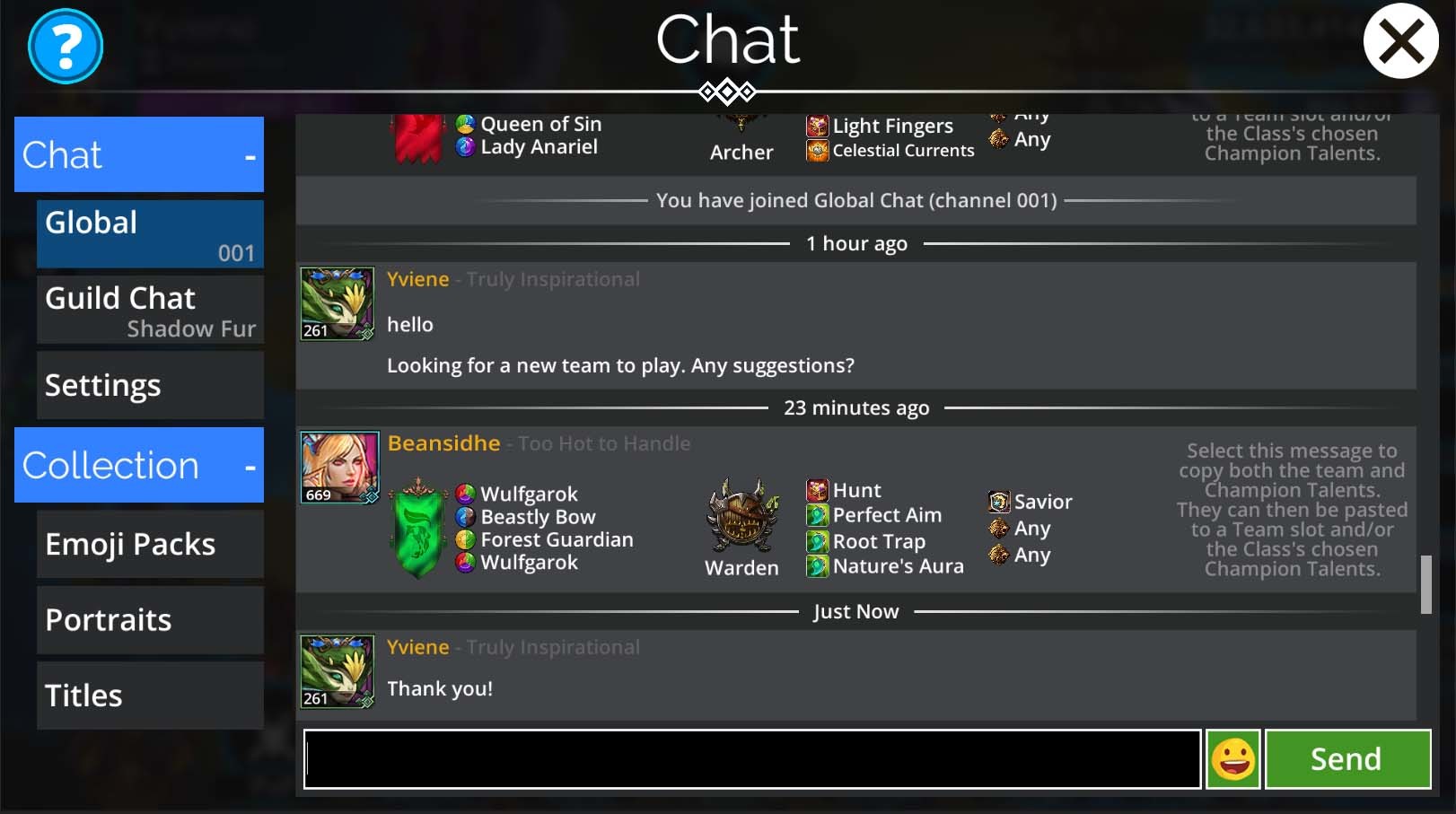
  • Shared teams will display in Chat with the team Banner, Mana Colors for the Troops/ Weapons, as well as listing any Champion Talents for an attached Class.
  • Classes without a Champion Talent set up will just display ‘Any’ meaning that any talent can be good for the Class.
  • Players who don’t own all the Troops in a shared team, will view the Troops they don’t own with a locked symbol. If they do choose to copy the team, they will only be able to create a team of Troops, Banners, Weapons, Champion Talents, that they do own.
  • Players can still view a players profile from team share messages by interacting with their portrait (or using the usual X / Square buttons on controllers).


Paste Team
  • Interacting with (i.e. clicking on, tapping on, or selecting with a gamepad) a shared team in Global/ Guild chat will copy that team to your clipboard, which players can then paste into a team slot by selecting Paste Team from the Manage Team pop up menu. [*/]
  • Team slots with existing teams set up will also display a string of text, called the Team Share Code. This code can be copied by interacting with it, then shared into other programs outside of Gems of War (like a Guild’s discord channel).
  • Other players can take a Team Share Code, use Paste Team to paste the code, and copy the team that way.
  • Pasting a team will replace any existing team that may already be that team slot.


Adventure Board
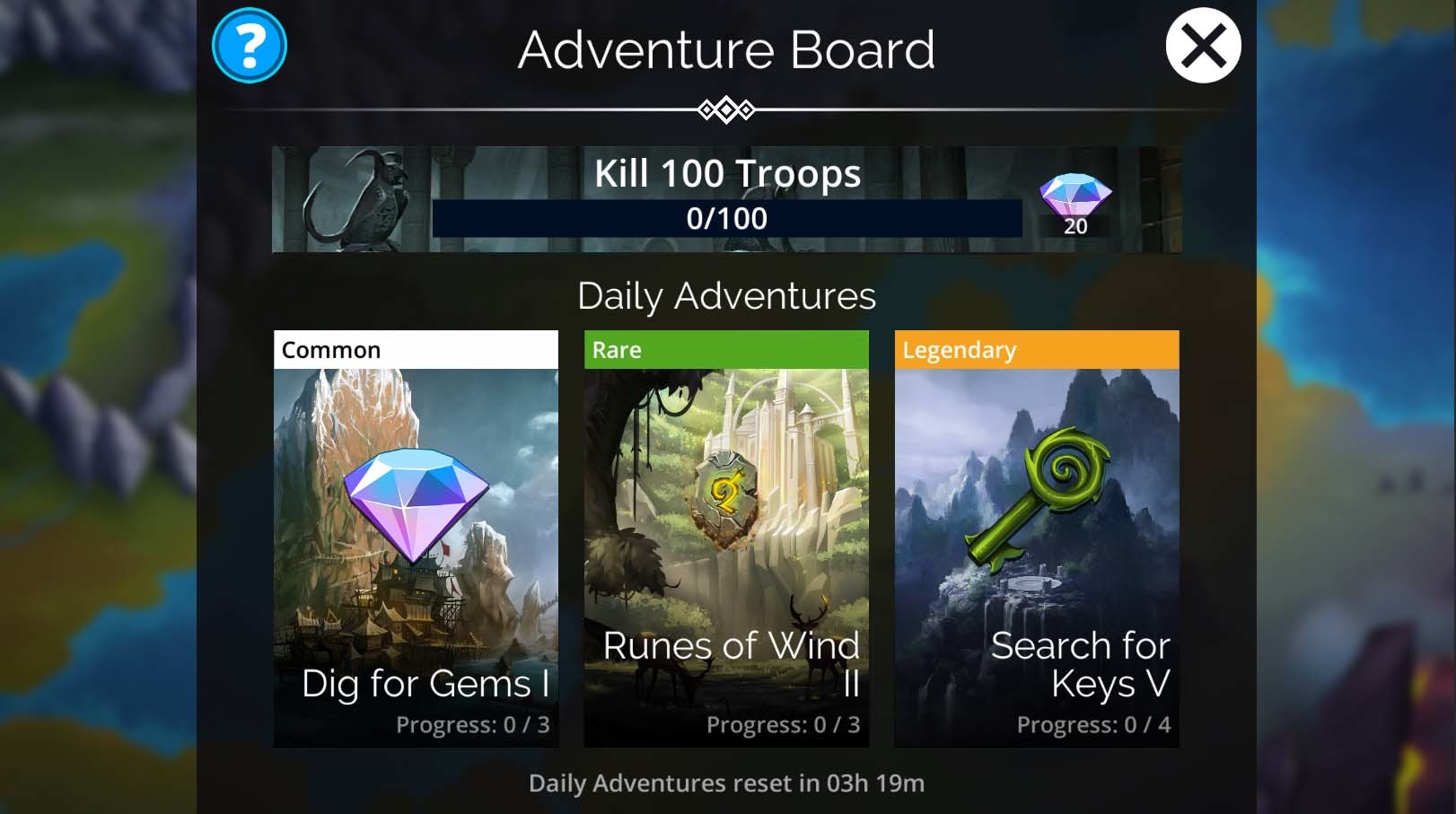
In the current game we had 2 competing systems – Daily Tasks, first introduced on the console version, where players could complete various actions and earn lots of small rewards; and Weekly Tasks (Snotstones for you veterans out there) where players would repeat a single action for a week to earn points and collect rewards. As the game has grown, we’ve noticed some issues with these 2 systems: Daily Tasks were fiddly to complete and their rewards weren’t as good when compared to other areas of the game; while Weekly Tasks were not very visible, and often not a lot of fun. We have decided to remove both systems, and replace them with the Adventure Board, which should help fix their shortcomings while distributing the rewards in a better way (note that the new system distributes exactly the same Gem-Value in rewards as the old system).
  • The Adventure Board can be found on the World Map in the same space previously used by Daily Tasks.
  • Players will have 2 types of tasks they can complete:
    • Daily Kills – For players over level 150, this task can be completed during regular gameplay. It mostly consists of a Kill-Count for Enemies or Enemies of a specified color. For players under level 150, see the Adventure Path below.
    • Adventures – Each Adventure is a series of 3-4 battles of increasing difficulty that give rewards based around a reward theme. (E.g. The Search for Keys will give a Key reward for completing each battle).
  • After Daily Kills is completed, it will restart at the next Daily Reset (note that if it is incomplete at daily reset, it does NOT reset back to zero)
  • Three new Adventures are available every day and will change after 24hr regardless of if the player has completed all the battles in them or not.
  • For players under level 150, the Adventure Path replaces the Daily Kills. Objectives in the Adventure Path are similar to the old Daily Tasks that helped players learn about the game, but they have received a complete overhaul in their order and rewards. Once the ‘Reach Level 150’ task is completed here, they are replaced by the Daily Kills.
  • Players who were still in the middle of completing the Daily Tasks that help teach the game, will be transitioned over to the Adventure Path that is relevant to their current progress in the game.
  • When players switch over to Version 4.4, they will be mailed the rewards from all tasks that they currently had acquired, whether they had been completed or not.
  • The “I’m Not Scared of the Boogeyman” achievement has been updated to work with the new Adventure Board.


Epic Fights
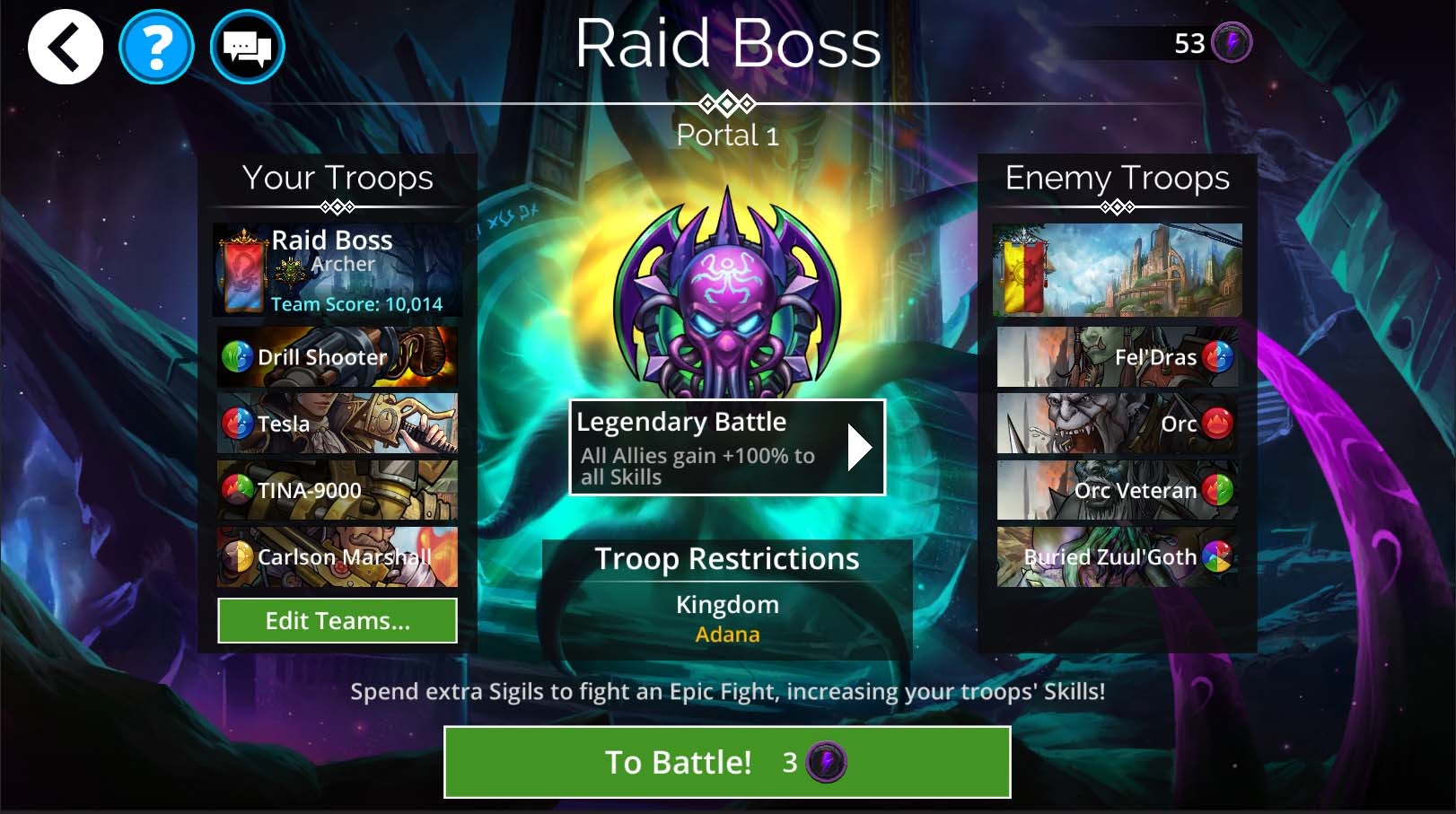
Epic Fights are means for players to spend more Event Sigils to gain a buff to their Skill Points for the battle. For veterans and levels 1000+, these aren’t something you will need to use very often, but for low level players trying to help their guild in tougher events, they are useful.
  • On the Pre-Battle menu, players will notice a new box under the event shield displaying the type of battle (which affects Skill point bonus + Sigil cost). Interacting with this box will open up a pop up menu with all the different Skill Points and their additional Sigil costs.
  • The types of battle and their additional Sigil cost + Skill point buff is as follows:
    • Normal Battle: +0% Skill Points, added cost +0 Sigils (this is the default type and regular battle everyone will know)
    • Epic Battle: +50% Skill Points, added cost +1 Sigils
    • Legendary Battle: +100% Skill Points, added cost +2 Sigils
    • Mythical Battle: +200% Skills Points, added cost +4 Sigils
  • Skill point buff will apply to all Ally troops.
  • When playing an event in 4.4, all players will get to try out an Epic Fight for free the first time. After that using an Epic Battle or higher will cost additional Sigils per battle.


Troop Roles
  • Every Troop has been assigned a Role, which matches their usual role within a team.
  • Roles are displayed as icons next to the Troop’s troop type.
  • The 9 basic roles are:
    • Defender: Frontline tank – great at mitigating Skull damage
    • Warrior: Tough frontliner or off-tank, with damage capability
    • Warmaster: Buffs/ summons allies for Attack or creates Skulls
    • Striker: Heavy damage dealer, mostly single-target
    • Assassin: Can often one-shot an Enemy
    • Mage: Deals large amounts of area damage
    • Generator: Generates Mana (either generally or of a specified color)
    • Support: Buffs Allies in a defensive fashion
    • Warlock: Debuff one or more Enemies
  • Troops can only have a single Role, which represents a Troop’s most common purpose in the game. E.g. Gorgotha is both a good frontline Troop and Mana Generator. His primary purpose is as frontline troop though, so he is classified as a Defender.


Daily Login Menu

The Daily Login Menu has been reworked to include all the various rewards players receive from their daily login in one single screen (so less clicking and tapping).
  • Daily login rewards displayed on this menu are:
    • 7-Day Login Rewards
    • Monthly Login Rewards
    • Honor Daily Rewards
    • New Player Rewards (if applicable)
    • Returning Player Rewards (if applicable)
    • Mage: Deals large amounts of area damage
    • Special Event Rewards (if applicable)
    • PVP Tier Rewards
    • Guild Daily Seals
    • Faction Ingots
    • Daily VIP Rewards
  • Daily Rewards are still sent via the mail for the player to collect.
  • New Player, Returning Player, and Special Event login rewards only display when necessary, and if more than 1 is active they will rotate between each other in the same spot on the screen.
  • Menus background and troop displayed will continue to be tied to the Weekly Event. However, the Weekly Event name and remaining time is displayed at the bottom of the screen.
  • Pop up for 7-Day and Monthly login rewards that previously appeared after the old daily login screens, has been removed, as the information displayed there is now in the daily login screen.
  • Players are still able to access the calendar menu if they wish to preview their upcoming 7-Day or monthly rewards.


Flash Offer Calendar
  • We’ve added in support to create a calendar of Flash Offers. These Flash Offer calendars will usually have a theme or be related to a special event. Our first one will be coming for Week of the Shark!
  • Each day will present a new offer for players to look at. Once the day has ended, that offer will no longer be available and a new one will replace it (until the calendar ends).
  • You do not need to have purchased any previous rewards to buy the current one.
  • Some offers may give rewards for free or for a Gem cost instead real money.


Chest Drop

Due to some instances of confusion over the past few months about drop rates of various troop rarities in chests (based on incorrect data acquired from the game by 3rd-party programs), we have decided to make the actual Drop Rates visible to everyone.
  • All chests menus now include a help button that will bring up the drop rates for items within that chest.
  • Please note that a drop rate of 1% does NOT mean if you open 100 chests you will get that thing – it’s not how probability works. It means there is an independent 1% chance on each chest-opening of acquiring that thing.
  • If you ignore the last dot point and write to our support team about it, Kafka will find out where you live and hurt you. Don’t make her do that. [*/]
    • Disclaimer: Of course, we’re just kidding about that last bit. The Gems of War Devs don’t condone non-gem-related violence of any kind, even against people who don’t understand probability.
  • Daily Rewards are still sent via the mail for the player to collect.
  • New Player, Returning Player, and Special Event login rewards only display when necessary, and if more than 1 is active they will rotate between each other in the same spot on the screen.
  • Menus background and troop displayed will continue to be tied to the Weekly Event. However, the Weekly Event name and remaining time is displayed at the bottom of the screen.
  • Pop up for 7-Day and Monthly login rewards that previously appeared after the old daily login screens, has been removed, as the information displayed there is now in the daily login screen.
  • Players are still able to access the calendar menu if they wish to preview their upcoming 7-Day or monthly rewards.


Balance Changes


Omen Traits
  • These traits will now give mana to the correct team at the start of battle. They will also no longer cause 4+ Gem matches to give an extra turn at the start of battle.
Abynissia
  • Queen’s Grace legendary Trait now give 2 Attack and Life to all Daemons at the start of my turn.
Anu’s Sceptre
  • Spell can now target Blue Gems
Champion of Anu
  • Base spell damage increased from 4 to 6
Death
  • Boost Ratio increased from 3:2 to 2:1
Draakulis
  • Now also gains Magic at levels 18 and 19
Euryali
  • Base spell damage increased from 1 to 2
  • Boost Ratio increased from x2 to x3


Stonehammer
  • Base spell Life gain increased from 1 to 5
Ice Troll
  • Mana cost reduced from 13 to 12
Undine
  • Base spell damage increased from 3 to 5


General
  • Boost ratios will now display the actual boost amount in a puzzle battle (where applicable).
  • Info tab for Hero Classes now been updated to be clear over the Troop Type the class gives.


Bug Fixes
  • Fixed an issue where the Troop Filter UI would overlap on non-16:9 aspect ratios.
  • Fixed an issue where one-shot spells were not disabling if the Troop was Blessed.
  • Fixed an issue where players were getting 2 turns on the first turn in Events, if the Potion of Explosion caused a 5 Gem match cascade.
  • Fixed an issue on iPhone XR where some UI on the World Map was going off screen.
  • Fixed an issue where “Revenge” and “Rival” tags were not displaying correctly in PVP after going to the World Map before returning to PVP menu.
  • Fixed an issue where Invasion Stage 3 wasn’t greying out correctly when completed.
  • Fixed an issue where weapon descriptions were not updating correctly in Screenshot mode.
  • Fixed an issue where the Class Weapons’ tooltip was not displaying if the player already owned the Weapon.
  • Other minor bug fixes and improvements


4.3.5 Patch Notes


Puzzle Game Info Menu

  • When Players open the Options menu in a puzzle game, they will see the new Battle Info menu
  • In Puzzle Battles, this menu displays the following battle information for both the player and opponent:
    • Time spent in the battle
    • Mana Surge Chances
    • Resources Earned + Max amount
    • Deaths Earned + Max amount
  • In Treasure Hunt, this menu displays:
    • Turns
    • Moves
    • Traitstones gained
  • Settings can still be accessed from this new menu on the button up in the top left


Settings Menu Rework

  • The UI has been changed to match the rest of the game, and the layout has been improved making the settings easier to navigate
  • All menus are now scrollable
  • The most commonly-used settings have been relocated to the top of General tab so players don’t have to jump around the settings menu to adjust them. These options include:
    • Animation Speed
    • Puzzle Hints
    • Show Spell/ Mana Details
  • The Alert tab has been redesigned to be easier to understand, meaning that players can choose which area of the game they want to receive notifications for, and then more options will appear allowing them to customize this further.
  • The Account tab has been redesigned to make it clearer how account linking is set up and how to swap between accounts
  • The Links Tab has been renamed Help and designed to provide clearer links to various help and support resources. This includes:
    • Help Center – This will open a window to the Game Guides section on the Gems of War Help Center
    • Submit a Ticket – This will display a list of support options. Once one is selected, it will open a window allowing players to submit a ticket for the option selected
    • Terms of Service – This will open a window to the Terms of Service for Gems of War
    • Privacy Policy – This will open a window to the Privacy Policy for Gems of War
    • Community Guidelines – This will open the Community Guidelines for Gems of War
    • Credits – Same as before!
    • Social Links – These smaller buttons will open web pages for the corresponding social services
  • Submit a Ticket will auto-fill several fields with some data to help the player and Support team. This includes:
    • Email address (if the player has linked their email with account)
    • Platform
    • Operating System
    • Device Model
    • Invite Code
    • Guild Name
    • Hero Level
    • VIP Level
  • Agent responses to Support tickets sent from the game will still be sent to a player’s email (we have no means to contact players about support issues in game). Players may need to create a Zendesk account for submitting a ticket.


Balance Changes Cthythrzyx
  • Spell damage upgraded so both upper and lower ends of the damage range scale from Magic
Ice Troll
  • The Spell will now create a mix of Blue and Brown Gems on the board, based on the current number of Blue + Brown Gems
Naga Queen
We made these changes as Naga Queen was very similar to Tai-Pan. They shared Mana Colors and both converted Brown Gems to Red.
  • Mana Colors changed from Blue/ Green to Green/ Brown
  • Now converts Yellow Gems to Red
Royal Engineer
  • Armor buff to Allies now scales off Magic
Tankbot
Tankbot now deals true damage so he continues to have Armor to steal.
  • Spell now deals true damage
Wulfgarok
  • Legendary Trait, First Wargare, changed to give 2 Attack and Magic to Allied Wargare when matching 4 or more Gems
Kingslayer
  • Spell’s conditional bonus damage now triggers if the Enemy’s Attack is greater, and bonus damage has been increased from 7 to 12


Bug Fixes
  • Fixed an issue where number separators were appearing as upside down question marks for French and Russian
  • Fixed an issue where the Extra Turn graphic was appearing behind Troops
  • Fixed an issue where Pet Rescue Event popups were appearing at incorrect times (like the battle rewards list screen)
  • Fixed an issue where MVP troops were gaining the Lucky badge despite not receiving a Death Mark
  • Other minor bug fixes and improvements

4.3 Patch Notes


Chat Improvements
  • Chat screen has received a new layout design
  • The new layout should be more intuitive to use, and better match the rest of the game
  • Chat lines now have alternating background colors (black and grey), making conversations easier to read
  • Chat lines from a single player will also be batched together to improve readability
  • A new menu system will appear on the left side of the chat window
  • The menu allows players to switch between Global and Guild Chat, adjust their settings, or view their social collectibles (more on that below)
  • Player portraits (more on those below too) will appear as part of their chat message, and include frames based on their level, the actual level number, and small “flares” showing that player’s Honor Rank (also more coming below)
  • Players are now able to use unlocked emojis in chat (which are part of the social collectibles)
  • Players are now able to exit Global chat but still be part of Guild Chat
  • Chat Window can be shrunk down into a “Lite Chat” window for anyone wanting to navigate the game while watching chat
  • The mini Chat window is a simplified version of the main chat window, so somethings may not visible in this mode (such as chat portraits or titles)


Social Collectibles

With the improvements to Chat, we have added 3 new types of collectibles for social:

Portraits
  • Players are now able to assign a portrait to their account to appear which displays in chat
  • Players have a single portrait when they start
  • A set of basic character-related portraits will be earned as the player levels up towards 80 (these will be given out immediately if you already have the levels)
  • Additional portraits can be unlocked by levelling Kingdoms to 10 (also given retrospectively if your kingdoms are at 10), completing a Delve level 100, or through Event rewards
  • Frames appear around a portrait in chat
  • Frames will change color as upgrade as the player levels up
  • Players with top Honor Ranks will have their Honor flare appear on their portrait as well
Emojis
  • All players will have access to a standard set of emojis
  • Some other basic emojis can be unlocked through simple tasks like playing PvP, or joining a Guild. Where applicable, these are also awarded retrospectively.
  • Additional emojis can be obtained during weekly events
Titles
  • Titles appear next to a player’s name in chat
  • Titles can be obtained by completing Kingdom Questlines (awarded retrospectively if you’ve already completed them) or during weekly events
  • All collectibles are displayed and managed in the Chat Menu Collection sections
  • Special Seasonal Social Collectibles will available for a limited time during their seasons (More Information to Come)
  • Past Event collectibles (if you didn’t get them from their event) will become available to purchase in the Chat Menu for a small Gem Cost – usually 2-3 months after the event.


Honor System
  • We have implemented a new Honor system to reward players who provide a fun and welcoming experience for others
  • Players gain Honor ranks when other players “Honor them” by awarding them an “Honor Point”
  • Starting at level 20, players will start to receive 2 Honor points per day (when they login) that they can give out
  • Daily Honor Points will stack up to maximum of 5

Honor can be given in 3 ways:
  • After a PVP match
  • Interacting with Guildmates via the Guild Roster
  • Interacting with players in Global Chat (via their player profile)

We have 3 different options for players to choose from to help define what they are honoring that player for:
  • Helpful (the player helped you, or was helpful to someone else)
  • That was Fun (something this player did made the game more fun)
  • High Five (Just a general catch-all show of support for another player)

Any Honor you receive will be displayed when you next collect a tribute.There are 6 ranks of Honor that can a player can have, these are (from highest to lowest)
  • Revered
  • Exemplary
  • Honorable
  • Respected
  • Warned
  • Dishonored
  • Respected, Honorable and Exemplary have multiple tiers within their rank that players will have to ascend through in order to reach the next rank. Note that we have opted NOT to display earned Honor as a progress bar, as this system represents something that we want people doing for “right” reasons, not simply another stat to min-max and cap out.
  • Tiers within a rank will be marked by special gems that appear on the Honor rank’s shield
  • All players will start at the lowest tier of Respected
  • Players can see other people’s Honor either from Honor flares (if the Honor rank/ tier has one) or from a player’s profile (this is only visible on Honor Ranks of Honorable and Higher)
  • Honorable Honor rank or higher will unlock a special login calendar that will give rewards out daily
  • Daily rewards will increase based on the Honor rank, so high Honor ranks give better rewards than a lower rank
  • Achieving some higher Honor ranks for the first time will give players unique rewards, including a special pet – the Revered Dragonkitty – if you reach Revered status.
  • Players will receive a pop up when they gain or lose Honor ranks


Player Reporting

Players can now be reported in-game, saving time sending reports directly to our support channel. We have 4 categories that players can be reported for:
  • Inappropriate Chat
  • Hacking or Cheating
  • Chat Spam
  • Offensive Name
  • We have also improved the way in-game notifications work for warnings or information about bans (including Chat Bans)
  • We have also added an in-game system that will notify players who have reported others, if their report has been acted upon (this means that if a report does result in a warning or ban then any players that reported that person will receive the notification)
  • Presently all reports will be manually processed by our support team, so nobody will be auto-banned by the report system. This may change in the future as we gather data, and feel confident to implement automations.
  • Players will lose Honor ranks for any bans or warnings issued by the Gems of War team
  • Players who lose points, may drop Honor ranks to the Warned or Dishonored ranks


MVP Screen
  • The final screen in the PVP game flow has been reworked
  • The new screen continues to display the player’s rank and trophies earned (also including the Guild current trophy rank)
  • New to the screen is a Troop highlight, which will name one of the player’s troop the MVP of the match
  • There are multiple MVP categories that can be awarded to troops, allowing utility or support troops who perform well to be highlighted too, not only the damage dealing troops.
  • Player’s will always see a troop from their team here, keeping attention on their team rather than their opponent’s team.
  • The screen also allows players to take screenshot or share the screen, so players can compare their MVPs with friends or guildmates outside the game.
  • This screen is also where players can Honor their opponent for fun defense teams


Tribute Screen
  • The tribute screen has had a visual update
  • It will now display all rewards that have been earned, as well as which kingdoms gave a tribute
  • The tribute screen will also display any Honors that have been earned since the last tribute was collected.


Live Event Potions
  • Most events have had a new feature added into the shop: Potions
  • We’ve added a different potion for each purchase-tier in the shop
  • These potions will give a unique effect that will apply to all troops in that Live event
  • Please Note – although these potions may help with tougher Faction Delve levels. they are not intended to be the system we’ve hinted at for dealing with Faction Team difficulty on higher levels (we have something planned for this later this year)


Content Callouts
  • We’ve added a new popup to the game that will better inform players when special events (eg. New releases like Mythics, Factions, Hero classes etc.) occur
  • These callouts will only appear once to inform players of the event, then disappear
  • These events will continue to have News articles in the News Menu for any player wanting to learn more


In-Game Surveys
  • We have implemented In-Game Surveys that may occasionally pop up during gameplay
  • These surveys are designed for us to get sentiment feedback from players about different areas or features or the game
  • Surveys will never be longer than 3 questions
  • Surveys can be skipped if a player doesn’t wish to participate
  • Surveys will usually reward a small number of Gems


Banner Filter
  • A filter has been added to the Banners tab on the Troop Collection menu. You can filter by positive or negative mana colours (the tick or cross on a mana gem respectively)
  • Unowned Banners can now be seen on the Banners tab
  • The keyword filter will check either the banner name, or the kingdom name
  • A “Suggest a Banner” button has also been added to look at the current team and automatically apply a filter based on the colours present in that team


Screenshot Mode
  • Troops, Weapons, Hero Classes and Pets can now be displayed in a photo friendly manner
  • Background, Particles and Information can all be edited to allow for players to customize the screenshot to their liking
  • Screenshots can be saved and shared easily for the different platforms
  • iOS and Android devices provide links to upload these screenshots to Social Media or other apps installed on their device


Achievements
We have 3 new Achievements for consoles and Google Play:
  • It's been an Honor - Give Honor for the first time
  • Real Housewives of Krystara - Get a total of 100 Social Items (Emoji Packs, Portraits, Titles)
  • The Real MVP - Receive the highest-level MVP award


Balance Changes

Splash Damage

Minor splash damage which would deal damage to an enemy and 1 damage to adjacent Enemies, has been renamed to light splash damage, and now deals 25% of the spell’s damage to adjacent Enemies. The following troops and weapons have been affected by this change:
  • Druid
  • Giant’s Mace
  • Goblin Rocket
  • Mace of Malice
  • Nature’s Wrath
  • Priest’s Hammer
  • Rending Affix
  • Rhynax
  • Siege Tower
  • The Stonehammer
  • Watcher


Bless
* Blessed Troops will now gain immunity to Transform.

Zuul'Goth
* Removed One-Cast Only affect from his Spell

Dragonian Rogue
* Spell now allows you to select a Gem for the X Gem destruction

Urska Druid
* Boost ratio increased from x2 to x3

Nightmare
* Boost ratio increased from x2 to x3

Stonehammer
* Gems created increased from 15 to 22

Elven Bard
* Troop type changed from Elf to Elf/ Mystic

Wisp
* Troop type changed from Fey to Fey/ Mystic

Princess Elspeth
* Troop type changed from Elf to Elf/ Mystic

Cobra’s Curse
We've made changes to Cobra's Curse so it will create Gems that benefit a wider range of Naga.
* Gem Colors created changed from Red + Purple to Red + Green


General

  • Troop filtering now allows for players to mark a color to be excluded
  • Glory Purchases are now able to be bought in bulk
  • Spoils of War glory pack now has a limit of 10 purchases per week. Originally, in its first year or two, Glory was rarer and more valuable, thus we could supply a good value pack like this. Currently though, as Glory can be earnt in such large quantities, we’re having to limit this pack to its original intended amount.
  • Event Chests have had a visual update to better display possible rewards from Event Chests, including the weekly kingdom’s name
  • Event Chests will now have a chance to drop multiples of Common and Rare troops from that kingdom. Chances for Epics, Legendaries & Mythics have not been nerfed, in fact they've been improved slightly... but you will now gain less Ultra-Rares, and instead receive multiple copies of Rares & Commons instead
  • We have improved some of the opening animations throughout the game
  • Gnomes and Battlecrasher troops now have an animation at the start of battle to show players that they are part of the battle
  • Submerged troops now display 0 damage when dodging AOE damage
  • Guild Wars will no longer display names of the opponent Guilds, until the day of the battle
  • Improved tutorials, so players now receive resources to spend in upgrading troop tutorials
  • Players no longer need to have a team selected in order to view hero classes
  • Tower of Doom will now give out Fireball + Heroism scrolls consistently across all guilds
  • Updated the Team Power algorithm


Bug Fixes

  • Fixed issues in the Chat System
  • Fixed issues with helmets not positioning correctly on Heroes (such as the Dragon Helmet on a Male Raksha)
  • Fixed an issue where status effects were applying even when the troop has Agile trait and avoids the skull damage
  • Fixed the Arena Rewards menu that was incorrectly showing Gold Keys, when Glory Keys are awarded
  • Fixed Flame Soul with +7 Affixes causing the game to freeze after casting the Spell on an enemy
  • Fixed an issue with Teams appearing blank or missing in the team selection menu before a battle after selecting the bottom team
  • Fixed an issue with the Legendary Tasks layout on 4:3 screen ratio
  • Fixed an issue with Baby Dragon and Goblin appearing as invisible in some early tutorials
  • Fixed some issues with entering the Guild menus after being kicked from a Guild in the same session
  • Fixed an issue with changing the ordering of troops in the Live Event not saving if changed from the pre-battle screen
  • Fixed a visual issue with troops not aligned correctly in the Darkstone Kingdom menu
  • Fixed an issue with Guild Wars showing the reward troop even if not in a Guild Wars week
  • Fixes to some issues with the Guild Wars Defense teams not setting correctly
  • Fixed some rare issues with data and text not updating until the game restarts
  • Fixed an issue/exploit where players were able to cause opponents to have same team as starting room in Faction events
  • Minor Bug Fixes


Help Center Articles

We've updated and added in new articles on our Help center for the 4.3 Update:

4.2.5 Update Notes


Hero Classes on Teams
  • Hero Class change Gem cost has now been removed
  • Players are now able to set a Hero Class to each team
  • Hero Classes can now be managed from the Troop/ Collectible menu
  • Class wins (for unlocking Class Weapons) will only apply to the Class assigned to the team
  • Class Champion XP will only apply to the Class assigned to the team that is used (if the Hero is used on the team)
  • A Hero Class still uses the same talent tree, so while you may use a Class on 2 teams, any changes to the Talent Tree with affect both teams
  • The Hero Class displayed on the main HUD will represent the Hero Class attached to the last team you used


Mail Improvements
  • Legendary Tasks will now be consolidated into a single mail, with the following rules:
    • The Mailbox must be at least half full (50+ unread mail)
    • A new Legendary Task mail will be created if the new legendary Task contains a Troop
    • Consolidated Legendary Task mail will mention how many Legendary Tasks have been combined into it
  • The consolidation for Legendary Tasks, starts at 50 mail, as the information on who completed the mail, and the list of what rewards each task gave exactly will be lost once it’s consolidated, and we wanted to keep that information intact for smaller guilds completing fewer legendary tasks.


General
  • Holiday Graphics and Music have been removed until the next Holiday season
  • Guild Admin Leave & Disband button now appear grey when disabled (even when selected by controller), to avoid confusion


Bug Fixes 
  • Fixed free scouting exploit
  • Fixed some instances of unlocalized text
  • Other minor bug fixes and improvements

4.2 Update Notes


Guild Admin Menu
The Guild Admin menus have their own new screen, which can be accessed from the Guild Pop up menu.

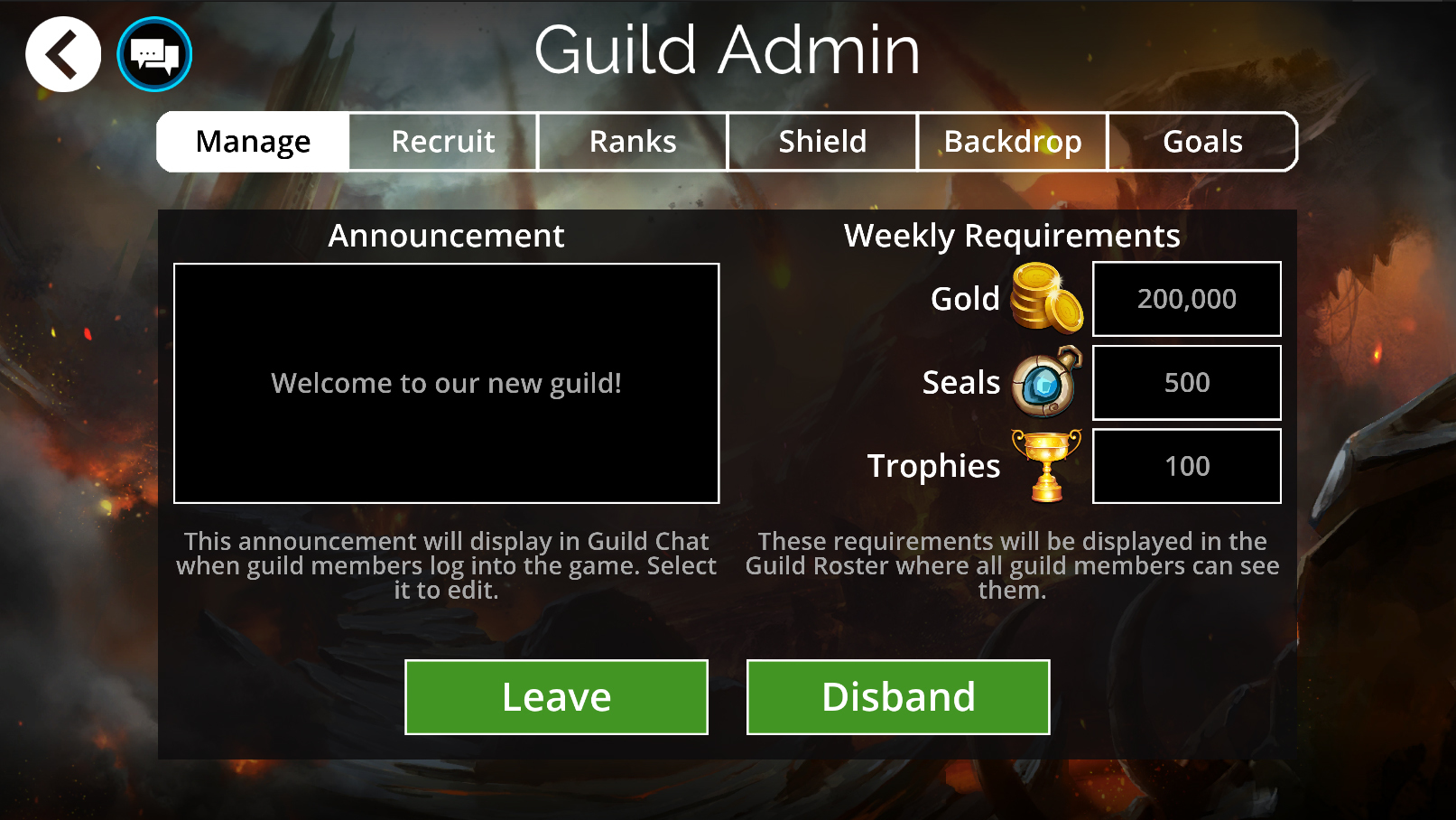
Manage

  • Guild Announcement is still edited and viewable from this screen
  • Rank 2 guild members will still be able to leave from this screen
  • Weekly Requirements can be set from this screen for Gold, Guild Seals and Trophies.
  • Weekly Requirements will be visible to all players on the Guild Roster


Recruit
  • Guild Leaders can set up their own recruitment message (this includes listing out any requirements the guild might have)
  • A new Slider has been added so the guild can set how “casual –> hardcore” they are
  • Guild Requirements, the Recruit message and Slider settings will be displayed for guilds in the Guild Search menu


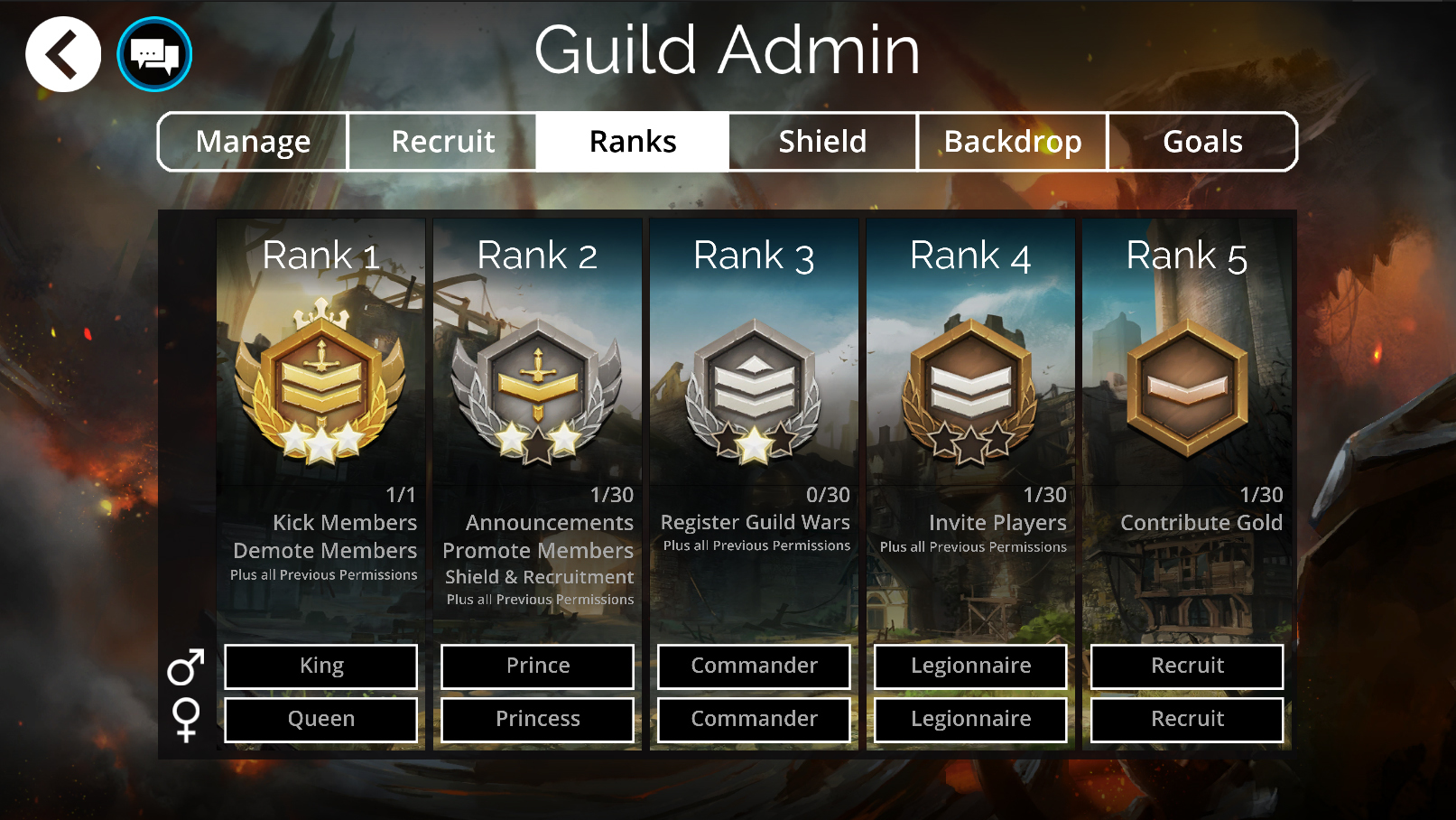
Ranks

  • Guild Leaders are now able to set their own custom Rank names
  • Rank names can now be set separately for both male and female heroes
  • Custom names have a profanity filter to try and avoid inappropriate guild rank names
  • Guild Permissions for each rank will also display on this screen


Backdrop
  • Guild leaders can now change the guild background to any unlocked background image
  • New background images are unlocked as your guild gains trophies


Goals

  • Guilds are now able to set sliders to adjust Guild Task priorities
  • On the Guild Task screen, the task with the highest priority will gain a glow effect indicating to other members that this is the task they should be focusing on first
  • Once the highest priority tasks are completed, the next task(s) will gain the indicator
  • Tasks can share priorities, meaning that 2 or more tasks will gain the indicator on the task screen, and won’t move on to the next priorities until both are completed


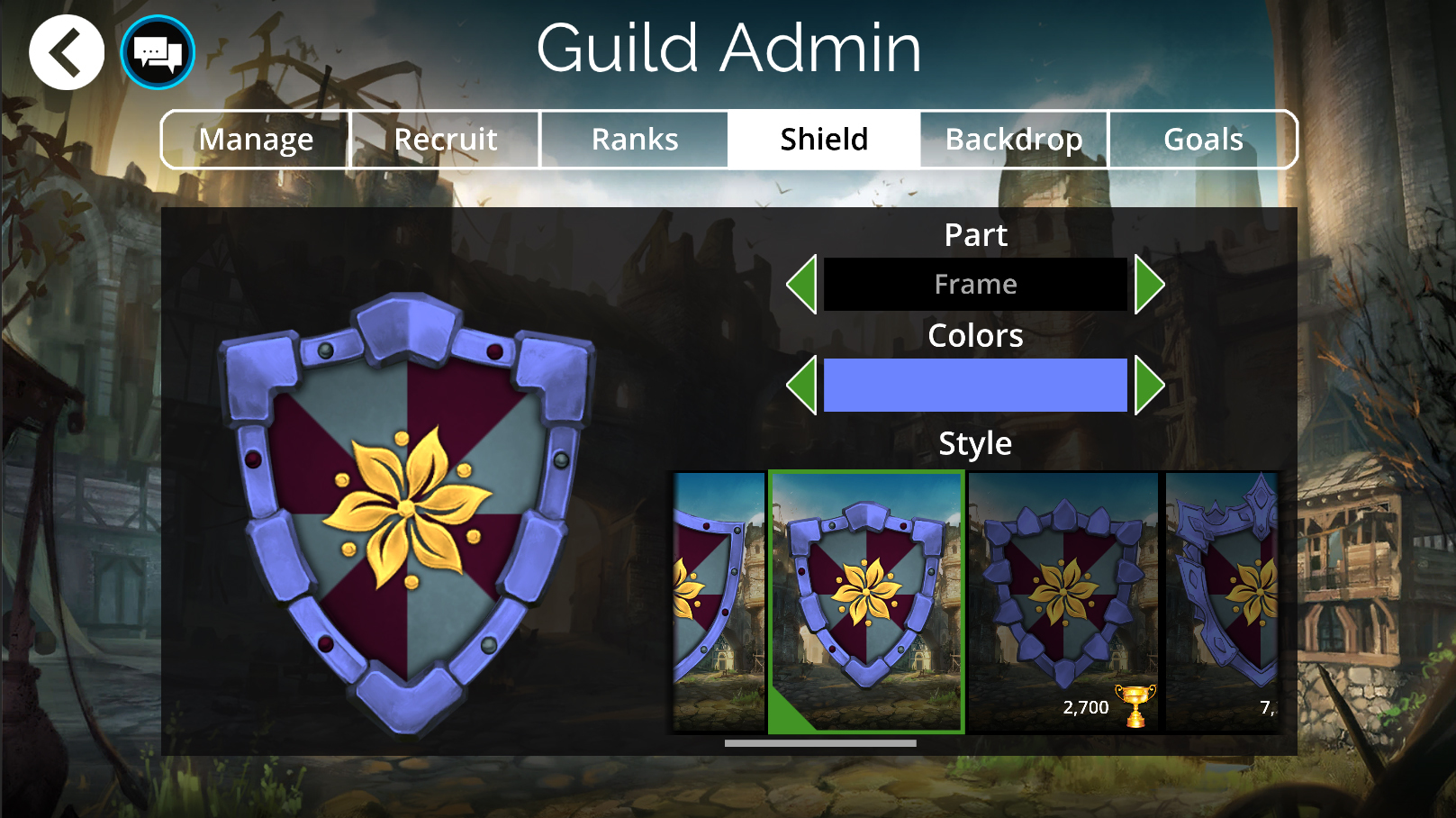
Guild Shields

  • Guild Shields have had a graphic update
  • Guilds can now customize shields further with the additions of Shield Borders and Shield Patterns
  • Some shield parts can only be unlocked by guild achievements including:
    • Trophy Number
    • Guild Level
  • More shield parts will be unlockable in the future, as well as new unlock methods


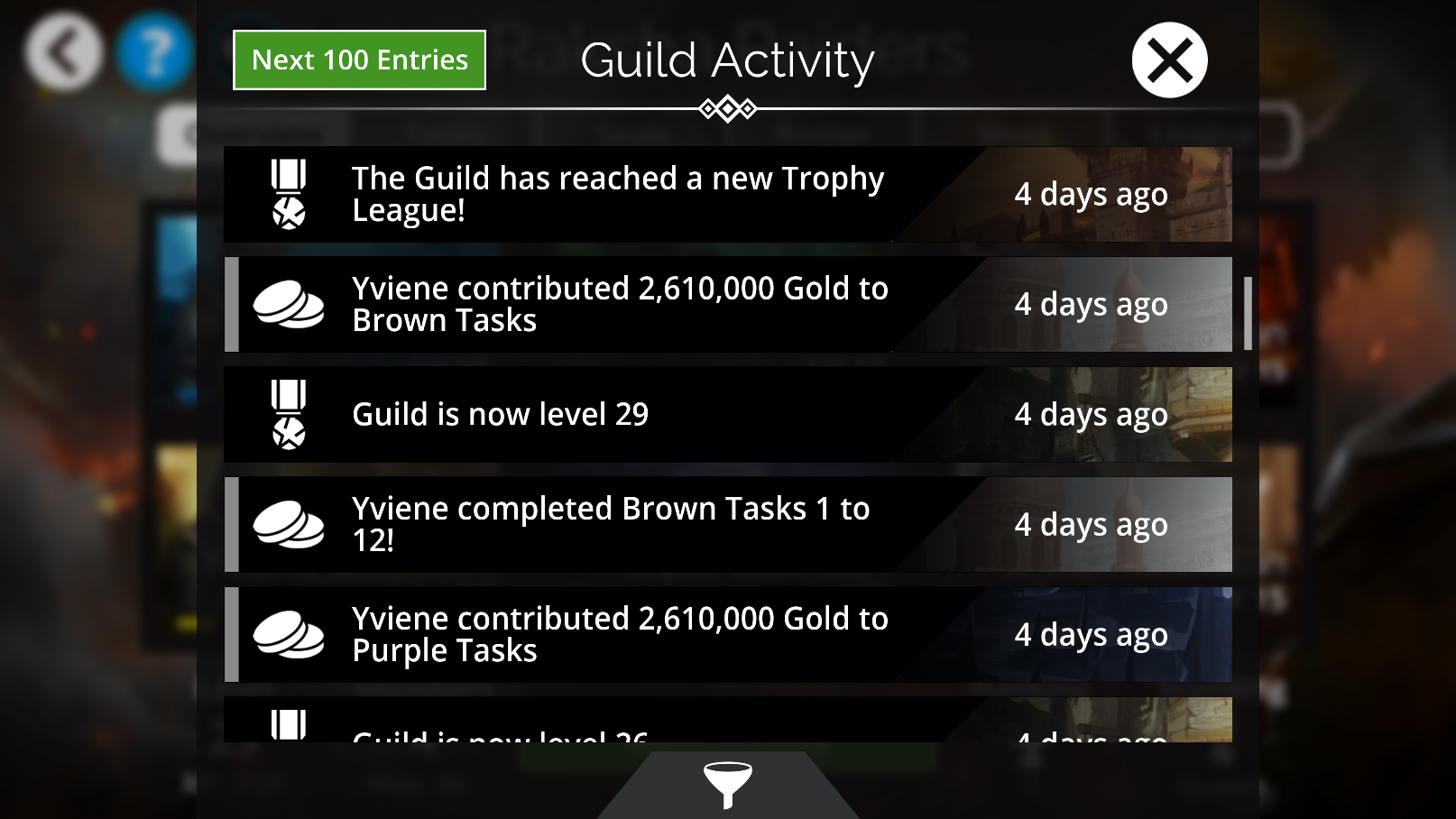
Guild Activity Log

  • The Guild Activity Log has returned and improved (it was removed in 2.0)
  • The Guild Activity Log button is located on the Guild Overview menu
  • The Activity Log will track the following:
    • Players joining or leaving the guild (includes players being kicked)
    • Guild leveling up
    • Gold contributions to tasks
    • Guild promotions or demotions
    • Guild statue level ups
    • Guild Admin changes
    • Guild Chest levels unlocked
    • Tasks Completed
    • Player reaching Tier 1 in PvP
  • The Guild Activity Log is viewable by any guild member
  • The Guild Activity Log is able to be filtered


More Guild Improvements
  • Guild Ranks no longer have limitations on the number of players for each rank (except for Guild Leader/ Rank 1 which is still only 1 player)
  • Guild members will now be marked as inactive on the Roster list if they haven’t played for some time (about 21 Days)
  • Any guild member who is marked as inactive can be kicked from the Guild, this includes inactive Guild Leaders
  • If a player is not Rank 1 or 2 in their guild, the Guild Leave Button will be displayed in the Guild Pop Up (the menu where the guild events are accessed from), instead of the Guild Admin button
  • If a player decides to leave a guild, there is a 2-day cooldown for re-joining that guild
  • Any player kicked from the guild will not be able to re-join that guild again. (This was introduced to stop trolls re-joining guilds they had previously been kicked from)
  • Players can be invited back into a guild without being affected by the guild joining cooldown


Guild Profile

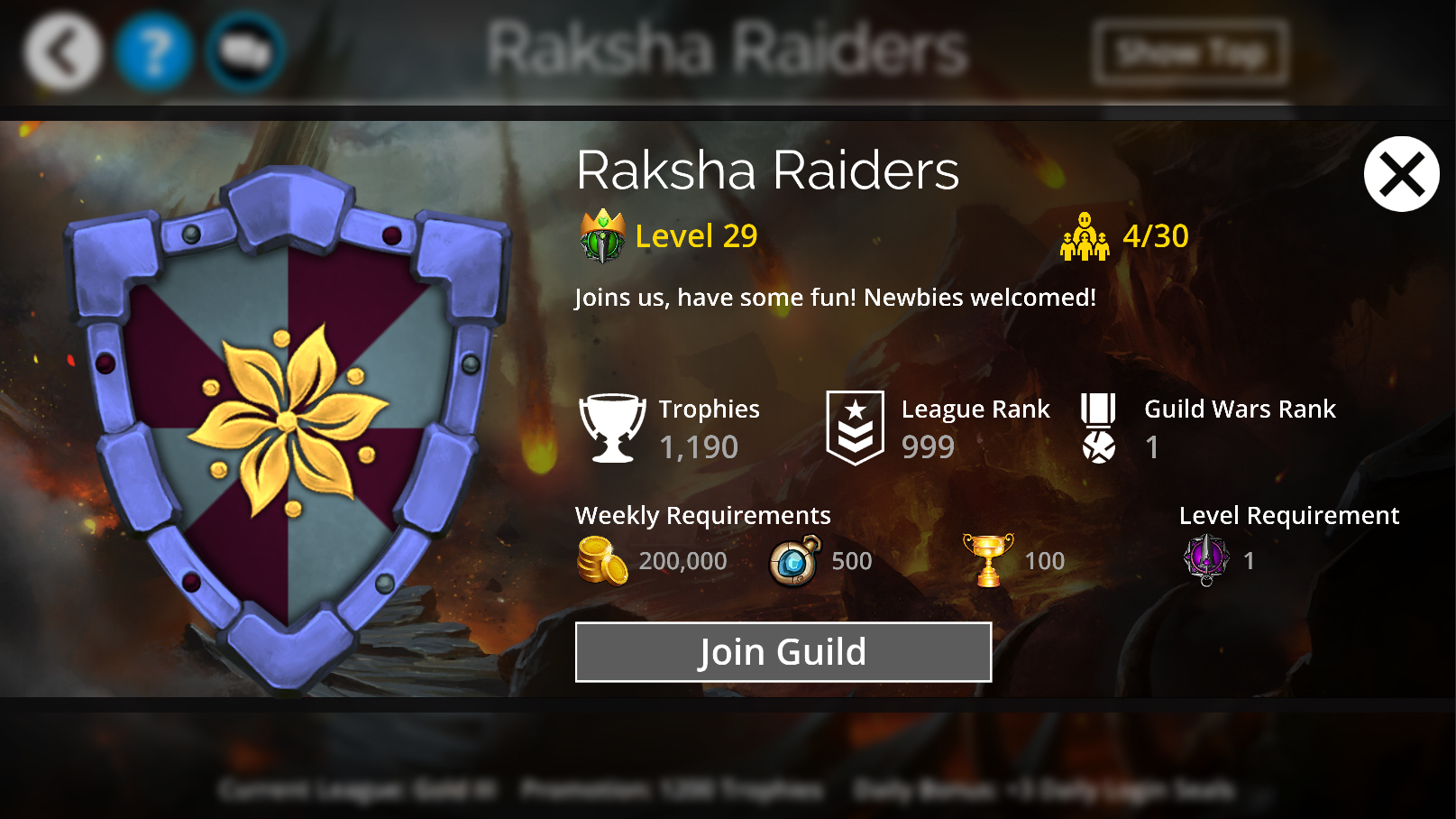
  • Guilds now have a profile that can be viewed
  • The profile will display:
    • Guild Name
    • Guild Level Number
    • Number of Members
    • Guild Trophies
    • League Rank
    • Guild Wars Rank
    • Guild Shield
    • Weekly Requirements for Gold, Guild Seals and Trophies
    • Level Requirement for joining
  • The profile can be viewed from:
    • Guild Leaderboard
    • Hero Profile
    • Guild Event Leaderboards
    • Guild Wars Roster
  • Players can join a guild from the Guild’s Profile Popup, if that Guild doesn’t have “Invite Only” turned on


Hero Profile

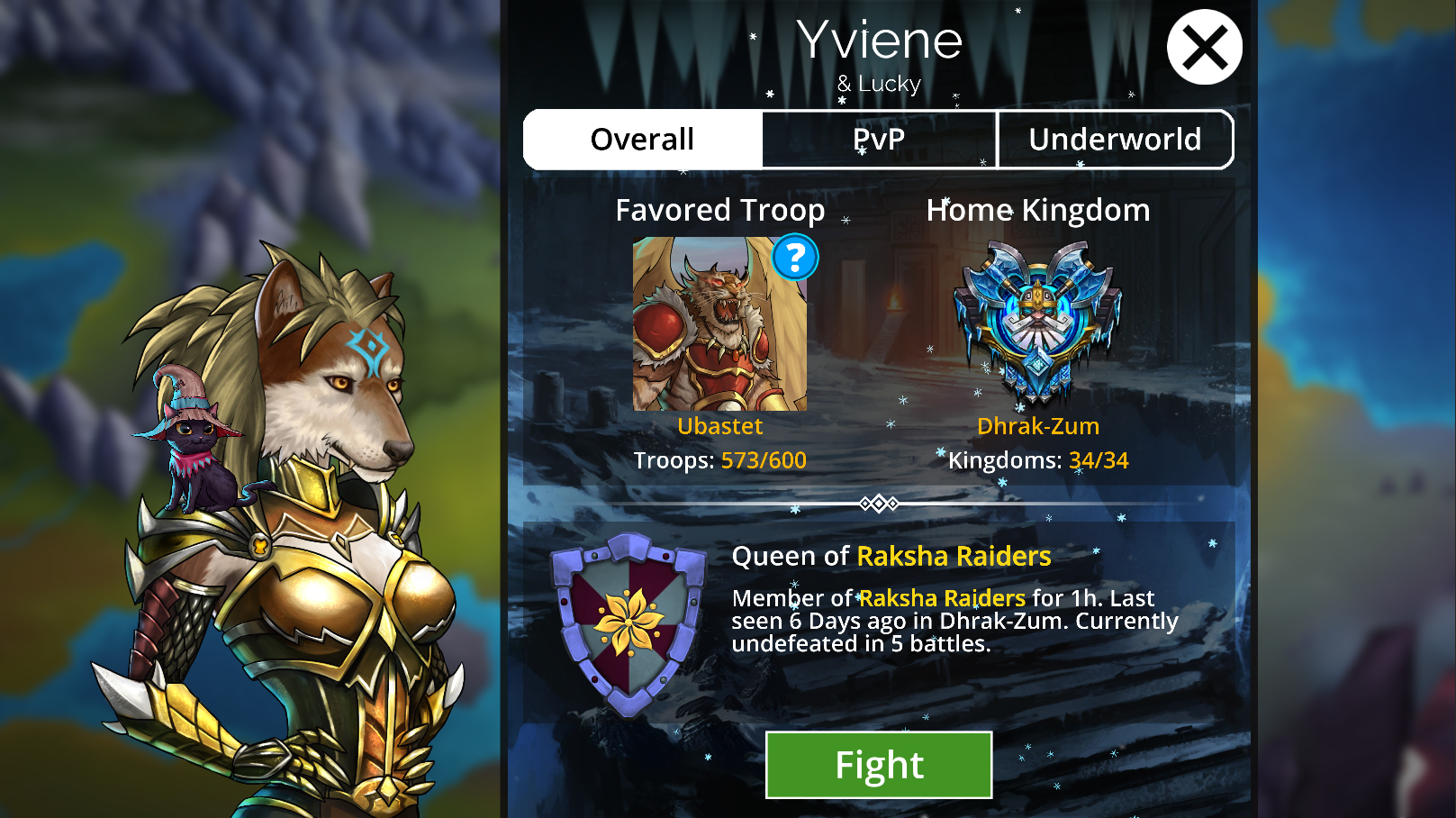
  • Hero Profile has had a graphic update
  • Players can now view more stats on Hero profile including Underworld Progress
  • The pop up will display the player’s home kingdom background and particle effects related to that kingdom


New Status Effects
  • BLESS: This is a positive status effect that grants a temporary Impervious effect, and cancels out the Cursed effect (see below). Bless ends when you cast a spell, or deal damage with skulls as the first troop.
  • CURSED: This is a negative status effect that makes all other status effects (including itself) only half as likely to automatically cleanse. In addition, it makes all affected troops able to be devoured, mana burned, or inflicted with negative status effects even if they would ordinarily be immune. It also cancels the Blessed effect (see above). It can cleanse automatically like most other negative status effects (though at half the rate).
  • BLEED: This is a negative status effect that causes a troop to take damage each turn. It can stack up to 4 times, and each stack increases to damage inflicted. One stack gives 1 damage per turn, 2 Stacks is 3 damage per turn, 3 stacks if 6 damage per turn, and 4 stacks is 10 damage per turn. It can cleanse automatically like most other negative status effects.


New Achievements
We have 3 new achievements.
  • Colonel Muster’d – Unlock 300 Troops
  • The Land Down Under – Unlock 5 Factions
  • People Know Me – Reach 5,000 Total Underworld Renown


Balance Changes Exploder Affixes
We have reviewed the affixes that contained explosions and changed them so they have a similar purpose without interfering with the board and causing players to miss out on extra turns. All changes have been listed below:
  • Crazy – Now gives a random Ally 2 Mana
  • Glacial – Now gives all Blue Allies 2 Mana
  • Elven – Now gives all Green Allies 2 Mana
  • Volcanic – Now gives all Red Allies 2 Mana
  • Angelic – Now gives all Yellow Allies 2 Mana
  • Daemonic – Now gives all Purple Allies 2 Mana
  • Dwarven – Now gives all Brown Allies 2 Mana
  • Deadly – Now gives all Allies 2 Mana
  • Doomed Storm – Now drains 2 Mana from 2 random Enemies
  • Doomed Ice – Now drains 2 Mana from Blue Enemies
  • Doomed Nature – Now drains 2 Mana from Green Enemies
  • Doomed Fire – Now drains 2 Mana from Red Enemies
  • Doomed Light – Now drains 2 Mana from Yellow Enemies
  • Doomed Darkness – Now drains 2 Mana from Purple Enemies
  • Doomed Stone – Now drains 2 Mana from Brown Enemies
  • Doomed Bone – Now drains 2 Mana from all Enemies
  • Doomed Grave – Now drains 3 Mana from all Enemies


Winter Imp
  • Legendary Trait, Chill now gives 8 Magic instead of 1
  • Spell now freezes all remaining enemies, if an enemy dies (instead of gaining magic)
  • Base spell damage increase from 3 to 4
  • Boost ratio increased from 2:1 to x2
  • Now also gains Magic at levels 14, 16, 17, 19


Summer Imp
  • Legendary Trait, Sunshine now gives 8 Magic instead of 1


Spring Imp
  • Legendary Trait, Seedling now gives 8 Magic instead of 1


Autumnal Imp
  • Legendary Trait, Fall now gives 8 Magic instead of 1


Imp of Love
  • Legendary Trait, Compassion now gives 8 Magic instead of 1


Spooky Imp
  • Legendary Trait, Boo now gives 8 Magic instead of 4


Trait Name Changes
With the introduction of the Blessed + Cursed status effects, the previous traits that shared this name have been renamed:
  • Blessed trait has been changed to Revered
  • Cursed trait has been changed to Accursed


General
  • Added an ‘Ascend All’ button in the troop upgrade menu
    • Players get notified about it at level 100
    • It will ascend troops to their highest available rarity
    • If multiple troops are in use in a team it will only perform the ascension if it can do so without invalidating those teams
  • While a Storm is active in the puzzle game, clicking the Left Stick on a controller or tapping on the Storm’s Gem will display a help window giving more information about what the Storm does
  • Additional Alerts have been added for various events that occur
  • Alerts are now possible to enable in your web browser (Windows and Android based browsers)
  • Improvements have been made to our asset servers, which should see significant increases in download speed when assets are downloaded or updated
  • A new Gnome, the Jewel Gnome, can now be found in PVP and Explore battles


Bug Fixes
  • Fixed the issue causing lag when in the Troop Collection Menu
  • Fixed the issue where defeating the Cedric Hideaway room was not applying its Delve Trait correctly
  • Fixed an issue where Spectral Knight’s spell was not dealing damage correctly
  • Fixed an issue where enemy Heroes were being transformed in level 0 Baby Dragons
  • Fixed an issue where summoned troops on AI Teams in Live events didn’t have traits
  • Fixed an issue where the Ingot/Affix tutorial was triggering for Doomed Weapons
  • Fixed a visual issue with Legendary Tasks displaying Gold instead of possible Troops, Keys, and other rewards
  • Other minor bug fixes and improvements


Known Issues
  • Hero level is not displayed on the new Hero Profile
  • Help button on Alerts tab in Settings menu does not function on Steam/Mobile.


Help Center Articles
We’ve updated and added in new article on our Help center for the 4.2 Update: