1. Zero-K
  2. News

Zero-K News

Zero-K v1.8.10.0 - Eight New Maps and MM Rotation

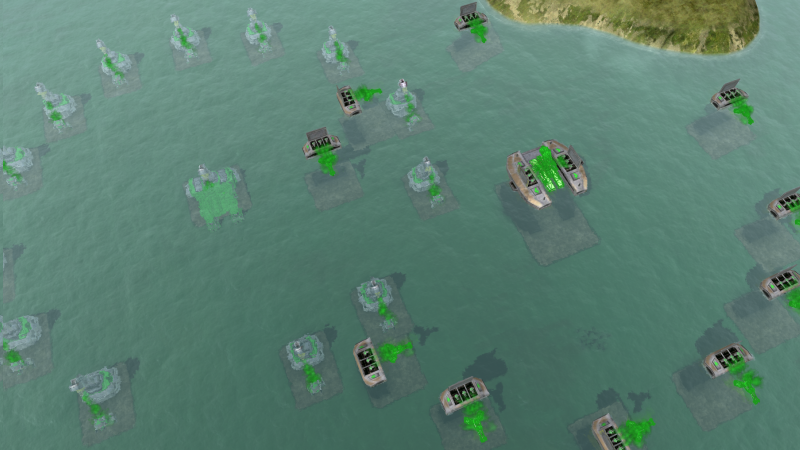
Aquanim and Dregs (two map creators in the community) have put together a mammoth effort and released eight new maps. Dregs made six maps and supplied the image below.


Aquanim made Anvilwood and Cobalt Dream, shown below. More information can be found in the map release thread.


These maps form the basis of a major matchmaker rotation, but are also suitable for coop, small teams, and possibly even arena-style large games. As always, the update includes a few fixes and UI features, the most fitting of which is improved explosion scars that look good on a wider range of terrain types. Additionally, an experimental new AI version is ready to be tested and mod support was improved.

Matchmaker Pool


New maps:
These maps were added or re-added last month:
The following maps remain in the map pool:
You might be worried to see a few classics missing from this list; don't worry, they're just taking a bit of a break and will be back later.

Notable Fixes
  • Updated the Myanmar flag.
  • Fixed downloading mods that are uploaded via the map upload page.
  • Fixed coop saves being able to override singleplayer saves.
  • Fixed a bug that caused raiders to be baited early when temporarily fleeing.
  • Applied more stringent checks for shader support, in an attempt to track down the integrated GPU UI disappearing bug (even though integrated graphics is technically not supported).
Other Changes
  • Added a dvorak keyboard grid option.
  • Added an experimental new version of the AI. It can be selected separately and is called 'AI: Bleeding edge test'.
  • Added a bindable button for a quick level terraform command that uses the height of the clicked location. The hotkey can be set in Hotkeys/Construction/Level.
  • Improved the build spacing UI, fixed the build spacing hotkeys in pregame placement, and added more options for displaying build spacing.
  • Improved the visuals of explosion scars, mostly by removing the brown circle around the edges of the crater, to make them fit a wider range of maps.
  • Pressing escape while in the main menu and ingame returns you to the game.
  • Surface weapons no longer fire at deep Amphbot Factories.
  • Fixed the default settings for tactical AI under Interface/Unit Behaviour.
  • Fixed a mex visualiser error on maps with no metal spots.
  • Tweaked Badger sound.

Zero-K v1.8.9.4 - Fixes and Amph Utility


Hotfixes don't usually warrant a full set of notes, but this one contains a few things that were being worked on in the meantime and fixes a noticeable idle behaviour bug. We're preparing to take a look at some of the less well-rounded factories, and part of that is making their unique aspects feel better to use. A few improvements to Lobster and Djinn made it into this update. Most notable is Djinn's less restrictive requirement for teleport, which has some interesting implications.
Balance
Lobster affects units in a larger radius.
  • Gather range 112 -> 160
Djinn is more powerful and convenient.
  • Lamp deployment time 9s -> 8s
  • Self deployment time 3.33s -> 1.11s
  • Increased throughput 120 mass/s -> 150 mass/s
  • Teleportation is much less picky about the destination being free of units.
  • Units with subsequent orders exit the Djinn in the appropriate direction.
Fixes
  • Fixed an idle-return bug that affected a few units (eg Halberd and Locust) due to their their lack of more elaborate unit AI.
  • Fixed some situations where drones could gain a target then return because the target is too far away.
  • Fixed terraform on flat plains not updating the map mesh until the camera moves.
  • Fixed the hollow rectangle terraform (hold ctrl+shift+alt) UI not matching the result and added an interior rectangle to the UI.
  • Force unhide default chassis if there are only four commanders to select.
  • Made camera save/recall save the whole state rather than just the position (this was in v1.8.9.3 a few days ago).

Zero-K v1.8.9.1 - Control Cleanup and Idle Improvement


A few tweaks to help new players ballooned into several major efforts aimed at improving the new player experience. As is often the case, I couldn't add a piece of UI without making it extra smart and configurable, so the result is a cleaner and more powerful interface for everyone. Once you see the cleaner command panel you won't want to go back to the full messy version, although you may want to go into the settings to unhide your favourite advanced unit states.

In other news I (GoogleFrog, writing this) have a Patreon. It is new, since the last release, and the aim is to free up a bit more time to support Zero-K.

The map above is a new version of Twin Lakes Park by TheMooseIsLoose.

Idle Behaviour

Idle units now give up and return to their old location if they move too far while chasing enemies (previously they could be baited across the whole map). This can be disabled by setting a unit to Roam. Raiders and riots are also a bit smarter about how they react to enemies while idle.
  • Idle raiders move to stay out of range when approached by riots or most other raiders.
  • Idle riots perform similar behaviour against skirmishers and against riots with greater range.
  • Units that have been pushed back in this manner only move a short distance. When pushed too far they will turn and attack.
While some attempt was made to generate good chase and push distances, there are around 100² unit matchups so the configuration is a little rough. Expect tweaks and improvements in future patches.

Also, drones now return to their host if they stray too far away.

Command Panel

The command panel has a simple mode so as to not overwhelm new players with esoteric commands. I liked it so much that I added configuration options, to give even those that was a few more commands a nice clean panel.
  • Replaced the icons for Repeat, Movestate and Firestate.
  • Command and state position/ordering is now stable and consistent.
  • Simple mode has slightly larger state toggles, large enough to show hotkeys. The old size can be enabled under Settings/HUD Panels/Command Panel (with Simple Settings disabled).
  • Dual-toggle Hold Fire and Hold Position states replace Movestate and Firestate by default. Under the hood they toggle Hold Fire/Fire At Will and Hold Position/Maneuver. The full triple-toggle states can be enabled under Settings/Interface/Commands.
  • Added the hotkey 'H' to toggle movestate.
  • Approximately one third of the states and command are now hidden by default. The visibility of each command or state can be toggled under Settings/Interface/Commands.
  • The position and order of the commands/states cannot be configured ingame. This requires a local configuration file found here.
Camera Controls

Many games have save/recall camera hotkeys, and it is an easy enough widget to write, so there was no reason not to add it.
  • Added bindable camera save/recall position hotkeys, and more control over alerts and transition times. These can be bound under Hotkeys/Camera/Camera Position Hotkeys.
  • Added the option to remove most advanced features from Combo Overhead/Free Camera, which can be enabled and configured under Settings/Camera with Simple Settings disabled. It can now be made to ignore shift, ctrl or alt, and can be permanent set to a particular tilt.
First Game Guide

There is now an interactive ingame guide that appears in your first non-campaign game. It is enabled by default to catch those who might need it. Experienced players can simply disable it with the X, and it can be enabled via Help.

Additional Improvements
  • Added Scalpel to Fencer unit AI.
  • In the lobby, watching a game or playing singleplayer no longer removes you from matchmaking queues.
  • Command queue transparency can be configured in the main menu under Settings -> Game.
  • The main menu settings menu now informs people that most settings only take effect upon entering the next game.
  • Improved metal and energy image extended economy tooltips.
  • Area Mex now queues one Solar with ctrl held, two with alt, and four with ctrl+alt. Previously it would queue four with alt.
  • Missile Silo no longer repeatably fires with repeat enabled. This frees up repeat to be used to loop the build queue. An attack command may be repeated by issuing it with ctrl held.
  • Added an experimental overlay that summarises visible reclaim. It can be enabled with 'Toggle Field Summary' under Settings/Interface/Reclaim Highlight (with Simple Settings disabled).
  • Added selection hotkey settings for Swift, Thunderbird and Athena. They can be set under Hotkeys/Selection.
  • Improved a few tooltips so that they are more descriptive. Move suggests line move. Reclaim/Repair suggests area reclaim/repair.
  • Added more icons for the menu entries.
Fixes
  • Fixed command tooltips defaulting to those set by the engine instead of being overridden.
  • Added startboxes for Supreme Crossing.
  • Fixed terraform height presets being unable to make walls around structures with ctrl held.
  • Terraform structure height no longer lets you try to make land-only structures underwater.
  • Fix factory plate UI on unit transfer within team.
  • Added Construction Plates to the cheat sheet unit spawner.
  • Fixed Merlin firing issues with save/load and improved walk animation.
  • Removed Misc Priority from units with shields that do not drain energy.
  • Optimised the defence range indicator.
  • Optimised the metal spot visualiser.
  • Fixed a performance issue in a piece of code that was meant to be disabled.
  • Fixed a bug with Zenith.
  • Fixed some incorrectly displayed rank icons in the extended player list.
  • Removed Dante lookahead as it seems to interact poorly with multiple weapons.
  • Dual wielding commanders now prefer to aim with their shorter ranged weapon.
  • Fixed a chicken spire error caused by there being no burrows.
  • Fixed a minor bug with AFK sharing.
  • Fixed Gauss localisation.

Zero-K v1.8.9.0 - Aim Lookahead and Plate Fixes


This is a quick patch to fix a few lingering issues with some of the Construction Plates, as well as to fix a few other bugs. The largest change is the application of aim lookahead to most raiders and riots. Units such as Glaive, Scorcher, Dagger, Mace and Redback now turn to aim at their targets before they enter range. The units that had the most to gain from lookahead, such as Kodachi, already had it, except for Archer, which gains lookahead in this patch.
  • Applied lookahead aiming to most remaining raiders and riots.
  • Slightly increased Dirtbag mound so that it blocks bots consistently.
  • Worked around rare Widow misses.
  • Improved and fixed effects for sonic blasters.
  • Fixed Shieldbot Plate yardmap not quite being a rectangle.
  • Fixed Jumpbot Plate icon.
  • Fixed Amphbot Plate underwater placement (the mouse traces were colliding with the sea).
  • Fixed Hovercraft Plate not letting units pass its open areas.
  • Fixed custom HUD panel placement breaking with UI scaling.
  • Blocked NaN command params from widgets.
  • Fixed Crab helptext regarding its armour.

Zero-K v1.8.8.2 - Construction Plates and Archer Rework


Some players like parallel build queues, some want more ways to optimise production, and some just think a base with lots of factories looks cool. All these desires are satisfied in this update with the introduction of construction plates - efficient mini-factories that must be placed near a main factory to function. They can be used in the campaign and teamgames to take advantage of allied tech, while in 1v1 they should make it easier for factories access their heavy units.

The rest of the update focuses on the balance of three areas: Kodachi, Amph, and dense team games. Kodachi has received nerfs to rein in the range bestowed by the fire prediction AI from v1.8.5.0. Archer takes over the role of sea riot from Scallop, with Archer gaining a sonic blaster and Scallop losing torpedo power. Funnelweb, Lance, Gauss and Big Bertha have various nerfs to open up the options in dense team games.

In other news, there is a 1v1 tournament this weekend. Click here for details and post to sign up.

Balance
Construction Plates are parallel build queues that offer an alternate method of increasing production. Hover a factory blueprint within 420 elmos of a factory of the same type to place a construction plate.
  • Cost 150
  • Health 1000 (1500 for Ship)
  • Build Power 10
Scorcher regains some of its damage.
  • DPS increased by 5.6%
Bolas has slightly more range to help it against Kodachi.
  • Range 225 -> 230
Kodachi has a nerf to take fire prediction into account.
  • Cost 170 -> 180
  • Range 230 -> 215
  • Reload Time 0.466s -> 0.5s
  • Moved 13% of on-hit damage to groundburn damage.
  • Projectile Velocity increased by 117% (reduces prediction overshoot).
Welder is more vulnerable to raids.
  • Health 2000 -> 1800
Scallop torpedoes are relegated to sidearm status.
  • Range 260 -> 270 (both weapons)
  • Can fire torpedoes from underwater.
  • Torpedo DPS reduced by 60%
  • Torpedo AoE reduced by 62%
Archer takes on the role of sea riot.
  • Replaced Water Cannon with Sonic Blaster.
  • Can fire into water, must float to fire.
  • Reduced Speed and increased DPS.
Lance is easier to catch.
  • Speed 55.5 -> 52.5
  • Turn Rate reduced by 9.4%
  • Range 1020 -> 1000
Funnelweb takes on a tankyness more appropriate for a constructor.
  • Cost 3000 -> 3500
  • Health 6500 -> 4500
Gauss is worse at tying up artillery.
  • Bunker Regen 20hp/s -> 10hp/s
Big Bertha is less generically powerful in dense team games.
  • Cost 5000 -> 6000
  • Reload 7s -> 8s
  • AoE reduced by 8.3%
  • Projectile speed reduced by 4.5%


Fixes
  • Scouted Caretakers and Strider Hubs no longer radar wobble.
  • Fixed metal reserve erroneously disabling repair.
  • Fix commander speed when walking in formation.
  • Various fixes to shared unit control mode.
  • Disabled shift append to groups by default.
  • Change disambiguation of space+click context menu.
  • Likho is better at avoiding obstructions when aiming.
  • Fix Grizzly float-to-fire AI in some edge-of-range cases.
  • Fixed manual queuing with Auto Reclaim/Heal/Assist widget.
  • Fixed an issue with auto-retreat for planes.
  • Fixed repeated screen resolution changes causing some UI widgets to be lost under the minimap.
  • Fixed zero volume music logic.
  • Fixed rare spectator panels crash.