1. Colony Survival
  2. News

Colony Survival News

Friday Blog 131 - 4K Textures and the Lighting System

'Weltenbäume' by JoeMan

This week, Zun started working on an option to change the texture quality settings. All blocks in Colony Survival have relatively high-resolution textures of 256 by 256 pixel textures, and each surface uses multiple textures: albedo maps, normal maps, height maps, specularity maps, etcetera. Players currently don't have a way to downscale these textures, making the game quite difficult to run on very low-end hardware.

Zun’s solution not only supports textures with lower resolutions, but also textures with higher resolutions than we currently have. Of course, I wanted to test this immediately. I added some 2048x2048 pixel textures. We were torn by the results.
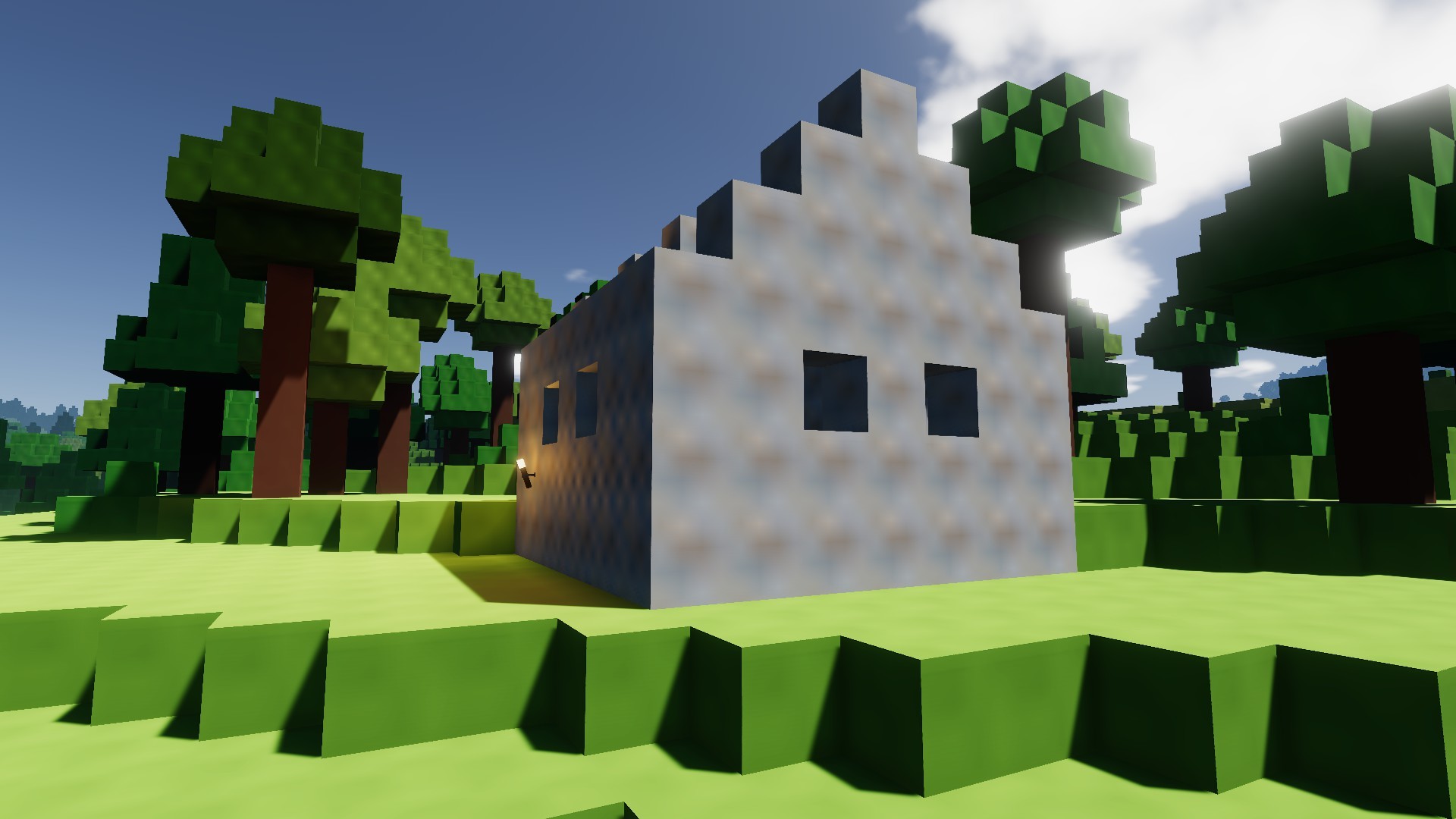
Very, very low texture settings

Of course, the high-res textures look very fancy, detailed and realistic. But simultaneously, they do lead to problems. The world of Colony Survival is fundamentally not detailed and realistic - it consists of blocks the size of a cubic meter. Our lighting isn’t realistic either. Is superrealistic textures where you can see every grain of sand combined with unrealistic big blocks and primitive lighting really the look we want?

To quote Jurassic Park: “[they] were so preoccupied with whether or not they could, they didn’t stop to think if they should”. We don’t want to be like that, so we stopped and thought if we really should upgrade to the highest possible resolution textures. It makes it harder to add new textures. Not all players have hardware that can run them properly. Superrealistic textures downscaled from 2048x2048px to 256x256px look worse than textures designed specifically for that resolution. And last but not least, superrealism is probably not the best style for Colony Survival.

One problem with realistic textures is that they highlight how unrealistic the lighting system is. It basically consists out of two values:
-Direct lighting, for the surfaces of the game that are ‘hit’ by the sun
-Ambient lighting, a darker shade for other surfaces (shadows)


It’s a pretty sensible system, but it ignores a lot of real life complexities. IRL, there is no magical “ambient lighting” that equally lights all surfaces in the shadow. Particles of light bounce across surfaces and the atmosphere, ultimately providing nearly all surfaces with a variable degree of light.

When you’re outside in an open field on a sunny day, most of what you’ll see is hit directly by bright sunlight, and shadows all appear to have roughly the same darkness. This is something that Colony Survival can simulate relatively well, and that’s where the game looks best.

But currently, IRL, I’m not in a sunny open field. I’m sitting indoors on an overcast day. The sunlight is scattered by the clouds, and a diffuse light hits my window. Shadows are vague. Items closer to the window are brighter than objects ‘deeper’ into the room. This is way, way harder to simulate in real time. For those of us who don’t have IRL lighting available nearby, I made a render with some realistic lighting on very primitive shapes:


As you can see, there is no clean divide between “brightly lit surface” and “deep dark shadow”. Both lit surfaces and shadows are a lot brighter on the right than on the left. The entire scene looks pretty realistic, despite the complete lack of textures and the very primitive shapes.

Now, compare this to two screenshots from Colony Survival.


This is a sand dune with pretty big height differences. In real life, the lower parts of the dune would get less sunlight than the highest parts, making them a bit darker and accentuating the height differences. None of that happens in Colony Survival. Everything gets an equal amount of sunlight, which makes this screenshot look flat, boring and unrealistic.


Here's another problem. Once the sun gets to a certain angle, a large part of the world is suddenly thrown into the shadows. Because there's only one value for ambient lighting, it's hard to fix this. If we make the ambient lighting brighter, shadows where you'd realistically expect them would be bright and boring. But if you make shadows properly dark, you'll also have to accept the effect in the screenshot.

Some of these problems are specific to voxel worlds. Luckily, the solution might also be possible solely because we're using a voxel world. Calculating more realistic lighting in a detailed, realistic world is very difficult, because the world is complex: you've got to keep track of millions of light particles bouncing through and around small holes, cracks and crevices. But because our voxel world mainly consists out of pretty large boxes, it's possible to write some clever algorithms that keep track of the surroundings when calculating how bright a surface should be. One of these methods is called floodfill lighting, and Zun is currently experimenting with that.

A complaint we’ve often received is the fact that deep, underground mines are so bright. That’s caused by the fact that we’ve got only one value for ambient lighting. Floodfill lighting should completely fix that issue.

The support for high resolution textures will be added in the next update, so modders will be able to experiment with them. For the 'official' version of the game, we believe better lighting is more important and practical than 2K/4K textures. We hope to be able to share the results of our experiments soon!

Bedankt voor het lezen :D

Reddit // Twitter // YouTube // Website // Discord

Friday Blog 130 - One Week of Workshop

'Weltenbäume' by JoeMan

The Colony Survival Steam Workshop has been available for one full week now! It has already proven highly useful. The most popular mod is Pandaros’ Settlers Mod, which has received over two thousand subscribers. In total, there are now more than two dozen different mods available.

Apart from the mods, it’s also possible to share worlds via the Workshop. Only 7 have been uploaded yet, but they’re very impressive. This blog uses screenshots from JoeMan’s Weltenbäume savegame, which contains three huge custom trees that contain all the requirements for starting a colony, like ores and water. But the Workshop also contains Pathros by PatateNouille, the castle visible in the background of the main menu. Last but not least, there is an insane world uploaded by Bog, which contains a colony with 50,000 colonists. Zun has regularly used that world to test performance optimizations :)


Technically, the release of 0.7.1 was the release of 0.7.1.7. We’re now at 0.7.1.10. In the weekend, we were on standby and continuously monitoring reactions to see if there were any significant problems that required a hotfix. There were, so Zun released 0.7.1.8 on Sunday.

To compensate for the busy weekend, we mostly took Monday off. Wednesday we released a bigger patch with a bunch of small changes. Co-op worlds started from a workshop were marked wrong, and that’s fixed now. Translations were updated, a problem that caused freezing was solved, just like another problem that caused some glitching terrain.

Yesterday, 0.7.1.10 was released, which should fix a problem with mods on Ubuntu, and which refactors torch lighting a bit. It shouldn’t make a visible difference, but if it does, please notify us!

0.7.1 did exactly what the plan published a couple of months ago promised. We've discussed our future plans some more, but our 'mental roadmap' hasn't changed significantly, so the linked blog is still accurate and relevant. The plans can still change though, so if you really like/dislike a certain feature in the list, let us know your opinion! And if you want your world to be featured in a future Friday Blog, upload it to the Steam Workshop :)

Bedankt voor het lezen!

Reddit // Twitter // YouTube // Website // Discord

Friday Blog 129 - 0.7.1, the Steam Workshop Update, is now live!

New items in mods made by Boneidle

The update should be available for everybody right now! The biggest new change is Steam Workshop support. This should make it a lot easier to find, install and update mods and texture packs. It's also possible to upload your savegames to the Workshop!

Straight to the Workshop

Modders have had access to the Workshop for a week now, and they've rapidly filled it with all kinds of new features and items. Some of these mods have literally been worked on for multiple years, like for example the Settlers Mod. There are many mods that add collections of new items. They add things like doors, windows, spiral stairs, new lights, furniture and a long list of other stuff to the game. There's a "Schematic Builder" available, which allows your colonists to build custom blueprints like cathedrals and castles. There are also mods with grief protection and other new multiplayer features. There's plenty of other stuff available, and the list is constantly growing!

Functional monorail and manapipes in the Settlers Mod by Pandaros

For reasons explained in last week's blog, Workshop-savegames work a bit different than regular ones. Instead of appearing in your regular list of savegames, they're available to choose from when you start a new world. This feature was added literally today, so there's not much choice on the Steam Workshop yet. We hope you'll help us change that! We'll regularly check the worlds on the Workshop, and feature them in Friday Blogs and trailers.

More from the Settlers Mod

But Workshop support is not the only change - it's part of a larger overhaul of our mod support. In the past, mods affected the entire game. You had to make sure you did not have conflicting mods, and if you wanted to switch to another mod or vanilla, you had to go to the game files and manually adjust them. It wasn't very user friendly.

In 0.7.1, mods don't affect your worlds until you explicitly tell them to. This means you can switch from a vanilla-world to a world with mods by Boneidle to a world with mods by Pandaros to a world with mods by Kenovis, without ever having to exit the game or fiddle around with folders. That should make it a lot easier to experiment with mods!

In the coming weeks and months, more mods should appear on the Workshop, and we can't wait to see all the worlds you've been working on appear there. We're going to see how the Workshop gets used in the coming period, and finetune things based on that. We're planning to add customizable settings to the mod selection menu, which we want to use for a standard terrain generation settings mod, allowing people to easily change the scale and shape of the world.

When you've tried the Workshop and the new features, please let us know your opinion! What's working well, what isn't? Which mods are your favorite? Nearly all modders have joined Colony Survival's Discord, so that's a way to reach them if you want to praise their mods and give feedback :)

Bedankt voor het lezen en veel plezier!

Straight to the Workshop

Reddit // Twitter // YouTube // Website // Discord

Friday Blog 128 - Time for Modders, Linux Problems and Custom Scenarios


We were planning to release 0.7.1 today, but at the last moment, decided not to. Mod creators have now had ~24 hours to upload their mods to Colony Survival's Steam Workshop, but that didn't give them a lot of time. More mods are expected to be added in the weekend.

Another problem is the fact that the Linux version of the game seems to be broken. Non-Latin fonts cause some issues and are in need of an alternative, and there's a big problem with loading .ogg audio files.

There's also a last feature Zun wants to add before releasing 0.7.1: savegames/scenarios. We'd love to allow people to easily promote and share their most beautiful colonies. We've seen a lot of highly impressive ones. But doing that via the Steam Workshop is slightly problematic.

The Workshop allows creators to update their assets even after they've been downloaded. That makes sense for texture packs, new items and other utilities. But imagine using a world from the Workshop, working on it for dozens of hours, and then losing your progress completely because the creator updated his savegame. That's obviously not ideal.

So we've got to make some kind of system where you can choose "scenarios", custom maps, when you start a new world. If the creator of the savegame decides to update it, it only affects new maps.

We've already seen players make maps that are meant to be played as "scenarios" / challenge maps, with for example a huge tree that contains ores and all the necessities to run a relatively large colony high in the sky. So that's the solution we've chosen, and Zun is working on it now. He expects to have it finished in a couple of days, and that's when we want to release 0.7.1 - combined with a Steam Workshop filled with a lot more content than it currently has!

Bedankt voor het lezen :D

Reddit // Twitter // YouTube // Website // Discord

Friday Blog 127 - Steam Workshop Live but still Private

The flat world, created by a testmod that will probably be available as a default

This week, we created our very own Steam Workshop page! Screenshot available below. It's only available internally, but it's relatively functional. Integration of the Workshop was slightly easier than expected. A lot of the required settings can be adjusted in default Steam Workshop menus, so we don't need to develop our own UI for them. In our private testbuild, it's now possible to upload mods to Steam Workshop from Colony Survival, and we can also download them into the game again. And of course, another important new functionality is the fact that it's now possible to select only specific mods to use in a world, making it a lot easier to regularly play both modded and unmodded worlds, and to experiment with combining multiple mods.

We've received multiple reports of people who missed the flatness of 0.6.3 worlds. As a result, Zun's testmod is an adjustment of the world generation, resulting in a nearly entirely flat world. We might make this option available as a default mod. For 0.7.2, we'd like to make extra settings available to modders, which will allow us to upgrade the flat-world mod into a full terrain generation customizer.

A release date of Friday next week is a definitive possibility. The Monday afterwards is another option (December 1) or the following Friday. This will give modders the possibility to configure their Workshop pages in time for Christmas :)


To make myself more useful for updates that rely mainly on programming/Unity skills instead of new textures and objects, I've continued to 'level' these skills and I really do feel like I'm making progress. I got quite a lot of encouragement as a result of last week's blog so thanks a lot :D

My little project is far from perfect or complete but I'd like to share some GIFs again:

I did run into some persistent shadow issues that we haven't been able to figure out this week. They're most obvious in the last GIF. If anybody knows a solution, I'd love to know!

Finally, the Half-Life Alyx trailer released this week! Here is the video:

https://www.youtube.com/watch?v=O2W0N3uKXmo
It looks like a revolutionairy and impressive experience. The way you can use your hands to grab and manipulate objects and to shoot looks very intuitive. There's one problem that makes us hesitant in regards to VR.

In VR, you can do some limited moving around by physically walking through your room. But my room is a bit smaller than for example Los Santos in GTAV, or the pretty much infinite world of Colony Survival. Which would require you to still use buttons/joysticks to move around, but that might be jarring in VR.

Nearly all of the gameplay scenes in the trailer are stationairy, or at least confined to an area of a couple of square meters. There is no walking through long streets, no climbing stairs, no running through corridors. And in most games, such activities are essential. That might be a coincedence, but it might also indicate that movement is still problematic.

So that makes us feel uncertain about the future of VR.
Perhaps the issue is fixed, and VR becomes as essential to gaming as the mouse, or as color is for movies.
Perhaps VR will create entirely new genres of games, causing regular gaming and VR gaming to coexist for a long time, like flight simulator games that require flightsticks.
Or last and least, VR is mostly a gimmick that will decline in the future, like 3D movies or the Kinect. We'll see! We'd love to have your opinion.

Bedankt voor het lezen :D

Reddit // Twitter // YouTube // Website // Discord