1. Borderless Gaming
  2. News

Borderless Gaming News

The New Borderless Gaming Feature Request & Feedback Portal

Announcing the New Borderless Gaming Feature Request & Feedback Portal


I'm excited to introduce a brand new way for the Borderless Gaming community to share their ideas, suggestions, vote on new features, and share feedback directly with me, the developer. The Borderless Gaming Feature Request & Feedback Portal is now live and available for users who have purchased Buy Borderless Gaming - Donation #1

Prioritizing Early Supporters

While I plan to eventually open up the portal to all paid owners of Borderless Gaming, I'm initially focusing on gathering feedback from the early supporters and most engaged users. These are the individuals who have consistently demonstrated their commitment to the project and have a vested interest in shaping its future direction.

I aim to ensure that the features and improvements I prioritize align with the needs and preferences of the most supportive community members.

How to Access the Portal

If you've purchased Borderless Gaming - Donation #1, you can jump right over to the new website borderlessgam.ing.

Note on Borderless Gaming Github Issues

While Github issues will still be checked for bug reports (which will get fixed regardless), any suggestions for features posted there will be a lower priority than the ones submitted through this dedicated Feature Request & Feedback Portal.

Open Source and Cost-Effective for All

The underlying technology powering this new portal is open source, and I've made the codebase publicly available for anyone to inspect, contribute to, or even self-host. I believe in transparency and collaboration, and by making the codebase open source, I hope to foster a collaborative environment where community members can actively participate in the development process.

Furthermore, I've designed this solution to be cost-effective, allowing other small developers on Steam to host their own user feedback systems without spending $50-$100 per month on similar services. This project will evolve over time, offering greater functionality and deeper integrations with Steam, all while remaining free to self-host for whoever wishes to do so.

You can find the source code here.

Go check out the new portal at https://borderlessgam.ing

I'm excited to hear your ideas and suggestions, and I can't wait to see how the Borderless Gaming community will help shape the future of the project.

Thank you for your continued support!
Borderless Gaming - Dark Mode Now Available

Optional Dark Mode DLC Now Available!


I'm excited to announce that an optional dark mode DLC is now available for Borderless Gaming.

With the release of v10 a few weeks ago, Borderless Gaming's internals were rewritten to improve stability, increase performance, and bring much-needed improvements to its interaction with Windows 11. I'm currently working on v11, which includes a complete UI rewrite to move away from the legacy framework I originally built nearly a decade ago. This rewrite aims to make Borderless Gaming cross-platform, sleeker, and improve the overall user experience.

To support the ongoing development and fund the work required for these significant improvements, I've released dark mode as an optional DLC. This DLC is intended to replace the previous "Donation DLC" and provides a way for the community to directly contribute to Borderless Gaming's continued development.

[h2]Why charge for dark mode?[/h2]

As the sole maintainer of Borderless Gaming, I rely on the community's support through purchases on Steam to continue dedicating time and resources to the project. I want to assure you that I would never paywall core functionality. Dark mode is a purely cosmetic addition that has not previously existed in Borderless Gaming and is not required to use the software or any of its features. By offering it as an optional DLC, it serves as a clear way for users to show their ongoing support for the project's longevity.

[h2]Regarding the achievement[/h2]

This DLC adds one new achievement. For those who are "achievement hunters" and prefer not to pay for unlocking achievements, you can still unlock it without purchasing the DLC by pressing "Win" + "F7" while Borderless Gaming is focused.

[h2]Why not increase the base app price?[/h2]

Borderless Gaming offers everything you need out of the box. Raising the base price would make the Steam version and its powerful features inaccessible to many people. By offering optional DLC, those who can afford to support the project further can do so, while ensuring the base app remains affordable for everyone.

[h2]Upcoming features in v11[/h2]

v11 will bring exciting new features, including integer scaling, custom frames, a modern UI, plugins, and much more. Your support through the dark mode DLC will directly contribute to the development of these features.

I understand that some people may have strong opinions on this approach. I want to remind everyone that Borderless Gaming is freeware, and you can find the full source code, including dark mode, on GitHub and use it without paying. By purchasing the dark mode DLC on Steam, you're funding the development of crucial new features, and if you don't want to purchase dark mode, you'll still have full access to any new features added thanks to the support and backing of the community.

As always, I'm open to your feedback and appreciate your continued support.

Click here to purchase dark mode.

Update Notes for Borderless Gaming v10

We're thrilled to announce the official release of Borderless Gaming v10 as of today! A huge shoutout to everyone who participated in testing the release candidate. Your support has been invaluable.

What's New?
In this update, you might notice minimal visual changes. That's because the focus was on enhancing performance and stability from the inside out. Key improvements include:
- Elimination of the .NET Framework dependency for a smoother experience.
- Significant reductions in crashes and stability issues for more reliable gameplay.
- Full compatibility with the latest Windows 11, ensuring everyone can enjoy their favorite games without boundaries.

Migrating Your Settings

Noticed your settings or favorites were reset? No worries! Here's a quick guide to migrate your favorites to v10 seamlessly:
1. Completely exit Borderless Gaming.
2. In your Steam library, right-click on "Borderless Gaming" and select Properties -> Local Files -> Browse.
3. In the installation folder, double-click "bgm.exe" to automatically transfer your favorites.

Need Help?

Encountering issues or have suggestions for our next update? We're all ears!
- Report issues directly on our GitHub page.
- Share your feedback or suggestions for future releases. We're already working on some exciting visual updates for the next version, so stay tuned!

Thank you for being a part of our journey.

Borderless Gaming 10.0 - Preview

Kept you Waiting, huh?

I'm excited to announce that after a significant hiatus, I'm back with a new update! The Borderless Gaming 10.0 prerelease isn't just about adding new features - it's about stepping into the future. I've ported the entire project from the .NET Framework, which it was initially built on, to the streamlined, efficient .NET 8.

The significant changes you'll find in this release include:

- Updated Tech: The transition to .NET 8 ensures the software continues to run seamlessly on modern systems, giving Borderless Gaming a solid foundation for future enhancements and features.

- Improved Stability: I've focused on fixing various stability issues that have occasionally impacted users in the past, ensuring a smoother, more consistent gaming experience.

- Standalone Executable: No more dependencies! Borderless Gaming now operates as a standalone executable.

But this is just the beginning! I have plans for more features and improvements in the pipeline, including expanding Borderless Gaming to support macOS and Linux. This has been a long-requested feature and I'm delighted to be working towards making it a reality.

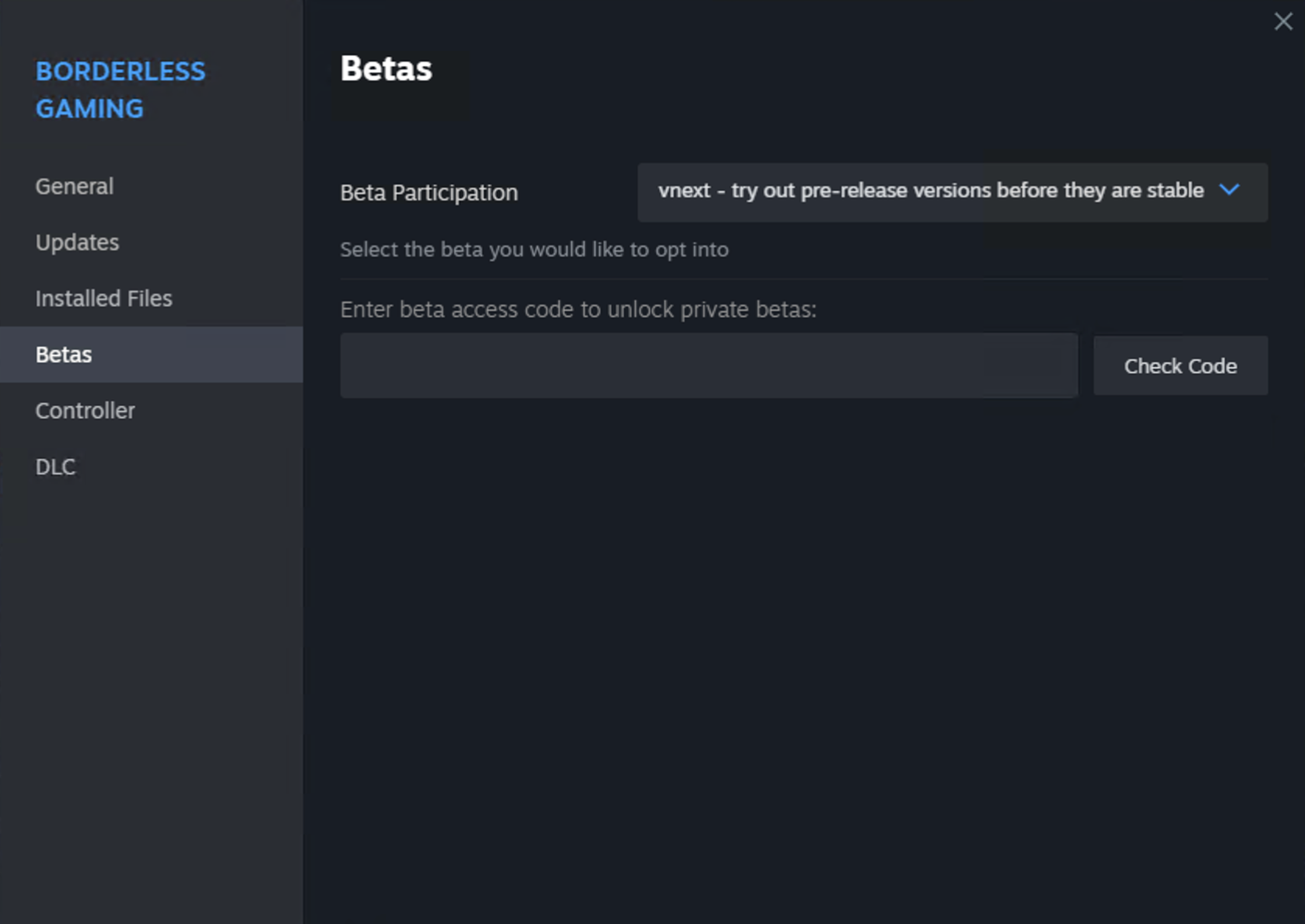
Please feel free to test out this prerelease and share your valuable feedback. Your input will be instrumental in shaping the future of Borderless Gaming. To try out the prerelease on Steam, opt-in to the beta:


And don't forget to share your feedback and request on the community hub: https://steamcommunity.com/app/388080/discussions/0/5264192561403132687/

Thank you for your continued support and happy gaming!

Borderless Gaming 9.5.6

Hi all,

Update 9.5.6 fixes a crashing bug happening to people on certain versions of Windows which are suffering from a Windows 10 glitch.

The update also fixes boot on start for laptops, introduces Portuguese, Japanese and Italian localization, and fixes the German one.

There are a handful of other misc bug fixes. I hope you enjoy the update.

If you'd like, you can check out my new project Rainway which allows you to launch all your PC games from one place on your home computer or through any browser, and it's completely free.

https://rainway.com/