1. Factorio
  2. News

Factorio News

Version 0.18.27 released

This is update contains large amount of potentially mod breaking changes. If you play heavily modded game, you may want to select 0.18.26 beta branch explicitly for couple of days until your mods get updated. We apologize for your inconvenience.

Graphics


  • New high resolution icons for all items.
  • New sprites for some equipment grid items.
Gui


  • Logistic chests have a different layout.
  • Visual improvements to the equipment grid.
  • Minor visual improvements to most of the game GUIs.
  • Minor layout changes to GUI of Combinators, Programmable speaker, Circuit and logistic connection windows, Rocket silo.
  • Added a close button to most game windows.
Sounds


  • New sounds for GUI interactions.
  • New sounds for game interactions, such as pipette, rotate entity, build ghost, mine ghost, switching gun.
  • Updating working sounds for many entities, such as substation, roboport, combinator.
  • New working sound for rocket silo.
  • New sound for night vision equipment, discharge defense equipment.
  • New tile build sounds for landfill, concrete, stone bricks and refined concrete.
Changes


  • Increased logistic filter count for requester and buffer chests from 12 to 30.
Scripting


  • Changed script.raise_event() to only allow mod-created events and specific game events.
  • Changed script.raise_event() to validate all required fields are provided for the given event being raised.
  • Added event filters for script raised revive, destroy, and created events.
  • Changed event erroring so errors during raise_event are properly blamed on the mod erroring.
  • Changed raise_event ordering to match standard event ordering.
  • All game events that support filters now filter correctly regardless of how they're raised (raise_event or actual game event).


You can get experimental releases by selecting the '0.18.x' beta branch under Factorio's properties in Steam.

Friday Facts #348 - The final GUI update

Read this post on our website.

It's been over 4 years since we planned the infamous GUI update. If all goes well, next week the game will get the last big GUI update for 1.0. While the state of the GUI is not close to our crazy plans we recently had for the GUI, it's above what we initially planned 4 years ago.

The update you will see next week includes:
  • A visual update to over 100 game GUIs
  • New high resolution icons for all game items (visible both in GUI and in the world)
  • New GUI sounds for most interactions


High resolution icons (V453000)


[h3]The plans[/h3]

A bit more than a year ago Albert had posted twice (FFF-290 and FFF-291) about our thoughts, experiments, and plans of creating high resolution icons.

Factorio has a ridiculous amount of items and things that need icons, which by itself means it’s a lot of work to redo them. I did not work on the new icons non-stop for a year as there were other more pressing tasks to be done sometimes, but they still took a large amount of time to make.

As Albert mentioned earlier, we also wanted to create multiple mipmaps per icon to control scaling better than letting the engine rescale icons by crazy amounts, but it could multiply the amount of required images to astronomic numbers...

[h3]The process[/h3]

Since we were very well aware of the amount of work that the icons would require, we tried to set up an efficient workflow first, and it paid off big time.


A rather simple Blender startup scene to standardize output paths and basic starting settings was a good start, but the part that saved my sanity was a python script which automatically creates mipmaps from given input images, and downscales images from nearest available higher resolution if an input is missing. And automatically puts the mipmap into the game, assuming the file names are correct.


This is huge because it means I could create the highest resolution image first and immediately put it in the game, and see if conceptually the icon is working.Once I would consider the highest resolution good enough, I could just downscale each of the resolutions manually in Photoshop and paint the extra necessary edits they would require.


The best part is that the mipmaps were not really extra work, they were actually a lifesaver. Creating a high resolution icon that is trying to be readable, look good, represent what it should and do all of it in any scaling level, can make iteration really difficult, as by changing a pixel in the image can introduce problems in completely unknown zoom levels.

It feels rewarding for "trying to do things right" when a solution that we initially thought is more proper looking but potentially more work, is actually more proper looking and less work in the end.


[h3]The result[/h3]


Some icons have been around for years and the entities they represented have changed, but the icons have not. Because of this and many other reasons, some icons will take some getting used to as they look different now. As a benefit of working on the icons on and off for more than a year, I also got to play the game with them over the year and I have gotten used to them already.

Click to view full resolution

Since we have updated our GUI to draw in high resolution with GUI scales like 200%, the item icons suddenly have too low resolution, so we needed to update the icons. That’s what I was thinking at first, but as I started seeing high resolution icons in the game (on belts, assembling machines, cargo wagons, in the map markers, and everywhere else...) I realized how much impact the new icons actually have.

Please do try to get used to the more revolutionary icons first, but do let us know about problematic cases - reworking all icons is a gargantuan project, but redoing individual icons can be very quick and done silently without breaking any mods. That’s what we’ve been doing in almost every major release after all.

The GUI style update (Twinsen)


As mentioned in FFF-338, the plan was to finalize the transition of styles, fix obvious issues and low hanging fruits, and try to get everything at a consistent level of quality for 1.0. While it didn]
In game you will notice that some layouts (such as logistic containers) were improved, broken layouts (such as the car/tank inventory) were fixed, plus about a hundred small things like better tilesets, better margins and paddings, proper centering of some elements, etc. Here are some examples of what you will see.
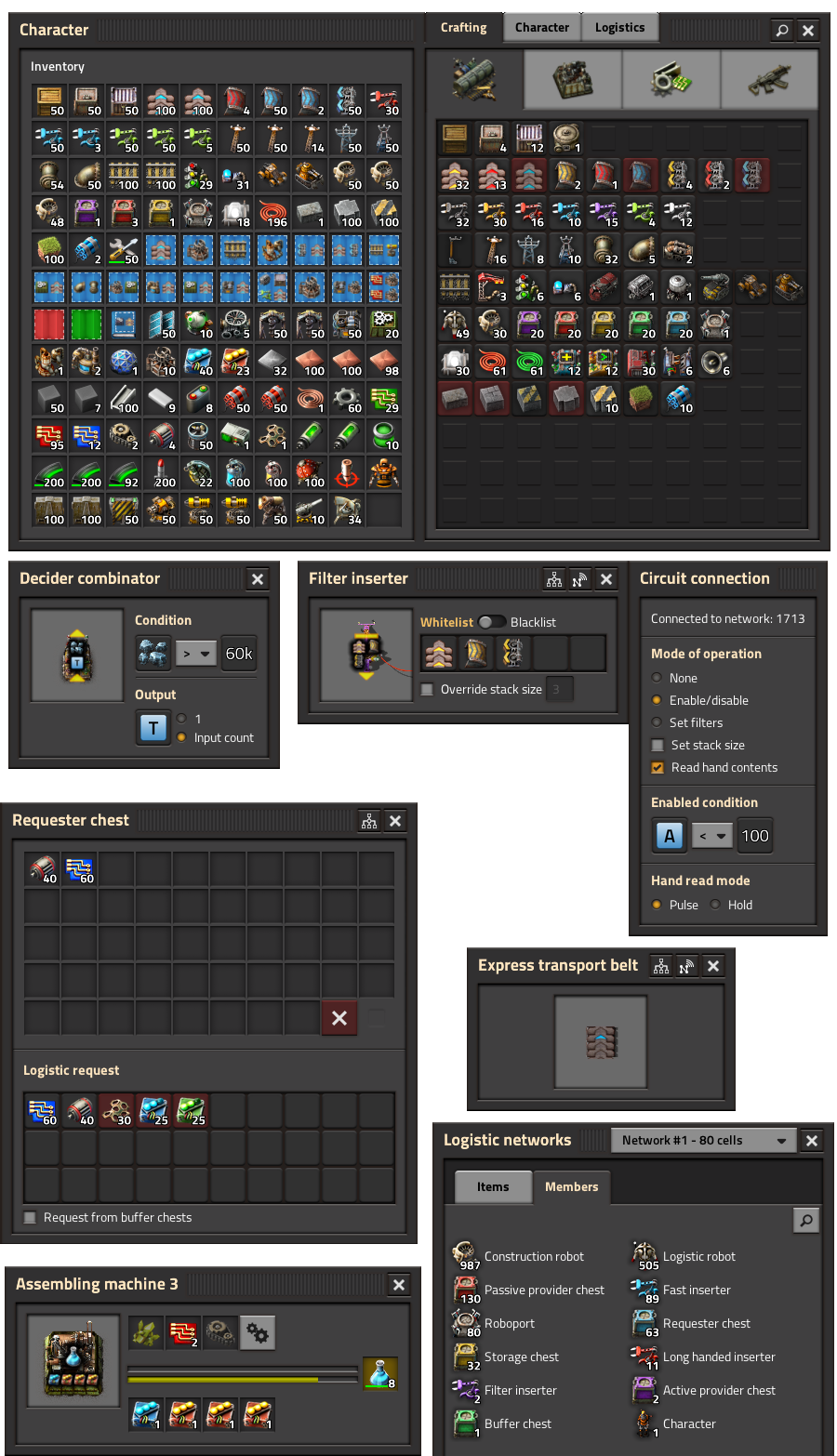


About the fact that we took 4 years, it's partly because (as is probably quite common in game dev) we underestimated the complexity of the GUI. Add on top of that some disorganisation and a constantly expanding and changing scope and you get a project that never finishes. So finally I decided to put my foot down, call it good enough and say no to the constant stream of changes.

That means it's not all good news. It doesn't look like the Blueprint Library will be getting an update before 1.0, currently making it a very low hanging fruit as far as the GUI is concerned.

Such a big update comes with some mod breaking changes, mostly related to changed Lua styles. In order to help modders in fixing the mods as soon as possible and also improving their styles to make them look closer to the base game, I made a long post in the [url=https://forums.factorio.com/viewtopic.php?p=492101#p?????>upcoming breaking mod changes topic. We initially intended to remove the old ]
After it's released, let us know what you think in the release post, or report any bugs you find on the bug forum.

Equipment grid improvements (Twinsen)


In the meantime, Ondra worked on some improvements to the equipment grid. As part of the icon update, this also includes some new graphics for the equipment sprites themselves.


UI sound effects (Ian)


As I mentioned in a recent post (FFF-341), I have been mostly working on UI sounds. My approach has been to get across the tactile feel of the buttons, plus the appropriate feedback for a particular action. But sometimes you don't really know until the rest of the team have heard them.

https://cdn.factorio.com/assets/img/blog/fff-348-gui-sounds.mp4

After prototyping ghost building for example, I thought I had a set of sounds that worked, however Vaclav gave me the valuable feedback that they were too much like 'in world' SFX and needed to be more electronic. This makes sense, as building with ghosts is really sending an instruction to the robots. We also have sounds for rotating entities, which is something you asked for. It provides a bit of useful and fun feedback which could be helpful if you hit the 'R' key by mistake when you meant to open your inventory.

https://cdn.factorio.com/assets/img/blog/fff-348-ui-sounds.mp4

In the case of night vision equipment, I started by making a subtle whoosh type sound but Klonan suggested something more like the 'wind up' sound in Splinter Cell, so I made a kind of a homage to that using a mixture of a rising synth sound and an electrical contact effect.

https://cdn.factorio.com/assets/img/blog/fff-348-nightvision.mp4

I asked Posila if we could play a different building sound for landfill. Once this was done I spent a whole day creating and play testing a variety of sounds, being careful to balance the levels between the impacts and the subtle water splash behind it. I felt they work so well that when Vaclav asked me to look into changing the concrete tile sounds, I used a similar approach and that mechanic also feels much more satisfying now.

https://cdn.factorio.com/assets/img/blog/fff-348-landfill.mp4

Val has been working on more variety for the different sizes of enemies, plus some new sounds for walking on rails. From now on it will be mostly final mix adjustments, including final music mastering and making the whole soundtrack uniformly a bit louder.

G2A resolution (Klonan)


Back in FFF-303, we talked about our thoughts on the grey market websites and more specifically about G2As vow to pay back 10x the money lost to chargebacks.

Well its been a long time, but we're happy to say we have reached the conclusion of the story. You can read the press release from G2A here and the interview with GamesIndustry.biz here.

In short, G2A has confirmed that 198 of the ~300 Steam keys we had recorded from fraudulent purchases were sold on the G2A platform, and they have kept their promise and have sent us 10x the chargeback fees (which was roundabout $20 an order).

That is pretty much it. G2A were quite open during the discussions, and we don't doubt the results they have provided. We still don't recommend purchasing Factorio from any unofficial sources, and there is no ongoing relationship or agreement with G2A after this.

I'd like to thank the team members at G2A who put in the effort to try to close this topic, even though there are more pressing concerns at the moment for all of us.

Version 0.18.25 released

Features


  • Added new tutorial campaign levels 04 and 05. (more)
Changes


  • Added a search bar to the mod settings GUI.
Bugfixes


  • Fixed a crash when building entity ghosts that immediately get invalidated through script.
  • Fixed that the choose-elem-button elem_type "signal" didn't show special signals. more
  • Fixed that furnaces required module slots to be effected by beacons. more
  • Fixed that some select-a-thing GUIs didn't have search bars. more
  • Fixed that LuaEntity::revive({raise_revive=false}) would still raise the revive event.
  • Fixed a crash when trying to iterate game.forces with the maximum number of forces created. more
  • Fixed a desync related to fast-replacing modded beacons. more
  • Fixed performance issue with initializing huge Lua arrays, that could cause loading of some modded saves take forever. more
Modding


  • Added item prototype flag "draw-logistic-overlay".
  • Added support to play a sound when a robot deconstructs something through utility-constants "deconstruct_robot".
Scripting


  • Added on_force_reset event called when LuaForce::reset() is run.
  • Added remove_colliding_entities and remove_colliding_decoratives parameters to LuaSurface::set_tiles().
  • Added LuaSurface::get_script_area, edit_script_area, add_script_area, remove_script_area, get_script_position, edit_script_position, add_script_position, remove_script_position.
  • Added 'elem_filters' onto choose-elem-button LuaGuiElements to control what options appear in the picker GUI.
  • Added 'crafting-category' filter to EntityPrototypeFilters.
  • Added 'has-ingredient-fluid', 'has-ingredient-item', 'has-product-fluid', 'has-product-item' filters to RecipePrototypeFilters which can accept a nested set of FluidPrototypeFilters or ItemPrototypeFilters.
  • Added 'place-result', 'burnt-result', 'place-as-tile', 'placed-as-equipment-result' filters to EntityPrototypeFilters which can each accept a nested set filters.
  • Added 'name' filter to EntityPrototypeFilters, FluidPrototypeFilters, and ItemPrototypeFilters which accepts either a single name or a list of names to accept, similar to LuaSurface::find_entities_filtered.


You can get experimental releases by selecting the '0.18.x' beta branch under Factorio's properties in Steam.

Friday Facts #347 - New hope demo levels

Read this post on our website.

New hope demo levels (Klonan)

A few weeks ago we discussed the changes to the demo and tutorial in the game (FFF-342). One piece of feedback we received after publishing the news was about the old 'New hope' campaign levels, and specifically the 'Abandoned rail base/Broken rail map'.

It seems a lot of you in the community really really enjoyed the new hope campaign levels, and several of the team here share the same feelings. After we scrapped the plans for a new campaign and reverted to the old demo, we had initially dismissed the idea to revive the New hope campaign...

However due to popular demand... we have decided to bring back the favourites, the first 2 levels of the new hope campaign. This time though, they will also be included in the demo version of the game. This represents a very significant increase in scope for the demo, increasing the demo content to include research, red science, green science, trains, and much more.

These levels should be ready for release within a week (but no promises).

[h3]Level 04 - Science and Automation[/h3]
This mission is a continuation of demo mission 03 where you build radars to scan the surrounding areas. You start with a small factory already operational. The radar detects a distress beacon and you must build a car to get there in time before the signal dissipates. This level introduces the labs and science packs, as well as providing the first taste of real automation.


At the end of the level, you pack your supplies in the car, and drive off to locate the distress beacon, before it fades out for good.
[h3]Level 05 - Abandoned rail base[/h3]
This level starts with you pulling up to the base, however you arrived too late and the base is already destroyed. Your goal is to re-establish the science production and rebuild the rail network.


After rebuilding the railway and the mining outposts, you must produce a large number of materials to finish the level. At the end of the level, there is a notice that this is the end, and we would recommend playing Freeplay next.
[h3]Whats new?[/h3]
The main work over the last weeks has been bringing the ancient maps up to date with modern Factorio. For instance now that we have more specific remnants, the ruined bases really look much nicer.


Also we have made a big effort to update the tile and map generation to make use of the new terrains, cliifs, and decoratives, most effectively...

Replacing terrain in a map (V453000)

The original Abandoned rail base level was nice, but it aged with all the changes to terrain generation that happened since.


The goal is to recreate the gameplay of the original level, but replace the terrain with modern one, including decoratives and cliffs.

The most gameplay-defining elements are entities and water on the map. Cliffs would be as well, but those didn’t exist when this level was introduced.

Tiles and decoratives we’ll just replace, and trees we’re going to try to get close enough. Of course, a lot of things like pollution absorption numbers have changed since the level was introduced so it won’t be absolutely the same regardless.


The first step I took was finding the random map seed that I want to use for the level. I do this by generating a random map in Freeplay, and I run a take_screenshot command, with two requirements:
  • The name of the output image is the seed of the map so I can reproduce the image just by reading the image name.
  • The resolution to 1 pixel = 1 tile so I can easily align it in Photoshop and read the coordinates (even though Photoshop uses a different coordinate system, at least staying in the same units helps).


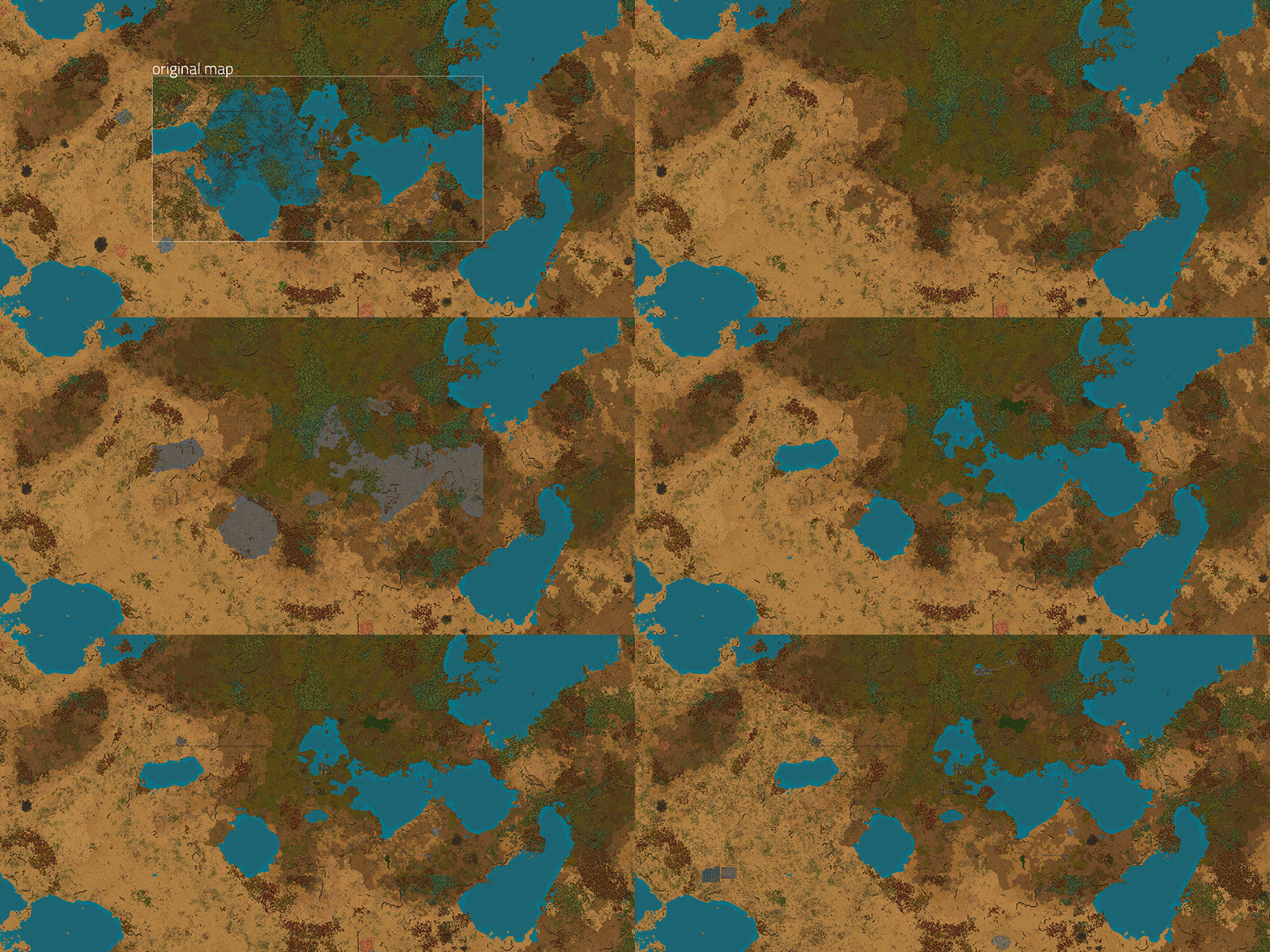
I take the same resolution screenshots from the original mission with and without tiles, and put the random seed images on top.

Having the visual preview with being able to move the image allows me to find the desired seed and offset quite quickly and position it really precisely.

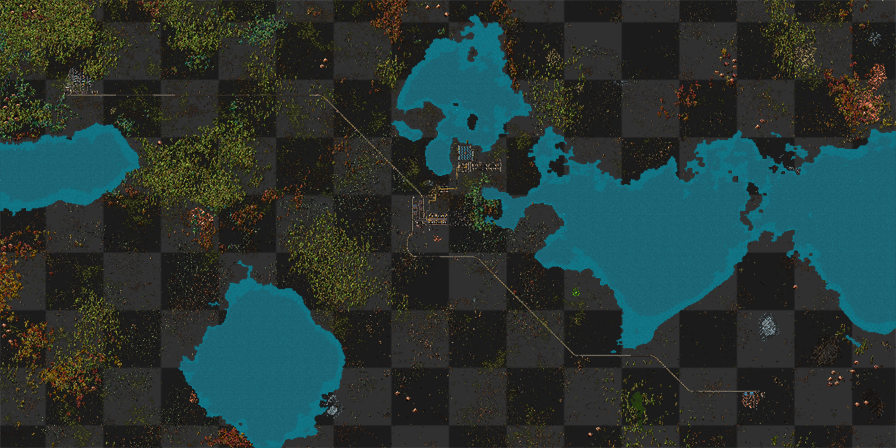
Now of course we can’t just paste the entities from the original level to this random surface as there are some conflicting areas, like the huge lake in the middle of the map.


So we have to remove unwanted lakes and resource patches.This is done by generating multiple maps with the same seed, but one without water (starting area only) and resources, and transferring areas between them.

Next up we can add water from the original level.


This step is quite special, in the original mission I replaced water by concrete, and created a blueprint from it. There’s better ways I could have done this, but for some reason I didn’t want to deal with offsets in this piece of script, and I’ve already used this method in some other place earlier so this solution came to my mind first.


Another script replaces all the concrete with real water. The bigger issue is that the original level had water all the way to the edge of the map (you can for example see the sharp edge on the right) and the water generation changed as well so manual edits are in order.


When we have water, it’s finally time to clone in the original entities.


To avoid conflicts, I use the clone_area tool which also removes entities in the destination surface. I’ve been able to go through this whole process in a single working day thanks to all the map editor features Rseding added and Lua commands we’ve created when working on the now cancelled campaign. Tools, experience and knowledge are hard to cancel. :)


And then we draw the rest of the owl. Fix places where the automated cloning hasn’t been good enough, add more ruins to be explored, tweak the gameplay and we will have a finished scenario.

Bots throw cliff explosives (Klonan)

Recently we made some improvements to the cliff explosive effects. However one thing we missed was that the bots needed to be updated separately, due to them using different logic to create the explosion. While it was an easy fix (copy paste some Lua definitions), it feels like it is treating the symptom rather than treating the cause. It isn't good to have the same thing defined in two separate places.

So never one to pass up a nice opportunity to have some fun, Rseding changed the way the 'Blow up cliff' job works, so it will always use the correct effect:

https://cdn.factorio.com/assets/img/blog/fff-347-robot-throw.mp4

Now instead of the robot hovering over the cliff, it will throw the same cliff explosive projectile as the player would. Not only this fixed the issue for good, but it looks a lot cooler.

Version 0.18.24 released

Graphics


  • Added player footprints and footstep visual effects.
  • Added car and tank dust and particle trail visual effects.
Changes


  • Construction robots throw cliff explosives from afar the same as players do, instead of dropping them at the cliff.
  • Changed rail segment visualisation colors to be more different from rail signal colors (red/green).
  • Clicking a GUI now brings it to the front. Most noticeable when using the map editor or debug GUIs where they overlap.
Bugfixes


  • Fixed that Fast splitters were missing a piece visually in East rotation top_patch more
  • Fixed that inserters could insert modules for recipes into module slots in some rare cases. more
  • Fixed that robots blowing up cliffs was different than manually blowing up cliffs. more
  • Fixed limiting cargo wagon to 0 slots would break progress visualization for full cargo and empty cargo train conditions. more
  • Fixed teleporting player between surfaces while the player was in a map view would not invalidate tile renderer cache. more
  • Fixed that the "use different settings per save" setting didn't work for single player games. more
  • Fixed crash due to use-after-delete when single unit builds a base in position that does not collide with the unit. more
Modding


  • Added the Prototypes GUI (ctrl + shift + E).
  • Added the Prototype Explorer GUI (mouse over most anything + ctrl + shift + F).
  • Added support to play different sounds for entity ghosts depending on the size of the entity in the ghost through build_sound (for small), medium_build_sound and large_build_sound on the entity ghost prototype.
  • Added support to play a sound when switching weapons defined through utility-sounds 'switch_gun'.
  • Added support to play a sound when picking up items (F key) through utility-sounds 'picked_up_item'.
  • Added optional 'turn_speed' to projectile prototypes.
Scripting


  • Added "include_fuel" field to LuaItemStack::create_blueprint.
  • Changed LuaSurface::create_entity so it places resource entities to center of a tile as map generator would. This can be overridden by optional snap_to_tile_center parameter. more


You can get experimental releases by selecting the '0.18.x' beta branch under Factorio's properties in Steam.