1. Solaroids
  2. News

Solaroids News

Early Access V1.2.3.2 - Trading Cards!

Hello everyone! Hope you had a great winter and holiday season. We're still buried under snow, but there's a light at the end of the tunnel.

Not a lot of updates for Solaroids for Steam, so my apologies for that. I've been adjusting the infrastructure of the game to support multiple platforms, so mostly hidden work behind the scenes. I'm also working on the promised Vector Mode from the Early Access Roadmap, and Monthly and maybe Weekly leaderboards. I'll hopefully be able to wrap those up soon, but either way will share some progress as it gets more concrete.

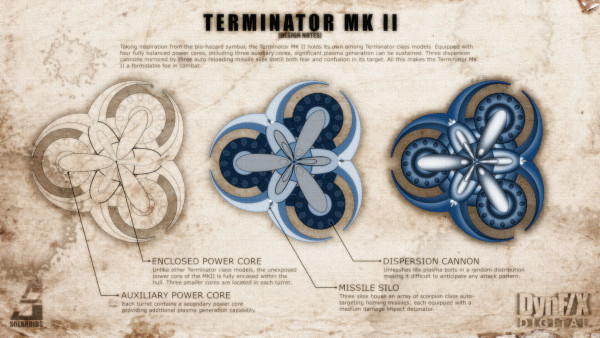
With that said however, I was able to spend time to finish a set of Steam Trading Cards that Valve approved late December. So if any of you were wishing for some extra Solaroids "bling", those are available to collect. I tried to make them both showcase some of the artwork I created, as well as be useful for players. As such they include design notes and descriptions of the capabilities of some of the enemy types. They are English only for now, but I would like to commission localization where there is enough popularity and if Steam will let me add them. Here are a few samples from the set of five available.


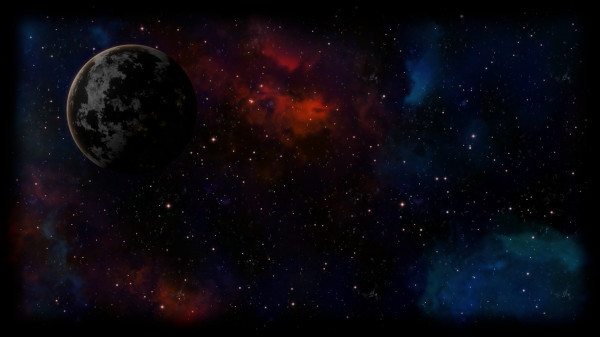
For those into starry-scapes, in addition to the trading cards, I created several Steam Profile Backgrounds to go with the set. You can collect them while crafting trading card badges. Here's a preview from the set of five available.


There is also a set of Steam Emoji Icons in the Solaroids theme. Collect enough to spell out Solaroids before I do! (SOːsolaroidsLːːsolaroidsAːROIːsolaroidsDːS)

Thank you for supporting me on my journey to try and make the Best Asteroids Style Space Shooter. If you ever want to chat about Solaroids with myself or other players, or brag about your top scores and share tips, join the (Solaroids Discord Server). It's quiet there now, but maybe you can help change that!

I've also created a dedicated Early Access Page filled with, gifs, links, and a place where you can sign up to be notified at full launch.

Cheers and happy blasting!

Chad

New Features
Performance enhancements for Linux/OSX.


Issues Addressed
  • Fixed issue where soundtrack wouldn't advance on Linux/OSX.
  • Fixed issue with camera when Seamless Wrapping Mode is turned off.


Previously Released Patches
  • Change mouse cursor from "hand" to a cross-hairs.
  • Balance volume of mine alarm sounds.
  • Fix issue with camera on resolution change.
  • Updates to core open-source libraries used on Linux/OSX versions.
  • Default to Stage-2 graphics, can be changed from the options.
  • Default to a maximum of 3-continues. Can be adjusted from the Gameplay options menu.
  • Updated title graphic.


Known issues

Early Access V1.2.3.1 - Mini-Mines, Screen Shake, and Player Spawn Positions Oh My!

Hello! Another small update to release a few small fixes and a couple of new features.


I've added a new type of mine I call Mini-Mines. These are smaller weaker versions of the larger mines already in game, but don't unleash a plasma wave when detonated. They also have an interesting feature where their lights blink the closer you get and make an audible chirp. I may add this effect to the larger mines too, since some times they are a little too stealthy. What do you think? They are now introduced on the level the existing mines were, and I've moved the existing mines a few levels later.

Another feature is the addition of an option called Player Spawn Position to choose where new player ships spawn. This is mostly for multiplayer scenarios, but like other options can also be used in single player as well. The default has always been for players to spawn near the sun. Under multiplayer situations, especially Player vs Player setups, this isn't always ideal. So now there are two other modes available under the Gameplay options menu in addition to the default of Near Sun. Random will spawn player ships at a random place on the map, and Near Other Players will spawn player ships near the average of the positions of other players. This later mode is useful when playing Co-op.

I hope you enjoy the tweaks.

New Features
Mini-mines. Now introduced where normal mines were, with normal mines introduced at a late level.
Player Spawn Position Option - Choose alternate player spawn positions.
Pick between the original near the sun location, a random location on the map, or near other players.
Camera shake is now used at key events like destroying bosses/mines regardless of how close the player is.
Increased amount of camera shake (still adjustable).


Issues Addressed
  • Fixed issue where rumble could get "stuck" when playing in shared screen mode.
  • Fixed issue where camera shake wasn't working when taking an impact.
  • Fixed issue where explosions were not being drawn in certain situations.
  • Minor changes to the new threat display (justification/sorting).


Known issues
  • Borderless window option is only implemented for Windows right now.
  • Disconnecting an external audio device being used by the game will cause a crash/freeze on Linux/OSX.
  • Some options and more recent prompts are English only or machine translated right now. If machine translated, they are indicated with an asterisk (*).

Early Access V1.2.3.0

Hello everyone!


I've got another small update to incorporate a few new noteworthy features that I wanted to get wrapped up before the Portland Retro Gaming Expo (PRGE). Yes, that's right... Solaroids will be showcased at PRGE this year thanks to the Portland Indie Game Squad. This is the first event for Solaroids outside of my local community, and I'm excited to show it to the retro gaming lovers at PRGE.

Well enough with the ancillary commentary, let's get on to the update.

First, I'm happy to present a new "shared" screen Local Multiplayer option. In this mode, rather than split the screen into up to 4 smaller screens, you can play with or against friends in a single screen. The camera will pan and zoom to keep all active players visible. Dueling has never been better.

The down side is things can get on the small side if players a long way from each other. Use the reticle to keep your direction straight - it always stays the same size and now displays the primary ship color. I'm still working out how to make power-ups readily identifiable when zoomed out for easier identification. You can find this new option under Gameplay in the option menu.

Second, I'm starting to map out additional stages and levels, and I just couldn't wait to share some new background elements with you. For now, I've added an option under Gameplay to select the "Stage" for the background elements to use. Ultimately this will be incorporated into the campaign along with additional enemies and other hazards, but for now it just adds an alternate view. Please let me know what you think and if it's the right direction.

Finally, a message is now displayed to compliment the final level wave warning sound. Players have all too often wondered what the warning sound means the first time they play. In addition, in Free Play mode this message is accompanied by a list of the end-of-wave baddies your about to face. You'll have to let me know if you find it useful to be able to anticipate the onslaught your about to face and possibly be defeated by, or just find it useless noise.

New Features
Shared-Screen Mode - Play on a single screen instead of splitting the screen.
Stage Select - Pick Stage 1 or Stage 2 (only affects background graphics)
Indicate the end of the level with a message in addition to the alarm sound.
List end of level threats in Free Play mode.
Adjust end of level waves.
Adjust Free Play mode difficulty. It gets a lot harder after a few cycles than it used to which was already pretty hard.


Issues Addressed
  • Fixed a bug related to positional audio and seamless wrapping.
  • Fixed a bug related to particle effects (explosions) and seamless wrapping.


Known issues
  • Borderless window option is only implemented for Windows right now.
  • Disconnecting an external audio device being used by the game will cause a crash/freeze on Linux/OSX.
  • Some options and more recent prompts are English only or machine translated right now. If machine translated, they are indicated with an asterisk (*).


I hope you enjoy the new features, and once again, happy blasting!!

Early Access V1.2.2.2

This release is dedicated to YouTube player/reviewer Big Joe Bear who was kind enough to both make me aware of a key issue now fixed in this release, and to also make a stellar video tour de force of Solaroids. Note to self, cause internet outages around the world to entice more players to play!! If you can, give his channel a look and support him if it interests you:

https://youtu.be/l9pLqZpr_SA

Hello Everyone! Things have been quiet on the Solaroids update front lately. Work hasn't stopped, but I've had to focus on some other aspects related to the game that are outside of the game itself. Stay tuned.

Some things I'm working on, but aren't ready yet, are additional leaderboards. I'm considering weekly and monthly boards, as well as per control type boards. I will probably be adding daily leaderboards once I have the planned Daily Challenge game mode implemented.

New Features/Tweaks
Reset parallax in multiplayer when doing a cut transition.
Don't show initial tips (in a ring around the sun) in free play mode.
Tuning of score multipliers:
  • Modern Control Style gets a 1x base multiplier now instead of 0.5x, with increased adder and increased decay factors.
  • Classic and Hybrid control styles stay mostly the same but get an adder boost.
Turn agility power-ups now increase (a little bit) the maneuverability of the ship in Modern (dual-stick) control style.
Fade in/out of per player stats / leaderboard displays.
Update framework libraries for Linux and OSX versions. These are big changes, especially with respect to audio, so please report any issues.
A bunch of internal changes to prepare for new features.


Issues Addressed
  • When playing with keyboard or mouse+keyboard, the mouse cursor is now locked to the game window during gameplay so you don't accidentally move it outside the window in the thick of combat. This is also in effect when borderless mode is active. So, for those of you that play borderless full-screen on a multi-monitor setup, you'll no longer accidentally scroll to the other screen and click on some other window with catastrophic results. Note that the mouse won't be locked to the window when pausing or from the main or exit menus. Thank you Big Joe Bear for communicating this issue to me.
  • Fix an occasional 1-frame visual glitch when detaching outriders and exploding complex enemies.


Known issues
  • Borderless window option is only implemented for Windows right now.
  • Disconnecting an external audio device being used by the game will cause a crash/freeze on Linux/OSX.
  • Some options and more recent prompts are English only or machine translated right now. If machine translated, they are indicated with an asterisk (*).


Happy blasting!!

Early Access V1.2.2.1

Hello Everyone! Just a small update to release a few new features, and round up a few bugs -- some of which were released as hot-fixes several weeks ago.

As players rack up more and more impressive scores, I thought it would be cool for you to be able to compare the control style you typically use with those of the other players. Classic and Hybrid (single-stick) control styles are the purest and most challenging modes, and as discussed in a previous update, come with some scoring advantages. Now you'll be able to see what control style a given score was achieved with. Next to scores in the global leaderboards you'll see a symbol denoting which control style was used: (C)lassic, (H)ybrid, and (M)odern. Note that this is only computed for new scores going forward, so any current scores are classified as Unknown and won't show a symbol until you beat your previous bests.

New Features
  • The Control Style used to achieve a score is now recorded and displayed next to the high score. (C)lassic, (H)ybrid, (M)odern. You have to have played in a particular style most of the time for it to count.
  • German translation updates.
  • Cleans up old log files when debug logging is disabled.


Issues Addressed
  • Ensure friend leaderboards immediately update in-game.
  • Adjust thruster sounds for Modern (dual-stick) control style.
  • Tune bullet sound effects.
  • Fix issue where the top-X scores were shown instead of an empty list when you don't have any friends that play Solaroids (what a shame ːsteamsadː).


Previously Released Patches
  • Fix issue with Control Style text in HUDs overlapping when multiple players are choosing their control style at the same time.
  • Fix crash on some machines/locales when player stat displays are generated.


Known issues
  • Borderless window option is only implemented for Windows right now.
  • Disconnecting an external audio device being used by the game will cause a crash/freeze on Linux/OSX.
  • Some options and more recent prompts are English only or machine translated right now. If machine translated, they are indicated with an asterisk (*).


I hope you enjoy the new refinements and features.

Once again... Happy blasting!!