1. Neos VR
  2. News

Neos VR News

2021.3.5.176 - Crouching, mouse scroll in desktop mode, tweaks, bugfixes & more

Hello everyone, sorry for another smaller build after a while, I'm working on a few things in the background that didn't give any results yet (e.g. switching to the new libVLC, which is giving some more trouble, but so far solvable) and reorganizing things internally - some if it you probably noticed as we moved all Neos related repositories to Neos-Metaverse on GitHub and added a bunch more that weren't public or on GitHub yet.

There's some extra progress on desktop mode in this, mostly smaller additions in this one as well as bugfixes for some issues that cropped up (e.g. the audio output desyncing over time). I'm working on the design and pieces of the interaction system, that's going to be coming soon after.

I've also started cleaning up some more of the existing bugs and issues to improve the general quality of life, the dynamic bone scaling issue is now fixed, as are a bunch of cases of user randomly flying or breaking when gripping and switching locomotions.

[h2]New Features:[/h2]
- Added ability to crouch in the desktop mode (using the C key or the left trigger on a gamepad)
- Added ability to scroll UIX ScrollRect with the mouse scroll wheel
-- This is based on a new general system for UIX canvases/elements receiving axis movement events
- Added support for importing Lights when importing 3D models/scenes (requested by @Elektrospy)
-- To enable, you need to go to Advanced Settings and check "Import Lights"
-- Currently not heavily tested and might need some tweaking. Will output debug info to log
-- The intensity of lights might be too strong or too weak after import, depending on the source and might require to use the LightSource Wizard to adjust after
-- Neos will normalize the maximum light intensity to 1, to avoid extremely bright lights when large units are used (e.g. watts coming from Blender)
- Added Keyboard & Mouse Avatar Anchor bindings
-- Space to release/exit anchor
-- WASD for primary axis and Arrow Keys for secondary axis
-- Space for primary action, Right Control for secondary action
- Added GrabbableHandling and ColliderHandling to BakeMeshes, which allows specifying how are those components handled (based on feedback by @ProbablePrime and @Enverex)
-- IfExists (default) - component is added if it exists on the source or if it's needed (e.g. Grabbable will enforce a collider)
-- AlwaysAdd - component will always be added
-- NeverAdd - component will never be added

[h2]Tweaks:[/h2]
- Moved majority of public (and private) Neos repositories from my personal GitHub account (Frooxius) to organization one (Neos-Metaverse)
-- NeosPublic, NeosLocale and any dependencies can now be found at: https://github.com/Neos-Metaverse
-- More open source forks and custom libraries/wrappers have been published (freetype, FreeImage, msdfgen, Msdfgen.NET, Compressonator.NET, crunch, Crunch.NET and QuantityX)
-- This is also done for better internal collaboration with developers and as pre-requisite for setting up a cloud build pipeline for Neos

- VR eye tracking is now ignored when switched to desktop mode, fixing user's eyes becoming derpy
- Neos now strips RTF tags from a world name when sending it to the Steam Rich Presence (reported by @Shard Wolf#5513 and @Earthmark)
- Updated MTC tutorial text to include information on how to activate the laser for remote gripping (based on general feedback, change provided by @Turk)

- Merged Korean locale additions and tweaks by @MirPASEC
- Merged Russian locale additions by @Shadow Panther [RU/EN, UTC+3]
- Merged Japanese, Esperanto and Chinese locale additions by @Melnus
- Merged French locale additions by @brodokk

[h2]Bugfixes:[/h2]
- Fixed mirrors and portals rendering the Overlay layer (reported by @epicEaston197 and @Khosumi)
- Fixed Neos-overriden audio output devices slowly getting more and more delayed over time (reported by @Shifty | Quality Control Lead)
- Fixed user rapidly flying away when gripping on an object in PhysicalLocomotion and switching to a different locomotion (reported by @Shifty | Quality Control Lead, @Aegis_Wolf | Art Director, @Hayden, @chemicalcrux, @Robyn (QueenHidi))
- Fixed user's transform getting corrupted and not syncing anymore when they're gripping on an object that gets destroyed (reported by @Cyro, @June and @Shire)
- Fixed user's transferred rotation getting doubled when gripping onto an object (rotating more than they should) (reported by @Zyzyl, @Rukio, @Princess and others)
-- This could also potentially fix any extra position and scale offsets in some scenarios (e.g. with avatar anchors, as reported by @Hayden)
- Fixed VR headset presence sensor setting user's status to Away even when desktop mode is currently active (reported by @Shifty | Quality Control Lead)
- Fixed dynamic bones getting scaled incorrectly when the user's root space changes while at the same time changing their scale (reported by @Shifty | Quality Control Lead, @H3BO3, @Hayden, @chemicalcrux and others)


Progress on new desktop mode (partially usable), February Community Highlights

Hello everyone, I hope your week went well!

We have some exciting progress to share on the development of our proper desktop mode. Thanks to several additions it has reached its first usable state for VR users for dynamic switching. There's still lots of work to do to bring it to feature parity and allow to use it without needing VR headset in the first place, but it's an important step forward.

If you're in VR, you can currently press the F8 key (this will likely change in the future) to dynamically toggle to the new desktop mode and back. The dash will now be projected directly onto your screen and usable with your mouse cursor, as you would any other application, allowing you to message people, open worlds, join sessions and change settings.

In the settings you will also find new option "Select Audio Output Device", which lets you override which audio device is used for playback. Along with the audio input device and your volume settings, Neos will remember your settings separately for VR and desktop mode, automatically switching them as you toggle between the modes, making the whole process effortless.

Thanks to the new input binding system we've also added gamepad support, allowing you to move and use avatar anchors (e.g. vehicles) with it, whether you're in VR or Desktop. There's a lot more to come as we continue building out more interaction systems and bring in more hardware.

Since it's the end of the month, we have also devoted our Friday livestream to showcasing some of the amazing community highlights from February, including some awesome games that you have created! If you missed it, check out the video below!


[h2]Community Highlights[/h2]

[h3]February Community showcase livestream[/h3]
As is the tradition at the end of the month, we have devoted out most recent Friday livestream to showcasing many of the amazing community creations made this month. We check out many cool interactive items as well as some amazing worlds and fun games! If you missed the stream, you can check out the recording here:
[previewyoutube][/previewyoutube]

[h3]Tamasobi by mohu yan, kinoko_b, Aetoriz[/h3]
This map is quite explosive, literally! A really fun team based competition where you as the user need to take a glowly ball of power and throw it into the other teams goal! Be careful though, the other team can steal the ball and have it hit the roof or ground and reset it. For those wondering how the game plays.It feels a bit like Battle discs but also a little bit like Echo Arena. Give it a try and let the creators know! Thanks mohu_yan, kinoko_b and Aetoriz for the fun map!


[h3]Abandoned Factory Hall by YumYum[/h3]
An eerie quiet map, with a nice sense of aesthetic. Inside the factory you’ll find a place left to the wild, contemplating what used to be here, or what was made. Outside you’ll find there’s more to the complex as it seems you are surrounded by more abandonment. Overgrown roads and walls surround making you think even more how did you get here? Thanks YumYum for the map!


[h3]Slime Springs by Gearbell[/h3]
You enter the cave and experience a particular aroma swelling your senses. Is it Rotten Eggs? Is it Sweaty Sport Socks? Maybe some sort of chemical. Little do you know you’ve found the hangout of the slime people. Of all shapes, sizes, and concoations, those of the slime variety come here to hang, jiggle, wiggle, and bounce with other slimes. Be careful though! I’ve heard tales of travelers entering the slime pools not returning quite the same as they were. Feel less solid as you say. Thanks for the map Gearbell! Also, welcome fellow slimes! I hope you feel at home.


[h3]Moment in the Week[/h3]
Now while creations, maps, tools, and toys get featured on here I wanted to take a moment to feature some of the more special moments of the community. Sometimes they aren’t always being recorded, or being clipped for many to see. Yet, In the process of making his very cursed Teletubbies inspired map. ProbablePrime has somehow managed to get all of us to watch teletubbies for 30 minutes, including “Banned” episodes. As this happened everyone kept adding to the cursed nature of the project, and more hilarity ensued. Thanks ProbablePrime, and thanks everyone who came by to bask and add to the eldritch horror. Only on Neos eh?


[h2]First usable version of Desktop Mode[/h2]
Our official desktop mode has gotten some crucial additions this week that have pushed it closer to a usable state. While we still don’t recommend it as the main way of playing yet (in part because you can’t properly use it without VR yet), it’s getting closer and already offers a way for VR users to switch to desktop for a bit to be able to socialize.

[h3]Screen projected dash[/h3]
One of the important additions was ability to the dash to be rendered as screen overlay, rather than a curved object in-world. Alongside adding a mechanism for pointer interactions (mouse cursor and touch screens), this has made the dash UI usable as traditional desktop UI, allowing you to search and open worlds, join sessions, interact with the contacts system (including sending/receiving messages), interact with UI and also importantly your settings.

While in-world interactions aren’t implemented yet, apart from being able to walk, run and jump, this lets you move around the environments and socialize for the time being when you jump out of your VR headset. Simply press the F8 key to switch from VR to desktop controls and back.

[previewyoutube][/previewyoutube]

Once interactions are implemented and the system has feature parity of the legacy debugging desktop
mode, we’ll remove the old one and make this one the new default for both users with and without VR.

[h3]Audio Output Override[/h3]
If you’re using different audio output for VR and for desktop, this new addition will be very useful to you. Instead of having to manually switch your audio output every time you toggle between VR and screen, simply go to Settings and use the new “Select Audio Output Device” option to change which audio output device to use.

Along with the audio input, noise gate and master volume, Neos will remember those settings for both Desktop and VR mode, automatically switching them for you as you toggle between the two modes.

[previewyoutube][/previewyoutube]

This way you don’t ever have to change your audio settings and you can effortlessly jump between desktop and VR as you play.

[h3]Gamepad support[/h3]
Thanks to our new internal input binding system, we have already added support for gamepads to Neos! You can now use standard gamepads to move around and use avatar anchor inputs, even while in VR!

As we add more interactions to the desktop mode you’ll be able to use tools, build and do everything else that you can do while in VR. We plan to add more different input devices as we go as well and provide ways to expose those to LogiX for scripting.

There’s still lots to do, but we hope that even the in-development versions provide you with some good benefits as we continue to add more functionality, fix bugs and bring the desktop closer to feature parity with VR.

[h2]Making textures tileable, avatar expression improvements and more[/h2]
Alongside the desktop mode we have added a bunch of other smaller features, tweaks and bug fixes as usual. Those include some new processing options for textures, which let you easily make any texture tileable (though quality will heavily depend on the type of the texture) or replace transparency with white or black color.

[previewyoutube][/previewyoutube]

We have also made numerous improvements to Neos’ support for facial tracking, greatly expanding the list of supported expressions on AvatarExpressionDriver and adding heuristics for automatically assigning expressions from blendshapes.

Based on the report from the community we have also improved the security of the local assets, making it harder to get unauthorized access to locally stored data. If you’d like to see all the changes and improvements over the past week, check out the patch notes on Steam or on our official Discord.

----------------------------------------------------

Anyway this is all for this week! We're excited as the pieces of the new desktop mode are falling in places. Now the major missing piece is the interaction system, which will allow you to click and grab items, interact with menus and use tools, weapons and other interactive elements. With those you'll be able to do everything you can in the legacy debugging desktop mode and we'll be able to make a swap.

It's a pretty big system on itself, our next goal is having a base version of it working and then adding more polish to all parts, making things easier to use, look better, removing jank and bugs. If you'd like to see the latest developments, check out our #devlog channel on our official Discord.

And as usual, big thanks to your support! Without it we wouldn't be able to grow this platform and keep going. See you next week!

2021.2.28.1210 - Fixed flickering dash in desktop mode & input system fixes

Just a small patch for a few things so they don't have to wait on a bigger build! Compatible with last build, no need to update right away if you don't need the fixes.

[h2]Tweaks:[/h2]
- Increased sensitivity of gamepad right thumbstick for camera look control

[h2]Bugfixes:[/h2]
- Fixed screen locomotion axis inputs (e.g. gamepad left thumbstick) being normalized, resulting no lack of analog speed control
- Fixed AvatarExpressionDriver heuristic incorrectly detecting lower lips raising as "Jaw Down"
- Fixed gamepad inputs getting stuck when the gamepad is disconnected (reported by @Shifty | Quality Control Lead)
- Fixed the dash in desktop mode flickering when the user isn't at unit scale (reported by @Lyo, @epicEaston197, @Robyn (QueenHidi), @Cyro and others)
- Fixed Neos crashing on startup when running through the native Oculus runtime (reported by @Shadow Panther [RU/EN, UTC+3])

2021.2.28.1002 - Desktop mode progress, Gamepad support, Face tracking, security

Hello everyone and sorry for fewer builds again, I'm still putting what time and energy I have into the new desktop mode and it's a bit tough splitting my focus now. There are several important additions to it, it's now in a state when it should be mostly usable for basic socializing! No interactions yet, but that's next on the menu.

When you switch to the new desktop mode (pressing F8 currently), you can now use your dash with your mouse! This lets you use the messaging system, inventory, world browser and settings! This means that you can now also adjust your microphone for the desktop mode and newly even the audio output device, meaning Neos will automatically switch your settings as you toggle between VR & Desktop!

There's initial bits of other systems too, for example we have initial Gamepad support now! It's only usable for locomotion & avatar anchors now (left and right thumbsticks map to the Primary & Secondary motion inputs), you can use it even if you're in VR.

I'm pushing whatever I have along with other things, because some upcoming things (swapping out the libVLC) I want to run through danger testers first and I don't want that to block some of the other additions, tweaks and bugfixes. There are some improvements to the Neos' face tracking framework, to make setup easier and support more expressions, new feature to make textures easily tileable and more.

IMPORTANT: Note that this build also improves the security of local assets and database. This will run database upgrade process when you first start which might take up to a few minutes (depending on the size of your database). The upgrade/repair process has been made significantly faster though, so hopefully it shouldn't take too long!

[h2]New Features:[/h2]
- Added ability to override audio output device
-- Can be found in Settings on the dash
-- The setting automatically switches between desktop / VR mode, allowing you to configure different audio output for when you're in VR and when in Desktop mode, switching between the two automatically (along with other audio settings)
-- If you won't use desktop/VR dynamic switching, it's recommended to change the audio device in Windows, as this mode potentially adds a bit of extra latency
-- Currently only supported on Windows

- Added initial Gamepad support
-- You can use it to move around in the new desktop mode or even while in VR
-- More interactions to come (e.g. virtual cursor to allow interacting with UI/dash)

- Greatly expanded list of supported expressions on AvatarExpressionDriver (under Users/Common Avatar System/Face)
-- Following expressions were added:
--- Tongue motion: TongueLeft, TongueRight, TongueDown, TongueUp, TongueRoll
--- Combined expressions: GrinLeft, GrinRight, Angry
--- Cheeks: CheekSuckLeft, CheeckSuckRight, CheeckSuck
--- Lip movement: LipRaiseUpperLeft, LipRaiseUpperRight, LipRaiseLowerLeft, LipRaiseLowerRight, LipRaiseUpper, LipRaiseLower, LipLeftUpper, LipMoveLeftUpper, LipMoveRightUpper, LipMoveLeftLower, LipMoveRightLower, LipTopOverturn, LipBottomOverturn, LipOverlayUpper, LipUnderlayUpper, LipOverlayLower, LipUnderlayLower, Pout
--- Jaw movement: JawLeft, JawRight, JawForward, JawDown, JawOpen
-- Grin expression was improved to require user to partially smile, rather than just bare their teeth
-- This will drive the avatar expressions using any supported lip/face tracking technology
- Added semi-automatic blendshape assignment to AvatarExpressionDriver (through inspector button)
-- For assignment to work, it needs to be placed on/above the Slot with SkinnedMeshRenderer
-- Any already driven blendshape are ignored
-- If there are blendshapes for independent sides (e.g. SmileLeft & SmileRight), the unilateral expression (e.g. Smile) is ignored, even if present to avoid potential overdriving
-- Note that you might need to manually add/remove/tweak the expressions after, as detection success heavily relies on the naming conventions of an avatar
-- If you find any blendshapes or problems with heuristics, let us know (ideally with a sample model)

- Added TongueRoll property to the AvatarRawMouthData
- Added AudioOutputDeviceInfo
-- This is analogous to AudioInputDeviceInfo, but for output devices

- Added "Make Tileable" texture processing option, which allows easily making any texture into one that will tile seamlessly
-- You can setup transition ratio (portion of the texture used for tiling)
-- Two simple algorithms are currently implemented - Loop and Mirror. Both bost well with organic textures, rather than rigid patterns

[h2]Work in progress:[/h2]
- Added initial implementation of PointerInteractionController, which handles pointer interactions in desktop mode (mouse cursor, touch screen)
- Added screen-projected overlay rendering to Dash in the Desktop mode
-- You can now use the dash UI when switched to the desktop mode

[h2]Tweaks:[/h2]
- Tweaked the priority issue scoring mechanism to include lifetime support as another score point and represent the score as a normalized value, rather than a raw sum
-- This helps anonymize the data a bit and make the numbers more readable
-- The lifetime support also gives us another datapoint for prioritization, highlighting people who have supported Neos in the past significantly, but are currently on lower pledge
-- votePoints has been replaced by activePledgeScore in the JSON (you'll need to update tools to display the data accordingly)
- Renamed AudioDeviceInfo to AudioInputDeviceInfo
- Improved world/asset data security (based on feedback by @ItsDusty )
- Improved database upgrade/repair process speed significantly
- Database upgrade/repair text now keeps changing every half second to help indicate that the process is on-going
- Added "thm", "thmb", "ind", "mid", "rin", "pin", "pnk" to finger rig detection heuristics (based on feedback by @Groxxy the Eye-Puppeteer)
- Added heuristic for merging multiple animation tracks into a single one when importing models where each individual part has its own unique animation track (based on report and sample models by @Aegis_Wolf | Art Director, @Dante and others)
- Small optimizations in BitmapX bilinear sampling

- Merged Korean locale additions by @MirPASEC
- Merged French locale additions & tweak by @brodokk
- Merged Russian locale additions & tweaks by @Shadow Panther [RU/EN, UTC+3]
- Merged Japanese locale additions & tweaks by @かず (kazu / GitHub: kazu0617) and @Aesc
- Merged Spanish locale additions by @Ruzert
- Merged Esperanto and Chinese locale additions by @Melnus
- Merged Czech locale additions and tweaks by @rampa_3 (UTC +1, DST UTC +2)

[h2]Bugfixes:[/h2]
- Fixed input groups getting their actions stuck on the last evaluated values when disabled
- Updated version number of the VoiceFacetPreset, forcing the icons to update to the newest ones (based on report by @ohzee, @Lyo, @Hayden, @Kulza and @Shadow Panther [RU/EN, UTC+3])
- Added generic type validation to ValueTextFormatDriver and to prevent instantiation with invalid types (based on feedback by @Cyro)

First phase of Input Binding system finished, community highlights

Hello everyone and welcome to another of our weekly updates!

This week we have some exciting news on the progress on the desktop mode. One of the major pre-requisites, the first phase of an input binding system, has been completed, finishing a large rework of Neos' internals in order to support new functionality. There's still lots of work to do before the desktop mode is in usable state, but with the new system it was already quick to add locomotion support, with more to come.

We also have another important change to our guidelines, to reduce some vagueness and anxiety it has caused. You can read more details below, on what we changed and why.

There are also many awesome community highlights, including a 3D snake game, some beautiful worlds and even a snowboarding mechanic in Neos. We showed off some of our own progress on the MTC Streaming & Recording room on our latest livestream.


[h2]Important update to the guidelines[/h2]
Veer, our chief of moderation, has made an important change to our guidelines based on feedback we have received from you, the community and discussion with the moderation team. Specifically we have removed this guideline: “ii. Publicly display fetishes or lifestyles in a blatant manner that may make others uncomfortable.”

While our original goal was to ensure that users will avoid using avatars and tools in public that tend to make a lot of people uncomfortable, we have found that this statement ended up being too vague and caused some anxiety over what constitutes as fetish/lifestyle and what does not.

Because we want Neos to be an open and tolerant space where people can freely express themselves, we have decided to remove this particular guideline as it was too subjective. Note that actual adult content is still not allowed in public, but other than that we don’t want the guidelines to be too strict or unclear.

To deal with people becoming uncomfortable around particular people and/or avatars, we’d like to direct users to use self-moderation tools instead, whether that involves politely asking them to change their avatar or banning them from your own sessions. We can also prioritize avatar blocking features and similar solutions to expand the set of tools available to everyone to make their experience more comfortable.

You can read the latest guidelines here.

[h2]MTC Streaming & Recording room showcase livestream, pizza[/h2]
If you missed our regular Friday livestream, you can check out the recording below. We have showcased some work in progress on the upcoming MTC Streaming & Recording room, which will teach users how to use Neos' built in streamer camera functions as well as provide a place to host events and record with a pre-built green screen.

Nexulan has also let the chat pick ingredients for his pizza order for some hilarity, thanks to generous Twitch sub gifts!

[previewyoutube][/previewyoutube]

[h2]First phase of new Input Binding system complete[/h2]
After some long major reworking of Neos’ input handling internals, we have released the first phase of our new Input Binding system! Originally Neos’ input handling code has grown organically over the years and had a lot of hardcoded rules and checks for specific controllers and combinations of input methods.

This has made it harder over time to add support for new VR controllers, but especially other input methods, like keyboard & mouse or gamepads for the desktop. We’ve also had requests for being able to customize the controls and add more different input devices over past years.

To solve this problem, we have designed a proper Input Binding system that replaces the hardcoded rules with a generalized system, while at the same time providing more flexibility and makes it easier to add support for new devices.

[h3]Input Groups & Actions [/h3]
The new system is based on a concept of “Input Groups”. Anything in Neos that needs to receive inputs defines one or more input groups, each with a list of actions (boolean, analog, 2D and 3D) that it receives.

These groups are then registered with the input binding system, which fill search and match bindings for those actions and handle sorting and blocking of inputs based on the priority of each group.

This way, if a particular input source (controller Trigger button for example) is used by a higher priority input, it will naturally block for any other inputs that might want to use it, rather than those blocking rules having to be hardcoded. This way the system adapts to customized controller bindings too.

Thanks to the new system, we could greatly simplify the code of common interactions, tools, locomotion system, avatar anchors and other inputs, removing all the old controller-specific code and replacing it with a more unified system, that is easier to extend and build upon, effectively serving as an abstraction layer between input devices, ensuring that any Neos behaviors don’t need to worry about any specific input devices.

The rework of Neos’ input internals has taken a while and currently only provides small improvements in behavior. For example we have fixed handling of dead zones and movement exponent curve, which was computed incorrectly. Thanks to this you should now have better control when moving in Neos, but you might also need to tweak your deadzone and movement exponent settings a bit if they become too sensitive.

Thanks to the rework we also discovered some serious performance bugs, which have been fixed and have done general cleanup of related systems, removing a lot of the cruft. While the surface benefits of the first phase of this new system are relatively minor, the main improvements are yet to come.

[h3]Locomotion in desktop mode & future additions[/h3]
Thanks to the flexibility and ease of use of the new Input Binding system, it has taken us less than 5 minutes to add locomotion support to the new desktop mode, giving users the ability to walk, fly and jump around.

While the desktop mode isn’t in a fully usable state yet, having this new input system implement is a major milestone towards its implementation. With it finalized we can now continue adding more features and building out necessary pieces to make the desktop mode properly usable, so stay tuned, there’s a lot more to come now!

[previewyoutube][/previewyoutube]

We’ll be also adding support for other input devices, like gamepads, giving you more options on how to play Neos. Once the system stabilizes a bit more internally, we’ll also start looking into exposing it for user configuration, allowing you to customize the bindings. This will be likely done through a configuration file first and UI later on.

[h2]Community Highlights by Turk[/h2]
Hello everyone! I hope everyone’s week went wonderfully! This week has been a little exciting as stuff has been a bit busy amongst the Neos community. New things have appeared through the creative void that is the Metaverse that is Neos. So let us shine a light on some of the things people have been making!

[h3]3D Snake by Joe Sylva & Napo[/h3]
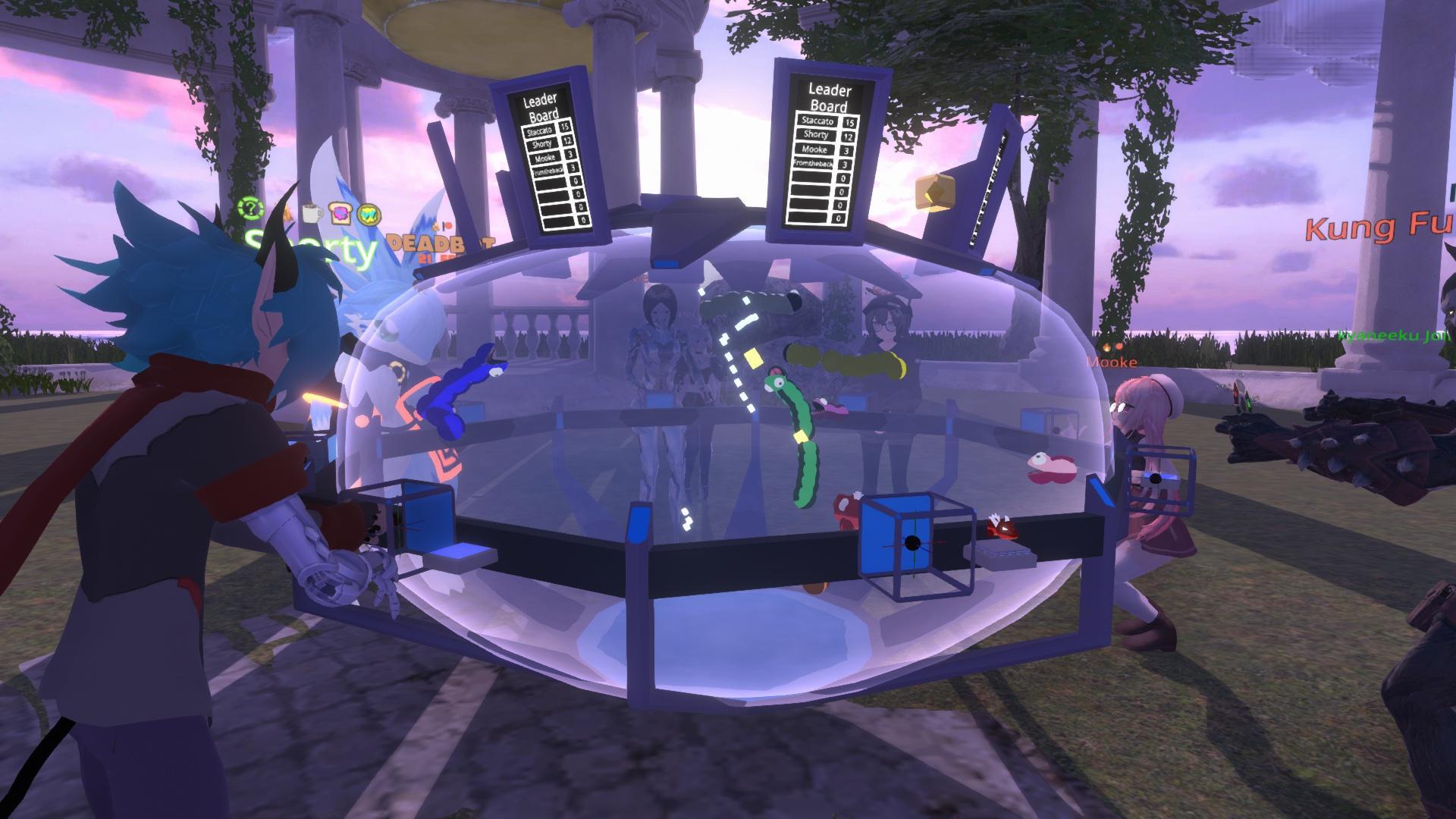
Showcased at the Metaverse Meetup we have 3D Snake! With a Maximum of 8 players you can grab your own snake and proceed to enjoy some VR quality fun as you twist, turn, pull, and push your hand all around to get that snake into those tight nooks and crannies. Be careful to not crash into anything! Your snake will explode and then you’ll have to restart your score all over again! (There’s also skins too! Instead of a Worm you can use a Dragon!) Props to Joe Sylva and Napo for showing him the ropes! This only took 2 weeks to make and the time shows!


[h3]Boolean Beach by Aetoriz[/h3]
An amazing map that took alot of our inspirations by storm! Enter this gentle beach filled with multi tones of gray black and white. Watch as all the trivialities of life fade into the dull and mundane. Jump and climb over the beach’s cliffs and dunes. This map has some nice styling and is definitely a sight to behold! It truly feels like you're in a different place entirely. Props to you Aetoriz! Thanks for making the map!


[h3]Donut Dimension by QueenHidi[/h3]
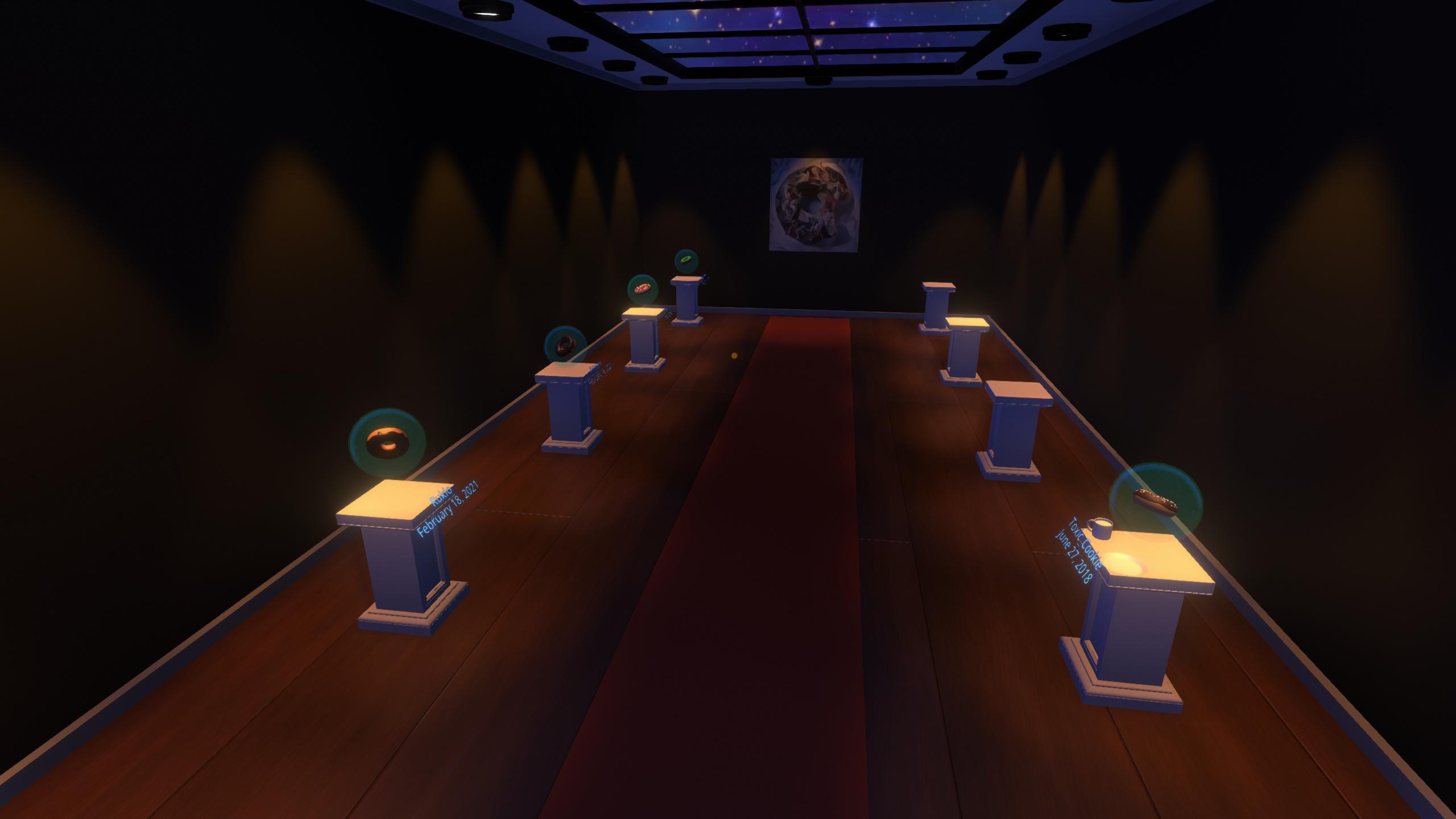
A wonderful idea to instill the spirit of the donut into everyone. The “Donut Tutorial” as called by many wanting to get into 3d Modeling made by the BlenderGuru. Shows as a nice world to showcase the example of everyone's donut! Thanks to everyone who contributed a Donut and Thanks Hidi for making a neat interesting map!


[h3]256fes Room by Danyy59[/h3]
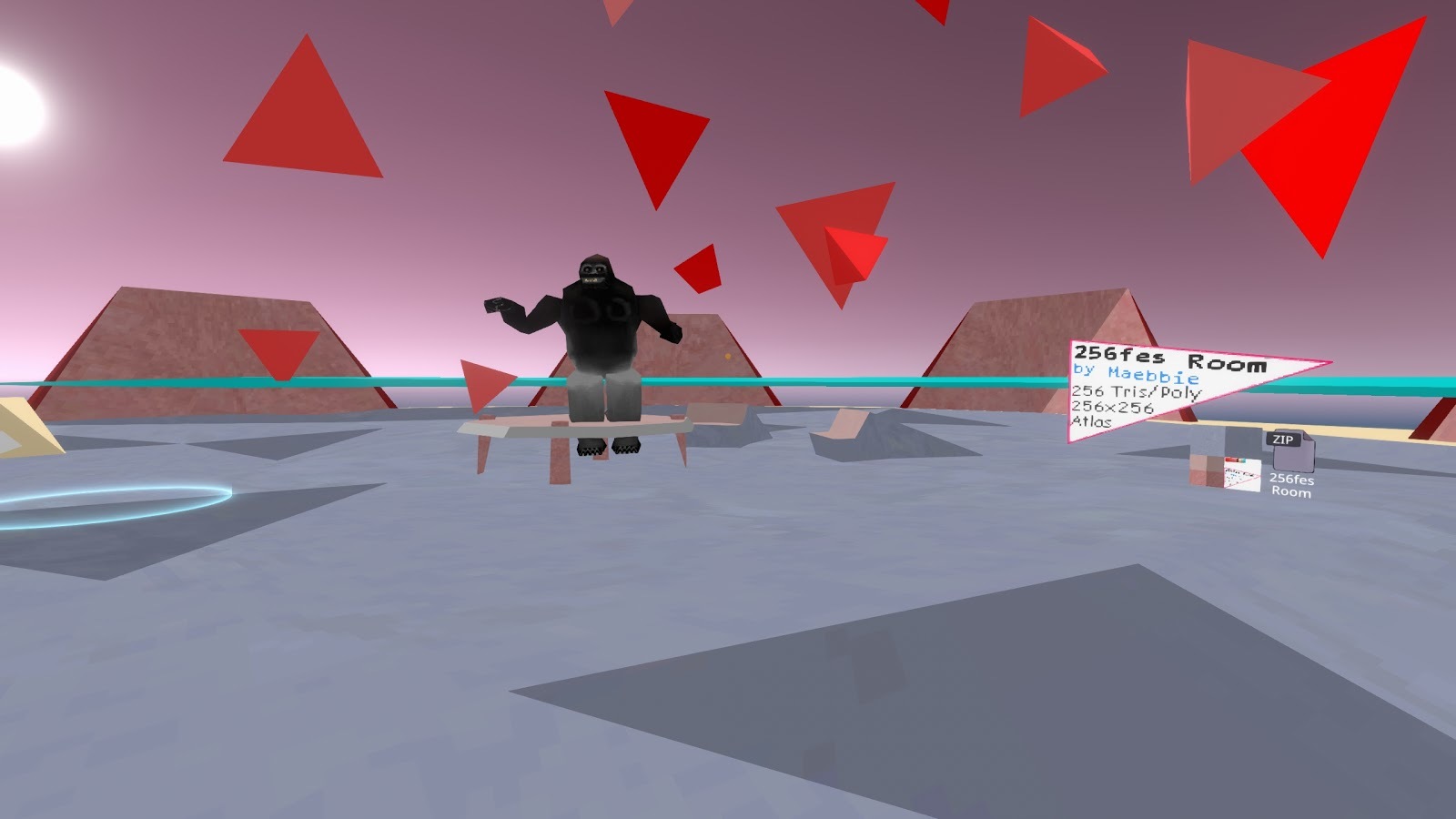
The 256fes challenge is back in season! People in Neos have been coming together to try and make assets with only 256 triangles! Now you might ask, why do that in this modern day and age? Well of course limitation breeds creativity! There have been all kinds of things made like avatars, maps, or even toys and tools! If you want to partake in the 256fes challenge just get into Blender and make something with only 256 triangles :) Thanks Danny for sharing your passion and showing us other parts of the modeling community!


[h3]Delvr Community One Shot by Chris and Tomo[/h3]
The boys over at DelVR have some cool things to show us with the new DnD system being used live and with a community behind it. They had their first community oneshot and it seems pretty packed! Check out part 1 of their vod to see how it went down. Thanks Chris & Tomato!
[previewyoutube][/previewyoutube]

[h3]VR Snowboarding by orange[/h3]
Thought the vehicle craze was over yet? Guess not! We had Geese, we had cars, now we have snowboards! As the Japanese Community in Neos was participating in a VR Snow Festival, all kinds of snow toys and maps are being made! Anyone feeling for some SSX Tricky in VR? While not released yet this got a lot of interest on twitter, so I figured it was appropriate to showcase the cool and new things users are cooking up in Neos!


https://twitter.com/i/status/1362339826003943427

-------------------------------------------

That's all for this week, we hope you had a great one and we're excited to bring you more progress on the desktop mode now with one of the major pre-requisites implemented, as well as clean up some other features, tweaks and bugfixes in the queue over the next weeks, so stay tuned!

And as usual, big thanks to our community for supporting this platform and allowing us to improve it every day. See you next week!