1. Rolling Line
  2. News

Rolling Line News

Train mod liveries! v4.13


The new train modding system now has full support for liveries!

But this new livery system can be used for much more than just simple texture-swaps...

Think of a livery as a "variant" of another mod, which shares assets (3D models, textures, audio, etc) with the original mod. You can replace assets, add new assets, and even remove assets.
You can also modify data like cab positioning, wheel blocks, sound effects, etc.


For example:
- You could make a variant of a mod which adds an additional 3D model for a unique horn, and change the horn sound effect as well.
- You can replace the texture colors to make a re-color of a train.
- You could add different steam particle effects to a steam engine.
- You could add an additional 3D model of raw materials to a freight wagon, to create a different kind of load. Like adding tree logs to a flat-car.

From the player's perspective, if they download a livery they also need to download the "base mod" which the livery is based on.
This is because the livery needs access to the assets (e.g. 3D models) that the base mod contains.

Train mod liveries can be found under the new "Train mod livery" tag on the Steam Workshop:


There is a full guide here which explains how the new livery system works:
https://steamcommunity.com/sharedfiles/filedetails/?id=2784582335

[h2]Automatic livery tags on the Steam Workshop[/h2]

A new feature which this update adds is a system for linking mods to their liveries using tags.
Any train mods uploaded to the Steam Workshop after this update will automatically include a "Livery Key" tag.
This tag will be shared between any liveries and the base mod.

What this means is that you can easily click on the livery key tag and you will see a list of all the different liveries which share the same base mod, as well as the base mod itself:


[h2]Livery permissions[/h2]

This update also adds a new feature which allows mod creators to choose permissions for whether their mods can be duplicated or used in liveries.


Choosing "Not allowed" for either of these options will prevent other players from making liveries/duplicating your mod.

But remember, modding is a community effort!
I would hope that all mods remain completely free to be edited and built upon, so please only use these restrictions if you feel that it is truly necessary.

For example, if you have a specific design which you don't want people to make liveries of, please also release a "livery template" version as well which people can freely edit.

[h2]open asset folder[/h2]

Another useful modding feature included in this update is the "open asset folder" button next to any asset selection input in the modding menus.

You can click this little folder icon to open the folder which this asset is contained in.
e.g. if the mod is a livery, then this will open the folder of the original mod


[h2]Auto-refresh textures when modding[/h2]

Textures also now auto-refresh when you edit them!
So if you are creating a mod and you make changes to the texture you are using (in the "custom assets" folder) all you need to do is click "Refresh preview model" and the mod will use the newly edited texture!

This fixed the issue previously where textures would not refresh unless you used a new file-name.

[h2]Other features[/h2]

This update also includes:
  • You can now use a setting to switch between hold/toggle mode for "hold key to change between prop scale and prop height" when placing props. This setting is in the "Pause menu -> PC Options"
  • QuickMods now have AI-control buttons in their cabs.
  • There is now a pop-up message when you try and load a QuickMod livery if its base-mod is not downloaded.
  • You will also see a pop-up message if a mod fails to load a 3D model asset (e.g. if a model is missing and cannot be loaded)
  • Fixed bug where mod names could be set as empty.
  • Fixed bug where collision would not be set correctly when a train mod uses an animated mesh for its body.

And that's all for now!
This update serves as a nice chunk of progress when it comes to the new modding system, and I'm sure the modding community is going to be very happy about this!

But there is still lots of work to come (e.g. custom audio and features like headlights in train mods) so the new modding system is still far from finished.
Keep an eye out for more updates in the future!

In the meantime, here are a few examples of the new livery system in action:
https://steamcommunity.com/sharedfiles/filedetails/?id=2784186560&searchtext=
https://steamcommunity.com/sharedfiles/filedetails/?id=2784186486&searchtext=

And here is the base mod that these livery require:
https://steamcommunity.com/sharedfiles/filedetails/?id=2784186381&searchtext=

Making liveries is a lot simpler than you would probably expect, all it takes is some basic image editing (like in Microsoft Paint) and the rest is all done in-game.
Why not have a go at making your own? ːsteamhappyː

Here is the step-by-step guide:
https://steamcommunity.com/sharedfiles/filedetails/?id=2784582335

Keyboard bindings & controllers! v4.12


It's about time!
Re-bindable keys has been one of those important features that's been nagging me for years, but it never quite made it to the top of the priority queue.

So this update adds full key binding support, as well as controller support.
Which means you can now play Rolling Line with joypad controls too!


The game will recognize any controller plugged into your PC and it will be used if you have "Joypad Enabled" in the "Pause menu -> PC Options" menu.

If you launch the game with a controller plugged in you will see this message on the main menu:
Simply press "Start" on your controller to enable it!


While a controller is plugged in you can still use the keyboard & mouse controls just like normal.

You can also use the key binding menu to re-bind controller buttons as well.

Help text (like the context-sensitive-help messages) will also show the new binding keys if you change them.

[h2]The bindings menu[/h2]

You can find a new menu called "Controls" on the pause menu.
From here you can individually re-bind all of the actions in the game. Each binding can have both a main binding and an alternative binding as well (e.g. you can use both the scroll wheel and PageUp/PageDown to control the players' height).

You can also reset each binding back to its defaults individually, or clear the binding's keys (set both the main and alternative binding to "none").


At the top of the controls menu you can change the category to show a different list of controls.

You can also toggle between the keyboard & mouse bindings and the joypad bindings.
This means you can customize the PC controls as well as the joypad controls independently, without overriding the other.


Some bindings will have a little '?' button next to them, you can click this to get a more detailed description of what the binding does:


Now that there's a proper in-game controls menu, you'll probably find a bunch of controls that you didn't even know existed!
Like these shortcut controls, which make toggling options like prop snapping and scale speed much easier and quicker:


Bindings are saved to a simple text file, which you can find in:
Steam\steamapps\common\Rolling Line\Data


[h2]VR input binding[/h2]

Remember Rolling Line uses "SteamVR input" which is an input binding system built into Steam. You can use this system to fully re-bind the VR controls (using any kind of VR controller).
The keyboard controls menu does not work for VR inputs.

You can find a full guide here on how to re-bind your controls for VR:

https://steamcommunity.com/sharedfiles/filedetails/?id=2029205314

[h2]New settings[/h2]

There are also a bunch of new settings related to controls, like:
  • "item clone key toggle" - is used to make the key which keeps a copy of items in your hand when placing (which is shift by default) behave either as toggle or hold.
  • "cinematic mouse smoothing" - enables a mouse smoothing filter, which is great for capturing video footage where you want the camera to rotate really smoothly. It's NOT at all recommended for actual gameplay.
  • "joypad enabled" - you can manually disable the joypad if you want to leave a controller plugged into your computer without it being used in Rolling Line.
  • "joypad look speed (horizontal/vertical)" - change the sensitivity of the joysticks.
  • "invert joypad look (horizontal/vertical)" - change whether the joystick view should be inverted.
  • "joystick deadzone" - higher values reduce joystick drift, lower values increase accuracy.

You can find all these options in the "Pause menu -> PC Options" menu.


[h2]Whistles in the modding system[/h2]

This update also adds/restores a bunch of whistles into the new modding system:
  • The whistle from the Ka steam engine
  • An NYC 6-Chime
  • A 3-Chime


[h2]Other fixes and changes[/h2]

Lastly, this update also has several other bug fixes and changes:
  • Fixed bug where train audio would sometimes linger in the scene after a map was loaded with no moving trains on it.
  • Made various fixes to the cab of the custom livery U20C (like headlight position).
  • Fixed a small track error in the save file used for tutorial maps.
  • The VSync setting has now been moved to "graphics" instead of "advanced"


And that's all for now!
I'm so happy with how positive the reception of the previous AI update was, and that update is now the most well rated update in Rolling Line's history!

Though the exciting updates still need to be balanced out with "quality of life" features like key binding, there's definitely going to be plenty more big updates on the horizon!

Train AI v4.11


Most of Rolling Line's updates are focused on either map making or modding tools, so It's about time I added something a bit more gameplay themed! So here's something that's been asked for more times than I can count throughout RL's history: train AI!

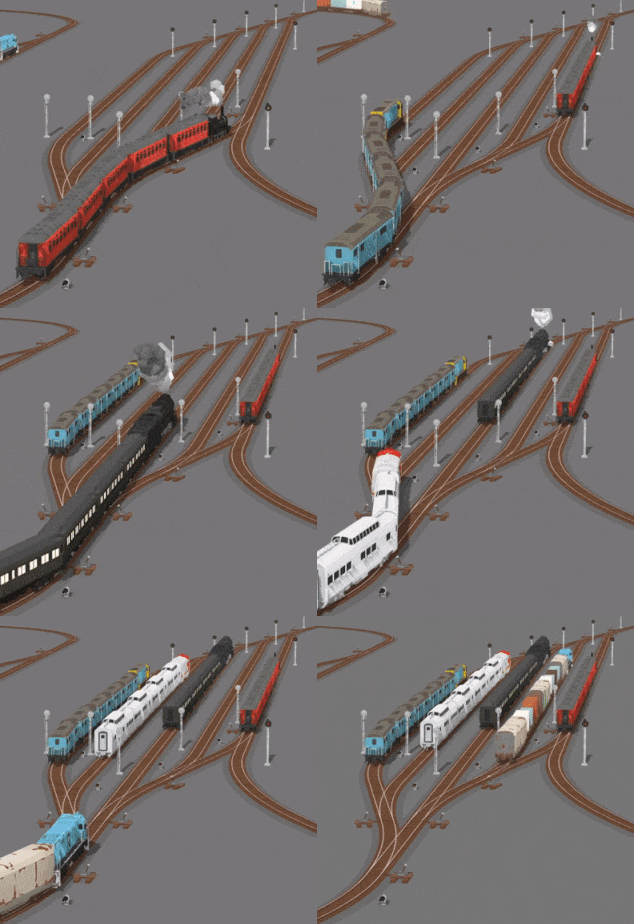
This update adds a new "Auto Drive" mode which allows trains to respond to signals and start/stop accordingly, as well as "Auto Switch" which can automatically switch turnouts to direct trains down empty tracks to avoid other trains.


You can use these new features to make all sorts of track designs, like automatically sorted yards and sidings for AI-driven trains to use:


You can also make use of a variety of "AI trigger signs" which can be placed on the ground next to the tracks to make them do things like sound the horn, reverse, stop & wait, and even control the max speed.


This AI system does require a bit of understanding to use, so I've written an official guide which explains how to build your own AI-ready layout elements and how to make sense of this new system:

https://steamcommunity.com/sharedfiles/filedetails/?id=2753143585

To summarise, AI relies on signals to decide where to go.
The guide above explains various ways in which you can set up signals so that your AI-driven trains can do operations like passing each other and automatically filling empty tracks in a yard.

But if you just want to do simple things like making trains sound their horn when passing a crossing, or stopping and waiting at a station then you don't need to use any signals at all! You only need to make use of the simple AI-trigger signs.


You can enable/disable AI by pressing "Y" when controlling a train with a hand-held controller.
Or you can simply use the buttons in the cab of every train:


There is also an "AI debug view" you can enable in the "Misc" menu which will make coloured lines show up in front of any AI-driven trains to help visualize what they are doing.
This is incredibly helpful when you are designing your own AI-friendly layouts!


[h2]Speed value changes [/h2]

This update required the speed of trains to be converted into real values (instead of the mysterious "Rolling Line units per hour" that is use to be!).
So this means you can now read the train speed in-game using either Mph or Kph!

The speed steps sizes have been adjusted a tiny bit too.


You can convert between the two in the menu "Pause menu -> Misc -> Mph instead of Kph"


[h2]New rusty & graffiti wagons[/h2]

Another bonus feature of this update is that it adds some rusty variants of a couple of the original NZ freight wagons:


And a special feature of these wagons is that they have a random chance of spawning with special graffiti on them!
Some of you may remember that this graffiti was included in the game as an Easter Egg in the past.

Huge thank you to Obli who made the incredible art for this graffiti!


[h2]Other fixes and features [/h2]

This update also includes a bunch of smaller changes:
  • Fixed the bug where wagon couplers drift apart when trains speed up and slow down (especially at low frame rates).
  • Pressing Enter to copy the track data on a piece of track will now also copy the colour used for the ballast at the same time.
  • Fixed a broken piece of track in the "example shelf" new game template map.
  • Entering a moving train will no longer cause the locomotive to reset its "goal speed". This was most noticeable when stopping trains (setting the speed to zero) then trying to leave the cab it would sometimes reset the speed and no longer return to zero.
  • Fixed bug where signals would flick over to green for a short time while locomotives pass by.
  • Added audio, extended skybox and made various fixes to the Open Hearth Point map.
  • Fixed bug where the particle emitter positioning UI when setting up a mod would forget the previous particle position when editing multiple times in a row.
  • Loaded 3D models in the modding system will now have their materials automatically compressed into a single material.


And that's everything!
I've been away from home (and consequently away from work) for a while around Christmas and New Years so this update has taken longer than I hoped.
But now that everything is back to normal I'm hoping to release a list of what I actually have planned for this year and what kind of updates you can look forward to!

This year is going to be a big one for Rolling Line, and things are starting to kick back into gear again.
I hope everyone has fun with the new AI features, I know I'm personally keen to have a go at making my own automated AI-friendly map!

Smoke particles for mods & maps! v4.10


Happy New Year everyone!
I've got big plans for Rolling Line in 2022, and it's starting off with a highly requested modding feature:
Custom particle effects!

You can now add your own steam/smoke/fumes particles to train mods, as well as place a new "particle emitter" prop in your maps to create your own moving particle effects.


[h2]Particles for train mods[/h2]

The first part of this update makes it possible to create your own custom particle effects for the new train modding system.

You can access these new particle options in the new "Mod edit window -> Effects -> particles" menu:


You can add as many particle emitters as you like:


And you can customize all sorts of things like particle size, colour, speed, rate, etc.


You can also easily mirror particle effects, which is perfect for making steam engines!


You can use these particles for all sorts of things, like steam engine smoke, whistle effects, and even startup fumes on diesel engines.
The rusty U20C now has a cold-start fumes effect to demonstrate this:


You can find a whole new section of the official train modding guide which explains how to use these new particle effects in detail:

https://steamcommunity.com/sharedfiles/filedetails/?id=2664192139

[h2]Particle emitter prop[/h2]

This update also adds a placeable particle emitter prop!
Which means you can now easily add your own particle effects to your maps.


Of course you can customize these particle emitters with all the same options!


You can be really creative with these, and I've already seen a bunch of great ideas made by the community, like this one which uses particles for a ship's smoke stacks as well as waves!


You can find this new particle emitter prop in the "Room -> tools 2" drawer:


[h2]Open Hearth Point[/h2]

Some of you might know of this map I uploaded to the Steam Workshop a while back:
https://steamcommunity.com/sharedfiles/filedetails/?id=2142272917

Well it suits these new particle emitter props perfectly!
So I decided to give it a bit of an update and include it in the game officially.


You can find this map on the main menu by choosing "new game -> mini maps -> open hearth point"


[h2]Other features[/h2]

Another modding related feature which this update adds is a new "Lock to wagon body" option for wheel blocks.
Enabling this option will make this set of wheels "lock" onto the body of the mod, which will stop it from rotating to match the track and it will instead always line up with the wagon's body mesh.

This is useful for animated steam engine wheels which you want to be visually connected to the main steam engine body, instead of pivoting independently.


You can also now access all the animated wheel sets from the official trains as mod presets!
So you can use models like the Berkshire wheels, side-rod animated wheels, big-boy, etc, in your own mods.


The control valves in the steam engine cab for mods also now control the steam effects (if your mod makes use of them) just like official trains.


You can also now use the transform edit tool (PC only) to move points used in train modding, like the cab position, player spawn position, particle positions, etc.
Simply press F when pointing at the preview point object and you will be able to move it around just like any other prop:


And a couple of small other things:
  • The "Show interaction UI" and "Show button names/icons" settings have been moved to the "misc" menu (instead of being deep inside the "VR options -> interaction" menu).
  • The page is now set correctly when selecting a mod preset from the list. This applies to all item lists (like selecting a custom livery texture, or wagon type).


And that's all for this update!
These smoke particles are really fun to use in maps and I can't wait to see what kind of creative ways people will be using them. And I'm sure the train modders are really happy with the new features.

2022 is going to be an exciting time, and Rolling Line is going to be growing a ton during this year!
Happy new year!

Christmas 2021 (Holiday Train!) v4.9


Merry Christmas everyone!
This year Rolling Line's Christmas update adds a very famous (and very pretty) train known as the Holiday Train!

It's actually a real-world train which Canadian Pacific runs down its main line to celebrate the holiday season. The real one even has live music performances from stages built into boxcars!


You can find the new Holiday Train (as well as a bunch of boxcar and passenger wagons with lights too!) in the "miscellaneous -> Christmas 21" drawer:


When you spawn a copy of one of the wagons, it will use a random lights design (from a few different options):


The lights on all the wagons also change colour!
And thank you to Stationmaster who made the original version of the AC4400CW with the little Christmas tree on top and the wreath!


[h2]Other features and fixes[/h2]

This update also includes:
  • Lots of the branding images for the game have been changed to a temporary special version for Christmas:


  • Just like with other holiday events, there is now a special main menu too:


  • And you can access the little scene used for the main menu from the "new game -> Mini Maps -> Christmas" option:


  • There is now a warning shown when setting the "model offset" value for the wheels & couplers on train mods. This is because the model offset value is only meant to be used for small visual adjustments (like moving the model a small distance so it lines up properly). This value should not be used to extend the length of the whole wagon, for this you should use the "Length" value found in "general options".
  • Loud weather no longer causes the music to fade out (e.g. storms and heavy wind).
  • You can now have multiple animated meshes on a single "wheel block" for train mods. There used to be a bug where only one animated mesh would be recognized, this has been fixed.
  • The image thumbnails for maps (and various other lists) now glow-in-the-dark, so you can still see them easily on dark maps.


You may have noticed that there's actually still a while to go till Christmas (10 days!).
I'm releasing this update a little early since I'm going to be spending the holidays with family, and enjoying some time off work. Update will resume after new years, and I have tons of exciting stuff planned for 2022!

In the meantime, I hope you enjoy the new beautiful holiday train, and have a Merry Christmas!