1. Rolling Line
  2. News

Rolling Line News

VL80 custom liveries! v5.15


This update adds custom livery support for the newly added VL80 locomotive, as well as a bunch of other minor fixes & features.

The Eastern-European comp is still running until June 25th! And it's amazing to see entries already showing up on the Steam workshop. You can find more info about the competition here:
https://store.steampowered.com/news/app/754150/view/4143953771616864523

Remember one of the categories you can win is for "Best fictional railway/location" and now that you can make your own liveries for the VL80 you can design your own fictional Eastern-Euro inspired railway line!

[h2]Creating your own liveries[/h2]

Making liveries is easy! All you need is basic image editing software (even MS Paint is fine).
There's a guide here on Steam that explains how to make your own liveries!

https://steamcommunity.com/sharedfiles/filedetails/?id=1405658466

Just as with all the other liveries, you can find the templates in the "Rolling Line -> Modding -> templates -> livery templates" folder:


[h2]Downloading shared liveries[/h2]

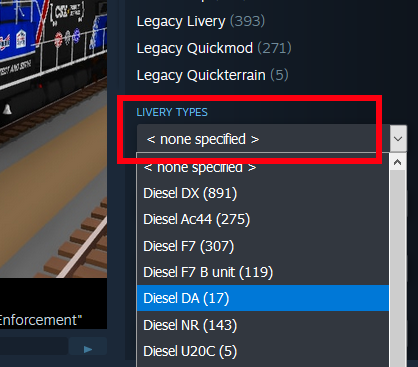
You can find other people's shared liveries simply by going to the Steam Workshop and using the “livery type” drop-down list:


[h2]Other features[/h2]

This update also includes:
  • The VL80 now has a new horn sound, plus a whistle!

  • The shading on the model for the VL80 has been improved a lot
  • Fixed the horn sound effect point for the VL80
  • You can now press the left + right bracket buttons to control the front & back pantographs individually. There is also a custom binding for this in the "controls" menu:

  • There is also a new binding to use the alternative horn sound for trains that use it (like the Sprinter and VL80):

  • Fixed a bug where snap points on track would not be updated correctly when placing a group of track on the ground


The livery in the thumbnail is this one made by Skull4786:
https://steamcommunity.com/sharedfiles/filedetails/?id=3261350018&searchtext=

That's everything for this update!
And I'm excited to see all the things people are working on for the Eastern Euro comp!

Eastern-Euro Comp! v5.14


It's time for a map competition, a new locomotive, and even a collaboration with another game! (Trans-Siberian Railway Simulator)

Trans-Siberian Railway Simulator is just about to be released, and the developers reached out to me to see if we could make a Steam bundle with both games, and you can find that bundle here:
(The bundle will become available once the game officially launches)

https://store.steampowered.com/app/998400/TransSiberian_Railway_Simulator/

But why stop there! I've always wanted to add some Eastern-European content to the game, so I'm taking this opportunity to run a map making competition themed around it.

This update also adds an incredible community-made mod (the VL80 locomotive) make by Akandr:
https://steamcommunity.com/sharedfiles/filedetails/?id=2253493285

The mod has been expanded to have all the features of official trains, like headlights, rust & snow effects, cab controls, collision, etc.


You can find these new trains in the "Trains -> Eastern Europe" drawer:


[h2]About the competition[/h2]

Just like with previous comps & jams in Rolling Line, this is a chance for you to make a map (or mods) with a theme and then share them on the Steam workshop!

The theme here is Eastern Europe, but this is very broad. It encompasses the whole style & feel of this part of the world and isn't specifically limited to just a few countries.
In fact you can even make fictional locations and fantasy railway lines if you want!

To submit a map/mod to the competition, simply upload it to the Steam workshop and tick this option when uploading in-game:


For this competition there will be 3 different winners, each of which will get a free game key for Trans-Siberian Railway Simulator!

The categories for each winner are:

[h2]Best overall map[/h2]
Pretty simple! This goes to the best overall map, which includes creativity, detail, design, etc.

[h2]Best fictional railway/location[/h2]
This category is especially for a fictional design, whether you want to create your own fantasy railway line or just make a map set somewhere that doesn't exist in the real world.

[h2]Best use of miniature scale mode[/h2]
This is for a map that makes use of the miniature scale player physics, like being able to walk around in detailed streets & buildings, or exploring a world designed to be viewed on-foot in miniature scale.


But of course you can make any kind of map you like! These categories are not limiting factors.
As usual, i'll also be posting a ton of shout-outs to my favourite entries at the end of the event! (not just the winning ones).

This competition will run for 3 weeks, finishing on June 25th.

If you want to view the entires so far for the competition, you can view the "Eastern Euro Comp" tag on the Steam workshop:


If you're looking for more Eastern-European style content, there are even some more mods on the Steam workshop!
For example:

https://steamcommunity.com/sharedfiles/filedetails/?id=2260197258
https://steamcommunity.com/sharedfiles/filedetails/?id=3242070671
https://steamcommunity.com/sharedfiles/filedetails/?id=2253489688
https://steamcommunity.com/sharedfiles/filedetails/?id=3030915840
https://steamcommunity.com/sharedfiles/filedetails/?id=2187560781

[h2]Other additions in this update[/h2]
This update also includes:
  • Some new cliff face and rock props in the terrain drawers
  • Fixed the 1.0 classic version of the game (it had a bug related to SteamVR that was affecting some people). For those unaware, you can play a day-one release version of the game (just for nostalgia’s sake) by switching to the "Rolling Line 1x" beta-branch.

[h2]Progress on the Sierra Logging map[/h2]
There hasn't been an update for a while since I've been putting all my time towards the upcoming Sierra Logging map which I've teased at a few times in previous updates.
I'll be making a full announcement of this map in the future, but in the meantime, here's some more preview screenshots of progress!

Western buildings! v5.13


Continuing on from the "lumber mill props" added last update, this next update adds some more props and features themed around a western town! This includes new buildings, props, and a new wooden tunnel style.

As you might have seen mentioned previously, all these updates are working towards a big map set in the Sierra mountains and the California logging industry in the early 1940s. This map is going to be Rolling Line's first ever expansion (almost 6 years after the games release). More details will be coming in the future about this expansion, but for now here's some new props added to the game while i've been in the process of making the town of Tuolumne, California!

[h2]Old western buildings [/h2]

Firstly, a modular hotel building:


A set of classic street-side shops:


And a church:


Also a bunch of props, including shop-front signs, wood planks, hitching posts, etc:


[h2]New wooden tunnel style[/h2]

This tunnel can be added from the popup track-style menu, or using the new painters in the "track tools" drawer. You can make a single-track tunnel or a double-track tunnel (by adding walls to each side on the two lanes of track). There are also snappable tunnel portals for single and double track tunnels:


[h2]More mill props[/h2]

A few new props added to the "buildings -> mill" drawer, these include a new modular water tower as well as a wooden "sand chute" building:


Other minor fixes/features also include:
  • Added snapping to all double-track tunnel portals
  • Added placement ghost arrow to all tunnel portals
  • Improved collision on several wooden debris pile props
  • Moved several props around to clean up drawers, there is no longer the bizarre "props -> warf" drawer, these props have been moved to "vehicles -> boats" and "buildings -> Western"
  • Added a couple of new church window props


[h2]Sierra logging layout preview! [/h2]

While this is still massively work-in progress, here are a few sneak previews of parts of the map that I have been working on! There will be much more info released about this map in the future.

Lumber mill props! v5.12


This update adds a ton of lumber mill themed props, like new modular buildings, moving log chain, smoke stacks, log piles, and more!

You can find all of these new props in the "buildings -> Mill (1 & 2)" drawers:


[h2]Log chain[/h2]

One of the new moving parts of a lumber mill, the log chain! This is used to pull logs from the log pond into the inside of the mill. There are a few different sizes and style variants.


[h2]Green chain[/h2]

The other new moving part for a lumber mill is the green chain, this is a conveyor which takes the freshly cut planks out of the mill so they can be sorted into sizes.


[h2]Log piles[/h2]

Lots of new log props! Including individual logs and big log stacks:


Also various drying stacks of planks:


[h2]Smoke stacks[/h2]

A new set of modular smoke stack props, as well as some roof details:


[h2]Sawdust burner[/h2]


[h2]Reeds[/h2]


[h2]Modular rail sheds/mill buildings[/h2]

The largest part of this update is a set of new modular buildings! These can be used for rail sheds (witch openable doors) or any building made with planks:


[h2]Flat tables (water)[/h2]

A very simple feature that's incredibly useful, there is now a full set of tables that have no sides, so they are just a flat surface. These are excellent for making water effects:


[h2]Other features[/h2]

Some props (like the log chain and openable doors) now have an arrow visible when placing them on the ground, to help make it clear which way they are facing:


There are also a few bug fixes:
  • level crossings no longer trigger from cars when they are set to "automatic" mode
  • the "packaged mods" and "packaged assets" options are now visible when uploading a main menu map scene to the Steam Workshop (these were missing before)
  • Fixed bugs with turntables being included in grouped track. A turntable can no longer be the first item in a group (it can still be included in a group, it just cant be the first piece of track selected)

You're probably wondering why the sudden lumber mill theme?
That's because it's part of the next major map release I'm working on, the "Sierra Logging" expansion!
This map is set in California during the historic logging boom in the Sierra mountains. Specifically the towns of Tuolumne, Jamestown, and the West Side Lumber Company!
There will be lots more info released about this map in the future, but it will involve a ton of new props being added into the game (just like these ones).
I'll be releasing props like these in updates as they are made, instead of waiting till the whole map is finished, since this will be a big project.

These props especially were all made to re-create the Tuolumne mill:

Dynamic roundhouses! v5.11


One of the main icons of railways: roundhouses!
Despite turntables being added to the game already, they have always been missing a proper system for creating roundhouse buildings. You can always make them with props, but this is a tedious and difficult process, so this update finally adds a solution!

You can now dynamically add roundhouse buildings to turntables, and their shape and size will automatically be scaled to fit the shape of the turntable. You can customize the style of the roundhouse (like door types, roof types, colors, size, etc) and even add multiple different types of roundhouse buildings to a single turntable.

[h2]Adding a roundhouse to a turntable[/h2]

When pointing at a turntable, use the right-hand popup option to open the menu for editing the turntable options. From here you can access a new menu for editing roundhouses:


You will then see an empty list. You can add multiple different roundhouse buildings to this list, which is useful for when you need more than one size/color of building attached to a single turntable. Click "add new" to create a new roundhouse building.


Editing a roundhouse building will give you a bunch of options, like the style, shape, colors, etc:


The start/end index options are used to control how many exits of the turntable are covered by the roundhouse building. For example, in this screenshot the roundhouse runs from exit 8 to 14:


You can also customize things like the height/length of the roundhouse building, and change the "offset" (the distance which the building is placed in relation to the edge of the turntable):


There are lots of different model styles for the doors, walls and roof (and of course the doors can all be opened!)


There is also now a new drawer (track -> roundhouses) which contains some example turntables with roundhouses already attached.


This update also includes a couple of other small things:
  • Fixed a bug relating to the collision on turntables not behaving correctly when some track styles were used.
  • Added a setting to enable/disable the "train rotation smoothing" effect. This effect makes your view smoothed when driving a train around corners. This setting is in the "pause menu -> gameplay" menu.