Cosmoteer 0.14.10 - Ion Beam Prisms
Cosmoteer update 0.14.10 is now available for download! This update enhances the existing Ion Beam Emitter weapon and makes it WAY cooler by adding the Ion Beam Prism. It also makes a significant change to the game mechanics of structure pieces, as well as a handful of other improvements and fixes.
The Ion Beam Prism is a new 2x2 exterior ship component that combines and redirects any ion beams that are shot into it, resulting in a potentially far more powerful beam:
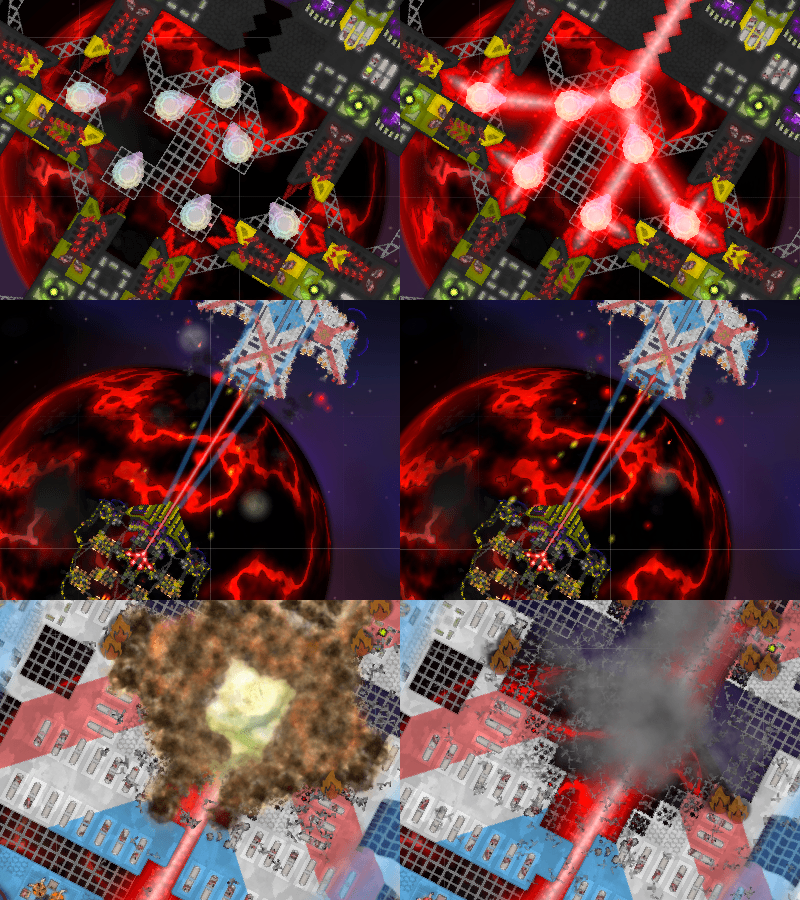
The Ion Beam Prism is mounted on a swiveling turret and can aim in a full 360 degrees, albeit very slowly. This feature alone makes the Ion Beam Emitter a much more versatile weapon, though at a significant cost increase.
But the real power of the Ion Beam Prism lies in its ability to combine multiple beams into a single, stronger beam. This makes it easier to focus all the power of multiple Ion Beam Emitters onto a single enemy target, as well as allowing the emitters to be housed within the interior of the ship while only exposing a single or small number of (ideally well-protected) Ion Beam Prisms to enemy fire.
Combining multiple beams is not without cost though, since each additional beam contributes 25% less power than the previous beam. To maximize the power of a single ion beam, it is optimal to combine exactly two same-sized beams per prism. Combining more than two beams in a single prism, or combining two beams of significantly different sizes in a single prism, will result in considerable power loss.
Ion Beam Prisms are also very fragile, and if they are destroyed while a beam is being shot through it, the resulting ion explosion can devastate the surrounding area as well.
To use an Ion Beam Prism, just build one in front of an Ion Beam Emitter, and the Emitter will be smart enough to shoot when the Prism is aiming at the enemy. You can also link multiple Ion Beam Prisms together to form a chain by selecting an individual Prism and clicking the "Link" button.
The "structure" pieces (those little girder tiles that hold the ship together) have also received a significant change to how they interact with the weapons on their own ship. Previously, structure pieces would block any weapons on their own or allied ships from firing over them, meaning you couldn't put any structure in front of your weapons without blocking them. But in this update the game mechanics have changed so that your own weapons can now shoot over your own structure pieces. This should make it easier to build and use Ion Beam Prisms, as well as make it easier in general to create clever ship designs.
The way that enemy weapons interact with structure pieces is unchanged (enemy weapons will still fly over them while damaging the first structure piece), with the exception of missiles, which will now fly over structure without exploding, unless the missiles were specifically targeting the structure.
This update also has a handful of other improvements, fixes, and modding features, which you can read all about in the changelog.
Enjoy!
Ion Beam Prism
The Ion Beam Prism is a new 2x2 exterior ship component that combines and redirects any ion beams that are shot into it, resulting in a potentially far more powerful beam:

The Ion Beam Prism is mounted on a swiveling turret and can aim in a full 360 degrees, albeit very slowly. This feature alone makes the Ion Beam Emitter a much more versatile weapon, though at a significant cost increase.
But the real power of the Ion Beam Prism lies in its ability to combine multiple beams into a single, stronger beam. This makes it easier to focus all the power of multiple Ion Beam Emitters onto a single enemy target, as well as allowing the emitters to be housed within the interior of the ship while only exposing a single or small number of (ideally well-protected) Ion Beam Prisms to enemy fire.
Combining multiple beams is not without cost though, since each additional beam contributes 25% less power than the previous beam. To maximize the power of a single ion beam, it is optimal to combine exactly two same-sized beams per prism. Combining more than two beams in a single prism, or combining two beams of significantly different sizes in a single prism, will result in considerable power loss.
Ion Beam Prisms are also very fragile, and if they are destroyed while a beam is being shot through it, the resulting ion explosion can devastate the surrounding area as well.
To use an Ion Beam Prism, just build one in front of an Ion Beam Emitter, and the Emitter will be smart enough to shoot when the Prism is aiming at the enemy. You can also link multiple Ion Beam Prisms together to form a chain by selecting an individual Prism and clicking the "Link" button.
"Structure" Mechanics Changes
The "structure" pieces (those little girder tiles that hold the ship together) have also received a significant change to how they interact with the weapons on their own ship. Previously, structure pieces would block any weapons on their own or allied ships from firing over them, meaning you couldn't put any structure in front of your weapons without blocking them. But in this update the game mechanics have changed so that your own weapons can now shoot over your own structure pieces. This should make it easier to build and use Ion Beam Prisms, as well as make it easier in general to create clever ship designs.
The way that enemy weapons interact with structure pieces is unchanged (enemy weapons will still fly over them while damaging the first structure piece), with the exception of missiles, which will now fly over structure without exploding, unless the missiles were specifically targeting the structure.
... And More!
This update also has a handful of other improvements, fixes, and modding features, which you can read all about in the changelog.
Enjoy!