So the last few weeks have been bonkers due to a gigantic house move (turns out we'd hoarded loads of stuff???), and I've got some other work to do over the next month or two, so I wanted to get an update out this weekend to show you all that I
am still alive and I
am still working on bringing Dungeon Deathball to the finish line!
I wanted to get a new monster into the next update, but I've had to focus on smaller tasks to fit into my busy schedule. So here they are...
Help Popups
One of the major problems this game still faces is in comprehension, particularly of new players, about how the game works. This is an attempt to remedy that problem.
Now, you'll see little popups on the sides of the screen which provide useful information and explanations.
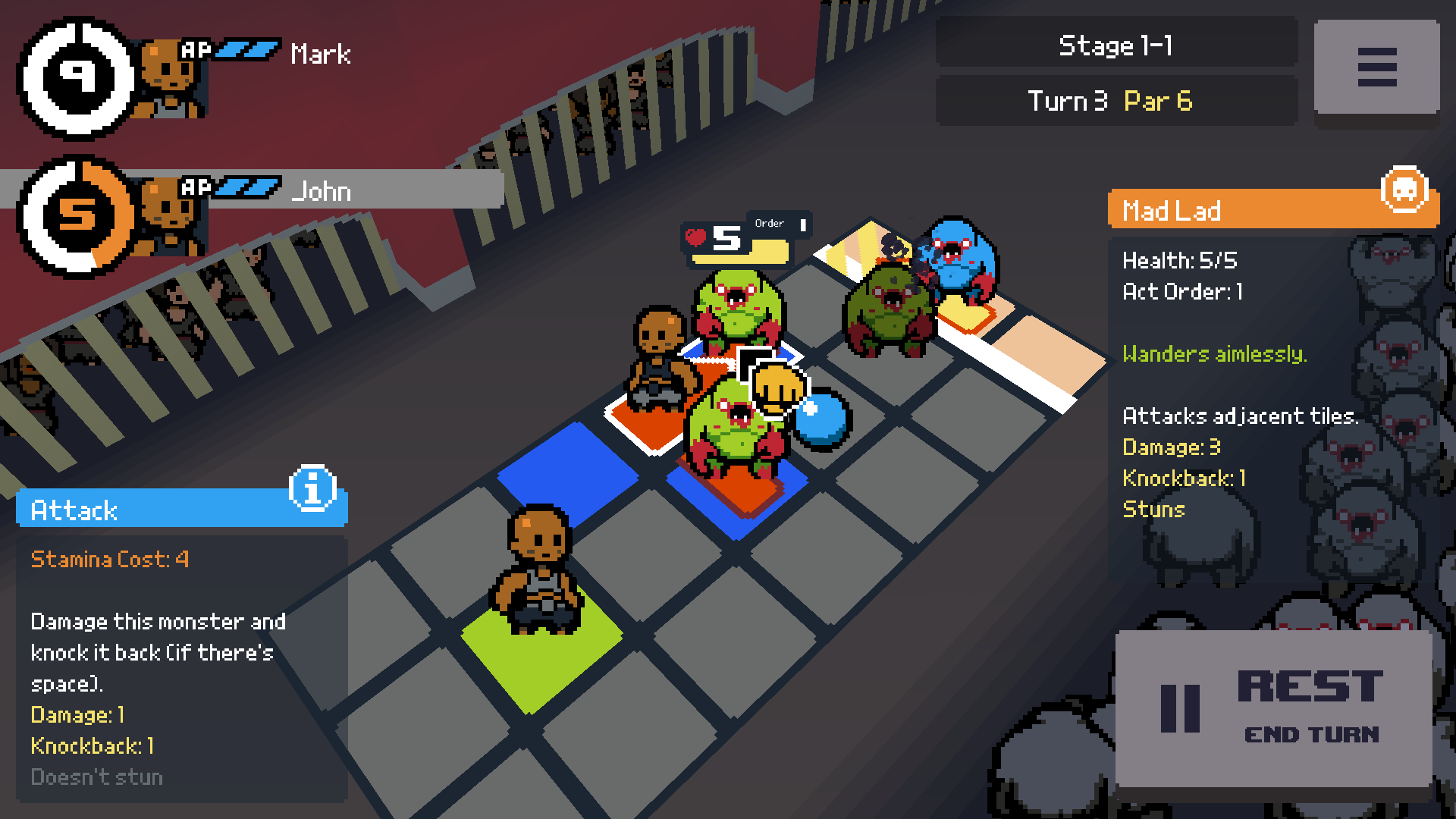
When your mouse cursor hovers over action buttons (e.g. Rest, Pass, Shoot) or field tiles (e.g. Move, Attack, Switch Player) you'll see a blue popup on the left which explains what that action does. If, for example, it's an Attack then it will tell you how much damage you'll do, whether or not it will stun the enemy, etc.
When your cursor hovers over an enemy monster, you'll see an orange popup on the right. This one tells you all about that monster's stats and how it moves and attacks.
Veterans will probably have already memorised a lot of this information (although there may be some useful details in there).
If you get tired of these popups or you find them obtrusive, you can simply disable them in the new.......
Options Menu
Hooray, now it's a proper game!
Hit the Options button from the title screen or the top-right corner during a stage and you can tweak the audio volume levels, or disable the aforementioned popups.
These settings are all saved across sessions automatically.
Full Changelist
- Added 'Help Popups' which give useful information for beginners. These can be disabled in the new Options menu. Player action popups (left, blue) tell you about stuff you can do when you hover over a button, a selectable tile or a player info panel. Enemy info popups (right, orange) tell you about an enemy when your mouse cursor is over one.
- Added an 'Options' menu (both from the title screen and in-game). Audio volumes (master, music and sound effects). Turn Help Popups on and off.
- Turn number and Par is now displayed in the top-right corner (moved from bottom-left), along with the newly-displayed Trials/Stage number.
- Par number now changes colour with more steps to show when you're approaching par. It now turns red when you're on your last chance, and goes grey when you've missed par.
- Improved some basic keyboard/controller functionality for menus by having default buttons highlighted when they appear. More to follow.
- Bug fix: prevented mouse clicks going through the UI and hitting tiles behind it.
Feedback
I hope you like the new features! If you're a new player, I'm particularly interested in how easy or difficult you find the game to learn and understand.
And please remember to leave a Review!- Matt
P.S. Who's going to EGX in Birmingham UK in a couple of weeks? I'll be there with my previous game,
Switch 'N' Shoot! If you say me, make sure you say hi!