1. Reentry - A Space Flight Simulator
  2. News

Reentry - A Space Flight Simulator News

Reentry has been patched to 0.9985.EA


This minor patch will correct the following issues:
  • Overexposure in Mercury for some (minor thing that was introduced in the previous update)
  • HTC Vive controllers can now move hands (no input binding yet)
  • UMA Rebuild to render the character in the Character Editor


Again, thank you all for the quick feedback and reports! :)

Reentry has been patched to 0.9983.EA


I just rolled out a minor patch to correct the blocking issue where the function bubbles in the Mercury cockpit stops reacting to mouse input.

In addition, I started creating some new logic that will be used to handle states between non-VR sessions and VR sessions (such as hiding the gloves etc).

Again, thank you all for the quick feedback and reports! :)

Update 0.998 is out! - Critical fixes and a word about VR


The 0.998 update is mainly about fixing issues and continuing to iterate the game towards its first major milestone, the 1.0 update. It will mainly fix some blocking issues and critical issues reported lately.

Note: If you are experiencing issues with this update, you can always revert to an earlier build using the Steam Betas Tab.

A word about VR
A few patches ago the old Virtual Reality (VR) implementation was moved to a dedicated branch as Unity deprecated the VR API that my old VR implementation was based on (preventing me to update the game to the latest and most modern version of Unity). While VR as a main focus is still a post 1.0 feature, I wanted to take this opportunity to speak more about its future in Reentry.

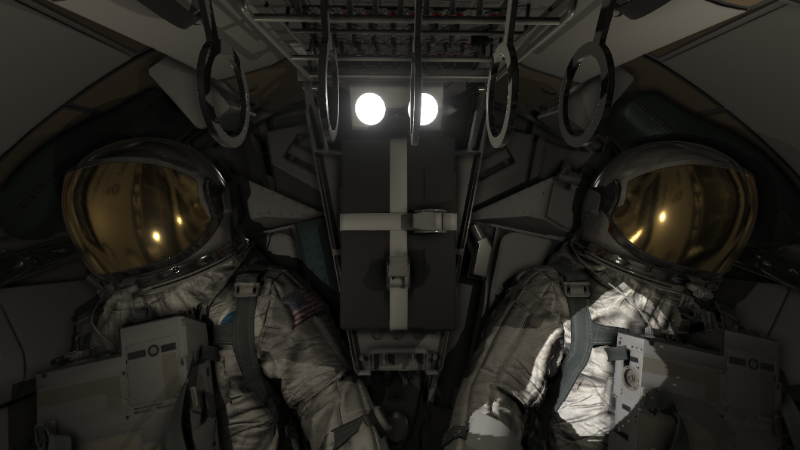
The plan for VR is to start testing the basics of a new VR rendering framework, and iterate on it as I get feedback from the community. I want to first of all test the core logic such as device recognition, rendering and basic interactions. I will do this in the Mercury program, and use this as the playground to learn as much as possible about device detection and basic rendering using the new API.

I'm happy to share that this approach starts today with this update. The beginning of the new VR-implementation has now become an alpha-feature that you can toggle on from Main Menu -> Settings -> Alpha Features.

The primary goal of this first iteration is to get feedback of device support, and I wish to limit it to this. For those who wish to join me in this development journey with regards to suggestions and feedback are welcome to join the official #vr-development channel found under the Alpha section on our Discord server,

With this first implementation you will be able to start a mission in the Mercury Program. I have implemented a very simple interaction model for now where you can use the controllers to control a laser pointer (on the right controller) that should be able to interact with all switches onboard. Using the A and B button, you can move switches and selectors to configure the panels.

For those familiar with VR development, the current implementation will try to initially only use the new OpenXR API built into Unity, with the VR Interaction Framework as its core.

Once I start to get feedback on device support, I will iterate on this implementation to add support for the mission pad so you can interact with to execute checklists and so on, and then move into a more sophisticated interaction model where you can use the controllers directly on switches instead of using a laser pointer. When this is done, you will have basic VR support that will let you complete any mission in Project Mercury!

If you wish to test this, enable VR from the alpha feature to toggle the VR section in Settings. From here, you can enable VR. The moon landscape will then render in the VR headset. The Main Menu will render on your monitor and you will need to configure settings and select missions from here. Once you start a mission, the game will start to render Mercury in the HMD.

I want to take this opportunity to thank you all for the suggestions and feedback during the old technical preview phase of VR, I learned a lot from this, and I'm very excited to start this new phase of VR support in Reentry.

A big shoutout to all the Test Pilots, the Community and those who help new players there, and for helping me shape this game into what it is today.


0.998 release notes:
  • Blocking issues fixed: Unable to launch the Gemini Campaing Mission 1
  • Fixes to blocking MOCR session logic bugs
  • Many fixes to the new Career path/tech tree feature
  • Updates to save states
  • Multiple fixes on mission scripts and typos
  • Multiple fixes on checklists and the checklist guidance system
  • Starting the new Mercury VR implementation
  • Fixed: Gemini Lock On light can occasionally get stuck in the lock on state.
  • Fixed: Gemini Encoder stopped working when docked
  • Corrected UI scaling issues related to the Mercury Failure Toggle window
  • Corrected km to nmi conversion in TEI academy lesson
  • Mercury and Gemini ascent guidance updates
  • Fixed: In the Apollo academy mission #10 Transposition and Docking, RCS thrusters A1, C1, and A2 are turned off at the beginning of the mission and there is no prompt to turn them on. They are needed to complete the docking.

Update 0.997 is out! - Career Path, Gemini fixes, CMC guidance


The 0.997 patch is mainly about correcting and tuning systems. It addresses some major issues around Gemini ascent. The patch also introduces a new system designed to help you navigate all the content of the game.

Note: If you are experiencing issues with this update, you can always revert to an earlier build using the Steam Betas Tab.


Career path node view
The "CAREER" view accessible from the Main Menu is designed to help new players navigate the content of the game and will try to guide you to learning a specific space craft. This is the first iteration of this and will continue to evolve going forward.

The first thing you need to do is to select the active space craft (this can be changed at any time). The career window will then show you how far you have progressed through the content specific for the selected space craft.


This screen will show you how far you have progressed on the various space crafts, your awards and various ranks tied to that craft (like your astronaut rank, mission controller rank, capcom rank and flight director rank).

Once you select a space craft (click on it), you will find a node based path where you can see how to receive awards and progress through learning a craft and playing it in the game.


Your current level and xp needed to reach the next level is visible on the Profile page. I have added the capcom and flight levels to this screen as well.


Note: You don't need to unlock the flight and capcom paths to join a mission control session as capcom of flight, but it will help you learn the needed knowledge to become a better capcom/flight.


Gemini Ascent fixes
One of the major issues is around Gemini ascent. This version seems to be correcting the ascent for many, but more testing and fixes are needed to make it stable.
If you are having issues with Gemini ascent, it would be great if you can reach out so I can get more data as I'm unfortunately unable to reproduce the issues on the test-computers I have available.

A dedicated thread on the Discord server has been set up for those who might still face these issues. Use this thread to report issues and discuss.
You can find the thread here: https://discord.com/channels/510845247404769331/1090688922767589457

Note: If you are not on Discord, feel free to use the Steam Community forum for this.


Gemini Campaign fixes
Multiple fixes are applied to the Gemini ascent, both mission sequences, instructions and fixes around completing issues.
If you complete a Gemini campaign mission using this build, and the campaign mission selector still don't show this, let me know and please supply the log-file so I can analyze.

If you are still facing issues related to this, you can use the following thread on Discord:
https://discord.com/channels/510845247404769331/1090688922767589457

Note: Again, if you are not on Discord, feel free to use the Steam Community forum for this.


Command Module entry guidance tuning
The recommended entry method is still to use manual control. However, I have made the 2nd iteration to make automatic entry guidance and RCS usage more stable. The guidance should now be much smoother and better on RCS usage.
Illustration: NASA

Mission Control Module entering alpha 2
With this update I will start the 2nd alpha round for the Mission Control multiplayer modules. A critical issue has been fixed that made MOCR crash after about 10 minutes of gameplay due to the major engine update that was rolled out a few patches ago.

Multiplayer modes are mainly are scheduled for version 1.2 -> 2.0 but will required significant testing, hence these early alpha testing rounds.

We will now get back into organizing official mission control sessions that you can join to learn all about being a Mission Controller and test if the new Mission Control nodes in the Career Path works.

Once the full development starts on Mission Control (1.2 -> ), the ranks you have earned will be visible on the joined player lists.


Thanks to the Test Pilots, Alpha Floor testers, and the community for helping me create this game!

Patch notes:
  • Career path node view
  • Fixed various MOCR crash to desktop issues
  • Campaigns achievements unlocks
  • Entry CM stability
  • Entry RCS forces and logic
  • Entry RCS jittering and oscillation tuning
  • CM entry guidance iterations
  • CM SCS rate switch rewiring to correct issue where it also affected the FDAI rate bands.
  • Profile: Save player and capsule name issue corrected
  • Gemini ascent
  • Another iteration of km -> nmi in Gemini Campaign missions
  • Gemini campaign 2 updates
  • RCS -> OAMS fix in Gemini Burns lesson
  • Campaign Save State fixes related to loading and completing missions when loading from state
  • Changed initial retro time on Gemini campaign missions
  • Increased the view range of the Lunar EVA astro and LRV cameras
  • Fix for camera teleport issue during Lunar EVA if pressing F5->F11
  • Fixes for the Gemini campaign completion issue

Update 0.996 is out! - Gemini ascent, restart mission, fixes


I'm happy to share that the 0.996 patch has been released! This sure took a good while due to the complexity of the issues I was trying to solve. But first of all, thanks to everyone who has been helping me with this build.

As with any 0.9 patch, the main goal is to improve the game and correct issues. In this patch you will find the option to disable the quindar tone (the beep when you receive a message), the ability to restart a mission and general improvements to the game.
Note: If you are experiencing issues with this update, you can always revert to an earlier build using the Steam Betas Tab.


Option to disable the quindar tone
The quindar tone was a tone used for recording purposes and is a tone you hear in-game when receiving a radio message (along with some random generated static). This tone can be heard in any real recording of a radio transmission during the Apollo program. However, this is mostly "cosmetic" as the astronauts did not hear this.

This update will let you disable this if you wish. You can do this from audio settings accessible from the Main Menu.


Restart missions
After a lot of feedback and requests, I have finally managed to spend some dev cycles on creating a restart mission button. This button is accessible from the Mission Debrief screen. Pressing this will restart and reload the current mission so you can try it again (in case you failed, want to improve etc.). This is added to all modules (Mercury, Gemini, Apollo).


Lunar Contact light
I have fixed the logic behind the Lunar Contact light to extinguish after DPS shutdown. This light should no longer illuminate during the lunar stay, ascent and return journey.


Gemini roll program
The majority of the dev cycles has been going into figuring out why the Gemini roll program fails, leading to a catastrophic ascent for some of you.
I was able to reproduce this issue 100% of the times (given the launch conditions reported by you where this usually happens). I wrote a fix and have ran tests on it and I am no longer able to reproduce this. However, due to the complexity if this issue, it might still be there so please let me know if you still experience this.


TEI Tool
I have had multiple reports of the TEI tool not working. After looking at data and logs, it seems the main issue is that the tool is opened too soon, before the entire state is properly loaded and the world is aligned. When loading a mission, take a look at the map data to see that you are in the correct orbit before trying to open the TEI tool.

I have changed some logic in the TEI tool and have added a warning message if it detects that the state is not in a good shape yet.


Command Module RCS
Multiple fixes to the internal logic of the Command Module RCS systems, both SM and CM.


Mercury AC volts gauge
I fixed an issue in the logic behind the Mercury AC volts needle logic that visually communicated the wrong value of the AC systems. This should now be corrected.


Thanks again to all the Test Pilots, moderators and community members who help me by providing feedback, testing and reporting issues!

Patch notes:
  • Continued to iterate on the major rendering engine update introduced a few patches back
  • Option to disable the quindar tone
  • Restart missions (End Session -> Restart Mission)
  • Gemini roll program fixes
  • Gemini Campaign mission 1 logic changes during initial ascent
  • TEI tool warning when not yet in a good state
  • Added a state loading check to TEI
  • Fixes to the Mercury AC volts gauge
  • Lunar Contact light should turn OFF after DPS Shutdown.
  • Minor changes to the logic behind RCS Logic cbs
  • Minor changes to the logic behind SCS Controller cbs
  • Typos