1. fpsVR
  2. News

fpsVR News

fpsVR - 1.7.2

The fpsVR has been updated with the following changes:
  • Fixed: after update fpsVR doesn't autostart


Update: if this does not help, restart Steam

fpsVR - 1.7.1

The fpsVR has been updated with the following changes:
  • Now microphone notifications (mute/unmute) are disabled by default, see the corresponding option in the settings on the "fpsVR" tab (option may be moved to another tab in future versions)
  • fpsVR now checks the version of SteamVR and offers to switch to old versions of fpsVR if the user uses an outdated version of SteamVR
  • Various bug fixes

fpsVR - 1.7

The fpsVR has been updated with the following changes:
  • New feature: Alarm clock (see the "Clock" tab)
  • New feature: Timer (see the "Clock" tab, except that it is a normal timer, it can be used to control time when using a wireless adapter for a VR headset)
  • New data set for in-game overlay - "FPS", old "FPS" renamed to "FPS & SS" (first option on the "Overlays" tab)
  • New feature: Emulation of keystrokes, see the tab "Utilities", it is possible to customize your own combinations - see the file keystrokes.json
  • New feature: Setting the size of the width of the overlay of the desktop in the SteamVR dashboard
  • New feature: Show/Hide the SteamVR mirror window
  • New feature: Notifications
    • Microphone mute / unmute notifications (especially useful for users of the Vive Pro, because there is a microphone control button on the right earphone)
    • Shows current time (see option on the "Clock" tab)
    • Notifications for Timer and Alarm.
  • Hide/Show in-game overlay by pressing a keyboard shortcut (WIP, but should work), disabled by default, read more here: https://steamcommunity.com/app/908520/discussions/0/1735462352484917218/?ctp=3#c1770385542765801452
  • Fixed the overlay window position "under the controller" for WMR controllers and Knuckles controllers, the reason is that the SteamVR laser pointer may conflict with the overlay window
  • Fixed several positions of the overlay window for Knuckles controllers to prevent intersection of the overlay window and controller model


FpsVR 1.7 is recommended to use with SteamVR 1.2.10+
with earlier versions of the SteamVR - try other fpsVR branches: 1.6.2, 1.5.2
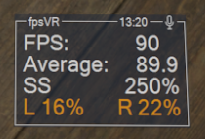
fpsVR - 1.6.2

The fpsVR has been updated with the following changes:
  • New setting added on the tab "fpsVR": "Send Error/Crash Reports to Developers on Exit"
    This setting allow send error/crash reports to devs automatically on exit. By default this setting is disabled. (If you wish to help speed up bug fix process, please, enable this option).
  • Added a new "position" for overlay in seated games - "Hide Overlay" which will hide overlay if controller(s) is turned off (was requested here - https://steamcommunity.com/app/908520/discussions/0/1735462352484917218/?ctp=2#c1743356517522919971)

fpsVR - 1.6 1.6.1hotfix

The fpsVR has been updated with the following changes:
1.6
  • Bug fixes
  • New tab "Audio" brings:
    • Ability to set default playback and record devices (without change Steam VR audio settings)
    • Ability to mute/unmute the microphone using VR headset proximity sensor(note: it is currently impossible to read sensor status if the SteamVR dashboard is open, in this case fpsVR will use the VR headset activity level)
    • Ability to change Steam VR audio settings (with simultaneous change default devices for playback, mirror and record)
  • New preset "FPS" for overlay (option to change presets has been renamed to “Data Set”):
1.6.1
  • Attempt to fix crash on tab Audio (seem like this is rare case)
  • Fix to Motion Smoothing option doesn't appear in settings after game starts.