Added playback support for audio tracks that are authored to have ambisonics encoded audio channels plus an additional non-diegenic stereo channels (head-locked).
New supported audio track formats:
a) first-order ambisonics (4ch) + head-locked stereo (2ch) playback (6 discrete input channels):
- FuMa input format sorting: WXYZ + LR (head-locked stereo)
- AmbiX input format sorting: WYZX + LR (head-locked stereo)
b) second-order ambisonics (9ch) + head-locked stereo (2ch) playback (11 discrete input channels):
- FuMa input format sorting: WXYZRSTUV + LR (head-locked stereo)
- AmbiX input format sorting: WYZXVTRSU + LR (head-locked stereo)
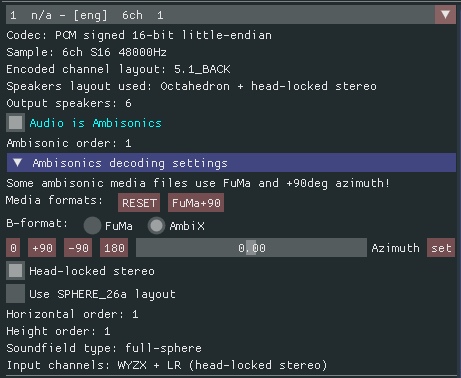
Added a separate volume control for ambisonics and head-locked stereo.

Added an automatic virtual speakers layout selection for ambisonics playback base on the horizontal and height order to resolve the following observations:
- if a lower order ambisonics audio is played using a higher order ambisonics field then the perceived audio will be more smear out and diffuse (lower sound stage).
One advantage will be that the 'sweet spot' for head position to perceive the audio correctly will be bigger.
- if a lower order ambisonics audio is played using a lower order ambisonics field then the perceived audio will be less smear out and with a better sound stage.
The disadvantage will be that the 'sweet spot' for the head position to perceive the audio correctly will be small and sensible to head translation.

Added support for binaural playback (2 discrete input channels) in case the audio track is authored with his own spatialization effect (e.g. a recorded binaural like 'Virtual Barber Shop').
This will deactivate the VHT's 3D audio spatial rendering and will play the audio directly to the headphones, without virtualized output speakers.
For a normal stereo audio you can use this to switch back and forth for comparison between the virtualized speakers playback and the old ‘head-locked’ stereo technology playback.

Added eight predefined video presets:
- 180 front dome EQR 3D SbS
- 180x101 front dome EQR 3D SbS
- 360 sphere EQR 3D SbS
- 360 cubemap Google EAC 3D SbS
- 180 front dome EQR 2D
- 180x101 front dome EQR 2D
- 360 sphere EQR 2D
- 360 cubemap Google EAC 2D
These video presets can be used for example if you have a folder with multiple 180 VR video files.


