Season 1 Known Issues
First off, thank you to all the Racers playing and enjoying KartRider: Drift!
We would like to make you all aware of the currently Known Issues in Season 1. We do our best to investigate and resolve these issues as quickly as possible, so please check below to see if there’s a solution to your problem!
We apologize for any inconveniences caused by these issues!

[h2]Common[/h2]
● (Checking) Time Attack history differs from actual time
● (ADDED Mar. 29)(Checking) An issue where track collisions are not counted and collision motions do not occur when using the Midnight Wave kart.
[h2]PC Platform[/h2]
● Some out-of-date graphics card drivers do not run the game normally.
✅ Workaround: Please update each manufacturer's latest graphics driver and play the game. Check and download the latest graphics card drivers:
- NVIDIA Graphics Card Driver
- AMD Graphics Card Driver
● When running KartRider: Drift on a PC that uses an Intel CPU (6th gen or higher) internal graphics card (also known as integrated graphics), the game may disconnect or close.
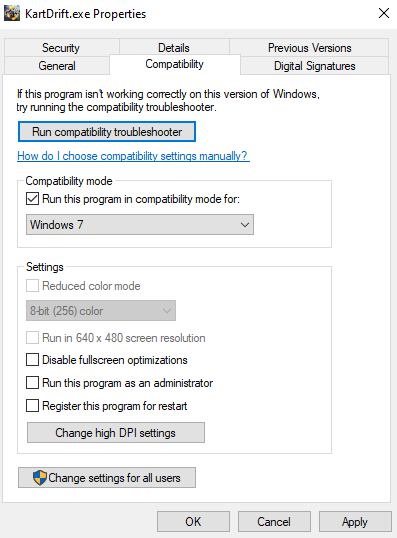
✅ Workaround: Please update the compatibility mode of the game executable file to “Windows 7” and then run the game.
- The game executable is "Kartdrift.exe" within the installation folder. If you are on Steam, simply right click the game and select "Properties" -> "Local Files" -> "Browse." If you are on Nexon launcher see the below image for the default file path.

- Right-click the executable file, then select the “Compatibility” tab, from there please change the compatibility mode to "Windows 7."
[h2]Mobile Platform[/h2]
● Voice chat does not function on iOS devices after locking the screen or putting KartRider: Drift in the background.
✅ Workaround: You can use the voice chat by closing the game application and restarting.
● Voice chat is heard from the device on the iOS device when using some Bluetooth devices and entering a custom race.
✅ Workaround: Connect the affected Bluetooth device again after entering the custom race.
● (Checking) When upgrading a kart while playing on a mobile device, sometimes a screen will appear accompanied by UI noise .
Issue: (FIXED Mar. 8) Some Racers were disconnected, and then restricted from matchmaking, due to a data setting error during Grand Prix matches.
✅ Solution: Affected Racers who were unable to matchmake as a result of these restrictions will have the matchmaking restriction lifted, and will also receive 2,000 Lucci.
Compensation will be sent to the Mailbox, and will expire after 30 days.
● Issue: (FIXED Mar. 14) Pop-up screen is being exposed when you log-out from the game on iOS / Android platform. (PSO WARNING)
✅ Solution: This was fixed as part of an OPTIONAL update to KartRider: Drift. If you are still experiencing this issue, please update your game.
We apologize for any inconveniences caused by these issues. We promise to work as quickly as possible to resolve these issues and any others that arise!
We would like to make you all aware of the currently Known Issues in Season 1. We do our best to investigate and resolve these issues as quickly as possible, so please check below to see if there’s a solution to your problem!
We apologize for any inconveniences caused by these issues!
Known Issues:
[h2]Common[/h2]
● (Checking) Time Attack history differs from actual time
● (ADDED Mar. 29)(Checking) An issue where track collisions are not counted and collision motions do not occur when using the Midnight Wave kart.
[h2]PC Platform[/h2]
● Some out-of-date graphics card drivers do not run the game normally.
✅ Workaround: Please update each manufacturer's latest graphics driver and play the game. Check and download the latest graphics card drivers:
- NVIDIA Graphics Card Driver
- AMD Graphics Card Driver
● When running KartRider: Drift on a PC that uses an Intel CPU (6th gen or higher) internal graphics card (also known as integrated graphics), the game may disconnect or close.
✅ Workaround: Please update the compatibility mode of the game executable file to “Windows 7” and then run the game.
- The game executable is "Kartdrift.exe" within the installation folder. If you are on Steam, simply right click the game and select "Properties" -> "Local Files" -> "Browse." If you are on Nexon launcher see the below image for the default file path.
- Right-click the executable file, then select the “Compatibility” tab, from there please change the compatibility mode to "Windows 7."
[h2]Mobile Platform[/h2]
● Voice chat does not function on iOS devices after locking the screen or putting KartRider: Drift in the background.
✅ Workaround: You can use the voice chat by closing the game application and restarting.
● Voice chat is heard from the device on the iOS device when using some Bluetooth devices and entering a custom race.
✅ Workaround: Connect the affected Bluetooth device again after entering the custom race.
● (Checking) When upgrading a kart while playing on a mobile device, sometimes a screen will appear accompanied by UI noise .
Fixed Issues
Issue: (FIXED Mar. 8) Some Racers were disconnected, and then restricted from matchmaking, due to a data setting error during Grand Prix matches.
✅ Solution: Affected Racers who were unable to matchmake as a result of these restrictions will have the matchmaking restriction lifted, and will also receive 2,000 Lucci.
Compensation will be sent to the Mailbox, and will expire after 30 days.
● Issue: (FIXED Mar. 14) Pop-up screen is being exposed when you log-out from the game on iOS / Android platform. (PSO WARNING)
✅ Solution: This was fixed as part of an OPTIONAL update to KartRider: Drift. If you are still experiencing this issue, please update your game.
We apologize for any inconveniences caused by these issues. We promise to work as quickly as possible to resolve these issues and any others that arise!