Game Guide: Game Menu Screens
1. Main Menu Screen
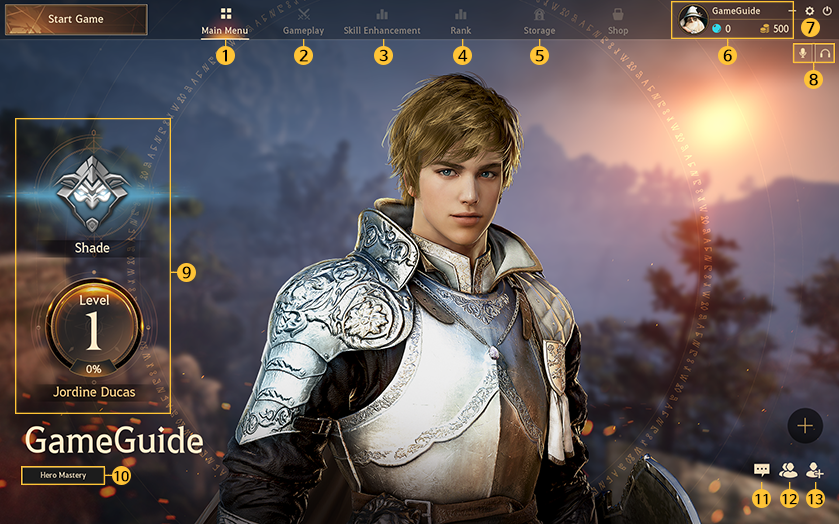
- Displays player information such as nickname and amount of silver in possession.
- Click on the profile icon to change picture.
2. Arena Menu Screen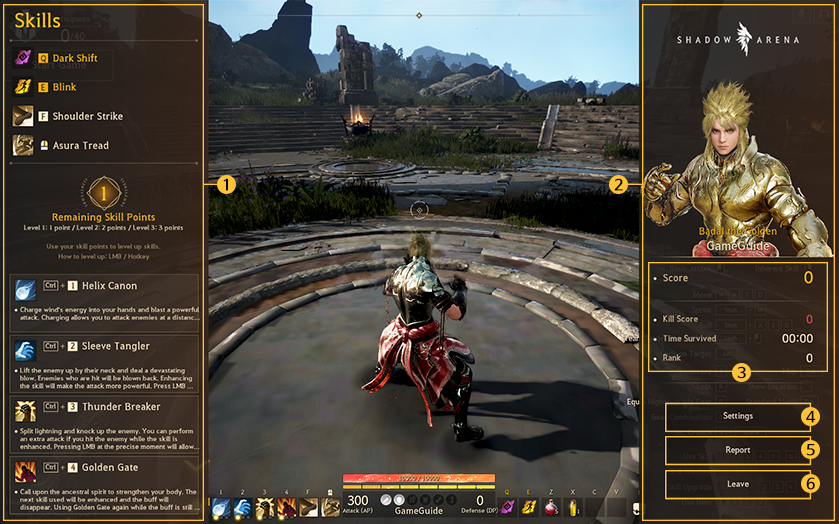
※ The contents of the game guide are subject to change depending on game updates.
① Main Menu
- Allows use of main game menu.
② Gameplay
- Allows selecting and entering of all gameplay modes.
③ Skill Enhancement
- Allows enhancing of Hero skills via Skill Enhancement.
④ Ranking
- Displays game ranks based on points.
⑤ Storage
- View “sealed items” in the storage.
⑥ Profile
- Displays player information such as nickname and amount of silver in possession.
- Click on the profile icon to change picture.
⑦ Settings
- Minimize game screen.
- Adjust basic game settings such as screen resolution, volume, language and hotkeys related to player actions.
- Exit the game.
- Adjust basic game settings such as screen resolution, volume, language and hotkeys related to player actions.
- Exit the game.
⑧ Voice Chat
- Change settings for speaking/listening during voice chat.
⑨ Mastery
- View Mastery of a selected hero and its tier.
⑩Hero Mastery
- View Mastery of each hero.
⑪ Chat
- Allows for general/party chat.
⑫ Friend List
- Displays list of friends.
⑬ Add Friends
- Type nicknames to add friends.
2. Arena Menu Screen
① Skill Window
- Press CTRL to view skills, raise skill levels, view remaining skill points, and skill descriptions.
② Menu
- Displays Battle Stats, settings and other options.
③ Battle Stats
- Displays information on the battle such as current score and rank.
④ Settings
- Adjust basic game settings such as screen resolution, volume, language and hotkeys related to player
actions.
actions.
⑤ Report
- Use to report players committing policy violations and/or inappropriate behavior.
⑥ Leave
- Leave current arena.
※ The contents of the game guide are subject to change depending on game updates.