1. Shadow Arena
  2. News

Shadow Arena News

I Want YOU for my Clan!


Recruit 5 members to a clan and all clan members (including you) will get 5,000 silver!

[h2]■ Event Period [/h2]

- July 9, 2020 (Thu) after maintenance – July 23, 2020 (Thu) before maintenance


[h2]■ How to Participate [/h2]

① Login to Shadow Arena.

② Create a Clan from the Clan menu at the top of the main screen. (Requires 1,000 silver)

▶ How to Create a Clan

③ Recruit clan members from the in-game chat or other communities.

④ Invite other players to your clan using clan invitation feature.

⑤ If you get at least 5 clan members, all your clan members will each get 5,000 silver!


[h2]■ Event Rewards [/h2]
Number of Clan Members
Achievement Reward
At least 5
5,000 Silver to each Clan Member

* The number of clan members will be based at the time the event ends.

* All clan members who are in the guild at the time the event ends will be eligible to receive the achievement reward.


[h2]* Additional Notices [/h2]

- The number of clan members refers to the total number of clan members including the clan leader that are in the guild.

- Event rewards will be sent by in-game mail after the maintenance on July 23 (Thu).

- Pearl Abyss reserves the right to change/cancel the event depending on mitigating circumstances. If changes are made, they can be found on this event page.

- If your account is restricted for violating the Terms of Service, you may be disqualified and have any prizes withdrawn even after being selected as a winner.

- If you have any other questions or concerns related to the event, please contact us via [Support].

- Any matters not listed on this page will follow the [Shadow Arena Event Rules].
[Winners Announcement] Team Mode Team Up Event!


We hope everyone had a blast teaming up for team mode! Or maybe you even made a friend?


P.S. We’ve also sent everyone who participated the rewards we promised, so check them out now! 😊


Winners
Server
Nickname
Nickname
NA

xXlSunTzulXx

Chorobura
SA

Xennma

Arkii
ASIA

푸딩

고라파덬
ASIA

Zerisamaa

Desireforfreedo
ASIA

황송

조운
ASIA

パンナコッタ

田兼沢
ASIA

l가l

tkrkdh
ASIA

艾希贝尔

KKPNMLGB
ASIA
불필요

불필요한당미

EU|RU

Wokoren

Berh

EU|RU

Funera

Powazin

EU|RU

Rainbird

Kifran

EU|RU

Svena19

KurumiSeenpai

EU|RU

DarkboyAlex

Vibe


■ Event Rewards

Hero Selection Coupon x1

1,000 Silver


※ Notices

- Event rewards will be sent to the winners through in-game mail.

- If you have any other questions or concerns related to the event, please contact us via [Support].

- Any matters not listed on this page will follow the [Shadow Arena Event Rules]

7/9 (Thu) Maintenance and Website Maintenance


Greetings, this is Shadow Arena.


We will be performing our maintenance on July 9 (Thu).


- During the maintenance, you will be unable to access the game service and website.


Game Maintenance Schedule
Server
Maintenance Schedule

Asia

July 9, 2020 (Thu) 16:00 - 20:00 (UTC+9)

NA

July 9, 2020 (Thu) 00:00 - 04:00 (PDT)

EU/RU

July 9, 2020 (Thu) 09:00 - 13:00 (CEST)

July 9, 2020 (Thu) 10:00 - 14:00 (MSK)

SA

July 9, 2020 (Thu) 04:00 - 08:00 (BRT)

Game Maintenance Impact

- Unable to access the game


Website Maintenance Schedule
Server
Maintenance Schedule

Asia

July 9, 2020 (Thu) 16:00 - 19:00 (UTC+9)

NA

July 9, 2020 (Thu) 00:00 - 03:00 (PDT)

EU/RU

July 9, 2020 (Thu) 09:00 - 12:00 (CEST)

July 9, 2020 (Thu) 10:00 - 13:00 (MSK)

SA

July 9, 2020 (Thu) 04:00 - 07:00 (BRT)
Website Maintenance Impact

- Unable to access the website


* Additional Notices

- The maintenance times are subject to change, extension, and/or early completion. Any changes will be provided as an update on this page.


- Once the maintenance begins, you will be automatically disconnected from the game, even if you are waiting in-queue or in a match.


Thank you

[Resolved] Troubleshooting for Patch Download Issue


Greetings, this is Shadow Arena.

We have resolved this issue with the July 9 (Thu) maintenance, and you will now be able to download patches normally.

We apologize for any inconveniences caused, and we will do our best to provide a better service.


Greetings, this is Shadow Arena.

There are currently issues where certain PCs are unable to download patches normally through the Steam launcher.


Issue 1: Download progress is stuck at 0% when restarting the launcher after changing the in-game language setting

- Close and restart the launcher experiencing this issue to have the changed language setting applied and be able to download the patch normally.


Issue 2: Download progress is still stuck at 0% after restarting the launcher

- Download the text file below and change the file name to service.ini. Next, place this service.ini file in your Shadow Arena installation folder to be able to download the patch normally.


1. Download and uncompress the file.

2. Place the service.ini file in your Shadow Arena installation folder (ShadowArena)

3. Open your launcher


If you experience the same issue after following the instructions above, please contact and provide the details of your issue to Support.

We will do our best to resolve this issue as soon as possible, and we apologize for the inconvenience caused.

Thank you for your patience and understanding.

Troubleshooting for Patch Download Issue


Greetings, this is Shadow Arena.

There are currently issues where certain PCs are unable to download patches normally through the Steam launcher.


Issue 1: Download progress is stuck at 0% when restarting the launcher after changing the in-game language setting

- Close and restart the launcher experiencing this issue to have the changed language setting applied and be able to download the patch normally.


Issue 2: Download progress is still stuck at 0% after restarting the launcher

- Download the text file below and change the file name to service.ini. Next, place this service.ini file in your Shadow Arena installation folder to be able to download the patch normally.


1. Text File [Download]

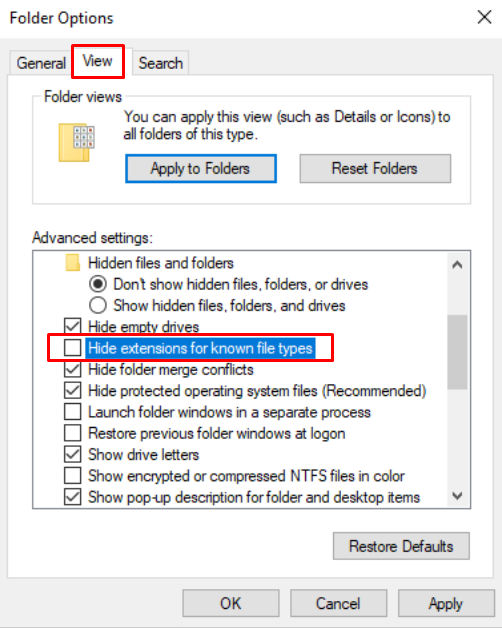
2. Open any folder, then go to View > Options > View > Uncheck Hide extensions for known file types


3. Change the name of the downloaded text file to service.ini

4. Place the service.ini file in your Shadow Arena installation folder (ShadowArena)

5. Open your launcher


If you experience the same issue after following the instructions above, please contact and provide the details of your issue to Support.

We will do our best to resolve this issue as soon as possible, and we apologize for the inconvenience caused.

Thank you for your patience and understanding.