1. Rhythm Quest
  2. News

Rhythm Quest News

Devlog 61 - Dotted Yellow Ghosts, More Custom Level Work

It'll probably be good if I can try to write my devlogs more concisely so they don't feel like such a chore to post...let's just get right into it.

[h2]Dotted Yellow Ghosts[/h2]

Let's start with the most interesting news first: while playing around with the level editor I realized that it felt really awkward to chart certain styles/sections of songs because of the lack of 16th note rhythms in Rhythm Quest. All of my obstacles (minus speed zones) are done at the granularity of half-beats (8th notes), which has been fine so far since I've been able to tailor all of my music to it, but a lot of the music out in the wild features other sorts of rhythmic patterns.

I don't want to go wild with facilitating =all= possible rhythms; I feel like Rhythm Quest chart design is good when it's constrained, just like DDR charts are at their best when they capture the "flow" of a song rather than trying to stepchart e-ve-ry in-di-vidual syll-able in the vo-cal ly-rics. But I decided to try adding in a new variant of the multihit ghost enemies:
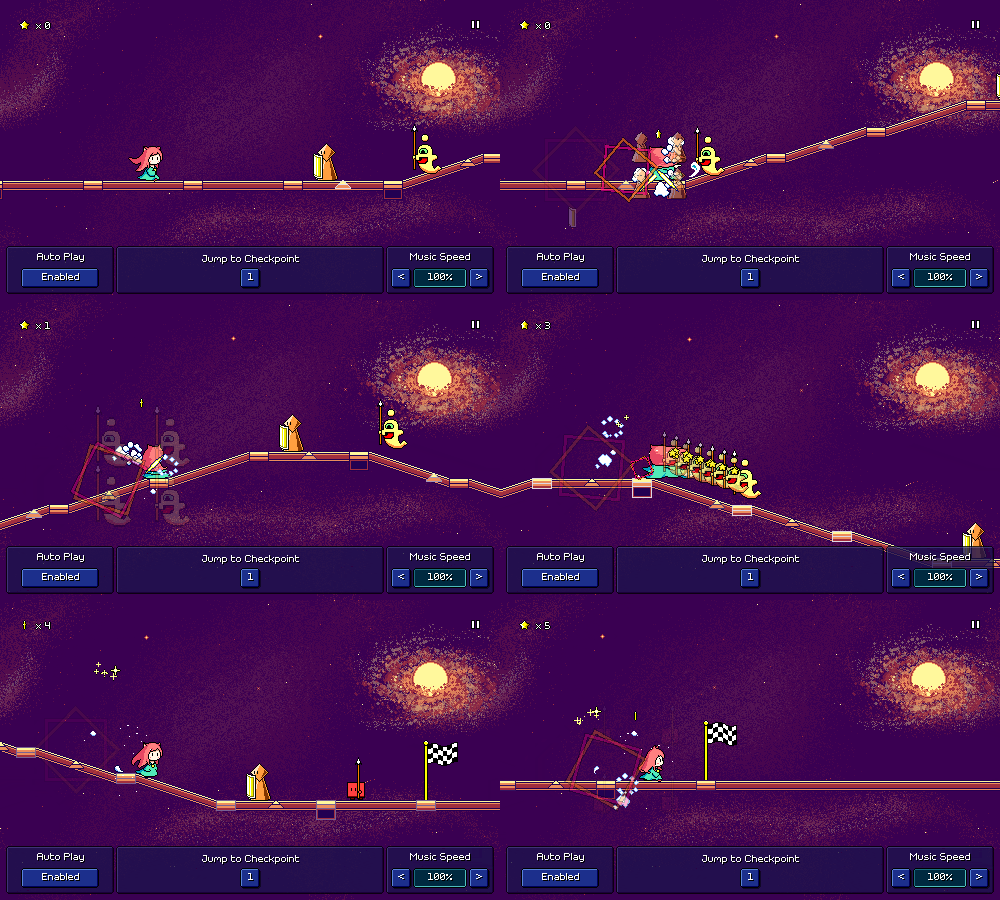


These go at dotted 8th notes, so exactly twice as fast as the regular purple ghost enemies. They're not only colored differently but have a little orb accent to distinguish them visually. Right now these are the only obstacles that are allowed to be offset at this granularity. You can, of course, mix these in with other obstacles if you'd like to be extra devilish, but I don't plan on doing so very often. I think if your chart makes frequent use of 16th-note granularity it might be a sign that you should chart it as double the tempo.

I haven't yet decided if or how these new ghosts should be incorporated into the main Rhythm Quest levels, but if I do include them they'll show up in World 6. It might actually be nice to do so as it would give players something else to learn besides the triplet speed zones, which might get old after a while if all 5 of the World 6 levels are primarily about them. Hah! See, it's actually not a bad thing that I've been putting off the rest of World 6 for so long...;P

You'll also notice from the above gif that I've added a debug toolbar with shortcuts that you can use while testing your levels to quickly jump between checkpoints and toggle autoplay. Basically the same tools that I've been using all along to develop my own levels, except as first-class UI elements instead of hidden developer-only shortcuts :)

[h2]Camera Scrolling Tweak[/h2]

The beatgrid markers break up the otherwise-continuous slopes in levels, and therefore, the camera followed suit, panning smoothly across the slope but the pausing for a brief moment at each flat beatgrid marker:
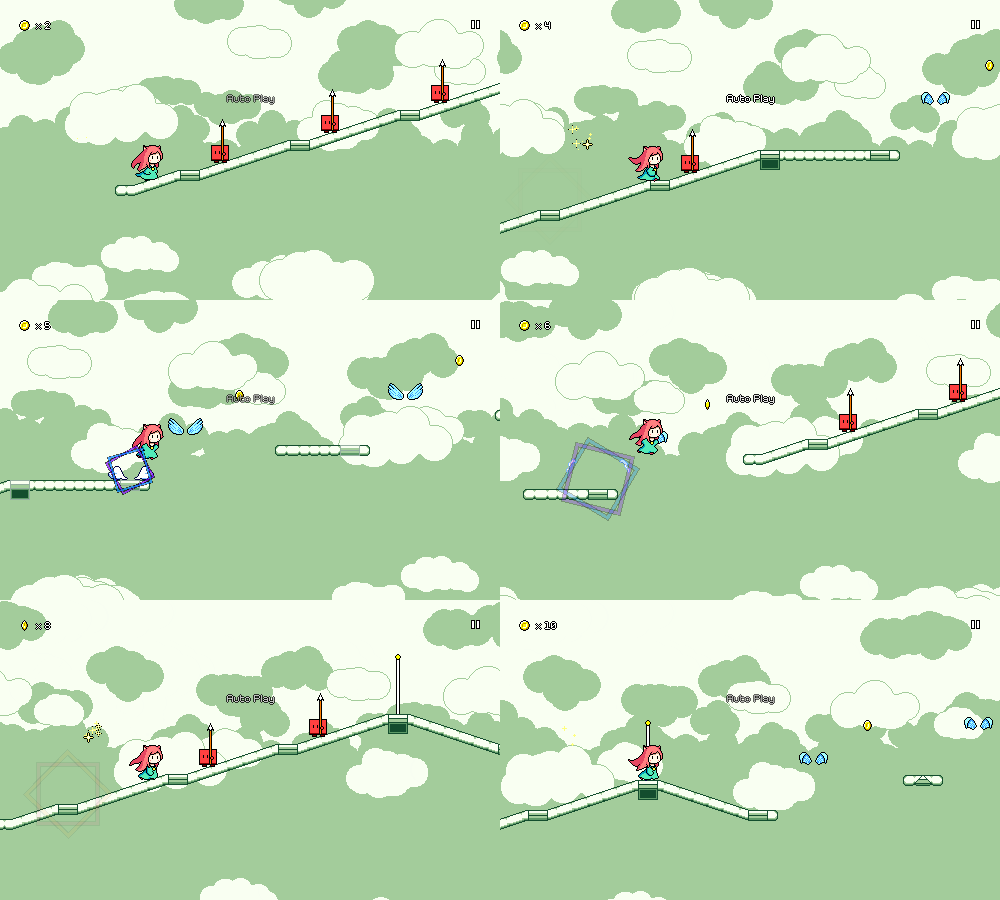


I didn't want to change the design of the beatgrid markers, but I'm trying a change where I instead modify the camera plotting so that it ignores them and instead acts as if the slope is continuous all the way through. This makes the camera scrolling smoother, with the downside that the player character's y-position on the screen doesn't stay centered for that brief moment.
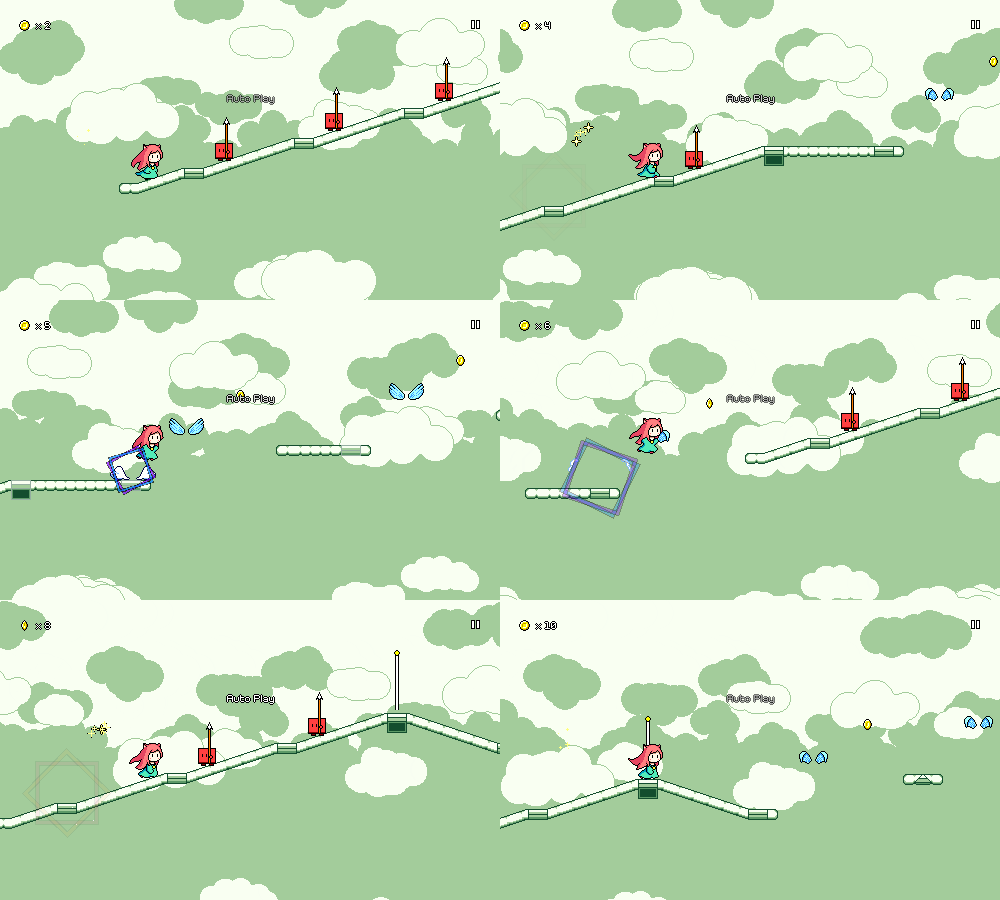


It's a subtle change, but I think (?) I like this new version better. The little camera "bumps" were honestly something that I just got used to a very very long time ago and didn't think very much of...I think I'll have to play some levels here and there and see if the new version bothers me at all.

[h2]Hierarchical Folder Display[/h2]

Last time around I showed off the custom level browser, which featured the ability to drill into subfolders of the root custom level directory:
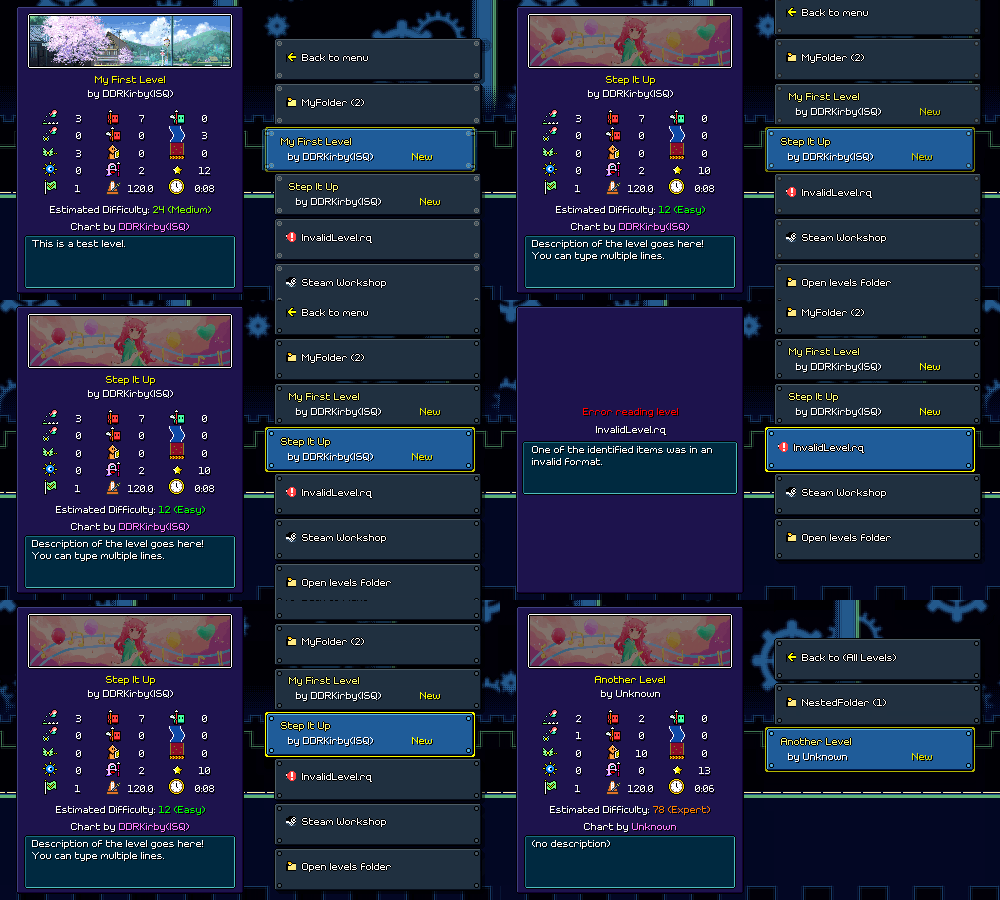


I've tweaked this so that folders (and nested subfolders) are all shown in the same singular display instead of jumping to a new set of buttons. I use indentations and arrows (like in a Windows Explorer view) for this, and animate the indented buttons as they appear and disappear:
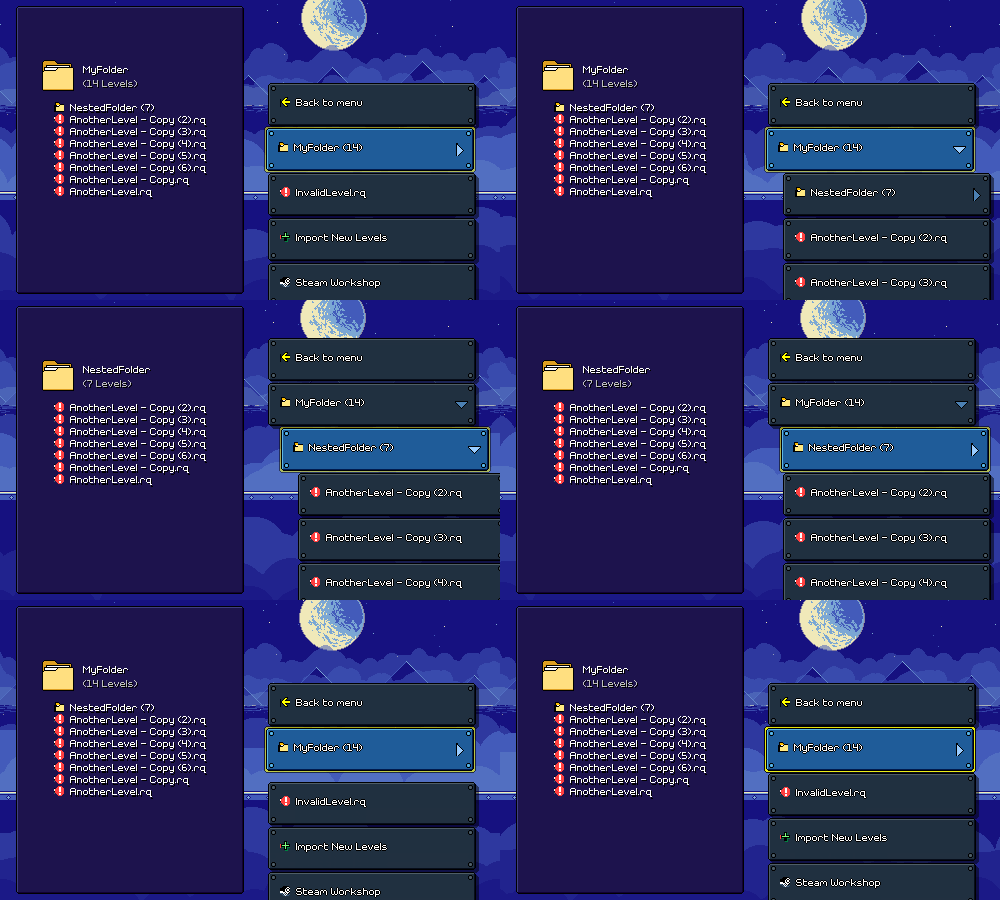


[h2]Preview Clips[/h2]

Back in the editor UI, I've added a new section to the music loading menu where you can specify a section of the song to use as a preview clip when browsing custom levels.
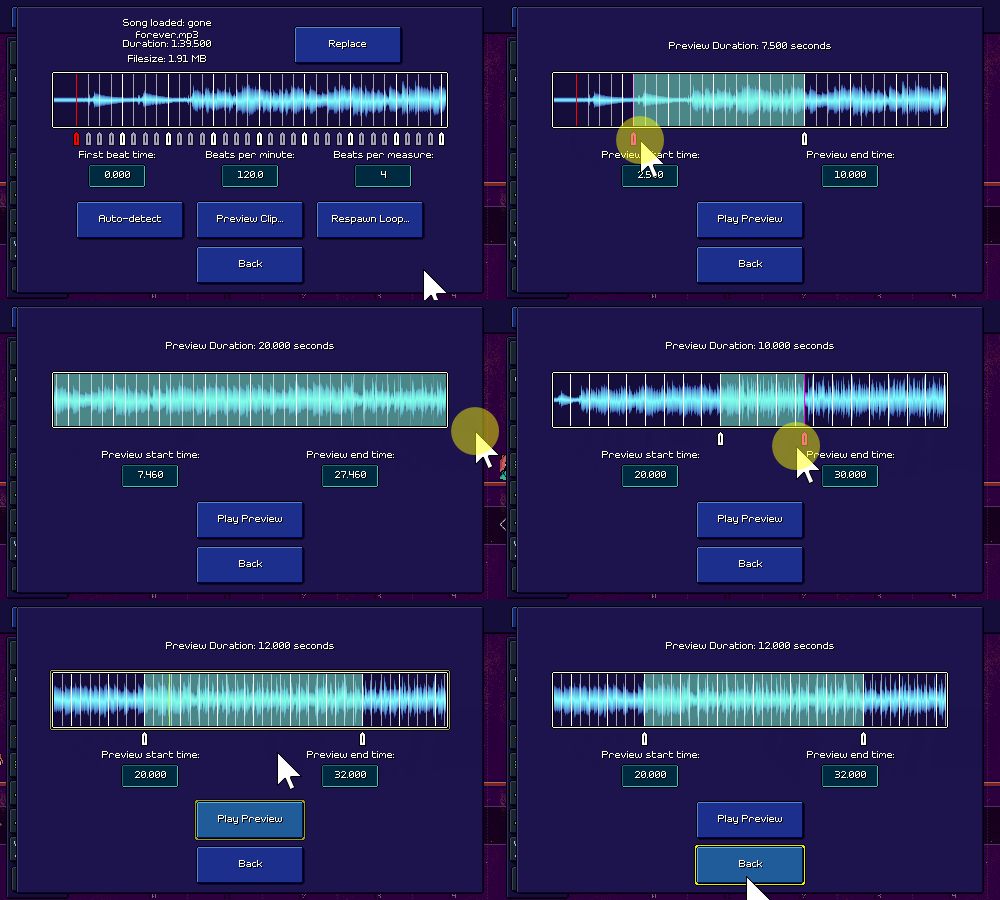


Thankfully I was able to reuse the same audio display component that I already made, and just add some new handles to it, but this wasn't really a trivial task; there's a lot of subtle things that need to happen to make this editor feel good, such as automatically scrolling when you drag past the end of the window, automatically clamping the preview clip length (right now it's a minimum of 1 second and a maximum of 20 seconds), etc.

I've gone back and forth a few times on exactly what the format of levels should look like and what different file types to use, as well as how music, levels, banner images, and such should be encoded. Initially I imagined the preview audio as simply being played as a segment of the original song, but I've decided to change that and instead I export the preview as a separate .ogg vorbis-encoded audio file -- this makes it easier to stream directly from disk. In implementing this, I had to look for a way to export that segment of audio data and vorbis-encode it. Surely there must be a nice, cross-platform, performant C# library that does exactly that, right? Unfortunately, the answer this time was "not quite", so I had to do some wrangling to get what I wanted, but it's working now...

[h2]Just Keep Working[/h2]

As always, there's still like infinity more things to work on. I have to add the new dotted eighth note ghost enemies to the level stats displays, I have to come up with a new UI for importing levels from zipped archives, and of course there's artist verification flows and Steam Workshop integration. I do want to give a shoutout to Rhythm Doctor as I've been referencing their level editor and custom level browser regularly to compare how they handle things. It's nice being able to look at an example of how a different team solved the same problems, just to have a jumping-off point.

I'm not going to lie, I was feeling a bit burnt out on Rhythm Quest in past weeks. Something about the mountain of work that seems to be ahead of me as I tackle this whole custom level endeavor (this is why I didn't do it in the first place...), but also just the fact that another year went by and I didn't finish my game (understandably so, but still...). I know there are a lot of expectations and external desires about Rhythm Quest and I've felt them weigh heavily on me at times...but I think it's unhealthy for me to give them too much space in my head, it's best if I just focus on finding the "fun" in development and try to minimize the pressure that I feel. Fortunately, I seem to have been able to do that in more recent days!
Rhythm Quest Demo v0.29.4 Released

The Rhythm Quest Demo has been updated to version 0.29.4! This patch features more bugfixes and adds a quality-of-life improvement for input bindings that should help players who are using high speed mods.

Full changelog:

Version 0.29.4
- Multiple key/gamepad bindings for the same action now function independently to allow for easier multipresses
- Added "blur" background filter
- Fixed keyboard button focus being lost after closing menu overlays
- Fixed jump logic when overlapping multiple obstacles
- Fixed jump miss sound playing on hit when sound scheduling disabled
- Fixed certain accessibility audio cues sometimes not triggering
- Fixed doublehit enemy inputs sometimes not respawning on input timeline
- Added support for localizing "Congratulations" text on demo end
- Slightly tweaked initial camera pan on load

Devlog 60 - Custom Level Browser, Stats/Metadata

Oops, I missed my monthly devlog post for November. On the plus side, I've been doing a lot of good work over the past few weeks! I've found that my time and motivation for Rhythm Quest tends to oscillate a little bit over time -- sometimes it's because other parts of my life are busy, other times it's because I'm working on something that's tougher to get motivated about. But I do my best to just keep plugging away slowly and steadily...

It's a little crazy to think that ~3 months ago the Rhythm Quest level editor didn't exist at all! Now we've got an entire editor tool palette UI, notifications, undo/redo, saving and loading, input timelines, waveform displays, animated preview sprites, automatic beat detection, level validation, ... There are like, infinity different things that go into custom level support, which is why I initially wanted to put it off until post-release...but I'm actually having a lot of fun developing it all, so that's great!

[h2]Custom Level Browser[/h2]

Most recently, I've been doing a bunch of work on a custom level browser that will let you navigate through the custom levels you've downloaded:


A lot of it is already working pretty well! It's able to parse all of the song files in the custom level folder, show them as options, and even allow you to drill down into subfolders in case you want to organize your custom levels into various different directories. Since the menu is dynamic (can have any arbitrary number of buttons), I decided to go with a scrolling menu layout. It works simply enough with keyboard/gamepad, but if you're using a mouse you can also scroll to a given song by clicking it (or even use the scroll wheel!).

You'll notice on the left panel that selecting a level brings up a bunch of details about the level, including a stats display of how many obstacles of each type are in the level. These weren't too hard to derive and save as part of the level metadata, and they should hopefully provide a nice way of judging the flavor of a chart, or in case you want to just avoid any levels that have speed zones or green enemies or whatever. It's a little busy, in terms of the visual look, but I do think that it's useful information to display. (Maybe there could be a toggle for it?)

There's still some additional work that needs to be done here...for one thing, I'm not a huge fan of the way that folders are handled...instead of drilling into separate submenus, it would probably make more sense to just have all songs be listed as one (indented?) list and then be able to open and collapse folders from there. I also don't have a way to access the shop or change characters/speed settings easily from here yet. =(

I also need to think about handling music previews...the easy thing to do would be to just load the entire song on-demand and start playback, but that's really slow, so I'll have to instead stream the music from disk. Of course, ideally you'd be able to edit which region of the song gets played in the preview...

[h2]Difficulty Estimation Curve[/h2]

There's a new "estimated difficulty" scale from 1-100, which is automatically calculated based on the density of actions required for the level. Of course, it's hard to be very precise in determining how much trouble any given player will have on different levels, but I figured it would be nice to at least have some rough estimation available.

Having a difficulty scale go from 1-100 is actually an interesting conundrum because there's no theoretical limit on how difficult a song can be (you can just add obstacles on every half beat and increase the tempo higher and higher). Right now the primary heuristic I use for determining difficulty is the number of button presses required per second, which ranges from 0.86 for level 1-1 all the way to 3.79 for level 5-5 (and probably a little higher through the end of world 6).

I could of course just pick an arbitrary maximum limit (5.0?) and then come up with a linear scale, where 0 presses/second = 1 and 5 presses/second = 100, but I don't think that would be a great scale, because the differentiation within the low and high ends of the scale would be pretty useless. Does it really make sense for level 1-1 to have a difficulty of 17/100? It feels like the lower numbers below 15 would just never get used. Also, perceived difficulty isn't really linear based on presses per second either -- the jump between 1 and 1.5 presses per second isn't nearly as big of a deal as the jump from 3 to 3.5 presses per second.

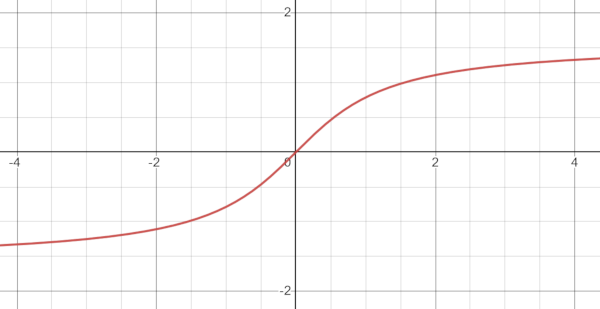
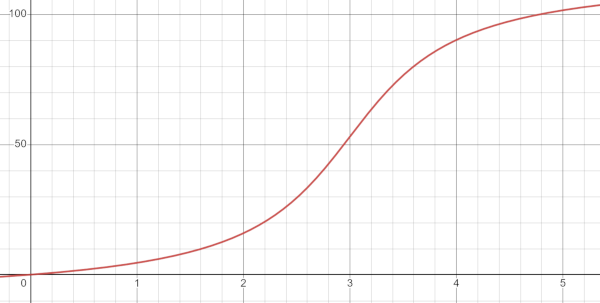
So instead of a linear mapping, I tried to find some sort of non-linear function that I could use to estimate difficulty. Ideally I wanted something that would ramp up very slowly from 0, then increase more rapidly toward the middle end of the range, and then taper off so that the crazy charts with 5 or 6 presses/second can just all be lumped in the 90s or whatever. In other words I wanted something that kind of has horizontal asymptotes...

If you've studied enough trigonometry (sorry, yes, math is back) you'd remember that the graph of y = tan(x) has vertical asymptotes. Which of course, means that the inverse, y = arctan(x), has horizontal asymptotes. The inverse tangent function graphs like this:


Which is pretty much what I was envisioning! All that was left was to apply some scaling constants to shift and scale everything around, and then I had my non-linear difficulty curve from 1-100 (currently caps out at around 4.8 presses per second):


Here are some values and what they map to, so you can get a sense of how this non-linear difficulty compares to what a linear mapping would provide:


Level | Actions/Second | Linear Difficulty | Arctan Difficulty
1-1 | 0.859375 | 17 (Easy) | 3 (Easy)
1-5 | 1.560284 | 31 (Medium) | 9 (Easy)
2-3 | 1.718750 | 34 (Medium) | 11 (Easy)
2-5 | 1.984972 | 40 (Hard) | 17 (Easy)
3-4 | 2.195684 | 44 (Hard) | 20 (Medium)
4-5 | 2.761905 | 55 (Hard) | 41 (Hard)
5-5 | 3.345877 | 67 (Expert) | 70 (Expert)
| 4.000000 | 80 (Impossible) | 93 (Impossible)
| 5.000000 | 100 (Impossible) | 100 (Impossible)


Of course, this is just a first attempt, so it's definitely possible that it'll need some tweaking or shifting around...

[h2]Level Metadata Editor[/h2]

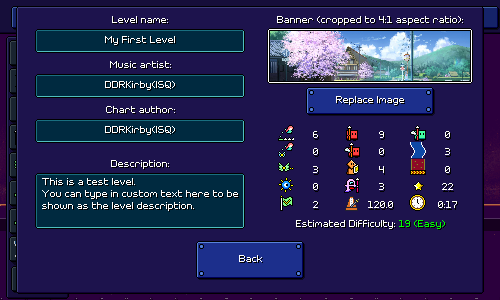
I also put together this screen for inputting all of the metadata that you see in the level browser:


Not too much to say here except that I had to program in the ability to load in a custom image that you provide, and then automatically crop it to the right dimensions when displaying it. This image will also be used for if/when you upload the level to the Rhythm Quest Steam Workshop (have to implement that at some point, too...).

[h2]Lots of Other Stuff[/h2]

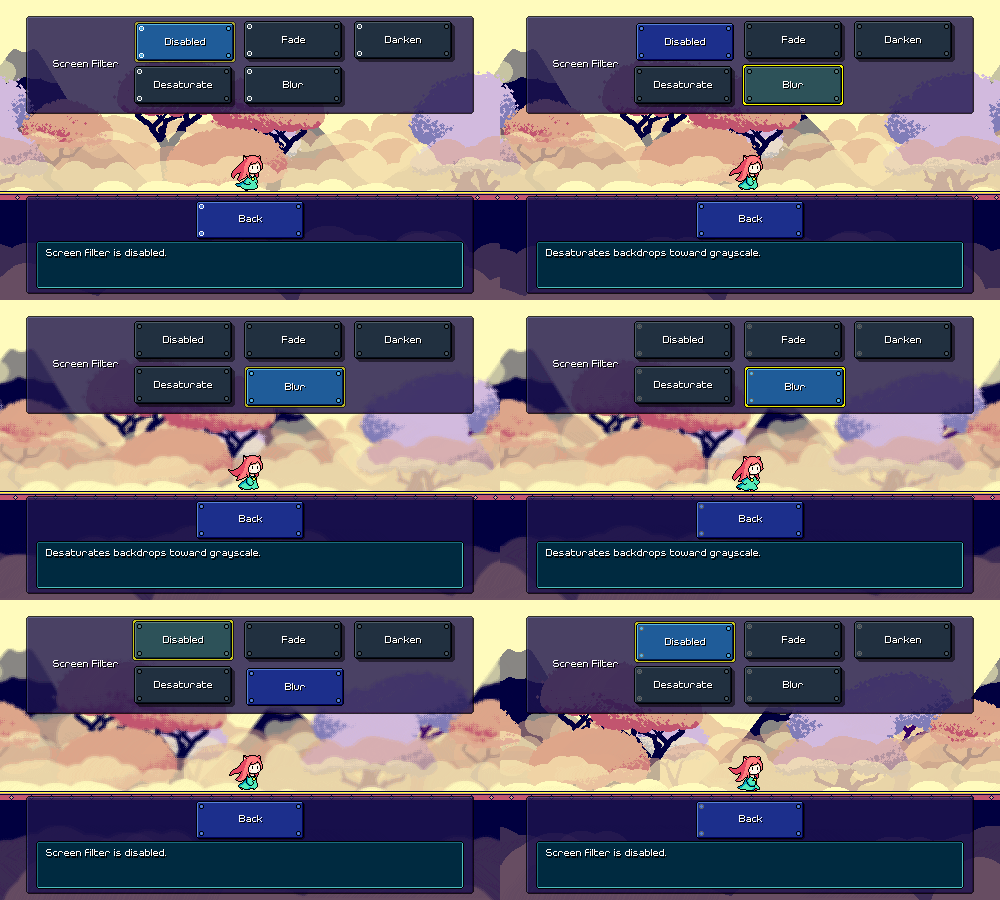
The new level browser was the main exciting piece of work, but I've also been doing a ton of other things as well...for instance, I implemented a blur filter for the background that you'll be able to enable in the screen filter settings:


In general this sort of quick and simple post-processing effect tends to break the clean look of pixel art, but I won't judge you if you just think it looks cool and want to just enable it for normal gameplay. It does tend to help with foreground/background readability, for sure.

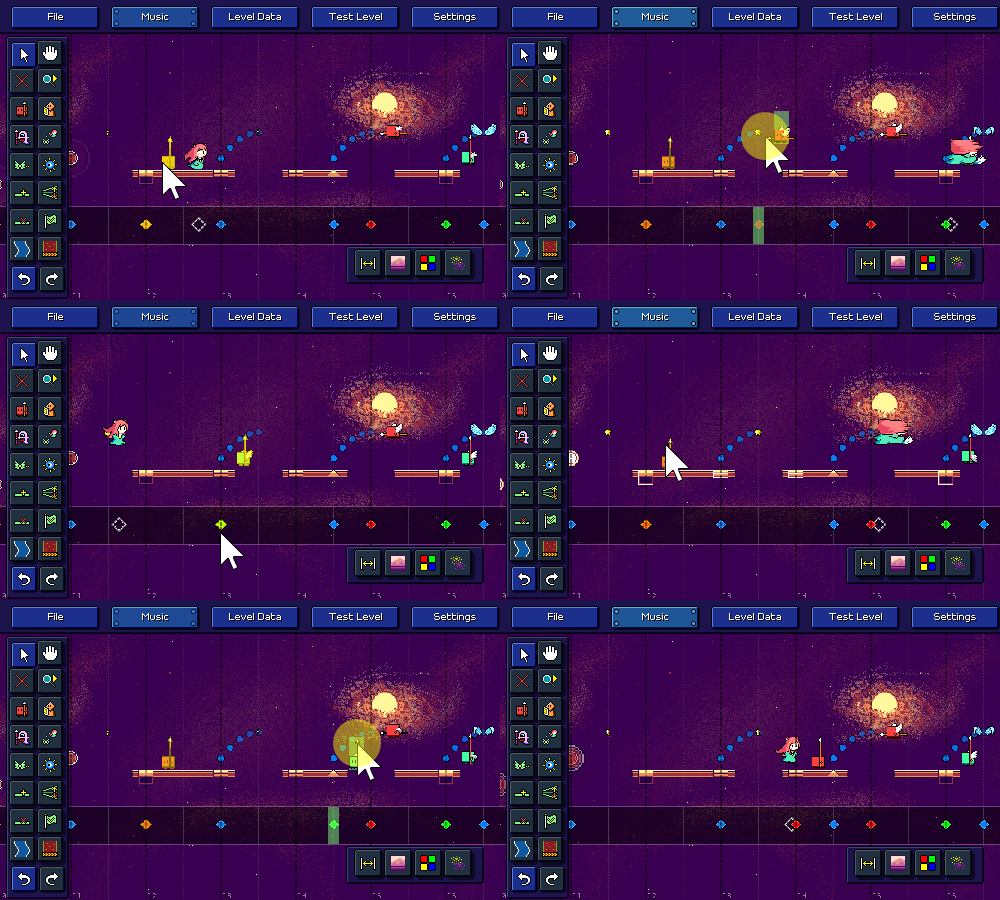
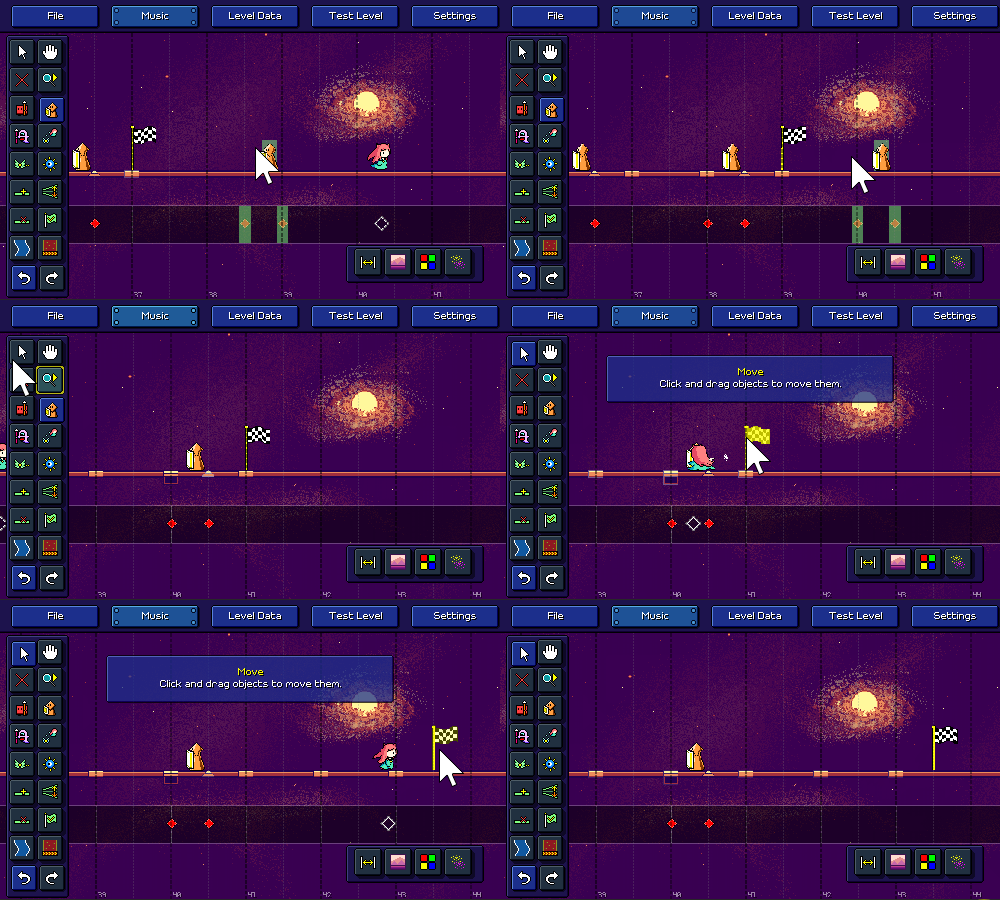
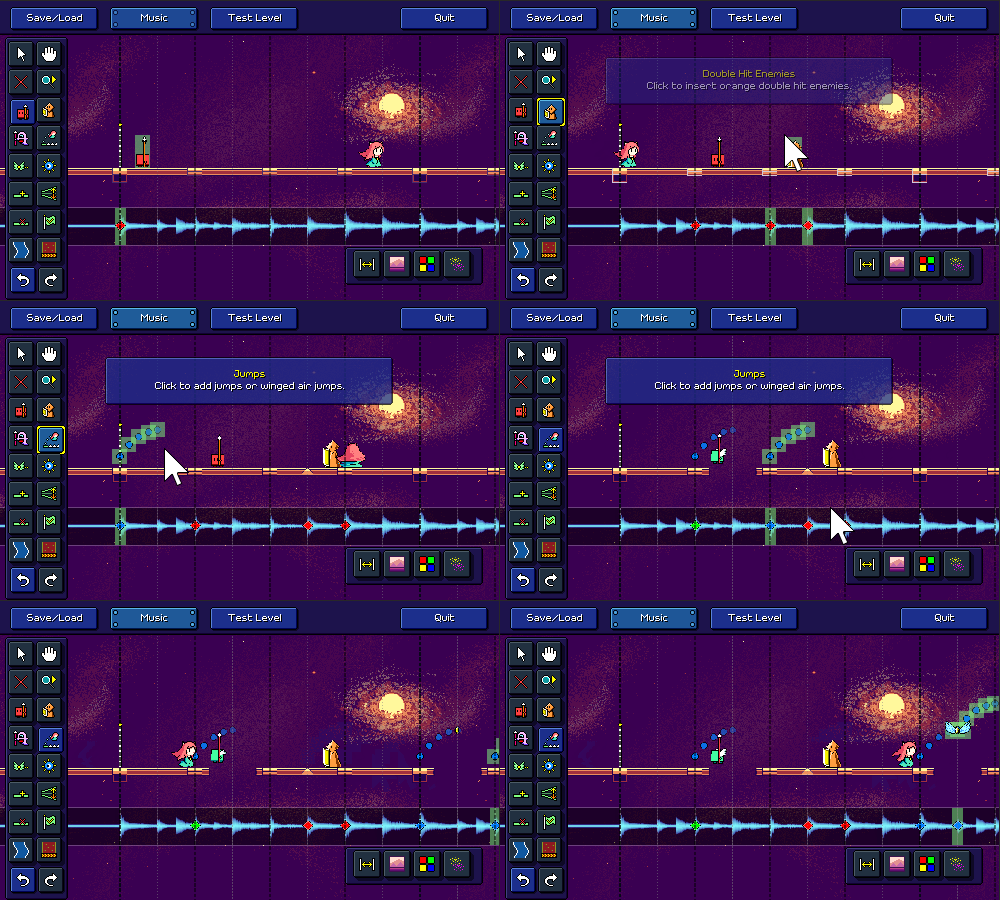
I also implemented the ability to drag obstacles around using a move tool. This is a little less straightforward than you might think...you're essentially doing a delete followed by a new action, but you need to validate that the new action will make sense after the delete and handle the preview accordingly.


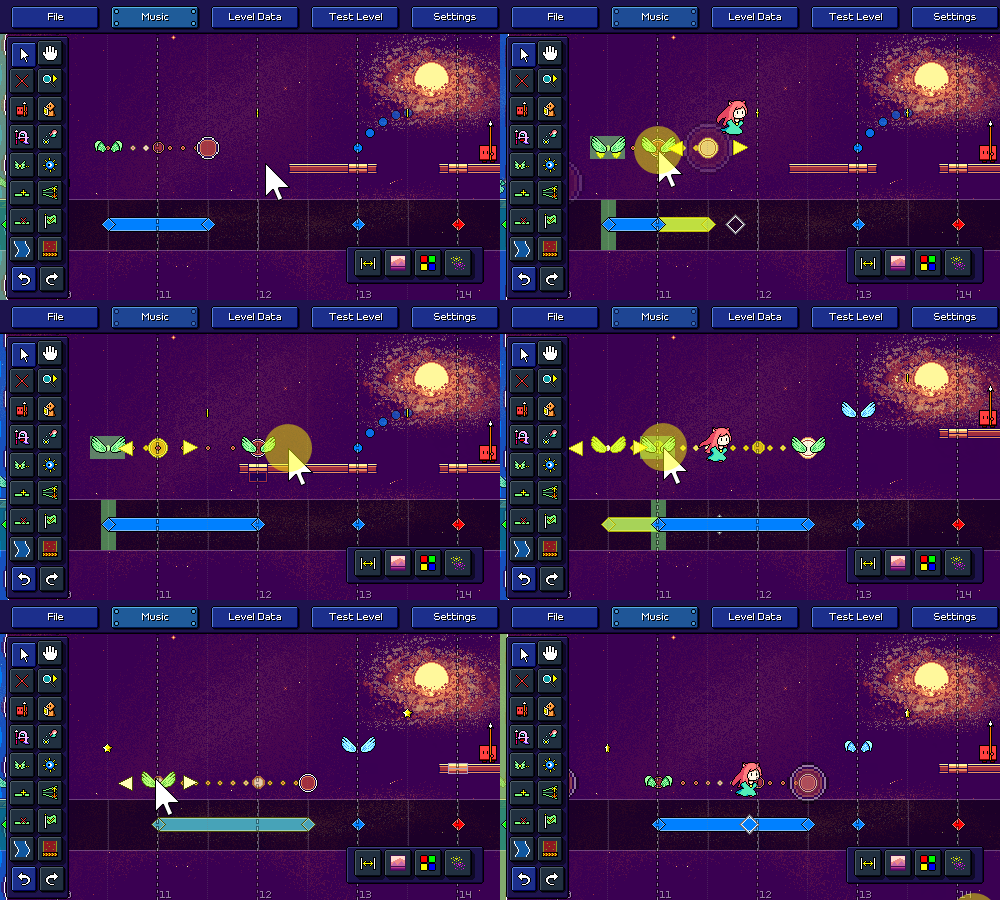
The same tool also lets you resize flight paths, water zones, and speed zones, by dragging the left or right side of them. Of course, the other obstacles need to all adjust based on the change...


The level end object automatically moves when you insert new obstacles past the end of the level. You can also move it around now!


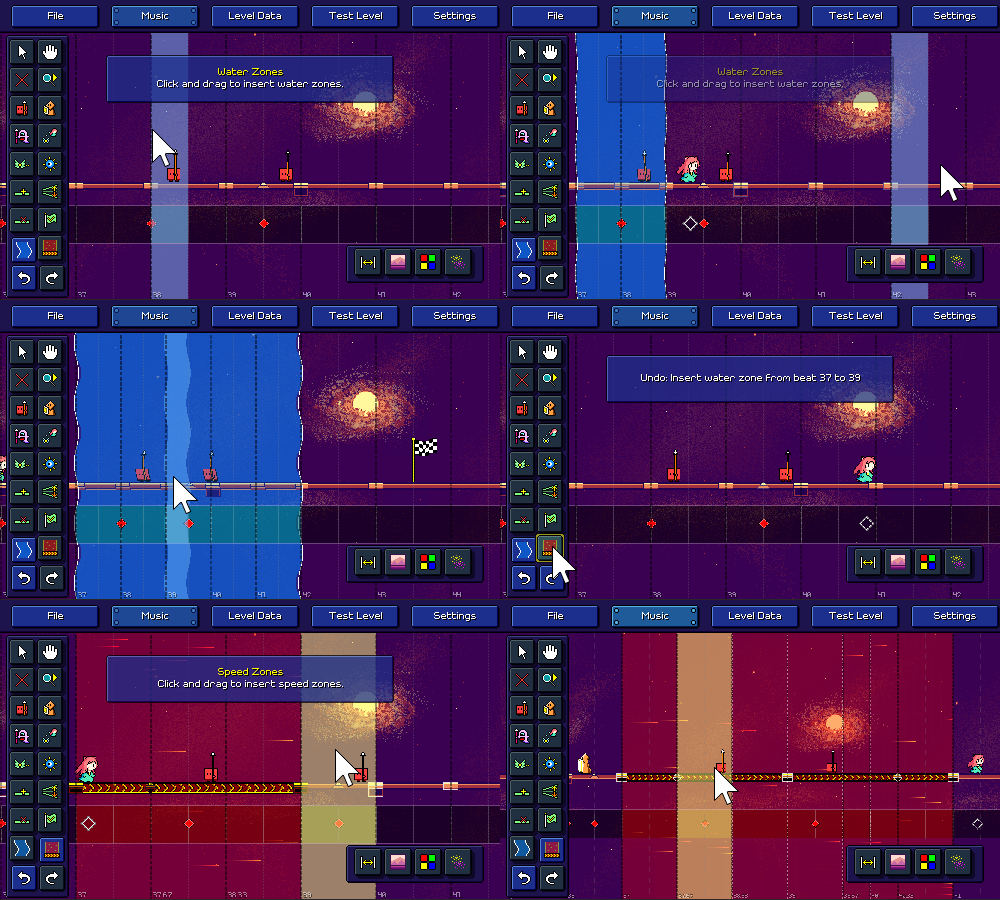
Water zones and speed zones will now automatically merge together if they overlap or are placed end-to-end:


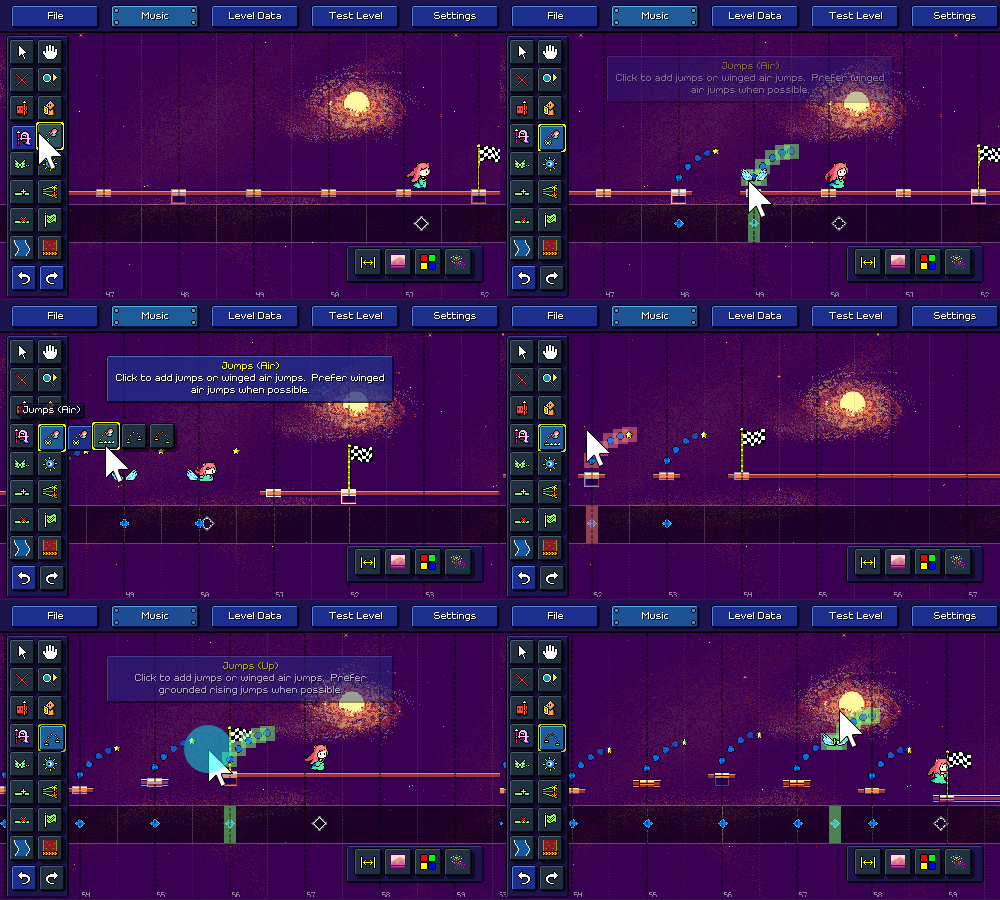
The jump tool now features multiple subtools for specifying whether you want to prefer (when possible) placing winged air jumps, grounded jumps, or grounded jumps with a vertical height difference:


What else...? I'll preview this in the future, but I also added an initial set of editor sound effects, so you can hear a nice little [pop!] when you place something. There was also a ton of work done on minor things with level validation logic, as well as general UI polish (the way that grid snapping worked, etc.).

I still need to release this in the next patch, but I also finally implemented the ability for separate keybindings to work independently instead of being summed together, which means it'll work if you press a second attack key without releasing the first one -- this one should help players out with faster charts or if you're playing with a high speed mod.

[h2]More Work to Come[/h2]

As we approach the end of 2023 I want to thank anyone who cares about my game enough to keep reading these devlogs. I may or may not take a little break from updates over the holiday season, but either way I'll be continuing to chug along as always with slow progress toward the mountain of work to be done. Sometimes I start to get really self-conscious of all of the expectations people must have about the game -- like, ~18,000 Steam wishlists and ~700 Discord members, that's a little ridiculous for my little project, isn't it?

Cultivating an active community presence is really not a strong point of mine, but I'm optimistic that when the time comes the level editor will be able to inspire a lot of new content and excitement. We're still a long ways from that, though, so I'd best not count my chickens before they hatch...

Devlog 59 - Music Loading, Automatic Beat Detection

It feels like I've been really inconsistent with these devlog entries, but looking back it seems like I have been basically putting out one per month quite regularly, so maybe it's not as haphazard as I thought!

[h2]Music Adjustment UI[/h2]

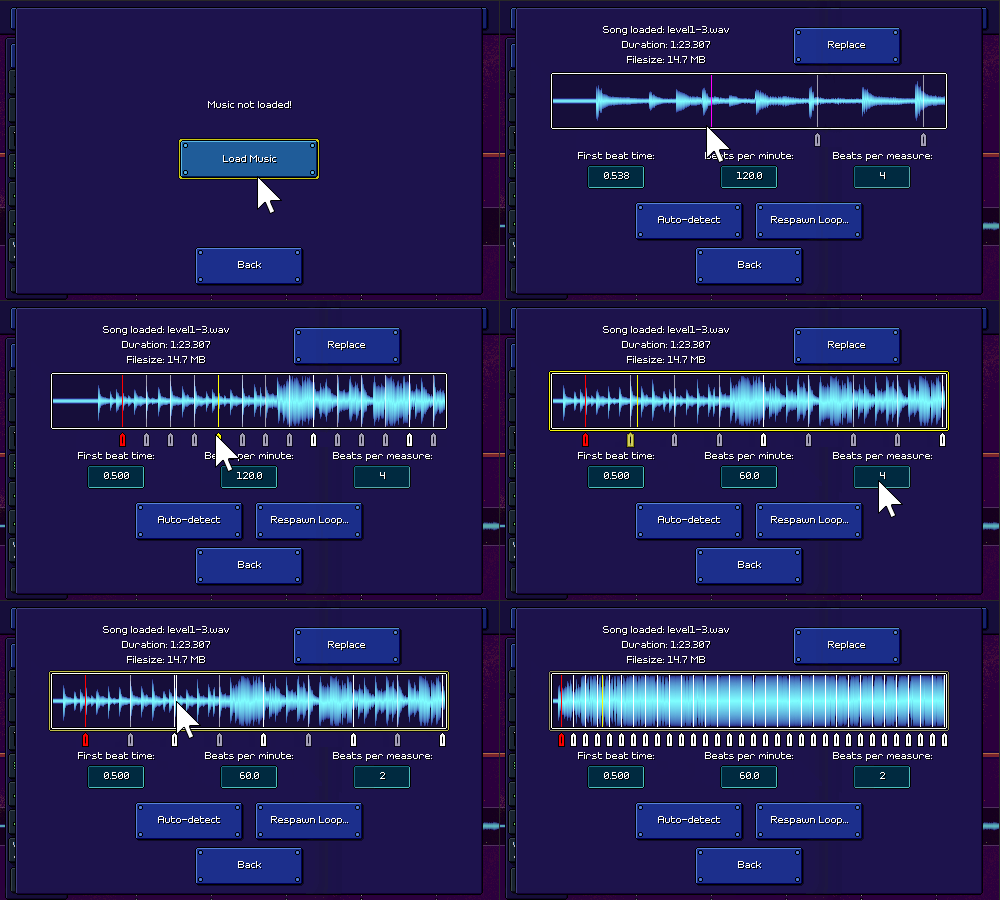
Last week I talked about the waveform display that I implemented using some fancy parallel burst compilation. My main use case for that functionality was to build out a UI for loading a music file and (more importantly) specifying and adjusting the tempo and start time for that file.

After a lot of work, here's what I ended up with:


It's working pretty well! You can preview the song, zoom into the waveform, and drag around the beat markers to adjust the timing to your liking, or simply type in the tempo and start time manually if you already have it on hand. There's also a built-in metronome function so you can verify your work.

This seemingly-simple UI widget really involved a lot of different moving pieces and little quality-of-life touches. There's smooth scrolling and zooming, and I needed to make sure that the beat markers appear and disappear as you scroll through the track. Dragging the beat markers past the end of the current view also makes it scroll automatically, and some of the beat measures fade out if you zoom out far enough (to avoid clutter).

It's worth noting that I took some of the functionality that I developed along the way and added it in other places. For example, since I needed to implement a metronome to give audio feedback on whether your song timings are correct, I also added that as an option to use in-game. I also added the waveform display to the background of the input timeline while editing, to serve as an additional reference:


[h2]Automatic Tempo Detection[/h2]

While the "respawn loop" button does nothing at all yet (that is supposed to be a separate dialog that allows you to provide an optional short audio loop that will play during respawns), the rest of this big devlog post is going to be talking about that other rather inconspicuous button, "Auto-detect".

You might have already guessed it, but clicking this button performs a whole bunch of math and signal processing in order to procedurally analyze the music file and attempt to automatically determine both the tempo and start time of the music file. Here's a short video of that magic in action!

[previewyoutube][/previewyoutube]

It's definitely not perfect, and it takes a few seconds to churn through all of the calculations (video above has that processing time skipped), but it actually does a pretty good job in a lot of cases! It looks easy since it's just a single magic button, but I ended up diving quite deep into the rabbit hole of audio signal processing and beat/tempo detection algorithms in order to implement this...

Before I start explaining the methodology here, I wanted to point out something that might surprise you a bit. You might think that my goal with this automatic tempo detection is to make it work so well that manually setting the timing data for a song is no longer necessary. That's a nice hope to have, but I'm not really confident I can do that. On the contrary, I actually think for me that it's the other way around: I want the manual beat-setting interface to work so well that the automatic tempo detection is unnecessary! In that sense, you could say that the automatic detection is really just a secondary nice-to-have feature that I could honestly have dropped altogether. But, I'm a perfectionist, and I found the problem interesting, so I dove in...

[h2]Resources and References[/h2]

While Unity provides basic access to audio data (get the samples out of an audio clip as a looooong array of floating point numbers), doing any sort of more involved operations (normalization, convolution, filtering) is something you'll want to use a specialized C# library for (don't reinvent the wheel!). NWaves was by far the most user-friendly and sensible one that I personally found (though I did end up re-implementing particular parts using Unity's job/burst systems, for performance reasons). NWaves was a huge boon for me and let me do things like Short-time Fourier Transforms without having to learn a bunch of new complicated math and attempt to implement it from scratch.

Also, I rarely find myself doing this, but for this particular problem I ended up consulting a whole bunch of research papers that have been written about the topic, some of which were extremely helpful.

"Evaluating the Online Capabilities of Onset Detection Methods" by Böck et al in particular provides a pretty nice survey of various approaches to detecting note onsets -- this is not 100% equivalent to tempo detection but is closely related.

Accurate Tempo Estimation based on Recurrent Neural Networks and Resonating Comb Filters, also by Böck et al, was one of the other more helpful reads.

[h2]Detecting a Tempo[/h2]

The process of tempo detection basically consists of the following steps at a high level:

Do some preliminary processing on the audio signal to prepare it for further steps
Run the audio through some sort of detection function(s) that is designed to highlight beats/onsets
Determine what tempo best lines up with the detected beats

[h3]Preliminary Processing[/h3]

This step is pretty boring, we basically make sure that the audio is normalized, and converted from stereo into mono. I also add some silence to the beginning as a buffer and scale the audio levels a bit (apparently working in a logarithmic scale tends to perform better).

In some approaches the audio is filtered and split into multiple parts -- for example one copy with only low frequencies, another with mid frequencies, and another with higher frequencies. I didn't find this to work super well for me and it also adds additional processing time since each filtered copy needs to be processed separately, so I just stuck with a single unified copy of the audio. But it's worth noting that filtering is a relatively common technique here, and your mileage may vary.

[h3]Spectral Analysis[/h3]

Now we need to take the music track and come up with some way to detect onsets or "strong attacks" in the audio.

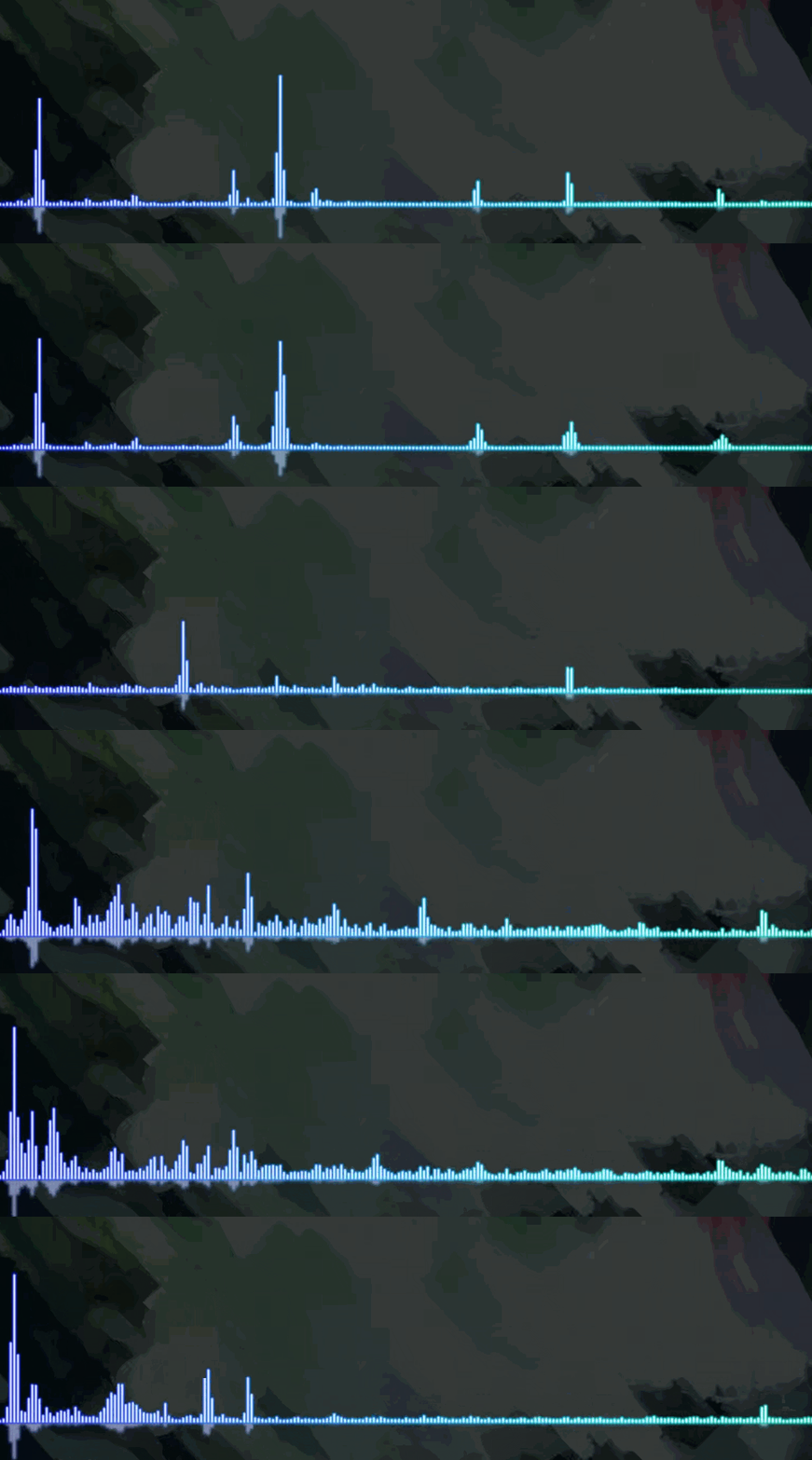
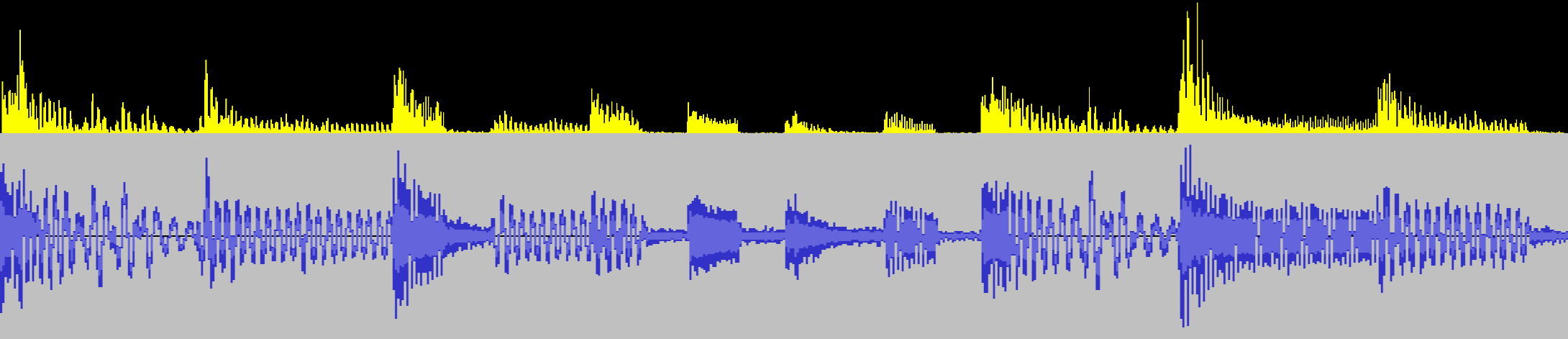
The first thing you might think of is to look at the places in the audio where the volume is loudest. That might work decently well for a single section of music with an isolated instrument that looks like this:


But for a loud song that has many different elements going on at the same time, the waveform looks more like this:


Part of the problem here is that all of the different sound frequencies that make up the song are represented together in a single waveform (one big array of floating point numbers), so it's almost impossible to isolate different musical events.

The Fourier Transform can help us here by converting a single audio signal into a breakdown of the different frequencies that comprise that signal. If you've ever seen any sort of spectrum visualizer like this one, the Fourier Transform is what's being used to evaluate how tall each "bar" in the spectrum is:


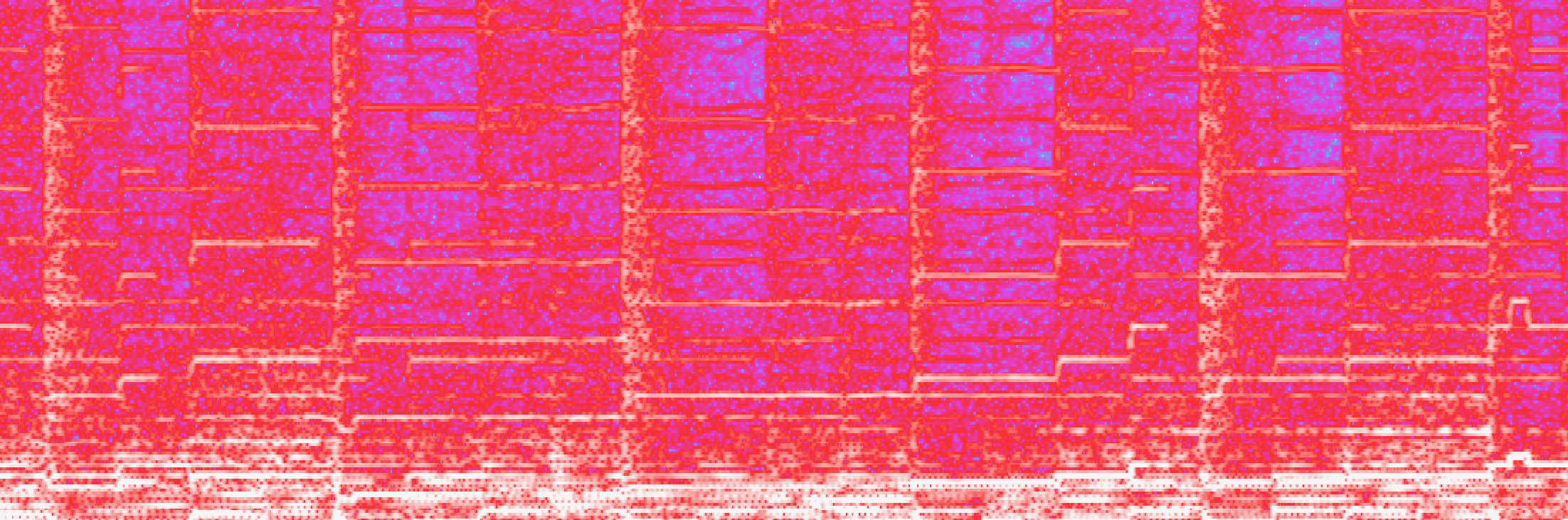
Here's the same complex waveform from earlier above, but this time displayed alongside its spectrogram (generated using a form of the Fourier Transform). Notice how you can not only see a vertical line pattern (corresponding to the big kick drum hits), but you can also see distinct horizontal bars that correspond to different notes being played on the lead melody synth.


[h3]Onset Detection[/h3]

NWaves can perform "Short-Time Fourier Transforms" in order to generate the equivalent of the above spectrogram, which is great. However, we still need a programmatic way to get from the spectrogram to some sort of evaluation of where note/beat onsets are.

There are various approaches to doing this. In fact, some of the best results are done using neural network techniques...which unfortunately are a little too far out of my wheelhouse for me to implement.

Instead I went with a simpler (well, kind of) approach, detailed in this paper. I basically take each of the sinusoidal frequencies (that are given by the Fourier Transform) and at each point in time, evaluate the change in energy and phase of that frequency. So if the energy level in a certain frequency goes up suddenly, that's a good indicator of a note starting. Similarly, if the phase of that frequency changes significantly, that's also a indicator of a note starting or changing. I add up all of the "change amounts" for every frequency and end up with a single number for that moment that describes "how much did the frequencies change in total at this moment?"

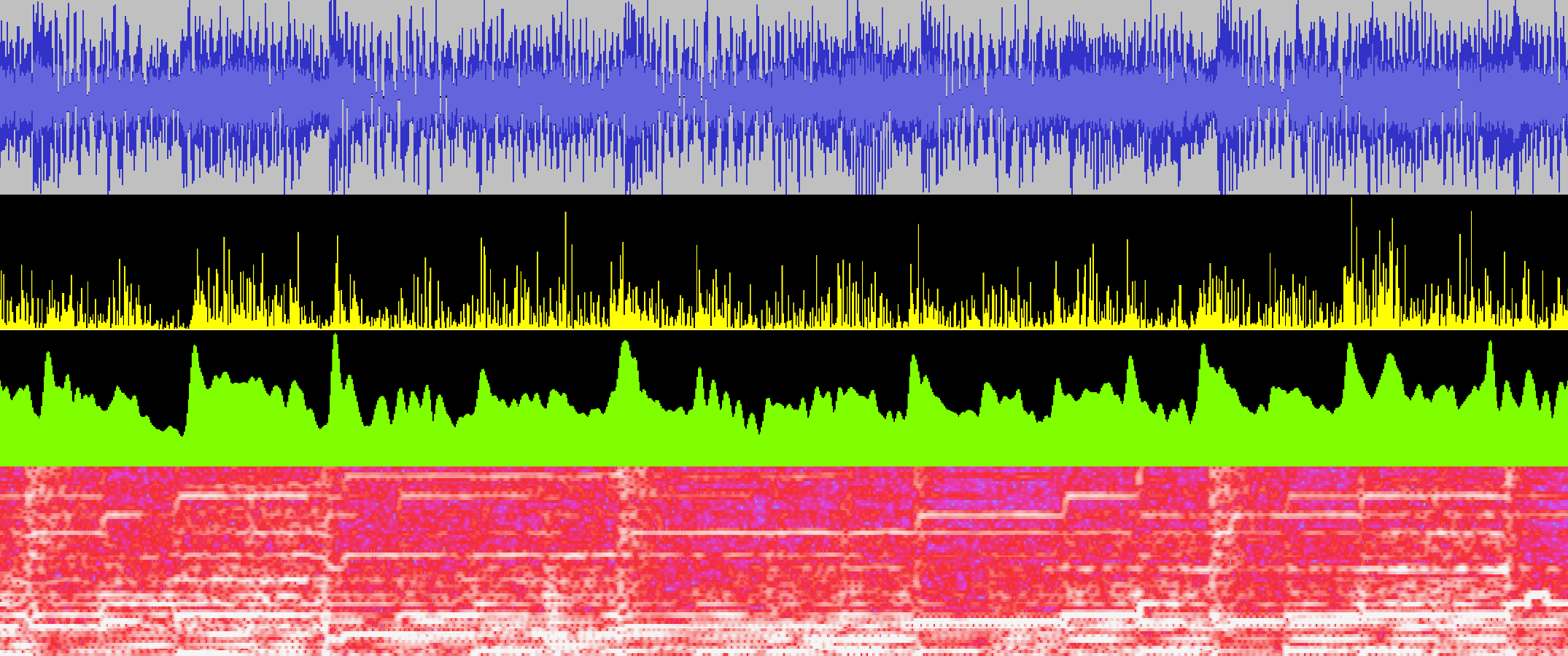
Here's a rough visualization of what that "total change amount" looks like, along with the other signal representations. The yellow spiky line is the raw "total change amount" data that I use for the rest of the computations, the green graph is just a smoothed out version of that to show that it does indeed map onto the beats of the song.


Here's a simpler example where you can see it a little more clearly:


In some approaches, you take this "change amount" and try to run some sort of thresholding to pick out discrete onset/beat events. I chose not to do this and instead leave the signal as a continuous one. As you'll see in the next section, we don't actually need to pick out discrete beats in order to find the tempo. (One advantage of this is that we can also make use of information that lies in between beats.)

[h3]Comb Filtering[/h3]

The next step is to look for regularities in the onsets (the yellow graph) so we can determine the actual tempo. The way I do this is simply to try many possible tempos (all the way from 60 BPM to 180 BPM) and see which one(s) "matches" the graph best.

How do we measure how well a given tempo "matches" the graph? The way I chose (referenced in some of the literature) is to use comb filters. A feedback comb filter is basically a fancy way of saying we are going to put an echo on the signal.

I run the onset graph through many different comb filter delays (echo lengths), corresponding to each candidate tempo. The hope is that if the delay matches the actual tempo of the song, then we end up getting more feedback resonance than if not, so the resulting signal amplitudes will be higher. That ends up being true! In the below graph the blue/cyan line represents the comb filter output for an incorrect tempo, and the green line represents the filter output for a matching tempo.


Both of them start out relatively similar, but you can see that as the resonance kicks in, there's a feedback effect on every beat (since there tends to be note onsets there more often), which causes a higher signal amplitude.

After calculating the comb filter output for all possible tempos, I simply go through and choose the tempo whose comb filter values are highest more than all of the other ones. Sometimes there is more than one different tempo that is higher than the rest -- often times this happens when the song has strong syncopated patterns, so for example instead of 120BPM the detector could also find 160BPM as a valid candidate. Right now I just have it pick the top one, but in the future I could build some sort of UI to suggest multiple tempos when it isn't quite sure.

[h2]Detecting Beat Offset[/h2]

Now that we have our song tempo calculated, the next order of business is to try and figure out what the beat offset is. I'm still working on tweaking this part a little, but what I do right now is take the comb filter output and process it even more using averages and thresholding. I end up with a more discrete selection of peaks:


I use various rules for selecting these peaks -- for example, the signal at that point has to be much higher than its average, it needs to be the highest point in some proximity, and there can't be two peaks too close to each other. Note that this attempted "peak selection" isn't perfect, and usually tosses away some otherwise-relevant information (which is why I didn't do it in the previous step). But as long as I get "enough" of the correct beats, it's fine!

The last step is simply to go through all of the possible beat offset values and see which one of them lines up most with the peaks from this step. I just do this by adding all the on-beat amplitudes that would result from a given beat offset.

[h2]It Works![/h2]

Amazingly, the entire system works fairly well most of the time! It still has some troubles with certain songs, and often the start time is wrong by half a beat (I'm guessing this is because off-beats tend to be featured prominently as well), but there are always going to be exceptions like that. Again, even when it's wrong, it usually has the correct option as its second or third choice.

After I ironed down the main algorithmic implementation, I ended up doing a pass over most of the computation logic and rewriting it to make use of Unity's parallel job / burst compilation system, which helped speed things up drastically. Right now the algorithm looks at the first 30 seconds of a song, which is over a million floating point samples, so there is quite a lot of data to parse through! Before the optimizations this process was taking over ~10 seconds, but it's now down to just a couple of seconds at most.

I could go on and on trying to fine-tune all of the different parameters in the system (there are a lot...), and I actually found a couple of silly bugs and noticable improvements even while writing this devlog (hooray!). However, it's about time that I call it a wrap on this particular system and get back to making sure that everything else in the editor is well-integrated...

Rhythm Quest Demo v0.29.2 Released

The Rhythm Quest Demo has been updated to version 0.29.2! This patch features some more bugfixes, but also adds a few in-game mods including an input timeline and metronome.

Full changelog:

Version 0.29.3
- Tweak/fix grass in world 1 level select

Version 0.29.2
- Fixed a softlock bug that allowed getting stuck in walls
- Slightly lowered audio encoding quality to reduce build size
- Fixed incorrectly-centered vertical backdrop scaling behavior
- (This fixes an issue where the foreground in 3-1 could cover more than expected)
- Fixed a bug where keyboard menu selection was not restored for certain menus
- Fixed a bug where the player could run off the level if the game is paused after a level end
- Fixed perfect medal animation offsets in world select for demo version
- Added "Run in Background" setting
- Added "Input Timeline" visual mod
- Added "Metronome" audio mod
- Fixed tutorial being skipped if 1-1 is restarted during it
- Fixed scheduled sounds being very slightly offset in some cases
- Fixed end level medal particles having different speeds depending on resolution
- Allow pressing any key in calibration screen (not just space)
- Fix subpixel render misalignment of player in game
- Fix subpixel render misalignment of ground in menu
- Disabled screen refresh rate label (currently not working)
- Localization updates