1. Rhythm Quest
  2. News

Rhythm Quest News

Devlog 65 - More Bonus Levels, Readability Mods

It's been a while, so I definitely have some cool stuff to show off from this past month of work! Let's start with everyone's favorite, looking at some more new levels...

[h2]More Bonus Levels[/h2]

Last time around I showed off some new bonus levels that I had written for Rhythm Quest. I've actually switched gears a bit for bonus levels and instead ended up making charts for a bunch of existing songs from my past releases. Here's a video sampler showcasing these:

[previewyoutube][/previewyoutube]

Super Mega Zero is a fast-paced song from the Super Mega Zero OST. Nothing too fancy here, just the standard charting that you'd come to expect by now, just at a high tempo. This one will really get your blood pumping!
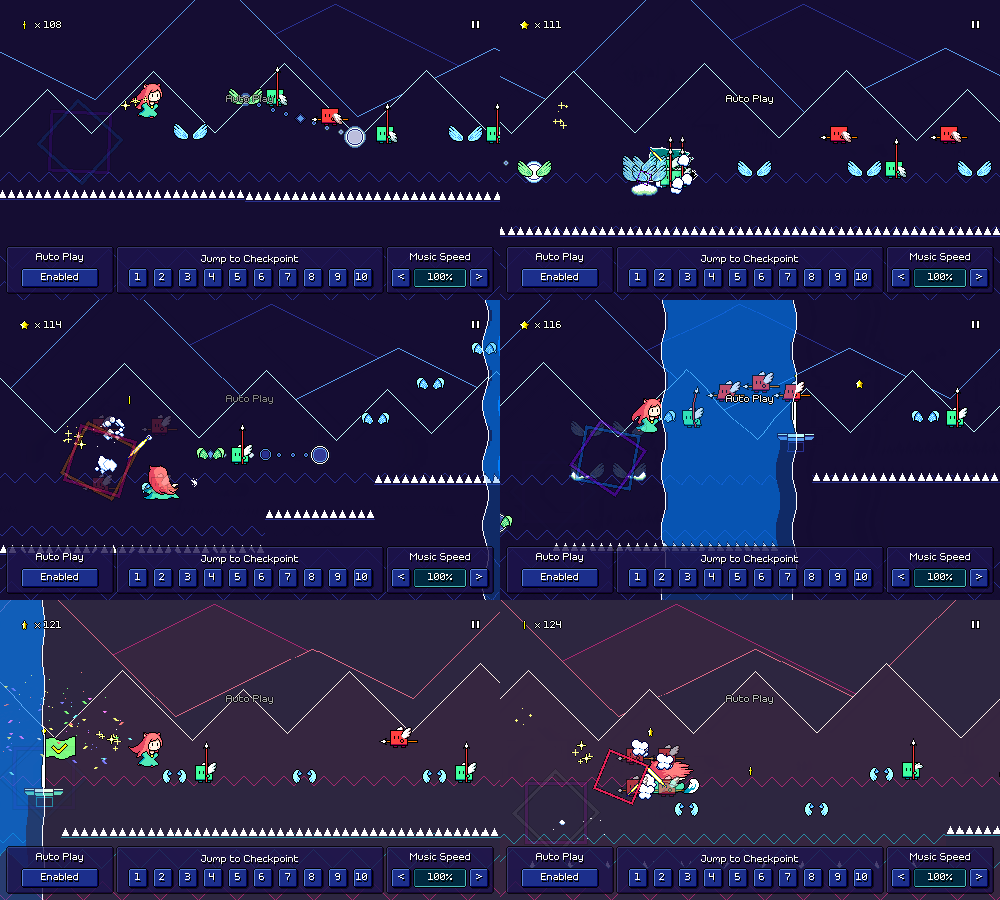


Standing Here Alone (Expert Mix) is from the Melody Muncher Deluxe OST. The Melody Muncher songs are naturally pretty easy to translate over to Rhythm Quest as Melody Muncher was already based on 8th-note rhythms to begin with. This one is the "Expert Mix" version of the song, which works better for formulating a harder chart.
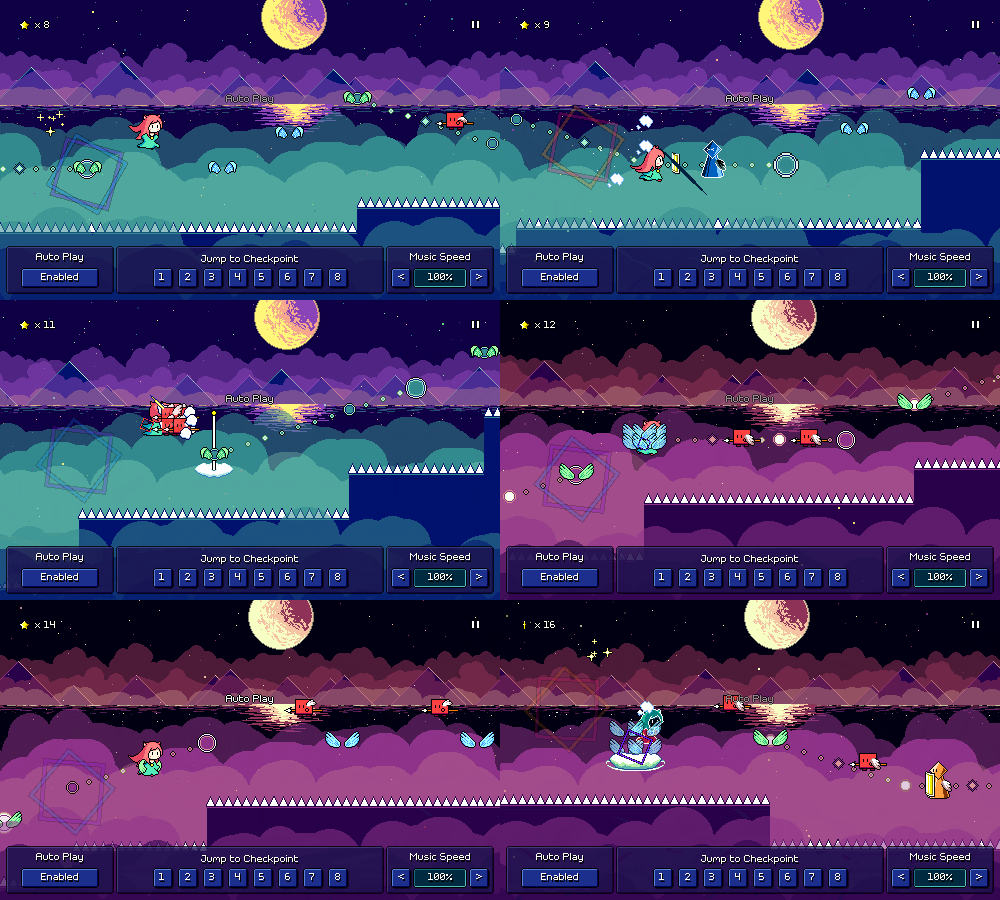


As the Cherry Blossom Falls is from Volume 2 of the Samurai Shaver OST. This one is a much slower song, so it's definitely on the easier side. As such, I made sure that it didn't feature any obstacles from worlds 3 onwards, so that it can be enjoyed pretty early on.
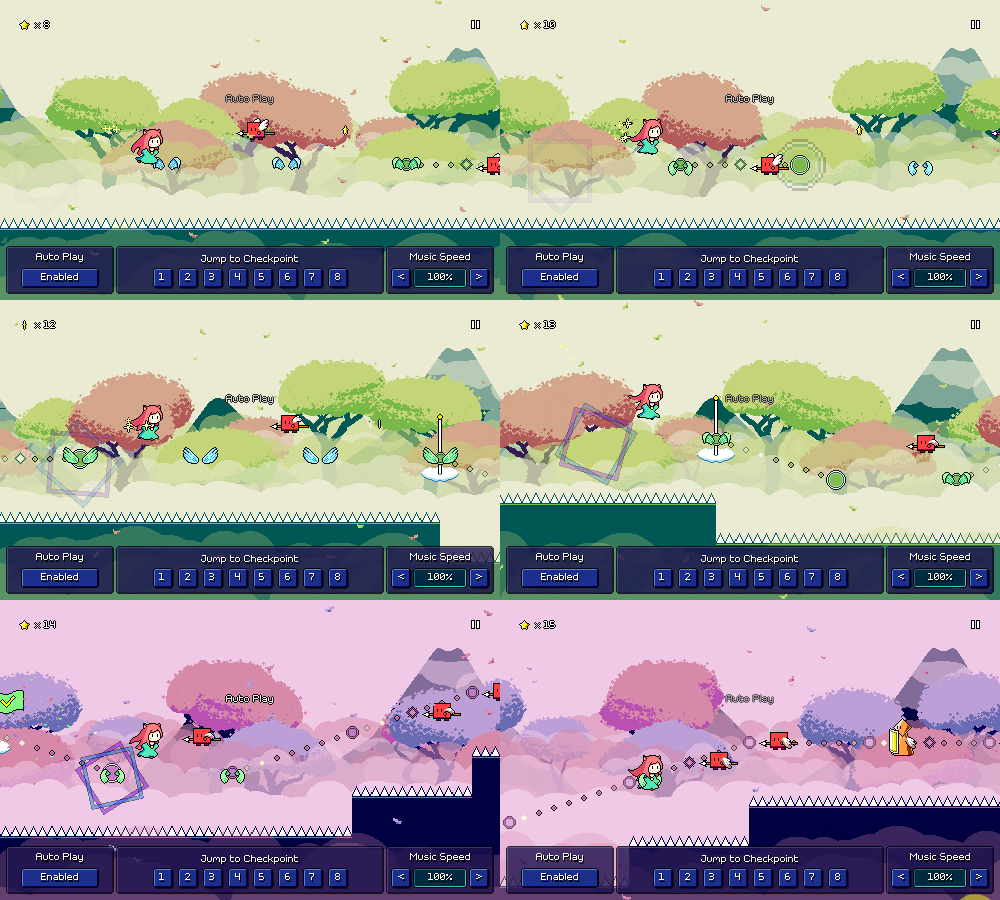


Let's Have an Adventure! is from my older album, The Ecstasy of Life. It's fast and upbeat, featuring dotted eighth-note ghost patterns that go right along with the melody (really glad that I decided to introduce this as a mechanic!). Some of the rhythms in this one are a little tricky, which led me to implement some readability mods that I'll talk about later in this post.

There are also some 4-note dotted eighth patterns here that I had to chart with one basic enemy plus a yellow ghost. Because of this, I briefly contemplated what it would be like if I had designed the ghost enemies with variable counts, so for example with some sort of counter, that way you could have 4-hit ghosts, or 5-hit ghosts, etc. In the end, though, I think I like the simplicity of the ghosts as is. There is something to be said about trying to make the most of a limited toolset!
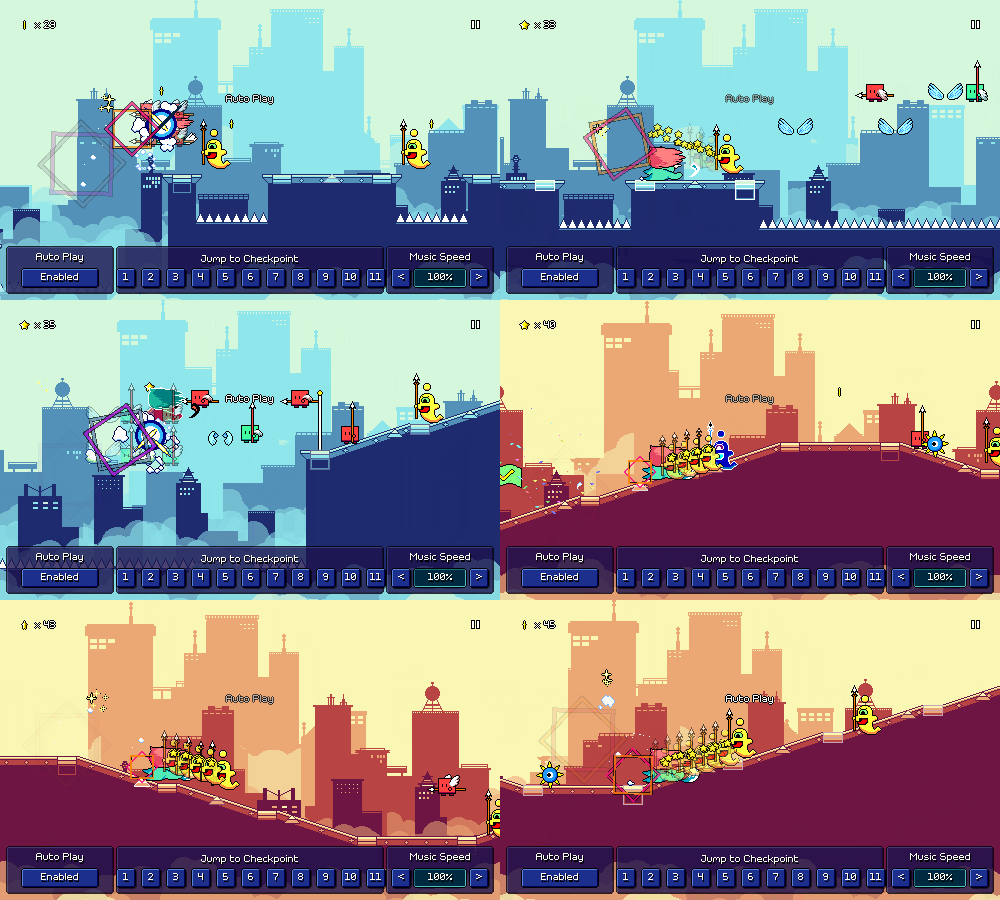


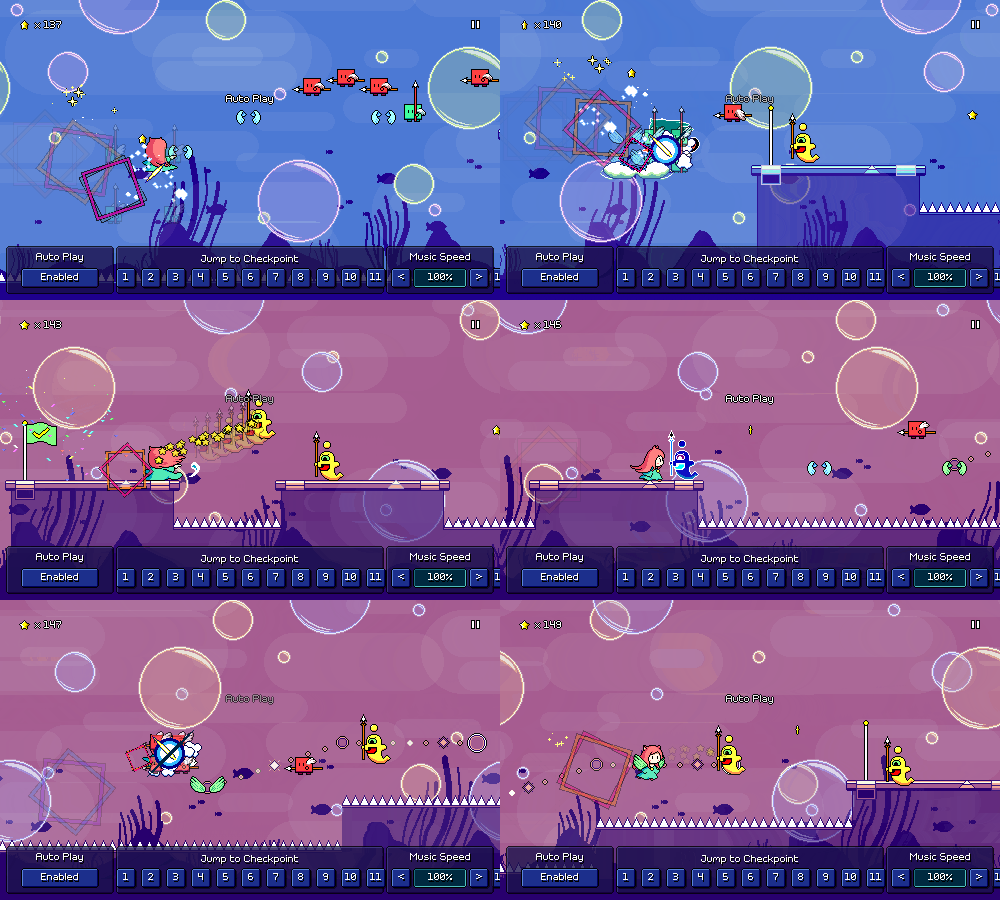
What Lies Beneath is from the Ripple Runner Deluxe OST and is the oldest of these songs (released 10 years ago, wow!). Because this one has a low tempo, I experimented with using some more complicated 16th note patterns. Like I've mentioned before, I want to be sparing with my use of these since they're not as easy to read, but with slower tempos I think it's okay.


[h2]Enemy Spacing Adjustment[/h2]

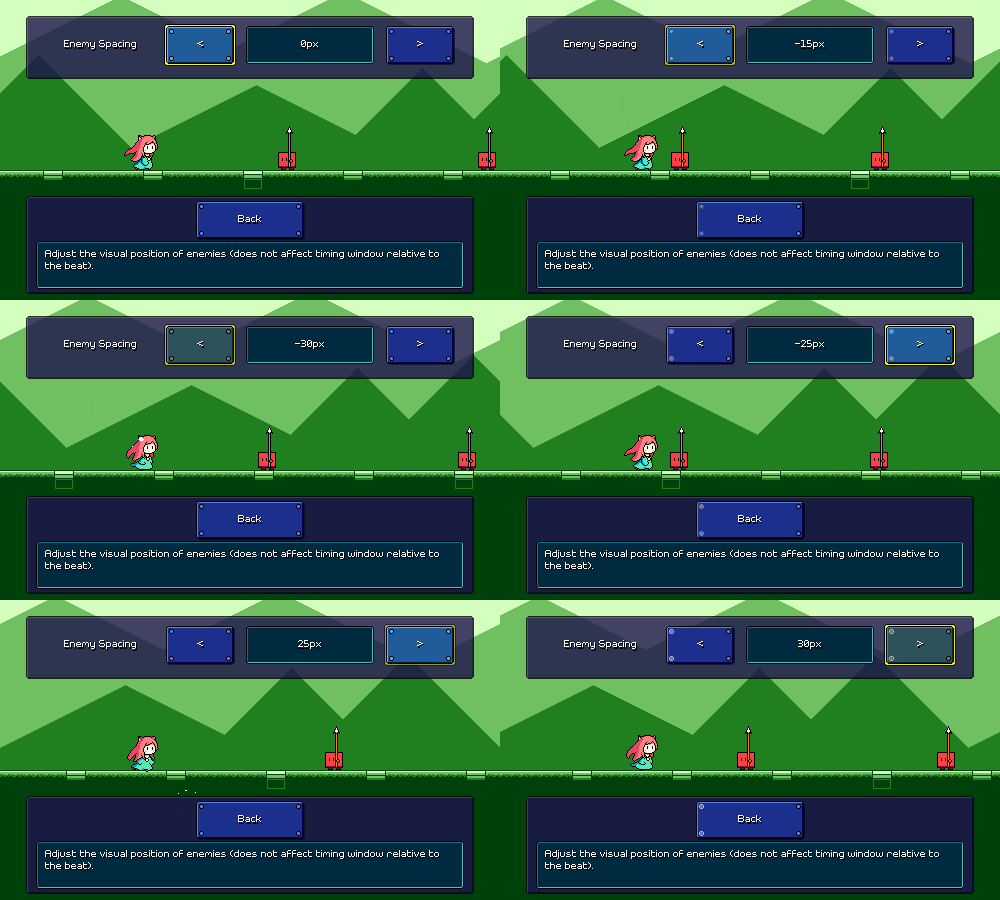
This was a minor quality-of-life tweak/setting that was on my backlog -- you can now adjust the horizontal offset placement of enemies, in case the default (around 30 pixels) feels off to you. This comes with its own fancy little live simulated preview:


[h2]Color/Beat Mapping[/h2]

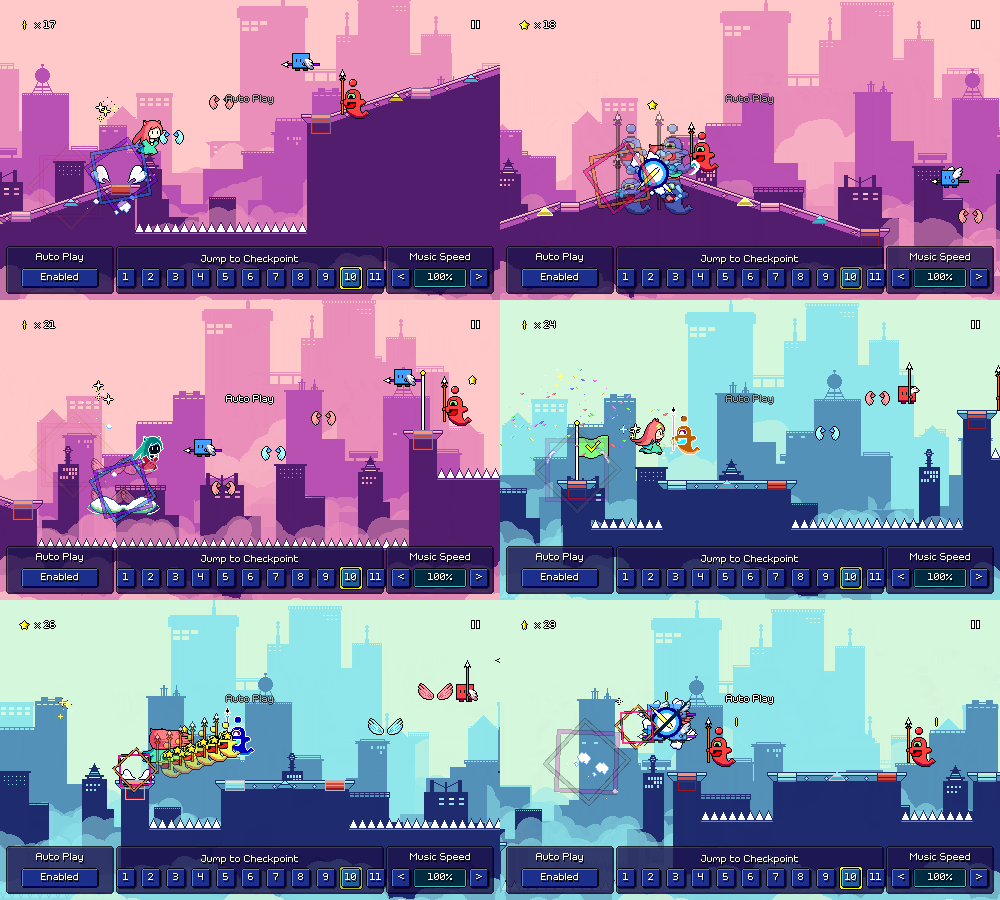
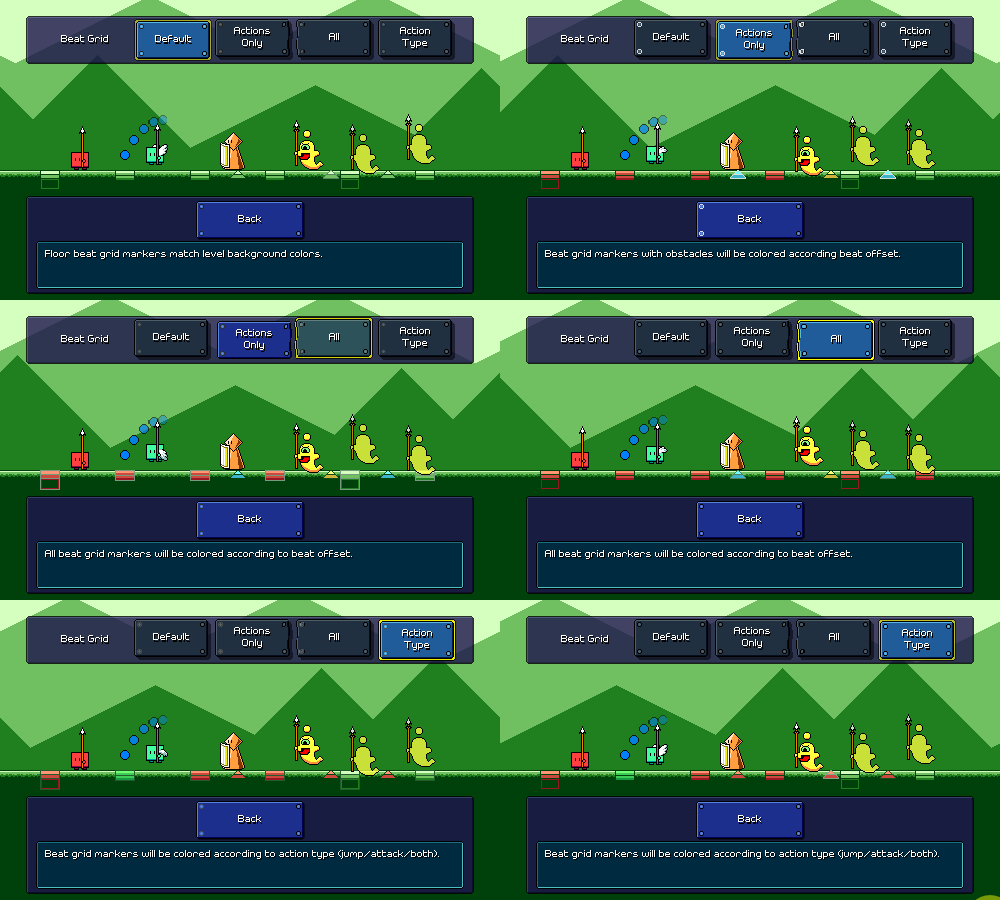
This one was a pretty big undertaking that I only recently wrapped up. You can now modify the colors of obstacles and beat grid markers to help decipher rhythms, a la DDR noteskins. Here's an example of that in action during gameplay:


I don't know how popular this kind of thing will be, but as I started to experiment (carefully!) with more complicated rhythms, I didn't like the fact that some of them can be a little ambiguous to sightread on the fly, so I wanted to at least provide some sort of nod toward players who want things to be a little more readable.

Floor beat grid markers (and flight path markers) can be colored according to their beat offset (red = downbeat, blue = offbeat, yellow = 16th rhythms), or according to the action on that beat (red = attack, blue = jump, green = both). This coloration will override the default color specified by the level palette.


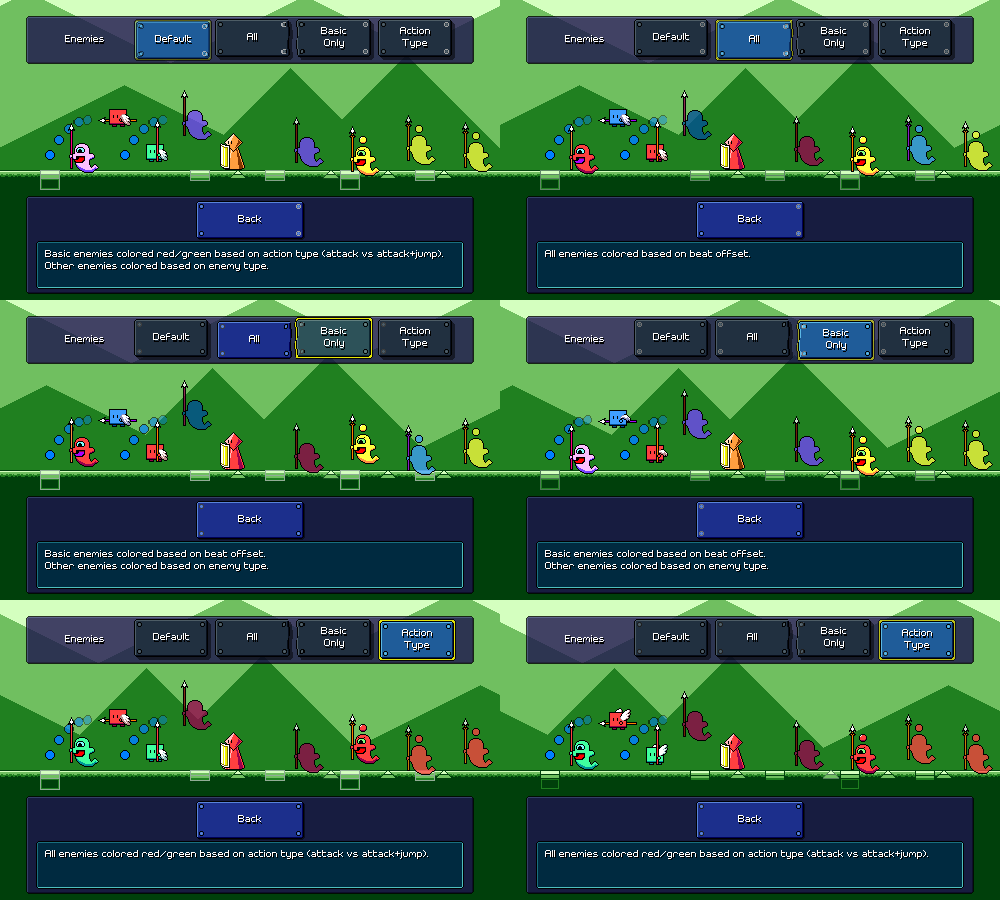
Enemies can likewise be colored according to beat (probably most useful) or according to action type:


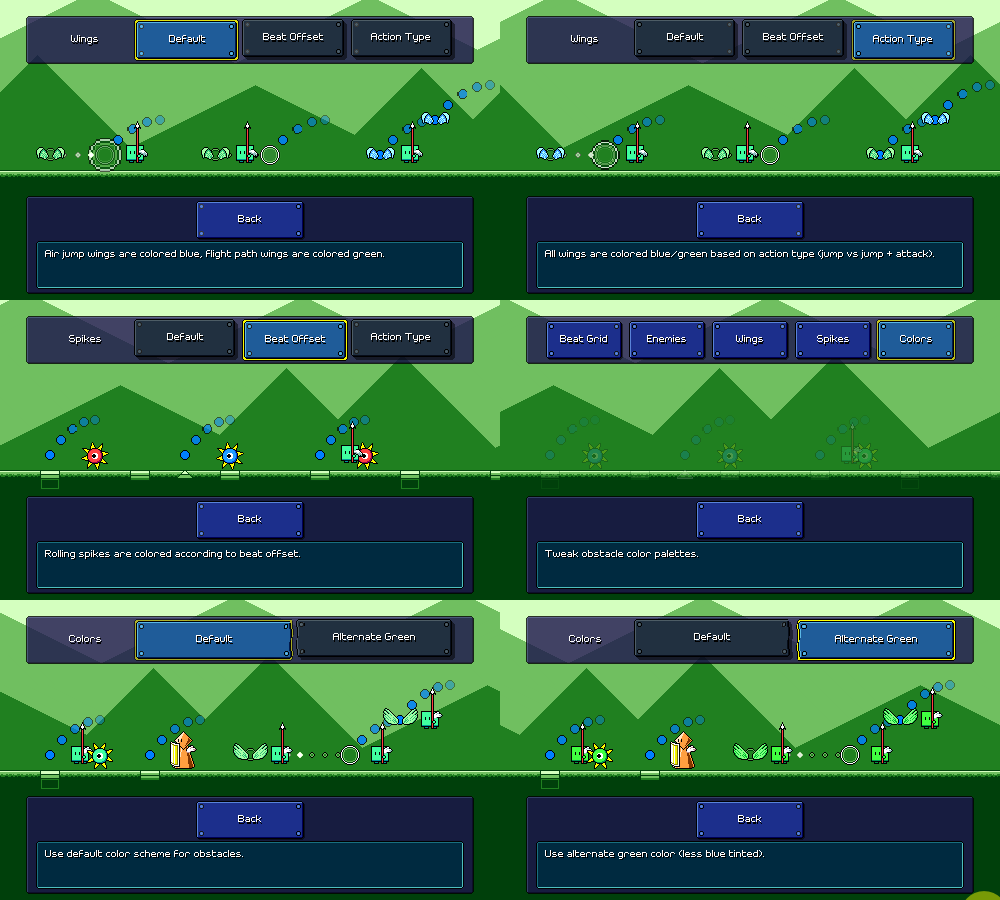
There are some separate settings for wings and spiked enemies, as well as an option to use a different shade of green in case you find that better (I can put more color variations here in the future if needed):


Overall one nice thing about Rhythm Quest is that color isn't actually necessary to differentiate anything, so all of this coloration stuff is hopefully just for people who want to tweak their experience or are having trouble with songs that use weird rhythms. Either way, I'm glad to have this feature finally complete, as it took a good deal of work. The preview UI for this was also perhaps more of a pain to put together than the actual feature itself! It's not even perfect (ideally it would display an actual level section being played in realtime), but this was what I came up with when I was balancing my effort/benefit ratio.

[h2]Other Odds and Ends[/h2]

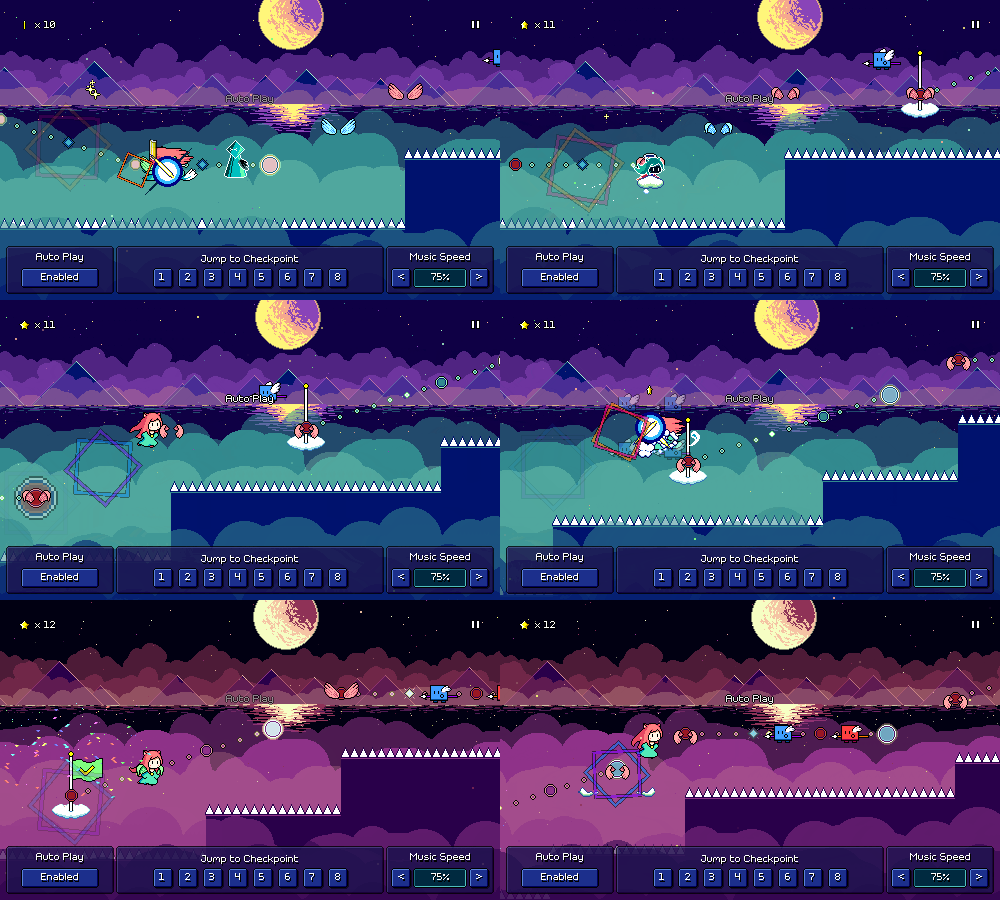
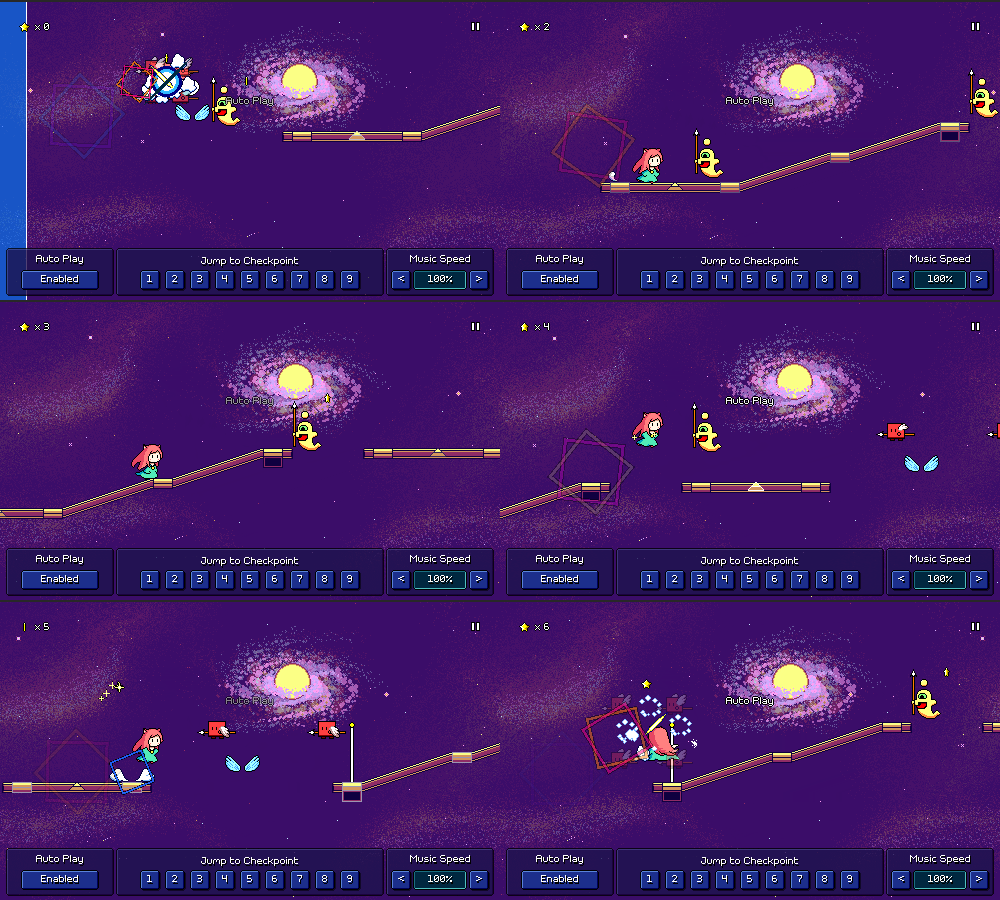
Previously checkpoints could only ever be placed on solid ground, and I made it a point to always chart all of my levels to accomodate that. I still think that's best practice, but for situations where that isn't a good option, I've added a little floating cloud platform for the checkpoint flag to sit on:


Finally, per a community request from a while ago, I've added the option for timing windows to scale in size based on the music speed multiplier:
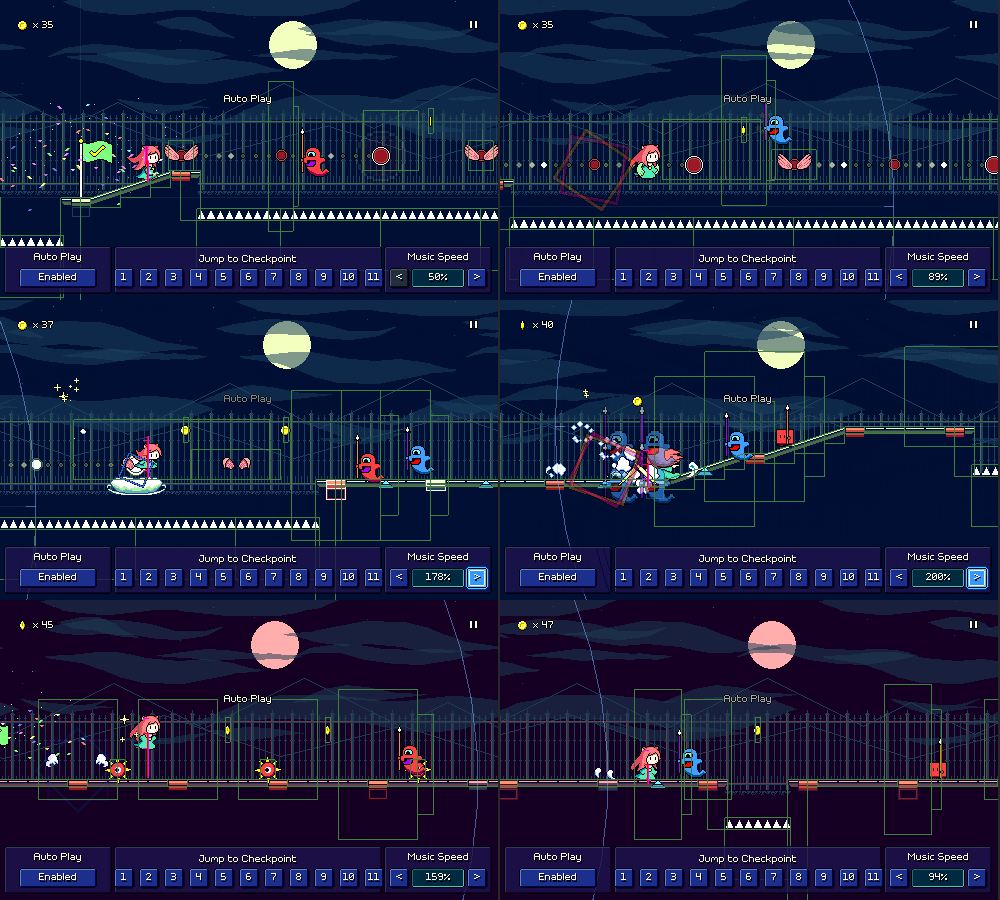


While I'm personally not a huge fan of this, I also understand the rationale behind it, and it wasn't too difficult to implement. It doesn't apply neatly to all obstacles (rolling spikes...) and it might possibly cause some weird behavior since the collision boxes are so unexpectedly large, but in most cases it should (?) work okay. Note that this doesn't fix the duration of timing windows across different song sections, so faster-scrolling sections will still have (slightly) tighter timing like normal.

I think that covers all the stuff I've been working on lately, minus one other thing which won't be ready to show for quiiiiteee some time. It certainly *feels* like I'm putting together a lot because of all the bonus levels, but that's mostly because charting existing songs (and not having to draw additional backdrops) is very easy. At some point I'll have to get back to actually finishing out world 6, but maybe after having made so many other charts I'll have a little more confidence in doing so...
Devlog 64 - Bonus Levels

Sometimes it can be good to bounce around and work on some different things here and there. This time I worked on some additional levels! I'm still feeling hesitant to finish out the levels in world 6, so I decided to work on some bonus levels instead. This is relatively low-pressure for me since the more bonus levels I have, the better, and they don't really have to fit a particular level of difficulty or anything. I also wanted to explore using the new yellow ghost enemies a bit to get to know how to chart with them.

[h2]Violet Hyperwave[/h2]

The first level I made is called "Violet Hyperwave". It's a synthwave-styled track that uses all of the mechanics in the game except for the triplet speed-zones. Here's the video of the full track:

[previewyoutube][/previewyoutube]

For now I'm not making new backgrounds for these bonus tracks (maybe later...?), which helps make the process a little easier; I'm able to just churn these levels out in 1 or 2 days, which feels nice.

Music-wise, there's a synthwave preset bank that I pull from a lot that slots right in here, and there's plenty of analog/vintage emulation to warm up the sound a bit. I really like the FM arp sound that comes in halfway through!

For the chart I didn't want to do anything crazy, so most of the patterns you'll see are pretty familiar, but as I mentioned earlier, I did try to make use of the new yellow ghost enemies. By themselves, they're actually not very difficult! It's a new rhythm to deal with, but hitting a yellow ghost enemy is slower than hitting double-hit enemies, so it's not actually that hard. This makes me wonder whether I should just introduce the yellow ghost enemies at the very beginning of world 6, and then shift over level 6-1 to be level 6-2 instead (?).


Combining yellow ghosts with other rhythms is in theory, possible, but I want to be careful with them, as 16th-note rhythms are quite a bit faster than anything else currently in the game. Maybe they'll be relegated to very specific recognizable patterns...? Something else I've tended to avoid up until now is having a ghost enemy (either purple or yellow) on the same beat as a jump, but I added a few instances of that in this level. Unlike with the basic red/green enemies, there's no special visual distinction for these combo presses, which I'm not the biggest fan of, so I might have to think about whether I can come up with a nice way of making that a bit easier to read.

In terms of estimated difficulty, this level clocks in at a 59 (Hard), which is a bit harder than levels 5-3 and 5-4, but not as hard as levels 5-5 and 6-1.

[h2]A Single Leaf Flutters in the Wind[/h2]

The second level is called "A Single Leaf Flutters in the Wind". It a fast song featuring East Asian instrumentation such as taiko drums and guzheng, and uses a pentatonic scale, just like the songs in world 4. Here's the track video:

[previewyoutube][/previewyoutube]

So one thing with the bonus levels is that a bunch of them are going to involve mechanics that the player hasn't necessarily been introduced to in the main levels yet. I'm not yet sure how I'm going to handle this exactly (initially I was going to gate access to bonus levels, but I might actually just show a warning instead of hard-locking them), but I'm going to try and include some levels that only feature the simpler mechanics, so you have something that you can play if you go to the shop before finishing most of the game. As a plus, these can also sort of serve as "challenge missions" (a la Celeste B-Sides) for players who are finding the main progression a little too easy.

To that end, I made this song that only uses the mechanics from worlds 1 and 2 (no ghost enemies, no water paths, etc), but is really fast-paced to present a challenge. It's at 135 beats per minute, so definitely on the faster side considering that it uses a ton of 8th-note rhythms. As you can see from the first few checkpoint sections, I wanted to really pull the gloves off on syncopated 8th-note rhythms here, encouraging you to read the airjump patterns in order to parse out the timings.

The song itself was really fun to write! Working on new levels like this always reminds me of why I enjoy working on the game, so this has been a nice break from figuring out the complicated stuff around custom levels. I appreciate that the songs are relatively short (1.5-2 minutes), so writing them doesn't really feel like some sort of gargantuan effort; I can pull it off very quickly.

For estimated difficulty, this level is a 73 (Expert) due to the note density, so it's a bit between levels 5-5 and 6-1.

That's going to do it for this update. Hopefully people are happy that finally have some new levels to show off again :)

Devlog 63 - Graphics Editing, Boring Gamedev Woes

I decided to explore the mod.io integration that I mentioned last month, and have decided to move forward with it, but I was getting a little overwhelmed trying to figure out exactly how I wanted to hook up all of the export/import/login flows, so I decided to table that and work on more core level editor functionality instead.

[h2]Backdrop/Tileset Selection[/h2]

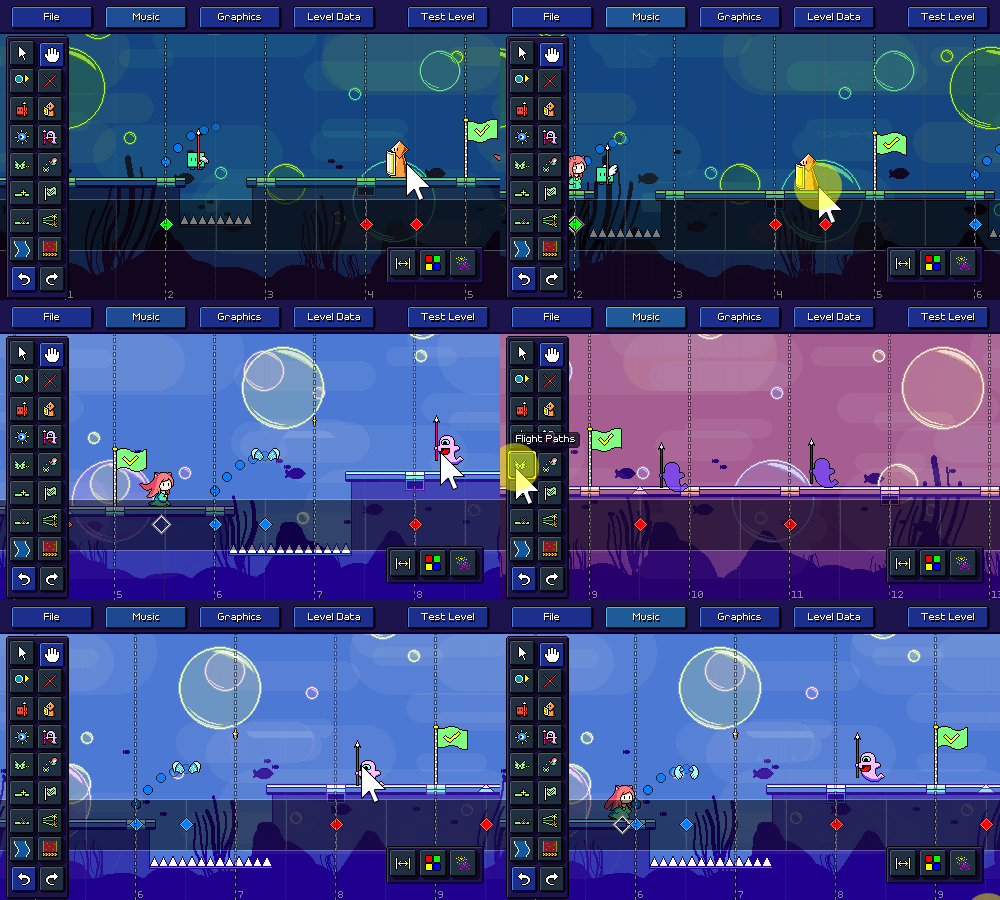
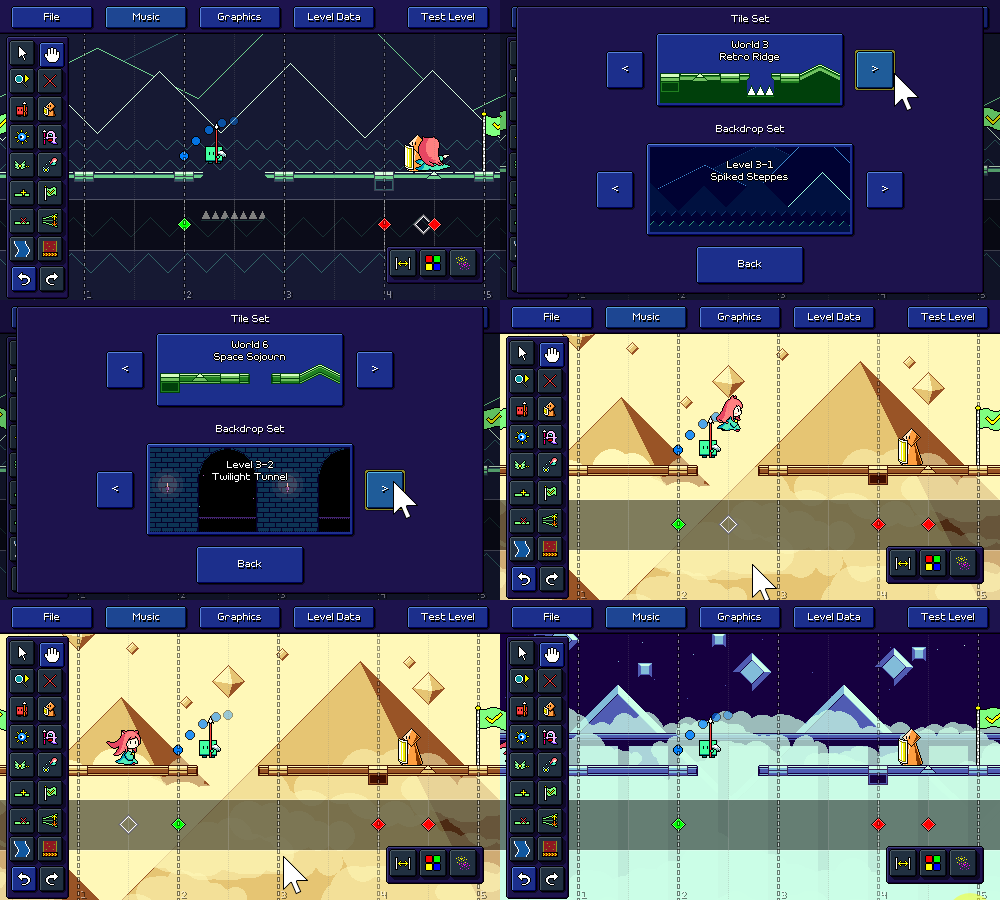
Up until now all of the progress screenshots I've shown of the custom level editor have just used the level 6-1 backdrops as a placeholder, and there was no way to change that...until now! I've added a "Graphics" menu where you can select between any of the level tilesets and backdrop groups that I've made for the game:


You might be asking whether or not it's possible to import your own background images and graphics and the answer is a definite "I'm not going to implement that yet". The backdrops are authored in very specific ways, using multiple parallax scrolling layers, and are also encoded in the special 8-bit red-channel-only format, with specific color limitations to work with the palette shader...even if I did implement the ability to import your own images, I feel like it would just be a huge hassle for anyone to author for the system as is. It's just not worth it at this time.

[h2]Palette Selection[/h2]

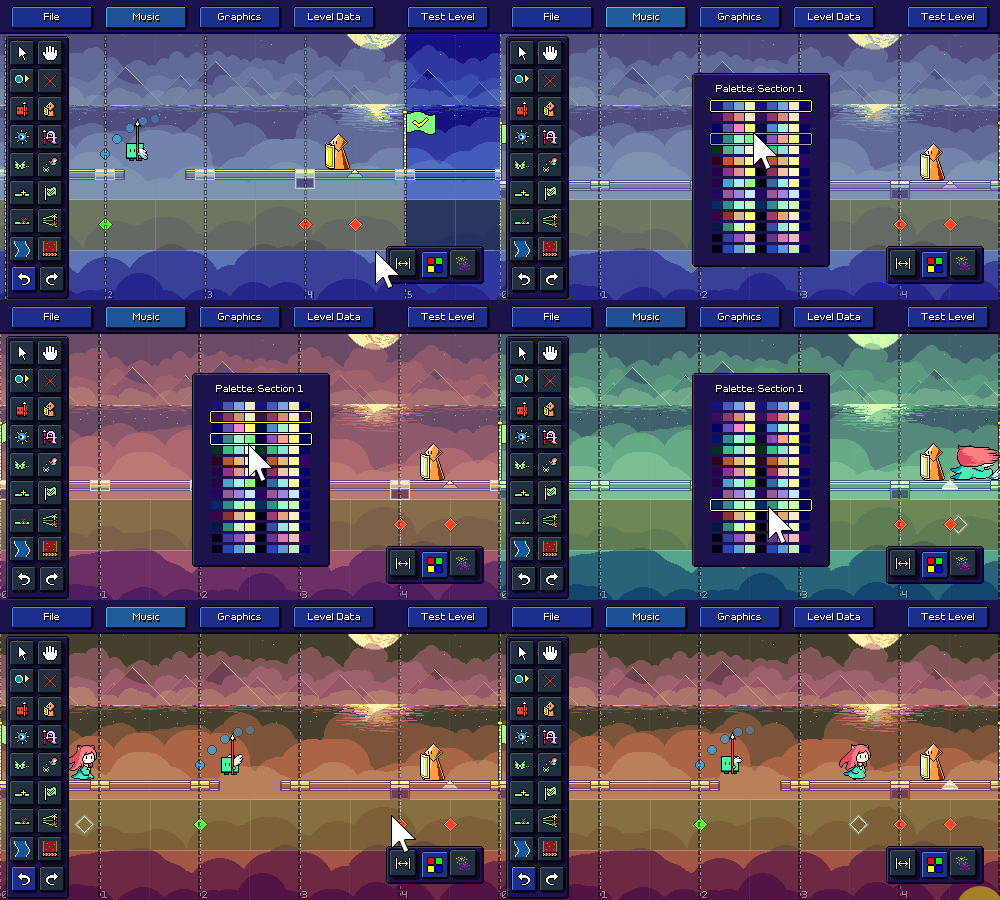
There's also a new tool that lets you change the color palette used in each checkpoint section:


Right now you can only select from the preset palettes that I've already authored for each set of level backdrops. Internally it's actually already possible to specify your own arbitrary custom color palettes, but there's no UI for it (yet?). As with the backdrops, it's probably more trouble than it's worth for people to dial in individual colors, but at least this one is more feasible (just need some sort of color picker interface), so I guess maybe it could happen someday.

Panning around the level will also automatically shift the color palette to whatever section is on screen, giving you a quick way to preview the colors as they change throughout the level:


[h2]Particle Effects[/h2]

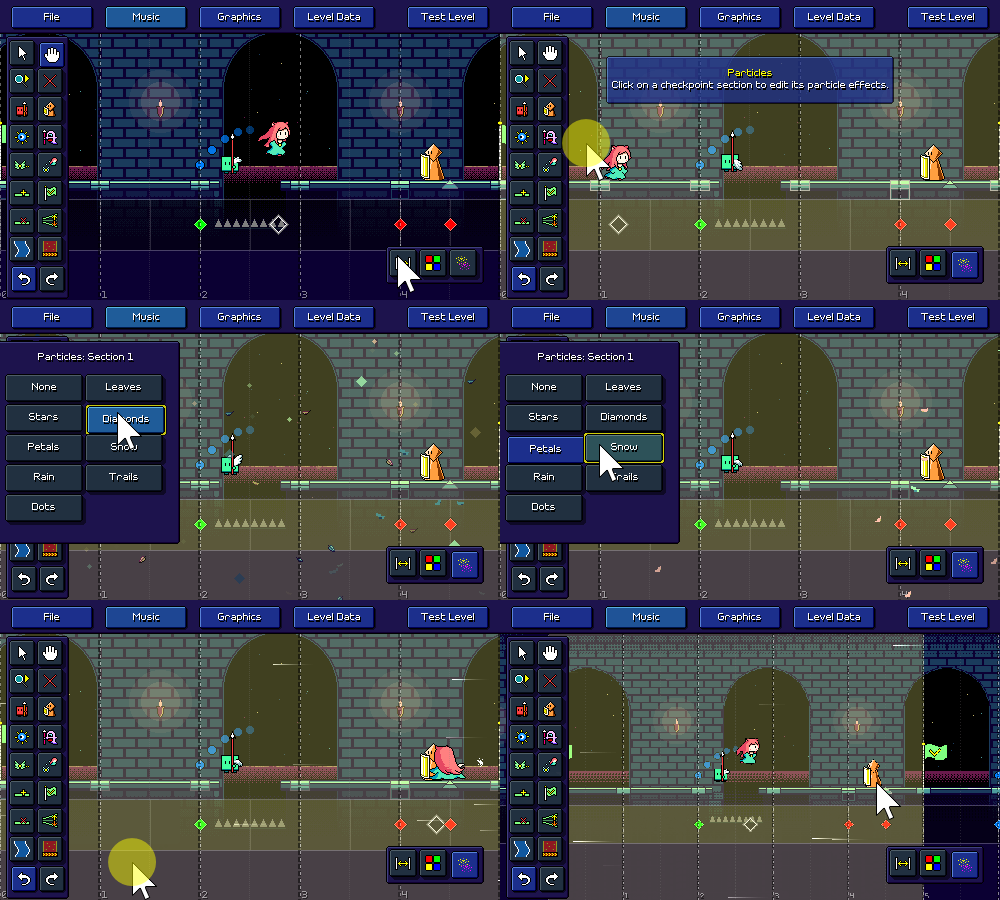
Keeping with the theme of graphics-oriented editor features, I also implemented the ability to add particle effects to each checkpoint section with another new tool:


I originally designed these particle effects on a per-level basis, so I'm not actually sure they work well across different backdrops (the layering might get messed up...), but at least it's enough for me to give this a passing grade for now.

[h2]Steamworks Refactor[/h2]

While I was experimenting with some of the mod.io integration -- specifically, trying to authenticate to mod.io using a Steam account -- I found it impossible to make some of the Steam functionality work using the Steamworks.NET integration that I've been leveraging until this point. I decided to spend some time ripping that out and replacing it with the Facepunch.Steamworks library instead, which had no such issues.

Along the way I decided to revisit how I was handling Steam builds. Up until now I had been making a completely separate set of builds for Steam vs. non-Steam distribution, with the latter having all of the Steamworks functionality taken out via compile flags. I decided to change that and just have it be the exact same build for both cases. The Steam integration will now always attempt to connect with the running Steam client, but if you didn't launch the game through Steam, that will just gracefully fail and it won't do anything.

The main benefit of this is that I don't have to make 3 extra builds every time I do a release (Windows/Mac/Linux Steam vs non-Steam), which is great. Functionally it's the same except if you run the Steam version of the game outside of the Steam launcher/client, it won't have any Steam integration. Thinking back, I don't actually know why I didn't do this in the first place; I feel like I've definitely seen this behavior in other games and it's generally better to not have divergent executables if you can help it.

[h2]Unity Upgrade a.k.a How I spent a week fixing a platform-specific bug[/h2]

If you've worked in gamedev for long enough you already know how this story goes...

So I noticed that on one of my Mac machines the game was totally unresponsive to input when starting up. That didn't happen on another machine I had so eventually I traced the issue down to being introduced with the latest version of MacOS Sonoma, but only in windowed mode due to some weird change with OS window size reporting code which causes Unity to choke.

"Luckily" the issue has a fix in later versions of Unity, so I dug in and started downloading gigs upon gigs of Unity Editor + Module updates across two machines to see if it actually helped (it did!). It had been a long time since I had done a Unity update, not only because my project is pretty far along in its lifecycle, but also because I remember there was a specific bug with mouse input not working on the upper-right corner of the game window with certain Unity versions a while ago which caused me to downgrade (sigh).

Of course, updating from Unity 2021.2.14f1 to 2022.3.19f1 came with it's own fair share of headaches. Not only did I have to install the new version of the editor, along with the support for WebGL, iOS, Android, etc builds, but I also had to update my Nintendo Switch SDK environment (queue up another big chunk of downloads). The Android build pipeline has its own set of dependencies and OF COURSE Unity 2022 requires a different version of those than Unity 2021, so go ahead and download the Android SDK/NDK/JDK =but= don't you dare download the latest version because Unity won't work with that! You need the specific version that Unity 2022 wants...

And of course, a major version update means I had to debug functionality changes, yay! Not only did I have to debug an issue with the audio scheduling, this also caused some of my plugins to stop compiling, such as the one I was using to bring up an OS-native file picker dialog (why is this not built-in to Unity...?). And oh, it turns out the mod.io integration that I was using doesn't actually compile for WebGL, also for some reason the Discord plugins weren't working correctly on OSX anymore?? Wait, why does the Discord SDK plugin have no documentation and why does it provide two conflicting Mac library files with different extensions? Wait, these two files are identical copies of each other???

Anyhow, I ended up with this task checklist over the course of that week:


    try updating unity to resolve input bug on sonoma
    tried updating unity but now music sync is broken
    Test to make sure build is still functional on all platforms
    How to port Modio to webgl: https://github.com/modio/modio-unity/compare/main...ComputerKim:modio-unity-webgl:main
    the fuuckkk? when starting osx build, main menu animations are fast, until you go into another menu - bug with cached beat lookups
    Lots of fixing build stuff with unity / plugins / blahhhhh
    Mac build discord lib WOW discord is dumb
    Downloaded new Android sdk/ndk/jdk
    Fix ios/android/switch builds (steamworks compile)
    More switch/android updates
    Finally got both android and switch builds compiling
    Fix ridiculous unity scriptablebuildpipeline issue causing builds to take hours


That last issue with Unity's scriptable build pipeline is particularly egregious because it causes addressable content builds to take egregiously long, we're talking 25 times longer than they should be taking otherwise (hours upon hours). It's also nasty because it only surfaces on repeated builds (i.e. the first clean build isn't affected). Some good soul on the Unity forums tracked down the bug in the Unity package source (literally a one line change) so I was able to just hack that fix in (because OF COURSE Unity hadn't yet integrated the fix into the official package after 3 months). I'm sure some poor developers out there are going to be none the wiser and have this as their first experience using the addressables system and just assume that this is how life is...

...Can we just stick to publishing games via Flash like we used to?

Rhythm Quest Demo v0.30.0 Released

The Rhythm Quest Demo has been updated to version 0.30.0! This patch includes some small but important improvements as well as a number of bugfixes for community-reported issues. The game internals also received a refresh with a new Unity version as well as some plugin updates (hopefully not breaking anything!).

I forgot to list it in the official changelog but this build also fixes a critical issue on later versions of Mac Sonoma where the game was unresponsive to inputs.

Full changelog:


Version 0.30.2
- Fixed scheduled sounds not playing correctly after respawns

Version 0.30.1
- Fixed wrong version of some east asian glyphs being used
- Fixed broken "Audio Mods" menu in main menu scene

Version 0.30.0
​- Updated Unity version
​- Fixed issue on later Mac Sonoma versions where the game was unresponsive
- Added pitched coin/metronome sfx to match the key of each level
​- Added ability to fast-forward endlevel sequence by holding menu button (escape)
​- Fixed "bumpy" camera movement across ramps/beatgrids
​- Fixed missing default keybinds for 'B' and '/'
​- Re-fixed certain accessibility audio cues sometimes not triggering
​- Fixed blurry horizontal line when using smooth font in shop display
​- Tweak line height for unicode pixel font
​- Tweak font pixel snapping logic
​- Camera pixel rendering fix for odd-pixel resolutions
​- Fixed offbeat pulse timing on respawn
​- Replaced and refactored Steam integration
​- Running the Steam build outside of Steam will no longer restart the game via Steam
​- Allow changing resolution in exclusive fullscreen mode
​- Added several more windowed resolution options for large displays
​- Fixed incorrect description for "Blur" screen filter
​- Fixed demo end screen showing up incorrectly after data reset
​- Fixed menu pulse animation speeds sometimes being incorrect

Devlog 62 - Custom Level Importer

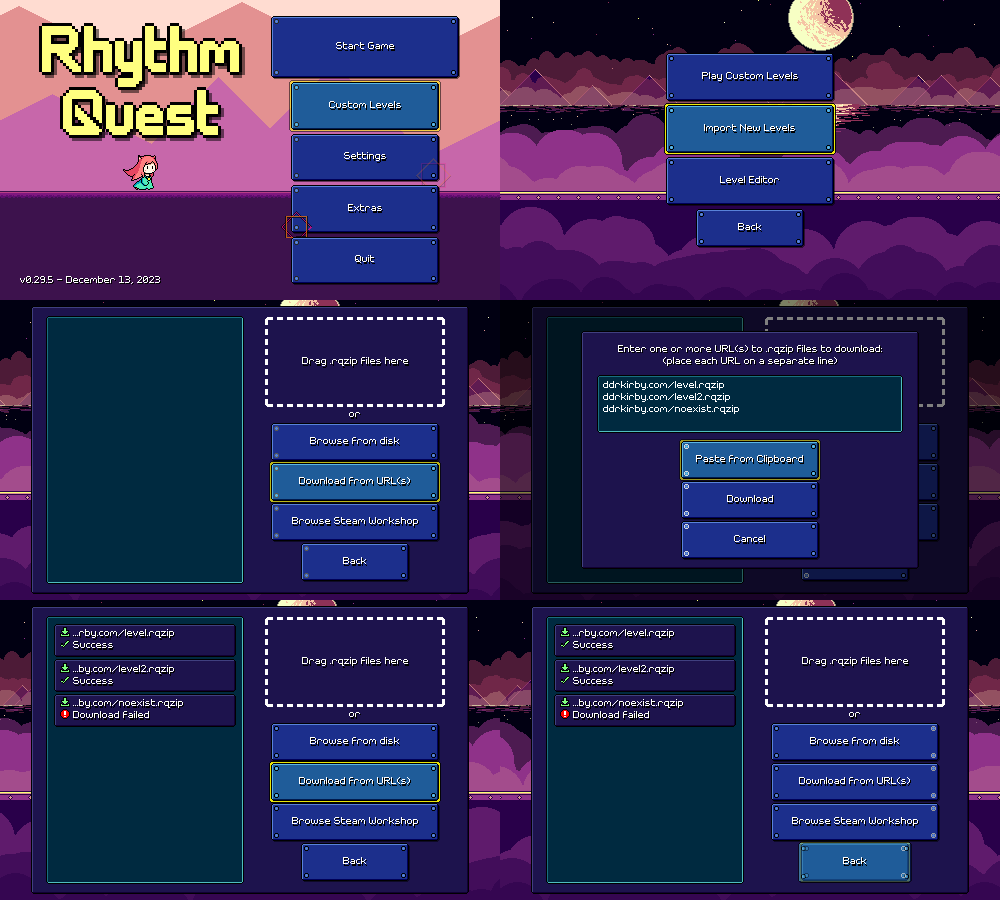
My most recent work on custom levels has been this screen where you can import new custom levels, either ones that you've already downloaded, or by typing/pasting public URLs where they're hosted:


Internally this importer needs to handle a bunch of different things -- fetching the level package, making sure that it doesn't already exist in your levels folder, and extracting the appropriate files from the archive. It's all more or less working now, though the "Browse Steam Workshop" button just takes you to an empty page (more on that later)... It currently also supports file drag-and-drop, though only on Windows (sorry, this is a really OS-specific thing and I couldn't find any other implementations!).

[h2]Level End Fastforward[/h2]

I also took some time to implement a small quality of life feature -- being able to fast-forward through the level end sequence:


This is done by pressing the menu button/key (escape on keyboard, start on gamepad), since you can't bring up the menu during the endgame sequence anyways. For mobile and mouse players, the "pause" icon in the upper-right corner fades into a fastforward button that has the same effect.

I'm just doing this by increasing the global timescale of the game to 3x whenever that button/key is pressed. In an ideal world I would fast-forward only the UI animation here, but that isn't really easy to do with my current implementation, so I think I'll just live with this.

[h2]Object Pooling[/h2]

I don't have any visuals to show for this one, but I also went ahead and did a nice performance optimization for the level editor. If you'll remember, the editor works by regenerating the entire level from scratch every time you make a change. It isn't super slow, but you can definitely notice a hitch every time you make a change when your level gets longer.

A lot of the time here was spent reinstantiating all of the level objects from scratch (including not only the obstacles but also every segment of the ground/terrain, timeline helpers, etc), immediately after the old ones were all destroyed and discarded. This is super wasteful as we could have just reused a lot of the same objects that we already had, as long as we reset their state properly.

To address this I now have an object pooling implementation in place so that instead of destroying the objects, I disable them and mark them as available to be reused. Then when the level is re-generated I can just grab those same instances and reuse them once I reset their state. My implemention isn't super robust, but it also doesn't need to be since level regeneration is essentially the only place in my game when objects need to be destroyed and recreated like this. This took a bunch of (mostly not too difficult) refactoring to get working, but there's a noticable difference in responsiveness now when changing larger levels. Yay!

[h2]Custom Level Publishing[/h2]

Looking forward I'm going to be taking a little bit of time to experiment with solutions for custom level publishing and browsing. I had assumed for a while that I was going to look at integrating with Steam Workshop to give players an easy way to share and browse each others' levels, but I'm now having second thoughts about that since it won't work well across other versions of the game (itch.io, mobile, switch...).

It's probably worth doing some exploration here, so I'm hoping to see if any other solutions may fit my game well. For example, I may be able to integrate with mod.io and use their service as a way to host and manage user levels. I could either use their built-in whitelabel in-game content browser, OR go the extra mile and implement one of my own (say hello to another mountain of UI work, future me...). In theory this could work cross-platform, but I'll have to start by dropping in their integration and seeing how it actually function in practice.