1. Rhythm Quest
  2. News

Rhythm Quest News

Devlog 58 - Level Editor, Scoring Rework

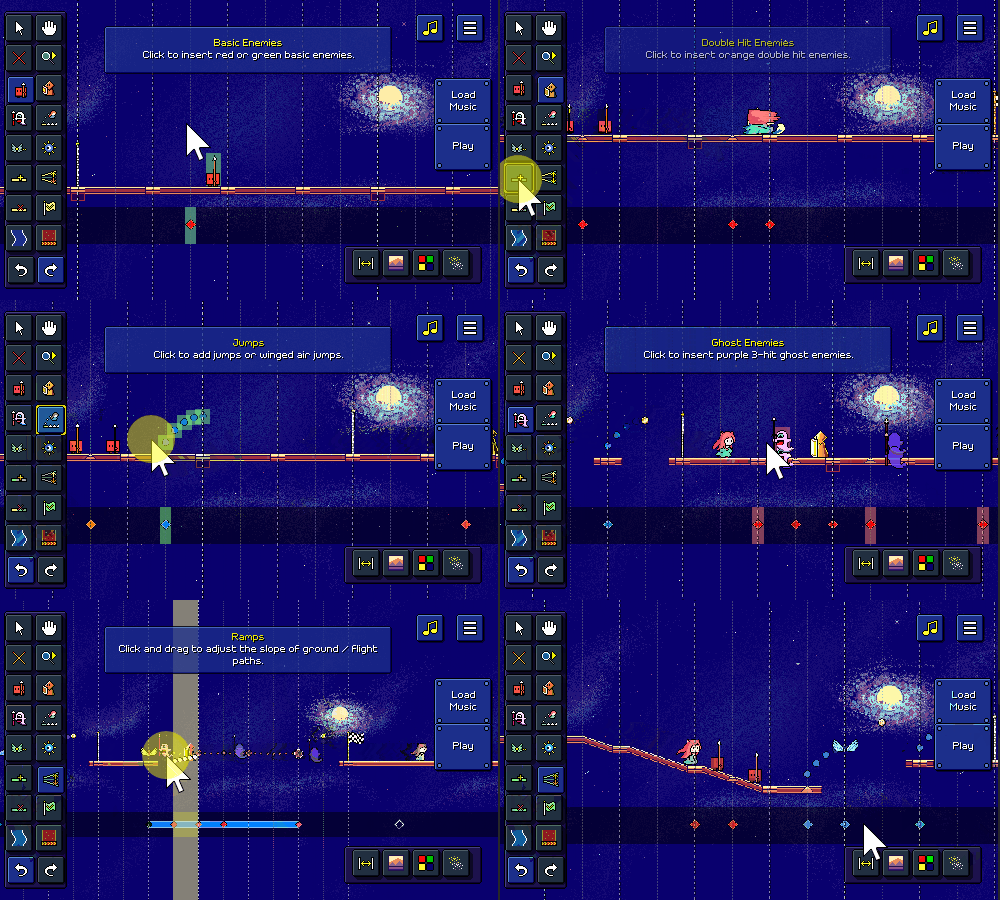
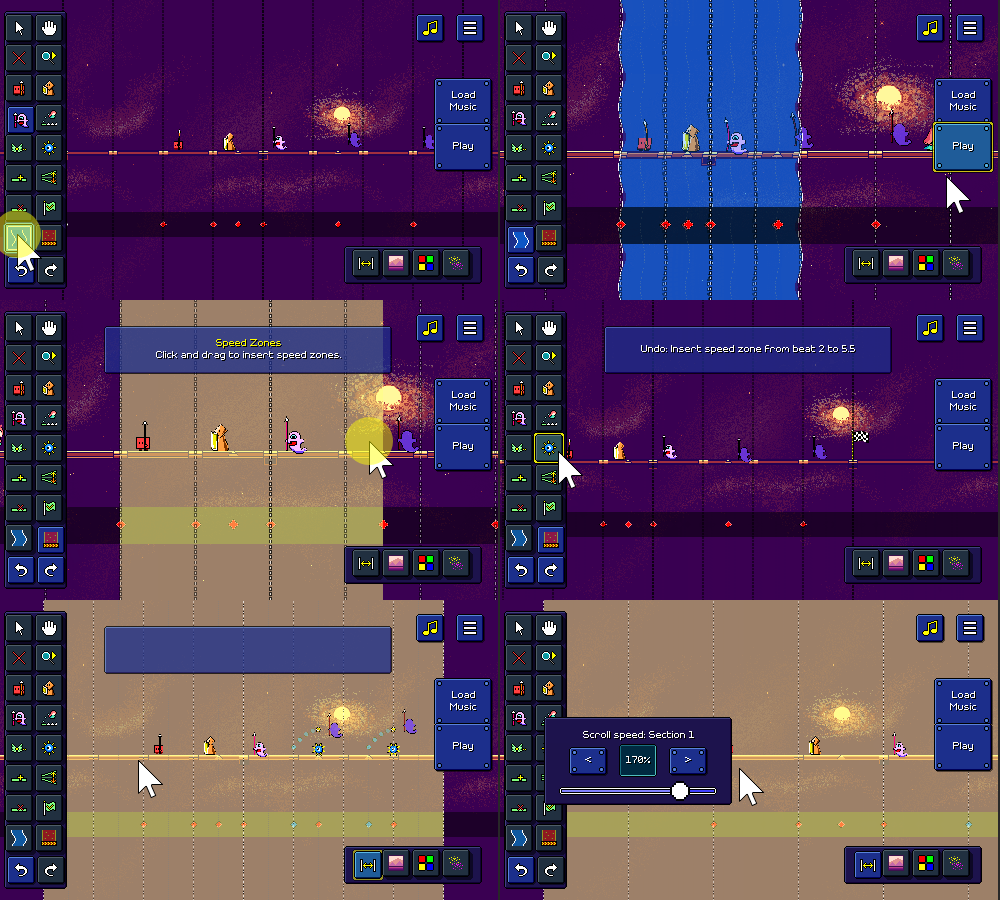
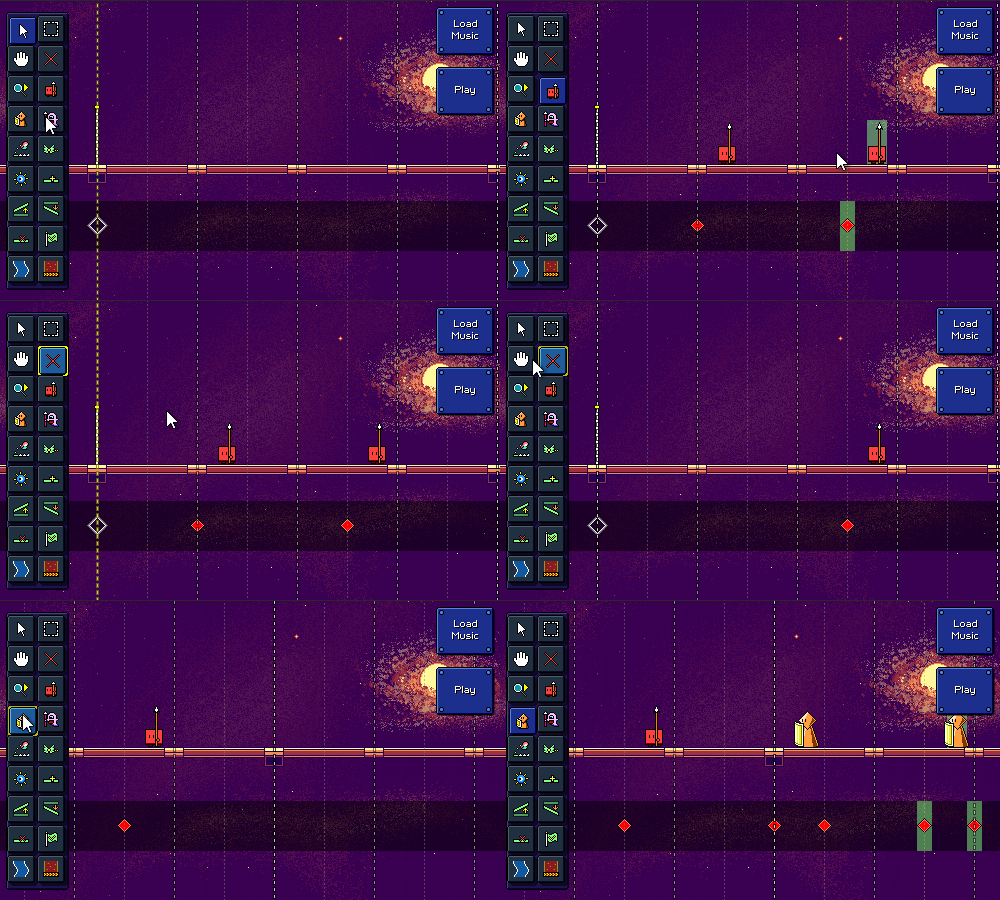
I've been continuing to try my best to clock in some hours toward fleshing out the Rhythm Quest level editor! Here's some quick demos of what is now possible in the editor:

[h2]More Tools[/h2]

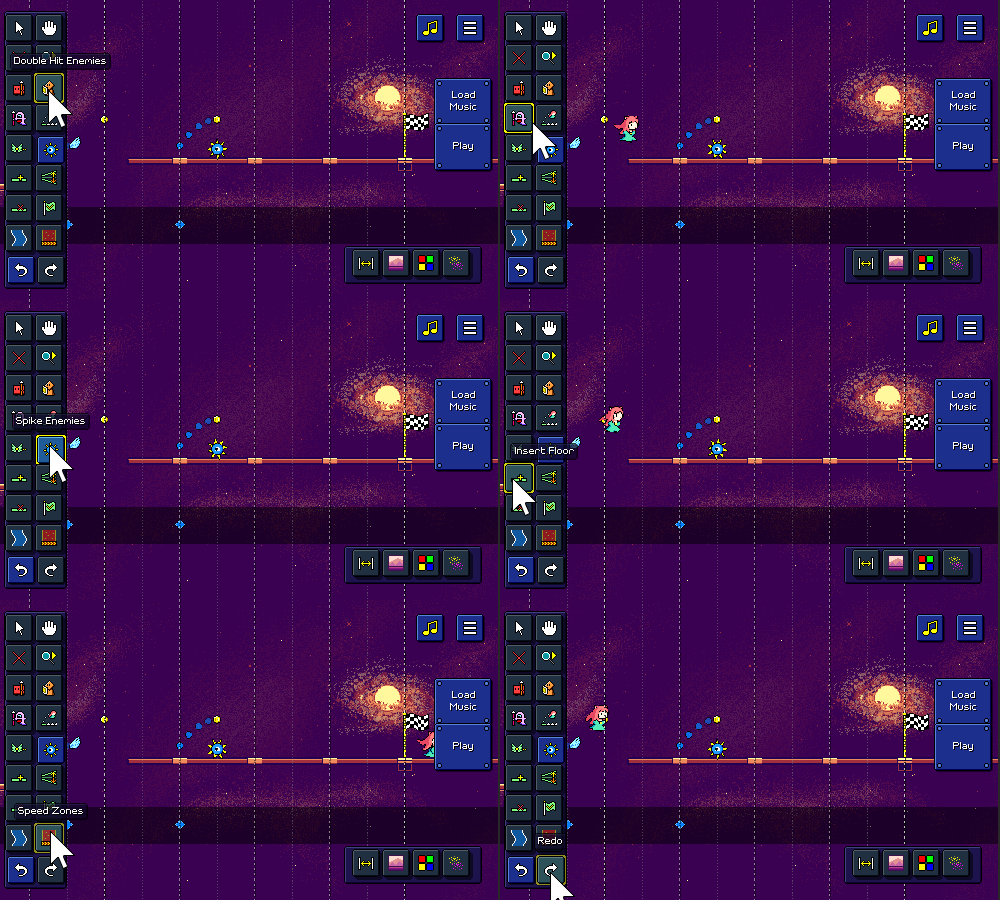
The level editor has a LOT of functionality that needs to be built out, so a lot of the time was spent just toward implementing additional tools, which you can see in the demos above. A no-so-short list of what I ended up implementing tool-wise:

  • "Insert Floor" tool to insert blank sections of track
  • "Delete Floor" tool to delete sections of track + included obstacles
  • Undo/Redo, (with Ctrl+Z / Ctrl+Shift+Z/Ctrl+Y keyboard shortcuts)
  • "Jump" tool which inserts either ground jumps or air jumps
  • When inserting or deleting jumps, the other obstacles adjust (e.g. ground jump becomes air jump)
  • Visualization for jump arcs (also provides something to click to delete jumps)
  • "Flight Path" tool lets you click and drag to insert flight paths
  • "Ghost Enemy" tool for purple multi-hit enemies
  • "Edit Ramp" tool for adjusting the slope of ground / flight paths
  • "Checkpoint" tool for adding checkpoints
  • "Spike Enemy" tool for adding spike enemies
  • "Scroll Speed" tool for adjusting the relative scroll speed of each section
  • "Water/Speed Zone" tools let you click and drag to insert those zones


[h2]Character Preview[/h2]

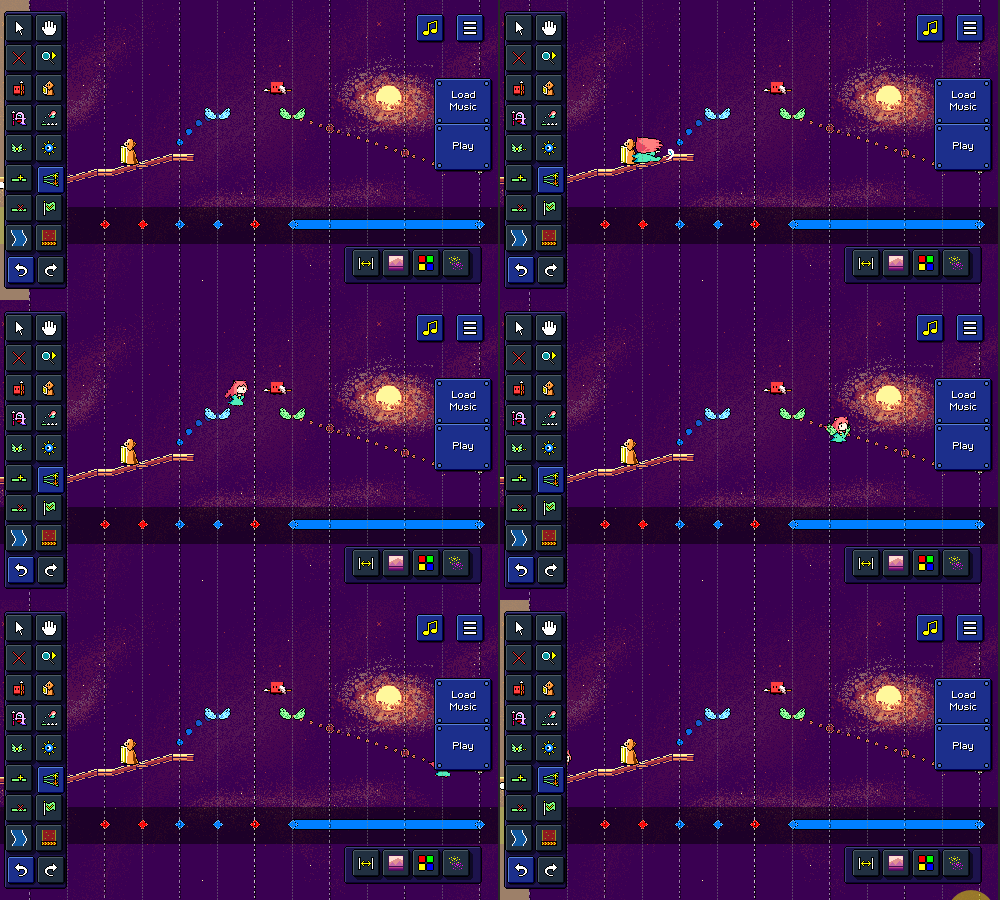
Something cool you'll notice in the gifs is an animated character preview that goes through the level. It's not too fancy, as it doesn't actually interact with any of the obstacles, but it's a fun little visual preview that didn't require a ton of effort to make happen.

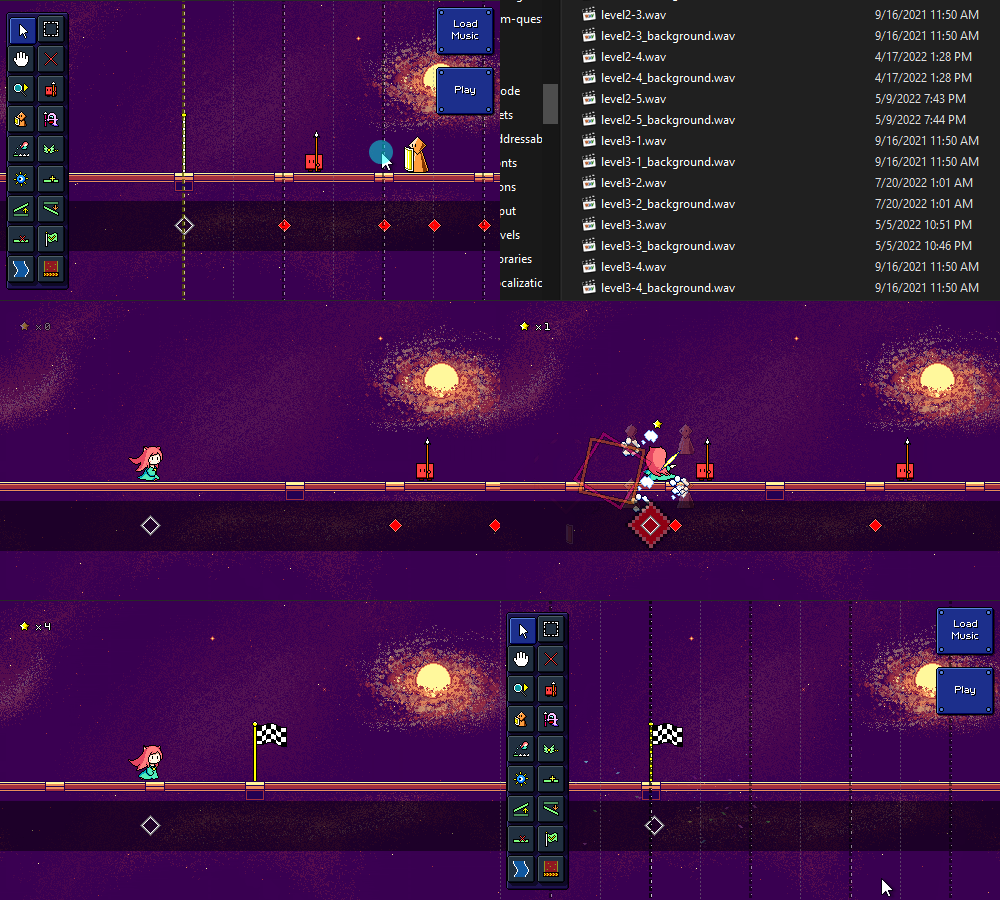
During level generation I actually already calculate the entire player path through the level -- this is needed to understand where to place obstacles such as coins, flying enemies, and the like. (This is actually just one of several such calculated paths; there's another one for the camera, for instance) You can see that in this debug view in red here:
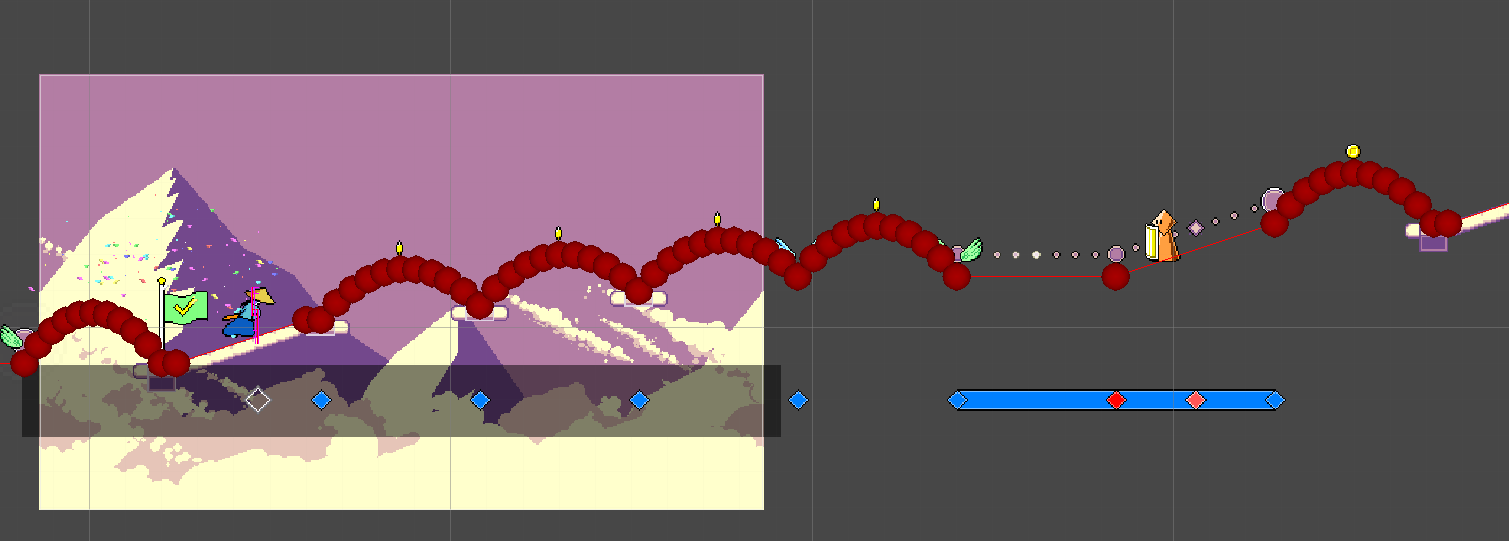


Since I already have this path on hand, it was simple to just create a preview sprite that traced along the same path at the correct speed. The only other work I needed to do was to trigger the appropriate animations based on the obstacle timings. There's no collision detection or anything like that, so it's very simple!


[h2]Tooltips and Notifications[/h2]

Another thing you may have noticed is that I've added tooltips for the different buttons in the editor! Right now most of them are on a big palette on the left (with some additional ones on the bottom-right), and they're just icons, so I thought it would be nice to show a little tooltip when you over over each button:


Along with that, I also implemented a notification system at the top of the screen! This not only gives you a little more context for how to use each tool (some of them involve dragging, others just require clicking), but also displays information on actions such as undo / redo history:
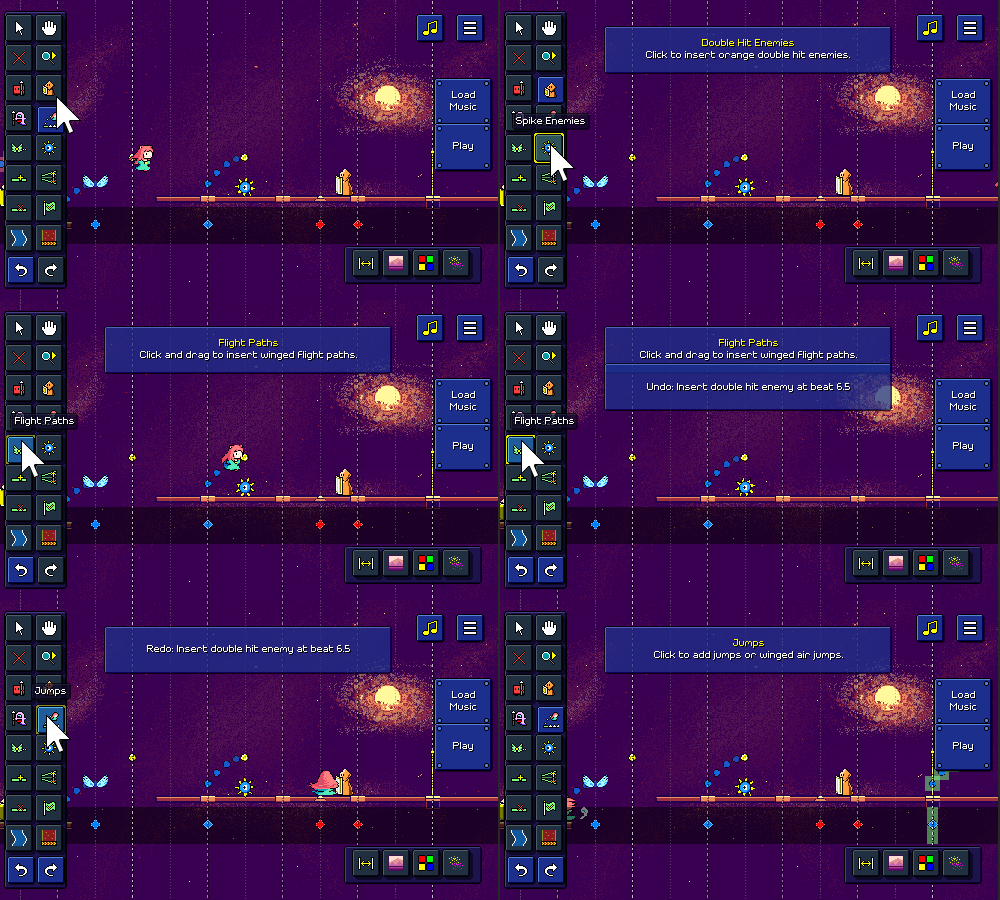


I wanted this to look nice, so it supports the ability to either show multiple notifications at once (automatically scrolling them as they fade out), or replace an existing notification. The way this works is that there are different "slots" for notifications, so for example if there's already a tool selection notification showing, it'll just replace that existing one instead of showing a brand new one.

[h2]Menu Hookup[/h2]

I also took a second to make the level editor accessible from the main menu:
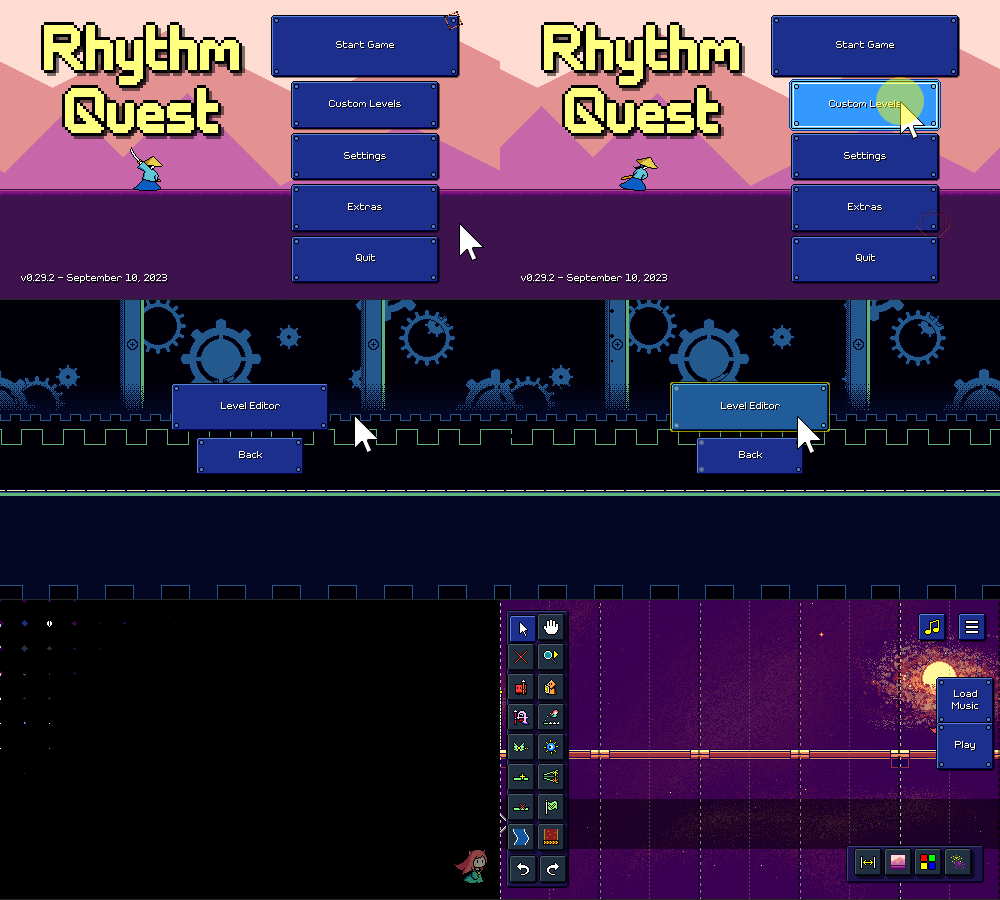


Right now the "Custom Levels" menu is empty otherwise, but eventually there will need to be some way to import / browse existing levels (more work for later...).

As a side note, the buttons in the main menu now adjust their height dynamically instead of always being the same. This is because the main menu actually has more or less buttons depending on a whole slew of factors:

  • The "Quit" button isn't shown on web or mobile builds
  • The "Wishlist" button is only shown on demo builds
  • The new "Custom Levels" button may also have some restrictions (?) (TBD)


I don't know why I didn't do this earlier, but it was simple enough to set up with Unity's layout groups. I still wanted the "Start Game" button to be a little larger than the others, but I was able to set that up using custom LayoutElement components, so now that one is 125% the size of all the others, and it all happens automatically. Yay!

[h2]Waveform Rendering[/h2]

I also ended up taking a little detour figuring out how to take a music file and calculate + render a waveform into a texture to display on the screen:
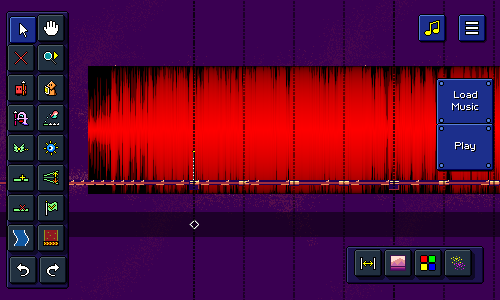


This task involves a surprising amount of technical finesse! A 1.5-minute song has some 4 million stereo audio samples, so obviously trying to plot and process all of that data is a little tricky to do in a performant and sensible way. Trying to draw a line between each of the 4 million points is pretty futile, so I didn't even bother doing that.

Instead, a common approach is to separate the audio samples into chunks -- in this case, one chunk for each column of the final output texture. Then for each audio chunk we can simply take the min and max signal amplitude for all of those samples and draw a line representing the magnitude of that. (you could also use other metrics, such as the average signal magnitude)

Because you're processing 4 million samples, this works OK, but is still a little slow. The other problem is how to actually draw all of the lines / pixels into the resulting texture in a way that's more efficient than simply calling Texture2D.SetPixel(...) thousands of thousands of times.

This is a rare case where I actually dug into the technical details of how to optimize the performance here -- luckily, there's a Unity blog post from earlier this year that describes some details of how to write to textures efficiently, and there's a link provided to some sample code that leverages the parallel job system and burst compiler to speed that up. It seems a little bit black-magicky, but it did the trick and I'm able to generate that texture on the fly without a noticeable hitch in framerate (woohoo!).

Right now since I'm just testing, the waveform appears as an ominous black-and-red texture behind the stage (haha), but eventually I hope to integrate this display into some sort of UI (?) that will help you tune the BPM and beat offset of the audio that you load into the editor. In case you're wondering, the texture is red-and-black because I'm using the lightweight one-byte-per-pixel R8 texture format (the same one I talked about in my backdrop optimizations post).

[h2]Next Steps[/h2]

Despite all of the good work that I've been able to accomplish, there's still no shortage of work needed in order to bring the level editor into a fully-functioning state (not to mention a slew of extra quality-of-life features that I've thought of already). Chief among those is the menu interface for adjusting song timing properties (BPM/beat offset), which is why I started looking into the waveform rendering tech...but, there's also things like export/import functionality, backdrops, color palettes, particle effects, (the list goes on...). Hopefully I'll have even more to show off the next time I write an update!
Devlog 57 - Level Editor, Scoring Rework

I've been kinda radio-silent over the past month. The first part of that was due to simply not getting that much done, but in the latter half of the month I had a better (and more exciting) reason for foregoing updates: I've been hard at work building out the initial skeleton of the Rhythm Quest Level Editor!

[h2]Changing My Mind on the Level Editor[/h2]

Those of you who have been following along for a while will probably know that I've always had plans to build out a Level Editor for Rhythm Quest, but that I had initially pegged it as a post-release feature -- something that I'd build after the release of the initial game. I wanted to make sure that I focused my efforts on bringing the main game to a finished state, even if it meant sacrificing some extra features that couldn't make the cut. Building a level editor is no small task and I wasn't even sure exactly how I would be able to do it. Would it be an entirely separate application? What would the interface look like? Would I have to refactor the entire level generation process again? What formats would levels be saved in? How would I load in external music files? How should I handle copyright disclaimers?

Despite my strong belief that Rhythm Quest levels work best when you have someone (like me) carefully crafting both music and charting together, and ensuring that the levels follow canonical Rhythm Quest charting conventions, I understand that the level editor is a popularly-request feature and could really help to bring excitement to the game in a multitude of ways. But the reason that I decided to change my mind and start working on the level editor now (instead of post-release) is much simpler: I simply got interested in building it.


On-Demand Level Generation

Like so many other challenges that I've come across in working on Rhythm Quest (like the new coin/medal rework, which I'll talk about later), the level editor conundrum was one of those things that sort of just sat in the back of my mind for a long time until I had finally devoted enough spare idle cycles to it and was beginning to have some ideas of how to actually get started working on it. There is of course something to be said for keeping feature creep down, but I've learned that "working on whatever I'm excited about" is usually a good approach for keeping me going.

Rhythm Quest levels are authored as strings of events. Here's how the charting for level 1-3 is written out, for example:


"Obstacles": [
"#... .... *... *... *... *...",
"#^.^ .-11 .^.^ .+11",
"#+.- .*.* .+.- .*.*",
"#.11 ..^1 ..^^ 1111",
"#*.* .*.* .111 1.11",
"#.^^ ..** ..^^ ..**",
"#.^^ ..** ..^^ ..**",
"#1.+ .1.^ .1.- .11*",
"#1.+ .1.^ .1.- .1**"
],


The different symbols here are a representation of different types of events. '#' represents a checkpoint, for example, while '1' is a basic enemy, and '^' is a normal jump. ('*' is shorthand for a jump followed by a flying enemy.) When the engine parses this string, it converts it into its respective sequence of timed events, so something like:


_events = {
new EventData(0.0f, EventType.Checkpoint),
new EventData(8.0f, EventType.NormalJump),
new EventData(8.5f, EventType.SingleEnemy),
new EventData(12.0f, EventType.NormalJump),
new EventData(12.5f, EventType.SingleEnemy),
...
};


This (along with other metadata about the level) then gets passed off to the level generation procedure, which is responsible for processing all of the events in order and building the actual level out of them. Normally this is all done ahead-of-time when I author the levels (in a process I call "baking" the levels), so the end level objects are saved into the scenes directly to optimize load time.

Now, the way that the (work in progress) level editor works is simply by maintaining a similar list of events that compose the level being edited, and re-generating the level again every time there's any change. It might seem terribly inefficient to keep rebuilding the level compared to just editing the resulting level objects directly, but there's a lot of reasons why it makes sense to do things this way. For example, changing a list of events is simply more efficient than having to worry about editing the actual level objects (moving floors around, etc). and I already have the code to do all of this, so I just have to worry about providing an interface to visualize these changes well.

[h2]Testing the Prototype[/h2]

Part of the reason I wanted to dive into working on the level editor right away was simply because I was curious whether this approach would even be feasible at all. I was worried that re-generating the level at each change might be too slow, for example. So I created a quick editor scene and made a script to hold a list of events, populated with some test data. I could then invoke the level generation process at runtime from there...

...and have everything be totally broken. All of the objects in the game are all built assuming that if the game is running, the level is supposed to be playing. They also assume that a song is playing, that they can query for the current music time, that a player instance exists, etc. So I had to do a bunch of refactoring to handle this unplanned-for case where we have all of these level objects, but they're not actively updating because we're in the level editor.

One thing I wanted to shoot for was to be able to instantly jump from the level editor into playing the level, without having to go through any sort of scene transition or anything like that. So I needed to make sure the level editing scene also contained everything needed for the base game, including the player instance, the music controller, etc. I also wanted to see if I could successfully load in audio files specified by the user. Here's what all of that looks like in action:


After doing all of these refactors, I had a simple prototype and I could add in basic enemies or ground ramps by pressing a key on the keyboard. One of the first things I did after that was to see what the performance was like when I triggered level generation, especially after I added a ton of events and made the level longer. To my delight and surprise (especially because the full level baking process normally takes a bit), the performance was actually pretty acceptable! I was initially expecting to see like 1-2 second pauses once the level got longer, but it seemed like it was only a minor hiccup most of the time.

This is also without any sort of optimization -- of which there could be many. Besides just raw "cache things, do work ahead of time, make the code faster", there's also the fact that most events shouldn't require the =entire= level to be rebuilt. Yes, a change in the ground ramp early on does mean that the height of the rest of the level will change, but at least you can skip re-generating everything that came before that. And adding or removing enemies shouldn't require the entire rest of the level to change. If it came down to it, I could force you to work on only one checkpoint section at a time. But it looks like I don't have to worry about any of those optimizations (yet).

[h2]Input Timeline[/h2]

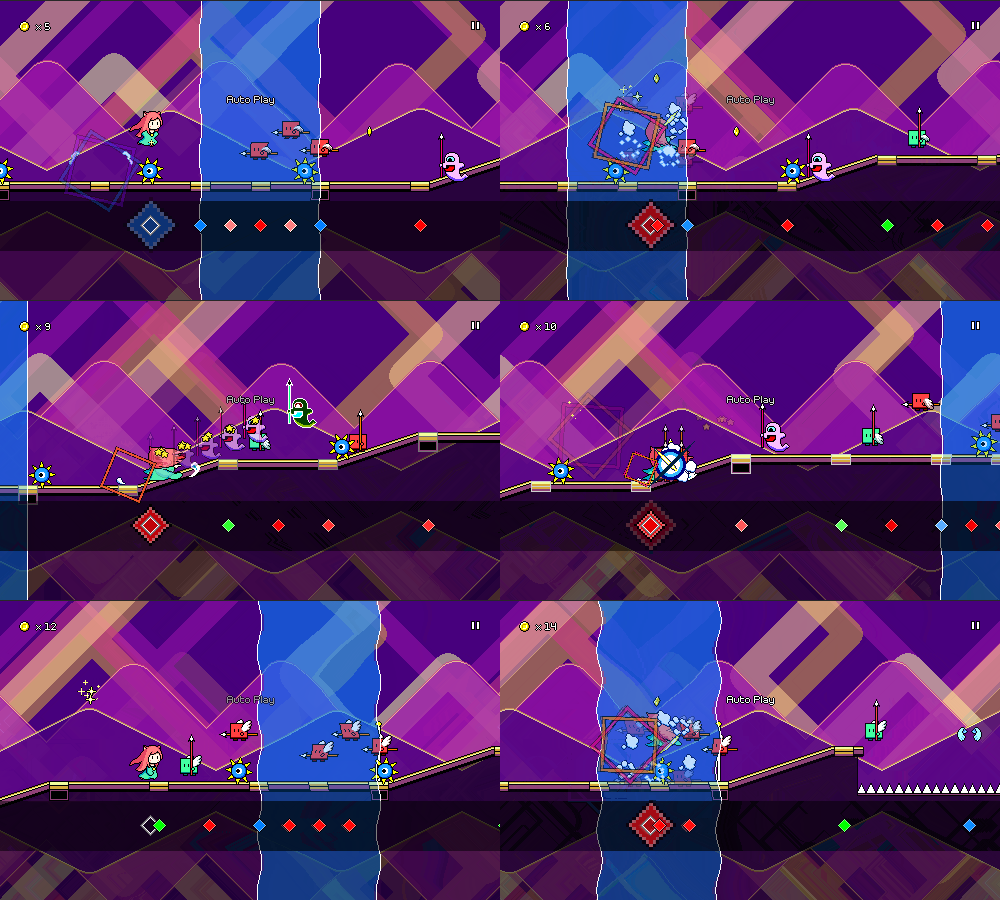
There's going to be a lot of work for me to do in the upcoming weeks for implementing various tools so that the editor can actually provide enough functionality to create a full level -- both in terms of all of the actual level obstacles (water zones, flight paths, etc.), as well as the level metadata (music BPM, scroll speed, background palettes). One thing I did in the meantime was to implement what I'm calling an "input timeline" feature, where the expected inputs are displayed as colored diamonds in a separate track below the level. I added this mostly for use in the level editor, but I also made it function in-game in case you want to use it there:


The exact look of this will probably need to be adjusted (not very colorblind-friendly right now either), but this is a really useful view for the editor already, and will probably become even more important once I look into more advanced editing features (editing via keyboard or even a "record" style live play). One thing about this input timeline is that you can see just how boring of a game Rhythm Quest is in terms of the raw inputs. A big part of the appeal of the game (to me, at least) is parsing the platformer-like obstacles into rhythmic elements; if the chart is just laid out in front of you like this it's really not too interesting.

[h2]Scoring Rework[/h2]

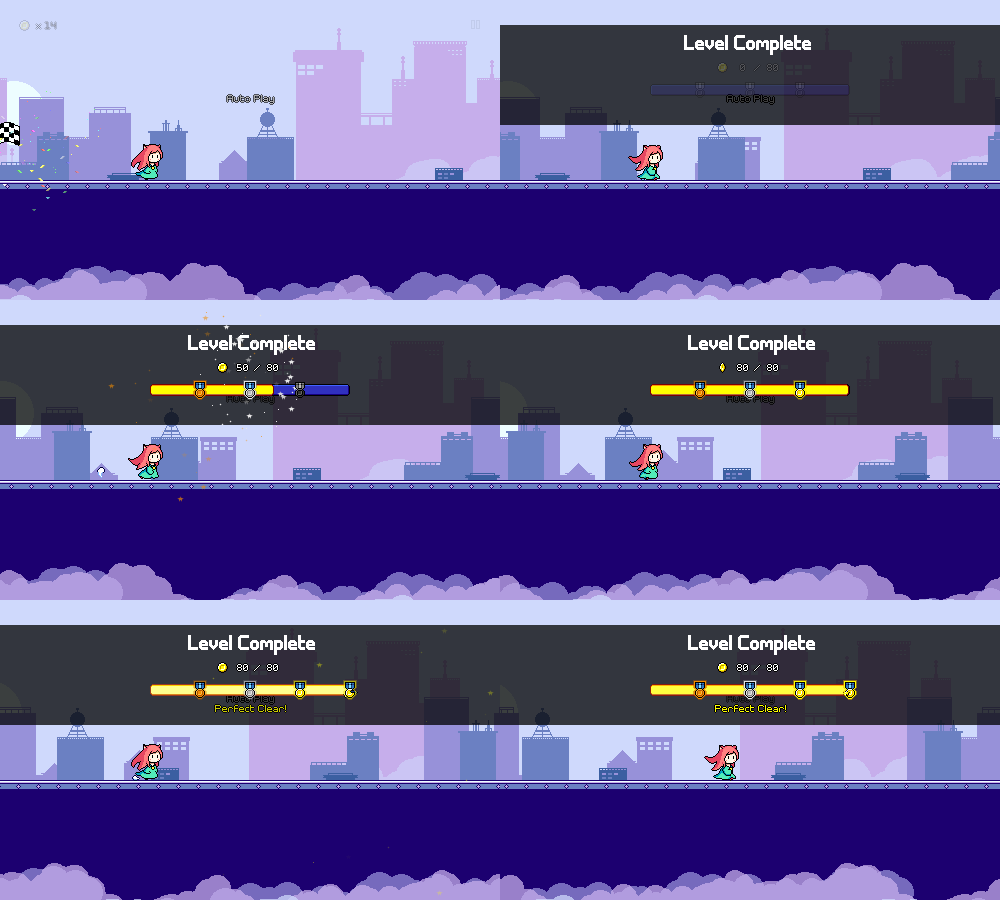
I did this a while ago but never wrote about it. Despite the fact that I've already tweaked the coin / respawn / medal scoring system a few times (at various points in time it's alternatively been based on respawns and coins), I've iterated on the system once again. I was never happy with how the medal thresholds felt both arbitrary and also not very visible, so I worked out a "progress bar"-style animation in the level end screen to show that off visually:


The thresholds are now straightforward and easy to remember based on the visual (25% = bronze, 50% = silver, 75% = gold, 100% = perfect). Previously you were awarded a bronze medal simply for completing a level, but I've changed that, so you'll just have no medal if you finished with less than 25% coins.

Along with this, I'm trying out a new system for coin loss amounts. Previously you always lost a fixed amount (5 coins) on every respawn, but this usually led to people either getting very close to perfect, or losing almost all of their coins on a particular section or two that they had trouble on, even if they performed very well through the rest of the song. I've always wanted something that scales more cleanly, like for example every time you respawn you lose 50% of your coins, but that by itself doesn't work well because it's extremely punishing for single mistakes that are made late in a level.

The way it works now is more complicated, but should hopefully be more "balanced" in terms of coin losses. The new system internally maintains two different coin numbers -- the coins that you have recently collected, and the coins that you have "banked". At every checkpoint, half of the coins you have on hand are put into the "bank" and can never be lost from then on. And at every respawn, half of your non-banked coins are lost. The idea is that this system rewards you for performing well, and can't fully "take away" that reward even if you mess up a lot afterwards. It's a bit obtuse in that it's a pretty hidden mechanic, but I like the simplicity of implementation and the fact that I'm not using some really random number like 5. We'll have to see how it works in practice, though!

That's going to do it for now. I'm trying my best to get the level editor off the ground...it's a lot of work, but also interesting and exciting since there's so many little systems that need to be written, for the first time! There's unfortunately a good chance that this will end up pushing back my launch date to 2024, but...I'm hoping you'll all agree that the custom levels that will come out of this will be worth the wait.

Rhythm Quest Demo v0.29.0 Released

The Rhythm Quest Demo has been updated to version 0.29.0! This patch fixes a bug with the latency calibration measurements (you may want to re-calibrate) and reworks the coin/medal system, along with other fixes and improvements.

Full changelog:

Version 0.29.1
- Fixed localizations not falling back to English translation
- Modify respawn/fadein timing for enemies according to music speed/respawn timing
- Fixed steam build not running properly when started outside of steam
- Localization updates

Version 0.29.0
- Fixed auto-calibration output values (was previously ~75% too low)
- Reverted level medals to be based on coin count again
- Changed coin thresholds for medals (25%, 50%, 75%)
- Changed coin loss amount/mechanic to be much less punishing:
50% of non-banked coins are now "banked" on each checkpoint and can no longer be lost
50% of non-banked coins are lost with each respawn
- Added new level end coin/medal display
- Updated ghost teleport to change speed based on music speed mod
- Updated input handling interactions to be more timing-accurate
- Fixed an input bug triggered by having multiple inputs on the same frame
- Fixed a bug causing the color invert fx on doublehit enemies to persist
- Fixed a timeslicing issue that sometimes caused interactables to be skipped at high speeds
- Try (again) to fix rendering issues at odd resolutions
- Added Respawn Timing setting
- Fixed ghost enemy trail effect to render consistently regardless of framerate/speed
- Fixed screen refresh rate label not actually updating
- Localization and UI updates
- Fixed respawn count not resetting properly when checkpoints are disabled
- Fixed the ability to finish a level and respawn simultaneously

Rhythm Quest Demo v0.28.0 Released

The Rhythm Quest Demo has been updated to version 0.28.0! This patch includes a multitude of extra settings and game mods, including the ability to play levels at a faster or slower speed!

Full changelog:

Version 0.28.0
- Fixed ramped floors being allowed with spike enemies
- Renamed "Cheats" menu into "Game Mods"
- Added assists/game mod settings to in-game menu
- Made shop accessible from Extras menu
- Added music speed game mod setting
- Added timing window game mod setting
- Added ghost helper game mod setting
- Added frame queueing graphics setting
- Added configurable bindings for gamepad controls
- Keyboard bindings now default to entire left/right half of main keyboard area
- Fixed rendering artifacts at odd resolutions
- Added UI volume setting, separate from sfx volume, reduced UI sfx volume slightly
- Change pixel font setting default based on language at runtime
- Added low quality graphics toggle to help framerate for older devices
- Added "Released Early" and "Released Late" text for hold presses
- Added "screenreader" command line argument force start with screenreader prompt
- Fixed too-fast scrolling before level 1-1 tutorial
- Fixed fullscreen not working for devices that present resolutions in an unexpected order
- Fixed vsync off behavior, especially for desktop platforms
- Changed flashing effects to be time-based rather than frame-based, to support higher refresh rates
- Settings are now saved when drilling into a submenu (not only when navigating back)
- Progress is now saved (again) while auto play is enabled
- Thickened some outlines on smooth text
- Minor tweaks to jump logic (hopefully not breaking anything)

Version 0.27.0
- Added tracking of respawn counts to save data and level display
- Localization and UI updates

Devlog 56 - Gamepad Rebinds, Odds and Ends

Despite what it might seem like, I've actually been working on quite a lot of different things for Rhythm Quest recently! Let's get right into it...

[h2]Game/Music Speed Mod[/h2]

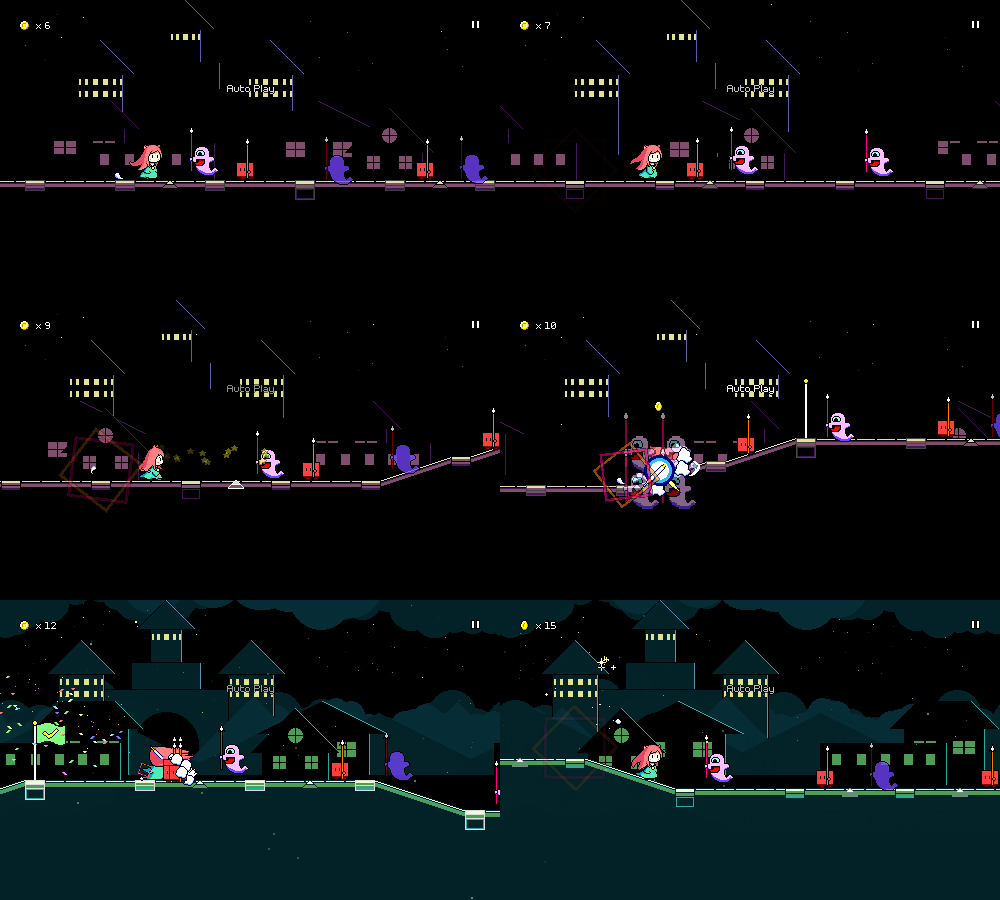
You can now change the speed of the music to make the game more or less difficult:

[previewyoutube][/previewyoutube]

Some of you might be wondering why this took so long to come to the game, considering how this has actually been a debug-only feature for a while. Changing the speed/pitch of the music isn't actually very hard, the problem is getting all of the music synchronization (and respawn, and pause) logic to work properly in tandem with it.

I'm happy to report that this has been implemented properly now! It's definitely not as simple as it might seem...every time you change the setting in the pause menu, what I'd =like= to do is to immediately increase the speed of the currently-playing pause music loop, then adjust the audio timing variables accordingly. But there's no way to do that in a way that respect the audio synchronization perfectly, since the audio timings are all running separately.

Instead I have another copy of the pause music which is set to play at the new pitch/speed. Instead of trying to play that one immediately, I schedule it to start playing 0.2 seconds from now (scheduling sounds in advance is the only way to ensure that they trigger at a precise time on the audio timeline). Unfortunately, I can't schedule a "stop" command in the same way for the first version, so instead I simply wait for roughly 0.2 seconds and then do a flip where I set the volume of the first loop to 0 and the second one to 1 at the same time. Doing all of this lets me keep the beat synchronized with all of my timers correctly.

Of course, since the whole process does take a little bit of time (0.2 seconds), I also needed to implement a simple wait, in case you trigger the button twice in quick succession -- the second music speed change doesn't occur until the first one is finished.

Anyways, this will be available in the upcoming 0.28.0 patch, so players can either use lower speeds to practice / get through difficult sections of the game, OR use higher speeds to give themselves an extra challenge.

[h2]Timing Windows[/h2]

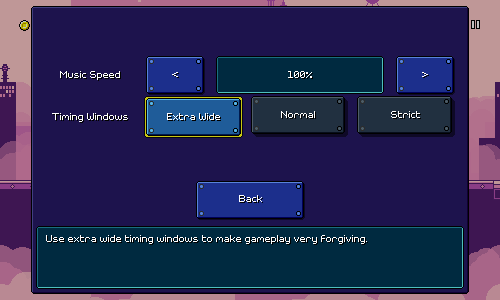
I also have a brand new setting for modifying the lenience of the timing windows for obstacles:


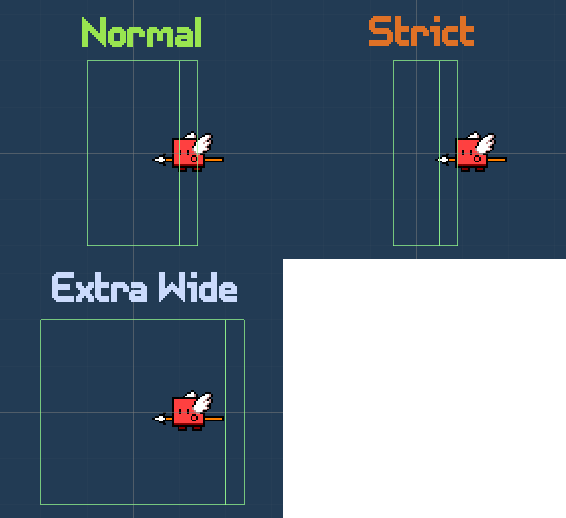
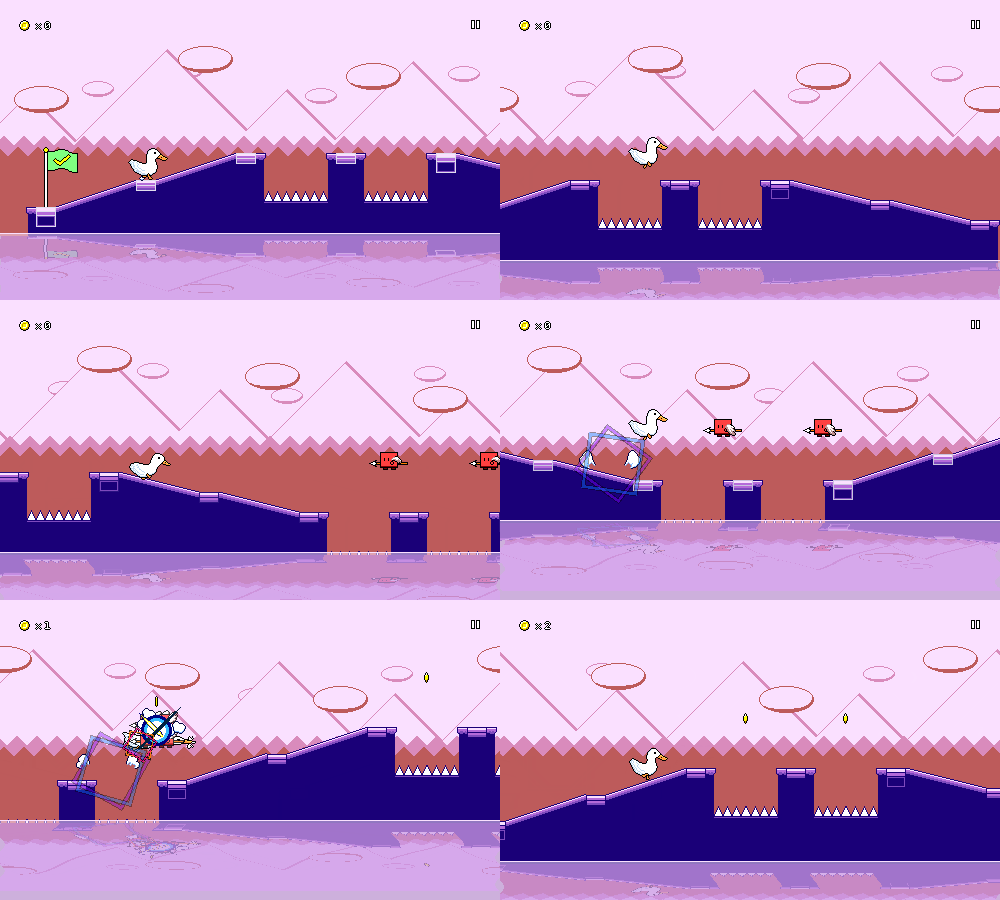
This affects the collider sizes of the various obstacles in the game. Here's how that looks for a basic flying enemy:


Originally I had a crazy half-baked idea in my head that to implement "extra leniency" I would actually buffer inputs for you and delay them automatically to "auto-correct" your early inputs...and for late inputs, I would just "freeze" the character in place for a split second to give you extra time to hit the correct button. I realized, though, that this would make empty jumps and attacks (the ones you do for no reason) feel really sluggish and awkward. I could try and do some tricks to correct for it, but in the end I figured that modifying the sizing of the colliders was simpler and just as effective, while maintaining the tie between your input and the game reacting immediately.

One cool thing is that the setting works for jumps too, even though you wouldn't think they have a "collider" to modify. This is because every jump (even if it's just a normal one over a pit of spikes) has an invisible trigger object (this is what spawns the blue "spinning square" visual effect). As long as you jump while you're inside of that trigger zone, my jump logic will autocorrect the length of your jump to make you land in the appropriate spot. I also already implemented "coyote time" jumps that will allow you to jump even after running off a cliff (as long as you're still within the correct trigger area), so it all just works. Here's that in action with the extra wide timing windows:


[h2]Ghost Helpers[/h2]

I got to see and/or hear about a variety of play experiences when I did my last internal playtest. I won't lie: the design of Rhythm Quest is almost entirely driven by my own sensibilities, but it's still useful to see other perspectives so I can make small course-corrections and admissions when I feel necessary.

Interestingly (or maybe this shouldn't really be surprising), different people seemed to struggle more or less with different aspects of the game -- for some, the water zones really threw off their ability to read the charts, while other people mentioned the ghost enemies being difficult to read since they felt like they needed to react to each of the new positions.

For people who struggle with the ghost enemies, I've added a new helper option that will display guidelines for the second and third positions of the ghosts:


This does, of course, take away from the entire conceit of the ghost enemies to begin with (with the helpers, it's no different than three red enemies), but I really don't mind adding these sorts of modifiers when the implementation is so simple (and I'm not busy working on other things). You can play Rhythm Quest however you want!

[h2]Performance Settings[/h2]

I already did a bunch of work on performance optimizations in a previous stint of work, but I'm happy to report that I've also made the rendering of the water sections more performant: previously, the render textures used to implement the "wavy" water shader were way bigger than they needed to be...now they don't extend past the height of the screen, and dynamically shift based on the camera to be more efficient.

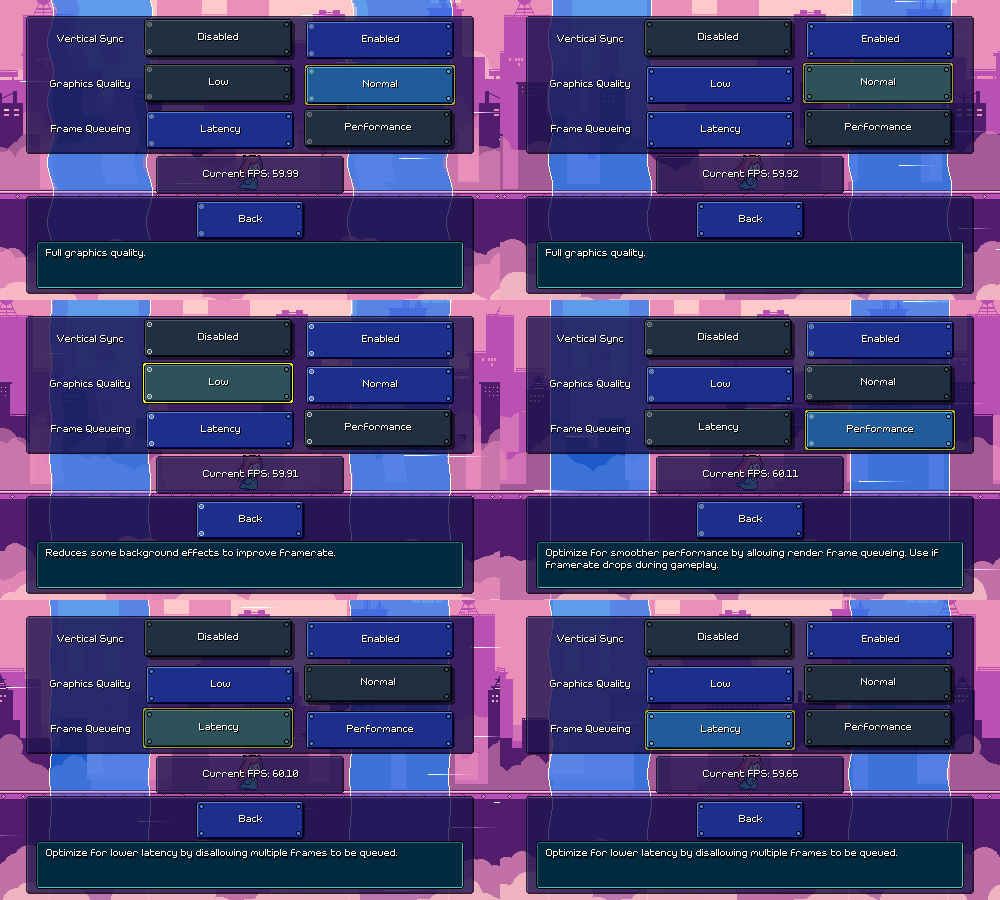
However, I also wanted to give a nod to some lower-end devices, and ended up adding a graphics quality toggle that will disable the fancy water shader entirely, as well as cut out some of the translucent backdrop layers (that I pick by hand) in an attempt to make rendering more performant. I also added another engine-level setting for controlling frame queueing. Those all live on a new sub-settings page that comes complete with a quick-and-dirty FPS counter and some water zones in the background so you can see the effects of the settings live:


[h2]Other Stuff[/h2]

Some miscellaneous other stuff was added too, like a "screenreader" command-line flag that will force the game to start in screenreader mode even if it doesn't auto-detect that one is enabled.

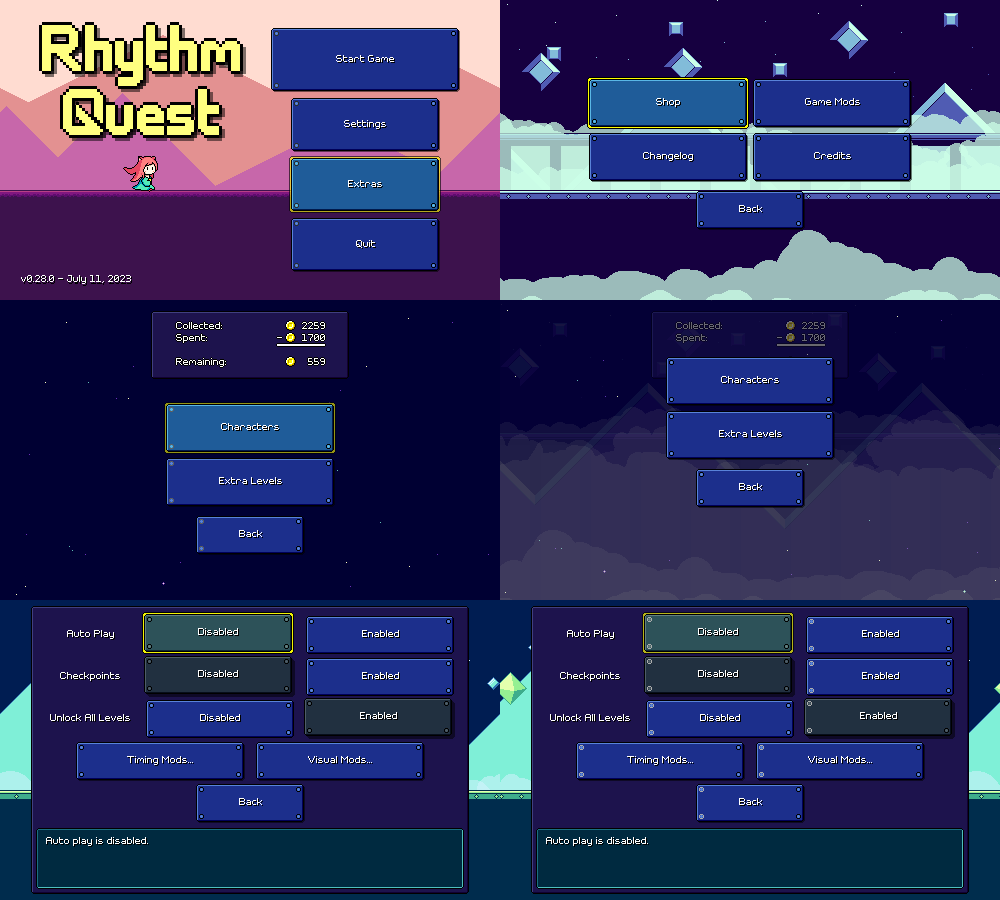
In an attempt to add a little more discoverability to the shop menu, I also made that accessible from the "Extras" menu in addition to the normal place in the level select screen. I also renamed "Cheats" as "Game Mods" since I'm throwing in all of the timing and visual modifications that I've added there. Most of those are also accessible via the in-game menu, which can be helpful if you need a temporary assist for a tough checkpoint that you're struggling on.


I think that about covers it for what I've been working on lately!