1. Golfing In Aether
  2. News

Golfing In Aether News

Golfing In Aether Update Released [1.3.2]

This update comprises primarily of bug-fixes but I've also added the ability to choose what level selection you get to play with during custom sessions.

Session Level Selection

Now that the game through its two free expansion packs has 50 levels there is enough variety where I’m able to add the feature where you can specify which levels to be randomly picked during a custom session.


There is preset options for like ‘early levels’ and ‘mid-late levels’, but also the ability to fully pick each level individually by a new menu giving you complete freedom on the session you wish to play.

If your chosen levels number less than 9 then the remaining levels required will be pulled from the full available list. For instance maybe you only pick the first 3 levels to be chosen at random, then remaining six will be made up of any remaining levels you haven’t picked. If you have more than 3 of each early/mid/late stage the stage structure will be the same as the default (3 of each type) otherwise it will be completely random.

The levels you picked will still try to follow the convention of sorting levels early, mid, late, so if you specify lets say the 3 late levels, you’ll see those at the end of the game, not the opening levels. If you pick lets say one early level, it will show up within any of the first bunch of levels, it doesn’t specifically mean it will be the first level as everything is still shuffled around. As the selection is a bit more random here you may not get specific 3,3,3 grouping of levels unless you’ve specifically picked at least 3 for each.

There are buttons to add all or remove all from the list for convenience, so if maybe you just want to remove 1 or 2 levels you don’t like, that’s also a good use of this feature.

Players seeking to unlock the ‘Perfect’ achievement (which less than 0.1% of players have earned) can use this feature to pick levels they are more familiar with or simply find easier. As you have to pick 9 different levels and then hit hole in ones in a row, it’s still a challenging achievement.

Achivements Menu Tidy Up

Another few changes in this update is tidying up the achievements menu a bit as felt this could do with a quality pass. The images are now cached differently so should be more responsive, and I’ve tweaked the formatting of selected items to be easier to see. The button to actually access this menu was overhanging a bit with the back button on stats menu so I’ve fixed that too.

The remaining updates up till Christmas will primarily be bug-fixing now if anything does need fixing, I’ve been doing some extended testing but at the moment there are no outstanding known issues. In the New Year there will be continued development and I'll talk about future stuff then.

https://store.steampowered.com/app/1914980/Golfing_In_Aether/
Patch Notes

[h2]General[/h2]
  • Fixed an issue where the release press of the top camera / camera toggle could conflict with pressing B to exit out of the game menu.
  • Added ability to choose what levels are played during custom sessions. You’ll find ability to change a ‘Levels’ setting in the custom sessions menu, when set to ‘custom’ an additional button prompt will appear at the bottom of the screen to take you to the new menu.

[h2]Environment[/h2]
  • Fixed some level LODs not loading correctly. I’ve made a workflow adjustment to simplify the process so will help with error prevention in future.
  • Fixed a island lod for ‘Short Spring’ not being consistently performance optimized.
  • Fixed the area for the flag raising up on levels ‘Water Hole’, ‘Speed Bump’, and ‘Getting Tee’d Off’.
  • Fixed ball stopping a little short on midhole madness.
  • Fixed ball exiting pipe a little too quick on ‘Go for it’.

[h2]Interface[/h2]
  • Fixed the alignment of lower glyphs on the scoreboard (especially via session replay) overhanging to the right.
  • Fixed some text getting cropped off on various prompts by widening the size of the prompt slightly.
  • Fixed achievement icons sometimes not loading in the achievement’s menu. I’ve instead triggered the caching of these icons when opening the stats menu.
  • Added improvement to achievement menu by having the progress bar selection colors going white when selected and color when unselected.
  • Fixed text minimum width on achievement menu so progress bars remain consistent length.
  • Added level selection menu, accessible via pressing Y or the levels button when level setting is set to custom in the custom session menu.
  • Added remembering last practice menu index when opening the season menu and pressing back. This behaviour previously worked for the leaderboards.
  • Fixed some gamepad navigation issues on the theme/season select menu.
  • Fixed some max values on the achievement menu being incorrect.
Discord Server

Be sure to check out the official discord server with channels for Golfing In Aether and my other various projects.
Golfing In Aether Update Released [1.3.1]

Todays update is just a small hotfix following on from yesterdays major update which you can read about in the link below.
https://store.steampowered.com/news/app/1914980/view/3613605906276861875
If you encounter any issues then please let me know as I’ll be doing small updates once anything is found or reported that needs fixing.

https://store.steampowered.com/app/1914980/Golfing_In_Aether/
Patch Notes

[h2]Environment[/h2]
  • Fixed a small wall gap on rail crossing.

[h2]Interface[/h2]
  • Fixed button width on Stats menu for achievements overhanging the back button.
  • Fixed an instance where it was possible for the launch intro to not close correctly under some join conditions.
Discord Server

Be sure to check out the official discord server with channels for Golfing In Aether and my other various projects.

Golfing In Aether - Christmas Gift Event

As a Christmas gift, by launching the game between now and January 15th will automatically unlock a Candy themed ball customization. Enjoy!

This is a pretty straight-forward event but I'm creating a post to answer any questions you may have and so the event duration can be tracked.

Christmas Gift Event

[h2]What do I have to do?[/h2]
To get this gift simply launch the game and it will become automatically unlocked as you reach the main menu.


[h2]What do I get from doing this?[/h2]
You unlock the above ball customization which is a single design featuring color customization.

[h2]How do I track my progress?[/h2]
You should see the Candy customization unlocked right away. However to check, simply start any session or practice game and look through the ball customization to find it.

[h2]How long will it take me to complete this event?[/h2]
You only have to launch the game and reach the main menu, so seconds at most.

[h2]How long does the event last?[/h2]
The event will conclude on January 15th giving you more than a month to complete it. This is indeed a long time, but will mean any players who purchase the game over Christmas and New Year also have a few weeks to obtain it.

https://store.steampowered.com/news/app/1914980/view/3613605906276861875
[h2]Is that it?[/h2]
Check out the above post for the major update and free winter expansion release which brings both a new Winter theme and several new levels all completely free.

Discord Server

Be sure to check out the official discord server with channels for Golfing In Aether and my other various projects.

Golfing In Aether Update Released [1.3.0]

The second free expansion to Golfing in Aether is here, introducing a winter theme along with several new levels. Theres is also a fair bit to talk about with there being a christmas gift log-in event, the deluxe edition getting updated with extra customization and the game also being on sale for 50% off.

https://store.steampowered.com/app/2168441/Golfing_In_Aether__Winter/

Free DLC - 9 New Levels and Winter Theme

Above is a link to the free DLC (it should be downloaded automatically). The levels will work in both the new winter theme shown or in the previous spring and autumn themes.


The level breakdown is one late game level, then five early and three mid game levels. The total number of levels in the game is now 50 excluding variations. As this is a free DLC, both achievements and the store page have been updated to factor in these new levels.

Hope you enjoy playing these levels, I'm fully open to feedback on any of them :) Hitting the 50 levels milestone means the game does have a fairly good level selection with it taking several sessions worth of random levels before you encounter a repeat level. You can of course also play each of these new levels individually via practice mode and compete against other players via the leaderboards.

https://store.steampowered.com/news/app/1914980/view/3613605906276984454
Christmas Gift Event

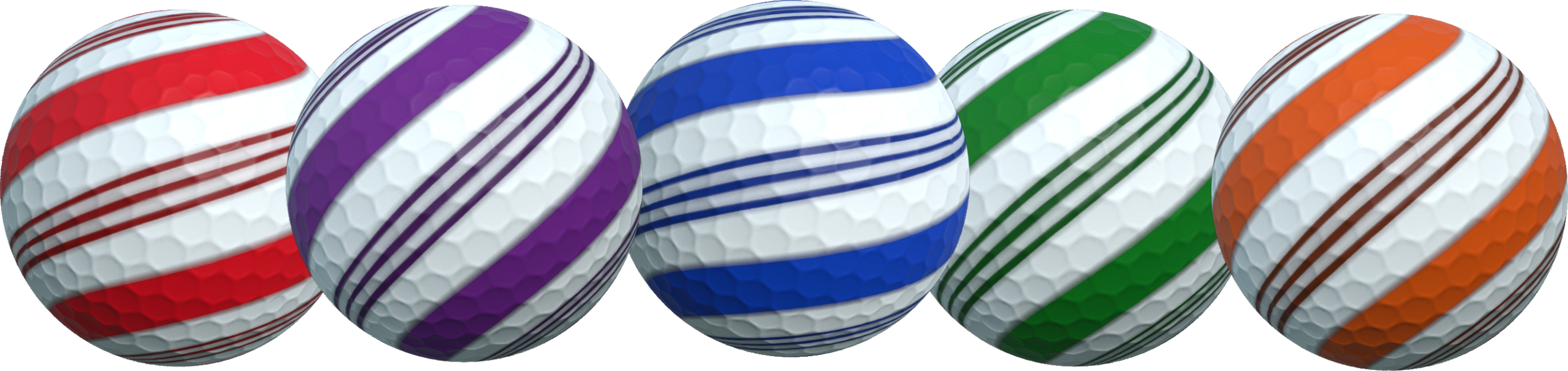
Above is a link to a seperate blog post discussing a christmas event currently active. Essentially if you play the game between now and January 15th you will unlock a Candy ball customization gift automatically.


The above image is of the balls you can unlock. These are only available via this event and for a limited time. You have till January 15th to play the game and get the gift.

Deluxe Edition Updated

Three new balls (shown above) have also been added to the Deluxe edition based around the Christmas Theme. The Belt design features color customization options whereas the Snowman and Pudding are fixed.

https://store.steampowered.com/app/1914980/Golfing_In_Aether/
https://store.steampowered.com/app/2138970/Golfing_In_Aether__Deluxe_Edition_Upgrade/
15-50% Sale

For the remainder of this week Golfing in Aether will have a 15-50% off sale, with 50% being on the base game and 15% on the deluxe edition DLC. So if Golfing in Aether has been on your wishlist then its a perfect time to pick it up and also get a free seasonal gift.

https://store.steampowered.com/news/app/1914980/view/5723537538091769835
https://store.steampowered.com/news/app/1914980/view/3413191463111280586
It's worth mentioning the two previous major updates since launch, including native Linux support and the previous Autumn Expansion which also added a bunch of a new levels.

Patch Notes

[h2]General[/h2]
  • Added support for Christmas Gift Event.
  • Added support for Free Winter DLC, which includes the Winter Seasonal theme and 9 new levels.
  • Added five holiday themed quick chat messages including “Merry Christmas!”, “Happy Christmas!”, “Happy New Year!”, “Happy Holidays!.”, and “Bah Humbug.”. You can find these using the search function on keyboard (5 key), or add them to your quick chat choices under game settings if using gamepad.
  • Added internal stat for number of different themes/seasons played.
  • Added improved packing to the decal faceplate texture.

[h2]Customization[/h2]
  • Added Christmas candy themed ball unlockable by completing Christmas gift event.
  • Added three Christmas themed balls as part of the Deluxe Edition (different to the event ball).

[h2]Environment[/h2]
  • Added improved tangents to the ramp in Goofy Golf. While not immediately apparent with darker grass, it showed up looking rather poor once testing with snow added so I reworked it.
  • Added improved tangents to various hole meshes.

[h2]Interface[/h2]
  • Added option to select new Winter theme when starting either a session or practice.
Discord Server

Be sure to check out the official discord server with channels for Golfing In Aether and my other various projects.

Golfing In Aether Update Released [1.2.8]

Todays update has lots of bug-fixes and quality of life improvements, I had delayed doing updates during the autumn seasonal sale so more to talk about than usual this week. For those of you who have just started playing I hope you are enjoying it, I typically do small updates at least once a week so if you encounter any issues or have suggestions let me know as theres generally quick turn around on that.

https://store.steampowered.com/news/app/1914980/view/3464985397053869703
If you haven't yet seen the post for the upcoming free winter expansion then be sure to check that out in the link above. All level/theme expansions are free with Golfing in Aether but if you wish to support this kind of developement then please consider picking up the Deluxe Edition as its a big help :)

Game Requirements

Game requirements indicated on store page have been lowered for both minimum and recommended. Specifically, the memory requirements, which I have it now listed as 4 GB. Going with a total system value here and its working with the presumption windows will gobble up more than 2 of that. For Linux I’ve listed the minimum as 2GB. The game only uses around 1-1.5 GB even when running on highest settings loading all 9 islands.

I had it listed as 8GB previously as wanted to see how the expansions would work out first. According to the steam survey only 0.18% of users have less than 4GB so I’m not going to worry about it beyond this. This is really just so players using systems such as portables with 4GB can see they can run the game.

For installation size I’m keeping the 2GB install for future proofing, but the actual install size has dropped from 1.9 to around 1.7 GB. This was achieved through compression of uncommon color textures, which will not have a meaningful effect. A Linux install is only 1.4GB. Upcoming Winter assets are already in the game files so there won't be much of an increase as remaining levels get completed.

Out of Bounds and Rolling Behavior

I did a few tidy ups to out of bounds respawning and some connected quirks with ball roll behaviour on specific surfaces.

Firstly some ground surfaces around holes were being misread and causing the ball to roll greater than they should. Essentially the ball would roll over certain tiny sections and its was then no longer behaving physically correct and would appear to lose the friction slowing it down.

Another area I targeted was falling into water, I found the ball could still move quite freely so added a bit of resistance to slow it quicker. Exiting pipes has also been tweaked so the ball will read the ground surface more responsively and act accordingly. There were examples of it rolling too much so I’ve fixed this as well.

I also found some examples of the ball not rolling enough due to a miss match on the physical materials in a couple of levels and these have been fixed. They were pretty apparent after making the above changes.

Please share any feedback you have and do let me know if you find areas you feel things could be improved as it helps to have feedback to refine this.

Obstacle Determinism

Next up I looked at some bugs/behavior with obstacles determinism. Previously if you reset back to the start of the level, including using the undo feature these were always syncronised. However, if you undid your shot from say 4 back to 3, the obstacles were not undone correctly. I’ve fixed this and reworked the system behind it to run off a single time variable and be standardised where its declared so this will help a lot with future error prevention.

Game Menu Improvements

Another thing I’ve done is made a couple changes to the game menu, firstly pressing escape or B on a controller will be treated as having selected resume. Secondly player 1 during practice will get a dedicated option to restart the level. This will behave identically to the button on the scoreboard.

Note: You can just press backspace or back/select to reset back to the start of the level, it will cycle through each of the shots you’ve taken. So you do not have to restart the level via this game menu thing, but I’m adding it as the reset functionality isn’t immediately clear.

Single Joycon Support

I got my hands on a pair of Switch Joycons in the Black Friday sales to test out and build a configuration for which I have now done. So if you wish to play with a singular joycon, select “Left Joystick Only (Joycon)” from the gamepad settings menu for overall layout presents.

Essentially this will only use the left joystick for all actions, and the configuration is similar to the D-Pad only config. I did however find the process of connecting Joycons to Steam via Big Picture a bit involved at current as for whatever reason the triggers and some buttons didn't map correctly so you may have to set that up first. Essentially ZL and L should be mapped to triggers, for me at least, I found they weren't automatically mapped to anything at all.

So far I’ve personally tested Xbox controllers 360 through Series X/S, PS4 Dualshock, and PS5 Dualsense, Switch Pro, Joycons (in both dual and single), Steam Controller, and various RetroBit six button controllers (Megadrive and Saturn). You can have a different controller type per each local player and store configurations on each profile too, options for both glyphs and control preset are available for easy picking so it’s really easy to switch stuff around if need be.

https://store.steampowered.com/app/1914980/Golfing_In_Aether

Patch Notes

[h2]General[/h2]
  • Fixed a rare possibility to end up reset onto an out of bounds area. I’ve added a check so the ground surface you are being reset to must be valid, if it is not it will return you to the spawn. Through a chain of events I saw it was possible to get respawned in water, so this just clears up this rare event from being possible.
  • Added a slight redesign of the slope in “Downhill from here”, specifically reduced two rows of the pinball-like obstacle at the edges and one from the middle. The point of this is to give the ball exit a greater roll speed so you more likely make it to the vertical windmill. By removing a single center post theres a greater chance of getting the hole in one.
  • Fixed when restarting a level the reset steps from the previous level hadn’t been cleared so it was possible to reset out of bounds.
  • Fixed when restarting a level planar reflections for water would stop working.
  • Fixed various timing visual bugs when restarting a level.
  • Fixed some issues where some reset steps weren’t correctly resetting various obstacles to the correct positions when in practice mode. E.g. reset to tee worked, but going from step 3 to 2 didn’t correctly handle the obstacle.
  • Added new uniform system to handle mover reset stepping with the purpose of error prevention, this will handle both the various horizontal, vertical, and inverse variations.

[h2]Environment[/h2]
  • Fixed a ball bouncing over a flat hole (e.g. like in ‘Midhole Madness’ causing the ball to roll longer than it should). Essentially it was reading the surface of the pipe angle and the ball was being treated as if entering a pipe it shouldn’t stop in. Instead, there is a delay check for entering this state overriden by transitioning to a pipe hole state in which it will begin immediately.
  • Added a bit more resistance from water when your ball lands in it, this will mean less time waiting for it to come to a stop.
  • Fixed some pipes having a bit too much delay with detection of next physical surface during exiting, this would sometimes cause a delay on the ball knowing it was on ground again (and thus rolling a bit much).
  • Added a revised mesh for the square hole areas you typically fall into off the edge of ledges, this is sloped better to avoid getting stopped in parts, which would disrupt the gameplay flow.
  • Fixed some wall gaps on “Spin Cycle”.
  • Fixed various issues with resetting during practice mode and how some obstacles were handled.

[h2]Interface[/h2]
  • Fixed a padding issue on the replay buttons.
  • Fixed a glyphs issue with the session replay being incorrect.
  • Added ability to exit game menu with the esc key or b button.
  • Fixed an issue where switching glyph mode while in a session replay didn’t update the glyphs for the replay buttons.
  • Fixed an issue where setting Glyphs keyboard only in the gamepad menu would cause some gamepad glyphs in that menu not to render correctly.
  • Added dedicated ‘Restart Level’ button to the game menu when playing practice. While it is possible to reset the level just by pressing the backspace or back button to undo back to the tee, this offers an alternative method, and will behave as if restarting the level via the scoreboard.
  • Added a single joycon config to the gamepad settings. Essentially this just picks the left joystick as the device for everything. Everything else should work as is, but I found the process of connecting a Joy Con to Steam a little more involved as by default triggers weren’t mapped correctly in big picture, so you may have to set that up first (this is nothing to do with, and outside this game though).
Discord Server

Be sure to check out the official discord server with channels for Golfing In Aether and my other various projects.