Beauty Update
[h2]Beauty Updates[/h2]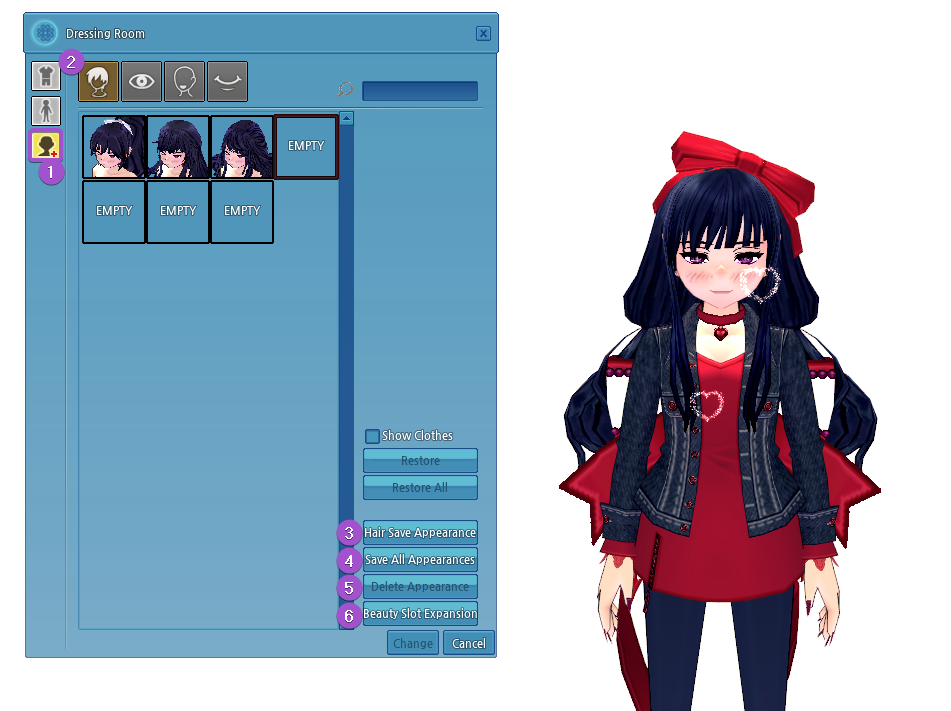
Default Blinking Speed
Blinking Interval: Min. 1 seconds/Max. 10 seconds
Number of Blinks: Blink Once
Blinking Speed: 0.10 seconds
Notes
- 30 new eye colors have been added to the Dressing Room.
- Changing your eye color will cost 3 Pon.
- Sandy Brown
- Poppy Brown
- Deep Olive
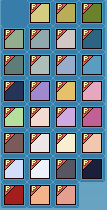
- Irish Mint Green
- Rainy Gray
- Smog Gray
- Ancient Blue-Green
- Thunder Gray
- Gloomy Gray
- Bold Sky Blue
- Soft Blue-Green
- Shadow Navy
- Premier Violet
- Caramel
- Scented Pink
- Sophie Green
- Lovely Pink
- Sweet Violet
- Soft Magenta
- Forest Brown
- Nostalgic Gray
- Light Beige
- Light Apricot
- Clear Gray-Blue
- Snow Gray
- Deep Dark Gray
- Devil's Shadow
- Soul Red
- Apricot
- Silky Pink
- 30 new skin colors have been added to the Dressing Room.
- Changing your skin color will cost 4 Pon.
- Soft Tan
- Dark Mud
- Almond
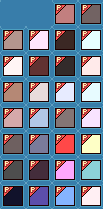
- Light Peach
- Deep Brown
- Silver
- Light Red
- Dark Tan
- Soft Ebony
- Pale Apricot
- Dark Almond
- Pale Copper
- Pale Water
- Cloud
- Light Tan
- Water
- Peanut
- Mauve
- Oak
- Dark Water
- Berserk
- Butter
- Mud
- Sweet Potato
- Red Snow
- Zombie
- Black
- Poison
- Spectral Soul
- Light Pink
- The Beauty Slot system has been added to the Dressing Room.
- This system allows you to store and change your Hair, Eye, Face, and Mouth appearances.
- Access the Slot Section in the Dressing Room by clicking on the Beauty Slot icon.
- Select an appearance tab: Hair, Eye, Face, or Mouth.
- Click on "Save Appearance", depending on which tab you are currently viewing, to save the current appearance of your character.
- Click on "Save All Appearances" to save all currently applied appearances of the character.
- If an appearance has not been saved, each appearance will be saved in an applicable empty Beauty Slot.
- Appearances that have already been saved will not change.
- If there are not enough empty Beauty Slots available, this option will not be available for use.
- Select an appearance in a Beauty Slot, then click "Delete Appearance" to remove the selected appearance from the saved Beauty Slot.
- Deleting an appearance cannot be reverted.
- After a saved appearance is deleted, the Beauty Slot will become empty and will be available for use.
- Click "Beauty Slot Expansion" to increase the number of empty Beauty Slots using Pon.
- 60 Pon can be used to add an additional empty Beauty Slot to the Hair tab.
- 45 Pon can be used to add an additional empty Beauty Slot to the Eyes, Face, and Mouth tabs.
- All appearances can be saved once in a Beauty Slot.
- When saving an appearance, the Hair, Eye, and Skin colors are also saved.
- You can change the character's appearance between all saved appearances at any time.
- After clicking on a saved appearance, click the "Change" button to apply the saved appearance to the character.
- If you change to an appearance saved in the Beauty Slot, without saving the current character's appearance, you will not be able to revert back to the unsaved appearance.
- Beauty Slots are exclusive to a character, and are not shared across your account.
- Each character receives 3 free empty Beauty Slots per appearance type.
- Saved appearances are available only for the individual character that saved the appearance.
- Additional empty Beauty Slots can be expanded up to 300 for each appearance tab.
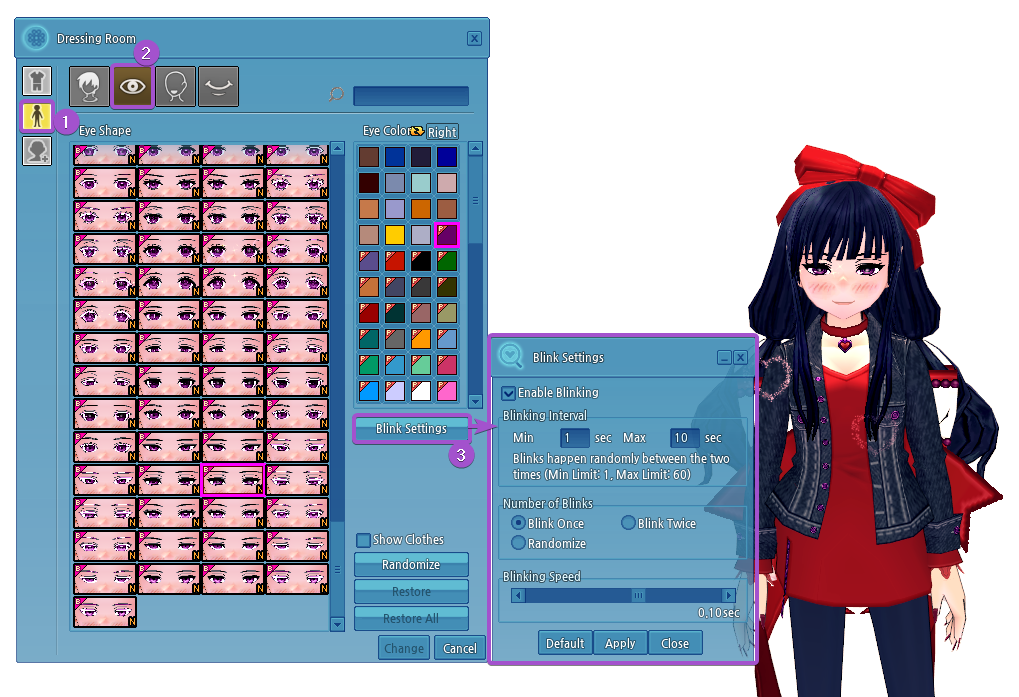
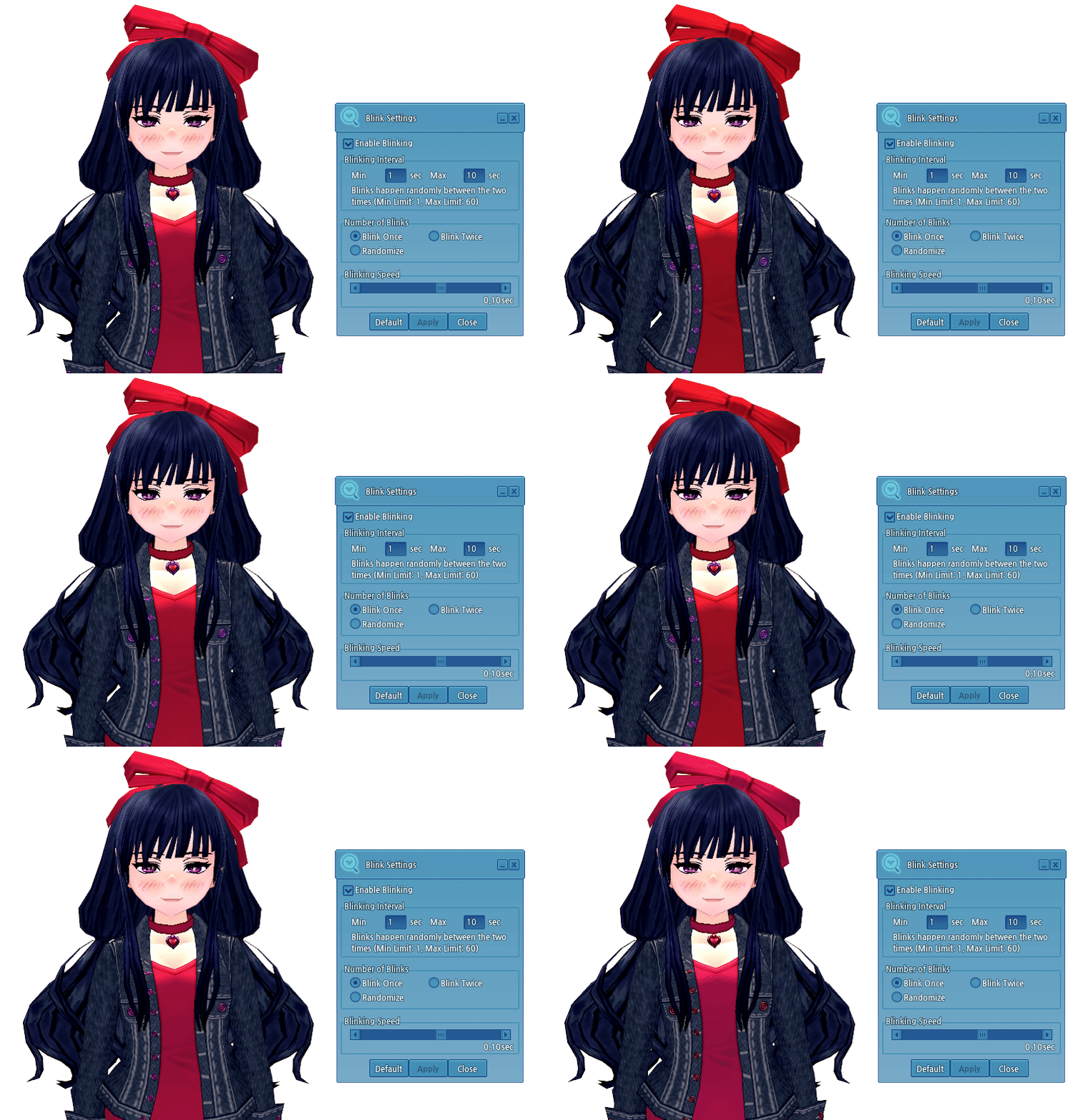
- The Eye Blinking feature has been added.
- This feature can be accessed in the Dressing Room under (1) Appearance Change -> (2) Eye -> (3) Blink Settings.
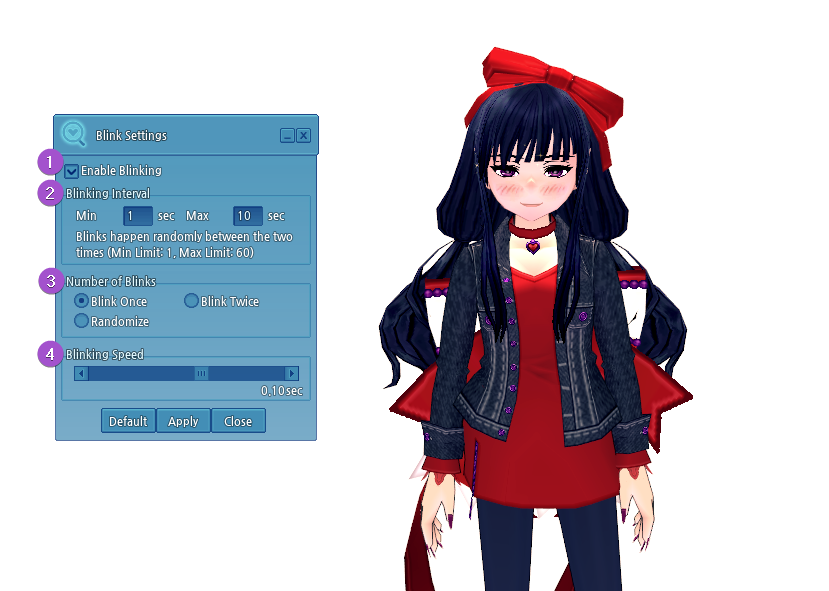
- Click on the "Enable Blinking" checkbox to turn the blinking settings on or off.
- If checked, the blinking settings are applied to the character.
- If unchecked, the blinking settings are not applied.
- The "Blinking Interval" can be set from a minimum of 1 second to a maximum of 60 seconds.
- This determines the time between eye blinks. The character will blink randomly between the set times.
- Example: If set to a minimum of 1 second and a maximum of 10 seconds, the eyes blink randomly between 1 and 10 seconds. Immediately after blinking, the cycle is reset, and blinks randomly again.
- The "Number of Blinks" can be modified for the blinking setting.
- Blink Once
- Blink Twice (consecutive blinks)
- Randomize
- If selected, your eyes will blink once or twice (consecutively) at random
- The "Blinking Speed" can be adjusted.
- This is the time it takes for a character to open and close their eyes.
- This time can be set from a minimum of 0.03 seconds to a maximum of 0.15 seconds.
- Once the blinking settings have been set up, click Apply to save it to the character.
- To apply the default eye blinking settings, click on the Default option, then click Apply.
Default Blinking Speed
Blinking Interval: Min. 1 seconds/Max. 10 seconds
Number of Blinks: Blink Once
Blinking Speed: 0.10 seconds
Notes
- Blinking does not apply to Partner characters.
- Blinking does not apply to the following eyes:
- Fox Eyes
- Innocent and Pure Look
- Too-solemn Look
- Languid Look
- Too-righteous Look
- Sharp Look
- Cartoonish Eyes
- Tired Eyes
- Bright Eyes
- Cai's Eyes
- Elatha's Eyes
- Pencast's Eyes
- Buchanan's Eyes
- Claudius's Eyes
- Romeo's Grateful Eyes
- Juliet's Grateful Eyes
- Shylock's Eyes
- Duncan's Eyes
- Crying Eyes
- Akule's Eyes
- Culinary Artist's Eyes
- Sour
- Bangled
- Horror
- Slight Frown
- Naive
- Dot Eyes
- Shady Eyes
- Guarded Eyes
- Deceiving Eyes
- Vagabond Eyes
- Two-Toned Hidden Heart Eyes
- Two-Toned Kyururu Eyes
- Serval Eyes
- Caracal Eyes
- Northern White-Faced Owl Eyes
- Western Parotia Eyes
- Superb Bird-of-Paradise Eyes
- Common Raccoon Eyes
- Fennec Fox Eyes
- Crested Ibis Eyes
- Beast Eyes
- Sleeping Eyes
- Meditating Eyes
- Elf M/F only
- Heartfelt Eyes
- Giant M only
- Sharp Eyes
- Giant M only
- Confident Eyes
- Giant M only
- Insightful Eyes
- Giant F only