1. Mabinogi
  2. News

Mabinogi News

Patch Notes - October 7th, 2021

Check out all of the details of this month's Patch Notes, featuring the Dungeon RE:Fine Update and Beauty Update!

The following Events, Sales, and Promotions are running: Dungeon RE:Fine Update
  • To learn more about the Dungeon RE:Fine Update, check out the full details here.
    • The Dungeon Notebook has been added to Mabinogi.
      • This item will list main rewards from dungeon end chests.
    • Four new Refined Armor sets, their respective Blacksmith Manuals, and Blacksmith crafting recipes have been added.
    • New materials have been added.
    • A new reward acquisition condition system has been added to Uladh Dungeons and Shadow Missions.
    • There are new changes to Uladh Dungeons, including changes to how Dungeon Keys work, how long a dungeon is, the view inside Fiodh and Coill Dungeons, etc.
    • There are dungeon reward changes that have been made.
      • Some Enchant Scrolls can now be obtained in dungeons.
      • Four new Exclusive Enchant Scrolls have been added.
    • There are new reward changes made to Shadow Missions.
    • A new item, Erinn Spirit, can now be obtained from Elite Shadow Missions.
      • Combining 10 Erinn Spirits will grant a 2nd Title Coupon according to their drop rate.
    • Spirit Gems (100) can now be obtained from Shadow Missions.
      • This items provides 100 Spirit EXP when fed to a Spirit Weapon.
Beauty Update
  • To learn more about the Beauty Update, check out the full details here.
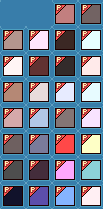
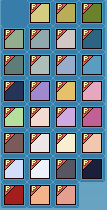
    • 30 new eye colors have been added to the Dressing Room.
    • 30 new skin colors have been added to the Dressing Room.
    • The Beauty Slot system has been added to the Dressing Room.
      • Beauty Slots will allow you to store and change your Hair, Eye, Face, and Mouth appearances.
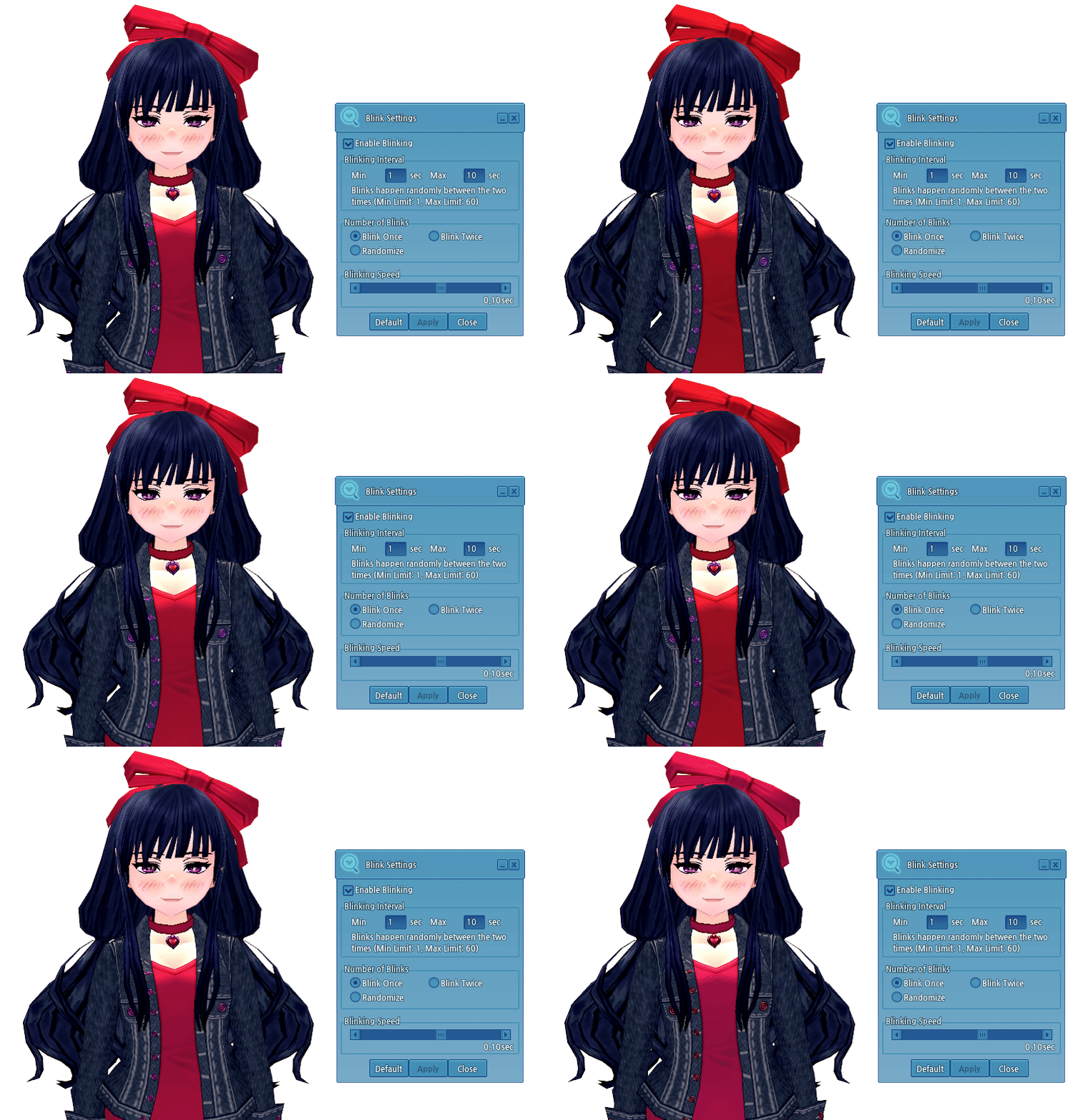
    • The Blinking System has been added to the Dressing Room, allowing you to set different options to your character's blinking.
The following changes have been made to the game:
  • Rich Chaotic Rune has been renamed to Condensed Chaotic Rune.
  • Quivers can now hold 1,000 arrows.
    • The price of the item has been updated to 1,520 Gold.
The following bug fixes have been made to the game:
  • Fixed a naming inconsistency issue with the Erinn Merchant's/Erinn Trader's items. All items have been renamed to "Erinn Merchants' Guild".
  • Fixed an issue in the Homestead UI where item names were overlapping with the time duration.
  • Fixed a text issue where the quantity of Glyph Recovery Scrolls used appeared abnormally in the sentence after using the Max Recovery option.
The following are known bugs:
  • There is an issue where you cannot Friend Summon using Fynn Pets. It will show the error, "Unavailable because the owner has opened a Personal Shop".
  • Some players' hotkeys and pet menu settings reset after logging out.
  • During the Kraken Rex boss fight, Kraken Rex will use an attack that will cause players to lose protection, semi-permanently, until they change channels or relog.
  • There is a typo in the Finishing Materials list when crafting the Dustin Silver Knight Greaves.
  • There is a known issue where some players are unable to obtain the G1 quest "Find Goro's Ring".
  • There is an issue where certain G3 cutscenes will not play, but still charges gold.
  • There is an issue where Homestead item information is overlapping.
  • There is an issue where the Today Visitor Count does not reset to 0. When a visiting character visits the Homestead, the Today and Total Count accumulates normally.
  • The available upgrades in the Item Upgrade may overlap in the UI if the window is increased.
  • Homestead Anvils and Furnaces have settings to allow visitors to use them, but do not actually restrict the use of the items.
  • There is a slight graphical error where part of the hose is missing when a William or Butler Partner uses the Water Hose gesture.
  • Some Partner gestures that have them holding a weapon will appear as though the weapon is disconnected and floating.
  • There are Partner gestures that do not activate when a Partner has something equipped in their left hand.
  • The incorrect image for the Bebhinn 2nd Title is displayed when you equip the title.
  • There is an issue after using the Thunder skill, the character can't charge Thunder again until after the Thunder bolt hits/damages enemies.
  • If you try to change your style to an appearance already saved in a Beauty Slot, it will say it failed.
  • There is a minor visual issue with the Beauty Slot text if you scroll up and down after expanding the Beauty Slot.
  • The outline color when clicking on an empty Beauty Slot is incorrect.
[COMPLETED] Scheduled Maintenance - October 7th

Mabinogi will have a scheduled maintenance on October 7th. During this time, the game will be unavailable. Maintenance is expected to begin at 7:00 AM PDT and last approximately 4 hours.

Please note that the estimated length of time for each maintenance is subject to change without notification.

-Time-

Thursday, October 7th

Pacific (PDT, UTC-7): 7:00 AM - 11:00 AM 
Eastern (EDT, UTC-4): 10:00 AM - 2:00 PM
Paris (CEST, UTC+2): 4:00 PM - 8:00 PM

To address the following:
  • Weekly server upkeep.
  • With Halloween coming soon, it is time for another candy type to be in the spotlight. The Wish Upon a Star Candy event is ending.
  • The Queen has other business to attend to, so teatime is over. The Royal Teacup Box sale is ending.
  • The Shopkeeper is closing up shop! The Homestead Refreshments and Hotdays sale/event is ending.
  • Ethel the Billionaire will be offering his services soon, so the Free Repair Weekends event is ending on October 10th at 11:59 PM PDT.
  • As mentioned, Ethel the Billionaire is back to support your growth needs! The Billionaire's Bankroll: Season 2 event is starting.
  • Dungeons are getting a much needed update! The Dungeon RE:Fine Update will be permanently added to the game.
  • To celebrate the release of the Dungeon RE:Fine Update, the Dungeon RE:Fine Celebration Hotdays are starting.
  • No longer will your Milletian have dry eyes! The Beauty Update will be permanently added to the game.
  • Make your Milletian look more unique! The Erinn Beauty Sales are starting
  • Processing of requested name changes. Note: The Name Change submission site will be unavailable after 7:00 AM PDT time, and will be available after the maintenance.
- The Mabinogi Team

Beauty Update

[h2]Beauty Updates[/h2]
  • 30 new eye colors have been added to the Dressing Room.
  • Changing your eye color will cost 3 Pon.
    • Sandy Brown
    • Poppy Brown
    • Deep Olive
    • Irish Mint Green
    • Rainy Gray
    • Smog Gray
    • Ancient Blue-Green
    • Thunder Gray
    • Gloomy Gray
    • Bold Sky Blue
    • Soft Blue-Green
    • Shadow Navy
    • Premier Violet
    • Caramel
    • Scented Pink
    • Sophie Green
    • Lovely Pink
    • Sweet Violet
    • Soft Magenta
    • Forest Brown
    • Nostalgic Gray
    • Light Beige
    • Light Apricot
    • Clear Gray-Blue
    • Snow Gray
    • Deep Dark Gray
    • Devil's Shadow
    • Soul Red
    • Apricot
    • Silky Pink
  • 30 new skin colors have been added to the Dressing Room.
  • Changing your skin color will cost 4 Pon.
    • Soft Tan
    • Dark Mud
    • Almond
    • Light Peach
    • Deep Brown
    • Silver
    • Light Red
    • Dark Tan
    • Soft Ebony
    • Pale Apricot
    • Dark Almond
    • Pale Copper
    • Pale Water
    • Cloud
    • Light Tan
    • Water
    • Peanut
    • Mauve
    • Oak
    • Dark Water
    • Berserk
    • Butter
    • Mud
    • Sweet Potato
    • Red Snow
    • Zombie
    • Black
    • Poison
    • Spectral Soul
    • Light Pink
[h2]Beauty Slots[/h2]
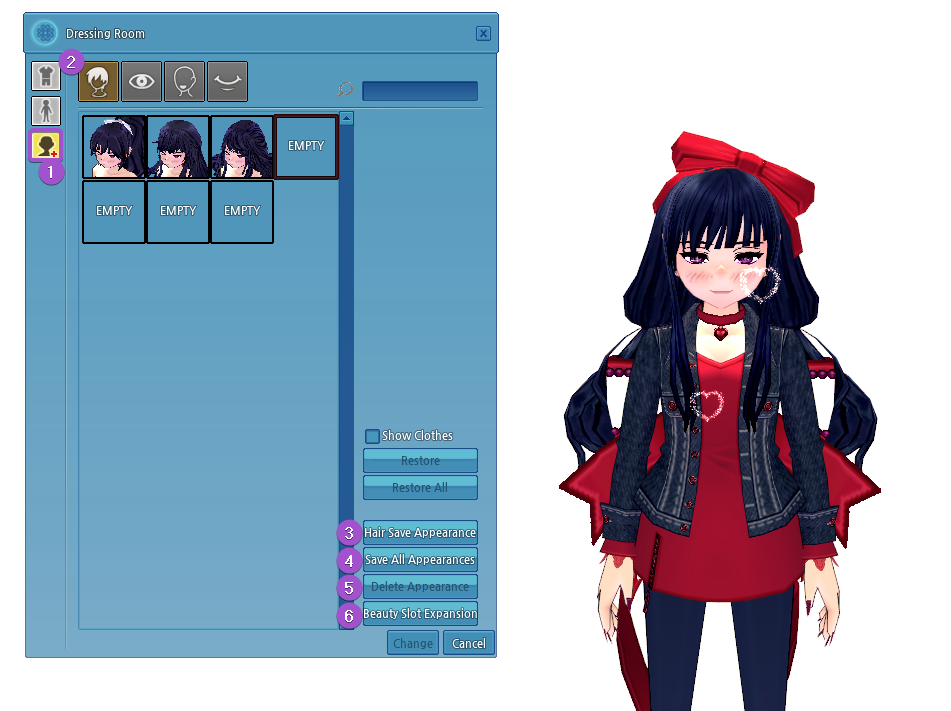
  • The Beauty Slot system has been added to the Dressing Room.
    • This system allows you to store and change your Hair, Eye, Face, and Mouth appearances.
  1. Access the Slot Section in the Dressing Room by clicking on the Beauty Slot icon.
  2. Select an appearance tab: Hair, Eye, Face, or Mouth.
  3. Click on "Save Appearance", depending on which tab you are currently viewing, to save the current appearance of your character.
  4. Click on "Save All Appearances" to save all currently applied appearances of the character.
    • If an appearance has not been saved, each appearance will be saved in an applicable empty Beauty Slot.
    • Appearances that have already been saved will not change.
    • If there are not enough empty Beauty Slots available, this option will not be available for use.
  5. Select an appearance in a Beauty Slot, then click "Delete Appearance" to remove the selected appearance from the saved Beauty Slot.
    • Deleting an appearance cannot be reverted.
    • After a saved appearance is deleted, the Beauty Slot will become empty and will be available for use.
  6. Click "Beauty Slot Expansion" to increase the number of empty Beauty Slots using Pon.
    • 60 Pon can be used to add an additional empty Beauty Slot to the Hair tab.
    • 45 Pon can be used to add an additional empty Beauty Slot to the Eyes, Face, and Mouth tabs.
Additional Details
  • All appearances can be saved once in a Beauty Slot.
  • When saving an appearance, the Hair, Eye, and Skin colors are also saved.
  • You can change the character's appearance between all saved appearances at any time.
    • After clicking on a saved appearance, click the "Change" button to apply the saved appearance to the character.
    • If you change to an appearance saved in the Beauty Slot, without saving the current character's appearance, you will not be able to revert back to the unsaved appearance.
  • Beauty Slots are exclusive to a character, and are not shared across your account.
    • Each character receives 3 free empty Beauty Slots per appearance type.
    • Saved appearances are available only for the individual character that saved the appearance.
    • Additional empty Beauty Slots can be expanded up to 300 for each appearance tab.
[h2]Eye Blinking[/h2]
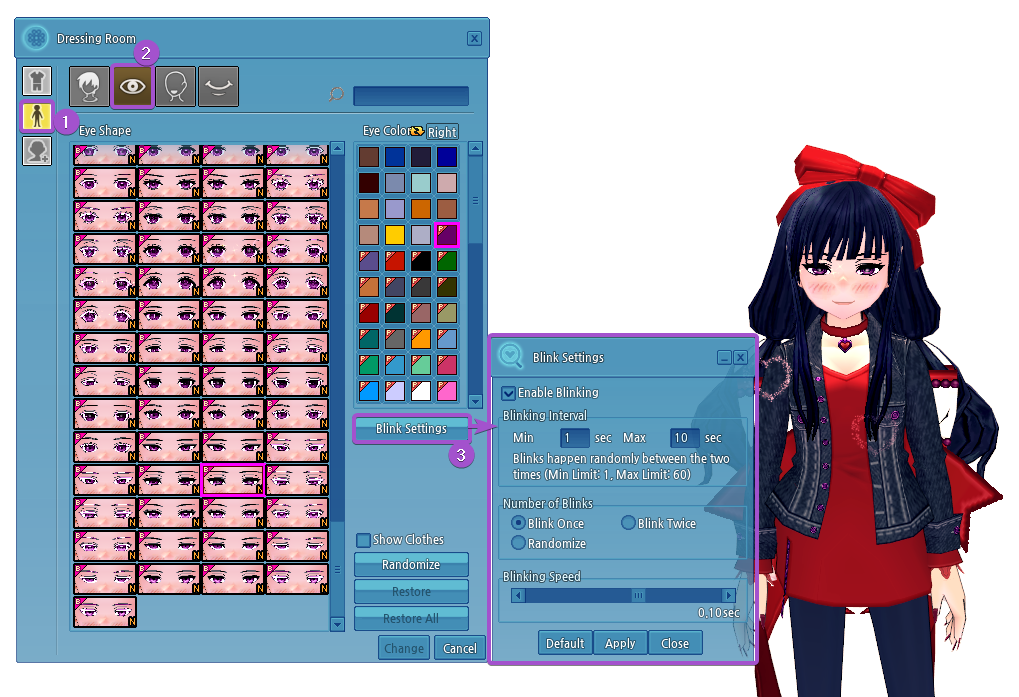
  • The Eye Blinking feature has been added.
    • This feature can be accessed in the Dressing Room under (1) Appearance Change -> (2) Eye -> (3) Blink Settings.
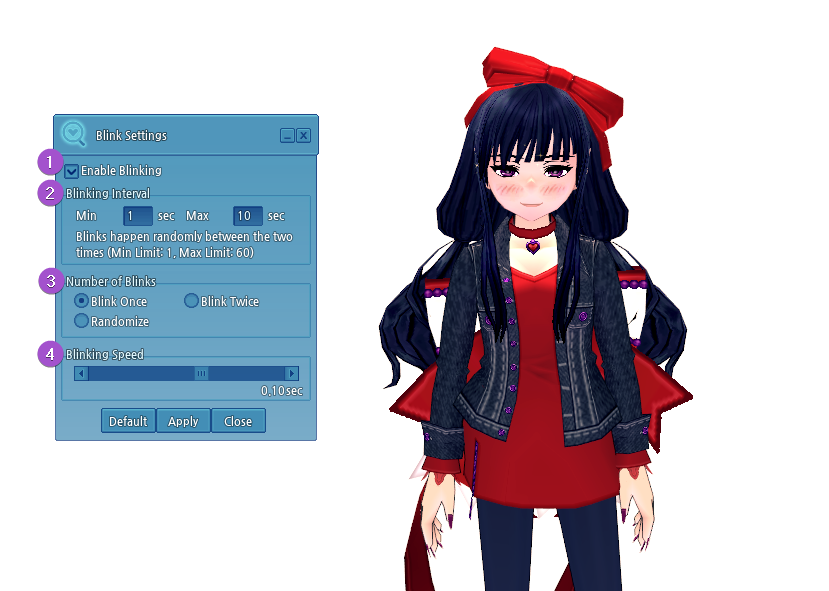
  1. Click on the "Enable Blinking" checkbox to turn the blinking settings on or off.
    • If checked, the blinking settings are applied to the character.
    • If unchecked, the blinking settings are not applied.
  2. The "Blinking Interval" can be set from a minimum of 1 second to a maximum of 60 seconds.
    • This determines the time between eye blinks. The character will blink randomly between the set times.
    • Example: If set to a minimum of 1 second and a maximum of 10 seconds, the eyes blink randomly between 1 and 10 seconds. Immediately after blinking, the cycle is reset, and blinks randomly again.
  3. The "Number of Blinks" can be modified for the blinking setting.
    • Blink Once
    • Blink Twice (consecutive blinks)
    • Randomize
      • If selected, your eyes will blink once or twice (consecutively) at random
  4. The "Blinking Speed" can be adjusted.
    • This is the time it takes for a character to open and close their eyes.
    • This time can be set from a minimum of 0.03 seconds to a maximum of 0.15 seconds.
  • Once the blinking settings have been set up, click Apply to save it to the character.
  • To apply the default eye blinking settings, click on the Default option, then click Apply.


Default Blinking Speed
Blinking Interval: Min. 1 seconds/Max. 10 seconds
Number of Blinks: Blink Once
Blinking Speed: 0.10 seconds

Notes
  • Blinking does not apply to Partner characters.
  • Blinking does not apply to the following eyes:
    • Fox Eyes
    • Innocent and Pure Look
    • Too-solemn Look
    • Languid Look
    • Too-righteous Look
    • Sharp Look
    • Cartoonish Eyes
    • Tired Eyes
    • Bright Eyes
    • Cai's Eyes
    • Elatha's Eyes
    • Pencast's Eyes
    • Buchanan's Eyes
    • Claudius's Eyes
    • Romeo's Grateful Eyes
    • Juliet's Grateful Eyes
    • Shylock's Eyes
    • Duncan's Eyes
    • Crying Eyes
    • Akule's Eyes
    • Culinary Artist's Eyes
    • Sour
    • Bangled
    • Horror
    • Slight Frown
    • Naive
    • Dot Eyes
    • Shady Eyes
    • Guarded Eyes
    • Deceiving Eyes
    • Vagabond Eyes
    • Two-Toned Hidden Heart Eyes
    • Two-Toned Kyururu Eyes
    • Serval Eyes
    • Caracal Eyes
    • Northern White-Faced Owl Eyes
    • Western Parotia Eyes
    • Superb Bird-of-Paradise Eyes
    • Common Raccoon Eyes
    • Fennec Fox Eyes
    • Crested Ibis Eyes
    • Beast Eyes
    • Sleeping Eyes
    • Meditating Eyes 
      • Elf M/F only
    • Heartfelt Eyes
      • Giant M only
    • Sharp Eyes 
      • Giant M only
    • Confident Eyes
      • Giant M only
    • Insightful Eyes
      • Giant F only

The Billionaire's Bankroll: Season 2

Ethel the Billionaire is here to support your growth needs again! Ethel will be providing support to all Milletians by covering 90% of your repair cost fees and selling Elite Shadow Mission passes. Along with Ethel, you can also obtain the maximum amount of keys, regardless of how many players are in the dungeon! Check out the details below.

Event Dates: Thursday, October 7th, After Maintenance - Thursday, November 18th, Before Maintenance
[h2]Event Details[/h2]
  • During the event, you will receive the quest, [Guide] Investing in the Future.
  • Find Ethel near the Bank in Dunbarton.
  • Register a main character with Ethel.
  • You can only register one character per account.
  • You will receive the following items after completing [Guide] Investing in the Future.
    • 10,000 EXP
[h2]Dungeon Key Drop[/h2]
  • During the event period, upon completing Tech Duinn Missions, your party will receive the maximum amount of keys available, regardless of how many party members are in the mission.
    • Tech Duinn Missions
      • 4 keys
  • If the number of keys available cannot be divided equally between party members, leftover keys will be given to party members at random.
    • Example: If 3 players clear a Tech Duinn Mission, each party member will get 1 key and one party member will receive an extra key.
  • Tech Duinn Missions may have more end chests than the max available keys given to the party.
    • Example: Depending on the number of party members who cleared Awakened Abyssal Lord Tech Duinn Mission, there may be 6-8 chests. However, the party will still only receive a maximum of 4 keys.
[h2]Repair Fee Support[/h2]
  • During the event period, Ethel will help support your growth by paying for 90% of your repair fees.
    • Talk to Ethel and select "Repair Fee Support".
[h2]Elite Mission Pass Support[/h2]
  • During the event period, Ethel will sell Ethel's Elite Mission Selection Box.
    • Talk to Ethel and select "Purchase Pass"
      • The selection box costs 200,000 Gold.
      • The selection box has a 7 day expiration.
      • You can choose either an Elite Pass for Tara or for Taillteann.
        • The selected pass has a 24 hour expiration.
      • You can only purchase 20 selection boxes per week.
        • The purchase limit is reset at midnight every Sunday.
[h2]Level Growth Support[/h2]
  • If you are between cumulative level 5,000 and 15,000, you can participate in the Level Growth Support event.
  • Talk to Ethel and select "Level Growth Support".
  • You will receive two quests, the daily quest, [Daily] A Stepping Stone for Growth - Level, and the achievement quest, [Challenge] Billionaire's Level Growth Support.
  • For the daily quest, clear the Advanced Uladh Dungeon that is specified in the quest details.
    • This quest can be received once a day.
    • This quest resets at 7:00 AM PDT.
    • Reminder: You can now purchase Advanced Dungeon Passes from the Researcher near Poulnabrone Rock in Dunbarton.
  • You will receive the following items after completing [Daily] A Stepping Stone for Growth - Level:
    • 8,000,000 EXP
    • Rebirth Potion x1
      • Does not expire
      • Cannot be traded
  • For the achievement quest, your objective is to reach cumulative level 15,000.
  • Once you complete the objective, talk to Ethel for the following rewards:
    • 10,000 EXP
    • Ethel's Celebratory Gift Box x1
[h2]Skill Growth Support[/h2]
  • If you are under Total Combat Skill level 1,700, you can participate in the Skill Growth Support event.
  • Talk to Ethel and select "Skill Growth Support".
  • You will receive two quests, the daily quest, [Daily] A Stepping Stone for Growth - Skill, and the achievement quest, [Challenge] Billionaire's Skill Growth Support.
  • For the daily quest, clear the daily Shadow Mission in Tara or Taillteann.
    • This quest can be received twice a day.
    • The quest resets at 7:00 AM PDT.
  • You will receive the following items after completing [Daily] A Stepping Stone for Growth - Skill:
    • Combat Skill Training Seal (10) Selection Box x10
  • For the achievement quest, your objective is to reach Total Combat Skill Level 1,700.
  • Once you complete the objective, talk to Ethel for the following rewards:
    • 10,000 EXP
    • Ethel's Celebratory Gift Box x1
[h2]Erinn Spirit Additional Drop Event [/h2]
  • When clearing Tara and Taillteann Shadow Missions on Elite difficulty, there is an additional chance to obtain Erinn Spirit.
    • This is in addition to the normal end chest rewards.
[h2]Tech Duinn Mission Pass Box[/h2]
  • When clearing Tech Duinn Missions on Normal or Advanced difficulty, there is a chance to obtain an Elite Tech Duinn Mission Pass Box:
    • Feth Fiada (Elite) Pass Box
    • Seven Nightmares (Elite) Pass Box
    • Revived Illusion (Elite) Pass Box
    • Awakened Abyssal Lord (Elite) Pass Box
  • The Pass Box expires after 3 days.
  • The Pass Box is tradable 1 time.
  • When the Pass Box is opened, an Elite Pass for the mission is granted and the pass will expire in 24 hours.
[h2]Ethel's Celebratory Gift Box[/h2]
  • Ladeca Combat 4x EXP Potion (1 Hour) (expires in 15 days)
  • Unrestricted Dungeon Pass (expires in 15 days)
  • Unlimited Shadow Mission Pass (expires in 15 days)
  • Baltane Elite Mission Pass Selection Box (expires in 15 days)
  • Skill Training Seal (30) (Not tradable) (expires in 15 days)
  • AP Potion (50) x2
  • Guardian Soul Stone (Event) x3
[h2]Combat Skill Training Seal (10) Selection Box[/h2]
  • Close Combat Skill Training Seal (10)
  • Archery Skill Training Seal (10)
  • Martial Arts Skill Training Seal (10)
  • Lance Combat Skill Training Seal (10)
  • Ninja Skill Training Seal (10)
  • Music Skill Training Seal (10)
  • Puppetry Skill Training Seal (10)
  • Transmutation Skill Training Seal (10)
  • Dual Gun Skill Training Seal (10)
  • Magic Skill Training Seal (10)
  • Battle Alchemy Skill Training Seal (10)
  • Chain Slash Skill Training Seal (10)

Dungeon RE:Fine Celebration Hotdays!

To celebrate the release of the Dungeon RE:Fine update, we are giving away some rewards to help you explore the update! Check out the details below.

Event Dates: Saturday, October 9th, 12:00 AM PDT - Sunday, October 10th, 11:59 PM PDT
[h2]Event Details[/h2]
  • Log in during the event period to receive rewards to celebrate the Dungeon RE:Fine update!
    • Any character on the account can claim the rewards but you can only claim them once.
    • You cannot claim the rewards on a character that is in the Novice talent.
  • You will receive the following rewards:
    • Unrestricted Dungeon Pass x3
      • Cannot be traded
      • Expires in 15 days
    • Unlimited Shadow Mission Pass x3
      • Cannot be traded
      • Expires in 15 days
    • Potent Finest Shadow Crystal (Event) x3
      • Cannot be traded
      • Expires in 15 days