Devlog 024 - Settings galore
Hello everyone!
With the Early Access release of shapez 2 set for August, we’re creeping ever closer to finishing development. Our current focus lies on remaining visuals and polish, especially when it comes to the UI. However, we still have some exciting new content additions to show you, so today we’ll walk you through what we’ve been working on lately.
https://store.steampowered.com/app/2162800/shapez_2/
[h2]News[/h2]
[h3]Alpha 22[/h3]
Last week we released Alpha version 22 for our Patreon supporters, which includes most of what we'll cover in this blog. If anything here makes you want to check out the game immediately and want to give us feedback, consider supporting us!
[h3]Disclaimer[/h3]
As always, a lot you see in this devlog is still subject to change. We’d love to hear your thoughts on everything, but if anything still looks a bit rough around the edges its likely still being worked on. For more info on what to expect from the Early Access release build, be sure to check out our previous blog.
[hr][/hr]
[h2]Gameplay[/h2]
[h3]New Scenarios[/h3]
We’ve added more scenarios to the savegame customization options. These scenarios affect the shapes you’ll need to deliver to the Vortex in order to progress. The higher the difficulty, the more shape types, layers and colors you’ll need to put together.
The types of shapes you’ll need to deliver are unique to their scenarios. We’re not talking small differences – these goals are completely different designs. We had a lot of fun making these challenges so we hope you’ll enjoy them as well!
Do keep in mind that unlike the difficulty Setting, scenarios are permanent and cannot be changed after the savegame has been created. You'll need to start a new savegame to play a different scenario.
Operator Certification
We highly recommend new Operators to obtain their Operator Certification before you do your own thing! You’ll be guided through building your very first factory with extra information and hints. The Operator Certification uses the default scenario settings, but you can customize the difficulty before you get started. Once you’re deemed worthy of the Certificate, you get to choose between continuing with the normal scenario or the hard scenario – more on them later. Your progress is fully transferred, including buildings and unlocked upgrades.

Factory - Normal
This is the default scenario and recommended for players unfamiliar with shapez. Eases you into newly-unlocked mechanics and shape goals are relatively straightforward.
Factory - Hard
Recommended for players who have already done a playthrough and are looking for an extra challenge. If you’re here from shapez 1, this scenario may be a good fit for you! Shape goals get more difficult faster, requiring additional cutting, stacking or painting when compared to the normal scenario.
Factory - Insane
If you’re a very experienced player and you’d like to push your brain to the limit, this scenario is for you. Will require game knowledge, precise planning and thinking ahead: shape goals need many different shapes and colors, often stacked to the maximum amount of layers – which for this scenario goes up to 5!
There's a lot of room for us to add more scenarios to the list and we already have some ideas in mind. Here's a teaser:
[expand]
 This is not in the game yet and we can't guarantee it'll make it in for Early Access release, but it's something we're working on![/expand]
Scenario customization
This option allows you to customize the settings of any of the previously mentioned scenarios. You still need to select one of them, but you can then customize map generation (as highlighted in this blog) and set additional savegame rules of which there are more now! If the Insane scenario isn’t insane enough for you, you can make it even more difficult here :)

[h3]Operator Level[/h3]
Keep delivering previously unlocked shape goals to increase your Operator Level! Every level unlocks additional chunks and research points to aid you in growing your factory! Completing a goal will allow you to complete it again, but with an increased amount of shapes needed. Be sure to diversify!
Operator Levels allow your old factories to remain useful after completing their milestones. Instead of quickly building something and to get rid of it once you advance, this incentivises to expand instead of replace and long-term solutions instead of quick and dirty ones. We want to see big and tidy factories!

If you want to go the extra mile, you can also produce the Randomized Goal! This requires less shapes to produce in order to level up, but you’ll need to switch up your factory frequently to adapt to the new goal. Or, just set up a Make Anything Machine!
[h3]Blueprint Icons[/h3]
Remember two weeks ago when we said we probably wouldn’t be able to add Blueprint Icons before the Early Access release? Yeah, about that…
Introducing Blueprint Icons! You can now customize your Blueprints with up to 4 icons at a time to make it easier to tell them apart in lists and hotbars. There’s a big list of icons already used elsewhere in the game and a couple of preset shapes. You can also add custom shape icons with Shape Codes!


[h3]Other new things[/h3]
Platform and platform blueprints can now be mirrored! We’ve also expanded the tutorial (now Operator Certification) and expanded the Knowledge Panel with all milestones, mechanics, example videos and translations.
[h2]Visuals and Graphics[/h2]
We’re working with new Rail visuals! Rails now look a lot less bulky and it clearly indicates which direction trains can travel. All the other visuals for trains are still work in progress though, so you’ll have to wait a bit longer to see everything else!

[h2]Development[/h2]
We’ve done a big simulation refactoring pass to improve simulation accuracy and stability. There have also been several more performance and rendering improvements.
DirectX 11 is now the default rendering backend on Windows systems, as we got a lot of feedback on the demo about some issues caused by Vulkan.
Factories outside of your view are now simulated at lower tick rates for up to 20x simulation performance improvements. This will prevent the simulation from struggling with huge factories, as only what you’re currently looking at is fully simulated. Your factory will continue to run perfectly fine if you’re not there to keep watch! It’s not like the belts start slacking off the second the manager is busy elsewhere. Or so they tell us.
[h2]Lore[/h2]
You read that right! We’ve begun to sprinkle bits and pieces of lore around the game to give it some flair. This includes the aforementioned Operator Certification, but you’ll be able to find lore and flavor text around various places in the game.


[h2]UI & UX[/h2]
As we’re getting closer to the Early Access release and most of it is ready, a lot of the remaining work consists of UI and UX changes. Here’s a list of what we’ve done!


[hr][/hr]
That’s it for now! Only a couple devlogs left to go before you get to play shapez 2 for yourself in August. We’re very excited (and very busy) and we hope you’ll join us again for the next devlog.
See you then!
~ Tobias & the shapez 2 team
[h3]Join the community:[/h3]
X / Twitter YouTube Discord Reddit TikTok Patreon
[h3]Check out the previous devlog:[/h3]
https://store.steampowered.com/news/app/2162800/view/4149584538797983676
With the Early Access release of shapez 2 set for August, we’re creeping ever closer to finishing development. Our current focus lies on remaining visuals and polish, especially when it comes to the UI. However, we still have some exciting new content additions to show you, so today we’ll walk you through what we’ve been working on lately.
https://store.steampowered.com/app/2162800/shapez_2/
[h2]News[/h2]
[h3]Alpha 22[/h3]
Last week we released Alpha version 22 for our Patreon supporters, which includes most of what we'll cover in this blog. If anything here makes you want to check out the game immediately and want to give us feedback, consider supporting us!
[h3]Disclaimer[/h3]
As always, a lot you see in this devlog is still subject to change. We’d love to hear your thoughts on everything, but if anything still looks a bit rough around the edges its likely still being worked on. For more info on what to expect from the Early Access release build, be sure to check out our previous blog.
[hr][/hr]
[h2]Gameplay[/h2]
[h3]New Scenarios[/h3]
We’ve added more scenarios to the savegame customization options. These scenarios affect the shapes you’ll need to deliver to the Vortex in order to progress. The higher the difficulty, the more shape types, layers and colors you’ll need to put together.
The types of shapes you’ll need to deliver are unique to their scenarios. We’re not talking small differences – these goals are completely different designs. We had a lot of fun making these challenges so we hope you’ll enjoy them as well!
Do keep in mind that unlike the difficulty Setting, scenarios are permanent and cannot be changed after the savegame has been created. You'll need to start a new savegame to play a different scenario.
Operator Certification
We highly recommend new Operators to obtain their Operator Certification before you do your own thing! You’ll be guided through building your very first factory with extra information and hints. The Operator Certification uses the default scenario settings, but you can customize the difficulty before you get started. Once you’re deemed worthy of the Certificate, you get to choose between continuing with the normal scenario or the hard scenario – more on them later. Your progress is fully transferred, including buildings and unlocked upgrades.
Factory - Normal
This is the default scenario and recommended for players unfamiliar with shapez. Eases you into newly-unlocked mechanics and shape goals are relatively straightforward.
Factory - Hard
Recommended for players who have already done a playthrough and are looking for an extra challenge. If you’re here from shapez 1, this scenario may be a good fit for you! Shape goals get more difficult faster, requiring additional cutting, stacking or painting when compared to the normal scenario.
Factory - Insane
If you’re a very experienced player and you’d like to push your brain to the limit, this scenario is for you. Will require game knowledge, precise planning and thinking ahead: shape goals need many different shapes and colors, often stacked to the maximum amount of layers – which for this scenario goes up to 5!
There's a lot of room for us to add more scenarios to the list and we already have some ideas in mind. Here's a teaser:
[expand]
This is not in the game yet and we can't guarantee it'll make it in for Early Access release, but it's something we're working on![/expand]Scenario customization
This option allows you to customize the settings of any of the previously mentioned scenarios. You still need to select one of them, but you can then customize map generation (as highlighted in this blog) and set additional savegame rules of which there are more now! If the Insane scenario isn’t insane enough for you, you can make it even more difficult here :)
[h3]Operator Level[/h3]
Keep delivering previously unlocked shape goals to increase your Operator Level! Every level unlocks additional chunks and research points to aid you in growing your factory! Completing a goal will allow you to complete it again, but with an increased amount of shapes needed. Be sure to diversify!
Operator Levels allow your old factories to remain useful after completing their milestones. Instead of quickly building something and to get rid of it once you advance, this incentivises to expand instead of replace and long-term solutions instead of quick and dirty ones. We want to see big and tidy factories!
If you want to go the extra mile, you can also produce the Randomized Goal! This requires less shapes to produce in order to level up, but you’ll need to switch up your factory frequently to adapt to the new goal. Or, just set up a Make Anything Machine!
[h3]Blueprint Icons[/h3]
Remember two weeks ago when we said we probably wouldn’t be able to add Blueprint Icons before the Early Access release? Yeah, about that…
Introducing Blueprint Icons! You can now customize your Blueprints with up to 4 icons at a time to make it easier to tell them apart in lists and hotbars. There’s a big list of icons already used elsewhere in the game and a couple of preset shapes. You can also add custom shape icons with Shape Codes!
[h3]Other new things[/h3]
Platform and platform blueprints can now be mirrored! We’ve also expanded the tutorial (now Operator Certification) and expanded the Knowledge Panel with all milestones, mechanics, example videos and translations.
[h2]Visuals and Graphics[/h2]
We’re working with new Rail visuals! Rails now look a lot less bulky and it clearly indicates which direction trains can travel. All the other visuals for trains are still work in progress though, so you’ll have to wait a bit longer to see everything else!
[h2]Development[/h2]
We’ve done a big simulation refactoring pass to improve simulation accuracy and stability. There have also been several more performance and rendering improvements.
DirectX 11 is now the default rendering backend on Windows systems, as we got a lot of feedback on the demo about some issues caused by Vulkan.
Factories outside of your view are now simulated at lower tick rates for up to 20x simulation performance improvements. This will prevent the simulation from struggling with huge factories, as only what you’re currently looking at is fully simulated. Your factory will continue to run perfectly fine if you’re not there to keep watch! It’s not like the belts start slacking off the second the manager is busy elsewhere. Or so they tell us.
[h2]Lore[/h2]
You read that right! We’ve begun to sprinkle bits and pieces of lore around the game to give it some flair. This includes the aforementioned Operator Certification, but you’ll be able to find lore and flavor text around various places in the game.
[h2]UI & UX[/h2]
As we’re getting closer to the Early Access release and most of it is ready, a lot of the remaining work consists of UI and UX changes. Here’s a list of what we’ve done!
- Cleaned up train toolbar & icons
- Added new 'conflicts' visualization: Whenever an issue is detected – like belts moving in opposite directions – an exclamation mark will appear at the location. There’s a button in the bottom right of the UI to toggle conflict warnings, though we suspect turning the warning off won’t fix the problem.
- Merged Upgrades and Shop into one shared tab: Allows you to shop for upgrades
- Added the option to clear all fluids in all fluid buildings
- Added setting to disable chromatic aberration
- Added setting to disable vignette: there will still be some vignette, but a lot less
- Added setting to choose the target display: for your sextuple monitor setups
- Added setting to reduce input latency: this may make the game feel more responsive, but will increase CPU load and may result in a lower frame rate.
- Disabled auto-rotation for large buildings, like the Painter
- Added setting to disable custom cursor (will make us sad)
- Splitters and Mergers are automatically placed when connecting or disconnecting belts or pipes.
- Added glow indicator for shapes that are actively being delivered
- Improved difficulty & scenario selection screen (see related section above)
- You’re no longer required to hold 'Shift' to replace conveyor belts / transport structures
- Transitions between waypoints or moving to the vortex are now animated
- Added placement indicators for fluid & wire buildings to better show inputs / outputs
- Improved fluid miner placement indicators
- Updated game logo: we gave it a real good scrub
- Added a button to take you directly to the relevant knowledge panel entry while placing or selecting a building
- Updates to the wire icons
- Improved & fixed belt launcher placement indicators & logic
- Added a setting to toggle toolbar selection mode between ‘deselect’ and ‘cycle’, with ‘deselect’ being the new default.
- Improved space belt & pipe placement, now should behave similar to belts but at a much larger scale (more improvements coming)
- Removed confirmation when purchasing speed upgrades: We know you got a need for speed
- Indicators for wrong connections are introduced for Buildings, Wires, and Pipes: These are the checkered blockers and separate from conflicts, though currently serve largely the same purpose.
[hr][/hr]
That’s it for now! Only a couple devlogs left to go before you get to play shapez 2 for yourself in August. We’re very excited (and very busy) and we hope you’ll join us again for the next devlog.
See you then!
~ Tobias & the shapez 2 team
[h3]Join the community:[/h3]
X / Twitter YouTube Discord Reddit TikTok Patreon
[h3]Check out the previous devlog:[/h3]
https://store.steampowered.com/news/app/2162800/view/4149584538797983676
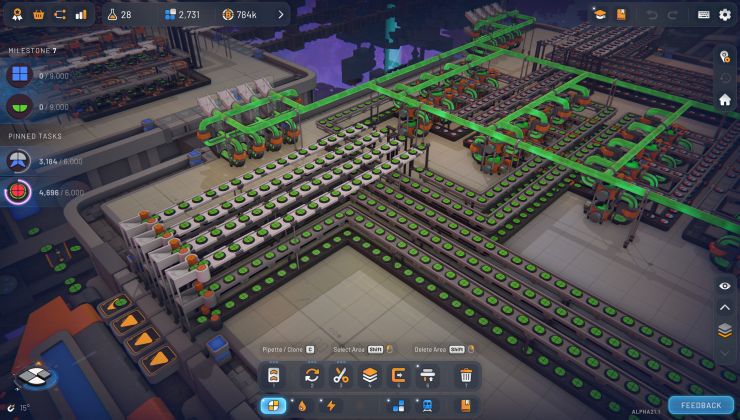


 Some wiring and a XOR Logic Gate. Signals are represented in light green (active), green (connected but inactive), dark green (not connected) and red (conflict)


 Visuals are work in progress


 The same shape in RGB (top left), RYB (top right), CMYK (bottom left) and Colorblind (bottom right)
 Miner Extension visuals are still placeholder


