1. Adaptory
  2. News

Adaptory News

Steam Next Fest – what's happening

Adaptory is coming to Steam Next Fest next week! Here's what will be happening (all times are in PST).

[h2]Today[/h2]

If you haven’t already seen the video, there’s a brand new trailer, just for Next Fest:

[previewyoutube][/previewyoutube]

The Adaptory Steam page has also had an overhaul, with new text, GIFs, and screenshots. I’m in the process of getting the page translated to a number of different languages, as well. (The demo will only be available in English, but I want to make it clear the full game will be localised!)

[h2]Wed 31 January, 2pm PST[/h2]

Jevon is going to try her first ever dev livestream on Twitch! This is going to be a real experiment, not exactly sure how this will go 😀

[h2]Thu 1 February, 4pm PST[/h2]

Adaptory’s Demo will be released on Steam, and anyone can download a copy and play it for free! 🥳

The version we’ll be releasing next week has new systems, content, and heaps of bug fixes. There are no limitations in this demo; you can play for as long as you want, but this version will only be released on Steam.

[h2]Mon 5 February, 2pm PST[/h2]

Steam Next Fest launches today at 10am PST. We will also be livestreaming the game later that day at 10am PST. This stream is going to be featured across all of Steam! I’ll be playing the game with special guest and friend ThisIsRubyOK, showing off some of the new systems, and answering questions. Come join in and say hi!!

https://store.steampowered.com/news/app/2201620/view/3978435073801534645

[h2]Wed 7 February, 8am PST[/h2]

We'll also be doing another livestream this day, at 5pm CEST, with another special guest. This stream is also going to be featured across all of Steam – so come on in and say hi again!

https://store.steampowered.com/news/app/2201620/view/4021219904157277531

[h2]Mon 12 February, 10am PST[/h2]

Steam Next Fest ends at 10am, but I'm planning to keep the Steam Demo live after this date. I may need to turn it off if something unexpected occurs.

We’ll then have a bit of a breather, review all of the feedback, and maybe make an announcement of the Early Access release date?!

---

A huge, huge thank you to everyone who has played any version of Adaptory over the last two years, provided feedback, bug reports, and support – especially everyone in the Adaptory discord and friends from NZGDA. The game feels really polished compared to a year ago and I am nervous and excited to share it with the world 😊
Adaptory: Livestream & developer Q&A

Join Jevon Wright (Adaptory developer) and a special guest as they play in Adaptory's first ever livestream!

Learn more about the game, ask questions with the team, deep dive into some of its simulations and mechanics, and get a sneak peek at some of the new art and systems coming to the game's demo for Steam Next Fest.

https://store.steampowered.com/app/2201620/Adaptory/

Alpha 7 now live

Alpha 7 is now live! You can download a copy on itch.io for free.

If you find any bugs, issues, balance problems or suggestions, please let us know on Discord or by email so we can keep improving the game! 🙂

The focus of this release has been technology, to try get the game as stable as possible before adding all of the systems and content for Early Access. This release has been heavily tested but there may be some bugs, so please let us know.

----

[h2]New art[/h2]

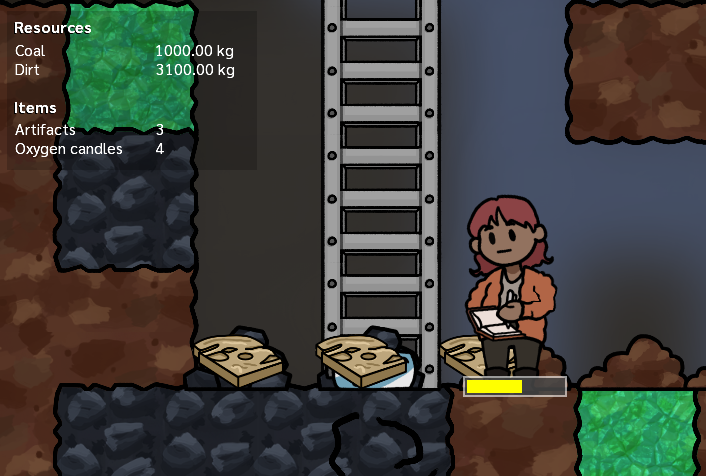
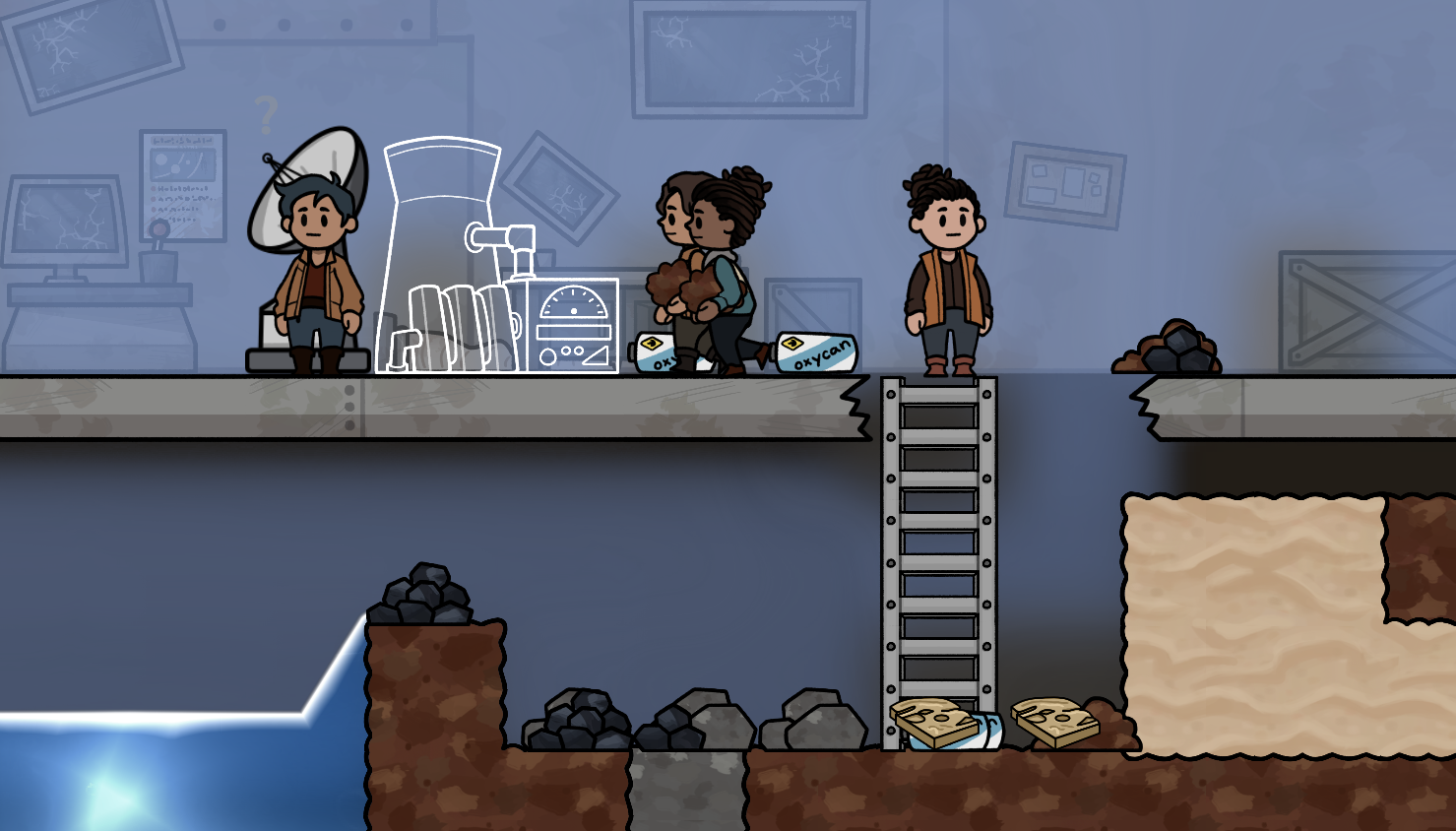
We’ve replaced all of the raw resource pile art with brand new art, and it looks amazing. There’s different art for small and big piles, and whether the piles are falling through space or are settled on the ground. Explorers also show what they’re carrying – whether raw elements, or items such as oxygen candles.

Explorers carrying dirt to supply the coal generator building blueprint

There’s also new art and animations for the battery and light buildings.

[h2]Tools for streamers[/h2]

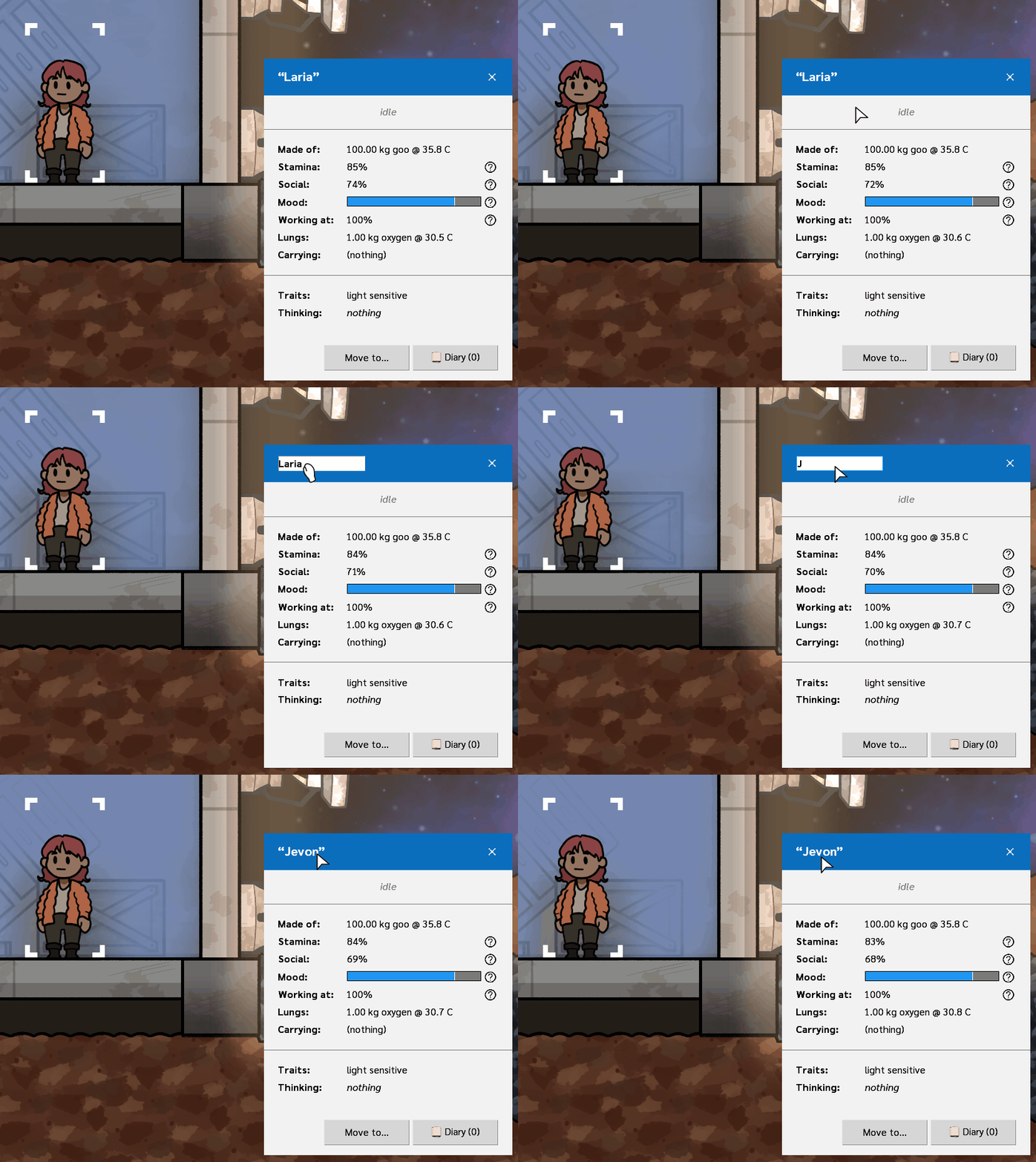
We’re starting to add some tools for streamers to play the game with their community! To start off, you’re now able to rename your explorers. You can change their name at the start of the game, or in the middle of a game by clicking on their name:

You can now rename your explorers

[h2]Resource counting[/h2]

Not sure if you’re running low on construction materials? Is your oxygen candle supply getting dangerously low? We’ve added a resource counter that automatically works out how many resources your crew is able to use. (It does not include resources that are buried, locked away behind doors, or otherwise inaccessible.)

The Resource Station shows all available items to your crew

[h2]Save and load[/h2]

You can now save and load your game in Adaptory, allowing for longer play sessions. This also means you can share save games with your friends, and perhaps collaborate on a base together!

Autosave has also been added (by default every ten minutes). Occasional game crashes should no longer be the end of your game. Save/load is experimental so please let us know if your save game doesn’t load properly.

[h2]New audio and FMOD support[/h2]

Alpha 7 marks our first release with sound design contributed by Mika! We have been adding lots of extra clicks and sounds and adaptive audio throughout the game. There’s also three new music tracks in the game, including a music loop played in the main menu – I recommend listening to the music with headphones, if possible!

This release also switches our audio engine from OpenAL to FMOD.

[h2]And a lot more[/h2]

  • More descriptions added to items and elements
  • Animated dialogs for alerts and popup menus
  • Brand new scrollbars that feel better and are more accessible
  • A shiny new splash screen at the start of the game
  • Command-line switches
  • Windowed fullscreen mode
  • And of course, lots of bug fixes and performance improvements


Full patch notes below.

[h2]What’s next?[/h2]

We will be participating in Steam Next Fest Feb 2024 so most of the next few weeks we will be focusing on getting our demo and Steam page polished.

Shortly after Steam Next Fest, the plan is to officially enter Steam Early Access! The EA version of Adaptory will include:

  • Oxygen generator and gas transfer buildings (these needed a bit of a simulation rewrite, which is why it’s not in A7)
  • Configurable explorer priorities and jobs
  • Storage for resources, artefacts, and explorers
  • A refreshed and modern user interface design
  • Plants and food production
  • A basic research tree


---

Release notes for Adaptory 0.9 (Alpha 7)


[h2]New Features[/h2]

  • Now uses the FMOD adaptive audio engine

    • "Sounds" slider now controls all sounds
    • Added User Interface levels slider
    • Added many more sounds and UI clicks
    • (In progress) Added a wider range of item impact sounds, based on the source and surface
  • Added resource counter, showing all elements and items that are accessible
  • Game load/save

    • These are saved to %APPDATA%\Roaming\Adaptory (Windows) or ~/Library/Application Support/Adaptory/ (Mac)
    • User preferences (options) are now saved to this location as well
  • Game autosave – by default every 10 minutes, but this can be changed in Options > Autosave
  • New battery and light art
  • New raw element pile art for all solid elements
  • Explorers now show what they are carrying, whether raw elements or specific items
  • User interfaces are now rendered asynchronously, improving performance
  • Animated dialogs for alerts, options, and escape menu
  • Rewrote scrollbars to be faster, more accessible, and better behaved
  • Explorers can now be renamed at any time
  • Added main menu music, and two more game tracks, by Sai Natarajan


[h2]Simulation[/h2]

  • Non-raw item types (such as artifacts and oxygen candles) no longer merge if in the same tile


[h2]Balance[/h2]

  • Increased item and pawn falling speed from 0.25 sec to 0.20 sec per tile


[h2]Internal[/h2]

  • Changed game speed options to 1x (1), 2x (2), 4x (3), 0.1x (shift-1) and 10x (shift-3)
  • Can now create items in the Sandbox tools
  • Added initial item and element descriptions
  • Added more active explorer errand descriptions
  • Runtime options can now be listed with --help on the command line
  • Changed -Dprivacy=1 to --privacy
  • Log messages are now written to disk in a temporary file instead to console

    • On Windows: %TEMP%/Adaptory_*.log
    • Added AdaptoryConsole.exe to Windows builds to still launch the game with a console
    • Added --log-to-file= to print log messages directly to the specified file, unless --log-to-console is specified
  • Added splash screen at game startup
  • Improved fullscreen/windowed logic

    • Added Windowed Fullscreen option, which is turned on by default
  • Changed selection priority order to Explorer > Item > Build errand > Building > Tile
  • Improved performance of building and explorer rendering
  • Renamed "pawns" to "explorers"
  • Removed Kryo dependency
  • Updated lwjgl library to 3.3.3


[h2]Accessibility[/h2]

  • Added "Animated dialogs" to options panel
  • Scrollbars now change width based on the UI scale factor
  • Added "Mouse wheel" scroll multiplier to options panel to control the speed of mouse wheel scrolling
  • Focused buttons can now be clicked with enter or space


[h2]Fixes[/h2]

  • Fixed explorers not making breathing sounds when catching their breath
  • Fixed footsteps being played too loudly
  • Fixed animated UI elements rendering on top of other UI elements
  • Fixed asset loading % at start of game jumping from 0% to 100%
  • Fixed scrollbars being interactive when a modal dialog was open
  • Fixed tutorial panels jumping around
  • Fixed explorer speech bubbles rendering above other dialogs
  • Fixed explorer speech bubbles rendering above power and other info layers
  • Fixed clicking a button in a dialog prevented moving the camera with WASD
  • Fixed selected text background colour vertical offset
  • Fixed game music not stopping when going back to the main menu
  • Do not always immediately shut down if an exception occurs while rendering

Alpha 6 now on itch.io

Fresh off the PAX AUS floor, Alpha 6 of Adaptory is now live! You can download a copy on itch.io for free.

If you find any bugs, issues, balance problems or suggestions, please let us know on Discord so we can keep improving the game! 🙂 I’m really proud of all the work that we’ve managed to pull together for this release, and I’m excited to hear your feedback.

----

[h2]New game screen[/h2]

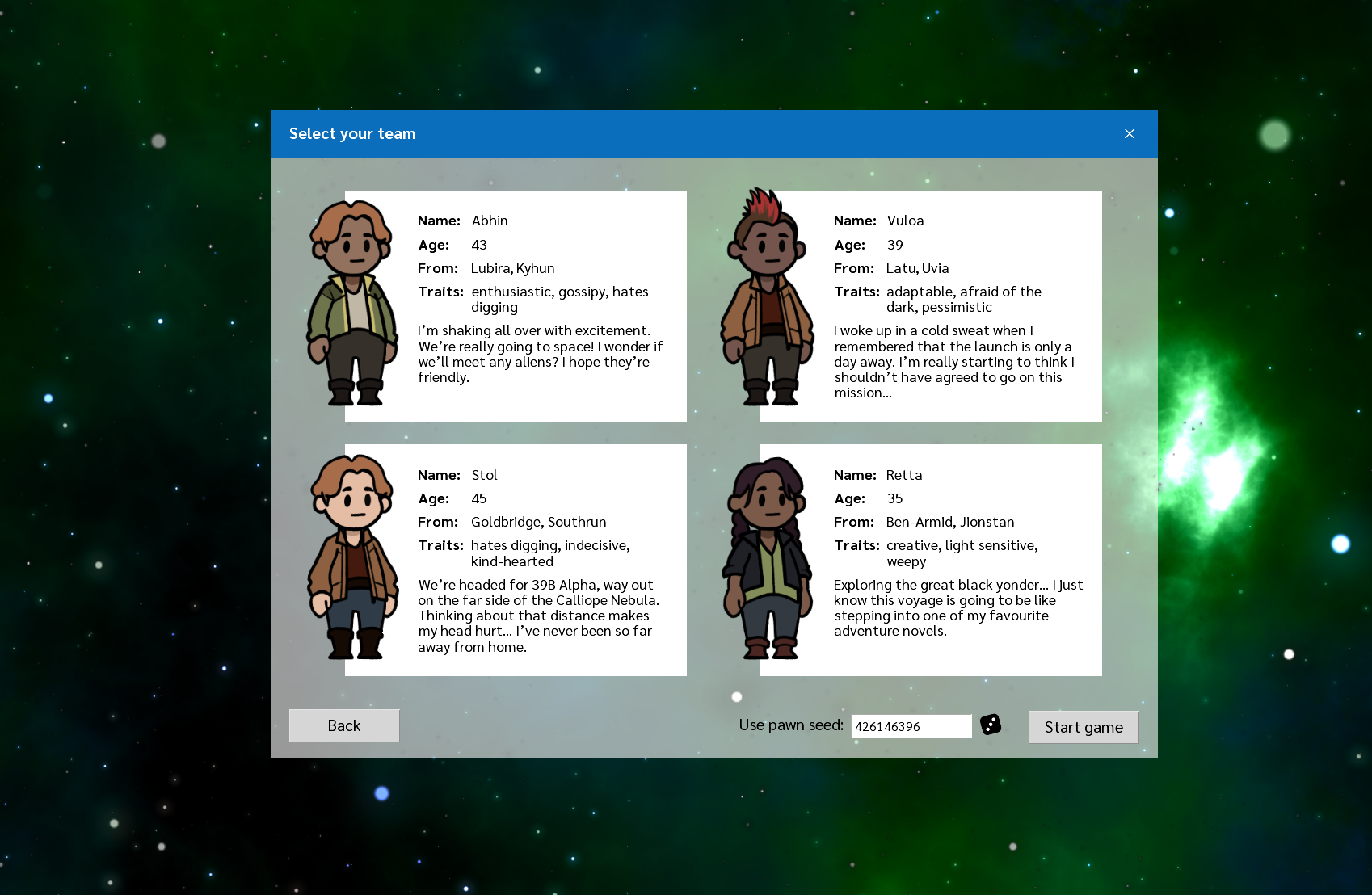
At the start of the game, you will now be presented with your team, and you can reshuffle them using a random seed. You can also re-use the same seed from a previous game to keep your previous team.

If you’ve received one of our exclusive team postcards, you can enter in this code here too!

Select your starting team and inspect their traits

[h2]New art and tutorial[/h2]

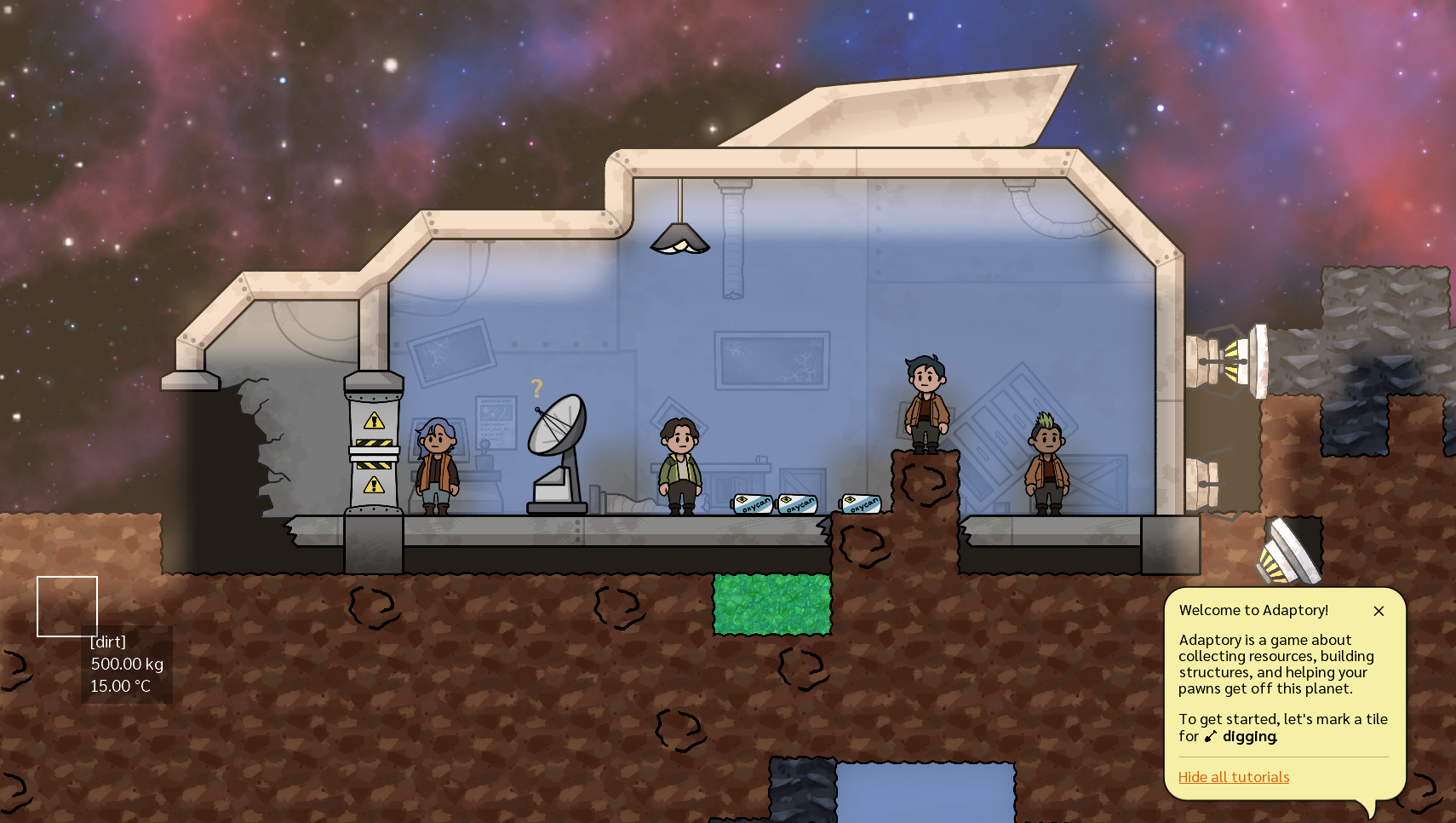
There is a lot of new art in the game! We’ve redone all of the solid elements (dirt, rock, ice, coal, etc.) and cleaned up the element edges tileset. We have also completely redesigned your crashed ship at the start of the game, with beautiful new art and a new base entrance.

The new crashed ship and solid element art – also showing off the new tutorial

Finally, I’ve also added a new simple seven-step tutorial to the game, to help new players get started. You can turn the tutorials on/off in the Options screen. I’d like to know if this tutorial is helpful or not – please let me know.

[h2]Conversations[/h2]

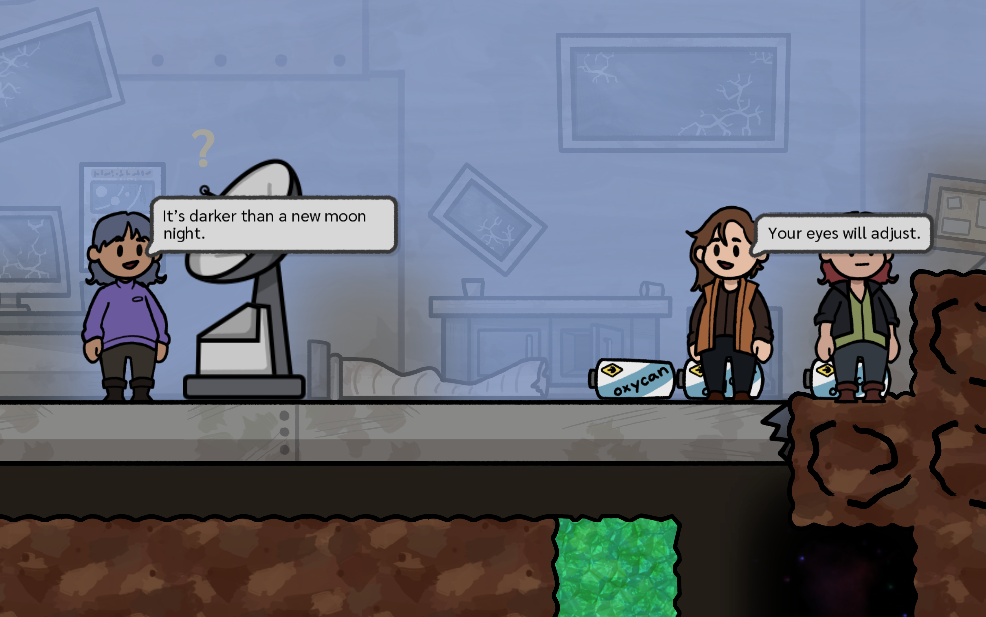
Pawns now have a “social” level, and talk with each other when their social levels are low. These appear as little speech bubbles in-game, and the text (and replies) are based on their personality types, their traits and buffs, and what’s been happening in game. Cass is going to be adding a lot more content!

Pawns now have conversations with each other about their experiences and observations of their world

[h2]Space exposure and background parallax[/h2]

There is now a new “space exposure” attribute on tiles in space – gases and liquids exposed to these tiles will gradually lose mass. (Previously this would only occur at the edges of the game world.)

We’ve also used this to add a new space background with parallax that is gorgeous 🥰

The new space background and fog of war in Adaptory

[h2]And a lot more[/h2]

  • Fog of war for unexplored areas
  • Added an inline feedback message when the player is unable to perform an action
  • “Dig-and-build”: you can now place build errands over solid tiles, and pawns will automatically dig them out first
  • Pawns no longer stand around idle in doorways
  • Pawns should no longer be spawned on the top of your crashed ship
  • Pawn pathfinding fixes
  • Trees now consider the light levels across all of their cells, not just their base, when calculating aliveness
  • Heaps of bug fixes and performance improvements


Full patch notes below.

[h2]What’s next?[/h2]

  • Save & load game
  • Configurable pawn priorities
  • Resource counters
  • Tools for streamers
  • Oxygen generators, plants, and food systems
  • And some new content


---

Release notes for Adaptory 0.8 (Alpha 6)


[h2]New Features[/h2]

  • Added a simple seven-step tutorial to the game; you can turn the tutorials on/off in Options
  • Added a brand new “New game” screen, where you can see the traits of your team before setting off. You can also enter in pawn seeds to get the same team each time
  • Added inline feedback messages when the player is unable to perform an action
  • New dialog art for reading diary entries
  • Pawns now write their diary entries using different fonts
  • Replaced all solid element art with new hand-drawn textures
  • Replaced the art and layout of the crashed ship at the start of the game
  • New “tile” tileset
  • Pawns now have a “social” meter, and talk with each other when their social levels get too low
  • Added a new space background with parallax 🥰
  • Added “space exposure” property to space tiles, not just the edge of worlds – gas and liquids exposed to these tiles will gradually lose mass over time
  • You can now place build errands over solid tiles, and pawns will automatically dig them out first
  • Added fog of war to unexplored areas of the world


[h2]Simulation[/h2]

  • Pawns no longer jam their heads into ship tiles when trying to access a build errand on the other side
  • Pawns no longer stand idle in a doorway – they will move to the nearest non-doorway accessible position
  • Trees now use the light level across all of their cells, not just their base, when calculating aliveness


[h2]Balance[/h2]

  • World generation can no longer replace dirt tiles inside the crashed ship with coal
  • Pawns should no longer spawn in the vacuum of space at game start
  • Increased battery storage from 100 W to 500 W


[h2]Internal[/h2]

  • Minimum window size is now 800x600 at startup
  • Improved quality of text rendering when against a transparent background (e.g. FPS counter)
  • Restyled debug console
  • More textures are now filtered, increasing render quality
  • Generated pawns now face in random directions at the start of the game
  • Added Return to Main Menu button in escape menu
  • Added close dialog buttons to all selected object panels
  • Improved the performance when trying to place many building errands at once


[h2]Fixes[/h2]

  • Fixed checkbox labels in options dialog word-wrapping too soon
  • Fixed windowed mode resetting to default dimensions after applying new options
  • Fixed crash if the game was paused while the viewport was very small (
  • Fixed crash on Windows Alt-Tab if the game was full-screen
  • Fixed a crash that could occur when a sad "investigator" pawn wrote a diary entry
  • Fixed console and sandbox panels hiding behind select pawn panel
  • Fixed a very rare crash at startup when loading YAML assets
  • Fixed a crash that could occur if a new game was started while another event was already happening
  • Fixed a rare bug where some interactive elements sometimes wouldn’t respond to clicks
  • Fixed pawns thinking they could access errands on the other side of solid tiles
  • Fixed a crash if you told a pawn to move outside the world bounds


Alpha 5 now on itch.io

Alpha 5 is now live! You can download a copy on itch.io for free.

If you find any bugs, issues, balance problems or suggestions, please let me know on Discord so we can keep improving the game! Thank you to everyone who have played previous versions and sent in their feedback and ideas. 🙂

---------

[h2]Revamped diary engine[/h2]

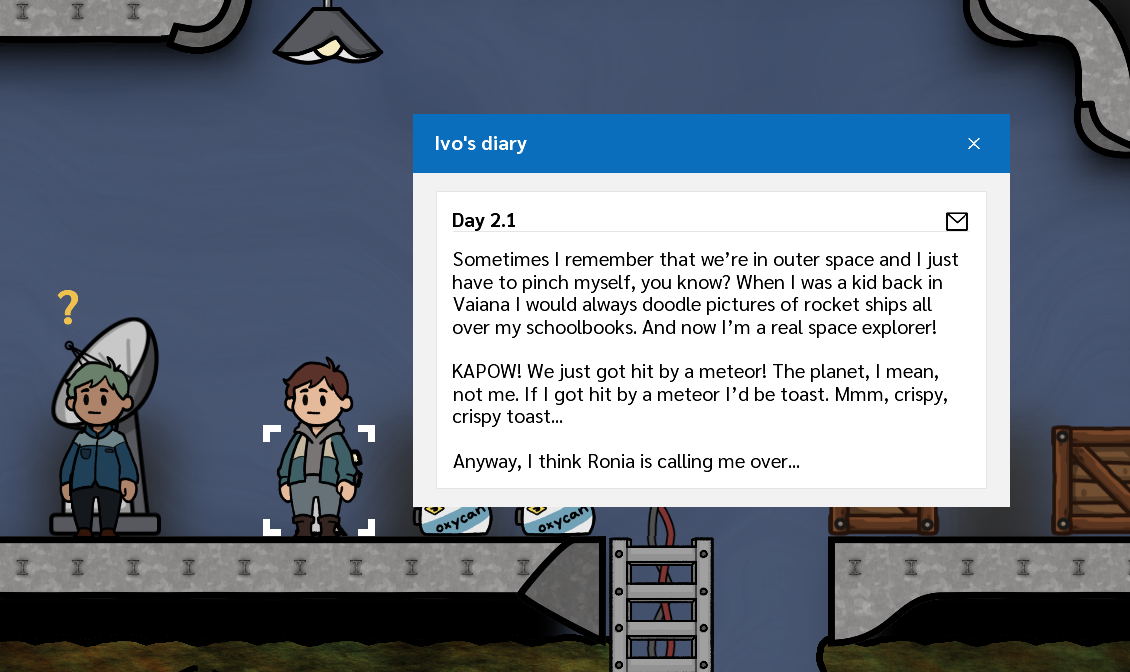
The diary engine has had a major overhaul, thanks to a grant from the NZFC Interactive Development fund. Rather than pawns writing diary entries immediately after an event occurs, the event may now become the topic of a future diary entry. As soon as the pawn wants to write a diary entry (generally once a day), they will select the most important topic to write about at that time.

A happy "enthusiast" pawn writing about a meteor event

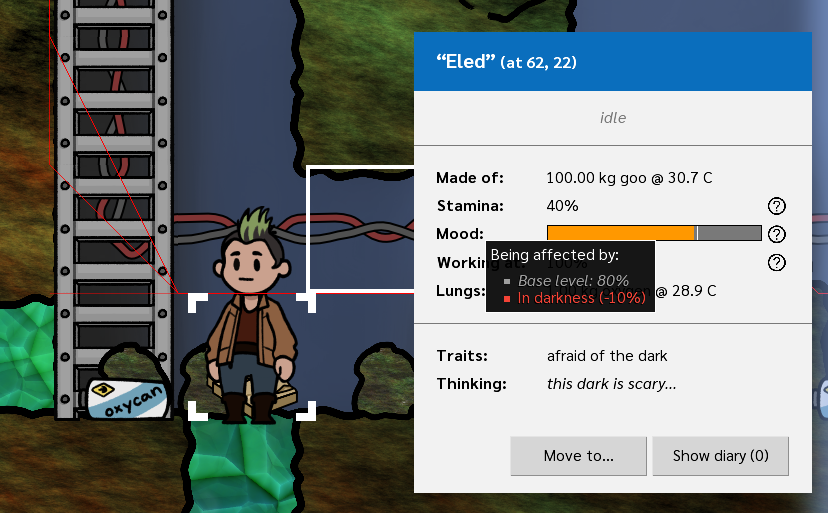
We’ve added in pawn traits, which affect how they deal with different situations. For example, a pawn that loves digging will work faster if they did a lot of digging recently, or a pawn that is afraid of the dark will get slightly sadder if their environment isn’t lit up. For now, each pawn will be assigned a single trait randomly.

Pawns now have one of four traits

There are also four new pawn buffs which impact your pawns’ productivity, happiness, and potential diary entries.

[h2]Liquid networks[/h2]

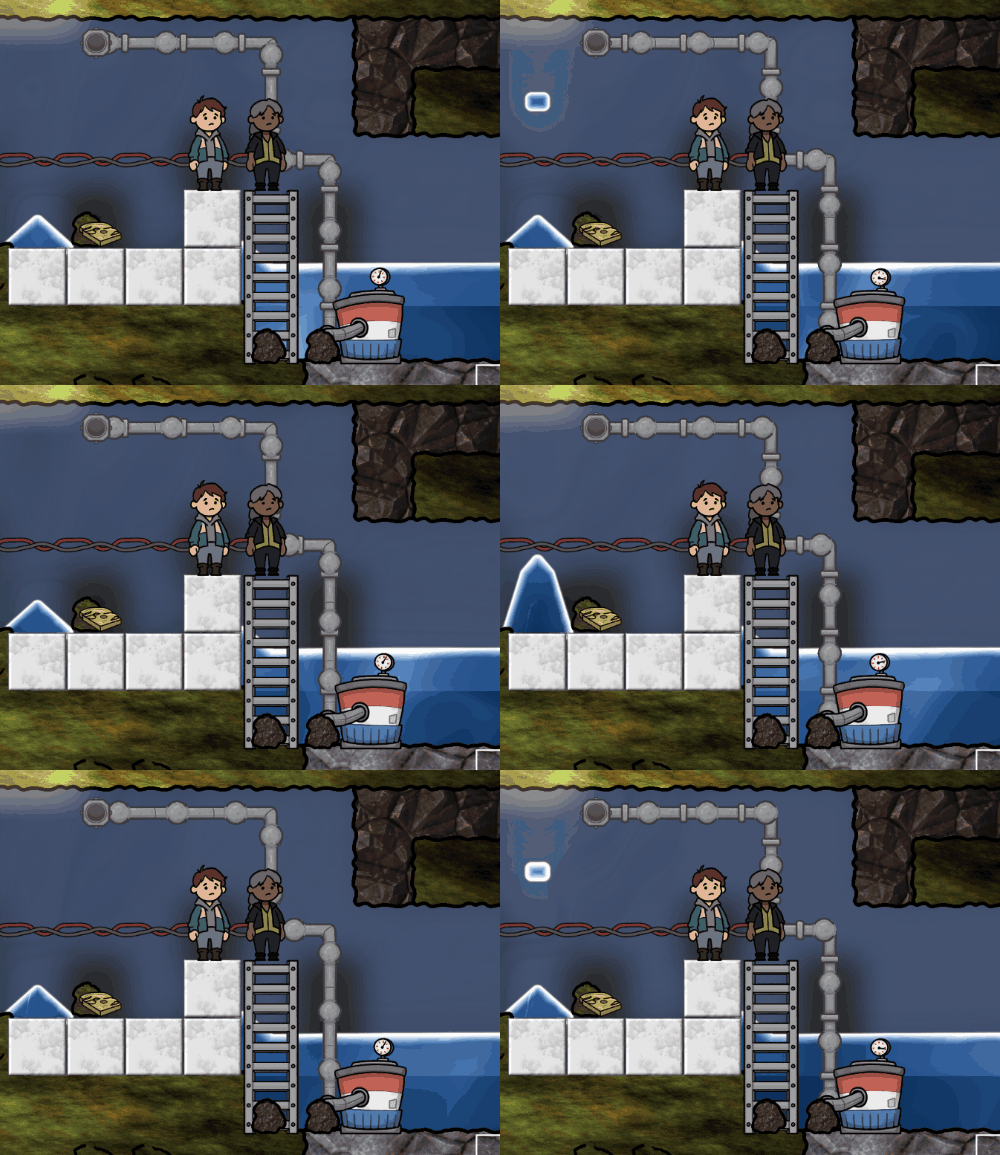
In Alpha 5, there are three new buildings for creating liquid networks – a way to suck up, transport, and release liquids throughout the world:

  • liquid pumps, which are powered buildings, that suck up liquids to put into the network;
  • liquid vents, that serve as exits for the liquid network; and
  • liquid pipes, which actually transport liquids in the network around (to the nearest vent).


A liquid pump moving water to a storage basin

In future updates these networks will tie into other buildings, such as an oxygen generator that will transform water into oxygen and hydrogen.

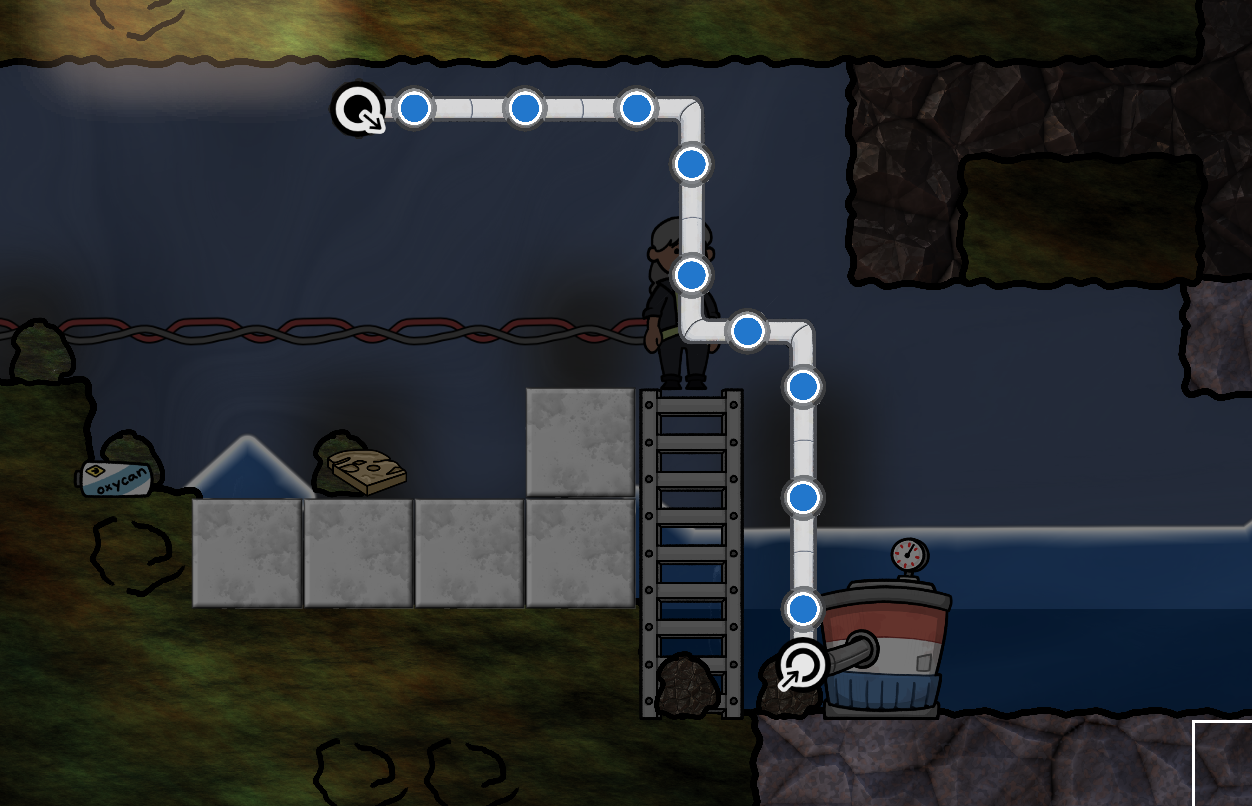
There is also a new liquid network overlay which shows your liquid network, and where the input and output points of the network are. This layer turns on automatically whenever you’re building liquid network-enabled buildings, or you can press F6 to toggle it:

The "liquid network" overlay layer, showing input and output points

[h2]Pawn quick-access bar[/h2]

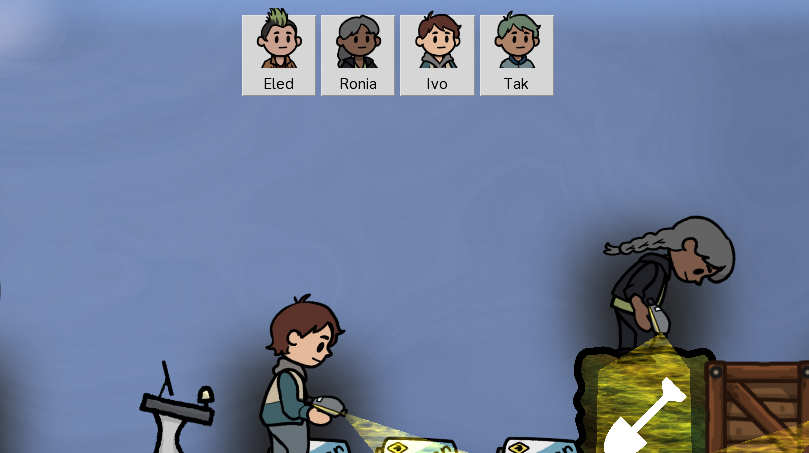
I’ve added a new bar to the top of the screen where you can see all of your pawns, their names, and their current state. You can see if they’re happy, sad, sleeping, or dead… well hopefully not the last one:

The new pawn quick-access bar

[h2]And a lot more[/h2]

There’s also improved pawn AI, new tree art, a new oxygen bar, an improved pause screen, closeable alert bubbles, graphics improvements, and a ton of bug and crash fixes. The full changelog is listed below!

--------

Release notes for Adaptory 0.7 (Alpha 5)


[h2]New Features[/h2]

  • New diary entry engine!
    • When an event happens in the world, or to a pawn, or a particular buff, that may become the topic of a future diary entry
    • As soon as the pawn wants to write a diary entry, they will select the most important topic to write about
    • Pawns use different diary templates based on their mood (happy, neutral, sad)
    • Rewrote most existing diary entries and added 12 new topic categories
    • Pawns no longer immediately write a diary entry at the start of the game
    • Diary entries are now shown in newest-to-oldest order
  • Liquid networks!
    • Added liquid pumps, vents, and pipes that can suck up and transport any liquids
    • Liquid pumps require electricity to function
    • Added a liquid network layer that shows points in the network where liquids can enter and exit
    • The liquid network layer can also be accessed with the keyboard shortcut F6
  • Added a new top bar for selecting and moving to your pawns
    • The top bar also shows their current mood (happy, sad, dead, etc)
    • Updated tree with new art, and changed dimensions to 1x2
  • Pawns can now have traits which affect how different buffs and situations affect them, and the diary entries they write
  • Selecting a pawn now shows what they’re thinking about – what’s going on, or their next diary entry topic
  • Issuing a move command to a sleeping pawn will now wake them up
  • When pawns have low oxygen levels, an oxygen bar will now appear below them


[h2]Simulation[/h2]

  • Buildings and pawns that are buried or otherwise covered by impassable tiles can no longer emit or absorb nearby elements
  • When pawns are low on oxygen, they will now look for the nearest tile that has at least enough oxygen to sustain them, rather than the nearest tile that has any oxygen


[h2]Balance[/h2]

  • New pawn buffs
    • in darkness, which normally has no effect
    • slept on floor, which reduces pawn happiness if they recently slept on the floor
    • did lots of digging yesterday, if they spent more than 20% of their time yesterday doing dig errands
    • someone recently died, if any pawn died in the last day
  • New pawn traits
    • light-sensitive, which negates the happiness buff from being in bright areas
    • afraid of the dark, which makes pawns unhappy if they’re in the dark
    • loves digging and hates digging, which increase or decrease happiness and pawn speed if they did lots of digging yesterday
  • Three additional pockets of water and oxygen are now generated in the world, just below the surface
  • Increased the “dangerously low” oxygen level for pawns from 25% to 30%
  • Pawns now catch their breath until their oxygen levels are back to 100% (was 25%)
  • Reduced the maximum length of the solar flare event by 25%


[h2]Internal[/h2]

  • Added current keybindings list to readme.txt, until there’s a proper control panel or configurable key list
  • Added “Report on Discord” link to error capture screen
  • Added check ✔ to selected items in dropdown menus
  • Game actions can now be done while paused – no need to unpause the game to apply changes
  • Improved the way that sprites are animated between ticks during a game pause
  • Reduced the size of world action buttons so more can fit on the screen at once
  • The UI scale range in options is now rounded to the nearest 5%, to improve accessibility – please let me know if this is too big or small!
  • Added border around the screen when the game is paused
  • Errands that were only accessible by dead pawns are no longer shown as accessible
  • Alerts that refer to a fixed-period event are now closeable


[h2]Fixes[/h2]

  • Fix dropdown hover not aligning up with dropdown contents
  • Fix a (very) rare crash if absorbed or stored mass in an object was nearly zero
  • Fix pending building outlines being hidden by doors and other animated buildings
  • Fix after applying settings, the menu screen behind the options panel could be dismissed with escape
  • Fix a bug where the game world and buttons could be interacted with with an open dialog (e.g. welcome, end of game)
  • Fix a crash where trying to build a ladder near the edges of the world
  • Fix a rare crash when a game event could be triggered before the UI had finished loading
  • Fix reading one pawns’ diary entries would mark ALL pawn diary entries as read
  • Fix digging tiles off-screen would sometimes not be displayed correctly until another tile was dug in that same chunk
  • Fix a bug where pawns at the bottom of a 1-wide tile refused to do errands unless they had another accessible space next to them
  • Fix tile information on hover showing what items are buried, now it shows “(buried item)”
  • Fix mouse cursor occasionally getting stuck when clicking a link
  • Fix credits dialog close X was not positioned in the header