360 Degree Interactive Screenshots - Client Update 9/25/2018
Introducing: 360 Interactive Screenshots! They are the new 3rd option on the F5 screenshot menu. These new screenshots let you look around & click on stuff to listen to music, watch videos, or launch Steam games right from your web browser!
Here's an example of what a 360 Interactive Screenshot is:
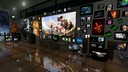
You can look around by dragging with your mouse, and you can click on stuff to watch it or access its shortcut.
360 Interactive Screenshots are very awesome, but unfortunately because WebGL doesn't let you load local files as textures, the new 360 interactive screenshots only work if you upload your screenshots to a web server. But that's no problem for all you people who have a web server! ːfallingmanː
Here's some fixes, additions, and improvements in today's update as well. Hope you are all having a fun time in your worlds & I'll see you in the metaverse! ːilyː
Here's an example of what a 360 Interactive Screenshot is:
You can look around by dragging with your mouse, and you can click on stuff to watch it or access its shortcut.
360 Interactive Screenshots are very awesome, but unfortunately because WebGL doesn't let you load local files as textures, the new 360 interactive screenshots only work if you upload your screenshots to a web server. But that's no problem for all you people who have a web server! ːfallingmanː
Here's some fixes, additions, and improvements in today's update as well. Hope you are all having a fun time in your worlds & I'll see you in the metaverse! ːilyː
Change Log
- Improved the AArcade Launcher to be automatically bypassed unless you use the -config launch option.
- Added the ability for the featured servers to be rotated. They will rotate once a week, for now. Every Wednesday.
- Added support for creating 360 Interactive Screenshots.
- Added a way to refresh the cached achievement images stored for a Steam game's stickers.
- Added support for map-specific CFG files in cfg/map_name.cfg after loading a map.
- Added Select to the context menu. It is useful for the rare cases when you want to select an object that has no collision mesh to click on.
- Added Look At Me to the context menu. It causes the object to continually look at you, like a sprite.
- Added an "Advanced" section to the context menu that put the following commands into it: Autoplay, Export, Model, Look At Me, Select.
- Added Web Screenshot URL to the Main Menu > Settings > UI tab. This is an advanced feature that lets users who plan to upload their interactive screenshots to their web server to specify the URL of the web folder they will be hosting the images at. This allows proper META tags to be generated in their screenshots, which makes them look very nice when shared in chat applications like Discord or Steam PMs.
- Added the command "manual_pause", which can be bound to a button using a console command like this: bind p manual_pause
- Added a -vr launch option that enables experimental VR support. Contact me in Discord if you are interested the details. Note that you have to use the following console command after loading into your map also: vrtoggle
- Fixed an issue that could cause odd behavior if people click Main Menu before AArcade is actually done starting up.- Fixed a bug with holding left-mouse for a list of nearby objects that could sometimes cause a crash.
- Fixed an issue with showing a Steam game's achievements as stickers.
- Fixed a crash bug that happened when taking an interactive screenshot with no objects within view.
- Fixed a bug that caused garbage JavaScript at the end of the interactive screenshot HTML files.
- Fixed a bug that could cause a crash if quick loading into a map after you deleted the screenshot that it tries to quick load into.
- Fixed a bug that caused interactive screenshots to be generated when the player just wanted a regular screenshot.
- Removed the Debug Info button from the text main menu.