1. Anarchy Arcade
  2. News

Anarchy Arcade News

Maintenance & Fixes - Client Update 8/27/2019

Today's small update fixes the old bug of the CD Headphones Wallmount cabinet sometimes disappearing from your cabinet list, and also fixes the syncing of custom skybox materials in user-created maps.

Note that your AArcade will take a few extra seconds to load up as it finalizes this update the next time that you launch it - then it'll be back to normal!

Party on!

Change Log
  • Added Wireframe Toggle to the Commands tab.
  • Fixed a bug that caused certain items & objects to seem to forget that they existed. (Most commonly the CD Heaphones Wallmount.)
  • Fixed a bug that caused 3rd person camera to initiate upon map transition when a custom player model is being used.
  • Improved support for the morphmodel console command to be given a model name explicitly.
  • Improved syncing of skybox materials used in custom maps.
  • Improved Adopt Model to work on models bundled into maps.


NOTE

At 10:55AM I pushed a hotfix that resolved crash issues with 1st-time-users and some users with odd model IDs in their library.

Hammer Time - Client Update 8/22/2019

Do you make your own levels in Hammer? Today's update makes it easier to share your creations with others with support for cloud-transferring of your custom created maps! It also adds a new Uploads panel to the Transfers Tab, so that server hosts can see what assets their guests are still waiting on.

Filter Servers By Universe

The server list can now be filtered by universe - so it'll be easier to find other servers by the same author by clicking on their avatar at the top of the server list.

Note that older servers won't show up in the universe list because they were created before this feature was added - but they are still joinable through the regular list.

Project Manager (Maps > Level Designer tab)

Advanced users are using the Maps > Level Designer tab to create custom maps for themselves & their friends to use. Maps that are created through this project manager are able to be synced dynamically in multiplayer sessions - so that your friends always see your latest additions & changes that you've made since last time you hosted.

When hosting a server on one of the maps that you are creating, you'll notice a new menu on the bottom left-hand corner of the Main Menu. This is the Re-Upload Map panel. You click this to put your custom map onto the session cloud, or to update the version in the cloud after you've made changes to your map in Hammer & recompiled.

That's it! Now your friends can check out your custom map creations easily in multiplayer with you. Party on!

Change Log
  • Added support for cloud-transferring of custom maps created from the Level Design tab.
  • Added an Uploads section to the Transfers tab, when you are live-hosting a server.
  • Added a "Re-Upload Map" button to the Main Menu when hosting a server on your own custom map. This lets you update the version your guests receive when they join.
  • Added VR Mode Snap Turn as the default VR turn method.
  • Added VR teleportation system for locomotion as comfortable as Count Dooku in pajamas.
  • Improved VR Mode to automatically go into VR mode upon loading an initial map.
  • Added Z Far and Z Far VR to the Main Menu > Settings > Camera tab. Adjusting them also impacts z-fighting on far away holograms against the walls behind them. (Only advanced users would want to adjust these values.)
  • Improved the Server List to let you filter by User Universe.
  • Improved the Server List to always consider cloud-available maps as joinable.
  • Improved obsolete Legacy Support to be opt-in only. (Reduces new user install size by over 500MB.)
  • Fixed a missing material in hub_construct.

6 New Cabinets, New Hub Map, & Events - Client Update 8/10/2019

Today's update brings 6 new cabinet models along with a new map that test out improvements to the upcoming Nodes feature.

6 New Cabinets Models
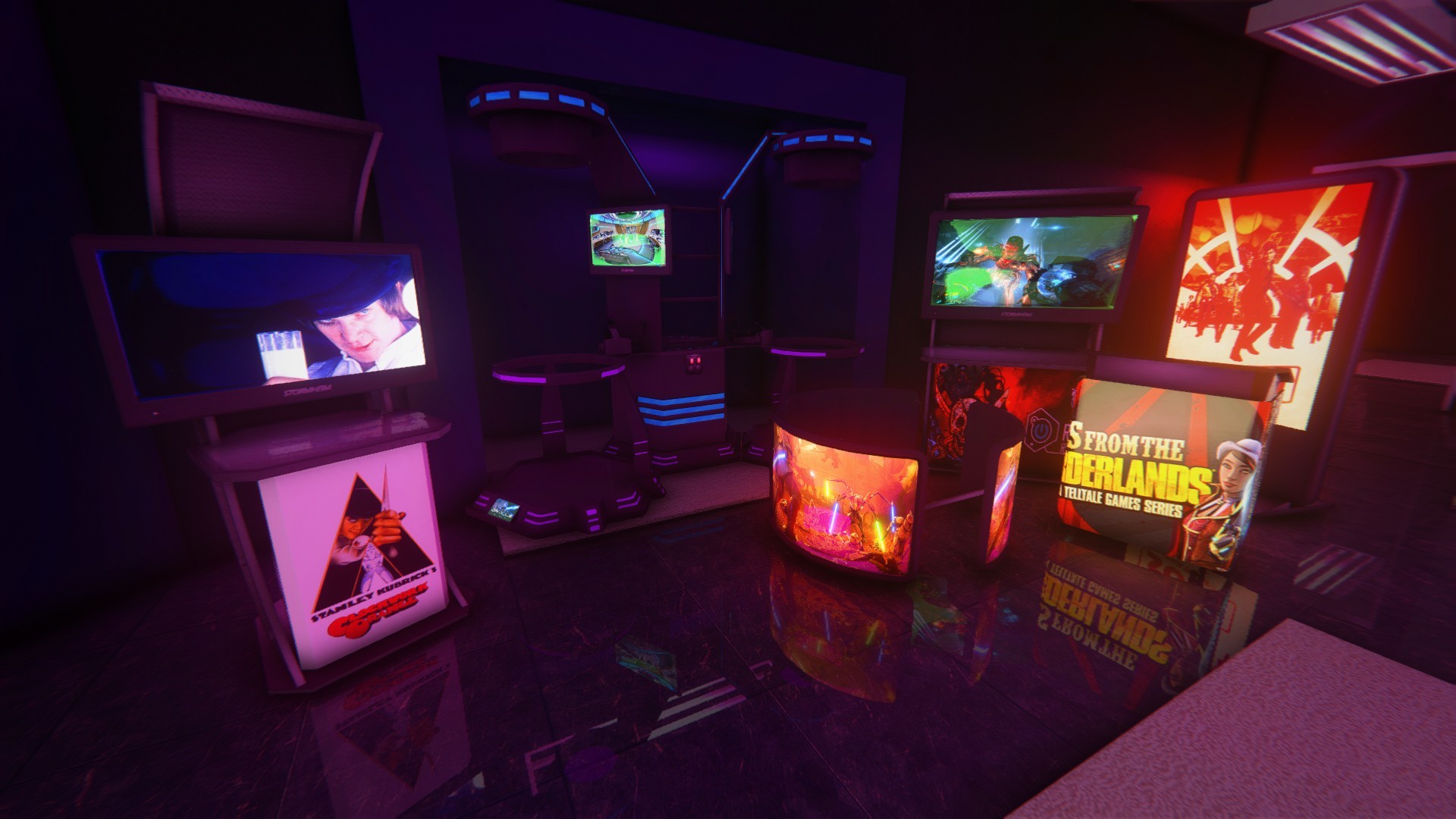
From left to right: Moon Kiosk, VRCade, Triple Force, Moon Kiosk Wide, Podium, Monolith.

Add some more variety to your arcades with these stylish new cabinet models. :) The Monolith and Triple Force cabinets are animated. The Monolith The Triple Force also allows you to change which image channel is used on it using Skins. The VRCade cabinet flashes colors in response to your system audio levels, and also allows you to toggle the VR gear on the shelf on/off using Body Groups. It was requested by AArcade user FunkyPixie, who also graciously donated $45 dollars with his request. (Thank you FunkyPixie for the support!)

Also, a bug has been fixed that might have caused the previous set of new cabinet models to be missing from your list in the past. So you might notice even more new cabinets on your list than these 6.

New Hub Map & Upcoming Nodes Feature

This new map looks strange, but that's because it IS strange. Hub maps are designed to be used with an upcoming feature called Nodes. Nodes are simple physical clusters of items & objects that an instance of can be spawned into any of your worlds. Hub maps, such as the new map hub_construct, are like node factories. They are where you create, edit, & save your nodes.

Nodes are an upcoming feature that are not fully implemented just yet, but are already partially working for users to start testing out. Full instructions for nodes will come in a few weeks when they are completed, but for now the main thing to know is that pulling the leaver next to a node is how you manage them. And also that nodes show up in your library like regular items. If you need help in the mean time, the Twitch or the Discord are the best places to get live chat with AArcade users.

AArcade Creators Meetup & Arcade Tours

Every 2 weeks AArcade users who create addon content using hard-mode tools (like Hammer, Blender, Photoshop, etc.) and I meet in an AArcade world where screenshots of the stuff we are working on are archived onto the walls. We talk about what people have been working on lately, check out the screenshots together that people have shared, and discuss upcoming features & development of AArcade. This is called the AArcade Creator's Meetup, and here is the Twitch VoD of the last one we had on Aug. 3rd: https://www.twitch.tv/videos/462872103

After this event, we all go and meetup with other AArcade users to tour multiplayer arcades together. Often the person who created the arcades we visit are in there with us, guiding us around and telling us about what we're looking at. This is called the Arcade Tours event, and here's the Twitch VoD of the arcades we toured last time on Aug. 3rd: https://www.twitch.tv/videos/462873799

If you'd like to take part in these live events, or just want to connect with the AArcade community, you can find us often at the Anarchy Arcade Twitch channel (twitch.tv/AnarchyArcade), or always in our Discord: https://discord.gg/9FSCDuJ

I'll see you around the metaverse! Party on!

Change Log
  • Added 6 new cabinet models: Triple Force, Podium, Moon Kiosk & Moon Kiosk Wide, Monolith, and VRCade.
  • Added the new map hub_construct for building & testing out the upcoming Nodes feature.
  • Added a new node style named Loft. It's like a floor node, but taller.
  • Fixed a bug w/ nodes that could cause nodes to spawn in duplicate objects.
  • Fixed a bug w/ nodes that could cause incorrect object orientations when saving.
  • Fixed a bug that caused some people not to get new cabinets added to their default library in AArcade updates.
  • Fixed a bug that caused Body Groups to appear blank on cabinet models.


NOTE: The new map, hub_construct, may not appear on your list if you have disabled detecting maps at AArcade startup. You could go to Main Menu > Settings > Import tab > Maps button in this case to detect it.

Quick Spawn & Paste - Client Update 8/2/2019

Greetings arcaders! Today's small update will help you add new things to your library faster. You can now CTRL+V paste a URL while in walking-around mode without bringing up any menu at all. This update also adds a new Quick Spawn Items option to the UI tab that lets you bypass the properties menu when adding new items.

Change Log
  • Added support CTRL+V pasting of URLs while in walking-around mode.
  • Added Quick Spawn Items to the Settings > UI tab. It allows you to skip the Create Item menu when spawning new shortcuts into your world. (You can always Edit Item to modify them afterwards.)
  • Removed Tutorial Nag from the Settings > UI tab because it was obsolete.
  • Improved the Servers Menu to load faster & prepared it for further improvements.

Body, Skin, & Vehicles - Client Update 7/25/2019

A Skin is the material used to give an object its looks & colors. Body Groups allow objects to have alternative and/or optional 3D parts attached to them. Today's AArcade update adds support for both Body Groups & Skins to the Transform menu!

Body Groups

If a model supports body groups, they'll be listed in the new Body Groups tab of the Transform menu. Each body group has its own name & slider. Some body groups can just be turned off/on, while others might have many different values to choose from! Note that most models do not utilize body groups.


Skins

If a model supports skins, they'll be listed in the new Skins tab of the Transform menu. Skins only impact the look & color of a model. Note that most models do not utilize extra skins.


Visual Vehicle Override

We've always been able to spawn the default HL2 Air Boat, but its looks are so basic & boring. Today's update lets us override the air boat's visual model with **any** of our own custom addon models.


Only the visual model is replaced with our own static addon model, not the behavior of the air boat, but even this is a big step up from the ugly air boat.
This feature takes a couple steps to setup, but is worth it especially for your arcades in very large maps!


First, you have to spawn your model into the world. Next, you middle-click on it, choose Advanced, then Flag As Vehicle. After that, it'll appear on the new Settings > Vehicle tab.

The Vehicle tab allows you to spawn your vehicle, but also allows you to adjust the camera position when riding in your vehicle, as well as adjust the offset & rotation of the visual model you are overriding the air boat with. Hover over any of the sliders for in-game help text about what they do.

Change Log
  • Added support for Body Groups & Skins. (Also added them to the Transform Menu while in Object Placement Mode.)
  • Added Mouse Wheel Up / Down to be enter/exit third person mode & camera zoom. (Only when weapons are disabled, otherwise it is switch weapons like normal.)
  • Added a Visual Vehicle Override system so that we can drive better vehicles than just the default HL2 Air Boat.
  • Added Flag As Vehicle and Unflag As Vehicle buttons to the Object Properties menu. Flagging an object's model as a vehicle adds it to the new Settings > Vehicle tab.
  • Added a Vehicle tab to the Settings menu. It will only be useful after you've flagged some of your addon props as vehicles. It is where you can adjust the camera & model overrides for each vehicle model you flag.
  • Added Vehicle Menu and Vehicle Remove All Spawned to the Commands tab. Also renamed the Air Boat command to Vehicle Spawn.
  • Added Camera Vertical to the Settings > Camera tab. It lets you control the vertical offset of the camera while in 3rd person mode.
  • Added help text when hovering over tab icons in the Tab Menu.
  • Added a Close Task and Close All Tasks buttons to the Commands tab. Useful for people who have Auto-Close Tasks turned off.
  • Added various console variables & commands associated with the new vehicle system: vehicle_menu, setvehiclemodel, air_boat_model, air_boat_offset, air_boat_angles, vehicle_eye_offset.
  • Improved addon model compatibility & stability. (ie. Fixed a crash bug that lots of models had.)
  • Improved range of motion of the values on the Settings > Camera tab.
  • Improved the Commands tab by renaming Toggle Libretro, Toggle Mute, and Stop Sounds to Libretro Auto-Play Toggle, Sound Mute Toggle, and Sound Stop respectively in order to make them easier to find in the list.
  • Fixed various issues with saving new nodes. (The rotation bug with objects positioned at odd angles is still an issue though.)
  • Fixed the togglephysics command to show up in console search & auto-complete.