1. Anarchy Arcade
  2. News

Anarchy Arcade News

Portals & Sky Paint - Client Update 2/25/2020

Today's update improves screenshot portals, adds the ability to paint skyboxes, and improves humanoid model animations!

Sort By Interactive Screenshots

The F6 Library Browser has been improved to allow sorting by interactive screenshots. This means you can take an interactive screenshot and use it as a makeshift favorites list to spawn individual items & props from it!

Portal Cabinet

Spawning screenshots as in-world portals has been improved - including the ability to spawn multiplayer servers as in-world portals. So today's update also includes a fancy new cabinet called Portal that allows screenshots to look like rifts in time & space.

Note that when you create an in-world portal from the MP servers menu, you'll probably want to decorate its item's Screen field to be something custom instead of the default server image.

Skybox Painting

The F8 Paint Menu has been updated to support skybox painting. There are 2 new buttons there: Pick Skybox and Reset Skybox. When you click on a skybox material in your palette it will automatically know that it's meant for the sky & apply itself there.

Note that HDR and LDR skybox types are different. You can only paint an HDR skybox with an HDR material - and vice versa.

Animation Sequences

Today's update fixes a bug that caused a lot of animations to fail to show up on the sequence menus. Most notably - all of the HL2 civilian animations. To accommodate all of the new sequences, the Transform menu has been improved to load sequences in as batches instead of all at once. Be sure to favorite the sequence names you like, and hide the sequence names you don't think you'll ever use!

I'll see you all in next month's update news, or you can come say hi in my Twitch channel (twitch.tv/AnarchyArcade) or on our Discord server! You. Are. Invited. https://discord.gg/9FSCDuJ

Change Log
  • Added Interactive Screenshots to the F6 Library Browser. It allows you to use screenshots as dynamic favorites lists. Note that only objects that have collision boxes get detected.
  • Added a new cabinet called Portal. It is useful for spawning screenshot or server portals - or just watching videos on. :)
  • Added support for painting skyboxes to the Paint tab. Also added Pick Skybox and Reset Skybox to the Paint tab.
  • Added "Auto/Global Rotation" to the Transform Menu. Switch it to Global if you want to spawn something perfectly flat even on a slanted surface.
  • Added a Spawn As Object button to each server in the Servers menu. Note that you can then decorate these portal items w/ a web screenshot if you wish.
  • Added Camera Attract Next/Previous to the Commands tab. Also improved them to work even if nothing is currently selected.
  • Added a Send To Favorites sub-menu to items in the EZ Library Browser. Click & hold on the favorites button to be able to choose which favorites list to add the item to.
  • Added Input Lock to the Action Bar commands list. It will allow you to lock input to your selected object, as if it were fullscreened.
  • Added Camera Rotation Lock to the Commands tab. It locks the 3rd person camera's rotation, allowing you to look at the camera.
  • Added Object Look At Me to the Commands tab. Also improved it to be a toggle, and to work on the next nearest object if none are under your crosshair.
  • Added the console command adopt_material. It will adopt the material that is under your crosshair into your aarcade_user/custom/adopted folder. This is useful when you want it to show up in your Hammer material list.
  • Added a "Reconnect Twitch" button to the chat menu. It should fix your Twitch chat if it bugs out. Note that sometimes it has to be clicked multiple times to work still :S.
  • Improved animation sequences on HL2-skeleton models. You'll notice many hundreds of animation sequences you can use now. Remember to favorite the ones you like the most, and hide the ones you think you'll never use. This animation update also expands player model compatibility. (Note that if you already had HL2 installed, then you already had this "expanded" player model compatibility.)
  • Improved many of the Commands Tab actions to be toggles instead of needing different actions for on/off. Also renamed many of the commands to appear in more appropriate alphabetical listing.
  • Improved the Universes section of the server list to properly show everybody's universe.
  • Improved the travel menu to support screenshots as well as server portals.
  • Improved model thumbnail generation to automatically hide models that crash AArcade at least once.
  • Improved Import Models and Import Steam Games to be much faster when adding large amounts of new entries.
  • Improved Tiny Mode to also adjust the Near Z render distance to prevent clipping issues with the floor.
  • Improved the Transform Menu's cabinet categories to scroll, if needed.
  • Fixed a bug that made slideshows not work with folders that had the # character in their path.
  • Fixed a bug with drag & drop not working with local folders that had # symbols in them.
  • Fixed the rotation snap on the Roll attribute arrows in the Transform menu to rotate in the proper directions.
  • Fixed a bug that caused hidden props to still show up in the mouse wheel list. (Re-implemented from a previous rollback.)
  • Disabled the lowest zoom level on the F6 library browser until various bugs with it are resolved.


NOTE
At 1:15PM Pacific time I pushed a hotfix to remove a debug button that I accidentally left on the main menu. ːilyː

NOTE 2
At 2:45PM Pacific time I pushed another hotfix to fix screenshot teleporting within the same map you are already in & teleporting to SP maps that don't have screenshots.
New Cabinet Models

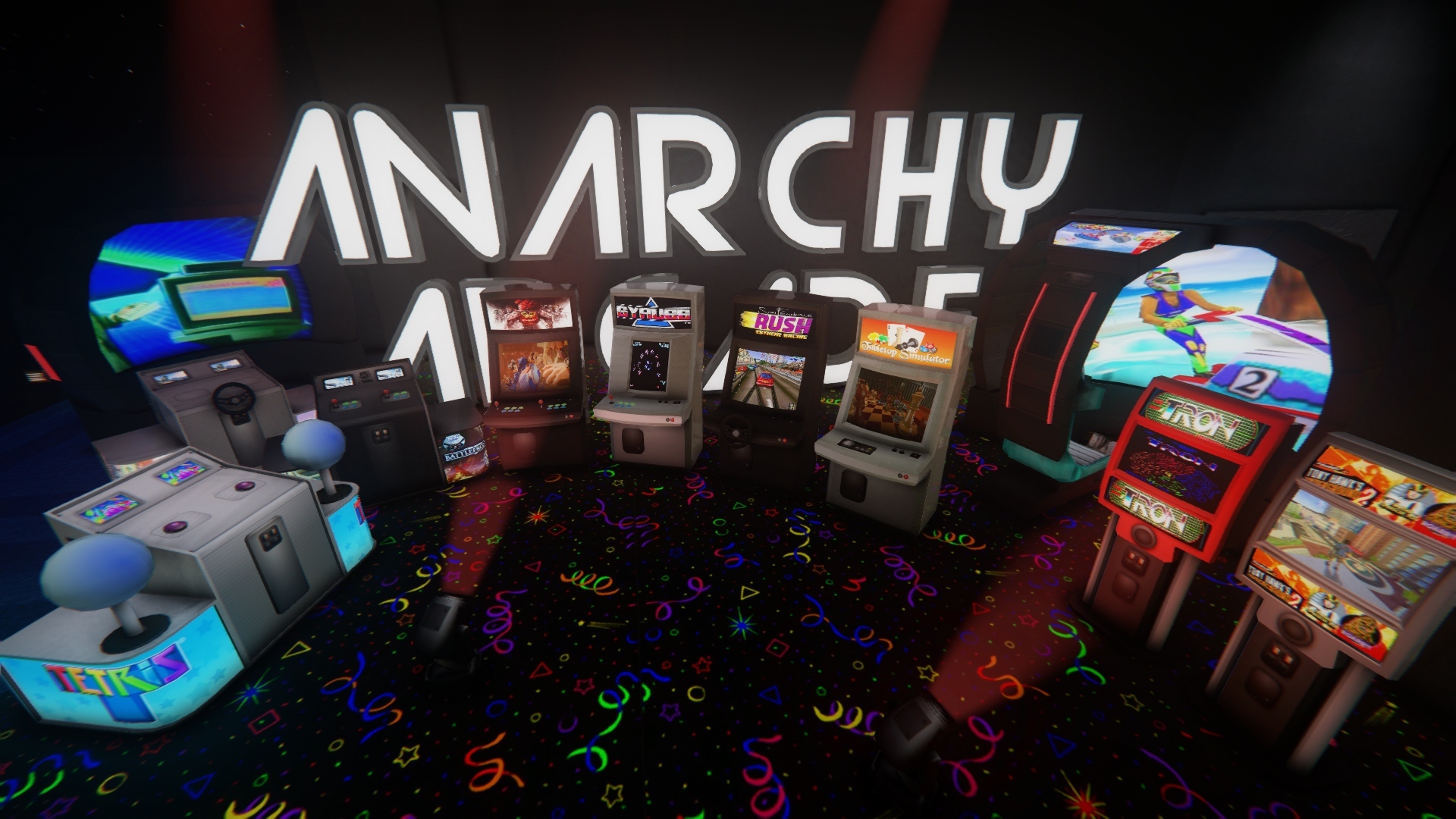
Greetings! Today's update brings 4 new cabinet models into the mix: Shaft, Chamber, Fatty, and Jumbo Deck. They have many variations in their Body Groups plus the Fatty and Jumbo Deck have alternate skins too! Each one is rigged up with attract camera animations, so pressing E on them will sent you into an automatic showcase of what ever you have inside of it!


[previewyoutube][/previewyoutube]

Community Hammer Jams

One weekend every month a handful of us who enjoy building worlds in Hammer get together in the Discord & on Twitch to do 2-day game jam / hackathon style map building marathon. We all agree on a simple & generic theme and then each create our artistic interpretation of that theme as a new custom world in Anarchy Arcade.

It's a lot of fun. We learn a lot about level design, logic scripting, and other game design elements. Plus we get to use our creations as our 3D desktops for the years to come. ːilyː

Here are the very brief highlight videos of the worlds we've created in our 2 previous Hammer Jams!
[previewyoutube][/previewyoutube]
[previewyoutube][/previewyoutube]

Our next Hammer Jam event will be announced in early February, and the theme is expected to be to recreate a set from our favorite cartoon show. Hope to see you all there!

By the way, if anybody needs an invite to the Discord where the community stays in touch, here is your invite!
https://discord.gg/9FSCDuJ

Change Log
  • Added 4 new cabinet models: Shaft, Chamber, Fatty, and Jumbo Deck.
  • Added the ability to try out the +precache_instances 1 launch option, which will cause all instances to load much faster in Singleplayer mode. (Note that due to a bug that increases the chances of crashing when loading the same instance over & over again, precache_instances is set to 0 by default until I am able to resolve this bug.)
  • Fixed a bug that caused hidden cabinet models not to show up in the cabinet select screen. (By reverting the fix for "hidden entries still showing up on the mouse wheel prop list" for now.)


[h3]Note[/h3]
At 1:01pm Pacific I pushed a hotfix so that the +precache_instances 1 launch option would correctly be disabled (set to 0) by default. You can still add +precache_instances 1 to your launch options to try it out - as intended. And it will be on by default in a future update after I polish it up a bit.

Back To The Grind - Client Update 1/4/2020

Happy new year arcaders! Today's update adds the options to freeze world physics props automatically & to make node origins invisible (instead of the little tablet.) Also the Move Object/Clone Object/Player Model Morph commands have been improved so that they use the next nearest object if there isn't one directly under your crosshair - which is great for positioning holograms!

Change Log
  • Added Hide Node Origins to the Settings > General tab. Node origins will still exist in-game, but be invisible.
  • Added World Physics Props to the Settings > General tab. If disabled, all the world physics props will be motion-disabled.
  • Added the following 2 console variables for debug purposes: debug_object_spawn 1 will log the object ID of each object into console.log prior to spawning them into the world. And skip_objects OBJECT_IDs_HERE will skip the specified comma-separated object IDs when loading into maps. These are to help troubleshoot the rare cases of not being able to load into an arcade save that has worked fine for you in the past.
  • Improved the Move Object, Clone Objects, and Player Model Morph commands to automatically grab the next nearest object if there is no object directly under your crosshair.
  • Improved the Move & Clone Object commands to utilize the last used transform on objects.
  • Improved CTRL + V work for pasting local file paths in addition to web URLs.
  • Fixed a bug that caused the Advanced Library Browser to not find any of your nodes when trying to load nodes from the leavers in hub_ maps.
  • Fixed a bug that prevented new cabinets from showing up in some users' libraries.
  • Fixed the Unhide button on the Object Properties menu to actually unhide the entry in your library like it's supposed to.
  • Fixed a bug that caused hidden entries to still show up on the mouse wheel prop list.
  • Fixed a bug that caused objects to always be rendered after they'd been highlighted w/ the glow effect at least once.
  • Fixed some console spam about tint colors.

Legs, Slideshows, & 3D Text - Client Update 11/9/2019

Greetings! Here's the run-down on what's changed. And as always, if you have any questions/feedback or would like to see me demonstrate how to use any of these features, you can drop into my frequent live Twitch streams and talk to me personally: http://www.twitch.tv/AnarchyArcade

Multiple Embedded Tasks Speedups

Today's update improves AArcade's ability to render numerous embedded tasks onto in-game screens at the same time. Why, you ask? Simple. Because people request it. So have fun multi-tasking on in-game screens! And (r)emember, just look at a screen and press the R button to set it on continuous play. You can hold TAB to manage/close your in-game tasks.

Slideshows (For Local Images)

Have a folder full of images? Just drag & drop one of the images to spawn it into your arcade. Then, middle-click on it and go to Advanced > Slideshow to transform it into a slide show of all the images in the folder! Note that slideshows only play when their object is active - and you can have as many slideshows active at the same time as you wish.

Drag & Drop Improvements

Now you'll be able to drag & drop images/URLs from standalone web browsers & even the games from the Steam client itself, in addition to local files.

3D Text Objects

Now, in addition to Landscape & Portrait, you'll also be able to choose 3D Text as a layout option. This will cause 3D letters to spawn on your object, allowing for some great signage. You'll want to use the new "Clear & Invisible" cabinet model on your 3D text objects - as they need no cabinet screen. (Newly created text cards will be 3D & use the appropriate cabinet by default.)

First Person Legs

Did you know most FPS games do not give you any legs in 1st person mode? Well as of today you can toggle on First Person Legs in AArcade, and the cool thing is that your legs will match what ever your player avatar model is!

Clone Your Instances

Too late for Halloween, but just in time for Christmas - the Instance Properties > Advanced tab now has a Clone button. Now you can clone your own arcades to preserve their original state before putting them through big remodels & renovations - such as we tend to do around holidays.

Favorites Lists Improvements

You may have already noticed that the List Properties menu has a Thumbnail field on it that didn't really get used anywhere. Today's update fixes that by adding Favorites Lists as one of the modes of the F6 Library tab. When you click the little heart on the bottom right corner of the F6 Library tab, all of your favorites lists will be shown to you as tiles to choose from.

In addition to the Favorites Lists mode, you'll also find new & improved Screenshots and Maps modes in the F6 Library tab.

Twitch Chat & New Cheer Command

The in-game Twitch chat support has been fixed & updated to the current Twitch API. You'll once again be able to use the chat menu (Y button) to talk to any Twitch streams you've setup in the Main Menu > Settings > Twitch tab.

Today's update also adds a new Twitch Bot Command. It's the !cheer TEXT_MSG command. If you have Twitch Bot Commands enabled & you are live streaming, your Twitch viewers can use this command to physically toss their TEXT_MSG out from your avatar's head into the AArcade world as 3D letters, followed by some junk objects that act as confetti.

You can customize which models are used as confetti by middle-clicking on a model and using the new Advanced > Flag/Unflag As Junk button. Anything you have flagged as junk will be among the pool of models used when tossing out confetti with the !cheer Twitch bot command.

Have fun! And you are all invited to join myself & the AArcade community in our Discord: https://discord.gg/9FSCDuJ

Or, if you prefer Twitter, I'm at Twitter.com/AnarchyArcade ːilyː ːspg2anarchyː

Change Log
  • Added 3D Text objects. By default, newly created text items will be 3D text. Also added a clear & invisible cabinet that is used on 3D text objects - as they need no visual cabinet model.
  • Added drag & drop support for standalone web browsers, the Steam app itself, and improved various other drag & drop support.
  • Added First Person Legs Toggle to the Commands tab. It lets you turn on/off 1st person legs.
  • Added Clone Instance to the Instance Properties > Advanced menu. Use it to make divergent copies of your own instances.
  • Added Favorites mode to the F6 Library Browser. It lets you navigate playlists as tiles instead of the drop-down list.
  • Added the ability to search screenshots to the F5 Library tab.
  • Added !cheer to the Twitch Chat Bot commands. It will allow your Twitch viewers to type !cheer TEXT_MSG to have their text message get spewed out of your face in-game along with 3 or 4 random models that you've flagged as "Junk."
  • Added Junk & Un-Junk buttons to the Object Properties menus. These buttons only show up if you have Twitch Bot Commands enabled. They let you add or remove models from the ones that get spewed out of your face when the new !cheer Twitch command is used.
  • Added the console variable autoplay_enabled 1/0. It enables/disables the autoplay object system when loading maps - for debugging purposes.
  • Fixed in-game Twitch chat support. If you haven't already - you can set it up in the Main Menu > Settings > Twitch tab.
  • Fixed a bug that could have caused some arcades that had autoplay objects to crash upon loading their world.
  • Fixed support for local images on the Edit Favorites List menu for the Thumbnail field.
  • Fixed a bug that made filtering for type "nodes" to ignore search terms.
  • Fixed a bug that would cause Reset Painted Material to only revert to the previously used texture instead of the original.
  • Fixed a minor bug that caused selecting stuff using the Near By Objects menu to cause the game world to pause.
  • Fixed an issue that made the F5 screenshot menu's cancel button look weird.
  • Improved AArcade's multi-threaded optimization by forcing the console variable mat_queue_mode to 2 when starting in non-VR mode, and forcing it to 0 (as required) when starting in VR mode.
  • Improved Camera Fly Mode on the Commands Tab to instead be Camera Fly Mode Toggle.
  • Improved Maps mode on the F6 Library tab. It now only loads how ever many screenshot thumbnails that will fit in the screen.
  • Improved map screenshot's default action in the F6 library to be to spawn them as objects into the world.
  • Improved Live Twitch Channel detection to use the newest Twitch API. (So that the Twitch Chat menu can properly indicate which streams are live once again.)


NOTE

At 5:20PM Pacific I pushed a hotfix for this update to fix an issue with in-world screenshots not working as teleportals.

Workshop Support Tune-Up - Client Update 9/24/2019

Today's update improves AArcade's support of legacy Steam Workshop shares & also improves the performance of very long favorites lists!

Subscriptions from AArcade's Steam Workshop will now be able to load up *much* faster when you start AArcade. Also, the subscriptions that used to get skipped as "GEN1" will also work fine now!

Note that the *first* time that you launch AArcade w/ this update, it will take longer than normal as AArcade consumes & caches the subscriptions. But after that, your subscriptions will load up ultra fast!

These Workshop improvements bring us very close to the goal of publishing new stuff from Redux, which will be re-enabled in the coming months. So stay tuned on that front!

There will also be more improvements in browsing / discovering / managing Steam Workshop subscriptions from in-game in future updates.

Party on!

Change Log:
  • Improved the F6 library's handling of very long favorites lists so that they load faster.
  • Improved framerate distribution between multiple playing embedded media screens. Also added the ability to turn off embedded media throttling to the Settings > General tab.
  • Improved the Edit Item and Edit Model menus to select all text when you first click on a field value.
  • Improved debug output to indicate the model name that it is about to have its thumbnail generated.
  • Improved AArcade's ability to load cached images from legacy workshop shares.
  • Improved legacy Steam Workshop support by adding the ConVar prioritize_legacy_workshop_images 0. When set to 1, the image loader prioritizes cached item images from legacy workshop shares over any URLs specified. (Also added it to the Settings > General tab.)
  • Fixed a bug that sometimes caused new web tabs to show up as solid black.


NOTE

At 3:33pm Pacific time I pushed a hotfix to correct a crash bug that impacted some users when using Wizards in the Library Browser. Should be all good now!