1. Anarchy Arcade
  2. News

Anarchy Arcade News

Attract Camera - Client Update 12/6/2018

Hello everyone! Today's update includes something called Attract Camera. Press E to select a cabinet, such as a video tablet, and the camera will go into attract camera mode and be animated.

You can use the new select_next and select_prev console commands to cycle between games without leaving attract camera mode.

Only about half of the cabinets support attract camera mode right now, but the rest will soon have support added for them as well.

Party on! ːilyː

Change Log
  • Added 3 new servers to the featured server rotation: Soulz Hangout by SoulzBaen, Party Cabin by RetroGameNinja, and GOG DosBox by River.
  • Added the PLAYERS list back into the TAB menu while in a MP server.
  • Added a potential fix to the Main Menu not loading some times.
  • Added cabinet animations to various cabinets.
  • Added attract camera mode when you press E on cabinets that support it.
  • Added the commands select_next and select_prev to cycle between cabinets in attract camera mode.
  • Added the command input_mode_toggle that can be bound to toggle into input mode instead of holding down RMB. (Press ESC to exit input toggle mode.)
  • Changed how screenshots are used to load other maps in-game. You now just activate them regular and click on the screenshot to load the map.
  • Changed the frequency of achievement progress notifications when you get close to achieving one to be lower.
  • Changed the Go For Launch achievement to only require 200 launches (lowered from 1,000.)
  • Changed the Typist achievement to only require 20 text cards be created (lowered from 40.)
  • Fixed an issued that prevented animations from playing on addon models for guests in multiplayer arcades.
  • Fixed SBS Render Mode to not crash you.
  • Fixed using the Hulu wizard on movies.
  • Fixed an issue that made it possible to earn the Speller achievement without spawning any letter props.
  • Fixed an issue that allowed wizards to create items with a blank FILE field in certain situations.
  • Identified an issue with joining/listing MP servers caused by Windows Defender blocking network calls to the master server.
  • Fixed an issue that caused AArcade to not start every time for some people.


NOTE At 9:08PM Pacific I pushed an update that fixed a not-launching issue with the original update. And another patch at 9:20PM Pacific so that the attract camera would work as expected. Should be all good now! ːbananaː

Steam Stats Achievements - Client Update 10/27/2018

Today's update adds Steam Stats & Steam Achievements to AArcade. You can see the next achievements you are closest to earning on the Main Menu.


You can also click the (I) icon to view ALL your Steam Stats & Achievements.

Party on!

Change Log:
  • Added support for Steam Stats & Steam Achievements.
  • Added 22 Steam Stats & 22 Steam Achievements.
  • Added more debug info around fetching the server list & hosting a server.
  • Added more debug info around AArcade initialization.
  • Fixed the FOV on 360 screenshots.
  • Fixed a bug that caused the You Are Here panel to show incorrect information if there were zero objects in the map.

Walls of Text + One Main Menu To Rule Them All - Client Update 10/16/2018

How do you do! Today's update might be lacking on the spooky for this time of year, but it's still got some nice stuff in it.

Change - Yes we can.

While AArcade has tens of thousands of compatible addon props, I still want there to be a good selection of included props that people can use right out of the gate. So I jumped on over to www.turbosquid.com and found an excellent change machine model for just $7.50, so I bought it, compiled it, and included it in today's update.

If you like this, be sure to keep shooting me your donations, and I can, in turn, buy some more cool models from TurboSquid to include in the next update. ːdealwithitː

I also want to give a shout out to Dekogon, the artist who made that model, just for being such a talented 3D artist & letting his work go for affordable prices. Thanks for existing, guy!

New Main Menu

Remember the old Main Menu? Remember the Atlas? Now they are one and the same. The sleek new Main Menu looks nicer, is easier to use, is less confusing, and puts more useful information in front of you ftw.

Walls of Text

Now you can create text cards and spawn them into your arcades just like regular items! To do it, just go to the Library Browser (EZ Mode), click on the new TEXT button there, type in some words and hit ENTER! Then you can place your text into the map.

Not fancy enough? No problem! Just go to it's Item Properties menu to customize its font size, background color/image, border size, and much more to get it looking just like you want.

Text objects are multiplayer-compatible and even show their text when they aren't selected! ːilyː

Arcade Heads-Up-Display

AArcade has context sensitive buttons. That means that depending on what you are looking at in-game, the buttons might perform different actions.

Now there is an Arcade HUD that shows you what the important buttons will do at any given time! This should help immensely with new users getting their feet on the ground with AArcade, but also might show seasoned AArcade veterans some common features they may have overlooked in the past.

Don't want the ugly Arcade HUD cluttering up your view? No problem! Just hit F1 to toggle it on-the-fly, or go into your settings to flip it off. Either way gets you back to your clean HUD-free screen!

Chat Box & Free Mouse Mode

The Chat Box & Free Mouse Mode, both formally contained in the old Main Menu, are now moved into their own menus allowing them to be more streamlined & optimized.

You'll notice these menus now pop-up much faster than before and aren't cluttered with other stuff on them. Hit the Y button to bring up the chat box. Going into Free Mouse Mode depends on your settings, but for most people all you have to do is look at an empty spot in your arcade and hold down right-mouse button to be able to click on stuff with your mouse instead of aiming at them with your crosshair.

GET HYPE!!!

The metaverse is real & now. The digitization of human history, thought, knowledge, and activities has been accumulating since the dawn of the digital age. The metaverse is real and encompasses all things, real & fiction, past & present. As always, we reference things within the metaverse with links & shortcuts. Meta data. Anything, fact or fiction, historical or theoretical, and everything in between, can be represented by meta data in a shortcut. This is the reality in which we currently live.

We are used to visualizing this metaverse as boring desktop shortcuts, menus, or lists of bookmarks. Being thrown back into your Windows desktop between activities is what kills your immersion and forms your concept of what it's really like to use a PC.

This one aspect, what our shortcuts look like, is the laser focus of AArcade. To increase the joy that you experience every time you use your PC, without interfering with the reality of how you use your PC.

So party on & enjoy yourself! That's what AArcade is all about. ːilyː

NOTE

At 7:15am Pacific time I pushed an update to fix the missing texture on the new Arcade Hud.

Change Log
  • Fixed an issue with videos not auto-playing when you select them.
  • Added a new prop: Change Machine.
  • Added a new arcade HUD that shows what context-sensitive buttons would do at any given time.
  • Added F1 as a hotkey toggle the Arcade HUD. (You can also do this from the Settings menu.)
  • Added a way to spawn text notes into your map.
  • Added transparency support for GIFs and other image types to the image viewer. (Only useful when using the Hologram cabinet.)
  • Added a new cabinet: Hologram. It is a flat plane that displays your item. When selected, it also supports transparency.
  • Improved how AArcade treats YouTube radio lists (RD) differently than YouTUbe play lists (PL).
  • Improved Free Mouse Mode to be more focused & optimized.
  • Improved the Chat Menu (Y button) to be more focused & optimized.
  • Fixed a bug with creating a new type from the Item Properties menu.
  • Removed "Hide Social & Chat" and "24 Hour Clock" from the Settings menu because the new main menu makes them obsolete.

360 Degree Interactive Screenshots - Client Update 9/25/2018

Introducing: 360 Interactive Screenshots! They are the new 3rd option on the F5 screenshot menu. These new screenshots let you look around & click on stuff to listen to music, watch videos, or launch Steam games right from your web browser!

Here's an example of what a 360 Interactive Screenshot is:


You can look around by dragging with your mouse, and you can click on stuff to watch it or access its shortcut.

360 Interactive Screenshots are very awesome, but unfortunately because WebGL doesn't let you load local files as textures, the new 360 interactive screenshots only work if you upload your screenshots to a web server. But that's no problem for all you people who have a web server! ːfallingmanː

Here's some fixes, additions, and improvements in today's update as well. Hope you are all having a fun time in your worlds & I'll see you in the metaverse! ːilyː

Change Log
  • Improved the AArcade Launcher to be automatically bypassed unless you use the -config launch option.
  • Added the ability for the featured servers to be rotated. They will rotate once a week, for now. Every Wednesday.
  • Added support for creating 360 Interactive Screenshots.
  • Added a way to refresh the cached achievement images stored for a Steam game's stickers.
  • Added support for map-specific CFG files in cfg/map_name.cfg after loading a map.
  • Added Select to the context menu. It is useful for the rare cases when you want to select an object that has no collision mesh to click on.
  • Added Look At Me to the context menu. It causes the object to continually look at you, like a sprite.
  • Added an "Advanced" section to the context menu that put the following commands into it: Autoplay, Export, Model, Look At Me, Select.
  • Added Web Screenshot URL to the Main Menu > Settings > UI tab. This is an advanced feature that lets users who plan to upload their interactive screenshots to their web server to specify the URL of the web folder they will be hosting the images at. This allows proper META tags to be generated in their screenshots, which makes them look very nice when shared in chat applications like Discord or Steam PMs.
  • Added the command "manual_pause", which can be bound to a button using a console command like this: bind p manual_pause
  • Added a -vr launch option that enables experimental VR support. Contact me in Discord if you are interested the details. Note that you have to use the following console command after loading into your map also: vrtoggle
  • Fixed an issue that could cause odd behavior if people click Main Menu before AArcade is actually done starting up.- Fixed a bug with holding left-mouse for a list of nearby objects that could sometimes cause a crash.
  • Fixed an issue with showing a Steam game's achievements as stickers.
  • Fixed a crash bug that happened when taking an interactive screenshot with no objects within view.
  • Fixed a bug that caused garbage JavaScript at the end of the interactive screenshot HTML files.
  • Fixed a bug that could cause a crash if quick loading into a map after you deleted the screenshot that it tries to quick load into.
  • Fixed a bug that caused interactive screenshots to be generated when the player just wanted a regular screenshot.
  • Removed the Debug Info button from the text main menu.

Interactive Screenshots - Client Update 8/23/2018

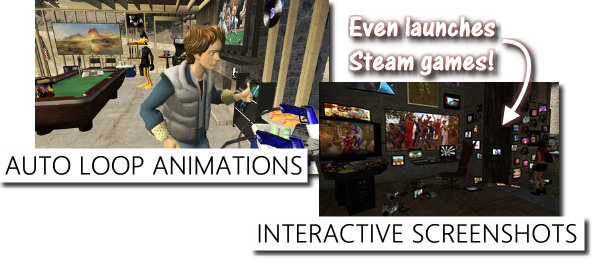
Share your creations with your non-AArcade friends like never before with the new Interactive Screenshot feature! Every object remains a clickable shortcut, and your friends can check out your links or even launch their Steam games directly from your screenshot!


Click this link to see what Interactive Screenshots look like: http://www.anarchyarcade.com/2d/de_cbble0.html

Today's update also adds auto-looping of animation sequences for addon models, so now it's easy to make Han Solo dance his heart out, or have Marty McFly continuously give you a thumbs up. :)

Various other improvements are listed below, including an option to cache your collection of maps to speed up start times!

AArcade is approaching completion, with restored Steam Workshop support & VR support being the last two remaining big-ticket items left for me to work on. Thanks everybody for your continued support, and I hope you're all enjoying the metaverse!

Change Log
  • Added Interactive Screenshots to the screenshot menu.
  • Added the ability to launch Steam games directly from Interactive Screenshots.
  • Added an Instance Info link near the clock that takes you directly to the Edit Instance menu so you can easily rename your instances.
  • Added auto-looping for all sequences played on custom addon models.
  • Added "Detect New Maps When AArcade Starts" to the Settings menu. Disable this to improve AArcade's startup time when you have hundreds of maps.
  • Improved & fixed the Origin wizard.
  • Improved & fixed the Instagram wizard.
  • Improved Netflix URLs to be preferred over an item's Preview URLs. (This was supposed to be in the previous update, but it was bugged out.)
  • Fixed a bug that could sometimes cause AArcade to crash when shutting it down with an object still selected.