1. Modulus
  2. News

Modulus News

Modulus is a "Zen" factory builder in which you build pieces of other factories


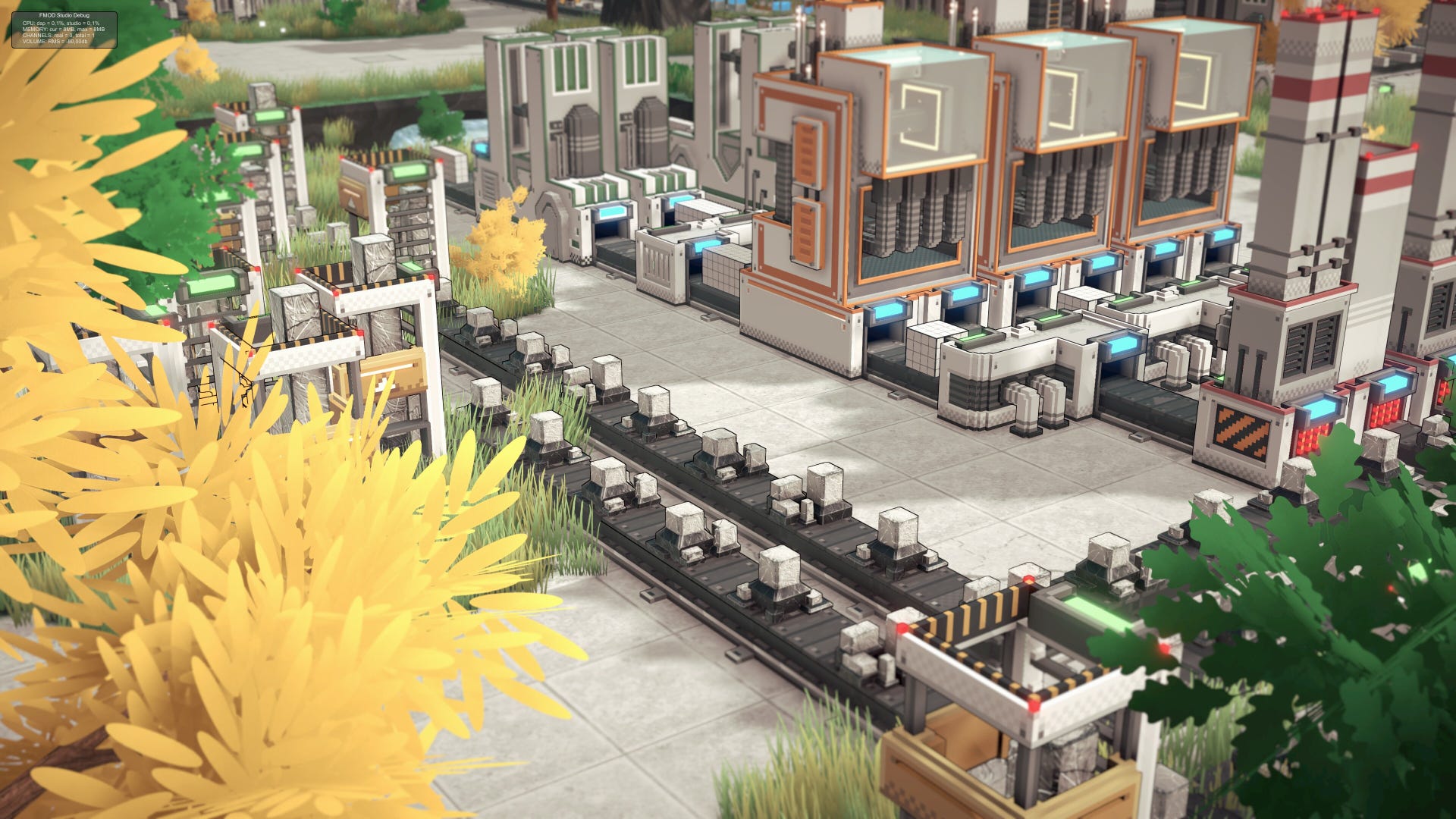
I think the idea of a chill, cosy, and/or “Zen” factory builder is among the most pernicious to ever dribble from a game developer’s earhole, but I can’t deny how... soothing it can be to look down on a world of symmetrically nested conveyor belts. At least till your iron smelting district backs up. Modulus seems zouper-douper Zen. It also has a pleasing consistency: in this factory game, you shape and manufacture pieces for buildings which, as far as I can tell from the devlog below, then manufacture things for other purposes.


Read more

Modulus - Demo Announcement

We are thrilled to announce that the Modulus demo will be available on April 3rd! This demo offers an exciting first glimpse into the world of Modulus, allowing you to experience the core mechanics and features ahead of the full release.

[previewyoutube][/previewyoutube]

[h2]Demo Highlights[/h2]
  • Hours of Engaging Gameplay: The demo features around 2 hours of content with several more hours to spent optimizing your factory. The demo is only limited in factory floor size.
  • Explore a Range of Customizable Operators: Experiment with a variety of operators that will enhance your factory's efficiency and productivity.
  • Explore Grey and Blue Buildings: Unlock and construct multiple building types, each offering unique functionalities to expand your operations.
  • Zen mode: Unlock Zen mode where there are no challenges, no objectives. Just you and the factory floor!
  • Comprehensive Tutorial: New to factory automation games? Our step-by-step tutorial will guide you through the basics, ensuring a smooth start to your journey.
Please be aware that save files from the demo will not be compatible with the full version upon release.

[h2]Supported Languages[/h2]
The demo will be available in English, Simplified Chinese, German, Russian, French and Dutch with plans to support additional languages in the full game.

[h2]We Value Your Feedback[/h2]
Your insights are crucial to us! After playing the demo, we encourage you to share your thoughts and feedback on our Steam Community Hub or join our Discord server to engage directly with the development team and other players.

Thank you for your support. We can't wait for you to get your hands on Modulus and look forward to hearing your feedback!

Thanks for reading, and have yourself a great day!
Jeroen (Studio Head)

Devlog #6: Interview with David, Game Director on Modulus


Hey everyone!

We're launching a new series of video devlogs aimed at bringing you closer to the heart of Modulus' development. In this first episode, we sit down with Game Director, David, for an in-depth interview. He shares insights into the creative process, challenges faced, and the passion driving Modulus forward.


[previewyoutube][/previewyoutube]

Our goal with this series is to provide you with exclusive behind-the-scenes access, showcasing how Modulus is made from concept to release. Stay tuned for more episodes, where we'll delve into various aspects of game development, introduce you to different team members, and explore the intricate details that make Modulus unique.

We'd love to hear your thoughts on this new video format, it helps us improve and tailor our content to your interests. Feel free to share your comments, and don't hesitate to join our Discord server to discuss directly with David and the rest of the team.

Thanks for reading, and have yourself a great day!
- Jeroen (Studio Head)

https://store.steampowered.com/app/2779120/Modulus/

Devlog #5: Operation Speed & Efficiency

As this been a big topic in many discussions, I’ve decided to shed some light on operator speeds and efficiency in the game. Many games use the input vs output speeds as a reference for players to build optimized factories. Because Modulus is not recipe based, this doesn’t actually apply well here. After all, players are free to choose how to create a module. Of course efficiency and deterministic results are the bread and butter of factory games and it’s super important in Modulus as well. We just calculate things a bit differently.

In Modulus, we talk about operation speeds and it is expressed in a unit form as operations/minute. For example, if a Cutter has an operation speed of 30 operations/minute, it means that it can perform at a maximum of 30 times per minute. Pretty straightforward right? Well, what makes Modulus original is that the operation you choose might actually change the output of a specific machine. Confused? It’ll get clearer with some examples.

[h3]The furnace[/h3]
Let’s take a look at the Furnace first. The Furnace has an operation speed of 30/m and requires 8 Polyrock to do one operation (smelting one basic cube). In other words, a Furnace is able to craft 30 cubes per minute if it receives 240 Polyrock per minute (8 Polyrock x 30). If we know that a standard conveyor belt moves 120 items per minute, that means a quarter (30 items) of the output conveyor belt will be filled with cubes. To get a full conveyor belt of cubes means you’ll need 4 maxed out furnaces feeding into one conveyor.


One Furnace running at max efficiency


4 Furnaces combined to create a full belt of cubes

[h3]Monotoner[/h3]
In another straightforward example, the Monotoner has an operation speed of 30/m. That means one Monotoner can handle a quarter of the capacity of one conveyor belt. (A quarter of a conveyor belt’s capacity can be recognized by modules that are 4 grid spaces apart).


One Monotoner working in sync with a maxed out Furnace

When trying to feed in more than 30/m, you’ll see that the Monotoner can’t keep up and the input belt will start clogging.


Monotoner is too slow for 60 cubes/minute

[h3]Cutter[/h3]
The Cutter is an interesting operator as it can behave very differently based on its settings. The base Cutter also has an operation speed of 30/m. Depending on your settings, a Cutter can transform a conveyor belt that feeds in 30 modules/minute into an output conveyor that is completely filled. In the following example, 30 modules/minute come in, but the Cutter produces 4 new modules, effectively multiplying the number of objects by 4, resulting in a full conveyor belt.


Cutter transforms 30 cubes/minute into 120 new pieces per minute, maxing out the output conveyor

If a player wants to lead a fully loaded conveyor through a Cutter, you’ll need parallel operators to ensure there’s no clogging. That’s because a Cutter will always produce more than what comes in, resulting in a larger load on the output conveyors. In the following example, 4 Cutters are used to transform a full line of cubes into 4 full lines of 4x4x1 slabs. Notice that everything is running at max efficiency, there is never a halt and all spaces on all conveyor belts are occupied. Neat right?


Cutting a full conveyor of cubes (120/m) into slabs (480/m)

[h3]Assembler[/h3]
The opposite is also true. In the case of an Assembler, the output will have a smaller load than its combined input, because 2 modules are merged into 1 new module. The Assembler processes 2 modules in one operation at a speed of 30/m. This means that 2 conveyors feeding 2 separate modules at 30/m, will also result in an output of 30/m. Check below example.


Assembler running at full efficiency

Of course in some cases you just want a faster production of a specific module and you’ll probably have a larger input of the two base pieces. In that case we need to build parallel tracks again like below.

[h3]Cranes[/h3]
Cranes are a bit the odd one in the bunch. But they have a specific speed though: 15 operations/minute. That means they will pick up a module from a conveyor belt every 8 spaces. (Because conveyor speed is 120/m, divided by 8 = 15). BUT, you can place as many as you want. So you decide for yourself how fast a module enters a building, depending on which modules are needed more than others. (Check my previous deep dive about module ratios).

[h2]Summary[/h2]
So what it all comes down to is the operation speed of any given operator. If you know the maximum operations of an operator you can set up your production lines to try and achieve their maximum capacity. Of course in some cases it might be beneficial to have parts of your production line produce less, because it’s just not necessary to have a full belt of something.
We feel like just giving you the operation speeds of operators should give you enough information to figure out max efficiencies, because frankly, everything else is up to you and how you choose to tackle the objective :)

Thanks for reading, and have yourself a great day!
- David (Game Director)

https://store.steampowered.com/app/2779120/Modulus/
Devlog #4: Module Ratios

For those interested, I wanted to elaborate a bit more on the numbers behind Modulus. Specifically the module requests per building. I’ve taken the Blue Core Facility as an example because it has clean ratios. (Not all buildings will produce such clean numbers, but it’s a good way of thinking when planning the construction of a new building)


As displayed above, the building needs 3 modules to be constructed. Let’s call them Mod1, Mod2 and Mod3. Mod1 & 2 need to be delivered 32 times and Mod3 only 16 times. If we break the modules down in our minds, we can slide the blue part of Mod2 inside Mod1, creating a nice rectangle of 2x4x8. Which is 64 voxels and exactly one full base cube, tadaah! If we multiply that by the delivery amount, we can calculate that the building will need EXACTLY 32 blue cubes. That’s neat.

If we apply the same logic to the white parts of the module, we can see it also needs exactly 32 white cubes in total (the calculation is a bit more difficult as Mod2 needs to be delivered 32 times and Mod3 only 16 times). The example above shows how to get to these numbers.

By the way, you don’t have to calculate in voxels, because that’s big numbers. What helps is trying to understand how many full cubes of each color you need.

Now why is this important you say? Well, if we know we need 32 blue cubes and 32 white cubes, we can plan our Polyrock extraction based on it. Imagine placing down two fully efficient furnaces producing cubes. One for the white ones and one for the blue ones (using a painter to paint the whole cube blue). This way we know that, if our production isn’t bottlenecked in any other way, you aren’t producing any waste and the only challenge left is to optimize each module production line. You can even add furnaces later if you see you need more cubes, in a ratio of 1 extra for the white cubes and 1 extra for the blue cubes.

I hope this makes some sense. In any case, it’s a nice way of looking at things when planning construction of a new building. Maybe there’s even smarter ways slightly :) I’m all ears!

Addendum: Module AMOUNTS and cranes
Once you have your production lines set up, it’s smart to think about how many cranes should be used per module. When we look at above example, it’s smart to use twice the amount of cranes for Mod 1 & 2, as the building needs double their amounts compared to Mod3. That way, a building will never have to wait for one specific module to be delivered, because all module deliveries will complete at exactly the same time. (same goes for the production cycle). This is of course assuming that the modules are coming in at a steady flow! Thanks for reading, have fun experimenting!

If you like Modulus, please consider wishlisting it, it helps us out a lot! And don’t forget to join our Discord to be able to talk directly to us: https://discord.gg/QbTr9bFqTF

Thanks for reading, and have yourself a great day!
- David (Game Director)

https://store.steampowered.com/app/2779120/Modulus/