1. Battlefield™ 6
  2. News

Battlefield™ 6 News

Battlefield REDSEC - Gauntlet 101

[p][/p][p]Survive and advance in Gauntlet: an all-new cutthroat, knockout-style elimination mode where squads race to complete missions.[/p][p]In Gauntlet, eight squads go head-to-head in a series of special missions that push every squad to their limit. Decryption, extraction, territory domination, target protection, explosive transport and more–only squads with the complete package will come out on top in this Gauntlet of elimination ending in a squad vs. squad showdown.[/p][p]Ready to run the Gauntlet? Assemble your squad and claim glory in this competitive experience.[/p][h2]Gauntlet at its Core[/h2][p]Gauntlet is a competitive, round-based mode based on a four-mission sequence :[/p]
  • [p]FIRST MISSION - Eight Squads[/p]
  • [p]SECOND MISSION - Six Squads[/p]
  • [p]THIRD MISSION - Four Squads[/p]
  • [p]FINAL MISSION - Two Squads[/p]
[p]The Combat Zone for each mission is based on sections of Fort Lyndon and is custom fit to the number of remaining squads, so that the First Mission has the largest Combat Zone and the Final Mission has the smallest. Its order of mission - namely the Second and Third Missions - can be skipped in specific circumstances, such as Multiple squads forfeiting the Gauntlet by leaving early.[/p][p]At the start of Season 1, there are eight mission types; one additional mission - Rodeo - will be added during Season 1, with more to follow in additional seasonal updates. [/p][p]Unlike Battle Royale, Classes in Gauntlet are the same as those in Battlefield 6 Multiplayer; if you are coming in from Battlefield 6 Multiplayer, your loadouts will carry over into Gauntlet.[/p][p]Specific missions may benefit from unconventional Class choices across the squad; rather than choosing the standard “Assault, Engineer, Support and Recon” balanced composition, you may find more success on double, tripling, or quadrupling up on a Class.[/p][h3]Reassignment[/h3][p]Nobody likes a quitter, especially if you are performing well in a Gauntlet despite them. When your Gauntlet team is eliminated due to teammates leaving, there is a chance that you will be assigned to a new Gauntlet team rather than be eliminated. [/p][p]Reassignment ensures all teams have four active players throughout the Gauntlet match, rewarding top performers from squads with teammates who leave mid-operation. At the end of each mission (save for the Final Mission), all squads, including eliminated squads, will be checked for open spots. If there is an open spot on a surviving squad, or if there is a unique scenario with open spots across multiple eliminated and surviving squads, then a Reassignment will occur, guaranteeing the next mission will have the correct number of squads. Full squads of four who advance to the next mission will not be reassigned.[/p][h2]Gauntlet Missions[/h2][p][/p][p]Every Gauntlet “round” is a different mode or “mission” - with eight mission types and numerous Combat Zones, it is incredibly rare to have the exact same Gauntlet mission sequence in back-to-back matches with over 70,000 different possible combinations. However, prior to each mission, a miniature briefing takes place that details the rules of engagement and how points are scored.[/p][p]Every mission offers one point for every kill and revive. This means reviving a squadmate is technically a two point play, as it earns your squad one point while denying a point from the enemy. Keep this in mind when determining your strategy for success as well as Class choice, since the Support Class has multiple tools to help with revives.[/p][p]True to Battlefield’s core principles, however, the most effective point scoring method across all but one mission is to play the objective. Whether it is destroying M-COMS, holding consoles, or remaining on designated zones, objective play will rack up score faster than playing for a K/D ratio.[/p][p]Across all missions, points are doubled in the last minute of that mission. For example, if a mission normally rewards a squad one point per kill, then a squad will receive two points per kill during the last minute of the mission.[/p][p]Some missions will only appear in specific Gauntlet rounds. For example, “Heist” is only played as a Final mission between two squads and does not show up as a First, Second or Third mission.[/p][p]The eight available Gauntlet missions, as well as when they can appear in a Gauntlet, are as follows:[/p]
[p]Name[/p]
[p]1st Mission (8 Teams)[/p]
[p]2nd Mission (6 Teams)[/p]
[p]3rd Mission (4 Teams)[/p]
[p]Final Mission (2 Teams)[/p]
[p]Circuit[/p]
[p]✓[/p]
[p]✓[/p]
[p]✓[/p]
[p]✓[/p]
[p]Contract[/p]
[p][/p]
[p]✓[/p]
[p]✓[/p]
[p]✓[/p]
[p]Deadlock[/p]
[p]✓[/p]
[p]✓[/p]
[p]✓[/p]
[p]✓[/p]
[p]Decryption[/p]
[p]✓[/p]
[p]✓[/p]
[p]✓[/p]
[p]✓[/p]
[p]Extraction[/p]
[p]✓[/p]
[p]✓[/p]
[p]✓[/p]
[p][/p]
[p]Heist[/p]
[p][/p]
[p][/p]
[p][/p]
[p]✓[/p]
[p]Vendetta[/p]
[p][/p]
[p]✓[/p]
[p]✓[/p]
[p]✓[/p]
[p]Wreckage[/p]
[p]✓[/p]
[p]✓[/p]
[p]✓[/p]
[p]✓[/p]
[h3]Circuit[/h3][p]Squads earn points by simultaneously capturing and holding as many control consoles as possible. Think Domination, except you must actively capture each control console, the number of which varies by stage:[/p]
  • [p]FIRST MISSION - Up to 36 Control Consoles[/p]
  • [p]SECOND MISSION - Up to 24 Control Consoles[/p]
  • [p]THIRD MISSION - Up to 12 Control Consoles[/p]
  • [p]FINAL MISSION - Up to 5 Control Consoles[/p]
[p]One point is earned every 20 seconds for each console controlled.[/p][p]The Support Class and its wealth of revival and defensive Gadgets could be great to lean on in this fast-paced mission, or the Assault Class can shine through its abilities to capture objectives faster than other Classes. Otherwise, consider the Recon and Engineer to lay down nasty traps on their captured consoles to prevent - or get the drop on - enemies from stealing them.[/p][h3]Contract[/h3][p]Every life counts in Contract. Squads earn one point for a kill, one point for a revive, and fifteen points for wiping a squad entirely, which brings us to the objective of a Contract:[/p][p]Any squad wiped - as in, all four squadmates are dead at the same time - is automatically eliminated from the Gauntlet match. In other words, this is a sudden death deathmatch.[/p][p]This mission is over when either the timer elapses or a number of teams has been eliminated to the following:[/p]
  • [p]FIRST MISSION - Four squads eliminated (Eight squads down to Four)[/p]
  • [p]THIRD MISSION - Two squads eliminated (Four squads down to Two)[/p]
  • [p]FINAL MISSION - One squad eliminated (Two squads down to the Winning Squad)[/p]
[p]More than any other mission, all classes can be the MVP of a Contract mission, so long as no reckless decisions are made. This may lead to less aggressive strategies, but be forewarned: all players are spotted periodically to prevent stagnation, so a squad that sits back and tries to play passively will have their defensive idle cover positions blown[/p][h3]Deadlock[/h3][p]Squads compete to secure and control rotating capture zones for as long as possible. This is most similar to the King of the Hill Multiplayer mode, but with a twist depending on how many squads play this mission.[/p][p]Like King of the Hill, a player may stand in a Deadlock capture zone to control it for their squad. If players from different squads occupy the same capture zone, the zone is contested. Having multiple players from the same squad occupying the zone does not cause points to be granted more quickly. Prior to the end of one zone, the location of the next one will be revealed on the map, allowing for a “rotation” over to the next objective for those who wish to play aggressively.[/p][p]Except for the Final Mission, where there is only one rotating zone, Deadlock features multiple capture zones. Specifically:[/p]
  • [p]FIRST MISSION - Four Zones[/p]
  • [p]SECOND MISSION - Three Zones[/p]
  • [p]THIRD MISSION - Two Zones[/p]
  • [p]FOURTH MISSION - One Zone[/p]
[p]This allows your squad to split up to get more points, although you may want to focus on just one zone to ensure consistent point scoring opportunities.[/p][p]Whether there is one capture zone or four, a squad earns one point by owning one zone for three seconds. All Classes can make an impact in Deadlock, but a special mention should be given to the Assault Class and its Spawn Beacon for granting advanced positions on active (or upcoming) objectives and capturing zones faster.[/p][h3]Decryption[/h3][p]Squads compete to secure and protect beacon pickups for set periods of time to "calibrate" them and score points, specifically 10 points after 50 seconds of calibration time.[/p][p]Picking up a beacon automatically marks you on the map and in the overworld, making you a target. Only one squad member can hold one beacon at a time, but each squad member can carry one beacon each. Sprinting will halt the decryption process, making slow, calculated movements necessary for survival while holding a beacon. [/p][p]Playing the objective - calibrating beacons - is crucial to success; the squad who balances beacon calibration with tactical engagement choices and consistently revives will ultimately come out on top. Although it may not be a great idea to crowd a squadmate with a beacon, leaving them alone is a recipe for disaster.[/p][p]This might mean the Support Class and its litany of defensive tools can help lock down beacons until they are calibrated, or the Recon Class could step up to spot enemy movements and hinder their advancements with anti-personnel mines. Otherwise, the Assault Class can decrypt beacons faster than any other class, but having a four-Assault set-up may leave the squad open to counter-attacks from savvy Support, Recon, and Engineer enemies.[/p][h3]Extraction[/h3][p]Travel between consoles scattered throughout the level to gather data, then extract the recovered drives using drones.[/p][p]The mission begins with terminals placed throughout the map with data drives sticking out of them, as well as drone pads that periodically call in drones for extractions. Players must interact with terminals to extract a recovered drive, then find a pad with a drone waiting to extract a drive. There is a countdown of 5 seconds before the drone leaves, and a drone can multiple extract multiple drives at once[/p][p]A squad earns three points for each successful recovered drive extracted, and a player can carry up to 10 drives at once, which can lead to up to 30 points per player in one extraction. Coordinating an escort for those holding drives, especially if your squad decides to risk carrying multiple drives at once, should be the main priority for winning - or advancing to the next mission after - an Extraction mission, with aggressive kills and reviving opportunities seen as regular point bonuses.[/p][p]The Recon and Engineer Classes can set traps around drone pads to make it harder for enemy squads to extract drives and rob them of point-scoring opportunities. Alternatively, the Assault Class and its Spawn Beacon can be great for getting reinforcements when extracting drives.[/p][h3]Heist[/h3][p]Seen as an ultimate showdown mission, Heist tasks the two remaining squads in a Gauntlet to retrieve objectives from enemy bases and return them to their own HQ, all while also defending an objective of their own. This is similar in format to the classic “Capture the Flag” game, but with intense stakes.[/p][p]If a squad drops a stolen case, consider it a fumble: either squad can pick it back up or it will automatically reset back to its original base if nobody picks it up within 60 seconds.[/p][p]Every enemy cache capture grants 10 points.[/p][p]All Classes have the chance to rise above the rest, but a Gauntlet victory will come down to how a squad compliments each other’s individual playstyle. Some may decide to watch their own cache back at their spawn in a defensive role, while others may take flank routes as another takes an aggressive beeline towards the enemy cache. Not communicating and coordinating these efforts can lead to a loss, but that should be second nature to squads who survived a Gauntlet long enough to see a Heist go down.[/p][h3]Vendetta[/h3][p]Protect your squad's High Value Target (HVT) and kill the enemy HVTs. [/p][p]The first operator to get a kill is marked as the first High Value Target (HVT). Whoever is a HVT earns their squad one point every five seconds they are alive, and their location is always visible on the map and HUD compass. [/p][p]All successful Vendetta strategies are focused on the safety of your principal; your squad’s HVT needs to be kept alive for as long as possible to rack up score for the squad. [/p][p]The Recon Class may be ideal for this mission, as they can spot enemies protecting their HVT while also going behind their lines with clandestine tools. Another potential priority Class is Support, who can lay down Deployable Cover and Intercept Systems to defend their HVT.[/p][h3]Wreckage[/h3][p]Your squad needs to find, transport and detonate bombs at specific locations across the map. Think of this as a squad-based Rush or, for our Battlefield veterans out there, consider this a respectful nod to some classic obliteration gameplay…[/p][p]When the mission starts, a number of bombs spawn at randomized positions. Interacting with the bomb causes a soldier to pick it up. A soldier can hold only one bomb at a time, and will explode if they fail to plant it at an M-COM in time. Bomb carriers and M-COM Sites - active, inactive and armed - are indicated to all players.[/p][p]Every M-COM Destroyed rewards 10 points, disarming a bomb off an M-COM rewards 5 points.[/p][p]The Assault Class’ quicker plant and defuse times can make them the go-to objective driver on the squad. However, the amount of defensive gadgets across the other three classes can make for a more well-rounded team that can help push towards and lock down objectives.[/p]

Battlefield REDSEC - Battle Royale 101

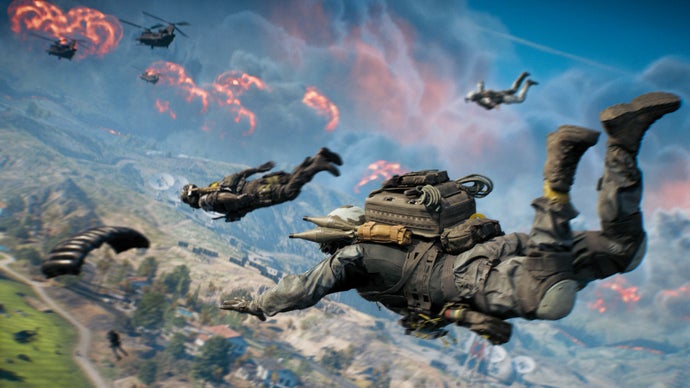
[p][/p][p]Prepare to drop into  Fort Lyndon.[/p][p]This massive, redacted military facility hidden in plain sight between pristine beaches and a sleepy residential community is home to some of the most advanced military projects in the world.  Rogue operators are racing against time and hostiles to keep each other out and the secrets in.[/p][p]Your mission? Survive the Battle Royale between NATO and Pax Armata squads fighting for control of Fort Lyndon. Consider this your briefing:[/p][h2]Before You Drop - Sidearms and Classes[/h2][p][/p][p]Battle Royale is the only non-Portal mode with different Loadouts than any other official Battlefield experience. In other words, instead of a Primary Weapon, Sidearm, customizable Gadgets and more, you are limited to the following items:[/p]
  • [p]Your Class, which comes with a Class Signature Set - Two Gadgets, a Signature Weapon Proficiency and a Signature Trait  - and a four-trait Training Path, which is different from normal (Multiplayer and Gauntlet) Training Paths (with only one available as of Season 1 launch).[/p]
  • [p]A Sidearm[/p]
  • [p]A Melee Tool[/p]
[p]Your Battle Royale loadout choice - the Class, Sidearm and Melee Tool - is only editable after joining a match and before dropping out of the infiltration plane.[/p][p]Each Class gets its default Gadgets, Signature Weapon Proficiency and Signature Trait by default. Their additional Passive Abilities, including their final Level 4 ability shared between all classes, are unlocked by earning score through eliminating enemies, completing Contracts and surviving deep into the match. [/p][p]Every soldier also gets Thermite Sabotage, an improved sabotage device which slowly damages a tank and its crew. Meant to be a last resort anti-tank tool against those unaware of a soldier right next to their tank, the Thermite Sabotage can be directly planted onto vehicles.[/p][h3]Assault Class - Pointman[/h3][p][/p][p]Gain the high ground and eliminate enemies from defilade.[/p]
[p]FEATURE[/p]
[p]Name[/p]
[p]In-Game Description[/p]
[p]GADGET 1[/p]
[p]Assault Ladder[/p]
[p]This equipment provides access to higher vantage points. Depending on the angle of placement, it can act as a bridge between buildings, or a ramp to help traverse obstacles on the battlefield.[/p]
[p]GADGET 2[/p]
[p]High Explosive Launcher[/p]
[p]Fires impact-trigger grenades designed for damaging structures and targeting infantry behind cover.[/p]
[p]SIGNATURE WEAPON[/p]
[p]Assault Rifle[/p]
[p]Faster draw times with Assault Rifles. Fire sooner when exiting a sprint.[/p]
[p]SIGNATURE TRAIT[/p]
[p]Mission Focused[/p]
[p]Nearby squadmates get faster progress with objectives, including arming and disarming M-COM explosives. In Battle Royale, respawn towers will capture quicker…[/p]
[p]LEVEL 1 PASSIVE ABILITY[/p]
[p]Quick Plating[/p]
[p]Armor replating is 33% faster.[/p]
[p]LEVEL 2 PASSIVE ABILITY[/p]
[p]Grenadier[/p]
[p]High Explosive Launcher carrying capacity increased to 5 rounds.[/p]
[p]LEVEL 3 PASSIVE ABILITY[/p]
[p]Cluster Munitions[/p]
[p]High Explosive Launcher explosions generate 5 fused submunitions.[/p]
[p]LEVEL 4 PASSIVE ABILITY[/p]
[p]Stockpile[/p]
[p]Class gadget resupply rate increases by 10% with each improvement. Effect resets upon death.[/p]
[h3]Engineer Class - Field Mechanic[/h3][p][/p][p]Disable incoming armored threats and maintain combat vehicles to keep them mission-ready.[/p]
[p]FEATURE[/p]
[p]Name[/p]
[p]In-Game Description[/p]
[p]GADGET 1[/p]
[p]Repair Tool[/p]
[p]A blow torch to repair friendly vehicles and equipment. Can also damage enemy assets. Extended use will temporarily overheat the tool.[/p]
[p]GADGET 2[/p]
[p]Aim-Guided Launcher[/p]
[p]An anti-vehicle launcher that can be upgraded to enable missile guidance to the target via the weapon's crosshairs. Inflicts greater damage on the sides, top, and rear of vehicles where armor is thinner.[/p]
[p]SIGNATURE WEAPON[/p]
[p]SMG[/p]
[p]Improved hip-fire control when using SMGs.[/p]
[p]SIGNATURE TRAIT[/p]
[p]Mechanized Infantry[/p]
[p]Take less explosives damage when near friendly vehicles and prevent them from being occupied by hostiles in the event that all vehicle crew exit. Repair vehicle health to keep both effects active.[/p]
[p]LEVEL 1 PASSIVE ABILITY[/p]
[p]Enhanced Targeting[/p]
[p]Launcher is now aim-guided via magnified optic.[/p]
[p]LEVEL 2 PASSIVE ABILITY[/p]
[p]Devastating Impact[/p]
[p]Damaging enemy vehicles reduces their repair effectiveness for a short period of time.[/p]
[p]LEVEL 3 PASSIVE ABILITY[/p]
[p]Mobility-Kill Warhead[/p]
[p]Aim-Guided Launcher hits temporarily immobilize vehicles for a short period of time.[/p]
[p]LEVEL 4 PASSIVE ABILITY[/p]
[p]Stockpile[/p]
[p]Class gadget resupply rate increases by 10% with each improvement. Effect resets upon death.[/p]
[h3]Support Class - Provisioner[/h3][p][/p][p]Increase squad endurance with more armor and ammo, enhanced healing, and gadgets that compromise enemy sight.[/p]
[p]FEATURE[/p]
[p]Name[/p]
[p]In-Game Description[/p]
[p]GADGET 1[/p]
[p]Supply Bag[/p]
[p]Once dropped, the bag resupplies all nearby infantry with ammo for weapons and regenerates health more efficiently, even when under fire.[/p]
[p]GADGET 2[/p]
[p]Smoke Grenade Launcher[/p]
[p]Fires impact-triggered grenades designed to create temporary smoke screens. Blocks ability to spot targets and clears spotted markers from all infantry inside the smoke radius. Can be carried standalone or underslung on weapons with a Gadget Mount attachment for faster access.[/p]
[p]SIGNATURE WEAPON[/p]
[p]LMG[/p]
[p]Faster transition to aim down sights (ADS) and no sprint speed penalty while carrying LMGs.[/p]
[p]SIGNATURE TRAIT[/p]
[p]Field Sustainment[/p]
[p]Distribute health packs to teammates when they directly interact with you.[/p]
[p]LEVEL 1 PASSIVE ABILITY[/p]
[p]Supply Line[/p]
[p]Armor carrying capacity increased. Ammo carrying capacity increased for all ammo types.[/p]
[p]LEVEL 2 PASSIVE ABILITY[/p]
[p]Urgent Aid[/p]
[p]Drag downed soldiers faster and revive them quicker.[/p]
[p]LEVEL 3 PASSIVE ABILITY[/p]
[p]Hemostatic Smoke[/p]
[p]Smoke Grenade Launcher speeds up revival for all classes, provides health regen after several seconds, and slows downed bleedout.[/p]
[p]LEVEL 4 PASSIVE ABILITY[/p]
[p]Stockpile[/p]
[p]Class gadget resupply rate increases by 10% with each improvement. Effect resets upon death.[/p]
[h3]Recon Class - Drone Specialist[/h3][p][/p][p]Rain death from above and track enemies on the ground to control the battlefield.[/p]
[p]FEATURE[/p]
[p]Name[/p]
[p]In-Game Description[/p]
[p]GADGET 1[/p]
[p]Motion Sensor[/p]
[p]This device spots nearby moving enemies, vehicles, and gadgets, marking their position in-world and on the minimap for all team members. Enemy infantry can remain undetected while moving in crouch or prone. The device emanates a sound audible to hostiles[/p]
[p]GADGET 2[/p]
[p]Recon Drone[/p]
[p]A combat drone that can carry explosive ordnance and be rigged to self-destruct. Can be left hovering to automatically spot hostiles, marking their position in-world and on the minimap. Equipped with thermal vision for enhanced spotting.[/p]
[p]SIGNATURE WEAPON[/p]
[p]Sniper Rifle[/p]
[p]Improved marksmanship skills, including reduced weapon sway, quicker rechambering between shots, and better breath control for steadier aim.[/p]
[p]SIGNATURE TRAIT[/p]
[p]Passive Spotting[/p]
[p]Looking at hostiles while aiming down sights will spot them, marking their position in-world and on the minimap for all team members.[/p]
[p]LEVEL 1 PASSIVE ABILITY[/p]
[p]Bombadier[/p]
[p]Recon Drone can drop explosive payloads.[/p]
[p]LEVEL 2 PASSIVE ABILITY[/p]
[p]Tracking Pulse[/p]
[p]Spot enemies within a specified radius for several seconds after downing their squadmate.[/p]
[p]LEVEL 3 PASSIVE ABILITY[/p]
[p]Loitering Munition[/p]
[p]Recon Drone can self-destruct for additional damage.[/p]
[p]LEVEL 4 PASSIVE ABILITY[/p]
[p]Stockpile[/p]
[p]Class gadget resupply rate increases by 10% with each improvement. Effect resets upon death.[/p]
[h3]Sidearm - The Choice is Yours[/h3][p]After choosing a Class, you then select a Sidearm and a Melee Tool. Given the similarities between all Melee Tools - save for the Sledgehammer, which is a slower, more powerful weapon compared to the knives - the bigger decision to be made is your Sidearm choice.[/p][p]All functional Sidearms can be chosen as your starting Battle Royale weapon and can be completely customized based on unlocked attachments and customization items. At the start of Season 1, here is why each Sidearm can be a solid starting weapon, as well as a formidable backup once you find a Primary Weapon:[/p]
[p]Weapon[/p]
[p]Unlock Criteria[/p]
[p]In-Game Description[/p]
[p]Use / Role[/p]
[p]P18[/p]
[p]Default Unlocked[/p]
[p]A reliable sidearm able to meet the demands of almost any combat scenario.[/p]
[p]Versatile tool with solid damage, fire rate and magazine capacity.[/p]
[p]ES 5.7[/p]
[p]Career Rank 24[/p]
[p]Companion to the USG-90, this sidearm has generous magazine capacity and exceptional bullet velocity compared to its peers.[/p]
[p]Rapid-fire machine to tag up or finish off enemies, especially up close, with the fastest ADS times and muzzle velocity in the category.[/p]
[p]M45A1[/p]
[p]Career Rank 39[/p]
[p]A classic sidearm brought into the 21st century. The damage it inflicts with .45 ACP is offset by a low base magazine capacity.[/p]
[p]Reliable workhorse with powerful, more controlled semi-automatic fire.[/p]
[p]M44[/p]
[p]Career Rank 48[/p]
[p]A modern revolver and hand cannon. Best ranged potential of any sidearm, but its capacity and effective rate are limited.[/p]
[p]A “skillshot” tool with hefty damage even at range, amplified by headshots at an increased multiplier.[/p]
[p]GGH-22[/p]
[p]Season 1 Battle Pass “Recruit Path” - Tier 5 Reward[/p]
[p]A renowned semi-auto pistol with a .40 caliber chambering for improved ranged performance.[/p]
[p]Balanced between high damage and high fire rate peers, rock solid in short-to-mid range engagements.[/p]
[h3]Custom Weapons[/h3][p]In lieu of starting loadout inclusion, you can earn your Custom Weapons during a Battle Royale match. Your Custom Weapons are pulled from any configuration - e.g. a Weapon Package - you have marked as a “Favorite.”[/p][p]See the “Upgrading Your Weapon” section of this 101 for more details on procuring your Custom Weapon.[/p][h2]Dropping In - Squad Leader, Breaking Formation and Parachutes[/h2][p][/p][p]Ready to drop? Open up your mini-map and ping your intended drop point either here or in the overworld to communicate your intentions with the rest of the squad. One squadmate will be automatically assigned as the “Squad Leader” - they are responsible for initiating the drop sequence and maneuvering the “squad formation” through the air to the intended drop point.[/p][p]At any point, any player who is not the Squad Leader can “break away” from the formation and continue dropping on their own. This is recommended as part of a coordinated strategy, such as splitting up to scavenge multiple buildings within a small city block or complex. If all else fails, or if you are a new player, stick to the formation until you are grounded.[/p][p]Your parachute will automatically deploy when you get close to the ground (unless you switch this Setting off, which we don’t recommend to new players). Alternatively, you can manually deploy the parachute to delay landing in favor of a more intentional landing spot, but remember that every second off the ground is another second for every enemy to start getting better weapons.[/p][h2]Scavenging - Crates, Vehicles and Vaults[/h2][p][/p][p]Although it could be a fun challenge to attempt, you won’t get far in Battle Royale with just your starting Loadout and Sidearm.[/p][p]Scavenging for loadout items, including Weapons, Throwables, Gadgets and more, is done by opening various containers scattered around the map. These containers can be:[/p][h3]Common Chests[/h3][p]Most regularly found around Fort Lyndon, Common Chests are Green boxes that contain Weapons, Ammo, Gadgets and Throwables. Often, their contents can be duplicative across numerous chests, but these items are still better than sticking with just the starting loadout at the beginning of a match.[/p][h3]Rare Chests[/h3][p]As the name implies, these black-and-red chests contain better quality items - Weapons, Ammo, Gadgets and Throwables - but are not as frequently found in a Battle Royale match. Occasionally, Rare Chests can contain Strike Packages, which are powerful activatable abilities that can turn the tide of battle. Call-ins can improve artillery strikes, smokescreen drops to conceal movements and UAVs to reveal enemy positions[/p][h3]Class Chests[/h3][p]These chests always grant loadout items that are specific to your Class, arguably making these the most valuable chests out of the three to be found in a match. Whomever opens the Class Chest will determine its contents, such that an Assault Class player will turn it into an Assault Class Chest.[/p][p]A Class chest will most frequently include a highly-upgraded weapon from the Class’ Signature Weapon, such as an LMG for the Support Class, high-end Gadgets and other items themed around the class’ Training Path abilities. Essentially, Class Chests are meant to bring out the best of your Class and should be opened whenever possible.[/p][h3]Vehicles[/h3][p]In addition to Chests, certain vehicles parked around the map contain items, which are usually themed to the vehicle type.[/p][p]For example, an ambulance most likely contains a Defibrillator or Supply Pouches that can refill health. Or a disguised box truck can contain weapons that would have been used for nefarious infiltration operations.[/p][h3]Drops[/h3][p]Frequently rewarded after completing a Mission, Drops fall out of the sky and contain valuable items, such as weapons with multiple attachments and call-in abilities.[/p][p]There are also Custom Weapon Drops, which contain weapons customized in the loadout menu outside of a Battle Royale match.[/p][h3]Locked Vaults[/h3][p]Outside of Drops, the other scavenging container worth mentioning are Locked Vaults, which can only be unlocked by the Engineer’s Repair Tool. If an Engineer interacts with a Vault, they will take a few seconds to open it, rewarding themselves (and their squad) with a mixture of rare items, such as weapons, Gadgets and more.[/p][h3]Intel Cache[/h3][p]One last scavenging note, or intel, rather: throughout Fort Lyndon are Intel Caches, which are briefcases with a “?” on them. Given how vital this intelligence is to both PAX Armata and NATO, picking these up grants Career XP.[/p][h2]Upgrading Your Weapon - Weapon Upgrade Kits and Custom Weapon Drops[/h2][p][/p][p]Scavenging for weapons is just one way to upgrade your arsenal. Weapons are graded in specific rarity tiers, with each rarity tier associated with an expected power level due to the amount of Attachment Points used in creating that weapon variant. Outside of the “Unique Tier,” which are weapons fit to your personal preferences, the mileage may vary on what weapons in each tier are considered “the best” for your playstyle. [/p][p]However, the criteria for each rarity tier and its drop frequency in Battle Royale is as follows:[/p]
[p]Rarity[/p]
[p]Color (Standard Values)[/p]
[p]Number of Attachment Points Used on Weapon[/p]
[p]Frequency[/p]
[p]Common[/p]
[p]White[/p]
[p]Attachment Points - 25[/p]
[p]Most available, especially in Common Chests[/p]
[p]Uncommon[/p]
[p]Green[/p]
[p]Attachment Points - 30[/p]
[p]Frequently available; nice to find in Common Chests[/p]
[p]Rare[/p]
[p]Blue[/p]
[p]Attachment Points - 60[/p]
[p]Sometimes available, particularly in Rare Chests[/p]
[p]Advanced[/p]
[p]Purple[/p]
[p]Attachment Points - 90[/p]
[p]Rarely available, most often as Mission Rewards[/p]
[p]Superior[/p]
[p]Orange[/p]
[p]Attachment Points - 100[/p]
[p]Extremely rare; only a few per match.[/p]
[p]Unique[/p]
[p]Red[/p]
[p]Varied Attachment Points[/p]
[p]Otherwise known as Custom Weapons, as customized and Favorited in the Loadout menu, and only available in Custom Weapon Drops (or scavenged from enemies)[/p]
[h3]Weapon Upgrade Kits[/h3][p]Any weapon that is below “Advanced” Rarity can be updated by using Weapon Upgrade Kits, which can be found in a variety of Chests and Drops. Each Weapon Upgrade Kit is unique to a Weapon Category, such as Assault Rifles or Shotguns, and is activated by opening the backpack menu while in a match. Look to the bottom left of your HUD and find the button (or key) next to the backpack icon. Alternatively, when next to a Weapon Upgrade Kit while holding the weapon associated with it  - e.g. holding a SMG when next to an SMG Upgrade Kit - there is an option to immediately use the kit on the weapon you are holding.[/p][p]Every Weapon Upgrade Kit includes a choice of two upgrade paths. For example, when upgrading an LMG, you may have the option to upgrade its Capacity or its Mobility. Each choice is associated with an attachment (or attachments) that are themed around that upgrade type. Often, upgrades only grant benefits, but there are some upgrade paths that may cause negative effects in exchange for more powerful boosts, such as increasing effective range at the cost of aim down sight speed.[/p][p]A weapon can be upgraded up until it is of Advanced quality, which is considered its “final” version outside of the incredibly rare Superior weapons.[/p][h3]Unique Weapons are Custom Weapons - Custom Weapon Drops[/h3][p][/p][p]Custom Weapons are all the “Favorited” Primary Weapons from the traditional Loadout screen, which is editable before joining any lobby. Go to the “Class Loadout” screen of the main menu, then select any class. Next, edit the Primary Weapon of any Loadout and select your weapon. You are able to Modify it by selecting a specific Weapon Package, then Customize it further with available attachments and customization items, before selecting “Favorite” to add it to your “Favorites” tab. This tab, which looks like a bookmark with a star in the middle, saves up to eight weapon configurations; remove them by simply unfavoriting them in this tab or when editing that exact Weapon Package.[/p][p]A Battle Royale match almost always includes a Custom Weapon Drop period where all teams can fight for a handful of drops scattered around the map. Alternatively, Missions can reward a personal Custom Weapon Drop. Regardless on how a Custom Weapon Drop is earned, every squad member can only pick one Custom Weapon out of a Drop.[/p][h2]Ammo and Armor[/h2][p]Outside of your life, the most important Battle Royale resource is your ammo. Ammo is shared between weapons within a Weapon Category - Assault Rifles, SMGs and LMGs, for example - rather by caliber. [/p][p]First, the most reliable way to consistently replenish ammo is through the Support Class and its Supply Bag Gadget, which always grants multiple magazines, clips and/or shells for the exact weapon you are using.[/p][p]When the Supply Bag is not available - either due to cooldown or the Support Class not being used - ammo can be found in chests and vehicles around the map. Found ammo will not always be for the Weapon Category of your choosing, but it will be stored in your backpack for whenever a weapon from its category is used.[/p][p]Another more reliable way to gain ammo - albeit, rarer than finding it on the map - is an Ammo Resupply Call-In. Available as a more common Call-In, most often as a Mission reward, the Ammo Resupply is a special crate that drops in from the sky to grant full ammo to all weapons in your current loadout.[/p][p]Eliminated players also drop all of their ammo upon death, along with all other loadout items they were carrying.[/p][h3]Armor[/h3][p]Every soldier drops into Battle Royale with one armor plates equipped out of two total armor plates, represented by a bar above the health bar on the HUD. [/p][p]Once armor is broken, indicated by the colored armor bar turning grey, any additional damage will impact health; plates can be replaced through a short process, indicated by pressing the command associated with the “armor vest” icon at the bottom-right portion of your HUD. Additional Armor plates can be found by scavenging around the map and opening up chests.  [/p][h2]Missions[/h2][p][/p][p]After several minutes in a match, you will receive a prompt to accept a mission at the top of your HUD near the compass; accepting missions are done on the same screen as when you open the full map.[/p][p]Missions are Battle Royale’s “side-quests” with varying degrees of risk and reward; missions that are most likely to get you into combat - or directly counter other teams - often give the greatest rewards. One squad member can accept a mission for the entire squad; once a mission is accepted, nobody else can accept another mission.[/p][p]Each mission shows its rewards that can range from Rare Weapons and Drop-Ins to full Custom Weapon Drops on the spot, and even a Vehicle Key Card, which opens special containers around the map that contain a tank. Each mission also has a brief description, including whether or not it involves fighting another squad directly (PvP or PvE).[/p][p]Some Missions can appear as “Counter Missions;” these become available when another nearby squad accepts a Mission that can be Countered. Counter Missions almost always involve fighting another squad and are tied to powerful rewards for the risk involved.[/p][p]The following Missions are available in Battle Royale at the start of Season 1:[/p]
[p]Mission[/p]
[p]Targeted?[/p]
[p]Counter Mission?[/p]
[p]Mission Objective[/p]
[p]Signal Decryption[/p]
[p]No[/p]
[p]No[/p]
[p]Players must align a set of antennas to amplify the radio beacon strength and decrypt the data. After interacting with an antenna, use the horizontal and vertical meters on your screen to move the antenna into “100% alignment.” You will be left defenseless while adjusting with the antenna.[/p]
[p]Weapons Cache[/p]
[p]No[/p]
[p]No[/p]
[p]Search for bolt cutters to gain access to a valuable weapons cache. Once unlocked, its contents are available for you and your squad.[/p]
[p]Demolition Crew[/p]
[p]No[/p]
[p]Yes[/p]
[p]Similar to destroying an M-COM in Rush; destroy the object (or objects) marked on your map by picking up a bomb and planting it on the objective. Defend the objective - or objectives - until it explodes to receive your rewards.[/p]
[p]Marked[/p]
[p]No[/p]
[p]Yes[/p]
[p]One player on the squad is targeted; their position is revealed to nearby squads due to nearby tracking devices. Destroy these tracking devices to complete this mission.[/p]
[p]High Value Assets[/p]
[p]No[/p]
[p]Yes[/p]
[p]Fight to control an asset which must be held for a set period of time to capture. Any enemy squad can counter the mission by capturing just one of the three pickups.[/p]
[p]Data Extraction[/p]
[p]No[/p]
[p]No[/p]
[p]Collect data on the collapsing ring weapon technology and encrypt it onto a data drive, then deliver the drive to an extraction drone and prevent other squads from stealing the objective.[/p]
[p]Headhunter[/p]
[p]Yes[/p]
[p]No[/p]
[p]The mission team is assigned a high value target, which could be the match’s kill leader or a player on the top squad, to eliminate. Once the HVT is eliminated, the squad is rewarded and the mission ends. If the target survives the time limit, the targeted player's squad is rewarded and the mission ends. The targeted squad can also complete their own Missions while being headhunted, but it is not recommended.[/p]
[p]Tank Hunter[/p]
[p]Yes[/p]
[p]No[/p]
[p]Upon accepting the mission, your squad will be given anti-tank (AT) gear in order to contend with an enemy ground combat vehicle. Either eliminate the ground combat vehicle or steal the vehicle to complete this mission.[/p]
[p]In order to focus squads at the final fights ahead, Missions are no longer given once there are only a few squads left in a Battle Royale match.[/p][h2]Get Back in the Fight - How Respawning Works[/h2][p]Death is not always finite; depending on how much time has elapsed in a match and how many other squad members are left alive, there are two options for getting back in the fight:[/p][p]SECOND CHANCE: You can respawn independently once per game. Upon activation, they will be air-dropped above a randomly chosen teammate. As the game progresses, the Second Chance feature will be disabled. However, those who haven't used their Second Chance will earn bonus Career Rank XP.[/p][p]RESPAWN POINT: If you are eliminated, your team can find Respawn Points scattered outdoors across the map. Once activated, your teammate must remain within the radius as the countdown progresses. If they are downed or leave the area, the point must be reactivated. All eliminated teammates will respawn together at the Respawn Point location. Each Respawn Point can be used only once.[/p][h2]Terminal Conditions - The Circle of Death and Victory[/h2][p][/p][p]There are three ways for your Battle Royale match to end: the first is being eliminated by an enemy squad.[/p][p]The second is what we call the Circle of Death. There are no survivors within the deadliest circle in Battle Royale; one step into no-mans land means near-instant death. Fortunately, this area is clearly marked with red on your mini-map. When you are near it, your HUD will also display a red skull icon and a distance to the circle’s edge.[/p][p]Our advice is simple: avoid at all costs.[/p][p]Finally, the last remaining squad in Battle Royale wins. This is no easy feat; only the best Battlefield REDSEC Battle Royale players should expect consistent wins. However with enough experience, your squad will find the many paths to victory.[/p]

Grab a free Battlefield 6 GeForce RTX 5090 FE worth $2,000, thanks to Nvidia

Nvidia has just announced an incredible opportunity for you to win an RTX 5090 Founders Edition graphics card, worth $2,000. In celebration of the launch of Battlefield 6, and the game's support for Nvidia DLSS upscaling and multi-frame gen tech, the company is giving away a special Battlefield 6 edition of its flagship gaming GPU.


This Nvidia giveaway is the perfect opportunity to not only bag yourself the best graphics card on the planet right now, but also to show off your Battlefield 6 skills, which will have to be considerable to win this competition. With only two days before the competition closes, though, you'll have to be quick.


Read the rest of the story...


RELATED LINKS:

New Battlefield 6 update will stop pushing you into battle royale spinoff Redsec if you don't play it

All Battlefield 6 battle pass rewards

Best Battlefield 6 settings for optimized PC performance

REDSEC New Player Guide

[p][/p][p]You are now entering Battlefield: REDSEC.[/p][p]This free-to-play Battlefield* experience is open to all those who are not only interested in FPS Battle Royale games, but who also want to explore the high-octane team tactical competitive mode known as Gauntlet.[/p][p]If you are already familiar with Battle Royale and FPS games, then we advise reading the Battle Royale 101 and Gauntlet 101 guides, as they speak to core game mechanics, including differences that sets Battlefield REDSEC apart from the rest, and finer details. However, if you are unfamiliar with these video game genres and are completely new to Battlefield, then consider this your bootcamp:[/p][h2]Battlefield in Summary[/h2][p]Before understanding what REDSEC is, what is Battlefield?[/p][p]Since 2002, the Battlefield franchise is known for producing iconic all-out warfare FPS experiences, built on the concepts of tactical destruction - environments that react to your in-game actions and may help you gain an advantage - and high-intensity team-based combat. [/p][p]REDSEC is Battlefield’s first-ever “free-to-play Battle Royale” game, but it’s not just Battle Royale: this experience includes Gauntlet, a round-based elimination mode that samples from the franchise’s rich Multiplayer history, as well as REDSEC’s Portal Community Creations, an ever-evolving sandbox from our community developers.[/p][p]However, your first steps into REDSEC - or rather, your Initiation - will more than likely come in the form of the Battle Royale Initiation playlist:[/p][h2]Battle Royale Initiation[/h2][p][/p][p]In BR Duos, eliminate hostels, track intel, and dodge the chemical ring on a condensed map.[/p][p]Battle Royale Initiation is built for new players: in this Battle Royale variant, you and a squadmate can drop into a match with the following key differences:[/p]
  • [p]This version of Fort Lyndon is significantly smaller than its full version. Specifically, only the southeast portion of the map is accessible, with the Marina, Fleetview Ridge and Golf Course serving as the northern border, and the Defense Nexus as the western border.[/p]
  • [p]Players who can access this mode are limited to newer players.[/p]
  • [p]A 48 player maximum, inclusive of Bots.[/p]
[p]Essentially, this is a low-stakes learning environment to learn how Battle Royale is done the Battlefield way. Specifically, your path towards victory will involve the following:[/p][h3]Dropping In[/h3][p][/p][p]Choose your Class, which comes with its own benefits such as Gadgets and a “Training Path” that grants passive traits as you and your squad perform in-game actions.[/p]
  • [p]ASSAULT - The ultimate frontline fighter, skilled at punching through enemy defenses. Dominate close to mid-range encounters and limit the enemy’s ability to fight.[/p]
  • [p]ENGINEER - The battlefield’s leading vehicle and equipment technician. Execute repairs to keep allies combat effective, or strike hostile armor with force to break their attack.[/p]
  • [p]SUPPORT - The backbone of any combat unit for defense and sustained fighting. Heal and resupply friendly forces, while fortifying defensive positions to keep them protected.[/p]
  • [p]RECON - The perfect intelligence and counterintelligence operative. Neutralize targets from a distance, or infiltrate, gathering intel and disrupting hostile forces.[/p]
[p]You also get to choose a Sidearm, a small personal defense weapon that is great in a pinch, but is not meant to carry you through an entire match. [/p][p]Next, get ready to parachute into Fort Lyndon! Either you or your duo will be labelled as the “Squad Leader;” when the Squad Leader calls for a jump, both of you will leap out of the infiltration plane.[/p][p]At any point, the non-Leader can “break away” from the formation and continue dropping on their own. However, we highly recommend that new players stay in formation. Your parachute will automatically deploy when you get close to the ground (unless you switch this Setting off, which we don’t recommend to new players). Alternatively, you can manually deploy the parachute to delay landing in favor of a more intentional landing spot, but remember that every second off the ground is another second for every enemy to start getting better weapons.[/p][h3]Securing Better Weapons, Ammo and Armor[/h3][p][/p][p]Your sidearm can only get you so far. That’s where scavenging for weapons, ammo and armor become the tools for survival.[/p][p]These are all available through a variety of crates found in the map; look for giant rectangular boxes that are green (Common), red-and-black (Rare), or red with Class symbols (Class Chests). Class Chests are the rarest of the trio, but often contain rewards that fit your chosen Class. Look for vehicles that can be opened to contain more items, as well as locked vaults that the Engineer Class can open with their Repair Tool.[/p][p]Crates can also contain Ammo, which is shared between all weapons in a given weapon category. For example, picking up Assault Rifle ammo will grant ammo to any and all Assault Rifles you use. While there are other ways to gain more ammo like picking it off eliminated enemies or getting an Ammo Resupply Call-In, the easiest way to restock is to use the Support Class’ Supply Box, which grants the ammo of the weapon you’re currently using whenever it is interacted with.[/p][h3]Completing Contracts[/h3][p][/p][p]Your primary mission in Battle Royale is to eliminate all enemies. Second to that are Contracts, objectives that can be accepted on your full map screen and reward powerful items. Whenever a Contract becomes available to choose, you will receive a prompt below the compass on your HUD.[/p][p]Here are some of the Contracts to look for out of the many, due to their simplicity and minimal risk of having to fight another team for rewards:[/p]
  • [p]Signal Decryption - Run towards two marked antennas on your map, then interact with them to get them in alignment. There is a horizontal and vertical meter that indicates the perfect antenna position. Be warned, however, that you will be left completely defenseless while aligning antennas.[/p]
  • [p]Weapons Cache - An excellent loadout-building Contract; a set of bolt cutters will be marked on your map to pick up. After grabbing them, the location of a valuable weapons cache will be revealed, which contains a few rarer weapons and other items for the whole squad to use.[/p]
  • [p]Data Extraction - A computer on the map has intel on the collapsing ring that threatens Fort Lyndon. Interact with the computer to encrypt a data drive; after several seconds, you’ll be able to extract the drive and take it to an extraction drone for safekeeping. Other squads can shoot the drone down, so be ready for a fight once that drive is collected.[/p]
[h3]Avoiding the Circle of Death, Respawning and Achieving Victory[/h3][p]Enemies are not the only danger to avoid: the Circle of Death is what it means, as one step into this area will near-instantly down and eliminate you. Mind the red-shaded areas on your mini-map, or heed the warnings on your HUD (the heads-up display you see while in-game) when it shows a red skull icon and a distance.[/p][p]Whether you die by enemy hands, venture too far out of the safe area, or fall out of the sky at terminal velocity, death is not always finite. In every Battle Royale’s first few minutes you automatically get a Second Chance, redeploying immediately from the sky to try to survive again. If you don’t use your Second Chance, you get a sizable chunk of XP, which is great for ranking up and unlocking more Loadout items.[/p][p]Alternatively, Battle Royale includes Respawn Points where squad members can revive their allies. After activating a Respawn Point, stay within its radius for a short period of time to respawn all dead allies. If you are spectating from beyond, you are able to request a respawn, but do so sparingly to avoid being ignored, especially if you are playing with random squadmates.[/p][p]The last remaining Battle Royale squad wins the match. If you win a Battle Royale Initiation, then congratulations! You’re ready to graduate to the full Battle Royale experience.[/p][h2]Graduating to Battle Royale - Tips for Survival and Victory[/h2][p][/p][p]At the end of your Initiation journey, either by choice or by hitting the playlist’s imposed limit, you should be ready to drop into Battle Royale.[/p]
  1. [p]STICK TO YOUR INITIATION ZONES. All that training in Battle Royale Initiation should make you familiar with major points of interest like the massive Main Street district. Learning the backstreets, rooftops, and corridors can give you an advantage over other new players who may be unaware of the surroundings.[/p]
  2. [p]KNOW YOUR CLASS. From starting gadgets to abilities earned in game, these are the tools that grant advantages before, during and between engagements. Remember to use everything your Class offers and ask a battle buddy with more experience to walk you through its basics.[/p]
  3. [p]WORK WITH YOUR TEAM. Battle Royale is about surviving as a squad; don’t stray too far from squadmates, be sure to share enemy locations and precious high-value items, and remember to revive them whenever it is clear to do so.[/p]
[h2]Gauntlet - Round-Based Elimination Multiplayer[/h2][p][/p][p]Battle Royale is not the only REDSEC experience: in Gauntlet, eight squads of four players each go head-to-head in a series of special operations that push every squad to their limit. If you like traditional Multiplayer FPS experiences, then you’ll love Gauntlet.[/p][p]Gauntlet is extremely similar to how you get started in Battlefield 6 proper, which we detail here. It involves creating a custom loadout - detailed in our loadout guide and our class guides throughout our onboarding hub - and pits squads against each other in a series of high-octane missions, most of them centered around objective play. Every mode includes a helpful in-game description and demonstration of how to play, including what actions score points for your squad. Failure to secure enough points results in elimination, while winning four modes in a Gauntlet match means victory.[/p][p]Here are three quick tips to get started in this pick-up-and-play experience:[/p]
  1. [p]WATCH THE BRIEFING. The small sequence before each operation gives a short demonstration of how it is played, as well as the points earned for each action. Ignoring this is an invitation to one-and-done matches.[/p]
  2. [p]PLAY THE OBJECTIVE. Although one mode (Contract) is all about kills and deaths, all other Gauntlet experiences reward objective play over player eliminations. Using what you learned in the briefing, focus on the actions that will score your team the most points, and don’t worry as much about that K/D ratio so long as you make tactical advances towards the objective.[/p]
  3. [p]COMMUNICATION IS KEY. Winning Gauntlet teams are able to define their plans for capturing objectives clearly and concisely. Use the ping system, voice chat and text chat to effectively plan and execute coordinated efforts, otherwise be prepared to be reassigned or get sent back to the start of the Gauntlet.[/p]
[p]*Includes optional in-game purchases. Applicable platform account and platform subscription (sold separately) may be required. Persistent internet connection and EA account required.[/p]