🥳 Next Fest Update 1.0.0 - An entire herd of improvements
Hey everyone! 🙋♂️
Since the last update, development of Horse Runner DX has progressed at a galloping pace. 🐎 As always, the demo will be kept up to date and will continue to receive regular updates with your suggestions for improvement. Thank you for all the lovely feedback and suggestions 🤗
Update 1.0.0 includes the following improvements:
[h3]New Features[/h3]
[h3]Improvements[/h3]
Feel free to let me know in the discussions what you think about the demo or make suggestions about what else you would like to see in the game.
I hope everyone has fun with the demo and at Next Fest! 🥳
Since the last update, development of Horse Runner DX has progressed at a galloping pace. 🐎 As always, the demo will be kept up to date and will continue to receive regular updates with your suggestions for improvement. Thank you for all the lovely feedback and suggestions 🤗
Update 1.0.0 includes the following improvements:
[h3]New Features[/h3]
- Unlockable starting horses: From the title screen you can now access the list of unlockable horses. By completing challenges you can unlock more and more horses to start the game with.
- Leaderboard: From now on, your high scores will be saved and displayed in a local leaderboard. Each horse that finishes a run will receive its own entry with its name. You can reset all entries under Settings\Data.
- Tutorial hints: When you play through the game for the first time, you will be shown tutorial hints that explain the game. You can reset the hints under Settings\Data if you want to see them again.
- Screenshot mode: There is now a screenshot button in the bottom left of the pause menu and the game over screen. This allows you to display the game without the UI and take a screenshot at your leisure.
[h3]Improvements[/h3]
- Improved music controls: You can now go back and forth in the music playlist using the F7 and F8 keys. With a controller you can use the shoulder buttons for this: LB/RB on Xbox controllers, L1/R1 on PlayStation controllers.
- Improved background music: A new music track was added and the loudness of the music tracks was adjusted to match each other.
- Automatic pause: If your controller is disconnected or the battery runs out, the game will now automatically pause so you don't run into a rock :-)
- Hiding the mouse: When you play with a keyboard or controller, the mouse cursor is automatically hidden so that it does not disturb you.
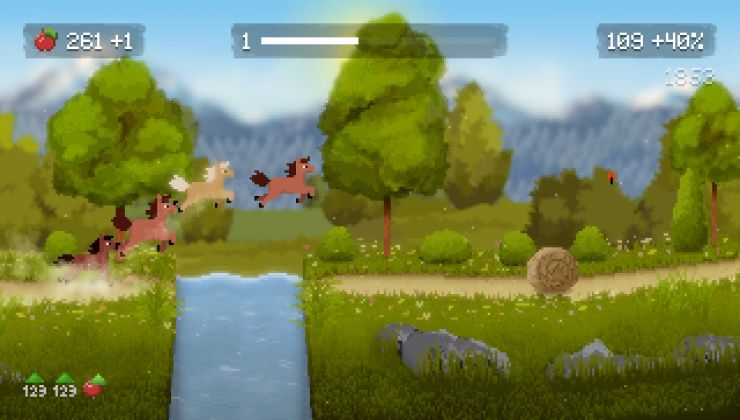
- Improved Shaders: The quality of the shaders has been improved, making text more readable and the game looking better overall.
- Improved fonts: The font used to display apples and the score has been improved so that the text no longer jumps back and forth when counting up.
- Improved progress bar: The progress bar now includes the goal flag to make it clear that the bar always refers to a level.
- Improved notifications: The notifications have been given a background to make them easier to read.
- Improved UI layout: The UI layout of all screens has been adjusted to provide more space for text in certain languages.
- Improved UI navigation: Fixed an issue where the game would accidentally quit on the title screen when pressing the wrong controller button. Sorry about that.
Feel free to let me know in the discussions what you think about the demo or make suggestions about what else you would like to see in the game.
I hope everyone has fun with the demo and at Next Fest! 🥳