 We’re excited to announce that in patch 4.3 we’ll be testing our first release of Vulkan to live on PC in patch 4.3.
To launch Rainbow Six Siege on Vulkan, please select the appropriate play button when launching the game on PC. You will be able to select either DirectX 11 or Vulkan on your launchers.
[previewyoutube][/previewyoutube]
[h2]WHY VULKAN[/h2]
The Vulkan API provides advantages over DirectX 11 that can help Rainbow Six Siege improve performance on a number of levels.
In brief, the Vulkan API will enable us to make improvements on workload through Dynamic Texture Indexing to reduce CPU cost, and Dynamic Resolution and AsyncCompute to reduce GPU cost. These features are already used on consoles, and the Vulkan API will allow us to do the same for PC.
By combining all these features, we can optimize both the GPU and CPU cost of rendering.For those interested in the technical details, you can find a more in-depth explanation of these features and the advantages they bring to the PC version below.
To ensure proper performance for Vulkan, be sure to read our IMPORTANT NOTES section.[h2]VULKAN, DIRECTX 11 AND APIs[/h2]
Vulkan and DirectX 11 are Graphics Application Programming Interfaces, known as Graphics APIs. They act as a communication medium between Rainbow Six Siege (and other games) and a player’s Graphics Processing Unit also known as GPU.
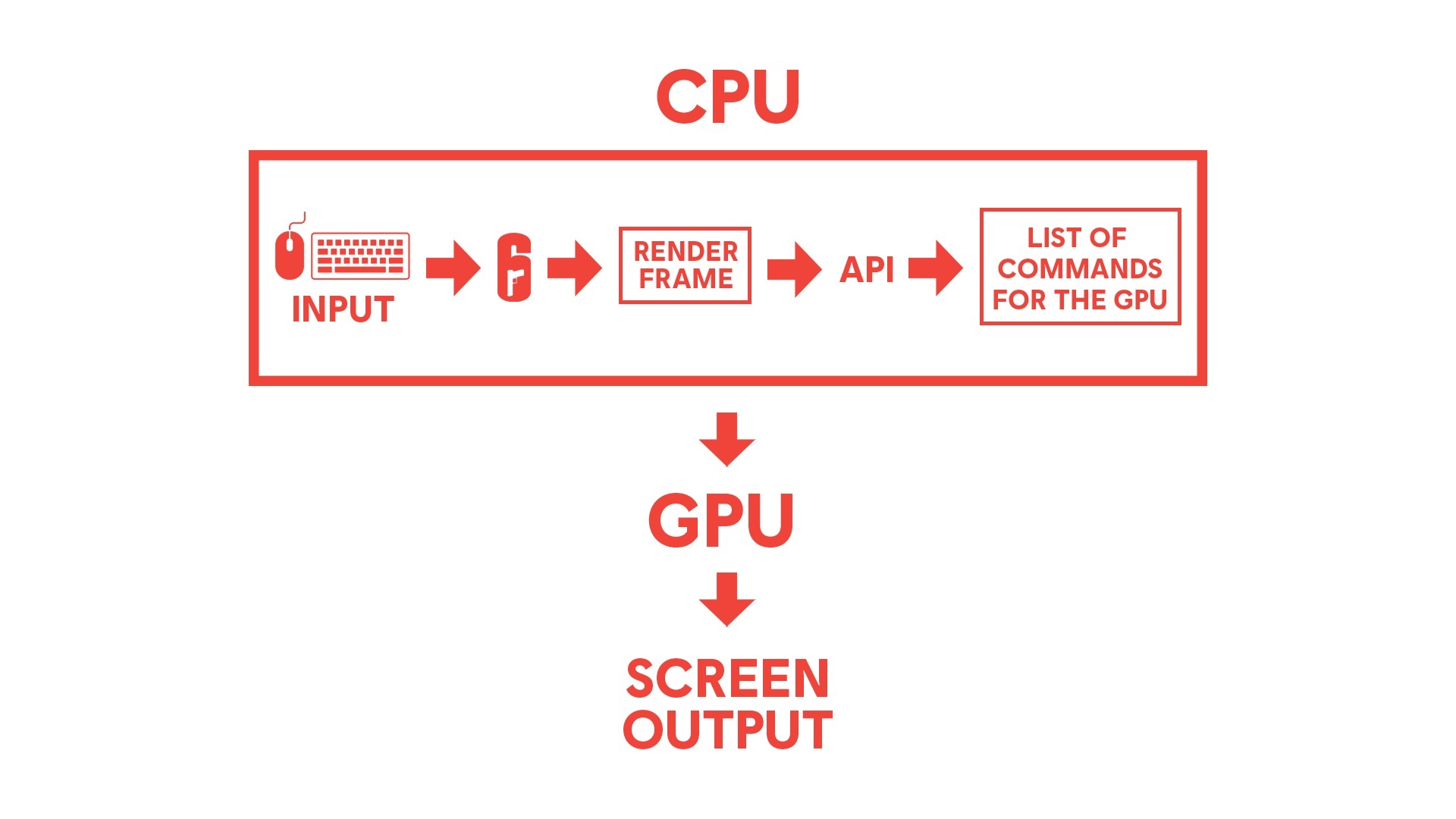
In games and other graphics-intensive applications, both the CPU and GPU run in parallel and a player’s maximum frame-rate when playing is determined by the slower of the two, which varies depending on hardware.
Players have some limited ability to control frame-rate by changing their graphics settings to improve their GPU workload, but the bottom-line is that performance is still limited by either their CPU or GPU.Here is where the APIs make a difference: The right API can offer features that allow us to enhance workloads and performance. Some APIs such as Vulkan are also much closer to the bare metal hardware and therefore require less CPU usage.
In short, they allow the programmer more flexibility, at the cost of additional coding complexity.Rainbow Six Siege currently uses the DirectX 11 API which was released more than 10 years ago. While it still delivers great performance, the graphics driver requires significant amounts of CPU processing. Moreover, some features supported by modern GPUs are not compatible with older APIs such as DirectX 11. (We also evaluated DirectX 12, but our internal tests show better CPU performance under Vulkan.)
Vulkan offers benefits that we can take advantage of that will help to reduce CPU and GPU cost, as well as support for more modern features that can open the door to exciting new things in the future.
[h2]TESTING VULKAN FOR RAINBOW SIX SIEGE[/h2]
Although we've conducted extensive internal validations and spent time gathering diagnostics from our Vulkan implementations on the Test Server, the biggest test of Vulkan will be its performance for our players on the live PC servers.
In 4.3, we will move forward to test Vulkan on live for PC. This is to test Vulkan against a broader variety of hardware and a larger population of players to help us ensure that overall stability with Vulkan is just as good or better than before. Please keep in mind that as we are still in the process of tweaking and testing Vulkan for Rainbow Six Siege, some players may see no change or potentially decreased performance with the initial live release. As we continue to move forward with Vulkan, the goal is to optimize Vulkan to improve graphics performance for our players.
[h2]Summary[/h2]
The Vulkan API provides advantages over DirectX 11 that can help Rainbow Six Siege improve graphical performance. Moreover, Vulkan as a newer API has benefits that will help to reduce CPU and GPU cost, as well as support for more modern features that can open the door to more new and exciting things in the future. With patch 4.3, we’ll be releasing Vulkan to live for PC for broader testing.
To launch Rainbow Six Siege on Vulkan, please select the appropriate play button when launching the game on PC. You will be able to select either DirectX 11 or Vulkan on your launchers.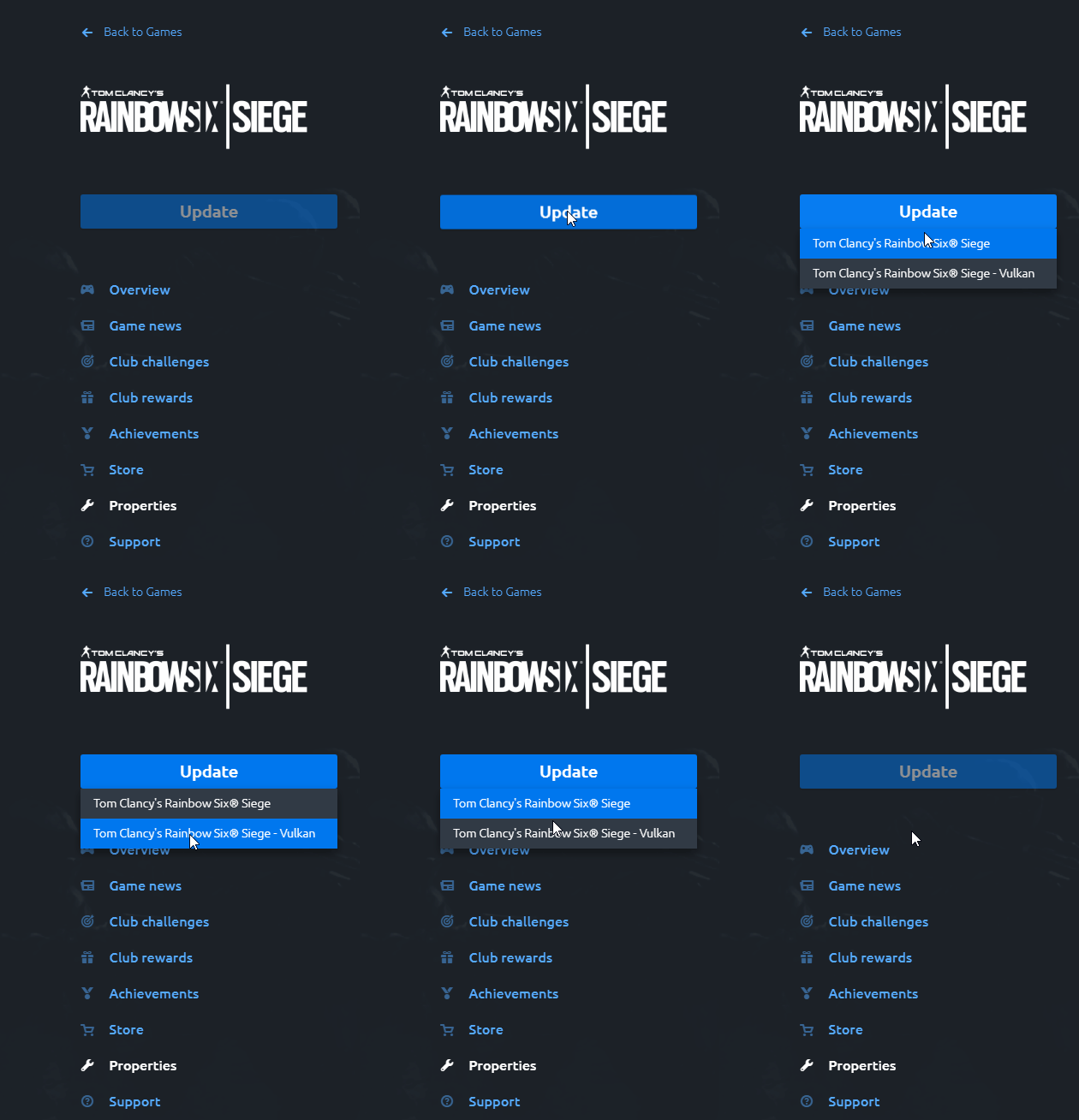 Don't forget, UPDATE YOUR GRAPHICS DRIVERS! For best results: Nvidia update 441.87, AMD update 20.1.4, Intel update 26.20.100.7372.
[h2]GETTING TECHNICAL[/h2]
Vulkan is an API that is designed to work closer to the hardware level.
By using the Vulkan API, Siege can take advantage of three modern features to improve workload performance:
- Dynamic Texture Indexing (also known as bindless rendering)
- Render Target Aliasing
- Async Compute
[h3]Dynamic Texture Indexing (also known as bindless rendering)[/h3]
WHAT IT DOES:
Dynamic Texture Indexing helps us reduce CPU overhead by issuing fewer draw calls (a call to the graphics API to draw an object that will appear on screen). This is accomplished by having the GPU dynamically select the texture used in the shader, instead of binding it by using the CPU. The result is less pressure on the driver, and the freed CPU cycles can then translate into better CPU performance overall.
EXPECTED RESULT:With Vulkan and dynamic texture indexing,
players who are CPU-bound should see better and more consistent frame rates.[h3]Render Target Aliasing & Dynamic Render Scaling[/h3]
WHAT IT DOES:
Render Target Aliasing will allow us to implement dynamic render scaling for PC which dynamically adjusts the scaling ratio depending on the GPU workload. Players can choose a target frame rate, and the game will automatically adjust the render resolution to reach that target, resulting in more consistent frame rates for GPU-bound players.
EXPECTED RESULT:Since launch, Siege has made use of various render scaling methods with TAA antialiasing techniques. PC players can independently set their game resolution and their display resolution – this allows us to then render objects at a lower resolution and afterwards temporally upscale them to the set display resolution. Temporal upscaling is a high quality upscaling method that offers high quality antialiasing with very low blurring, and has the added benefit of improving performance.
With the addition of dynamic render scaling optimization working alongside TAA antialiasing, we hope to improve frame-rate and consistency for GPU-bound players.
[h3]Async Compute[/h3]
WHAT IT DOES:
AsyncCompute is a hardware capability that allows us to execute tasks in parallel on the GPU, thus providing more tools and opportunities for better and improved optimization. Since the launch of Siege on consoles, we have been able to utilize AsyncCompute for console players to optimize graphics techniques such as Ambient Occlusion or ScreenSpace Reflection. Graphics Cards previously supported AsyncCompute, however the DX11 API did not allow us to utilize it. With Vulkan it is now possible to do so.
[h2]IMPORTANT NOTES[/h2]
Graphics drivers:
UPDATE YOUR GRAPHICS DRIVERS. (Nvidia update 441.87, AMD update 20.1.4, Intel update 26.20.100.7372). In the past few months, we've worked closely with Nvidia, AMD and Intel to optimize driver performance in Siege. To get the best performance, please make sure to install the latest drivers (you will receive a warning if your drivers are out of date).
Hardware support:Unfortunately, some older hardware is not supported under Vulkan.
- On Nvidia, Vulkan is supported starting with the Kepler series (GTX 6 series). So Kepler, Maxwell, Pascal and Turing-based GPUs are supported. Any Nvidia GPUs after 2012 should be supported. (List of Nvidia GPUs)
- On AMD, Vulkan is supported starting with GCN1 (Radeon HD 77XX series). Any AMD GPUs after 2012 should be supported. (List of AMD GPUs)
- On Intel, Vulkan is supported starting with Gen9 (mostly Core IX-6XXX, Intel HD Graphic 5XX). Any Intel GPUs after 2015 should be supported. (List of Intel GPUs)
GPU memory oversubscription (requesting more GPU memory than available):One of the advantages of DirectX 11 drivers is that they are very good at handling GPU memory oversubscription. With Vulkan, oversubscription can trigger stuttering and potentially crashes. Due to this, to ensure a smooth experience, players will need to pay attention to the estimated memory consumption in the graphics settings menu. We also display a warning message whenever we detect that oversubscription is occurring. To prevent this, players should try to reduce the texture quality and/or the resolution of the game, which are the biggest factors leading to oversubscription.
We encourage players in our PC community to try launching the game with Vulkan so our test results can be as reflective of our PC population as possible.