GUIDE TO ADS SENSITIVITY IN Y5S3
Let’s talk sensitivity. ADS sensitivity (not your feelings). Today we’re going to teach you how to convert your old sensitivity settings from the old sensitivity system to the new one in Y5S3.
Keep in mind that when Shadow Legacy goes live, it will automatically convert your old sensitivity settings into the new system! The automatic conversion should preserve the original ADS feeling you had before the new season when it goes to live. It will switch your ADS settings to "Advanced" mode and adjust the per-zoom sliders to replicate the previous sensitivity settings.
Table of Contents
Context
- - Issues with the old system
- - Improvements with the new system
Conversion Guide
- - Conversion calculator
- - 'The Maths'
Example Calculation
Getting Technical
CONTEXT
Previously, ADS sensitivity used constant multipliers. Every zoom level had their own constant multiplier which was used to adjust the sensitivity while in ADS. This caused a few issues we wished to address this season with the addition of new scopes.
[h2]A NEW ADS SENSITIVITY SYSTEM IN Y5S3[/h2]
QOL and Improved Customization
The first issue with the old system was a straightforward QOL problem. With a single ADS sensitivity slider, it was difficult to have different sensitivity preferences depending on the zoom level. This forced some players to constantly adjust their ADS settings between rounds if they wanted to switch scopes with different zoom levels. To make everyone’s life better, the new "Advanced" settings allow players to customize sensitivity per zoom level with the new sensitivity sliders without having to adjust each time you change.
Improved ADS Sensitivity Consistency
The second issue is a bit more complex. We realized it was difficult for players to get a consistent feeling between zoom levels due to the fact that the constant multipliers differed from one zoom level to another, and because of other external factors not directly taken into account such as the field-of-view (FOV). This meant that players would often resort to third party calculators to achieve the desired effect. So, to improve consistency we looked at 360 Distance and Visuomotor Gain (scroll down for an in-depth explanation).
[h2]CONVERSION GUIDE:[/h2]
Method 1 - Easy Mode: Automatically find and convert your sensitivity settings with our handy-dandy spreadsheet.
Method 2 - Hard Mode: If you want to ‘Do the Maths’. Look below.
🤓 Math time
[h3]INPUT VARIABLES:[/h3]
- OldADS = The old ADS sensitivity value in the options.
- VerticalFOV = The FOV value in the display options for PC, or 60 degrees for consoles.
- AspectRatio = The aspect ratio of the display. For most cases, the game resolution width divided by the height (e.g. 4/3, 16/9, 16/10) should be correct.
- NewADS = The new ADS sensitivity value in Shadow Legacy (Y5S3).
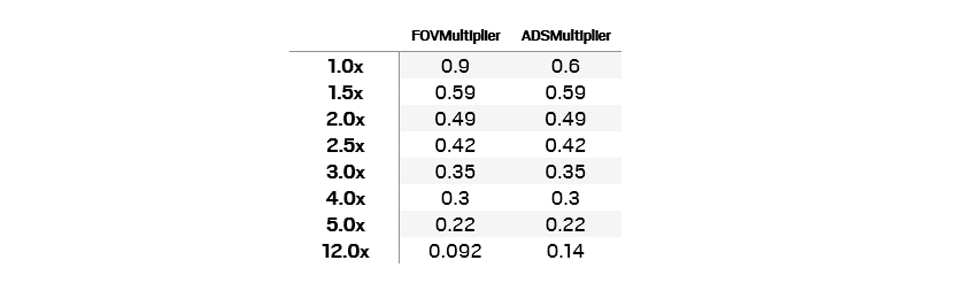
[h3]ZOOM LEVEL MULTIPLIER LOOKUP TABLE:[/h3]
[h3]EQUATIONS:[/h3]

If HorizontalFOV > 150 degrees, recalculate the VerticalFOV:



[h3]EXAMPLE:[/h3]
STEP 1: FIND YOUR SETTINGS
Look up your settings. A 16:9 aspect ratio will be 16/9, and 60 degrees will be 60.
In our example, we have:
- Display aspect ratio of 16:9.
- FOV setting of 60 degrees.
STEP 2: CALCULATE YOUR HORIZONTAL FOV (calculate new vertical FOV if Horizontal FOV > 150)
Take your vertical FOV and your aspect ratio and plug it into the Horizontal FOV formula. If your Horizontal FOV > 150 you need to use the Vertical FOV formula to recalculate the Vertical FOV.

Here the HorizontalFOV
STEP 3: CALCULATE YOUR FOV ADJUSTMENT
Lets's say you had an ADS value of 30 from the old model and want to know how to set your 1.0x magnification settings.
Look up the FOV multiplier from the table above and plug in your Vertical FOV.

STEP 4: CALCULATE YOUR NEW ADS SETTING
Look up the ADS multiplier from the table above and plug in the FOV Adjustment you just calculated. Multiply by your old ADS setting.

STEP 5: WE MADE YOU DO MATH 😋
In this scenario, an ADS value of 20 should be used for the 1.0x slider of the new model, in order to replicate the feeling of an ADS value of 30 of the old model.
[h2]GETTING TECHNICAL[/h2]
[h3]HOW WE IMPROVED CONSISTENCY WITH ADS SENSITIVITY IN SHADOW LEGACY[/h3]
There are typically two ways to keep a consistent effect when changing zoom levels: maintaining the 360° distance and using visuomotor gain.
[h3]360 DISTANCE[/h3]
A 360° distance system means the same physical distance on the mouse or gamepad stick will rotate your character by a constant angle. The unit of measurement to define this sensitivity is centimeters (or inches) per 360 degrees, which is the physical distance required to do a full rotation of the camera. Maintaining the same measurement means using a high magnification scope can be very disorienting, as the view will wildly change from one point to the next due to the zoom.
However, due to the disorientating effect, it is usually undesirable to make the 360° distance constant across zoom levels. While default adjustments can be set for different zoom levels to prevent this issue, there is no gold standard for determining what should be the default adjustment when zooming at various levels. Moreover, personal preferences and varying opinions make this a less ideal solution.
[h3]VISUOMOTOR GAIN[/h3]
Visuomotor is the coordination of movement and visual perception by the brain. And a Visuomotor Gain system scales the rotation linearly in order to maintain better consistency and perception when rotating your view.
To break it down further, let's start with an analogy. When you look at an image and move it around with the mouse, you normally expect the same physical distance on the mouse to always move that image by another constant physical distance on your monitor. When you zoom in on that image, you also expect the visual relationship between those distances to remain the same.
In Siege, the image is actually what you view through the player's camera, and "moving it around" in that context means "moving the 'panoramic view' around". Once again, regardless of the zoom, a given physical mouse or gamepad stick distance will always match another physical monitor distance and scale linearly. So in practice, the more you zoom in, the less the camera will rotate in degrees, therefore automatically increasing the 360° distance.
Because of the consistent feeling visuomotor gain provides across all zoom levels, we decided to use it as the new ADS sensitivity model in Siege.
From now on, new R6 players will have an ADS sensitivity value of 50 for all zoom levels. This value of 50 gives a neutral and consistent transition between hipfire and ADS with regard to physical mouse/gamepad stick distance versus physical monitor distance. Other similar FPS games also use similar values to achieve the same effect.
Side Note: If you are on PC and have modified the XFactorAiming value of your GameSettings.ini file, this will unfortunately affect the neutral ADS value of 50. Instead, the neutral value will be (1 / XFactorAiming).
For players who would still prefer to use the previous model, use the guide above to convert the old ADS value to the new ones, which should allow you to replicate it with the new system.
To learn more about the new sights and scopes coming in Y5S3, you can also check out our Sights/Scopes Dev Blog!