It's finally here!
[h2]Barony has been upgraded to 4.0[/h2]
If you’ve been playing Barony for a while, you’re going to notice a LOT of changes.Steam has been the lifeblood of our community. We thank you for continuing to play and spread the word about Barony! That said, please allow us to offer a warm welcome to the Nintendo Switch community. As Barony features Crossplay between Steam, Switch and Epic, you may find yourself rubbing elbows with a lot of new players, if you're into that kind of thing!

[h2]What’s the Quality of Death Update?[/h2]
[h3]TL;DR[/h3]
All New UI
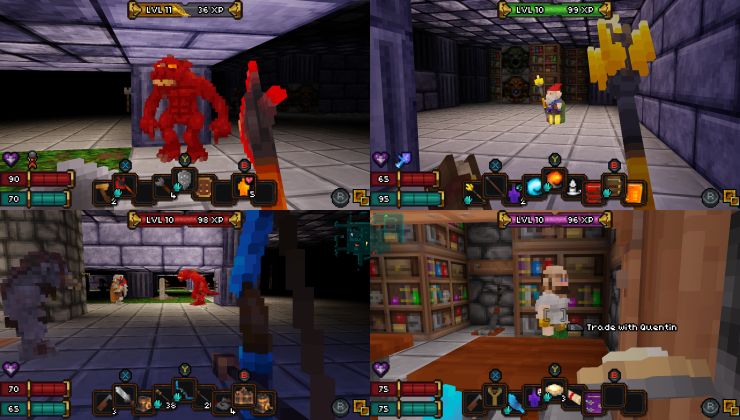
2-4 Player Split-Screen
Overhauled lighting solution
Full Steam Deck and gamepad support
Enhanced content, gameplay tweaks, and bugfixes

If you like to go with the flow,
go play it now and discover everything for yourself!We've also provided a more comprehensive run-down of what to expect.
This blog post on the
Turning Wheel blog breaks it down (in great detail) so If you're interested in the details,
head over there now.
[h3]
View Quality of Death update details and changelists[/h3]
[h2]Quality of Death Tips for Barony Veterans[/h2]
If you've been playing Barony for a long time a few of the things you're used to may've been moved around. While the above article covers a lot, here's a few quick tips if you need a quick fix:
[h3]UI Size[/h3]
If you played the previous version of Barony on high-resolutions, the new UI might feel strangely large. This is because Barony's UI used to scale with your screen resolution, as shown here:

So if you played in 4k, your text would be extremely tiny! We needed to correct this so that the UI would always look correct regardless of your preferred screen size.
But don't fret if you don't like how big it is now, the QoD Update has HUD scaling options that will help.

Just go to the Settings menu, and under General you'll find a slider called "HUD Scale". The default is set to 100% and was designed to fit all the game's information in 720p. But if you prefer a smaller HUD and have a larger screen, we encourage you to scale it down! (I personally play with the HUD scaled to 75%)

At 4k, or 1440p, both 75% and 50% scales will usually look crisp, and 1080p is good at 75%. If you don't run at a typical resolution and / or the pixels aren't lining up properly, you may also want to try the Filter Scaling option.

[h3]Game Flag Settings[/h3]
In the previous version of Barony, game flag settings were always only found in the Settings > Misc tab. We have relocated this setting
to the Lobby to try and help make it clear that these pre-game settings apply to new games of Barony that you start, not games you load.

You may still access the game settings in the
Settings > Game tab once you've begun the game to adjust the settings for that session, and the changes you make there within a game will not affect your saved settings from the Lobby.

[h3]Auto-Appraise[/h3]
A gameplay change in QOD is that
Appraisal can no longer fail and only achievable Appraise attempts will be made. So if your character doesn't have the Perception and Appraise skill needed to appraise an item, items will not Auto-Appraise.

If you play as a class who starts with
less than 0 Perception, this means you'll have to level up until PER increases, find glasses, or use unidentified potions and scrolls (which give you a chance to raise Appraisal) before you can begin Auto-Appraising.
[h3]Ready for Adventure?[/h3]
We hope that extra information helps. There are a number of other UI / UX and gameplay changes you might have questions about, so as always, feel free to
take a look at the FAQ:
Post-QOD FAQAnd of course, there's always more info in
that big blog post I mentioned before.

[h2]More to Come![/h2]
In the coming weeks and months we will have more updates, large and small, and they'll be coming
a whole lot faster now that we've gotten this foundation underneath us. We're very excited to continue supporting Barony with new features and content. We'll be back to share more soon!
Until then, happy lich hunting!