1. Stellar Tactics
  2. News

Stellar Tactics News

Stellar Tactics community wiki

I've had a bunch of requests to start a wiki for Stellar Tactics and I'm happy to say that the wiki is live now!

https://stellartactics.gamepedia.com/Stellar_Tactics_Wiki

This is your wiki, so feel free to add content, edit, upload and otherwise make this a great resource for other players. I've seeded the site with a good amount of information. However, there is so much more that could be added and I would prefer to spend my time developing the game. I'll continue to add pages and information as I add the remaining features, content, and polish.

I'm excited to see where you all take this if you decide to get involved. Stellar Tactics has a great community of positive supporters and I'd like to thank you all for your contributions and support.

I've been very busy with the next content update that includes revised character animations, updated ground combat pacing, a number of new combat features and the weapon class special attacks system. But that's not all. I also have a few surprises that I think you are going to like. More on that in a few weeks when I'll be ready to show you some of the new things that are coming to the game.

Thanks as always for supporting Stellar Tactics!

Crafting and Salvaging patch

Today’s patch adds the first pass at the crafting and salvaging system. The crafting system lets you craft almost every item that can be equipped in the game other than faction armor, ammo, grenades, and devices.

Crafting requires the disassembly of items you find in your travels. When salvaging, you learn about the items you are disassembling and eventually, you earn a schematic so you can craft that item.

Salvaging – process items found in your travels into component parts for crafting.
  • You must mark items in your inventories (CTRL-Click - General/Stash/Cargo Hold).
  • Once items are marked, you can access the salvage toolbox from the inventory menu via a new icon above the general inventory.
  • Junk items generate finishing materials used in the crafting finish process.
  • Weapons, armor and other items that can be equipped generate primary crafting components.
  • Salvaged items are placed in a separate infinite inventory. This inventory feeds the crafting bench and parts are automatically placed on the crafting table.
  • As you salvage items, you will earn experience towards unlocking a schematic for that item. At times you may even gain experience towards the next tier schematic.


Crafting - Once you unlock a schematic, you can craft the item. All schematics come in various quality tiers that need to be unlocked. Schematics are also a very rare drop from loot crates, cargo containers, enemy packs, and lockers.

Crafting requires a number of items:
  • (Required) Base item components of the same quality tier salvaged from a similar item
  • (Required – In cargo hold or station storage) Refined ore. You can mine ore and refine the ore, or purchase from the Trade-Net
  • (Optional – In cargo hold or station storage) Rare earth minerals to clear conditions. You can mine ore or purchase from the Trade-Net
  • (Optional – In cargo hold or station storage) Finishing items salvaged from junk and rewarded during salvaging of equipment


Rare earth minerals and finishing items are optional, however, they are very important and you could end up with a sub-par item if you do not have any on hand when crafting.

To craft an item:
  1. Travel to any trade station and look for a crafting station. Crafting stations have a unique icon on the radar and map.
  2. Select the crew member you want to craft and select the crafting station. The crafting table will be shown.
  3. On the top left is a list of unlocked schematics (if any are unlocked). Choose one.
  4. You may need to adjust a few initial values before you start crafting. For example, when crafting a weapon, make sure to set the correct weapon skill level before selecting the begin crafting button. When crafting an item for your ship, make sure the correct ship is selected.
  5. All items except for weapons can be “re-rolled” That is, you can re-roll a number of base equipment stats.
  6. When you are ready, select the processing button and start crafting.


Processing:
  1. Each process step will expend AP
  2. If successful, the quality of the item will improve.
  3. At various stages, negative and positive “conditions” may arise. You can select a condition to expend a single unit of rare earth for that step to clear negative conditions and activate positive conditions.


Finishing:
  1. Once all AP is expended, the item is ready for finishing.
  2. Select your finishing options if any. The higher the quality, the more options.
  3. Select the “Finish Crafting” button and the item will be placed in your inventory or cargo hold.


About progression:
  • Primary crafting components cannot be purchased. They can only be gained by salvaging equipment.
  • Occasionally you are rewarded crafting components for next tier items when salvaging as a bonus
  • The higher your skill in salvaging, the more components you get when salvaging an item. In some cases, you may be able to salvage enough components to build several items of a similar type.
  • The value of crafted items of high quality exceeds the value of any similar items you might loot.
  • Occasionally you are rewarded experience towards the next tier schematic when salvaging a lower tier item
  • Higher tier schematics require more disassembly than lower-tier schematics. Bonus experience offsets the number of items you need to disassemble to unlock that next tier.
  • You can find schematics when looting ship containers and gear in ground missions. These are extremely rare.
  • You are rewarded experience regardless of failures when salvaging.
  • Schematic experience is rewarded for every component that is disassembled. It is best to use the third salvaging option initially that rewards additional schematic unlock EXP.


Grenades and ammo will have a separate utility device that will let you break down these objects and craft other ammo types. That will come in a future patch.

The patch includes entries in the in-game guide for salvaging and crafting for reference.

Armor visual types are random for now until I can get more sets in the game. I’ll also likely add an “appearance” slot in the future that lets you equip a visual appearance of your choice. The faction armor set appearances are reserved for faction armor.

Perks are not available for Salvaging and Crafting at this time. As usual, I’ll add those after I gather more feedback on the system.

Note: Salvaging has been moved to the general skill area. It is no longer a space specific skill.

There are a few other things I’d like to do with salvaging – salvaging enemy ship wreckage and various items found in ground exploration locations.

I hope you enjoy the crafting system. I’ll be reading feedback on the forums and will make adjustments over time.

So, what’s next? I’ll be updating the ground combat animations and adding weapon-specific special attacks. I’ve gathered a lot of feedback from the community and there will be a few new options for targeting enemies and displaying target information. In general, I’ll be taking a deep dive into the combat system and adding a new pass at polishing the ground combat system.

After that, boarding. I have everything I need for this now including all the ship interiors. I know many of you have been waiting for this and I’m eager to get started.

General patch notes and fixes:
FIXED: A rare case where ship cargo could not be looted
FIXED: A rare case where incursions would not trigger
FIXED: Duplicate stats on high-quality armor
FIXED: Map, load/save and cargo storage screens close with the ESC key
FIXED: A few UI font scale issues
FIXED: A few typos
FIXED: A bug related to the correct rollover info displayed for equipped devices
UPDATED: FTL Drives and refineries are now dropped as loot in ship containers
UPDATED: Stun grenade effect reduced from three to two combat rounds
UPDATED: Frag grenade damage increased
UPDATED: Gas grenade damage increased per round of damage

As always, thanks for supporting Stellar Tactics.
Crafting preview


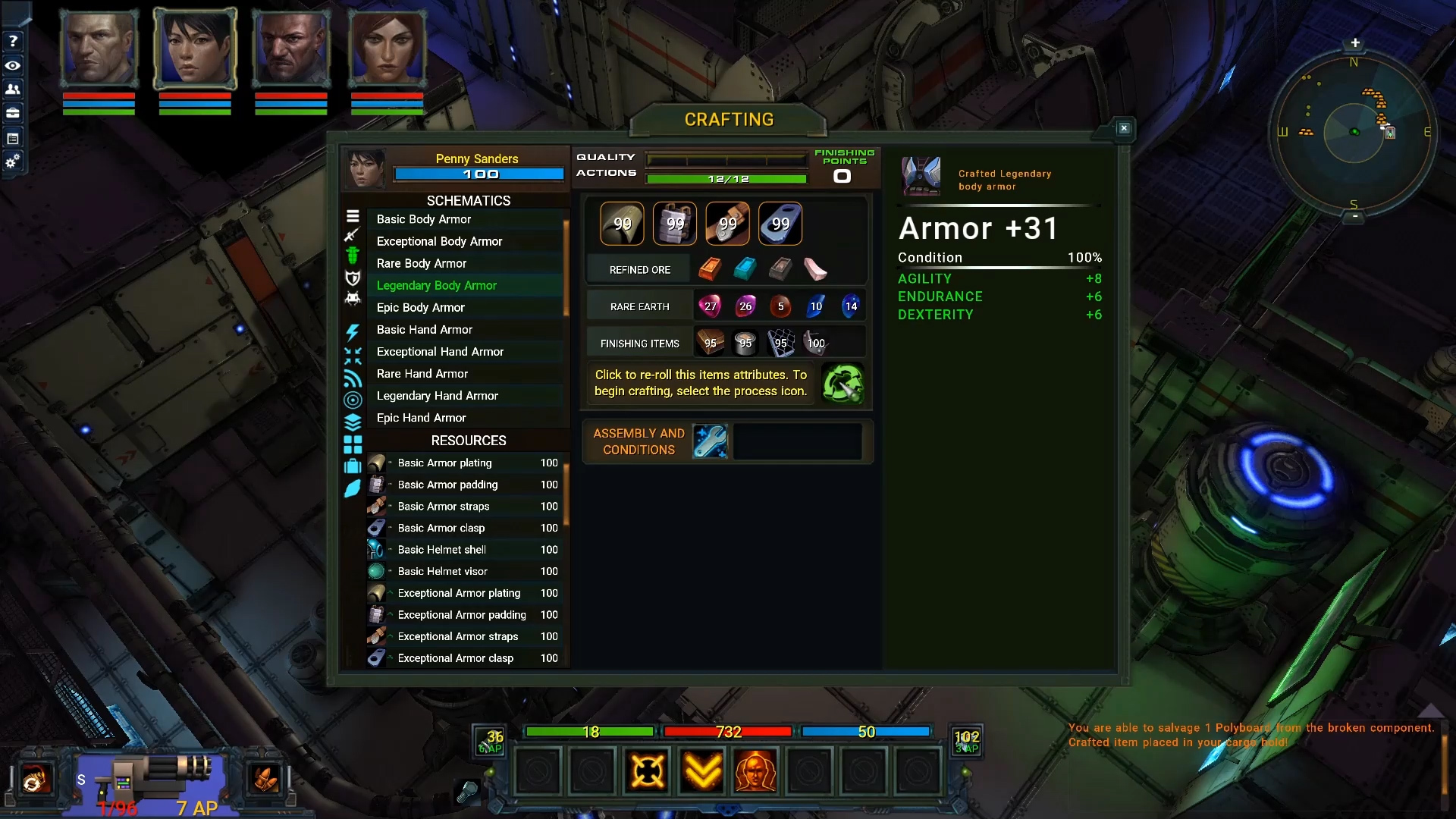
I’m posting a video first look at the crafting system today. There is still a good bit of cleanup, bugs to fix and balancing work to do. I’m hoping to have this patched into the game in a week or so.

https://youtu.be/f7ZLqCSHYLM

Crafting requires various components:
  • Crafting components are broken down from items you find in the world using the salvaging skill
  • Refined ore and rare earth minerals from mining or purchased from the Trade-Net
  • Finishing items salvaged from junk you find in your travels

Crafting requires schematics that are unlocked as you salvage items and learn more about them. Schematics can also be very rare drops from various enemies and in ship crates. Over time you will gather a large number of schematics that can be used to craft gear for your crew and parts for your ships.

Assuming you have a schematic and the required resources (components and refined ore) you can begin crafting by selecting a crafting station found on trade stations across the universe. I’ll also be adding crafting stations to ship interiors when I patch the boarding system into the game at a later time.

Once you find a crafting station, you can select a schematic and the table is automatically filled with the resources you need to craft the item. Refined ore and rare earth minerals are pulled from your cargo hold and from the station's storage when crafting, so, you can stockpile these items on stations if you want to. Components and refined ore are required. However, it is very important to also have a good stock of rare earth minerals and finishing items.

Some crafted items have additional options you can select. For example, beam pistols and rifles have options to select various damage types. Ship equipment requires you to select a ship type. Your current ship is always selected by default.

You can re-roll the base stats for most items. Ground weapons are the exception as they scale on the weapon skill of the crew member. When crafting a weapon, you can select crew portraits to preview the weapons stats on that particular character.

Rare earth minerals – At various stages in crafting negative and positive “conditions” may develop. If you do not have the appropriate rare earth mineral, it could cost you finishing points, increase your chance for a crafting process failure and decrease the number of actions you have resulting in a lower quality item. Having the correct rare earth minerals will also let you trigger bonus effects for additional finishing points and extra action points.

Finishing items – The last stage of crafting is finishing. At that point, you should have the correct finishing items from salvaging to take advantage of allocating finishing touches to the item. These additional points increase the effectiveness of the item you are crafting.
In general, high quality crafted items will always be better than item drops or equipment found on vendors. The exception to this will be some of the new bosses that will be coming to the game and perhaps faction gear which will see a re-balance in the near future. When crafting weapons, especially higher quality weapons with mod slots, those slots are unlocked based on the quality of the crafted item. In addition, higher quality items unlock more finishing options so you will need to keep an eye on conditions when they pop up.

That’s all I have to show for now. I hope you enjoy the first look at the crafting system!

Progress update - Crafting and ship interiors


I’m posting a work in progress video today that shows the salvaging portion of the crafting system which is nearly complete. I still have a bit of work to do on the UI and balancing. The video also shows the first completed ship interior for the boarding system. More details below.

https://youtu.be/Dy3GbDkl2Vg
Crafting requires components and the salvaging system lets you mark items in your inventory, stash and cargo hold for disassembly. As you disassemble items, you will gather crafting components and the finishing items you will need to craft equipment for your ships and crew.

You can salvage items anywhere. That is, you do not need to travel to a salvaging station to break items into component parts. Initially, I was going to tie salvaging to a static salvaging station that would be on your ship and space stations. I felt it would be a lot more useful if you could do this at any time, clearing inventory of excess equipment and vendor junk items. Crafting material storage is infinite so you won’t need to worry about max inventory for these items.

Equipment – When disassembling equipment, you will gain salvaging experience, component parts, finishing items and progress towards learning a locked crafting schematic for that item type (based on the quality of the item).

Junk items – Junk items generate finishing materials. These will be used in the finishing stage of crafting to assign stats, weapon min/max damage values, and other bonuses to equipment. In general, crafting an item can result in a finished item with bonuses and stats that are better than any item you can buy or find in the game.

I’ll be starting on the crafting portion of the system next now that I can generate crafting components. This will take a while and I hope you all enjoy the system when it’s finished.


Ship interiors are being worked on. These interiors will be used for a number of purposes:
  • Boarding: Disable a ship and enter through the airlock. Various doors to be hacked, hostile enemies defending their ships and objects that need to be repaired – not to mention loot and the ability to sell these ships for profit.

  • Missions: There will be a number of missions that may pop up as a communication from a disabled ship, rescues and a few other scenarios that will require entering other ships.

  • Your home: Ships will serve as a place to store goods, interact with the crew and craft items.

That’s all I have for now. Thanks as always for supporting Stellar Tactics!

Progress update and Patch


A few fixes and QoL requests addressed today. The patch should be posted shortly. As always, if you find any bugs/issues, please post on the bug forums. I'll address any critical issues promptly.
https://steamcommunity.com/app/465490/discussions/7/

Just a note about the crafting and salvaging system. The paper design is nearly complete. I should start implementing these systems next week starting with the base salvaging system related to inventory items (junk, weapons, armor, turrets, etc.). From there I'll start implementing the crafting system using those salvaged items. I'll provide more details in a post at some point as I get closer to finalizing the system. I don't want to make any promises until I have it fully working and have time to test and tweak things.

Crafting will not be just a matter of adding x + y + z to create a new finished item. There will be multiple stages of crafting similar to:

  • Setup - Setup the crafting table with salvaged components, and resources of varying qualities
  • Process - Process the components using various resources
  • Finish - Finish the crafting session enhancing the item and adding stats, bonuses, slots etc with remaining CP (crafting points)


I'll keep everyone posted as I make progress.

FIXED: Completed eliminate missions now display the green "cleared" state on the mission objective map if an area is cleared after the primary "eliminate" mission objective is completed.
FIXED: Hacking tool no longer displays stats. All hacking bonuses were moved to perks a while ago.
FIXED: If you were queuing up attacks and ran out of ammo when using the combat queue - the game would lock up and you would need to reload a save to continue. Bad bug - thanks for reporting it!
FIXED: A very rare case where some system configurations could not load required DLL's at the start of the game causing a forced exit when clicking past the EA display screen.
FIXED: A bug that would display "NONE" in the dialog field instead of Dr. Emily Jensen while in the Ruins.
FIXED: A number of typos.
UPDATED: Key binds would not allow binding of the up and down arrow keys. All key binds have been reset and you will need to re-map your keys. I am looking into key binds for grenades and med-kits for a future patch.
UPDATED: When a weapon is equipped, mod slots are now clearly labeled in the weapon mod slots menu as "Mod slot not available". This should make it less confusing when players try to identify equipped weapons that actually have mod slots.
UPDATED: Added arrows to the portraits on the character information and inventory screens so you can scroll through active crew members with the mouse rather than using the F1-F4 keys. The F1-F4 keys still work if you prefer to use them.
UPDATED: Adjusted ship materials so they load faster resulting in less hitching when NPC ships are loaded in star systems and the FTL map.
ADDED: "Steering" mode for ships. Holding the left and right mouse buttons will now place the camera behind and slighting above the ship. You can move your mouse in any direction to steer the ship in this mode. Additionally, the left and right turn keys used while in steering mode will accelerate turns. Releasing the mouse buttons will return control to the normal state.

Thanks as always for supporting Stellar Tactics and I hope you all have a wonderful weekend!