1. Rec Room
  2. News

Rec Room News

Rec Room PATCH - the "Too Much to Handles" edition

[h2]General Improvements and Bug Fixes[/h2]
  • Play Audio At Position now logs a maker pen warning when playing the maximum amount of audio clips at once instead of a CV2 error.
  • Fixed a bug where the inventions spawned through the portfolio sometimes failed.

Please see here for convenient links to controls, tutorials, comfort options, etc.:https://recroom.com/community

We love to hear your feedback, so please don't hesitate to let us know what you think.

Rec Room PATCH - the "Too Much to Handles" edition

[h2]General Improvements and Bug Fixes[/h2]
  • Fixed a bug where there was a vignette when a VR player was close to another player.
  • Fixed an issue that caused the 'Set as Room Default' button on the Background Objects Constant chip not to work as expected.
[h2]Rec Room Studio[/h2]
  • Rooms 2.0 hierarchy editing is now supported in Rec Room Studio! Click and drag orange Maker Pen scene objects in the Hierarchy window to change parent and child relationships between objects. Open the parent Object Board in the Circuit Editor window to edit and connect to child Circuit Boards. Studio Props can be parent or child objects, and interact with parent gizmos such as rotators!
  • Fixed an issue with the position and rotation of custom Studio Objects and their children in Rooms 2.0 rooms not being saved correctly in RR Studio.
  • "Remake Object Board" and "Remake Object Boards For All Prefab Instances" for custom Studio Objects are now called "Update Object Board" and "Update Object Boards For All Prefab Instances". This new operation incrementally adds and removes ports and chips to the Object Board so that user modifications are not destroyed.

Please see here for convenient links to controls, tutorials, comfort options, etc.:https://recroom.com/community

We love to hear your feedback, so please don't hesitate to let us know what you think.

Rec Room PATCH - the "Too Much to Handles" edition

[h2]Third Person Mode[/h2]
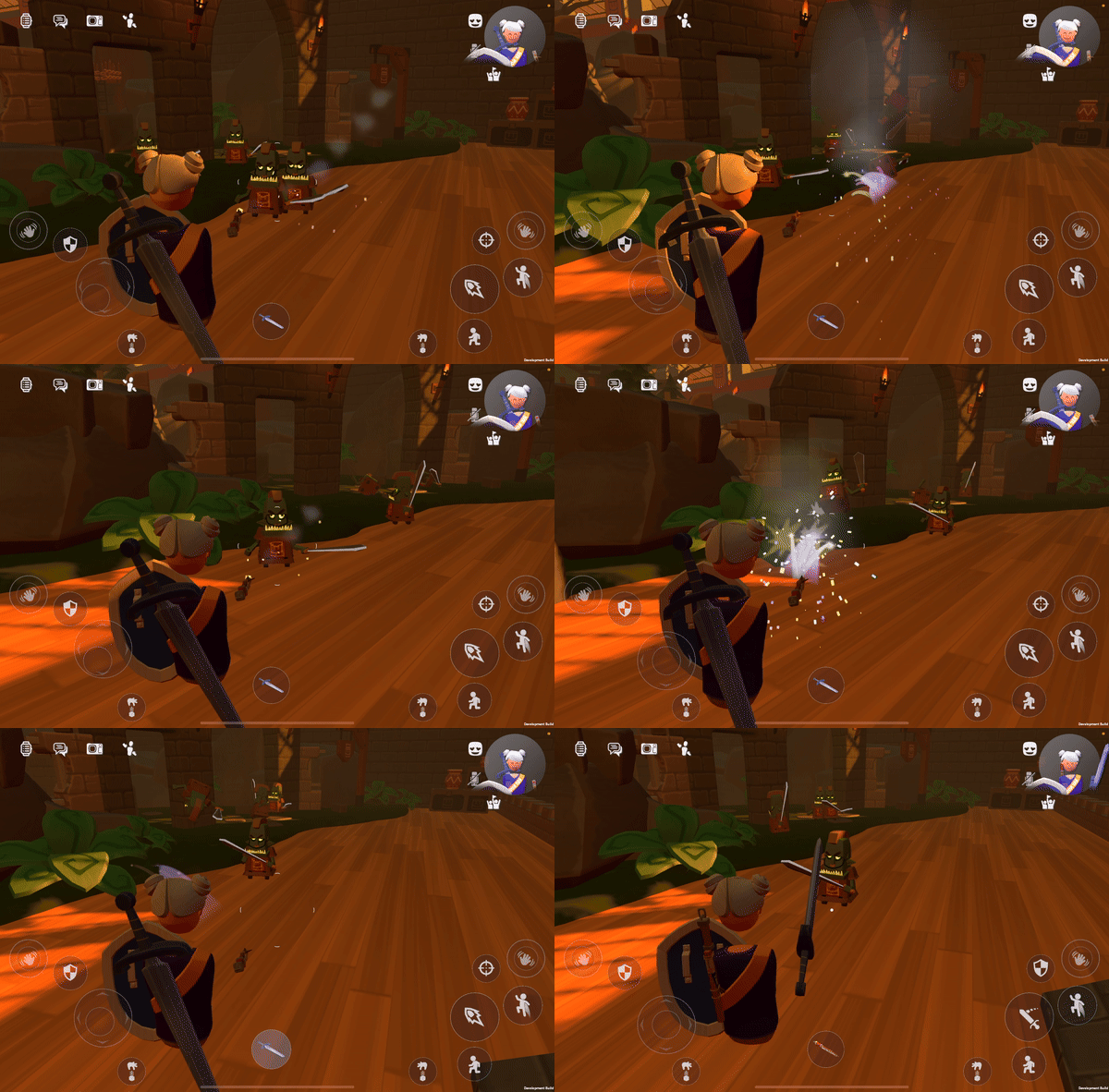
We're starting to roll out big updates to third-person mode!

Soon you will be able to pick things up, throw a ball, shoot a gun, and swing a sword (you know, actually engage with the world), all in the third-person mode! And it will be a great way to enjoy your full-body avatar.
  • Q: What platforms will support third-person? A: All Screens platforms (Gamepad, Keyboard, and Touch). No out-of-body experience for VR.
  • Q: When will I get it? A: We're carefully A/B testing this feature over several rounds, hopefully "Soon"
  • Q: What is happening to first-person? A: First-person mode is here to stay! Third-person will be an entirely optional way to play.
  • Q: How does third-person work in UGC Rooms? A: By using our cross-platform building blocks like Handles, Interaction Volumes, Locomotion Circuits, etc. most rooms already work great in third-person! Later, we'll add new circuits for creators to customize or restrict third-person if the room is meant to be played in a specific way.

We believe "iteration is quality", and we'll be iterating on third-person a lot this year, so let us know your feedback!
[h2]General Improvements and Bug Fixes[/h2]
  • Player UIs only show above your own head in third person if you have opted in to Show Own Nametag in Third Person
  • Touch can now reliably tap on old UIs like the costume equip button. Touch hides the dot reticle while targeting UI since it only uses direct tap.
  • Fixed a bug where Screens could not interact with Scoreboards from the same distance as VR
  • Camera shake and recoil are tuned and limited to reasonable amounts in certain cases
  • While wall climbing, Screens can drop off (or slowly descend) by pressing Crouch
  • Fixed the infinite shot bow bug.
  • Fixed a bug in Rooms 2 which prevented you from changing default values for Player Properties on a Player Definition Board.
  • Restrict KBM Marquee Selection to the current scope in Rooms 2. Allowing selection across scope led to a variety of issues.

[h2]Rec Room Studio[/h2]
  • Introducing the water shader, one of the tools we've been creating for My Little Monsters! Now you can make your water features POP in all new ways. Check out the new example water assets! Prefabs can be found under `Assets/DefaultAssets/Prefabs/Environmental Assets/Water Examples/
  • When dragging a new wire from a Studio object board, the Studio Function chip is now included among the list of chips that can be created and automatically connected to the new wire.
  • Fixed a number of issues in R2 rooms around copying, duplicating, and pasting objects that are children of a container.
  • The 'Set HUD Element Enabled' chip uses the Slot configuration of the Room Level HUD chip that it is connected to.

Please see here for convenient links to controls, tutorials, comfort options, etc.: https://recroom.com/community
We love to hear your feedback, so please don't hesitate to let us know what you think.

Rec Room PATCH - the "Too Much to Handles" edition

[h2]General Improvements and Bug Fixes[/h2]
  • Transferring room ownership now requires confirmation.
  • Fixed an issue that could cause notifications from the Show Banner Notification chip to persist into other rooms.
  • Fixed an issue with the Swing Handle where other players could trigger swings for a VR player.
  • Fixed an issue where objects with default tags wouldn't keep those tags on clone in Rooms 2.0.
[h2]Rec Room Studio[/h2]
  • Studio Objects now have a default Object Board that contains the In and Out ports for its Unity Properties and Unity Events. Default Object Boards for Studio Objects are only available once a room has been re-built from RR Studio -- older room saves will still have an empty Object Board when creating an Object Board for Studio Objects.
  • Custom skyboxes are working again!
  • Fix RRStudio not relaunching for some users after an update is applied. (Fix will apply on the next release after this one)

Please see here for convenient links to controls, tutorials, comfort options, etc.:https://recroom.com/community

We love to hear your feedback, so please don't hesitate to let us know what you think.

Rec Room PATCH - the "Too Much to Handles" edition

[h2]General Improvements[/h2]
  • We've added a couple of audio settings (echo cancellation and background noise suppression) that we're going to be rolling out over the coming weeks. These can interfere with sample recording and playing music through your microphone. If you notice any issues with either of those activities, try turning these settings off in the Audio Settings.
  • While targeting a drawing surface with a marker in hand, you will no longer be able to target or swap with other tools in view. Touch players can now properly go into draw mode by pressing the Draw prompt on screen.
  • Added the following nodes into beta: Not Equals, List Add If Not Contains, List Distinct, List Union, List Intersect, List Except
  • Data Tables now support Inventory Items as a column type.
[h2]Bug Fixes[/h2]
  • Fixed a bug with inventions causing dorm anchors to not work correctly. Inventions with dorm anchors which were created while this was broken will need to be fixed and re-saved.
  • Adjusted the landscape geo in \^RecRoyale to eliminate spots where players can get stuck in falling animation.
  • Fixed an issue where leaving ShareCamera in Tripod mode in front of a physical button can block the button from being pressed by other players.
  • Fixed a bug that allowed shapes to be inverted.
  • Fix rotation and inversion toggles for RR Studio billboards.
  • Fixed an issue with invention rotation during spawn while using ACM.
  • Fixed a long-standing bug which sometimes caused Spawner Components to spawn AI in the wrong orientation. (Imps staring at the floor, goblins looking at the ceiling, etc.)
  • Fixed the View More Featured custom avatar items button.
  • Fixed "Out of network heat!" errors for synced variables not including the variable for context in the maker pen log
  • Fixed an issue that could cause the 'Player Joined' event not to run in rooms with deleted Player Definition Boards.
  • Some rooms with state machine chips will now correctly load again.
  • Fixed bug where some items, like potions in rec royale, were harder to pick up than others.
  • Fixed bug where saving a modified room with an enabled Equipment Slot would cause saving issues.
  • Restored the missing 'Back' button in the maker pen palette.
[h2]Rooms 2.0[/h2]
  • In R2, there is a new HUD button to directly access your Room Inventory if there's any visible items.
  • Freeze tool is available when edited into an R2 container.
  • Added two new rooms-2-specific chips into beta: Handle Set Player Filter Tags, Handle Get Player Filter Tags.
  • Players can fly in R2 rooms when taking pictures of their inventions.
  • Collision events and chips should now return the root object in Rooms 2.
  • Fixed an issue where Player Traits for Sprint Speed, Crouch Speed, and Prone Speed would not update when changed via their corresponding set node (i.e. "PlayerSetSprintSpeed") upon first entry to a room.
  • Fixes an issue where the center pivot operation could not be undone while in edit mode.
[h2]Rec Room Studio Bug Fixes[/h2]
  • You can no longer accidentally delete nodes in the Circuit Editor that should not be deleted (ex: In/Out nodes within Object Boards)
  • RR doesn't support point light shadows. Removed shadow options from point lights.
  • Objects that are connected to scaled clamps, pistons, and rotators now show up in the right place and at the right scale.
  • Added new Inspector buttons to Create New Object Boards for objects that could have a board, but don't currently.
  • Fixed an issue where the Object Board attachment mode was set to Attached on every Object Board when saving rooms in RR Studio.
  • Fixed a bug with the default position and rotation when placing new objects into the Maker Pen Scene (e.g. a new Button).
  • R2 rooms now support hierarchy changes involving Object Boards. Previously moving an object like a Button into a Container in Studio would leave the Button's object board in a corrupted state. Now the Button's object board will be moved into the Container's Object Board as expected.
  • When moving, rotating, or scaling hierarchies of objects in R2 rooms, objects will now end up in the right place and at the right scale, without jittering around in the process.
  • Fixed an error message that appeared when attempting to test Rooms 2.0 subrooms in-game.

Please see here for convenient links to controls, tutorials, comfort options, etc.:https://recroom.com/community

We love to hear your feedback, so please don't hesitate to let us know what you think.