1. Rec Room
  2. News

Rec Room News

Rec Room UPDATE - the "Home Sweet Home" edition

[h2]New Home[/h2]
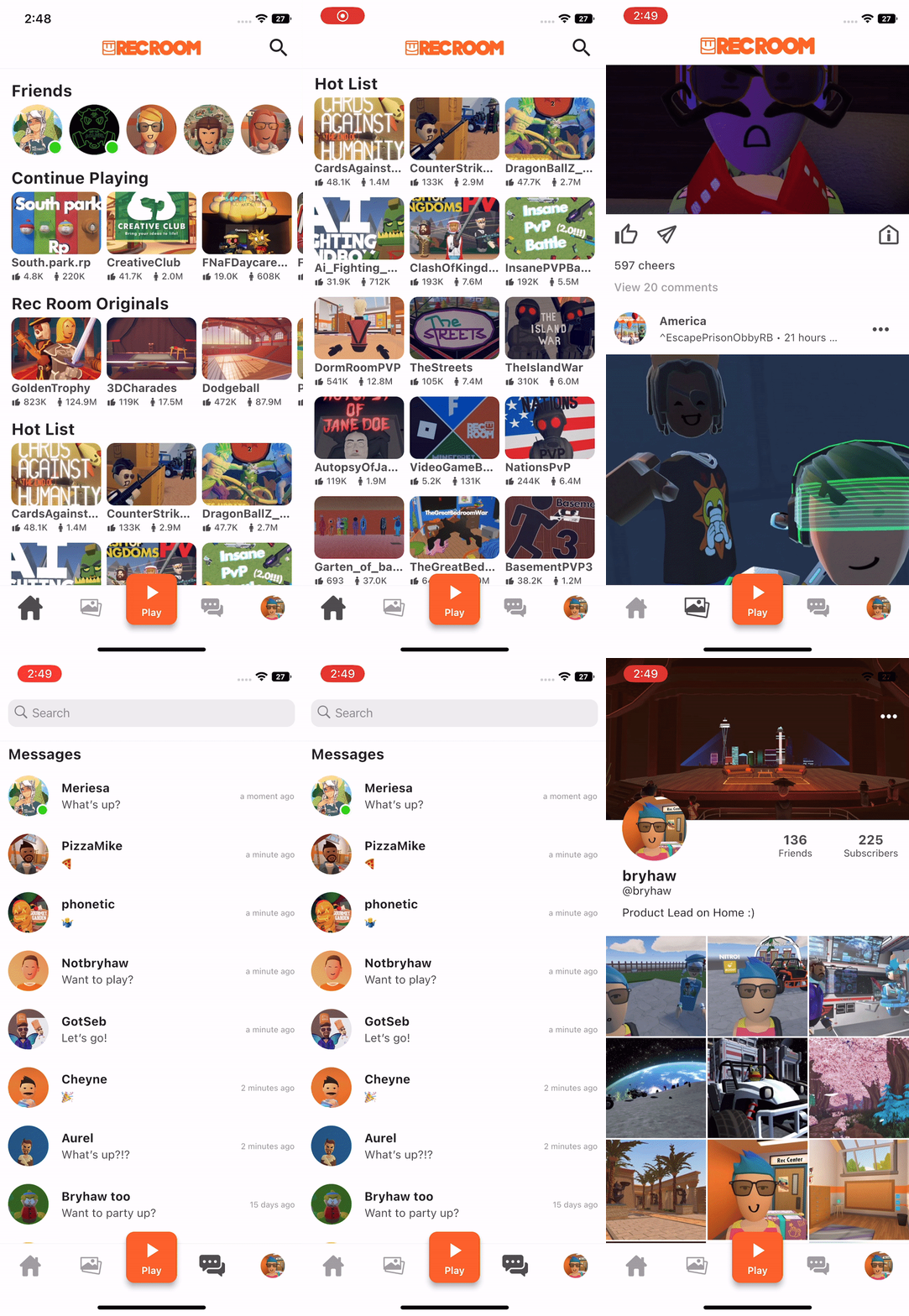
Over the last several months some of you with iPhones have received the new "Home" experience when launching Rec Room. We are excited to announce that Home has now been rolled out to a larger number of iPhone users.

As a reminder, Home was created to load Rec Room quickly, find what you want faster and bring in what you already love about Rec.Net. You can discover rooms, scroll the feed, comment on photos, and chat with friends, all with the core Rec Room experience being a tap away.

[h2]New Objective Marker System[/h2]
We've been rolling out a new Objective Marker System!
  • Mark an in-world point of interest using the new Objective Markers. Set up a marker by configuring an Objective Marker constant, and then move, activate, and modify it using a suite of related chips. This UI marker renders on top of everything else to help guide players to their destination.
  • New Objective Marker chips in Beta: Objective Marker Constant, Get/Set Color, Get/Set Current Distance, Get/Set Distance Indicator Enabled, Get/Set Enabled, Get/Set Label Enabled, Get/Set Label, Get/Set Position, Get/Set Proximity Fade Threshold, Attach To Player Or Object, Get Target Object, and Get Target Player
[h2]Circuits[/h2]
  • New Beta Chips
    • If Player Is Valid
    • If Player Is Valid And Local
    • If Player Has Role
    • If Has Tag
    • Instance Get Max Players
    • Interaction Volume Set Hold Time
    • Interaction Volume Get Hold Time
  • Fixed a bug which caused the
    Player Left
    event to fire twice for each person who left the room. We've split this up into two events:
    Player Leaving
    (fired just before a player leaves) and
    Player Left
    (fired just after a player leaves).
    • The
      Player Leaving
      event is the last moment at which a given Player value is valid. It's your last chance to do anything that assumes they're in the room.
    • The
      Player Left
      event fires just after a player has left. Therefore, the Player value received with the event will always be invalid. (But you can still compare it with other values using
      Equals
      .)
    • The old
      Player Left
      event has been deprecated, so existing rooms should be unaffected.
  • Added default footstep and jumping SFX to the SFX Constant chip.
  • When using the "Configure" tool on Circuits Chips, the "Chip Options" tab will now be open by default.
  • Fixed a bug that prevented the 'Self' chip from being cloned.
  • Fixed a bug that could cause some players not to have player boards.
  • Fixed an issue where the Cloud Data settings page wouldn't refresh once it was opened once in a room instance.
[h2]Maker Pen Improvements[/h2]
  • Double-clicking with the Maker Pen select tool to unfreeze an object now works consistently in non-beta multiplayer environments.
  • Saving the room will no longer reset the object selected for Maker Pen creation to the default shape.
  • Better scaling on Manipulate tool handles with basic shapes.
  • Fixed an issue where a drag input using the Manipulate tool on a shape container would error instead of switching to shape editing mode.
  • Pressing tab will no longer break references to the edge you're currently trying to drag off.
  • Fixed a bug that caused existing shapes that were scaled uniformly via their containers to lose that scale when enabling hierarchical building.
  • Add buttons to AnimationController MakerPen Edit menu: "Clear Keyframes", "Clear Object Connections"
[h2]General Improvements and Bug Fixes[/h2]
  • Spawner location is not modified by room reset.
  • Fixed an issue where, when one player interacts with an Interaction Volume, the Interaction Volume would appear briefly disabled for other players.
  • Fixed bug where a room authority change could reset objects' positions if those objects are the parent of a Clamp gizmo.
  • Fixed bug where a room authority change could cause a collision to be improperly reenabled on Rec Room Studio objects clamped to held tools.
  • Fixed a bug that could cause Player World UI to get in a corrupted state.
  • Fixed "Hide this Player's Name" setting on roles.
  • Fixed an issue where some trees would have blocky-looking shadows on non-mobile platforms.
[h2]Rec Room Studio[/h2]
  • Gives creators a built-in way to have "billboard" style objects, including those with text on them! This just makes a very common object type more accessible to those less familiar with the troubles that come with 3D rotations.
  • Added some prompts to save unsaved changes to scenes before closing them when switching open rooms.

Please see here for convenient links to controls, tutorials, comfort options, etc.: https://recroom.com/community

We love to hear your feedback, so please don't hesitate to let us know what you think.

Rec Room PATCH - the "Extreme Fire Crunch" edition

[h2]General Improvements and Bug Fixes[/h2]
  • Rec Room Object tags now support home values. Additions or deletions performed with tags through circuits will no longer save with the room, and will be reset when the room or object is reset.
  • We've added a 'Bake Tags' button to the Maker Pen Circuits Settings page. The goal was to allow players to turn tag sets into warm delicious cookies; but instead it seems to allow players to save tags set through circuits.
  • Improved the placement of the scale and move handles when using the Transform tool within a shape container with the "Rotate Around" pivot set.
  • Fixed Room Door destination when multiple Welcome Mats are in subroom of current room.
  • Shirts don't go that way! Fixed avatar items appearing sideways in the display case.
  • Fixed a bug that caused the 'Can Use Play Gizmos Toggle' permission to incorrectly default to 'disabled'.
  • Fixed circuit error chip tracking for the 'If Local Player Should Run', 'If Player Is Local', variable chips, and remote Event Sender chips.
  • Fixed a bug that caused port previews to rotate incorrectly when viewing them in VR.
  • We're testing a "+" button next to the Token and Room Currency Balance that takes you to the page for purchasing more
[h2]Rec Room Studio[/h2]
  • Creators can now create new rooms without leaving Unity! In the "Open Room" dialog, enter the name of the new room you wish to create and, if that name is not in use, click the "Create" button to create the new room.
  • Also in the "Open Room" dialog: creators can now search through a list of subrooms.
  • Things that cannot be cloned in game (i.e. Role Chips) now also give you an error if you try to copy/clone them within RR Studio. This increases consistency when creating things both in game and in RR Studio. You can see if any built-in item is cloneable by checking its
    RecRoomObjectInstance
    component.
  • Memory explorer can now help you find large or duplicate meshes that might be contributing to room memory bloat.
  • Alpha testing now works for Rec Room Studio/Lit shader on Quest & Pico.
  • Fixed an issue with Rec Room Studio rooms where Studio Objects that have a Physical PhysicsMode did not work for non-authority players.

Please see here for convenient links to controls, tutorials, comfort options, etc.: https://recroom.com/community

We love to hear your feedback, so please don't hesitate to let us know what you think.

Rec Room PATCH - the "Extreme Fire Crunch" edition

[h2]General Improvements and Bug Fixes[/h2]
  • Teleport VR players will no longer get trapped in legacy flying mode.
  • Fixed an issue that was preventing teleport VR players from picking things up with their left hands.
  • Fixed bug where copy-paste MakerPen tool was disabled.
  • Chips will no longer appear as grey boxes.
  • The following CV2 chips are now out of beta and available for use in all rooms: Show Purchase Prompt, Award Consumable, Award Room Key
  • Added the ability to activate a consumable directly from the purchase page.
  • Added the ability to tell what items in a UGC storefront you own already just by looking at it.
[h2]Rec Room Studio[/h2]
  • The version of RR Studio that you are using now shows up in the Title-bar of Unity! This should make it easier to send screenshots of problems as you no longer have to go to the
    About
    window for RecRoom Studio to show Devs which version you're on.
  • Initial version of the "Memory Explorer" tool. Memory Explorer is the first of a set of performance-focused tools that we're working on. It's intended to be a hub for estimating the memory cost of your room on different platforms. Initially, it only supports textures & render targets, but will be expanded over time with meshes, audio, animation, video, and any other large-level resources.
  • There is now a
    Documentation...
    link within the
    Rec Room Studio
    drop-down in the Unity UI.
  • Adding Rec Room Studio content to a room will no longer change the visual post-processing settings. (Translation: uploading a room from Studio for the first time won't make it lose the blue tint.)
  • Fixed a Studio bug where Visual Post Processing effects would stop displaying in the scene view.
  • Fixed a bug where the Environment Lighting settings in rooms uploaded from Studio would be ignored.

Please see here for convenient links to controls, tutorials, comfort options, etc.: https://recroom.com/community

We love to hear your feedback, so please don't hesitate to let us know what you think.

Rec Room PATCH - the “Extreme Fire Crunch” edition

Circuits Updates


  • Event Sender chips configured to Room Authority of Authority will no longer take network heat when the target player is local.
  • Player Logic Boards have undergone some restructuring in order to improve performance and reduce their impact on the chip limit.
    • Player Logic Boards for each player will no longer count towards the overall room chip total. (Chips in Player Definition Boards will still count.)
    • Player Logic Boards will no longer appear over Players' heads.
  • Rename "HUD Element Constant" to "Game HUD Element constant"
  • In the config menu renamed button "Preview HUD Element" to "Set HUD Element Values"
  • New Chip: ‘Game HUD Element Set All Values’ overwrites HUD element with input constant’s home values.
  • Fixed a bug that could cause the 'Create Circuit Board' operation to break the Maker Pen.
  • (Beta only) You can now configure Circuit events to fire when a player purchases a Room Key or a Consumable.


## General Improvements and Bug Fixes

  • Restored presence info for each player on the friend page, so that you can better see what your friends are up to.
  • Windows Standalone now auto-focuses input fields for Room Chat and Maker Pen search, just like Steam.
  • Fixed a rare case where players would be missing most content on their Home screen.
  • Fixed a VR issue with incorrect initial rotation on a drag move/rotate operation when using the maker pen with the move or transform tools.
  • Bundle store displays will now always show the rarest items first.
  • Fixed a bug where the clothing customizer would not be available immediately after purchasing RR+.
  • Fixed a bug that caused extra undo steps to be added when creating shapes.


## Rec Room Studio

  • Rec Room Studio no longer includes its own copy of Rec Room. Please install the latest Rec Room build via Steam or from rec.net. Make sure to launch Rec Room before running "Play Local."
  • Objects created in Rec Room Studio for the orange scene now have consistent default values with objects created in-game with the Maker Pen. This provides more consistency across Rec Room Studio and Rec Room.
    • Wall running and clambering are now defaulted to true.
  • Fixed an issue with setting custom texture sizes in Rec Room Studio for textures with resolutions smaller than 32x32.
  • Fixed a bug where sending a room reset event in a Studio room could break the lighting.


Please see here for convenient links to controls, tutorials, comfort options, etc.: https://recroom.com/community

We love to hear your feedback, so please don't hesitate to let us know what you think.

Rec Room PATCH - the “Extreme Fire Crunch” edition

[h2]Saved Outfit ++ Part 2[/h2]

We are rolling out a glammed-up Outfit page with some hotly requested features:
  • Set a custom thumbnail for your outfit on the new edit page!
  • Erase old outfits to free up outfit slots
  • View the elements that make your favorite fits
  • And make your best looks public to add them to your portfolio!


[h2]Storefront Improvements[/h2]

We will be gradually rolling each of these features out to all players:
  • Item Cards on the Storefront Preview page will now include a Buy button, which brings the player directly to checkout.
  • Creators can now resize Storefronts to include more Item Cards on the Preview page.
    • Up to 50 cards from the Storefront's first carousel can be displayed.
    • Storefronts can be as large, small, short or long as you want them to be... up to 50 slots in either direction!


[h2]General Improvements and Bug Fixes[/h2]

  • Added an exclusive or (xor) chip.
  • Now when doing a drag move with the transform tool and the pen is moved between the up and down buttons, the selection is rotated to match pen rotation.
  • Fixed a bug where joining a room via a meetup link resulted in the player not being in the party.
  • Players will no longer see an error message when trying to go to a friend that previously invited them to a different room.
  • Fixed an issue that affected switching back and forth between the maker pen and the charades pen.
  • Fixed an issue with shape creation mode; scale no longer adds an extra undo entry.
  • Fixed an issue where audio would not play when rotating objects with Rotate Tool.
  • Fixed an issue where shapes would not highlight when hovered with Manipulate Tool.
  • Fixed a bug that could cause old rooms to fail to load circuits.
  • Fix for vignette effect not showing up on iOS with graphics set to high quality.


We love to hear your feedback, so please don't hesitate to let us know what you think.