1. World of Warships
  2. News

World of Warships News

The Recruiting Station: A Simple Guide


[h3]Have you ever used the Recruiting Station? If not, then you’ve probably at least heard of it.[/h3]
As the name suggests, the Recruiting Station is World of Warships’ referral program, and it’s actually much simpler to take advantage of than you might think. In essence, what happens is that a player sends invitations to people who they think would enjoy World of Warships. The inviting player receives rewards when the people they invite accept their invitations and play the game.

[hr][/hr]
[h2]
Getting Recruits
[/h2]
The Recruiting Station revolves around the relationship between the Recruiter and their Recruits.
  • A Recruiter can be any player with at least 15 battles fought on their account
  • A Recruit (a.k.a. Shipmate) is a person who either:

    • Doesn’t have a World of Warships account
    • Has fewer than 15 battles on record
    • Has an account but hasn’t played in 90+ days

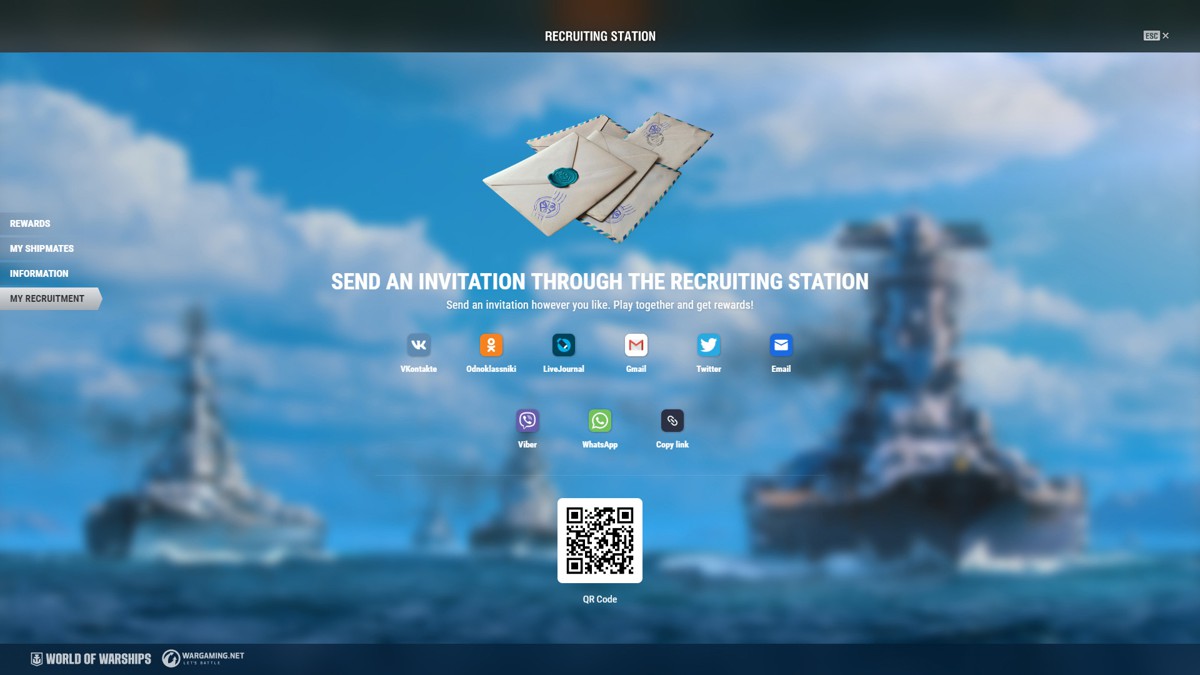
If you fit the criterion to be a Recruiter and you know someone who fits the criteria to be a Recruit, then just send them an invitation through the Recruiting Station interface—either on our website or from your in-game Port screen.

Recruiting Station
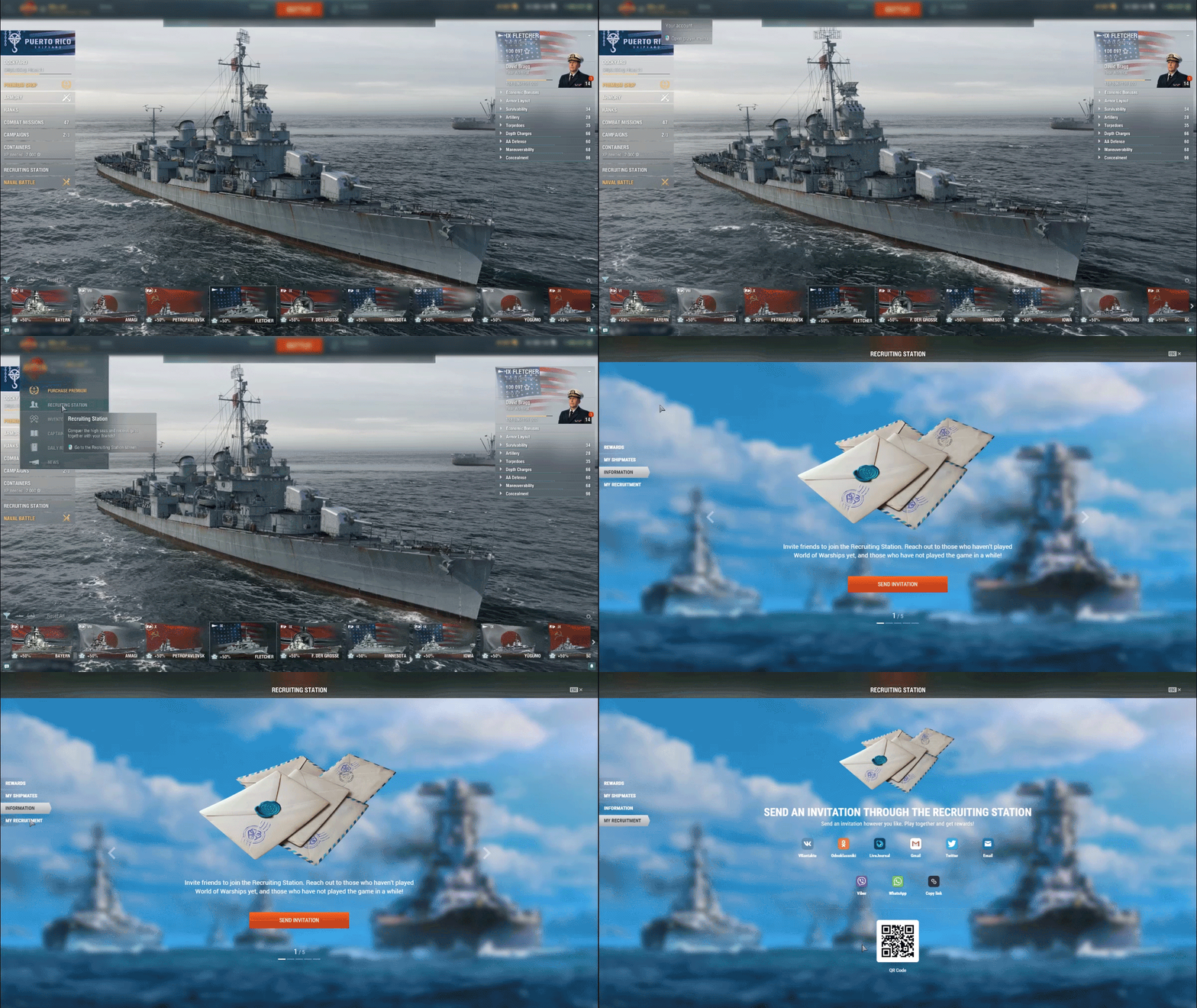


    You can send as many invitations as you want to as many people as you want—there’s no downside.

[h3]Did you know…?[/h3]
If you’re new to the Recruiting Station, you can claim a FREE Recruiting Station container with minimal effort. Here’s how:
  1. Log in to the Recruiting Station page
  2. Share a referral invitation three times

Regardless of whether the recipients accept the invitations or not, you will automatically get a Junior Recruiting Station container as a welcome!
[hr][/hr]
[h2]
Benefitting From Recruits
[/h2]
Once somebody accepts one of your invitations, they become tied to your account as your Recruit. What does that mean for you?

[h3]Community Tokens[/h3]
  • For every single battle your Recruit fights alone, 10 Community Tokens will be credited to your account, up to a limit of 1,500 Community tokens per week.
  • For every single battle you fight in a Division with one or two of your Recruits, 18 or 22 Community Tokens will be credited to your Account, respectively, plus bonus amounts if these battles end in victory.

[h3]Premium Account[/h3]
  • The first time your Recruit fights a battle playing a Tier VI ship, 3 days of Warships Premium account will be credited to your account.

[h3]Doubloon Cashback[/h3]
  • You will receive 10% of the total value of every purchase made by your Recruits in the Premium Shop in the form of Doubloons.
    As you can see, you can pick your own pace. You can actively support your Shipmates in progressing faster and get higher rewards, or you can just send the invite, sit back, and reap the regular Recruit battle rewards without having to lift a finger. The choice is yours!

[hr][/hr]
[h2]
Spending Community Tokens
[/h2]
So, you’ve recruited an entire gang of Shipmates and you’re swimming in Community Tokens. What now?

[h3]Armory[/h3]
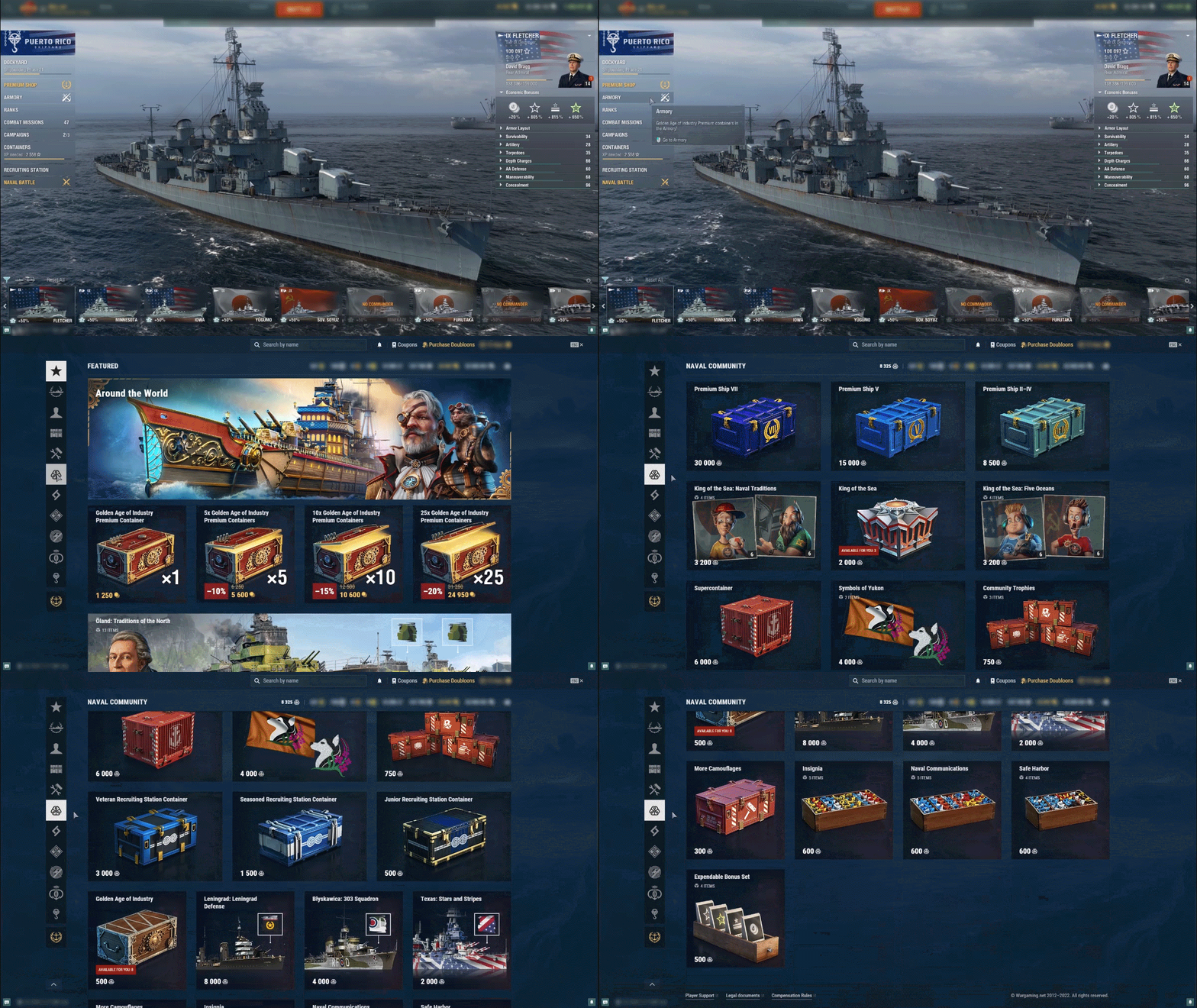
Community Tokens are first and foremost an Armory currency.

Head to the Naval Community tab in the Armory interface and take your pick—from signal flags and economic bonuses to Premium ship containers, special Commanders, and Supercontainers.


[h3]Invest in your Recruits![/h3]
But Community Tokens are not just any Armory currency.

They have a unique property that allows you to spend them in the REWARDS section of the Recruiting Station interface. There, you can exchange Community Tokens for special bundles of two of each type of Recruiting Station container at a discount. What’s special about these bundles is that while one of the containers goes to your account, the second goes to the Recruit of your choice. It offers a welcome chance for them to obtain one of the valuable rewards inside these containers, including Premium ships.


[h3]Did you know…?[/h3]
The Recruiting Station is not the only source of Community Tokens in World of Warships.
  • Twitch Drops: Simply link your account to Twitch and watch World of Warships livestreams.
  • Public Test: Download the Public Test client in the Wargaming Game Center and complete missions during our monthly test sessions.
  • And more! Stay up to date on the latest World of Warships news on our website to catch all special events and activities giving out Community Tokens.
[hr][/hr]
[h2]
Rewards for Recruits
[/h2]
The Recruiter isn’t the only one who benefits from this special relationship. So, what do Recruits get?

[h3][h3]Click here to see the Recruit benefits[/h3][/h3]
[h3]After accepting the Recruiter's invitation, a Shipmate can earn rewards for performing the following actions:[/h3]
[h3]If they are new players:[/h3]
Fight one battle in any mode, except for battles in the Training Room
  • II Emden with the National camouflage, a Port slot, and Commander with 9 skill points
  • 7 days of Warships Premium Account
Fight one battle playing a Tier VI ship
  • VI Repulse with a Port slot and Commander with 10 skill points
  • 7 days of Warships Premium Account
  • 5,000,000 Credits
  • 25x signals of each type
  • 30x common expendable economic bonuses of each type
  • 25x special expendable economic bonuses of each type
  • 20x rare expendable economic bonuses of each type
  • 5x More Coal containers

[h3]If they are returning players:[/h3]
Win 25 battles playing Tier IV–X ships
  • 14 days of Warships Premium Account
  • Premium Ship V container

[h3]Community Tokens[/h3]
  • Every single battle a Recruit fights in a Division with their Recruiter will net them 5 Community Tokens—10 if the battle ends in victory.
[hr][/hr]
[h2]
Anniversary Recruiting Event
[/h2]
The World of Warships Seventh Anniversary party has spread to the Recruiting Station with bonus prizes and hot giveaways for both Recruiters and their Recruits while Update 0.11.8 is live! Each successful Recruit means guaranteed Community Tokens plus entry to both a weekly giveaway and the Grand Giveaway that takes place at the close of the event with Premium ship containers, t-shirts, or even the coveted Belfast on the line!
Event ends: Fri. 07 Oct. 01:59 CEST (UTC+2)

Take Part Now!

For more detailed information about the Recruiting Station, click here.

American Freedom and Way of the Warrior DLCs giveaway!

Commanders!

When World of Warships first released in 2015, there were only two nations available to play: USA and Japan.

Now—7 years, 11 nations, and 400+ ships later—we’re proud to be able to celebrate our game’s anniversary with a pleasure cruise down memory lane: pick up our festive gift and experience a wave of nostalgia aboard some of our most veteran American and Japanese Tier III researchable ships, each with her own 3-point Commander.

To unlock the gift, simply claim one of the following Free DLCs:
  • American Freedom

https://store.steampowered.com/app/1889260/World_of_Warships
  • Way of the Warrior

https://store.steampowered.com/app/1954920/World_of_Warships

As soon as you claim one of the two, the other will also be automatically unlocked on your account. In total, you will receive:
  • American Destroyer Wickes
  • American Cruiser St. Louis
  • American Battleship South Carolina
  • Japanese Destroyer Wakatake
  • Japanese Cruiser Tenryū
  • Japanese Battleship Kawachi
  • 2 days of Warships Premium Account

*These ships are researchable — meaning that they can be earned in-game through playing. This bundle offers to speed up your low Tier research by giving you immediate access to this nation's different ship types.
If you already own one or more of these ships, you will receive compensation for them in credits.

Follow the news — get the goods


IIf you like reading our news on Steam, there’s a good chance you’ve already subscribed. But if you haven’t yet—we’ve got a sweet new reason to do so!

Each month, subscribers will get a FREE Steam container! We’re going to send one out today (for those already subscribed) and another one at the end of the month.

To subscribe, click the "Follow" button either on the store page


or the community hub.


Each Steam container drops 10x signal flags and one of four random items: 250 Doubloons; or 5x Steam camouflages; or 10,000 Free XP; or 1 day of Warships Premium Account.

Divisions in World of Warships: Play with Friends

Well-coordinated actions are especially important when it comes to team play. World of Warships is a game that encourages players to coordinate their actions with those of their allies to secure victories in battle. But is this possible in a team composed of random players? If you doubt it, there's a solution—create a Division!
Divisions allow two or three players to join together and fight in battle. You can play with your friends and cover one another like partners do in your favorite action movies, try different combat tactics, have lots of fun, and generally enjoy the game together. If you don't have any friends in the game yet, Divisions will help you find some. You just have to take the first step, or in this case—simply click a couple of buttons!

[hr][/hr]
[h2]
How to Create a Division
[/h2]
[h3]Division menu[/h3]
You can find the Division menu in the Port to the left of the Battle! button. By opening it, you'll see a list of your contacts, as well as the nicknames of players who are currently looking for a Division. Click a player's nickname to instantly invite them to your Division. After that, all you need to do is select ships and head into battle. You can also use the "Looking to Join a Division" button in the Division menu. Click it, and your nickname will become visible to other players who will be able to invite you to a Division.

[h3]Chat in Port[/h3]
The chat button can be found in the bottom-left corner, under the ship carousel. One of chat channels is specifically dedicated to searching for Divisions. Enter this channel and introduce yourself.

[h3]In battle[/h3]
Found a player with admirable skill? Invite them to your Division right in the heat of battle! Press the Tab key to open the Divisions tab, where you can quickly create a Division or submit a request to join an existing one. Divisions created right in battle are called "dynamic."

[h3]External channels[/h3]
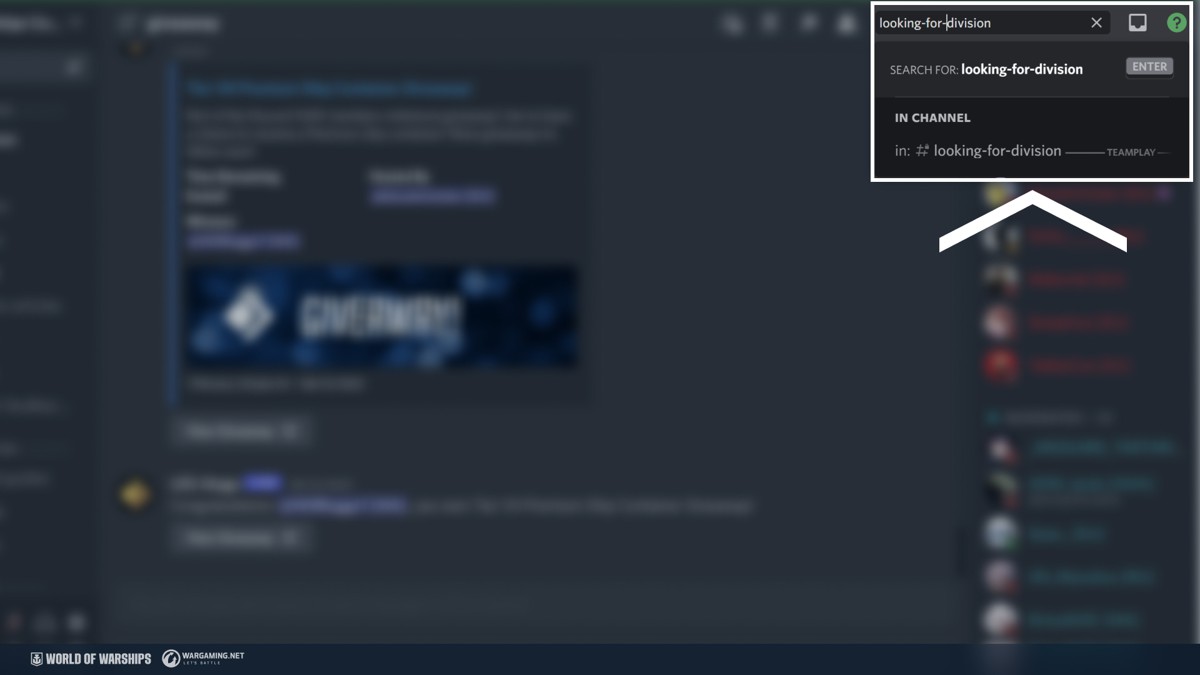
To look for Divisions, you can use a special section of our official forum or a separate channel on Discord. The advantage of this option is that you can be more thorough in choosing your brothers and sisters in arms by communicating with them in advance of banding together.

[h3]Your friends[/h3]
If you have a friend who's eager to play, it's even simpler— just add them to your contacts using a dedicated button in the bottom-left corner of the Port and invite them to your Division by clicking their nickname. If your friend doesn't have a World of Warships account yet, send them a referral link via the Recruiting Station program. By registering with this link, your friend will receive loads of in-game presents, and both of you will obtain rewards for playing together afterwards.
[hr][/hr]
[h2]
Communicating in a Division
[/h2]
Not everyone likes communicating in battle. When fighting in a Division, theoretically, you can work together without direct communication and use quick commands instead. But communication is one of key advantages of playing in a Division. It helps improve interaction like nothing else. For this purpose, Division members can use:
  • A separate text chat both in the Port and in battle.
  • Internal voice chat.

In general, you can use any means of communication, including Discord (vacant rooms are always readily available on our server).
[hr][/hr]
[h2]
Tactics for Playing in a Division
[/h2]
We've already made a passing mention of the wide variety of tactics that you can use in battle as one of main advantages of playing in a Division. These are not just mere words. There's straight logic here—each ship type in World of Warships has its weak spot. But a reliable ally will help you keep it protected, and you'll form a versatile power. In a Division, you can apply this tactic in every battle.
  • A cruiser + a destroyer with Smoke Generator. In this tandem, the destroyer's smoke will provide cover for the cruiser while she delivers targeted artillery salvos to strike opposing ships spotted by the destroyer.
  • A destroyer + a battleship. Enemy targets are spotted by the destroyer, and crushing artillery fire is delivered to them from the battleship's guns. The same applies to cooperation between a battleship and an aircraft carrier. The latter is generally perfect at conducting reconnaissance; the former can deliver the sinking blow.
  • An aircraft carrier + a destroyer. The aircraft carrier can both perform reconnaissance and cover the destroyer from air attacks. This leaves the destroyer more free to capture Key Areas and cause other problems for the opposing team.
  • A Division of battleships. This combination allows you to bring devastating concentrated fire to bear on your targets. For spotting purposes, the Division can be enhanced with a destroyer or aircraft carrier.
    These are just a few of the many tactics that you can exploit playing in a Division. Try it for yourself, and you'll find effective combinations that will bring you victory in many battles!

Account Transfer has started!

Dear players!

Now, the transfer procedure begins! Starting from this date, you can transfer your account data to the EU server* and continue playing via Steam.

*Check the additional information by clicking on this link.

[h2]Transfer: General Information [/h2]

This transfer campaign has been designed specifically for CIS realm players in order to give them the opportunity to move their accounts to the EU realm and continue playing World of Warships on Steam. All the other regions remain without any changes (e.g. in terms of this campaign you cannot transfer your account from NA to EU, or from ASIA to NA etc.).

The transfer allows the player to move their account data from one server to another while retaining purchases, resources, statistics etc. After the transfer, the original account on the CIS server will be blocked and then deleted in 59 days. During this time period, every transferred player has a one-time opportunity to change their decision.

The transfer procedure is available for all players that have an account on the CIS realm.

In order to use the transfer option, you need to have an email address and password added to your World of Warships account.

We fully understand that this decision might not be an easy one and you might have a lot of extra questions about the transfer. We will try our best to cover as much information as possible in this article. Let’s dive into the details!

[h2]Transfer: Frequently Asked Questions [/h2]

  1. Q: How do I prepare for the transfer?
    A: Generally, you don’t need to do anything, but you can make a couple of actions beforehand to make sure that everything goes smoothly:
    • Check if you have completed the account registration. If not, make sure to add an email and a password to your account.
    • Check if you have another account on EU registered using the same Steam account. If yes, then you will need to unbind it from your Steam ID.
  2. Q: What will happen to my progress and in-game property when I transfer to the EU server?
    A: All your in-game items are transferred to the new EU account, with the exception of cruiser Bagration and its permanent camouflage. Your game statistics may be partially unavailable for certain time periods. All progress made on your account up to the point the decision to transfer your account is taken will be preserved.

  3. Q: Once transferred, can I go back to the RU Server?
    A: If you transferred your account to the EU region and then changed your mind, you will have 59 days to decide to return to the RU region. The process includes the following steps: 14 days after a successful account transfer to the EU region, an account in the CIS region will be automatically marked for deletion. Account deletion will take place 45 days from the date the deletion request was made. After a CIS region account is deleted, a return to the RU region is no longer possible. That is, you will have 59 days to change your mind and cancel the removal request, and then remove the restrictions on the game through the CPC. The request for deletion can be canceled by the player themself in the Account page.

  4. Q: Will I be able to make purchases/payments? If so, what will the prices be like?
    A: For players from the Russian Federation or the Republic of Belarus, after the transfer to the EU region, payment in the Premium Shop will not be available (from the date the account transfer procedure is opened). The exception is the case of changing the country of the account if there are grounds for this.
    For players not from the Russian Federation or the Republic of Belarus, after the transfer of the account to the EU region, all payment methods will be available as normal. The pricing approach will be similar to that in the CIS region.

  5. Q: What will happen to my nickname?
    A: Your EU account is assigned a nickname according to the following rules: if the your former nickname on the CIS server is not taken in the EU region, it will be transferred as is. If it is being used by a previously-existing account on EU, the system will generate a placeholder nickname and you will be given the ability to change it for free.

  6. Q: What will happen to my clan?
    A: If you were a clan commander in the CIS region, then a new clan will be automatically created for you in the EU region. If the clan’s name or tag is already in use in the EU region, the clan will be assigned a random name and tag, which you can change for free. Clan buildings, oil and treasury will be transferred, but not all clan achievements will be. You will be able to distribute resources from the treasury 14 days after the successful account transfer. The clan in the CIS region will be disbanded and its name and tag will be blocked from use by other players for 30 days.

  7. Q: Will my ping change after moving to the EU region?
    A: This depends on the individual in question’s ISP and physical location. In some cases, ping may improve, in others it may deteriorate significantly. For players from Ukraine specifically, the connection should be more comfortable on the EU server.


We hope that this article will be useful for everyone who wants to learn more about the transfer before making a decision. We understand that this is a big change for our players, and we will do everything we can to make sure that your gaming experience on a new realm will be enjoyable and fun!

Hope to see you on EU soon!