1. Stormworks: Build and Rescue
  2. News

Stormworks: Build and Rescue News

v0.9.18-19 (The 2 Length Wedges Update)


Dear Stormworkers,

Different sized wedges and pyramid blocks are very popular in the polls we have run on discord. This week we are bringing the first part of new wedges and pyramids with different slopes!

These new basic blocks allow you to create much smoother forms and looks to your vehicles.

They are also much more efficient in physics where they produce simpler forms, when making curved shapes.

The new parts include 2x1x1 wedges, 2x1x1 pyramids, and 2x2x1 pyramids, allowing lots of new forms in your vehicle bodywork design.

We can't wait to see what you create with these new parts, we will be watching the workshop :-)

Please let us know what further blocks you would like to see!

Last week we suggested we might make minor updates less frequent and asked for your feedback. There was a good mix of responses, so we are going to trial minor updates being every 2 weeks, starting in the new year, and see how it goes. In the intermediate weeks, we are still going to post an update focused on communication, talking about upcoming features and major updates. This will allow us to talk about updates further ahead and get your feedback. This is a temporary trial and we will be looking for your feedback on how we should best schedule updates.

Much love
The Stormworks Developers

Patch Notes

v0.9.18

Rework - Classic colour palette now also uses white text for dark logic types

Fix - Winter mode incorrectly applying cold debuff outside of the arctic
Fix - CTD when placing decorative tyres
going on testing now to double check its all in place

v0.9.19

Feature - 2x1 and 2x2 Wedges

Fix - Updates for Arctic Mining, Fishing Community, Long Distance and Research Center mission playlists
Fix - Numerous issues with painting including: Symmetric Painting, Symmetric Plane Fill, Plane Fill Undo and some other smaller issues

v0.9.16-7 (The Fluid and Data Cables Update)


Dear Stormworkers,

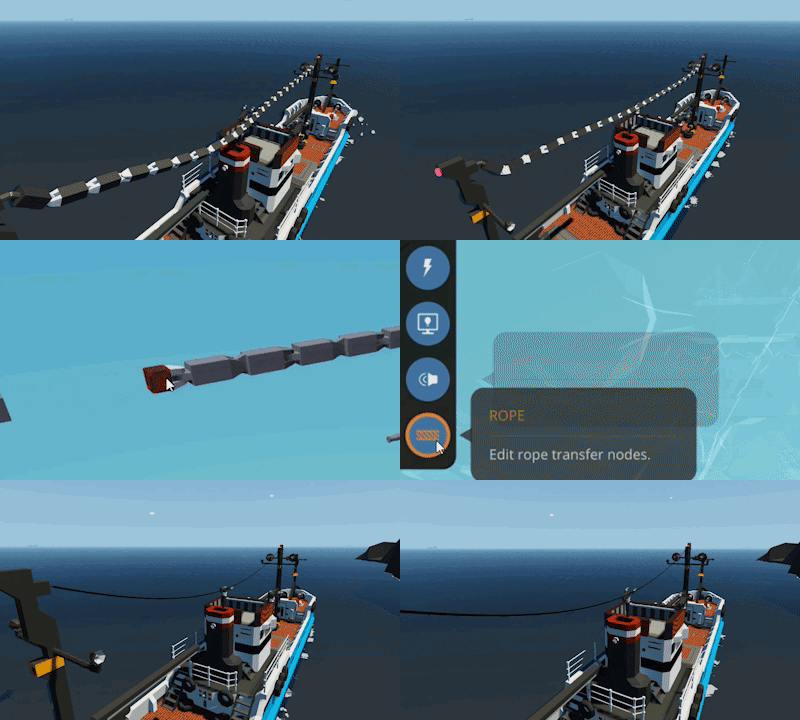
This week with the minor update, are are adding new data and fluid cables!

Just like last weeks ropes update, when creating ropes between these new anchor points, the appropriate type of cable is created - either structural (regular rope from last week), fluid hose, or data / electric / video / audio.

This means you can now connect your fluid and robotic systems up across ropes.

We added this from your feedback where players needed more than structural links when connecting objects together, often needing to extend electrical, mechanical, and fluid storage systems to achieve the functionality that they want.

We hope you enjoy these new components.

We are currently working hard towards the next major update and hope to start announcing what to expect soon.

We are also discussing the update schedule. We have been doing weekly updates for almost 2 years now, and we love releasing updates and getting your feedback on these updates. However, one concern is that a potentially game changing update every week is too much for most players to keep up with, and can be too much to absorb. It can also mean vehicles should be updated regularly to absorb the new components or balance changes.

We are considering that players may prefer less frequent minor updates, with bigger major updates, and more communication about upcoming changes ahead on time. What do you think? Stay with weekly updates? Focus more on the major updates with minor updates every 2 or 3 weeks? Would you prefer to hear about the next major update further in advance? Please let us know in the discussion!

Much love
The Stormworks Developers

Patch Notes

v0.9.17

Feature - Electrical Cable Anchors and Fluid Hose Anchors

These new rope logic blocks only allow one link, but can transfer Data/Electric/Fluid over the link.

Rework - Changed rope logic node colour to black
Rework - Accessibility palettes now use high contrast font colours for logic types
Rework - Several small aesthetic changes for rope logic in the vehicle editor
Rework - Reduced number of vertices on logic links (tiny performance boost in editor)

Fix - Moved Rope Anchor to the Specialised category (from Blocks)

v0.9.16

Fix - Rope Anchor mirroring issues
Fix - Vehicle freeze with very short ropes

v0.9.14-5 (The Vehicle Ropes Update)


Dear Stormworkers,

This week we are adding a new rope system to vehicle editing! You can now place ropes on your vehicles, the same way you place logic links. This will create a physically simulated rope between the anchor points.

These ropes are really useful for rigging on ships, mechanical links on cranes, towing objects, and other physical or cosmetic functions.

We look forward to getting your thoughts and feedback on the new ropes, and we can't wait to see what you make!

We are open to more rope features, so please let us know your ideas using the feature request buttons in game.

Much love
The Stormworks Developers

Patch Notes

v0.9.15

Feature - Rope Anchor Block

Using the new Rope logic type, you can link two or more Rope Anchors to create lengths of rope between them.

v0.9.14

Rework - New default mission thumbnail
Fix - CTD when uploading thumbnails that are not 512x512
Fix - Added a warning that prevents non 512x512 images from being uploaded
Fix- Incorrect scaling of mission default thumbnail
Fix - Uploaded but unsubscribed missions not showing up correctly in update workshop item view
Fix - Custom thumbnails allowing uploading of certain non PNG types to the workshop

v0.9.12-3 (The Custom Thumbnails Update)


Dear Stormworkers,

This week we are adding the ability to add a custom thumbnail to your workshop uploads!

Players have been using exploits to attach custom thumbnails for some time now, so we wanted to level the playing field and officially support player created thumbnail images.

You can place 512x512 png images in your Stormworks custom thumbnails user data folder and these thumbnails will be accessible from the upload-to-workshop screen. These folders can be found at:

Windows: %appdata%/Stormworks/custom_thumbnails

MacOS: Library/Application Support/Stormworks/custom_thumbnails

The images will be uploaded with standardised overlays to show the workshop asset type, so players can easily tell where the workshop item will appear in game.

We hope you enjoy the new minor update and we can't wait to see your new Workshop thumbnails!

Much love
The Stormworks Developers

Patch Notes

v0.9.12-13

Feature - Custom Thumbnail Support when uploading to workshop
Thumbnails for the workshop now also have a new overlay

Fix - The change to fluid connectors transferring electric has been reverted
Fix - All issues with Grippers and their magic tracks have been resolved
Fix - Monitors now render shadows according to graphics settings
Fix - Certain connectors logic breaking when damaged
Fix - Environment mods are no longer tagged as Missions for the workshop unless they actually contain missions
Fix - Improved diesel selling at Fishing village
Fix - Moved fuel storage at Starter base

v0.9.11 (The Environment Mod Update)


Dear Stormworkers,

This week we are very excited to announce.... environment mods!!!

You can now add player made buildings and vehicles to Stormworks using the new environment system. The environment mods are similar to missions, except they spawn automatically when you start a new game and are persistent.

This means you can create your own buildings, bases, harbours, cranes, and other utility as well as spawn vehicles by default when you start a game.

As a reminder, make sure to check which you have active before starting a game as they cannot be removed once the game is started.

These environment mods can be uploaded to the workshop like other player creations. Subscribing to items automatically adds them to the list of environment mods that will spawn when you start the game.

You can also turn off some of the base game structures such as fuel stores and cranes and replace them with your own creations or ones from the workshop.

We hope you enjoy customising your game and creating your own mods and we look forward to seeing what you create!

We are discussing Stormworks tomorrow on WIIT student radio 88.9FM Chicago, tune in to get some clues on future development and the next major update.

We are also considering replacing normal mode with some new creative mode tools to compliment advanced mode including the ability to disable fuel and electricity consumption, disable engine overheating, etc. This is in response to very few players playing with normal mode and the obvious benefits of focusing development on a single game mode. Please let us know your thoughts!

Much love
The Stormworks Developers

Patch Notes

v0.9.11

Feature - Environment Mods
Environment mods spawn on world creation, and do not de-spawn.
Players can create environment mods through the mission editor.

Default static vehicles have been removed from tiles and have been replaced by a handful of preset Environment Mod playlists listed in the playlist selector of the new game screen. (Fuel tanks, Fluid Gantries, Cranes, Elevators).

Rework - Default Fuel Tanks and Fluid Gantries have received some touch-ups
Rework - Some non-essential Cranes have been removed
Rework - Multiplayer optimisations; moved several calculations to the server side
Rework - Toggle All button in playlist selector now only toggles the active tab

Balance - Reduced fire damage radius from 1.5 to 1.0

Fix - White screen when loading into a game
Fix - Removed old deprecated tutorial playlist
Fix - Fluid connectors now transfer electric
Fix - Winch making noise and using charge when fully spooled / unspooled
Fix - Unpowered magnet connectors will no longer connect

Fix - Some users experienced a lack of mission spawning with older saves after the last update, although this can be fixed by updating the xml, we have added code that should resolve this issue.