ChilloutVR 2025r181
[h2]Player Colors[/h2]
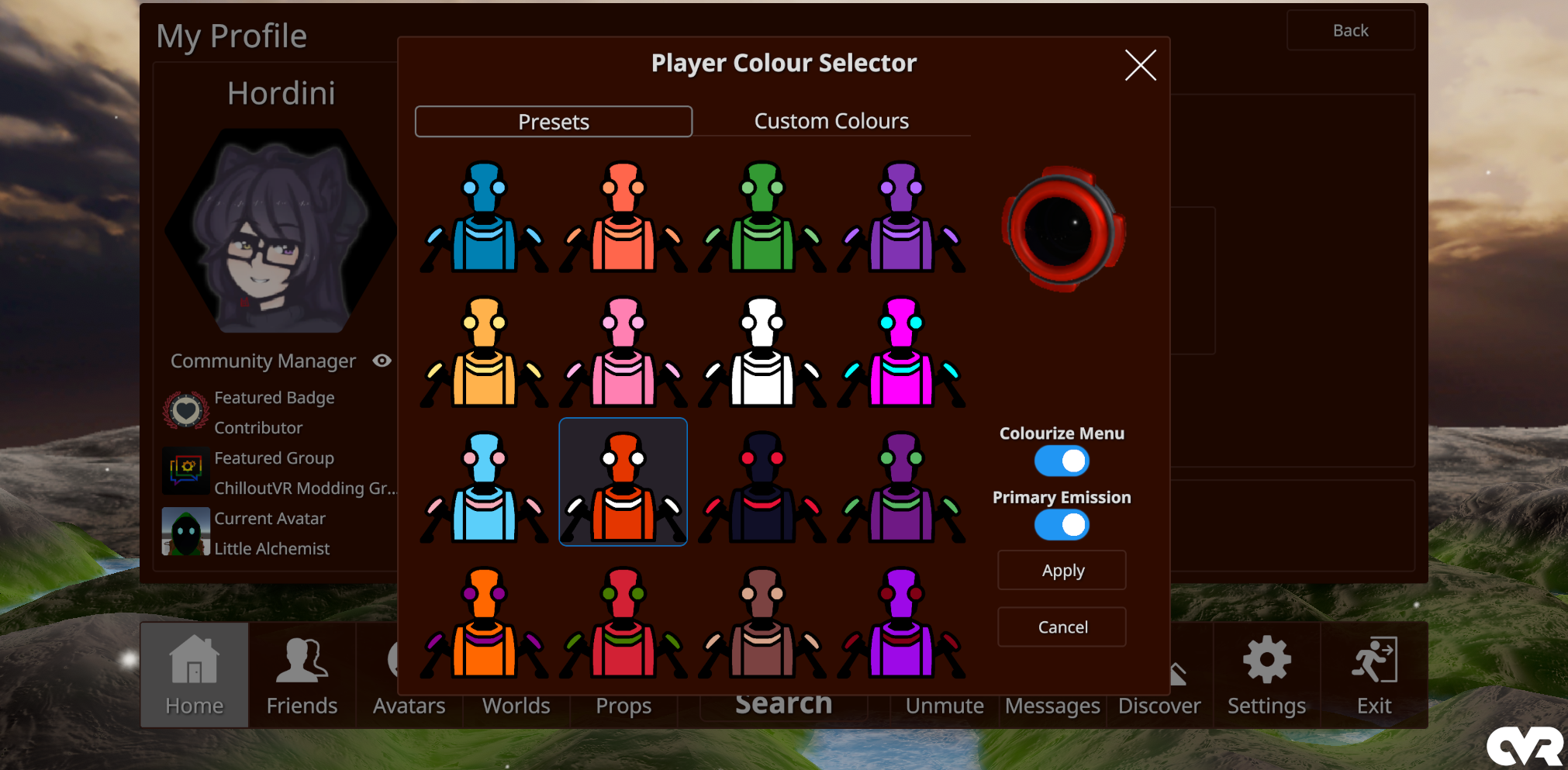
Choose between preset 15 color pallets to associate with yourself via your profile page in the Main Menu
Applies both locally and on remote clients for:
[h2]Camera Indicator Overhaul[/h2]
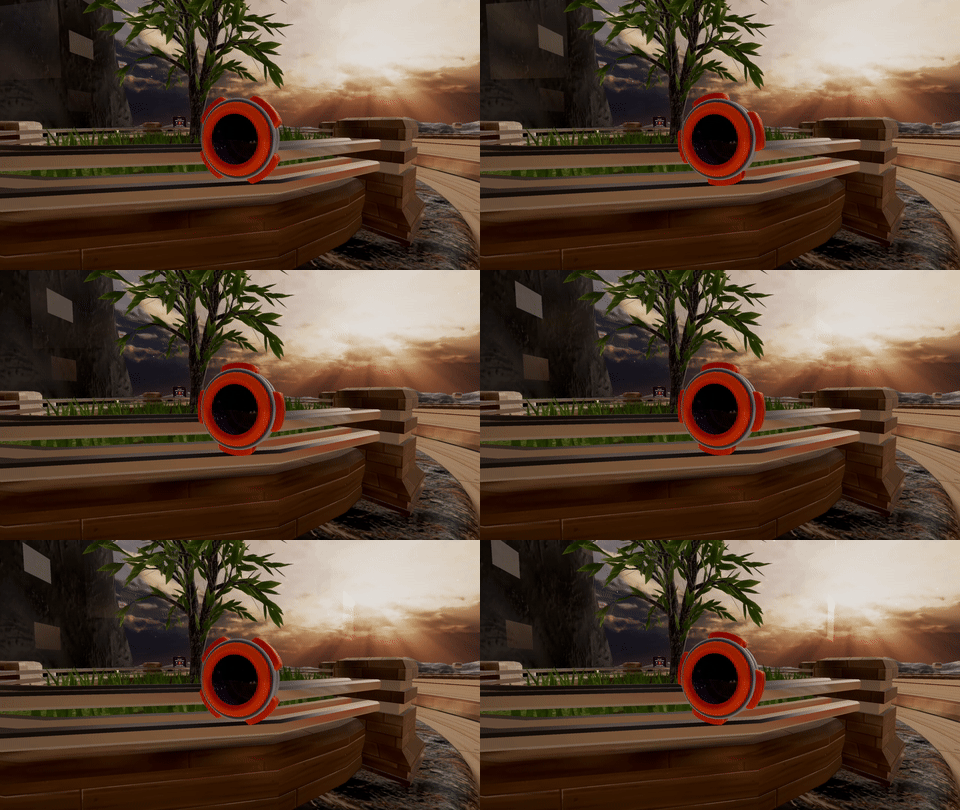
The Camera Indicator has been completely reworked with a fancy new model, support for the new player colors, and a neat little animation when capturing an image!
Big thanks to Exterrata and Racush for their work on this
[h2]Portable Camera Changes[/h2]
New settings are now available to take more betterer pictures, including:
[h2]Native Modding UI Library[/h2]
The popular UI library mod is now natively implemented for developers to tinker around with!
This also includes a Player List and Selector in the quick menu for easy access, as well as all of the usual player and self-moderation settings normally available on user profiles.
[h2]Mini Me[/h2]
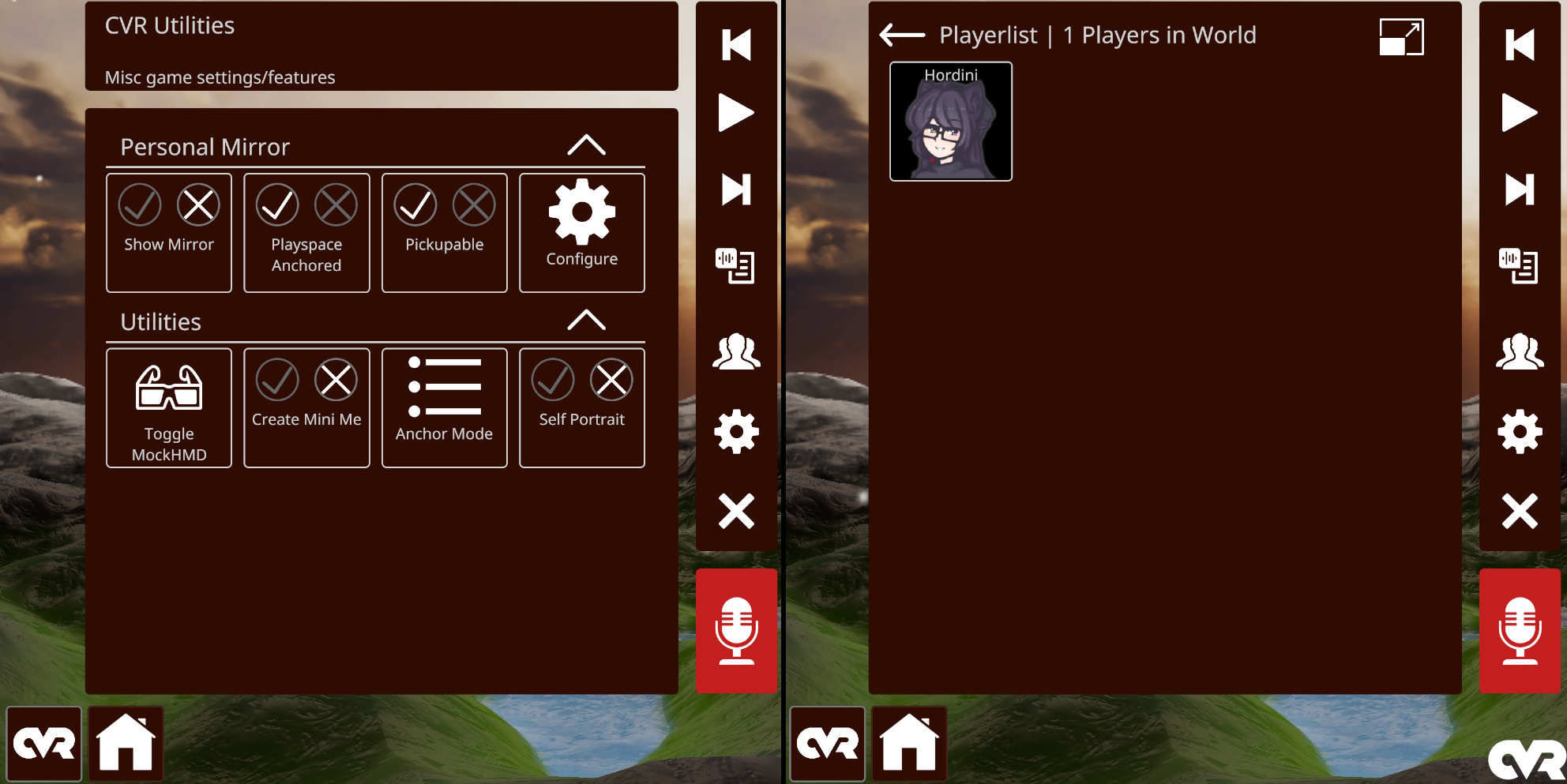
Presenting the latest improvement in mirror-dwelling technology: Mini Me
Can't get enough of yourself in a mirror? Why not the menu as well?!
[h2]Portable Mirror[/h2]
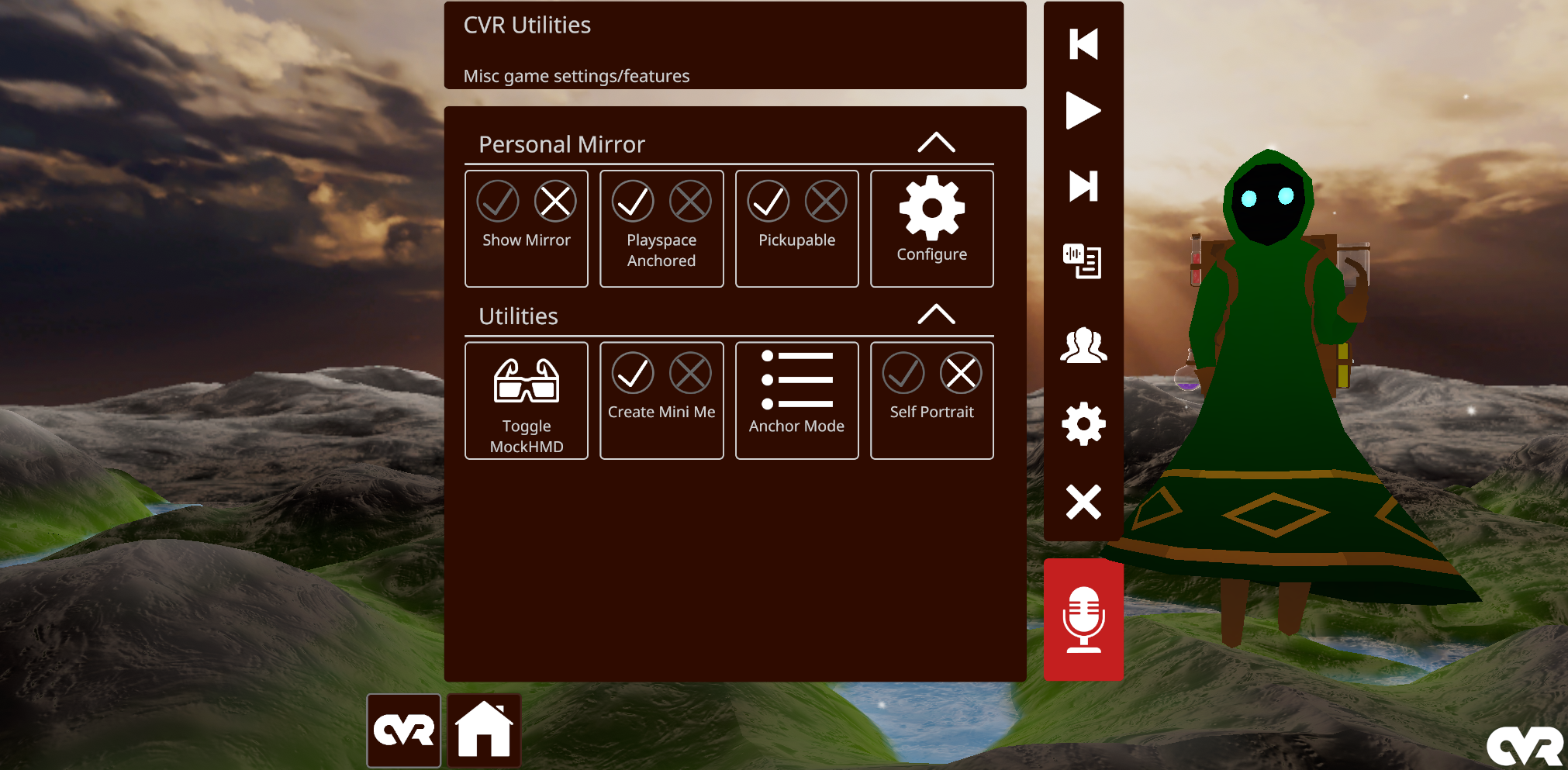
We heard you like mirrors, so we gave you more mirrors!
Now accessible from the Quick Menu, a mirror can be spawned from anywhere with various customization options to fit your needs.
[h2]ChatBox[/h2]
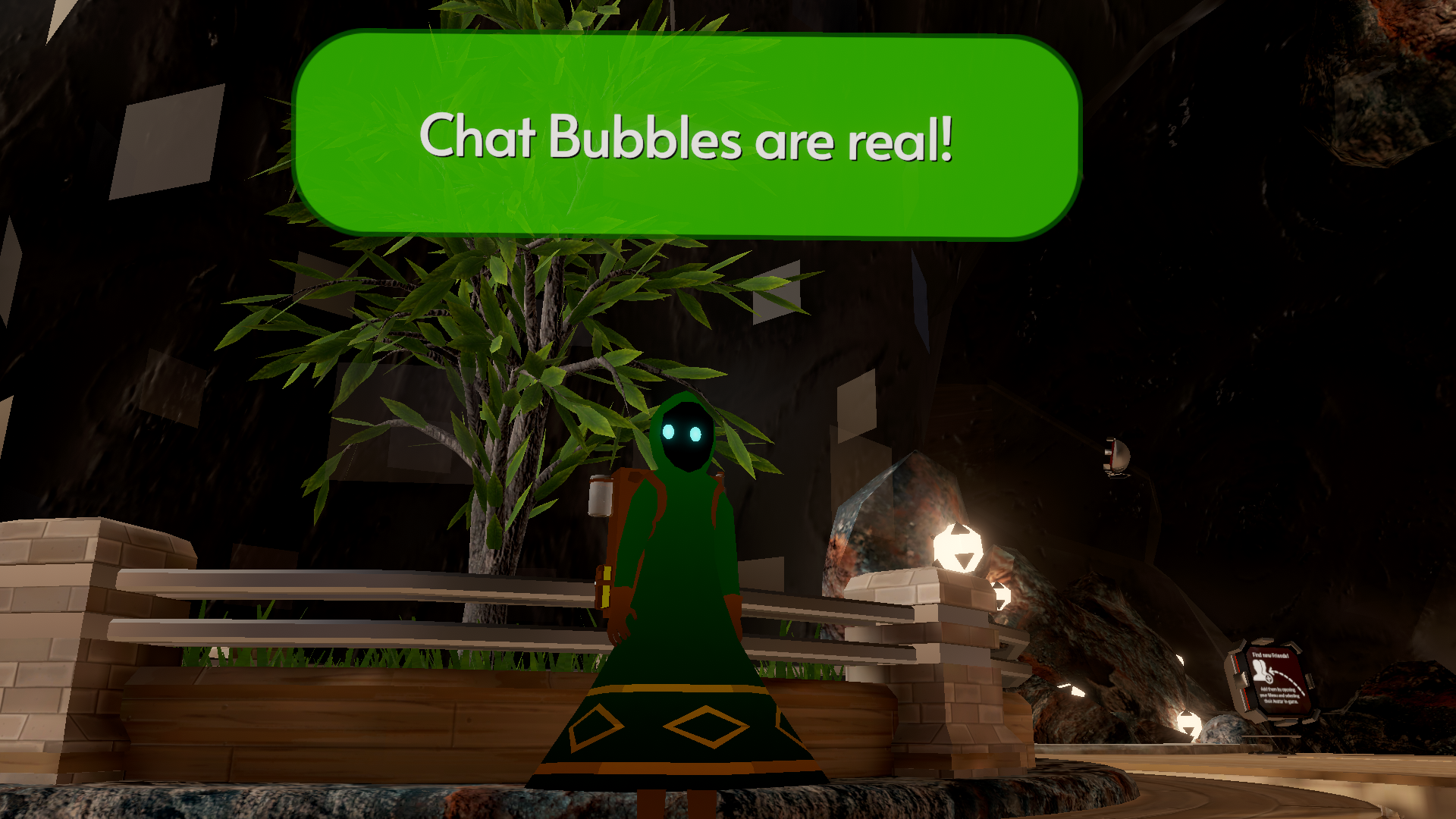
Text chat messages can now be sent and seen by users in the same instance
[h2]New Login UI[/h2]
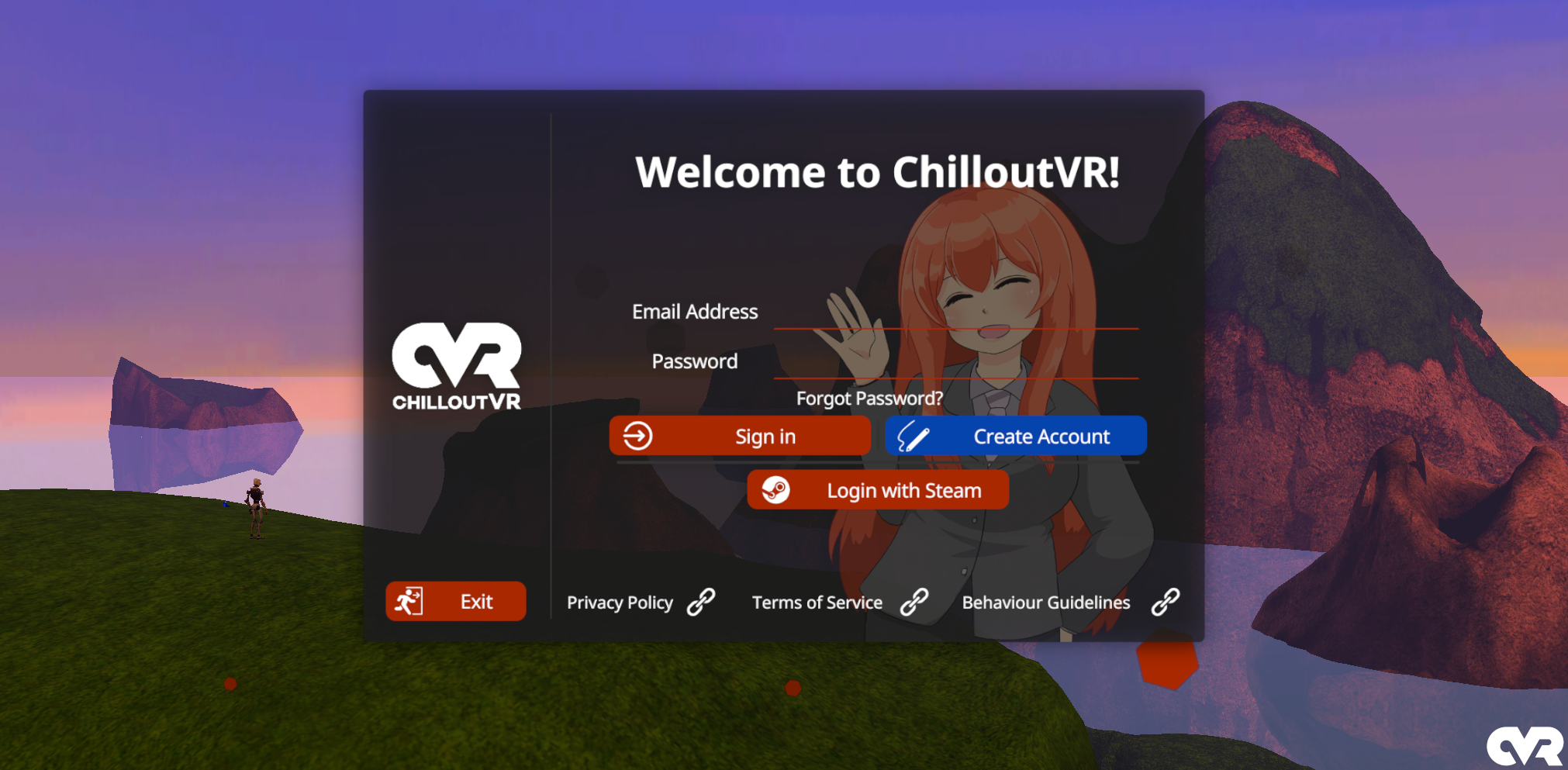
Makise has invaded the UI and will now greet you when logging in
A big thanks to our External Contributors:
Choose between preset 15 color pallets to associate with yourself via your profile page in the Main Menu
Applies both locally and on remote clients for:
- Controller Ray
- Object & Player Highlight
- Camera Indicator (synced)
- Dropped Portals (synced)
[h2]Camera Indicator Overhaul[/h2]
The Camera Indicator has been completely reworked with a fancy new model, support for the new player colors, and a neat little animation when capturing an image!
Big thanks to Exterrata and Racush for their work on this
[h2]Portable Camera Changes[/h2]
New settings are now available to take more betterer pictures, including:
- Show World mask (for transparency)
- Lock Portable Camera UI
- Anchor Camera viewport in world space (VR Only)
- Pin to Player and Pin to World
- Stereoscopic (side-by-side) capture mode
- Support for custom sounds
- ...and more!
[h2]Native Modding UI Library[/h2]
The popular UI library mod is now natively implemented for developers to tinker around with!
This also includes a Player List and Selector in the quick menu for easy access, as well as all of the usual player and self-moderation settings normally available on user profiles.
[h2]Mini Me[/h2]
Presenting the latest improvement in mirror-dwelling technology: Mini Me
Can't get enough of yourself in a mirror? Why not the menu as well?!
[h2]Portable Mirror[/h2]
We heard you like mirrors, so we gave you more mirrors!
Now accessible from the Quick Menu, a mirror can be spawned from anywhere with various customization options to fit your needs.
[h2]ChatBox[/h2]
Text chat messages can now be sent and seen by users in the same instance
- Visibility settings
- Parameter Stream integration
- Works alongside Text-to-Speech
- Support for custom sounds
[h2]New Login UI[/h2]
Makise has invaded the UI and will now greet you when logging in
Full Changelog:
- Added AddSpacer to UILib Category element
- Added an attempt to fix invalid URLs that would get rejected by the game server
- Added an instance creation timeout to give up checking if the created instance is up
- Added a toggle to keep the current velocity upon exiting flight mode
- Added automatic retry logic if authentication did not receive a response from the Voice Server
- Added Avatar/Prop/World menus remembering which category was opened across restarts
- It should open the official tabs when there's no previous category selected
- Added copy deeplink to instance page
- Added CVR Material Data Provider
- This Component can be used to bind information to Materials such as
- Transforms matrices, for the current frame, and last frame
- Mesh Vertex and Index Information (read and writable)
- Skinned Mesh Renderers Vertex Information for the current (read and writable) and last frame
- Render Textures as read write Targets
- This Component can be used to bind information to Materials such as
- Added CVR Render Controller
- This component is used to control the execution order of the CVR Material Data Provider and the CVR Blitter
- This component can also be used to instantiate Meshes on a per Instance of a content basis, in order for the modifications to a mesh to only happen to that specific instance.
- Added CVR Utils tab to the left of home on the tab bar
- Added experimental Mini Me utility to Quick Menu
- This will spawn a 0.5m tall clone of yourself which you can grab
- This is being used as a test for the Content Clone system which is used by the Show Attached Props in Self Mirrors graphics option
- Added extra logs related to skipped clients for OSCQuery when the OSC verbose option is active
- Added group moderated badge to instance details view
- Added handling for instance World change
- Added handling for when Unity Explorer (mod) overrides our event system input module
- Desktop input is now disabled while Unity Explorer is open
- Added hidden text mode to keyboard (for password/secret fields)
- Added icons to Prop details page
- Added initial native ChatBox implementation
- Added visibility settings for the local nameplate
- Added parameter stream for ChatBox IsTyping
- Added ChatBox to CVRAudio mixer
- Added the key Y (without any modifier) to open the Text Comms prompt
- Swapped TTS button to trigger ChatBox/TTS based on settings
- Support for Custom Sounds
- Added Instance Info tab to "Game Information" block of big menu
- Added menu push notification when user selects an OSC face tracking module with OSC disabled to remind them to enable OSC
- Added native implementation of Self Portrait
- You can find it's toggle in the new CVR Utils tab on the Quick Menu
- You can adjust the settings for it under the User Interface settings category
- Added new eye tracking module to follow the interaction ray pointer
- This is set as the default and can be disabled in Implementation settings
- In Desktop your eyes will follow your mouse while it is unlocked
- In VR your eyes will follow your active controller ray while a menu is open
- Added open in Hub buttons to all content pages
- Added physical up/down arrow keys to go up/down the line, and if not multiline goes up/down history
- Added physical up/down arrow keys to go up/down the line, and if not multiline goes up/down history (similar to how the virtual arrow keys work)
- Added Player Colors
- You can now choose between preset 15 color pallets to associate with yourself via your profile page in the Main Menu.
- The selected color scheme will apply both locally and on remote clients. Currently, these will apply to:
- Controller Ray
- Object & Player Highlight
- Camera Indicator (synced)
- Dropped Portals (synced)
- Added Playerlist to the QuickMenu, if you're familiar with it from UILib it's the same!
- This includes the player quick settings that appear in it
- Added position/rotation to auth packet
- Added simple update notice on first big menu open
- Added spawn radius option to CVRWorld
- Added the ability to toggle rank visibility on the nameplate for those who have it
- The rank information will always display in the User Details page of the Main Menu
- Added verified event group badge to group details view
- Added warning when joining a Group Moderated instance (More info to come shortly)
- Adjusted half-body IK neck stiffness to reduce the amount your spine and hips are affected when rotating your head
- Adjusted how voice ping is handled
- Adjusted initial XR loading to fix an issue where attempting to start XR and failing would lead to the client partially thinking you are in VR
- Adjusted interaction highlight to only render in player cameras
- Adjusted Quick Menu styling to better integrate the UILib tab bar
- Adjusted the terrain foliage fix to once again only run in Legacy Worlds (2019 Asset Bundles)
- Built replacement schedule system and moved all jobs onto it
- This should fix some strange issues where jobs failed to be removed and accumulated over time causing significant lag in some situations
- Changed Nameplate render queue to 3010
- This should address some worlds unintentionally over-rendering Nameplates
- Changed so if you ever accept the group alert to a specific instance, you won't be prompted again
- before it would prompt again if 10 mins had pass or when changing instances
- Cleaned up ImageCache handling
- Completely reworked avatar/prop/world list fetching and API interactions
- *Completely reworked Vote Kick functionality
- Required participant count is now dynamic based on the amount of users in the instance instead of hard-coded at 50% or more
- The more users in the instance the less percentage of users need to agree, minimum of 25%
- The result of the vote kick is now announced to all users who participated
- The initiator of the vote kick is now immediately counted as a vote against the target user
- Remaining lifetime of a vote kick is now reset when receiving a vote instead of the hard-coded 30 seconds
- Target user will now be kicked as soon as the votes reach over the calculated threshold instead of waiting down the vote lifetime
- HUD messages are sent to all EligibleParticipants for start and end with result information
- Target is alerted without revealing who did it via HUD message
- Vote Kick cannot be started with 2 or less users in the instance
- Current state of vote kicks are displayed on all eligible participants vote kick message including current votes for, against, threshold, and time remaining
- Content will no longer immediately unload on destruction
- This should help to alleviate needless hitches when content is immediately respawned
- Fire HUD notifications when certain GS settings are changed
- Fix content filter settings scroll not working if you touch between elements
- Fix CVRUIManagerBaseInput destroy getting angry if ran before CohtmlInputSystem exists
- Fixed an error during async instantiate that could lock up the object loader if the source bundle was unloaded or did not contain any objects
- Fixed an error when loading a World with a unreadable mesh asset with no mesh data
- Fixed an issue where while filtering a World scene an error occurring would prevent connection to an online instance
- Fixed Avatar & Spawnable Pickup Markers leaking textures
- Calling SetGuid with an invalid ID will also now clear the pickup marker properly
- Fixed comms client not removing registered pipelines on user disconnect
- Fixed current instance info being cached for 10 mins
- basically you wouldn't show yourself as online in the instance after you created and joined it
- Fixed current instance info being cached for 10 mins
- basically you wouldn't show yourself as online in the instance after you created and joined it
- Fixed destroyed portals hanging around for slightly longer than they should have been
- Fixed Exit button in login room not doing anything
- Fixed eye tracking target position execution order
- This fixes eye tracking applying relative to the underlying animated pose of the avatar instead of after IK had been solved
- Fixed forced world transition effect not having its duration respected
- Fixed group members list scrolling being inconsistent
- Fixed group members pagination
- Fixed instance join target not being reset when logging out
- Fixed issue in texture parsing where content load could throw an exception in some cases
- Fixed local camera indicator appearing in taken photos in some cases
- Fixed Magica Cloth 2 global interactions not working
- Fixed Magica Cloth gravity zone interaction not working correctly for avatars
- Fixed memory leak related to profile images on nameplates
- Fixed menu leaking VRAM
- Fixed object/player highlighting instantiating the source mesh
- This should fix the interaction highlight for players or props with magica cloth not appearing as it should
- Fixed OSCQuery filtering out valid clients (oops)
- Fixed Parameter Stream `IsPrivateInstance`, `IsPublicInstance`, and `IsGroupInstance` entries
- Fixed Portable Camera post processing volumes applying to Player & Path cameras
- Fixed potential for duplicated eye movement targets when creating player mirror reflection targets
- Fixed potential issues with CVRAdvancedAvatarSettingsTrigger with multiple delayed triggers firing
- Fixed proximity grab highlight not creating the highlight with filtering pass for nested interactables
- Fixed regression GameInstanceController UpdateTeamList not handling local player properly
- Fixed regression of invalid AAS check being busted for lifetime of remote player after first successful validation
- Fixed remote synced world objects losing collision with the local player
- Fixed Steam Overlay screenshots saving in the wrong color space
- Fixed telegrab not actually "grabbing" the pulled object if grab is held when they cross the hand
- Fixed telepathic grab toggle not working when directly aiming at a pickup
- Fixed the client forgetting a World is legacy content when rejoining it
- This would cause several legacy content mitigations to no longer be effective after a rejoin, like the terrain foliage fix
- Fixed the clients IsLegacyContent check not being functional
- Fixed the graphics selection not being initialized in the menu
- Fixed the local camera not being grabbable once pinned
- Fixed transition dropdown not properly enabling colour pickers
- Fixed TTS modules and voices not loading on the menu
- Fixed TTS not showing the current selection when loading
- Fixed various issues with raycasting menus in weird cases
- Fixed world anchor menu not resetting on VR mode switch
- Fixed world pre-load not displaying progress meter
- Fix game resolution showing as undefined when manually changing the window size
- GameObjects on CVRReserved or Internal layers are now moved to Default on scene load
- It is not recommended to upload with GameObjects on these layers. Undesired behaviour may be introduced as we change how we use these layers internally. A notible instance of this is the Audio Link config panel prefab, which is redistributed on an “illegal layer”, which during this Nightly cycle became invisible to the player as we changed what we use the layer for.
- Hooked up portable mirror to Quick Menu button
- Updated UI with new icons and a delete button
- You can spawn up to 4 mirrors from Quick Menu
- Implemented Avatar/World/Prop list sorting options
- Implemented Dynamic Plates - All staff tags are now powered by dynamic plates - Added additional templates for newer roles
- Implemented Dynamic Plates on client
- Implemented dynamic tick rate controlled by GS
- This is an experimental feature, you may find it being tested randomly
- Implemented eyes pupil dilation and constriction for face tracking
- Implemented graphics option to see held/attached/seated props in self cameras (player-only mirrors, self camera, self portrait, etc...)
- Implemented local player nameplates
- Added handling for newer GS rank info and API rank info changes
- Implemented MockHMD toggle for debugging SPI compatibility in Desktop without VR
- This can be found in the CVR Utils tab of the Quick Menu
- Implemented new Haptic Touch feature which plays controller haptics when touching objects
- By default it is limited to only interact with other players avatars
- Configurable in the Interactions settings
- Improved behaviour of selecting an input field which does not pop the CVR Keyboard
- Improved Menu VRAM usage
- Integrated comms authentication state into voice reconnection logic and comms HUD indicator
- Invert movement direction for upside-down orientation in VR
- Limited props and avatars to a max of 1000 total renderers to avoid a Unity bug causing a game freeze
- Made avatar advanced settings send as unreliable
- Just like the prop sync change this should increase the speed that settings sync, shouldn't have any major issues probably
- Made guardian disconnect messages actually appear properly
- Made instance world change preload target world
- Made LoginRoom audio sources use world output mixer group
- LoginRoom audio level can be controlled using world volume slider
- Made modals darken the main menu as well as disable input while open
- Made nameplates show when the cursor unlock key is pressed when nameplates are set to Menu Only to match VR behaviour
- Made outbound comms network messages wait until successfully authenticated
- Made Prop update send as unreliable
- In testing this seems to have greatly increased the stability and speed for prop movement, we'll have to monitor for potential weirdness, but looks good so far
- Made some changes to the keyboard (Puff Machine)
- Fixed vertical alignment of placeholder text
- Fixed placeholder text blocking clicks on the input element
- Improved responsiveness when using a physical keyboard
- The caret no longer lags behind the typed text or gets stuck when using key repeat
- There is no longer a delay between the first typed character appearing and the placeholder text disappearing
- Improvements to keyboard history
- Pressing up with no history no longer results in "undefined"
- Pressing down while in the present no longer clears the line
- The current line is saved and restored when entering and exiting history
- Hidden text is no longer added to the history
- Made the CVR Keyboard aware of multiple variables of selected in-world input fields:
- Multi-line
- Character count
- Placeholder text
- Title
- Made the list of face tracking modules in settings dynamic (Puff Machine)
- Made the Steam Screenshot hook ignore Save to Steam Library toggle in the Portable Camera settings
- Made UILib native (A stub exists for mods depending on UILib)
- Made wormhole portals 50% bigger
- Make all menu views optionally be coloured by player colour
- This is off by default, you must enable "Colourize Menu" from the User Interface category of settings
- You are able to adjust the max brightness of the primary menu colour from User Interface settings as well
- Make the Cohtml menus collider disable later in the closing animation, so the raycast beam doesn't clip through while the menu is still fully opaque
- MultiLineNewline line type is now forced to MultiLineSubmit due to the CVR Keyboard not supporting this input mode
- Portable Camera Adjustments
- Added Show World mask option
- Toggling this off allows you to capture transparent photos
- Added button to lock Portable Camera UI
- Added button to anchor Camera viewport in world space (VR Only)
- Added a Pin to Player option alongside Pin to World
- Added Stereoscopic (side-by-side) capture mode
- Added camera setting for mirrors to inherit disabled layers
- This means if you disable the local/remote players in the portable camera capture they also wont display in mirrors rendered within that capture
- Added always-displayed tooltip for Desktop Camera keybinds
- Made the Camera anchored to screen like the menus when on Desktop
- Tweaked Drone Mode to make it a bit less jank when toggling it
- Tweaked the Camera settings panel a bit to make a bit more Desktop-friendly
- Fixed panoramic capture not respecting post processing
- Fixed hitting reset on the the FPR Debug & Capture Integrations settings headers resetting all camera settings
- Added Camera setting to disable roll
- Added Show World mask option
- potential fix for avatar leaking materials
- Potentially addressed issue where world load could cause the game to crash in specific situations
- Potentially fixed multiple setting dropdowns not being initialized
- Prevent saving the default TTS voice when the previous one is not available
- This should prevent you losing the selection of a voice provided by a mod is the mod is temporarily turned off
- Registered missing bold NotoSans font to menus
- Removed arm weight being included in the VRIK footstep solver
- This fixes your legs gravitating towards your controllers or legs stepping when moving your arms outward
- Removed closing the QM opened keyboard when the QM closes while in VR
- Removed CVRAvatar from the RootComponent whitelist shared by Props
- Removed debug page from Quick Menu, added playerlist in it's place
- Renamed the Community Guide rank to Helpful
- This was done to make the role more clear
- Alongside this, we will be reaching out to more community members to offer this role
- Renamed the settings category from `Audio & Voice` to `Audio & Comms`
- Reworked how material instantiation works, should provide a slight speed up to filtering content
- Reworked the terrain foliage fix to better handle reloading an already loaded Legacy World
- Unground the player if the applied gravity direction is similar to a 70degrees slope, which is around the limit where a human can still stand
- This fixes the broken gravity zones issue that was introduced during r180
- Updated Christmas event objects and such (soon™)
- Updated CVR Blitter to add the ability of binding multiple Render targets
- The CVR Blitter can now be used to write information to multiple Render Textures at the same time
- Updated default Oculus Touch SteamVR bindings
- Added the `mute` action to left controller `X` button
- Moved `jump` action from the left and right controllers `thumbstick` click to just right controller `A` button
- Added the `gesture lock` action to left controller `thumbstick` click
- Added SteamVR skeleton input to the default Oculus Touch bindings
- Updated login UI and changed how login room works
- Updated Magica Cloth 2 to 2.16.3
- Updated MetaPort CurrentInstanceName and CurrentInstancePrivacy on GSInfoUpdate receive
- Updated the Camera Indicator (Exterrata & Racush)
- The camera indicator has been replaced and given new animations and color.
- The capture timer and screenshot are also now visualized using a ramping up spin leading to an outward flash.
- Thank you Exterrata for the new camera indicator and Racush for the flash FX!
- These new visual effects are also now synced over the network, so you can now tell when a picture is taken by another user.
- Updated to Unity 2022.3.58f1
- Various unified to legacy expressions conversion fixes
- VLC Changes (Malthbern)
- Updated VLC-Unity binaries
- This fixes the crashing issues VLC had previously
- Gave the subtitle selection more room to breath
- Added a [Language] tag on subtitle tracks
- This fixes tracks that don't have names showing up blank on the selection dropdown
- Fixed a bug where if 2 or more subtitle tracks have the same name the first in the list is always chosen
- Remember, to enable VLC put `--enable-libvlc` in the game's launch options
- Updated VLC-Unity binaries
- Whitelisted the following UI components for Props:
- Scrollbar
- ScrollRect
- LayoutElement
- UnityEngine.UI.Mask
A big thanks to our External Contributors:
- Exterrata
- Malthbern
- Puff Machine