Hello everyone, welcome back to the weekly update!
To all of our new users: Welcome to NEOS, we’re so happy to have you here! We've hit record numbers thanks to you guys, peaking at 82 concurrent users this week! This really helps boost our drive to provide you with the best metaverse experience!
The Neos update this week is no less exciting either! Major progress has been made with the UI overhaul with the release of brand new text rendering system, which serves as a foundational building block for reworking the UI/UX and offers major performance improvements, as well as support for importing your own TrueType font files.
There are some other wonderful features this week, from the Tooltip Multiplexer to the new improvements of our SimpleAvatarProtection.
Medra is also hosting our very own secret Santa in Neos, where our users exchange gifts and guess who has made theirs. We’ll be live streaming this event on our Twitch soon, so join us for some fun Holiday shenanigans!



[h2]New Text Rendering system & support for importing font files[/h2]
The new text rendering system for Neos is finally up and running in the latest builds of Neos! This is a completely custom system created from scratch specifically for Neos, to replace the Unity Text Mesh Pro and serve as a foundational building block for the UI overhaul.
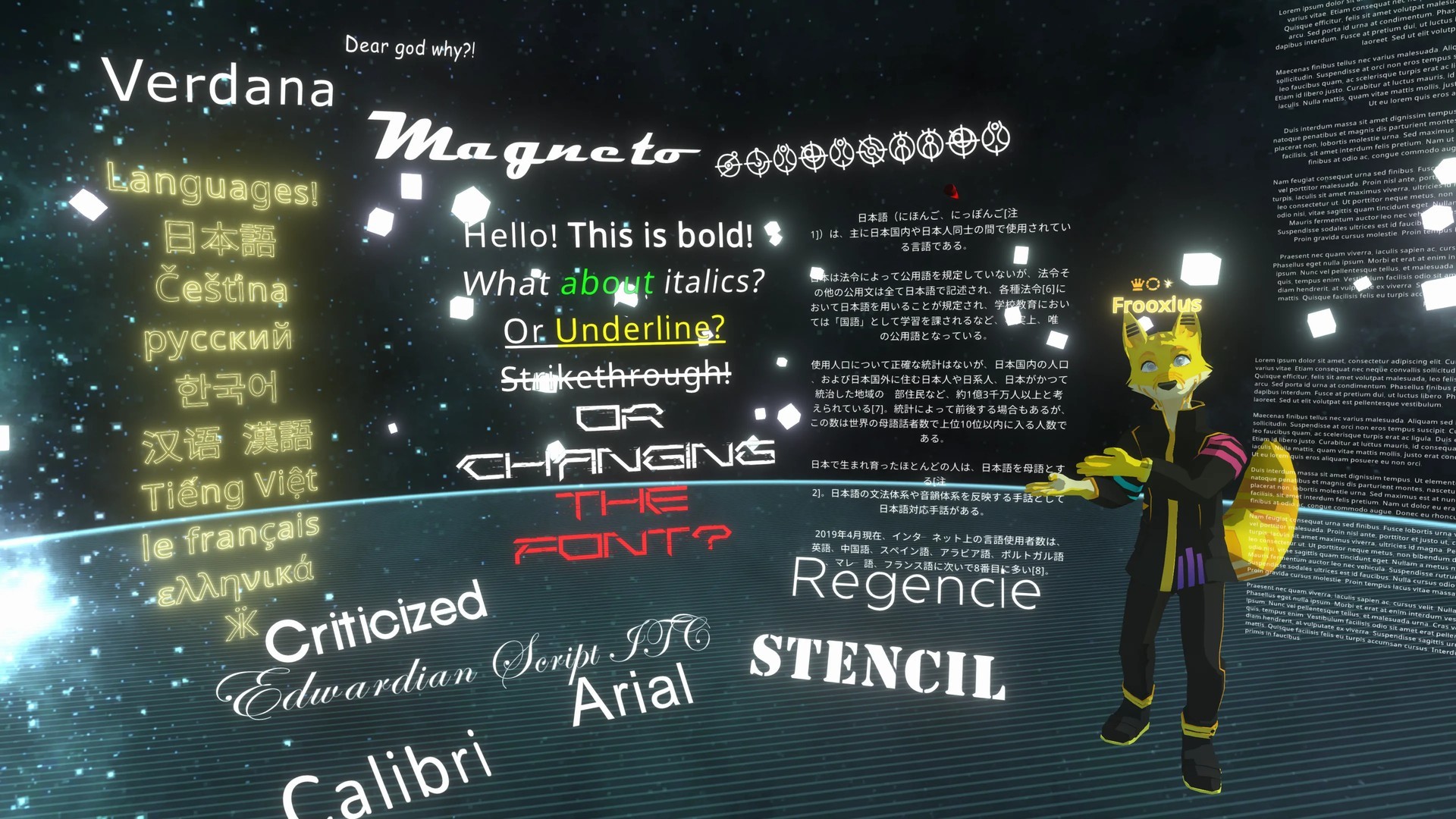
It brings many new benefits. It’s highly performant, running asynchronously and heavily utilizing multi-threading. This reduces lag spikes related to generating and rendering text, reduces overall CPU utilization and makes Neos more responsive.
The new system also offers much more creative freedom and flexibility. Neos now supports import of TrueType/OpenType font files (.ttf, .ttc, .otf and .otc). Simply import them as any other asset, drop over text renderer and your text will be instantly rendered with the new font!
Neos now uses a method called MSDF (multichannel signed distance field) for achieving high visual quality - this offers better preservation of detail and sharp corners than previous method. The generation parameters (glyph resolution, range and padding) are configurable, if you notice visual artifacts with complex or thin fonts, simply increase the resolution.

Another benefit is support for dynamic glyph generation, rather than being restricted to a pre-generated subset. This allows support for languages with a large number of symbols, like Japanese, Korean and Chinese. Currently languages that require complex text shaping aren’t supported yet (like Arabic), but are planned in the future.
Since it’s designed specifically for Neos, it also integrates very well with other Neos’ subsystems. It uses regular materials and meshes, meaning you can technically drop in any material you like (although MSDF fonts won’t display correctly without the special shader) or use the font material outside of the text rendering system.

Currently the new system is used for all instances of TextRenderer in Neos, all existing worlds and items are automatically upgraded. If you notice any issues or things breaking, please make a report, ideally in #bugs-and-feedback channel on the Discord.
Text embedded within a UI canvas (inspectors, friends list, inventory, file browsers and so on) is still using the old system at the moment. We’ll be creating a new UI framework to replace the old one, using this text rendering at its core. There’s a lot more cool stuff to come!
[previewyoutube][/previewyoutube]
[h2]Asset Cache Obfuscation & SimpleAvatarProtection improvements[/h2]
We've made some new improvements to asset security, such as obfuscating the cache. You can no longer see the textures and other assets in your computers cache directory. This should make it much more difficult for users to extract models and textures, so we can help keep your assets safe!
There are also some major improvements with the SimpleAvatarProtection component which now prevents users from easily snagging mesh, materials and textures from the inspector, or with the material tip or mesh tip.
The upcoming license / object ID system will provide much stronger protections in the future and greater flexibility for managing your and other people’s assets.
[h2]Tooltip Multiplexer[/h2]
This one's going to be a big hit with our power-users and creators! This special new tooltip component allows you to have all of your favorite tooltips in one. You simply choose the tooltips you wish to use, put them in the components index list and use a little bit of LogiX to swap between tips by changing a single number.
[h2]Community Highlights[/h2]
First, a warm welcome to all of our new international users! We at NEOS wish to thank you all so much for giving us a try. We're all so very happy and humbled to have you join us in exploring this new frontier into the metaverse!
You can
join the conversation about Neos VR here on Twitter and check out all the cool things people are doing!

[h3]Secret Santa Creator Jam event[/h3]
Medra is hosting a very special Creator Jam this Sunday. Users who have joined the secret Santa were given a random name from the list to procure or create a special gift for them. I know we’re gonna have some wacky gift ideas this year! We’ll be livestreaming the event on our Twitch, so come check it out!

[h3]Snowglobe by Turk[/h3]
This beautiful and cozy world features a very interesting ceiling design! Make your way over to the coffee table, pick up the snowglobe and look into it and you'll see a tiny version of the room! What's more, you'll see a tiny version of yourself looking into a little snowglobe. Look up at the ceiling and you'll see a massive version of yourself!
We’re so happy to have you join us again for this weekly update! Thank you to all of our users and patrons! Without you, we could not move forward with the project. You literally make our world go 'round! And again, to all of our wonderful new users, welcome!

[h2]What’s next?[/h2]
With the new text rendering system pretty much done, we’re now more than half-way through the technical phase of the UI overhaul. Next we’ll be working on a brand new UI framework system, using the new text rendering as a basis, that’s going to replace the current Unity system.
Similarly to the new text rendering this will not only offer drastic performance improvements (especially with lots of windows and inspectors open!), but also give us full control over all parts of the system, which will allow for redesigning the UI visuals and interactions to provide the experience we want.
We’ll also continue fixing up any issues with the text rendering as we go and there are some new additions planned, like better text editing (being able to click anywhere in the text to position the cursor) or 3D mesh text generators, so there’s a lot of fun stuff you can look forward to!