1. Rolling Line
  2. News

Rolling Line News

Track upgrade part 3: turnouts! v2.14


Today's update is the 3rd and final part of the big track upgrade!

This update brings turnouts over to the new dynamic system and adds a bunch of new types of turnouts.
You can now generate turnouts of any angle, radius, length etc and even make wye switches!


There are several new pre-made track pieces added to the track drawers as well as four new options in the dynamic track generator:
- straight
- curved
- double curved
- wye


When placing turnouts you can now also change the direction by holding "shift" plus "Q and E" while snapped on to track!


There were also a few smaller bugs fixed in this update:
  • detail paints and and track styles are kept when picking up dynamic track pieces
  • fixed decimal rounding on dynamic track values
  • collision on track now updates to match the ballast style used
  • fixed unusual collision on flexytrack
  • made changes to the dynamic track generator UI


Now that the track is all finally converted to the new system I can move on to some new things!
There will be a small update soon that adds the option to set different styles of turnout levers, as well as possibly some other new track detail features.

But the next major update is likely to be some fun stuff for Halloween, I've got some pretty exciting stuff planned!

Enjoy!

Track upgrade part 2: gradients and flexytrack! v2.13


Today's update continues the work Ive been doing towards the new dynamic track system.
This part (part 2) brings flexytrack over to the new system, as well as adding smoothed curves to gradient track!
The next part of these track updates (part 3) will be coming up next and will bring turnouts over to the new system.

Since flexytrack is now part of the new upgraded track system, you can now use all the new painters (bridges, tunnels, all track styles, etc) on flexytrack too!
Flexytrack is also now much smoother and precise than it was before.

The new way gradients work is the highlight of this update though!
Rolling Line previously had to cheat gradients, and there was no real support for creating curves on an angle smoothly (for things like a helix) but the system has now completely changed and gradients are now perfectly smooth!

When you change the gradient angle of a piece of track (scroll wheel/VR up-down action) it will now automatically smooth the curve in-between!


This also works for curved track, which means you can easily make things like uphill winding track and a perfectly smooth helix!


These new features are bringing the game one step closer to completing this new track system, and after the next part of this update (part 3) all the track in the game will be using this new upgraded system!

There are also a few features and bug fixes in this update:
  • Change the angle change step from 1 to 0.5 on the dynamic curve generator (so you can now generate angles like 22.5)
  • Added an option (in the "Misc" menu) to have an on-screen readout of the angle and radius of dynamic track when hovering over it. this is useful for figuring out what values you need to generate similar track to what you have already placed.
  • Fixed shading on track/bridges.
  • Fixed bug with custom liveries being cloned (default wagons that get loaded when you dont have the livery installed).
  • Changed how snapping curves works, curves are now actually switched between right/left curve direction when pressing Q and E, instead of just being rotated.


Once this track upgrade is done, im planning to add a brand new train to the game, as a change of scenery from all this track related stuff (more info on that in the next update!)

But in the mean time, i hope you enjoy these new track features!

Track system upgrade and new track styles! v2.12


The track system in Rolling Line is undergoing big changes!

The old system I made had huge limitations, and required me to manually build 3D meshes for every single piece of track, which meant that adding new track curves was a very long and tedious process.
But with this new system track can be automatically generated based on custom values like radius and length! Which means you can now easily build track with any angle you please.

This new system also means that it is MUCH easier to add different kinds of track and style adjustments to the game! For now this means that you can paint on details like bridges onto any track (instead of being restricted to specific "bridge" pieces of track). This update comes with a few new track styles and detail addons, but many many more will be coming in the future thanks to these new changes!

This big track upgrade is going to be released in three parts (since its a very big job).
- This is the first part, which only affects curves and straight pieces of track.
- The next part will affect flexytrack and make changes to how gradients work.
- The third and final part will convert turnouts to the new system, at which point ALL track in the game will be using the new system!

What this means is that right now (after this update) only straights and curves will be affected by these new features, you cannot use the new style painters on old track, flexytrack and turnouts.
Once all three updates are complete, all track will be using the same system and you will be able to use these new features on everything!

You can now generate curves with a custom radius and angle, as well as straight track segments (with a custom length) using the new curve generator:


The distance between each step in the radius is exactly equal to the standard distance between track already established in the game, so it's easy to make multi-track curved yards!


There are also plenty of pre-made track pieces you can use (just like before) so you don't have to use this track generator at all, its more for people wanting to make specific curves for advanced track layouts.


Along with the new track generator, there is also a bunch of new track style painters:


There are three new styles of track:
- wonky rails (no sleepers)
- wonky rails with derelict sleepers
- derelict sleepers without any rails


There are also two new style of ballast:
- wide ballast
- embankments (for elevated track)

as well as one new track color style, rusty track:


You can also now paint bridges directly on to track!


I've been working on this new track system in the background for weeks now, and it's great to finally start bringing it into the game officially! This new system completely changes how track is handeled programming-wise and paves the way for all sorts of new features which would have been incredibly difficult to implement on the old system.

I'm also working on the previously mentioned Sao Paulo content alongside these new track features, so there will be some new props (and even a new train!) coming in the near future!

Enjoy!

(P.S. Thanks Steam for deleting half the news post when I published it and making me re-write it. I've had a lot of problems with this new system already so far)

Dark mode theme! v2.11


Something simple that Rolling Line has desperately needed, a dark mode theme! No longer do you need to be blinded by the solid white loading screens (especially in VR).

There are now several new options in the "Graphics -> Theme" menu which you can change to customize a few new things.

You can change the backdrops to be solid black (instead of the blue sky) which affects the official maps (main layout, Santa Fe) and the custom track room walls, but this won't affect the user-placed wall props.


You can also choose to have night-time menus! this replaces the random menus around the main layout with a bunch of night ones (using the Hanmer Springs map).


And lastly, you can of course change the loading screens to use a dark theme.


Alongside this small update I've been spending a lot of time working on upgrading the custom track system! This new system allows for choosing any angle you want for pieces of track, as well as new track style additions (like 3rd rails, overhead wires, more types of tunnels etc). This track update is still in development and will be coming soon!

In the meantime, enjoy this nice little quality-of-life improvement!

Sprinter Liveries! v2.10


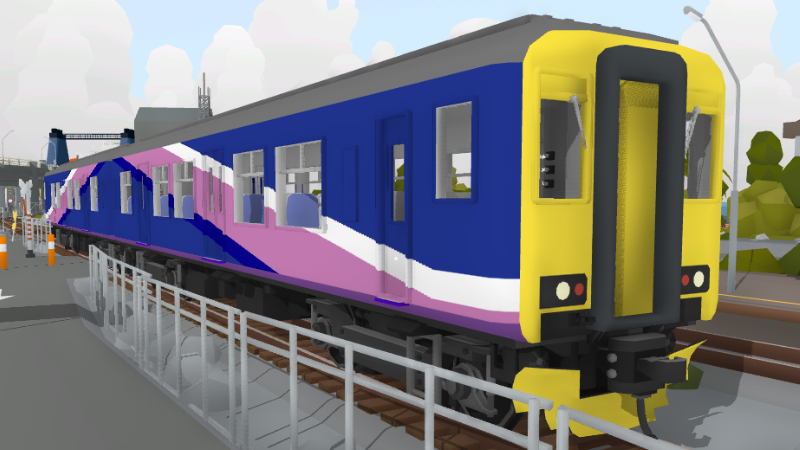
Custom liveries are now available for the British Sprinter locomotive!
You can find them under the "Commuter Sprinter" tag in the Steam workshop and access them in-game in the usual manor.


You can find the new template files in the "Rolling Line\Modding\templates" folder.
Or simply use this copy of the template here:


I've been working on lots of back-end structure changes and testing out lots of new things in preparation for some big features on the way! Some updates to look forward to in the near future (while i'm working on the Sao Paulo expansion) are things like new track, roads and overhead wires!
This last part of the year is going to be very busy, and there's going to be lots of big things happening for Rolling Line!

Enjoy!