Flight Log #2: Avatars
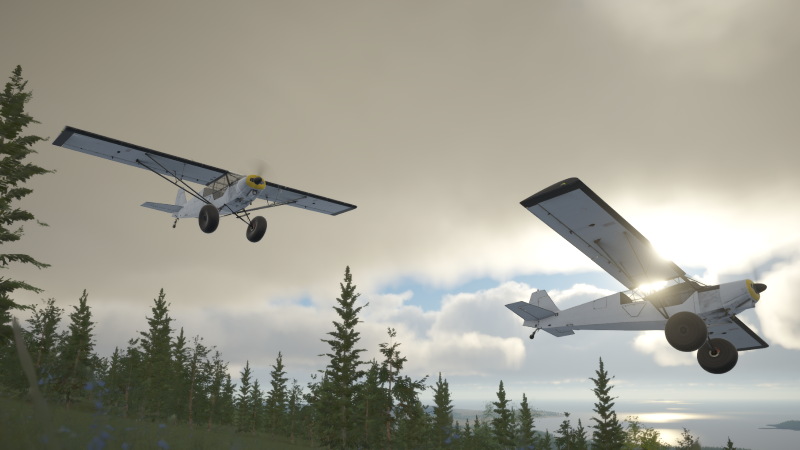
Characters in any game are a complex endeavour and one of the appeals of making a flight sim was that we could avoid them entirely! No human character models to perfect, no uncanny valley where faces somehow never look ‘right’, no matter how much you tweak, and no need for a team of animators to bring complex characters to life. No, instead, we could simply have an aircraft comprised of multiple meshes that either remain static, continually spin around (think propellers and wheels), rotate between two specific angles (most other moving bits of an aircraft!) or, in the case of some of the Deadstick team’s recent playthroughs - fall off entirely!
Whilst the focus in Deadstick is on being the pilot not the aircraft, playing in first-person means you don’t need to see your character - the pilot is literally you, playing through the screen and mastering your skills as a bush pilot - that is, until you introduce multiplayer!
Multiplayer with other aircraft is all well and good, but the beauty of Deadstick is being able to get out and walk around. Without avatars, and the ability to see one another, you cannot truly share that experience.
Those of you that came to see us at Cosford and had the chance to experience the multiplayer, will be more than familiar with our little red capsule characters. At the time, these were our solution (read, "hack") to representing the player character to others. These capsules had a certain simple charm to them and after all of the positivity generated from Cosford, we knew we needed a way to be able to introduce some form of avatar into the sim but without all of the complexity that comes with full human characters.

After much discussion, considering various different simplified and stylised humanoid options, it quickly became apparent however, that by adding realistic human avatars, we could do so much more to convey/express what players are up to, that it became inevitable that we would have to tackle the challenge head on!
[h3]The Traditional Approach[/h3]
As with all such things, it is often simplest to look at what others do when trying to solve such a problem and copy it. So we set off on a path to author a prototype humanoid character, get him rigged and set up with a few standard walk, run, and jump animations, and then sync his position with other players over multiplayer.
So just what goes into choosing a model for you, the player to be?
Firstly, we wanted to find one that could be used more-or-less off the shelf. We are a small team and, whilst we are lucky enough to have several very talented Vehicle and Environment Artists, character creation is a fairly specialised skill and models can often take months to develop from scratch. What's more, when designing anything new, there is always the challenge of trying to transfer a particular design/idea from one's own mind's eye to something that can be captured in a design brief and correctly interpreted by an Artist (I'm sure this is a problem any Police Sketch/e-Fit Artists can relate to!). It is by no means an impossible task, but one which usually requires several rounds of iteration before both parties can share the same mental picture.
So, we set about scouring the internet, to find a base model from which we could work. Much like the app store for playing games, these days there are several online marketplaces available to purchase assets which can be used in both film and games. This is great for creators! However, whilst models may look the same on the surface, they generally have very different requirements in terms of how they are authored, just how detailed the models are, and how they are then set up to run in-game. I'm sure you're all familiar with poly counts - whilst more generally look better, they are also (to somewhat oversimplify) a fairly good way of quickly bringing a graphics card to a crawl.
Unlike static assets, there is still more to consider however - characters need to be rigged to an underlying skeleton which can be manipulated and animated in a form that is friendly to the engine we are using, and any materials and textures also need to be developed in a form which is compatible with the rendering techniques we are using. PBR seems to be one of the buzzwords often talked about in flight sims in the last few years and it is the standard we are also using.
As I'm sure you can appreciate, the above narrows down the choice of what is suitable quite quickly!
What’s more, we had a fairly specific set of ideas of just what kind of look/feel we wanted to go for with our initial pilot and just what he should wear. It’s all very well dressing for the warmth and comfort of the cockpit whilst flying but, if things go wrong and pilots need to land out, then being suitably equipped to survive until rescued is a consideration that needs to be taken seriously. As beautiful as the backcountry is, it can quickly turn very hostile towards those that are ill-prepared for the conditions they may inadvertently find themselves in.
A great source of inspiration for Deadstick is the excellent videos produced by those at Backcountry Pilot. In one such video, there is a 30 minute presentation on what considerations should be made when dressing for the backcountry and what to pack in your survival bag. It’s well worth a watch here!
Another eye opener is the video with Bradley Friesen and someone whom I’m sure needs no introduction, FlightChops, on an inadvertent night in the cold and how quickly and serious things can change.
With all of that in mind, we scoured the internet and found this chap:

Arguably, a little over equipped and bearing somewhat of a resemblance to a lead character in a very famous third-person Action Adventure game, he wasn't exactly what we were looking for but was authored in a manner which was engine-friendly and also could serve as a good foundation upon which we could tweak and finesse the model to suit our needs.
Primarily, by removing the unnecessary holsters and scarf (somewhat of a hazard around spinning propellers) and redressing slightly. Removing the scar revealed a deep v-style shirt, which was a little too action hero for our needs, and so, we set about scaling the look back a little and instead opting for the classic bush pilot go to - the lumberjack!

The base mesh as imported, ready for edit.
An additional complication comes in as to just how characters are authored these days. You’ll remember me mentioning that, generally, with more polygons, comes better looking models. Well, Artists certainly know this and are keen to throw every last one at their models to achieve the best result. There is, however, a little trick that can be used to achieve a similar result without all of the graphics card expense using a technique known as baking.
Not cookies sadly, but Artists can author their models in very high detail, then create a low poly approximation of it and ‘project’ or ‘bake’ the detail from one to the other. This isn’t just in the form of textures, however, but the same is true for lighting - tricking the eye into thinking there are 3D details and creases etc. on the model where, in fact, none exist.
This presented an additional challenge as the process is generally somewhat one way - the model is authored in high detail, then a bespoke low poly mesh is generated, and the details baked across. We only had access to the baked end product and would therefore have to make our changes there directly.
Manipulating the geometry isn’t too tough but editing the baked information (saved in the form of texture and normal maps) was a challenge. What’s more, in the process of optimisation, the source Artist had combined the holsters into a single mesh, removing any pieces of shirt geometry that were underlying, as they wouldn’t be seen by the end user and, therefore, would have always been rendered unnecessarily. We therefore had to reconstruct all of these shirt parts before we could remake it!
Whilst at it, our talented Artist, Matt, took the opportunity to separate out all the materials for each of the clothing items, giving us the possibility to customise characters in the future. At the very least, allowing us to swap textures for a given garment, but with the foundation in place to swap clothing meshes entirely if desired.
Once remade, the next challenge is that any changes to the polygons or, more specifically, the overall topology of how the mesh is constructed, quickly break the skinning (the process in which an Artist defines just how each vertex should attach to each bone) and so the next task was to rework all of the skinning, fixing any problem areas such that our character could correctly move once again.
As is often the case with skinning, things didn’t go entirely to plan on the first attempt...

However, several tweaks later, and our character was rigged and ready to go.
And here we have it - our first pass character (literally) up and running within our game world.


This is very much a proof of concept, there are certainly more tweaks we would like to make - adding additional details to the character and softening some of the ‘hero’ features. However, we are pleased with the results so far and have had lots of fun testing together in the multiplayer (more to reveal there later!)
[h3]Advanced Avatars[/h3]
So how do we make our avatar look and feel human? Once running around, he’s already a big improvement on the red capsules, but feels very robotic. One obvious problem is that he stares fixedly at the horizon at all times, as if he’s wondering if he left the gas on. I wouldn’t get in a plane with this guy!
Since he’s controlled by another player, we do actually know where he should be looking - it’s wherever the other player’s looking.
At one time, head look would be implemented by just rotating his head, but this doesn’t produce a great result - especially when the target is behind him. Unless he’s possessed, he shouldn’t be able to rotate his head 180 degrees to look behind him. Instead, his head, neck, shoulders, and even torso should be involved in getting his eyes on the target.
In technical terms, each bone needs to follow certain constraints and the whole system needs to be solved so the eyes are on the target without the bones breaking those rules. This is a very common and well understood problem, known as Inverse Kinematics (IK). Unity supports this out of the box, so it’s fairly easy to hook up.
So now your avatar can run, jump and look around. Importantly, I know whether you’re looking at me or not which makes him (and thus you!) seem immensely more human.
[h3]IK Avatars In the Cockpit[/h3]
When he gets into the cockpit he now sits rigidly upright and looks around correctly.
IK lets us do more… We can use the same approach as the head looking to put his hands on the joystick. As long as the IK is working correctly, he will realistically re-pose himself as the joystick moves according to the remote player’s input (This is a good way of understanding the literal meaning of “Inverse Kinematics” - he’s not really moving the joystick, the joystick moves and that moves his hand, which moves the arm’s bones. In other words, the Kinematics (i.e. movement) is Inverted (backwards)).
We can also put his left hand on the throttle and his feet on the rudder pedals. As the remote player operates the controls, he will move his whole body accordingly.

This is pretty good, but Deadstick has a lot of other controls. It would be great if he could interact with everything in the cockpit. We already know what the other player is looking at, so we interpret that as a guide for what the avatar should be interacting with. So when the other player hovers over the magnetos key, we can tell the avatar to reach out and do the same.
Up until this point, we were using Unity’s built in IK, but we start to see some issues. It seems that it only does a limited number of bones, so when we tell him to position his hand he only moves his shoulder and elbow. This would be sufficient for anything within arm’s length, but in this case it leaves him grasping helplessly for the key - he needs to lean forward to reach it. In IK terms, we need full body IK, which Unity doesn’t provide. Happily, there are 3rd party solutions available - we use FinalIK.

So now he operates the controls fairly well and he’ll look around, but he will sit bolt upright no matter what happens to the plane. To solve this, we can apply a bit of feedback from the physics to his position, moving him around in his seat as he would if he was really flying. The IK will keep his hands on the controls (as far as possible).

Finally, for the human touch, we’ve added some simple emotes - these are just animations that play on the top half of the character whether he’s on foot or in the plane. So you can wave to other players - it’s only polite when you’ve just avoided an in-air collision!

[h3]The Future[/h3]
As with all of the systems we are developing in Deadstick, we like to think about what the future may hold for them and, in turn, develop them in a way that provides a solid yet flexible foundation upon which we can build. The two most exciting areas here are customisation and VR. Of course, we will want to expand upon the range of characters we can offer, such that all players can find one that appeals to their inner bush pilot persona, but allowing players to take that a step further by being able to choose their attire would be a lot of fun and make pilot recognition much simpler!
As we focus on VR post-Early Access, we are keen to exploit the full body IK system further also, not just guessing where pilots should be moving their limbs based on the instruments/cockpit controls they are interacting with - but rather let them drive the animation directly through their real world movements, further increasing the immersion that players can experience.
Finally, on the post-Early Access wishlist, is the option to transport humanoid passengers, either in the form of AI characters, which must be transported from A to B as part of a passenger job, or perhaps, more excitingly, by teaming up with one of your buddies for a shared cockpit flight and being able to accurately gesture and interact with one another.
This and more will all be possible thanks to the foundation upon which we have built our characters.
[h3]Avatars In Action[/h3]
We weren’t planning on releasing a video with this social update. However, we had so much fun testing the avatars in multiplayer that we couldn’t resist sharing a quick sneak peek of what we have achieved so far!!
The following video is spliced together from that play test...
[previewyoutube][/previewyoutube]
Whilst the focus in Deadstick is on being the pilot not the aircraft, playing in first-person means you don’t need to see your character - the pilot is literally you, playing through the screen and mastering your skills as a bush pilot - that is, until you introduce multiplayer!
Multiplayer with other aircraft is all well and good, but the beauty of Deadstick is being able to get out and walk around. Without avatars, and the ability to see one another, you cannot truly share that experience.
Those of you that came to see us at Cosford and had the chance to experience the multiplayer, will be more than familiar with our little red capsule characters. At the time, these were our solution (read, "hack") to representing the player character to others. These capsules had a certain simple charm to them and after all of the positivity generated from Cosford, we knew we needed a way to be able to introduce some form of avatar into the sim but without all of the complexity that comes with full human characters.
After much discussion, considering various different simplified and stylised humanoid options, it quickly became apparent however, that by adding realistic human avatars, we could do so much more to convey/express what players are up to, that it became inevitable that we would have to tackle the challenge head on!
[h3]The Traditional Approach[/h3]
As with all such things, it is often simplest to look at what others do when trying to solve such a problem and copy it. So we set off on a path to author a prototype humanoid character, get him rigged and set up with a few standard walk, run, and jump animations, and then sync his position with other players over multiplayer.
So just what goes into choosing a model for you, the player to be?
Firstly, we wanted to find one that could be used more-or-less off the shelf. We are a small team and, whilst we are lucky enough to have several very talented Vehicle and Environment Artists, character creation is a fairly specialised skill and models can often take months to develop from scratch. What's more, when designing anything new, there is always the challenge of trying to transfer a particular design/idea from one's own mind's eye to something that can be captured in a design brief and correctly interpreted by an Artist (I'm sure this is a problem any Police Sketch/e-Fit Artists can relate to!). It is by no means an impossible task, but one which usually requires several rounds of iteration before both parties can share the same mental picture.
So, we set about scouring the internet, to find a base model from which we could work. Much like the app store for playing games, these days there are several online marketplaces available to purchase assets which can be used in both film and games. This is great for creators! However, whilst models may look the same on the surface, they generally have very different requirements in terms of how they are authored, just how detailed the models are, and how they are then set up to run in-game. I'm sure you're all familiar with poly counts - whilst more generally look better, they are also (to somewhat oversimplify) a fairly good way of quickly bringing a graphics card to a crawl.
Unlike static assets, there is still more to consider however - characters need to be rigged to an underlying skeleton which can be manipulated and animated in a form that is friendly to the engine we are using, and any materials and textures also need to be developed in a form which is compatible with the rendering techniques we are using. PBR seems to be one of the buzzwords often talked about in flight sims in the last few years and it is the standard we are also using.
As I'm sure you can appreciate, the above narrows down the choice of what is suitable quite quickly!
What’s more, we had a fairly specific set of ideas of just what kind of look/feel we wanted to go for with our initial pilot and just what he should wear. It’s all very well dressing for the warmth and comfort of the cockpit whilst flying but, if things go wrong and pilots need to land out, then being suitably equipped to survive until rescued is a consideration that needs to be taken seriously. As beautiful as the backcountry is, it can quickly turn very hostile towards those that are ill-prepared for the conditions they may inadvertently find themselves in.
A great source of inspiration for Deadstick is the excellent videos produced by those at Backcountry Pilot. In one such video, there is a 30 minute presentation on what considerations should be made when dressing for the backcountry and what to pack in your survival bag. It’s well worth a watch here!
Another eye opener is the video with Bradley Friesen and someone whom I’m sure needs no introduction, FlightChops, on an inadvertent night in the cold and how quickly and serious things can change.
With all of that in mind, we scoured the internet and found this chap:
Arguably, a little over equipped and bearing somewhat of a resemblance to a lead character in a very famous third-person Action Adventure game, he wasn't exactly what we were looking for but was authored in a manner which was engine-friendly and also could serve as a good foundation upon which we could tweak and finesse the model to suit our needs.
Primarily, by removing the unnecessary holsters and scarf (somewhat of a hazard around spinning propellers) and redressing slightly. Removing the scar revealed a deep v-style shirt, which was a little too action hero for our needs, and so, we set about scaling the look back a little and instead opting for the classic bush pilot go to - the lumberjack!
The base mesh as imported, ready for edit.
An additional complication comes in as to just how characters are authored these days. You’ll remember me mentioning that, generally, with more polygons, comes better looking models. Well, Artists certainly know this and are keen to throw every last one at their models to achieve the best result. There is, however, a little trick that can be used to achieve a similar result without all of the graphics card expense using a technique known as baking.
Not cookies sadly, but Artists can author their models in very high detail, then create a low poly approximation of it and ‘project’ or ‘bake’ the detail from one to the other. This isn’t just in the form of textures, however, but the same is true for lighting - tricking the eye into thinking there are 3D details and creases etc. on the model where, in fact, none exist.
This presented an additional challenge as the process is generally somewhat one way - the model is authored in high detail, then a bespoke low poly mesh is generated, and the details baked across. We only had access to the baked end product and would therefore have to make our changes there directly.
Manipulating the geometry isn’t too tough but editing the baked information (saved in the form of texture and normal maps) was a challenge. What’s more, in the process of optimisation, the source Artist had combined the holsters into a single mesh, removing any pieces of shirt geometry that were underlying, as they wouldn’t be seen by the end user and, therefore, would have always been rendered unnecessarily. We therefore had to reconstruct all of these shirt parts before we could remake it!
Whilst at it, our talented Artist, Matt, took the opportunity to separate out all the materials for each of the clothing items, giving us the possibility to customise characters in the future. At the very least, allowing us to swap textures for a given garment, but with the foundation in place to swap clothing meshes entirely if desired.
Once remade, the next challenge is that any changes to the polygons or, more specifically, the overall topology of how the mesh is constructed, quickly break the skinning (the process in which an Artist defines just how each vertex should attach to each bone) and so the next task was to rework all of the skinning, fixing any problem areas such that our character could correctly move once again.
As is often the case with skinning, things didn’t go entirely to plan on the first attempt...
However, several tweaks later, and our character was rigged and ready to go.
And here we have it - our first pass character (literally) up and running within our game world.
This is very much a proof of concept, there are certainly more tweaks we would like to make - adding additional details to the character and softening some of the ‘hero’ features. However, we are pleased with the results so far and have had lots of fun testing together in the multiplayer (more to reveal there later!)
[h3]Advanced Avatars[/h3]
So how do we make our avatar look and feel human? Once running around, he’s already a big improvement on the red capsules, but feels very robotic. One obvious problem is that he stares fixedly at the horizon at all times, as if he’s wondering if he left the gas on. I wouldn’t get in a plane with this guy!
Since he’s controlled by another player, we do actually know where he should be looking - it’s wherever the other player’s looking.
At one time, head look would be implemented by just rotating his head, but this doesn’t produce a great result - especially when the target is behind him. Unless he’s possessed, he shouldn’t be able to rotate his head 180 degrees to look behind him. Instead, his head, neck, shoulders, and even torso should be involved in getting his eyes on the target.
In technical terms, each bone needs to follow certain constraints and the whole system needs to be solved so the eyes are on the target without the bones breaking those rules. This is a very common and well understood problem, known as Inverse Kinematics (IK). Unity supports this out of the box, so it’s fairly easy to hook up.
So now your avatar can run, jump and look around. Importantly, I know whether you’re looking at me or not which makes him (and thus you!) seem immensely more human.
[h3]IK Avatars In the Cockpit[/h3]
When he gets into the cockpit he now sits rigidly upright and looks around correctly.
IK lets us do more… We can use the same approach as the head looking to put his hands on the joystick. As long as the IK is working correctly, he will realistically re-pose himself as the joystick moves according to the remote player’s input (This is a good way of understanding the literal meaning of “Inverse Kinematics” - he’s not really moving the joystick, the joystick moves and that moves his hand, which moves the arm’s bones. In other words, the Kinematics (i.e. movement) is Inverted (backwards)).
We can also put his left hand on the throttle and his feet on the rudder pedals. As the remote player operates the controls, he will move his whole body accordingly.
This is pretty good, but Deadstick has a lot of other controls. It would be great if he could interact with everything in the cockpit. We already know what the other player is looking at, so we interpret that as a guide for what the avatar should be interacting with. So when the other player hovers over the magnetos key, we can tell the avatar to reach out and do the same.
Up until this point, we were using Unity’s built in IK, but we start to see some issues. It seems that it only does a limited number of bones, so when we tell him to position his hand he only moves his shoulder and elbow. This would be sufficient for anything within arm’s length, but in this case it leaves him grasping helplessly for the key - he needs to lean forward to reach it. In IK terms, we need full body IK, which Unity doesn’t provide. Happily, there are 3rd party solutions available - we use FinalIK.
So now he operates the controls fairly well and he’ll look around, but he will sit bolt upright no matter what happens to the plane. To solve this, we can apply a bit of feedback from the physics to his position, moving him around in his seat as he would if he was really flying. The IK will keep his hands on the controls (as far as possible).
Finally, for the human touch, we’ve added some simple emotes - these are just animations that play on the top half of the character whether he’s on foot or in the plane. So you can wave to other players - it’s only polite when you’ve just avoided an in-air collision!
[h3]The Future[/h3]
As with all of the systems we are developing in Deadstick, we like to think about what the future may hold for them and, in turn, develop them in a way that provides a solid yet flexible foundation upon which we can build. The two most exciting areas here are customisation and VR. Of course, we will want to expand upon the range of characters we can offer, such that all players can find one that appeals to their inner bush pilot persona, but allowing players to take that a step further by being able to choose their attire would be a lot of fun and make pilot recognition much simpler!
As we focus on VR post-Early Access, we are keen to exploit the full body IK system further also, not just guessing where pilots should be moving their limbs based on the instruments/cockpit controls they are interacting with - but rather let them drive the animation directly through their real world movements, further increasing the immersion that players can experience.
Finally, on the post-Early Access wishlist, is the option to transport humanoid passengers, either in the form of AI characters, which must be transported from A to B as part of a passenger job, or perhaps, more excitingly, by teaming up with one of your buddies for a shared cockpit flight and being able to accurately gesture and interact with one another.
This and more will all be possible thanks to the foundation upon which we have built our characters.
[h3]Avatars In Action[/h3]
We weren’t planning on releasing a video with this social update. However, we had so much fun testing the avatars in multiplayer that we couldn’t resist sharing a quick sneak peek of what we have achieved so far!!
The following video is spliced together from that play test...
[previewyoutube][/previewyoutube]


 (Terrain early WIP, time asleep shortened for demonstration)