1. Tabletop Playground
  2. News

Tabletop Playground News

Scripting has arrived


Welcome to the largest feature update yet: Tabletop Playground now has scripting support using JavaScript!

Scripts bring a whole new level of possibilities for creating games in Tabletop Playground. You can use them to automate tasks, help with counting and bookkeeping, enforce game rules, or even create AI opponents. The rest of this post will become a bit technical, so if you’re more interested in playing than creating, rest assured that better and more complex games are now possible!


Tabletop Playground offers three ways to use scripting: When creating a game using the Editor, you can define a global script, you can attach scripts to objects, and you can use the in-game scripting console to execute code immediately. You can also activate the scripting console if you’re hosting a multiplayer game, giving you scripting superpowers! But remember that with great power comes great responsibility…

You can write script files in the text editor of your choice, we recommend Visual Studio Code: it’s fast, free, and gives you lots of useful features when editing Tabletop Playground scripts. There’s syntax highlighting, autocompletion, and direct access to the API documentation. You can even debug your scripts with breakpoints and inspect the contents of variables!


JavaScript is one of the most popular programming languages today. That comes with many advantages: you may already know how to code in JavaScript, and if you don’t, there’s lots of resources online to help you learn. There are also many existing modules that can be used to make scripting easier and enhance what you can do.

The JavaScript engine used is the same as the one in the Google Chrome browser. That means it’s very fast, allowing complex computations even while running the game. It also supports the Chrome debugger and console – if you have used JavaScript before, you will know how useful they can be!


The current beta release contains a lot of scripting functionality already, but we won’t stop there: we plan to continue to improve and enhance the API until release and beyond. With your feedback helping shape what features we add for scripting!

Start testing out the scripting in Tabletop Playground right now through our early access Creator’s Program. Join our Discord server to become part of our growing tabletop gaming community and to get the latest updates on development as we work towards release.

You can wishlist Tabletop Playground on Steam and follow us on itch.io, Facebook, Twitter and IndieDB to be the first to know when it launches in 2020.

Creator’s Program And New Release Window

Hey everyone we’ve got some exciting news to share this update!

From today we’re starting a Creator’s Program for Tabletop Playground in collaboration with mod.io, which will going forward be our early access initiative. This will mean you’ll be able to play, test and create content, and share it with other community members, similar to how we’ve been running it previously.


But importantly, the program is being run through mod.io, which will be our cross platform solution for mod/user-generated content. We’re keen to bring Tabletop Playground to multiple PC storefronts and platforms in the future, but to ensure everyone can upload the access the same content as each other after release, we can’t rely on Steam Workshop going forward.

From today we’ll be handing out a limited amount of codes every fortnight to members of our Discord who are eager to get involved. However, anyone who has already received a code will be able to continue testing and be part of the Creator’s Program.

To get involved in the Creator’s Program and be some of the first players to get your hands on Tabletop Playground and contribute to the development, join our community Discord.

Read more about the Creator’s Program on our new F.A.Q. page: https://tabletop-playground.com/faq/

And check out the Tabletop Playground mod.io page here: https://tabletopplayground.mod.io/


Another important announcement, which many of you would have probably presumed by now, but Tabletop Playground will be releasing on PC and VR in 2020. Previously we had been working towards a 2019 release, but through our community's feedback, we've decided to add several more features before release and therefore decided to push back the launch to 2020.

We’re looking forward to having you continue to give us feedback through the Creator’s Program and adding new features for you to check out as we head towards launch next year.

We’re still hard at work implementing Javascript scripting at the moment and we’ll have more news to share on that front in the coming weeks! Until then, we look forward to chatting with you more about the Creator’s Program and Tabletop Playground on Discord. To make sure you don’t miss any updates, follow us on Facebook, Twitter and sign up to our newsletter.

Card Hands And Playing In A Cyberpunk World

It’s been a while since the last Tabletop Playground development update, but that doesn’t mean we haven’t been busy! We’ve been adding several new features and usability enhancements (and fixing some bugs…). For this update we’ll be showcasing two new features: the card hand and a new futuristic 3D environment!

With the new card hand, you don’t need to go back to your card holder on the table in order to look at your cards or interact with them. They’ll always be at the bottom of your screen for easy access! You can drag and drop cards to reorder, add, or remove them from your hand, just like you would on a card holder. The card hand can be set to always on, always off, or auto-hide as shown in this GIF:


We’ve also been working on the fifth 3D environment that will be available to host your tabletop games in. After fantasy ruins, a western saloon, a 60s living room, and a Victorian chamber, you can now play in a cyberpunk city street.


So if you’ve ever wanted to play a game of chess in a run-down alley of a futuristic city, you’ll finally have the chance!


That’s all for this update, but if you’re keen to learn more about the features we’ve been working on check out our previous updates on our blog. Until the next update, remember to follow us on Twitter, Facebook and join our community Discord so you can keep up to date on all the latest Tabletop Playground news as we work towards release!

Multistate Madness

The previous posts were all about ways to customize the appearance of objects in the game. But sometimes, changing colors or material is not enough and you want to switch the texture of an object. For example, what if you need a way to count points or have a rulebook with multiple pages ready on the table?

With the new multistate objects, you can switch textures during the game. There are two standard multistate objects included with Tabletop Playground: a 10 state counter and a 100 state counter. You can change their state by pressing a button, using the context menu, or on the object properties window.


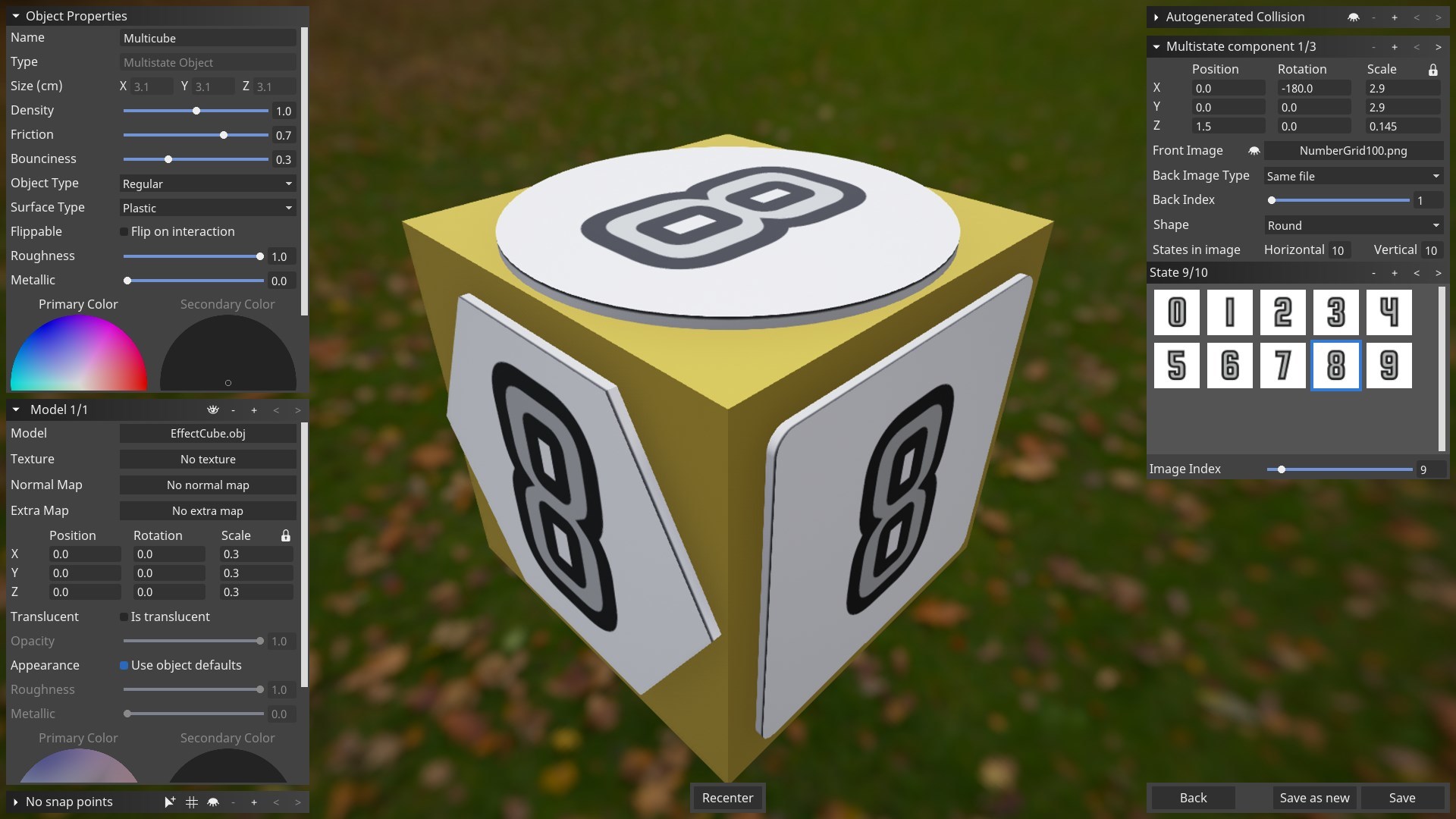
When you create your own multistate objects, you can combine multiple components: Just as with standard objects, you can use model components to add arbitrary 3D models. You can also add multistate components. They come in square, round, or hexagonal shape and can have dozens of different texture states.

The texture states are defined in the editor in a similar way as the cards in a card deck. All multistate components of an object are always in the same state. For example, here’s an object with a cube model and three multistate components:


You can now find an entry on multistate objects in the knowledge base, too!

Shiny Heavy Metal


Apart from colors, objects in Tabletop Playground have two other properties that alter their appearance: you can define how rough and how metallic they are.

Roughness determines how “shiny” an object is: an object with roughness 0 is perfectly smooth and will sharply reflect surrounding light. On the other hand, an object with roughness 1 scatters incoming light so you don’t see any reflections or highlights on it.

The metallic value should be 1 for surfaces that are clearly a metal, and 0 for most other materials like plastic or cardboard. Values between 0 and 1 are uncommon, but can be used to achieve special effects. The following image shows a light grey sphere with different roughness and metallic values:


You can alter the roughness and metallic values for most objects in-game. But when you create new objects in the editor, you can also define which parts of the objects are metallic and how rough any point on their surface is. You can use the “extra map” introduced in the color post: The red and green channels determine where colors can be changed. The blue channel controls how metallic an object is, and the alpha channel controls roughness. Many of the objects included with Tabletop Playground use the extra map for rougher and smoother parts of their surface. Some objects, like the chest, also have both metal and wooden parts.